ignition NISSAN QASHQAI 2017 Owner´s Manual
[x] Cancel search | Manufacturer: NISSAN, Model Year: 2017, Model line: QASHQAI, Model: NISSAN QASHQAI 2017Pages: 508, PDF Size: 2.68 MB
Page 301 of 508
5-16Starting and driving
PUSH-BUTTON IGNITION SWITCH
POSITIONS
LOCK (Normal parking position)
The ignition switch can only be locked at this
position.
The ignition switch will lock when any door is
opened or closed with the ignition switched off.
ON (Normal operating position)
The ignition system and the electrical accessory
power activate at this position without the
engine turned on.
The ON position has a battery saver feature that
will place the ignition switch in the OFF position,
if the vehicle is not running, after some time
under the following conditions:
.all doors are closed.
.shift lever is in P (Park) position (CVT model)
or N (Neutral) position (MT model) .
The battery saver feature will be cancelled if any
of the following occur:
.any door is opened.
.shift lever is moved out of the P (Park)
position (CVT model) .
.ignition switch changes position.
OFF position
The engine is turned off in this position.
Auto ACC position
With the vehicle in the P (Park) position (CVT
models) or the N (Neutral) position (MT models) ,
the Intelligent Key with you and the ignition
placed from ON to OFF, the radio can still be
used for a period of time, or until the driver’s
door is opened. After a period of time, functions
such as radio, navigation (if so equipped) , and
Bluetooth
ŠHands-Free Phone System may be
restarted by turning on the audio system (See
“Audio system” (P.4-38) in this manual) , or by
the UNLOCK button on the Intelligent Key for up
to a total of 30 minutes.
EMERGENCY ENGINE SHUT OFF
To shut off the engine in an emergency situation
while driving, perform the following procedure:
.Rapidly push the push-button ignition switch
3 consecutive times in less than 1.5
seconds, or
.Push and hold the push-button ignition
switch for more than 2 seconds.
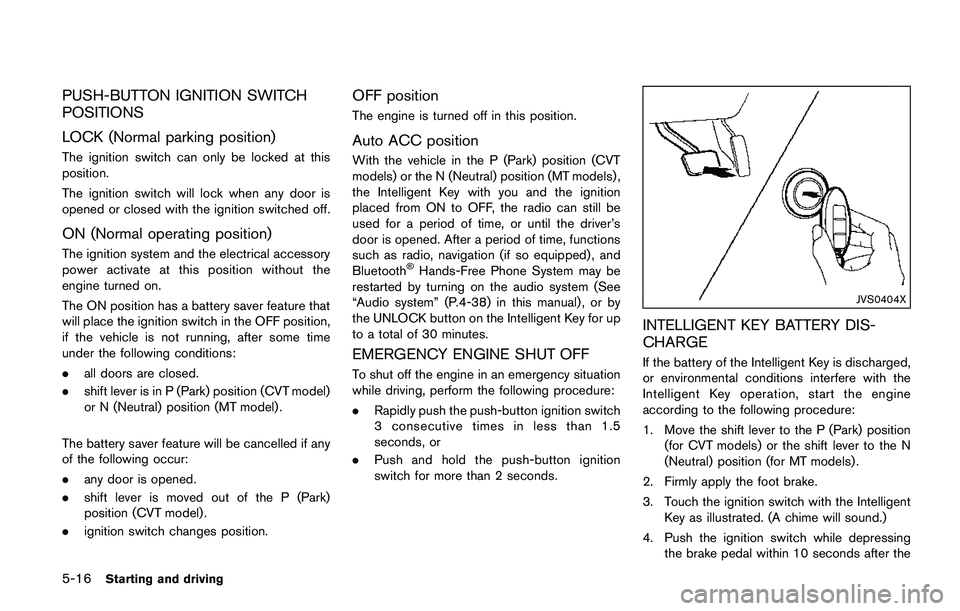
JVS0404X
INTELLIGENT KEY BATTERY DIS-
CHARGE
If the battery of the Intelligent Key is discharged,
or environmental conditions interfere with the
Intelligent Key operation, start the engine
according to the following procedure:
1. Move the shift lever to the P (Park) position
(for CVT models) or the shift lever to the N
(Neutral) position (for MT models) .
2. Firmly apply the foot brake.
3. Touch the ignition switch with the Intelligent
Key as illustrated. (A chime will sound.)
4. Push the ignition switch while depressing
the brake pedal within 10 seconds after the
Page 302 of 508
chime sounds. The engine will start.
After step 3 is performed, when the ignition
switch is pushed without depressing the brake
pedal, the ignition switch position will change to
ACC.
NOTE:
.When the ignition switch is pushed to
the ON position or the engine is started
by the above procedures, the“Key
Battery Low”warning appears (on the
Vehicle information display) even if the
Intelligent Key is inside the vehicle.
This is not a malfunction. To turn off the
warning, touch the ignition switch with
the Intelligent Key again.
.If the“Key Battery Low”warning ap-
pears (on the Vehicle information dis-
play) , replace the battery as soon as
possible. (See“Intelligent Key battery
replacement”(P.8-23) .).Make sure the area around the vehicle is
clear.
.Check fluid levels such as engine oil, cool-
ant, brake fluid, and window washer fluid as
frequently as possible, or at least whenever
you refuel.
.Check that all windows and lights are clean.
.Visually inspect tires for their appearance
and condition. Also check tires for proper
inflation.
.Lock all doors.
.Position seat and adjust head restraints.
.Adjust inside and outside mirrors.
.Fasten seat belts and ask all passengers to
do likewise.
.Check the operation of warning lights when
the ignition switch is placed in the ON
position. (See “Warning lights, indicator
lights and audible reminders” (P.2-10) .)1. Apply the parking brake.
2.Continuously Variable Transmission
(CVT) model:
Move the shift lever to the P (Park) or N
(Neutral) position. (P is recommended.)
The starter is designed so that it does not
operate unless the shift lever is in either of
the above positions.
Manual Transmission (MT) model:
Move the shift lever to the N (Neutral)
position, and depress the clutch pedal to
the floor while starting the engine.
3. Crank the enginewith your foot off the
accelerator pedalby turning the ignition
switch to START. Release the switch when
the engine starts. If the engine starts, but
fails to run, repeat the above procedure.
.If the engine is very hard to start in
extremely cold weather or when restart-
ing, depress the accelerator pedal a little
(approximately 1/3 to the floor) and hold
it and then crank the engine. Release the
accelerator pedal when the engine starts.
.If the engine is very hard to start because
it is flooded, depress the accelerator
pedal all the way to the floor and hold it.
Crank the engine for 5 - 6 seconds. After
cranking the engine, release the accel-
Starting and driving5-17
BEFORE STARTING THE ENGINESTARTING THE ENGINE (model
without Intelligent Key system)
Page 303 of 508
5-18Starting and driving
erator pedal. Crank the enginewith your
foot off the accelerator pedalby
turning the ignition switch to START.
Release the ignition switch when the
engine starts. If the engine starts, but fails
to run, repeat the above procedure.
CAUTION
Do not operate the starter for more
than 15 seconds at a time. If the engine
does not start, turn the ignition switch
off and wait 10 seconds before cranking
again, otherwise the starter could be
damaged.
Do not turn the ignition switch to the
START position unless the engine and
starter have stopped moving. Attempt-
ing to start the engine while the engine
or starter is moving may cause damage.
4.Warm-up
Allow the engine to idle for at least 30
seconds after starting. Do not race the
engine while warming it up. Drive at
moderate speed for a short distance first,
especially in cold weather. In cold weather,
keep the engine running for a minimum of 2 -
3 minutes before shutting it off. Starting andstopping the engine over a short period of
time may make the vehicle more difficult to
start.
5. To stop the engine, shift the shift lever to the
P (Park) position (CVT model) or N (Neutral)
position (MT model) and turn the ignition
switch to the OFF position.
NOTE:
Care should be taken to avoid situations
that can lead to potential battery discharge
and potential no-start conditions such as:
1.Installation or extended use of electro-
nic accessories that consume battery
power when the engine is not running
(Phone chargers, GPS, DVD players,
etc.)
2.Vehicle is not driven regularly and/or
only driven short distances.
In these cases, the battery may need to be
charged to maintain battery health.1. Apply the parking brake.
2.Continuously Variable Transmission
(CVT) model:
Move the shift lever to the P (Park) or N
(Neutral) position. (P is recommended.)
The starter is designed not to operate unless
the shift lever is in either of the above
positions.
Manual Transmission (MT) model:
Move the shift lever to the N (Neutral)
position. Depress the clutch pedal fully to
the floor.
The starter is designed not to operate unless
the clutch pedal is fully depressed.
The Intelligent Key must be carried
when operating the ignition switch.
3. Push the ignition switch to the ON position.
Depress the brake pedal (CVT models) or
the clutch pedal (MT models) and push the
ignition switch to start the engine.
To start the engine immediately, push and
release the ignition switch while depressing
the brake pedal (CVT models) or the clutch
pedal (MT models) with the ignition switch in
any position.
.If the engine is very hard to start in
extremely cold weather or when restart-
ing, depress the accelerator pedal a little
STARTING THE ENGINE (model with
Intelligent Key system)
Page 304 of 508
(approximately 1/3 to the floor) and while
holding, crank the engine. Release the
accelerator pedal when the engine starts.
.If the engine is very hard to start because
it is flooded, depress the accelerator
pedal all the way to the floor and hold it.
Push the ignition switch to the ON
position to start cranking the engine.
After 5 or 6 seconds, stop cranking by
pushing the ignition switch to OFF. After
cranking the engine, release the accel-
erator pedal. Crank the enginewith your
foot off the accelerator pedalby
depressing the brake pedal and pushing
the push-button ignition switch to start
the engine. If the engine starts, but fails
to run, repeat the above procedure.
CAUTION
Do not operate the starter for more
than 15 seconds at a time. If the engine
does not start, push the ignition switch
to OFF and wait 10 seconds before
cranking again, otherwise the starter
could be damaged.
4.Warm-up
Allow the engine to idle for at least 30seconds after starting. Do not race the
engine while warming it up. Drive at
moderate speed for a short distance first,
especially in cold weather. In cold weather,
keep the engine running for a minimum of 2 -
3 minutes before shutting it off. Starting and
stopping the engine over a short period of
time may make the vehicle more difficult to
start.
When racing the engine up to 4,000 rpm or
more under no load condition, the engine
will enter the fuel cut mode.
5. To stop the engine, move the shift lever to
the P (Park) position (CVT models) or move
the shift lever to the N (Neutral) position (MT
models) , and push the ignition switch to the
OFF position.
NOTE:
Care should be taken to avoid situations
that can lead to potential battery discharge
and potential no-start conditions such as:
1.Installation or extended use of electro-
nic accessories that consume battery
power when the engine is not running
(Phone chargers, GPS, DVD players,
etc.)
2.Vehicle is not driven regularly and/or
only driven short distances.In these cases, the battery may need to be
charged to maintain battery health.
REMOTE ENGINE START (if so
equipped)
Vehicles started with the remote engine start
function require the ignition switch to be placed
in the ON position before the shift lever can be
moved from the P (Park) position. To place the
ignition switch in the ON position, perform the
following steps:
1. Make sure that the Intelligent Key is carried
with you.
2. Depress the brake pedal.
3. Push the ignition switch once to the ON
position.
For additional information about the remote
engine start function, see “Remote engine start”
(P.3-22) .
Starting and driving5-19
Page 305 of 508
5-20Starting and driving
CONTINUOUSLY VARIABLE TRANS-
MISSION (CVT)
The Continuously Variable Transmission (CVT)
in your vehicle is electronically controlled to
produce maximum power and smooth operation.
The recommended operating procedures for this
transmission are shown on the following pages.
Follow these procedures for maximum vehicle
performance and driving enjoyment.
Engine power may be automatically re-
duced to protect the CVT if the engine
speed increases quickly when driving on
slippery roads or while being tested on
some dynamometers.
Starting the vehicle
1. After starting the engine, fully depress the
foot brake pedal before moving the shift
lever out of the P (Park) position.
This CVT is designed so that the foot
brake pedal must be depressed before
shifting from P (Park) to any driving
position while the ignition switch is in
the ON position.
The shift lever cannot be moved out of
the P (Park) position and into any of
the other positions if the ignition
switch is placed in the LOCK or OFF
position.2. Keep the foot brake pedal depressed and
move the shift lever to a driving position.
3. Release the parking brake and foot brake
pedal, and then gradually start the vehicle in
motion.
WARNING
.Do not depress the accelerator
pedal while shifting from P (Park)
or N (Neutral) to R (Reverse) , D
(Drive) , or manual shift mode. Al-
ways depress the brake pedal until
shifting is completed. Failure to do
so could cause you to lose control
and have an accident.
.Cold engine idle speed is high, so
use caution when shifting into a
forward or reverse gear before the
engine has warmed up.
.Never shift to either the P (Park) or
R (Reverse) position while vehicle is
moving forward and P (Park) or D
(Drive) while the vehicle is rever-
sing. This could cause an accident
or damage the transmission.
.Do not downshift abruptly on slip-
pery roads. This may cause a loss ofcontrol.
CAUTION
.To avoid possible damage to your
vehicle; when stopping the vehicle
on an uphill grade, do not hold the
vehicle by depressing the accelera-
tor pedal. The foot brake should be
used for this purpose.
.Except in an emergency, do not shift
to the N (Neutral) position while
driving. Coasting with the transmis-
sion in the N (Neutral) position may
cause serious damage to the trans-
mission.
DRIVING THE VEHICLE
Page 306 of 508
JVS1025X
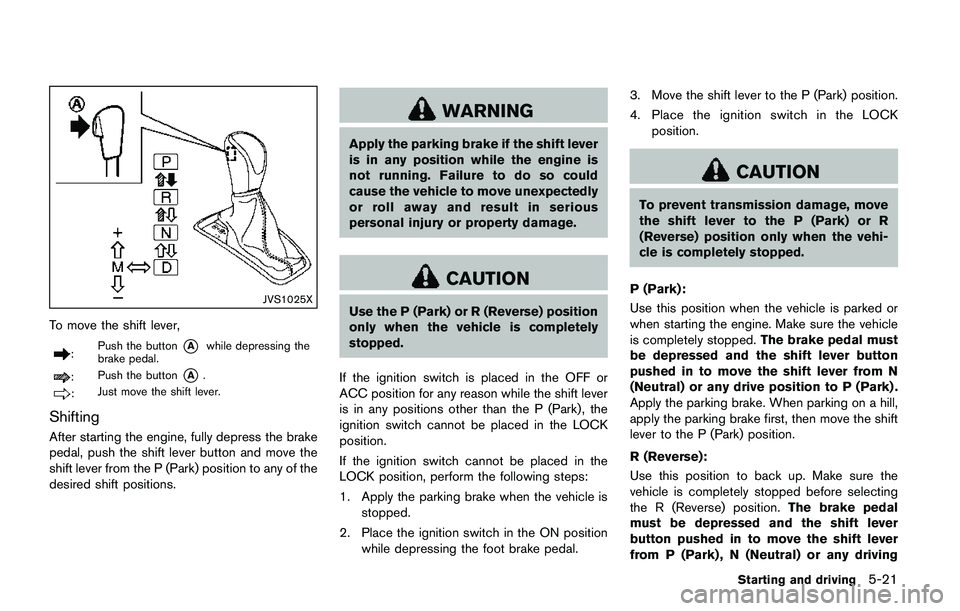
To move the shift lever,
:Push the button*Awhile depressing the
brake pedal.
:Push the button*A.
:Just move the shift lever.
Shifting
After starting the engine, fully depress the brake
pedal, push the shift lever button and move the
shift lever from the P (Park) position to any of the
desired shift positions.
WARNING
Apply the parking brake if the shift lever
is in any position while the engine is
not running. Failure to do so could
cause the vehicle to move unexpectedly
or roll away and result in serious
personal injury or property damage.
CAUTION
Use the P (Park) or R (Reverse) position
only when the vehicle is completely
stopped.
If the ignition switch is placed in the OFF or
ACC position for any reason while the shift lever
is in any positions other than the P (Park) , the
ignition switch cannot be placed in the LOCK
position.
If the ignition switch cannot be placed in the
LOCK position, perform the following steps:
1. Apply the parking brake when the vehicle is
stopped.
2. Place the ignition switch in the ON position
while depressing the foot brake pedal.3. Move the shift lever to the P (Park) position.
4. Place the ignition switch in the LOCK
position.
CAUTION
To prevent transmission damage, move
the shift lever to the P (Park) or R
(Reverse) position only when the vehi-
cle is completely stopped.
P (Park):
Use this position when the vehicle is parked or
when starting the engine. Make sure the vehicle
is completely stopped.The brake pedal must
be depressed and the shift lever button
pushed in to move the shift lever from N
(Neutral) or any drive position to P (Park) .
Apply the parking brake. When parking on a hill,
apply the parking brake first, then move the shift
lever to the P (Park) position.
R (Reverse):
Use this position to back up. Make sure the
vehicle is completely stopped before selecting
the R (Reverse) position.The brake pedal
must be depressed and the shift lever
button pushed in to move the shift lever
from P (Park) , N (Neutral) or any driving
Starting and driving5-21
Page 308 of 508
High fluid temperature protection mode
This transmission has a high fluid temperature
protection mode. If the fluid temperature be-
comes too high (for example, when climbing
steep grades in high temperature with heavy
loads) , engine power and, under some condi-
tions, vehicle speed will be decreased auto-
matically to reduce the chance of transmission
damage. Vehicle speed can be controlled with
the accelerator pedal, but the engine and vehicle
speed may be limited.
Fail-safe
If the vehicle is driven under extreme
conditions, such as excessive wheel spin-
ning and subsequent hard braking, the
fail-safe system may be activated. The MIL
may illuminate to indicate the fail-safe
mode is activated. (See “Malfunction In-
dicator Light (MIL)” (P.2-16) .) This will
occur even if all electrical circuits are
functioning properly. In this case, place
the ignition switch in the OFF position and
wait for 10 seconds. Then turn the switch
back to the ON position. The vehicle
should return to its normal operating
condition. If it does not return to its normal
operating condition, have the transmission
checked and repaired, if necessary. It is
recommended you visit a NISSAN dealerfor this service.
WARNING
When the high fluid temperature pro-
tection mode or fail-safe operation
occurs, vehicle speed may be gradually
reduced. The reduced speed may be
lower than other traffic, which could
increase the chance of a collision. Be
especially careful when driving. If ne-
cessary, pull to the side of the road at a
safe place and allow the transmission
to return to normal operation, or have it
repaired if necessary.
Adaptive Shift Control (ASC)
The Adaptive Shift Control automatically oper-
ates when the transmission is in the “D” (Drive)
position and selects an appropriate gear de-
pending on the road conditions such as uphill or
downhill.
Control on uphill and curving roads:
A low gear is maintained that suits the degree of
the slope to allow smooth driving with a small
number of shifts.Control on downhill roads:
The Adaptive Shift Control shifts to a low gear
that suits the degree of the slope when the
accelerator pedal is depressed, and uses the
engine braking to help driving in the downhill.
Control on winding roads:
A low gear is maintained on continuous curves
that involve repeated acceleration and decelera-
tion, so that smooth acceleration is available
instantly when the accelerator pedal is de-
pressed.
NOTE:
.Adaptive Shift Control may not operate
when the transmission oil temperature
is low immediately after the start of
driving or when it is very hot.
.During some driving situations, hard
braking for example, the Adaptive Shift
Control may automatically operate. The
transmission may automatically shift to
a lower gear for engine braking. This
increases engine speed but not vehicle
speed. Vehicle speed is controlled by
the accelerator pedal when the vehicle
is in the Adaptive Shift Control mode.
.When the Adaptive Shift Control oper-
ates, the transmission sometimes
maintains a lower gear for a longer
period of time than when Adaptive
Starting and driving5-23
Page 309 of 508
5-24Starting and driving
Shift Control is not operating. Engine
speed will be higher for a specific
vehicle speed while Adaptive Shift
Control is operating than when Adap-
tive Shift Control is not operating.
JVS0392X
Shift lock release
If the battery charge is low or discharged, the
shift lever may not be moved from the P (Park)
position even with the brake pedal depressed
and the shift lever button pushed.
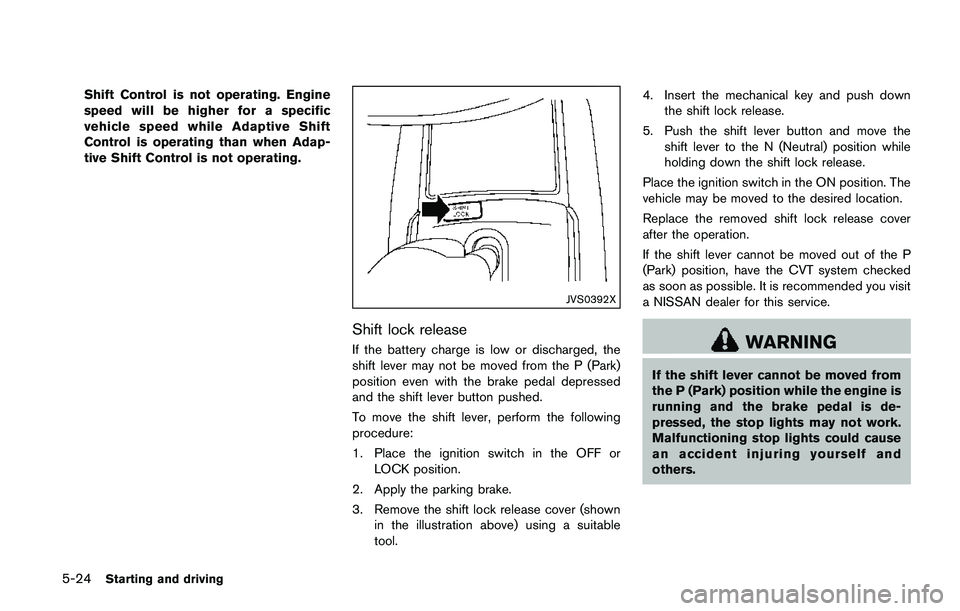
To move the shift lever, perform the following
procedure:
1. Place the ignition switch in the OFF or
LOCK position.
2. Apply the parking brake.
3. Remove the shift lock release cover (shown
in the illustration above) using a suitable
tool.4. Insert the mechanical key and push down
the shift lock release.
5. Push the shift lever button and move the
shift lever to the N (Neutral) position while
holding down the shift lock release.
Place the ignition switch in the ON position. The
vehicle may be moved to the desired location.
Replace the removed shift lock release cover
after the operation.
If the shift lever cannot be moved out of the P
(Park) position, have the CVT system checked
as soon as possible. It is recommended you visit
a NISSAN dealer for this service.WARNING
If the shift lever cannot be moved from
the P (Park) position while the engine is
running and the brake pedal is de-
pressed, the stop lights may not work.
Malfunctioning stop lights could cause
an accident injuring yourself and
others.
Page 312 of 508
SPA2331
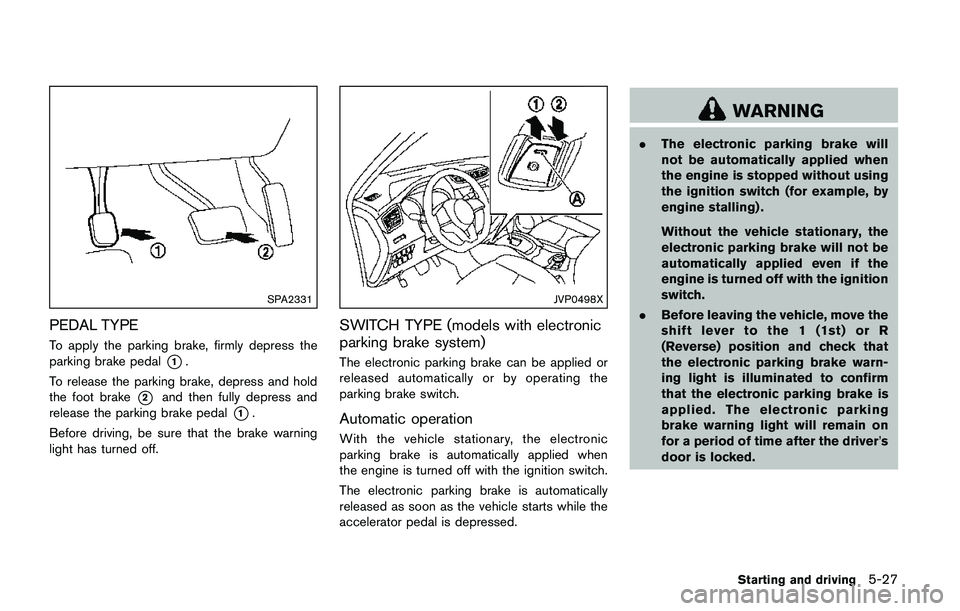
PEDAL TYPE
To apply the parking brake, firmly depress the
parking brake pedal
*1.
To release the parking brake, depress and hold
the foot brake
*2and then fully depress and
release the parking brake pedal
*1.
Before driving, be sure that the brake warning
light has turned off.
JVP0498X
SWITCH TYPE (models with electronic
parking brake system)
The electronic parking brake can be applied or
released automatically or by operating the
parking brake switch.
Automatic operation
With the vehicle stationary, the electronic
parking brake is automatically applied when
the engine is turned off with the ignition switch.
The electronic parking brake is automatically
released as soon as the vehicle starts while the
accelerator pedal is depressed.
WARNING
.The electronic parking brake will
not be automatically applied when
the engine is stopped without using
the ignition switch (for example, by
engine stalling) .
Without the vehicle stationary, the
electronic parking brake will not be
automatically applied even if the
engine is turned off with the ignition
switch.
.Before leaving the vehicle, move the
shift lever to the 1 (1st) or R
(Reverse) position and check that
the electronic parking brake warn-
ing light is illuminated to confirm
that the electronic parking brake is
applied. The electronic parking
brake warning light will remain on
for a period of time after the driver’s
door is locked.
Starting and driving5-27
Page 313 of 508
5-28Starting and driving
CAUTION
When parking in an area where the
outside temperature is below 328F
(08C) , do not apply the parking brake
to prevent it from freezing.
For safe parking, place the shift lever in
the 1 (1st) or R (Reverse) position and
securely block the wheels.
NOTE:
.To keep the electronic parking brake
released after the engine is turned off,
place the ignition switch in the OFF
position, depress the brake pedal and
push down the parking brake switch
before opening the driver’s door.
.If a malfunction occurs in the electric
parking brake system (for example, due
to battery discharge) , it is recom-
mended to contact a NISSAN dealer.
Manual operation
The electronic parking brake will not be auto-
matically applied if the engine is stopped without
using the ignition switch (for example, by engine
stalling) . In such a case, you have to apply the
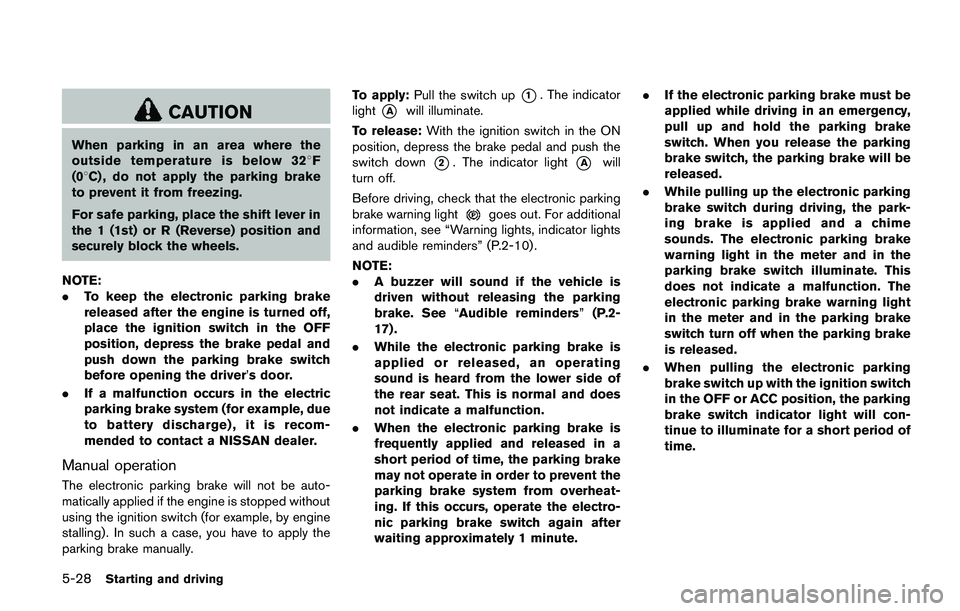
parking brake manually.To apply:Pull the switch up
*1. The indicator
light
*Awill illuminate.
To release:With the ignition switch in the ON
position, depress the brake pedal and push the
switch down
*2. The indicator light*Awill
turn off.
Before driving, check that the electronic parking
brake warning light
goes out. For additional
information, see “Warning lights, indicator lights
and audible reminders” (P.2-10) .
NOTE:
.A buzzer will sound if the vehicle is
driven without releasing the parking
brake. See“Audible reminders”(P.2-
17) .
.While the electronic parking brake is
applied or released, an operating
sound is heard from the lower side of
the rear seat. This is normal and does
not indicate a malfunction.
.When the electronic parking brake is
frequently applied and released in a
short period of time, the parking brake
may not operate in order to prevent the
parking brake system from overheat-
ing. If this occurs, operate the electro-
nic parking brake switch again after
waiting approximately 1 minute..If the electronic parking brake must be
applied while driving in an emergency,
pull up and hold the parking brake
switch. When you release the parking
brake switch, the parking brake will be
released.
.While pulling up the electronic parking
brake switch during driving, the park-
ing brake is applied and a chime
sounds. The electronic parking brake
warning light in the meter and in the
parking brake switch illuminate. This
does not indicate a malfunction. The
electronic parking brake warning light
in the meter and in the parking brake
switch turn off when the parking brake
is released.
.When pulling the electronic parking
brake switch up with the ignition switch
in the OFF or ACC position, the parking
brake switch indicator light will con-
tinue to illuminate for a short period of
time.