tow NISSAN QASHQAI 2017 Owner´s Manual
[x] Cancel search | Manufacturer: NISSAN, Model Year: 2017, Model line: QASHQAI, Model: NISSAN QASHQAI 2017Pages: 508, PDF Size: 2.68 MB
Page 33 of 508
1-14Safety — Seats, seat belts and supplemental restraint system
SSS0292
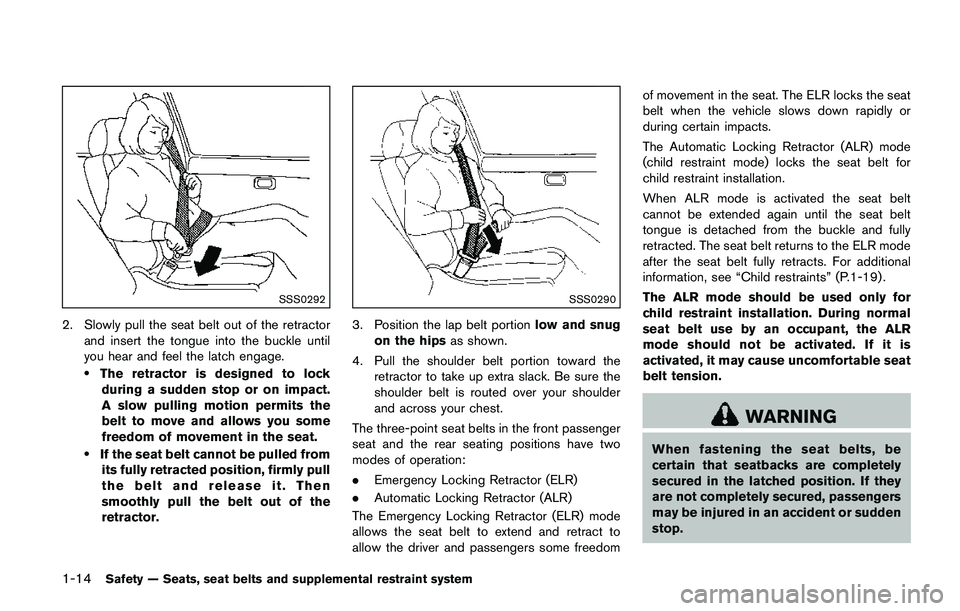
2. Slowly pull the seat belt out of the retractor
and insert the tongue into the buckle until
you hear and feel the latch engage.
.The retractor is designed to lock
during a sudden stop or on impact.
A slow pulling motion permits the
belt to move and allows you some
freedom of movement in the seat.
.If the seat belt cannot be pulled from
its fully retracted position, firmly pull
the belt and release it. Then
smoothly pull the belt out of the
retractor.
SSS0290
3. Position the lap belt portionlow and snug
on the hipsas shown.
4. Pull the shoulder belt portion toward the
retractor to take up extra slack. Be sure the
shoulder belt is routed over your shoulder
and across your chest.
The three-point seat belts in the front passenger
seat and the rear seating positions have two
modes of operation:
.Emergency Locking Retractor (ELR)
.Automatic Locking Retractor (ALR)
The Emergency Locking Retractor (ELR) mode
allows the seat belt to extend and retract to
allow the driver and passengers some freedomof movement in the seat. The ELR locks the seat
belt when the vehicle slows down rapidly or
during certain impacts.
The Automatic Locking Retractor (ALR) mode
(child restraint mode) locks the seat belt for
child restraint installation.
When ALR mode is activated the seat belt
cannot be extended again until the seat belt
tongue is detached from the buckle and fully
retracted. The seat belt returns to the ELR mode
after the seat belt fully retracts. For additional
information, see “Child restraints” (P.1-19) .
The ALR mode should be used only for
child restraint installation. During normal
seat belt use by an occupant, the ALR
mode should not be activated. If it is
activated, it may cause uncomfortable seat
belt tension.
WARNING
When fastening the seat belts, be
certain that seatbacks are completely
secured in the latched position. If they
are not completely secured, passengers
may be injured in an accident or sudden
stop.
Page 57 of 508
1-38Safety — Seats, seat belts and supplemental restraint system
LRS0454
Front passenger position
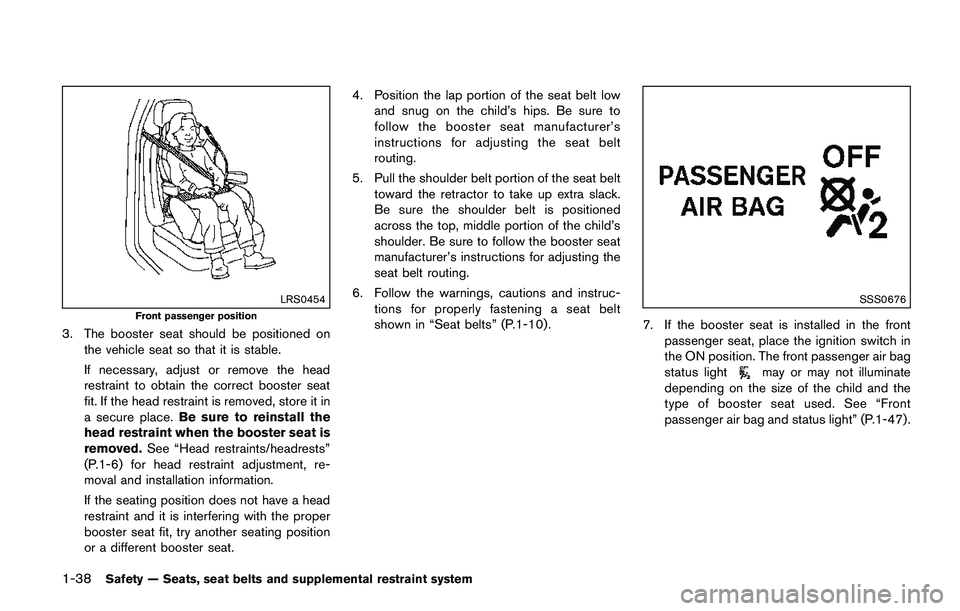
3. The booster seat should be positioned on
the vehicle seat so that it is stable.
If necessary, adjust or remove the head
restraint to obtain the correct booster seat
fit. If the head restraint is removed, store it in
a secure place.Be sure to reinstall the
head restraint when the booster seat is
removed.See “Head restraints/headrests”
(P.1-6) for head restraint adjustment, re-
moval and installation information.
If the seating position does not have a head
restraint and it is interfering with the proper
booster seat fit, try another seating position
or a different booster seat.4. Position the lap portion of the seat belt low
and snug on the child’s hips. Be sure to
follow the booster seat manufacturer’s
instructions for adjusting the seat belt
routing.
5. Pull the shoulder belt portion of the seat belt
toward the retractor to take up extra slack.
Be sure the shoulder belt is positioned
across the top, middle portion of the child’s
shoulder. Be sure to follow the booster seat
manufacturer’s instructions for adjusting the
seat belt routing.
6. Follow the warnings, cautions and instruc-
tions for properly fastening a seat belt
shown in “Seat belts” (P.1-10) .
SSS0676
7. If the booster seat is installed in the front
passenger seat, place the ignition switch in
the ON position. The front passenger air bag
status light
may or may not illuminate
depending on the size of the child and the
type of booster seat used. See “Front
passenger air bag and status light” (P.1-47) .
Page 71 of 508
1-52Safety — Seats, seat belts and supplemental restraint system
.Do not make unauthorized changes
to your vehicle’s electrical system,
suspension system or front end
structure. This could affect proper
operation of the front air bag sys-
tem.
.Tampering with the front air bag
system may result in serious perso-
nal injury. Tampering includes
changes to the steering wheel and
the instrument panel assembly by
placing material over the steering
wheel pad and above the instrument
panel or by installing additional trim
material around the air bag system.
.Removing or modifying the front
passenger seat may affect the func-
tion of the air bag system and result
in serious personal injury.
.Modifying or tampering with the
front passenger seat may result in
serious personal injury. For exam-
ple, do not change the front seats by
placing material on the seat cushion
or by installing additional trim ma-
terial, such as seat covers, on the
seat that is not specifically designed
to assure proper air bag operation.
Additionally, do not stow any ob-jects under the front passenger seat
or the seat cushion and seatback.
Such objects may interfere with the
proper operation of the occupant
classification sensors.
.No unauthorized changes should be
made to any components or wiring
of the seat belt system. This may
affect the front air bag system.
Tampering with the seat belt system
may result in serious personal in-
jury.
.It is recommended you visit a
NISSAN dealer for work on and
around the front air bag. It is also
recommended you visit a NISSAN
dealer for installation of electrical
equipment. The Supplemental Re-
straint System (SRS) wiring har-
nesses* should not be modified or
disconnected. Unauthorized electri-
cal test equipment and probing
devices should not be used on the
air bag system.
.A cracked windshield should be
replaced immediately by a qualified
repair facility. A cracked windshield
could affect the function of thesupplemental air bag system.
*The SRS wiring harness connectors are
yellow and orange for easy identification.
When selling your vehicle, we request that you
inform the buyer about the front air bag system
and guide the buyer to the appropriate sections
in this Owner’s Manual.
Page 84 of 508
JVC0581X
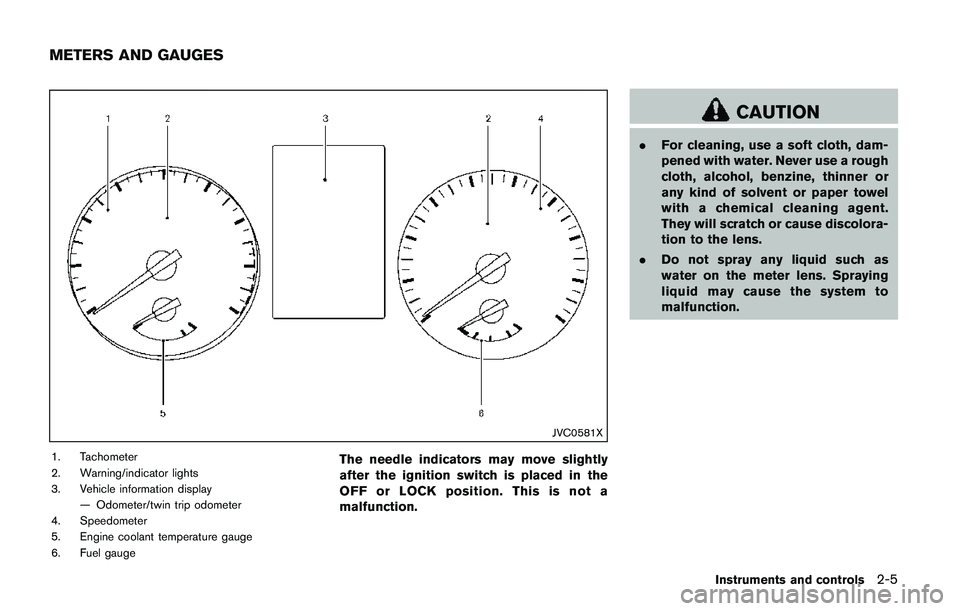
1. Tachometer
2. Warning/indicator lights
3. Vehicle information display
— Odometer/twin trip odometer
4. Speedometer
5. Engine coolant temperature gauge
6. Fuel gaugeThe needle indicators may move slightly
after the ignition switch is placed in the
OFF or LOCK position. This is not a
malfunction.
CAUTION
.For cleaning, use a soft cloth, dam-
pened with water. Never use a rough
cloth, alcohol, benzine, thinner or
any kind of solvent or paper towel
with a chemical cleaning agent.
They will scratch or cause discolora-
tion to the lens.
.Do not spray any liquid such as
water on the meter lens. Spraying
liquid may cause the system to
malfunction.
Instruments and controls2-5
METERS AND GAUGES
Page 90 of 508
you visit a NISSAN dealer for this service.
If an ABS malfunction occurs, the anti-lock
function is turned off. The brake system then
operates normally, but without anti-lock assis-
tance. (See “Brake system” (P.5-102) .)
orBrake warning light (red)
This light functions for both the parking brake
and the foot brake systems.
Parking brake indicator (models not
equipped with electronic parking brake
system):
When the ignition switch is in the ON position,
the light illuminates when the parking brake is
applied.
Low brake fluid warning light:
When the ignition switch is placed in the ON
position, the brake warning light illuminates, and
then turns off (models equipped with electronic
parking brake system) . If the light illuminates
while the engine is running with the parking
brake not applied, stop the vehicle and perform
the following:
1. Check the brake fluid level. If brake fluid is
necessary, add fluid and have the system
checked. It is recommended you have this
service performed by a NISSAN dealer.
(See “Brake and clutch fluid” (P.8-9) .)2. If the brake fluid level is correct, have the
warning system checked. It is recommended
you have this service performed by a
NISSAN dealer.
Anti-lock Braking System (ABS) warning
indicator:
When the parking brake is released and the
brake fluid level is sufficient, if both the brake
warning light and the Anti-lock Braking System
(ABS) warning light illuminate, it may indicate
the ABS is not functioning properly. Have the
brake system checked, and if necessary re-
paired. It is recommended you visit a NISSAN
dealer for this service. (See “Anti-lock Braking
System (ABS) warning light” (P.2-10) .)
WARNING
.Your brake system may not be
working properly if the warning light
is on. Driving could be dangerous. If
you judge it to be safe, drive care-
fully to the nearest service station
for repairs. Otherwise, have your
vehicle towed because driving it
could be dangerous.
.Pressing the brake pedal with the
engine stopped and/or low brake
fluid level may increase your stop-ping distance and braking will re-
quire greater pedal effort as well as
pedal travel.
.If the brake fluid level is below the
minimum or MIN mark on the brake
fluid reservoir, do not drive until the
brake system has been checked. It
is recommended you visit a NISSAN
dealer for this service.
Charge warning light
If the light illuminates while the engine is running,
it may indicate the charging system is not
functioning properly. Turn the engine off and
check the alternator belt. If the belt is loose,
broken, missing or if the light remains on, have
your vehicle serviced immediately. It is recom-
mended you visit a NISSAN dealer for this
service.
CAUTION
Do not continue driving if the alternator
belt is loose, broken or missing.
Instruments and controls2-11
Page 96 of 508
appears in the vehicle information display. If
the fuel-filler cap is loose or missing, tighten
or install the cap and continue to drive the
vehicle. The
light should turn off after a
few driving trips. If thelight does not
turn off after a few driving trips, have the
vehicle inspected. It is recommended you
visit a NISSAN dealer for this service. You
do not need to have your vehicle towed to
the dealer.
.Malfunction indicator light blinking — An
engine misfire has been detected which may
damage the emission control system.
To reduce or avoid emission control system
damage:
1) Do not drive at speeds above 45 MPH
(72 km/h) .
2) Avoid hard acceleration or deceleration.
3) Avoid steep uphill grades.
4) If possible, reduce the amount of cargo
being hauled or towed.
The malfunction indicator light may stop
blinking and remain on.
Have the vehicle inspected. It is recom-
mended you visit a NISSAN dealer for this
service. You do not need to have your
vehicle towed to the dealer.
CAUTION
Continued vehicle operation without
having the emission control system
and/or CVT system checked and re-
paired as necessary could lead to poor
driveability, reduced fuel economy, and
possible damage to the emission con-
trol system.
Security indicator light
The light blinks when the ignition switch is in the
OFF or LOCK position. This function indicates
the security system equipped on the vehicle is
operational.
If the security system is malfunctioning, this light
will remain on while the ignition switch is in the
ON position. For additional information, see
“Security systems” (P.2-36) .
Turn signal/hazard indicator lights
The light flashes when the turn signal switch
lever or hazard switch is turned on.
Vehicle Dynamic Control (VDC) off
indicator light
When the ignition switch is in the ON position,
the Vehicle Dynamic Control (VDC) off indicator
light illuminates and then turns off.
The light comes on when the Vehicle Dynamic
Control (VDC) off switch is pushed to OFF. This
indicates that the VDC system and traction
control system are not operating.
AUDIBLE REMINDERS
Key reminder chime
Models with Intelligent Key:
A chime sounds if the driver’s door is opened
while the ignition switch is placed in the OFF
position with the Intelligent Key left in the
vehicle.
Make sure the ignition switch is placed in the
LOCK position, and carry it with you when
leaving the vehicle.
Models without Intelligent Key:
A chime sounds if the driver’s side door is
opened while the key is left in the ignition switch
and the ignition switch is in the OFF or LOCK
position. Be sure to remove the key and carry it
with you when you leave the vehicle.
Instruments and controls2-17
Page 119 of 508
2-40Instruments and controls
reservoir tank. Do not use the
window washer reservoir tank to
mix the washer fluid concentrate
and water.
If the windshield wiper operation is inter-
rupted by snow or ice, the wiper may stop
moving to protect its motor. If this occurs,
turn the wiper switch to the OFF position
and remove the snow or ice that is on and
around the wiper arms. In approximately 1
minute, turn the switch on again to operate
the wiper.
JVI0863X
WINDSHIELD WIPER AND WASHER
OPERATION
The windshield wiper and washer operates
when the ignition switch is in the ON position.
Push the lever down to operate the wiper at the
following speed:
*1Intermittent — intermittent operation can be
adjusted by turning the knob toward*A(Slower) or*B(Faster) . Also, the intermittent
operation speed varies in accordance with the
vehicle speed. (For example, when the vehicle
speed is high, the intermittent operation speed
will be faster.)
*2Low — continuous low speed operation
*3High — continuous high speed operation
Push the lever up*4to have one sweep
operation of the wiper.
Pull the lever toward you
*5to operate the
washer. Then the wiper will also operate several
times.
After a short delay, the drip wipe function will
operate the wiper once more to clear remaining
windshield-washer fluid from the windshield.
NOTE:
The Speed Dependent feature and Drip
Wipe feature may be disabled. For addi-
tional information, refer to“Vehicle infor-
mation display”(P.2-18) in this section.
Page 124 of 508
High beam assist (if so equipped)
The high beam assist system will operate when
the vehicle is driven at speeds of approximately
19 MPH (30 km/h) and above. If an oncoming
vehicle or leading vehicle appears in front of your
vehicle when the headlight high beam is on, the
headlight will be switched to the low beam
automatically.
Precautions on high beam assist:
WARNING
.The high beam assist system is a
convenience but it is not a substi-
tute for safe driving operation. The
driver should remain alert at all
times, ensure safe driving practices
and switch the high beams and low
beam manually when necessary.
.The high beam or low beam may not
switch automatically under the fol-
lowing conditions. Switch the high
beam and low beam manually.
— During bad weather (rain, fog,
snow, wind, etc.) .
— When a light source similar to a
headlight or tail light is in the
vicinity of the vehicle.— When the headlights of the
oncoming vehicle or the leading
vehicle are turned off, when the
color of the light is affected due
to foreign materials on the
lights, or when the light beam
is out of position.
— When there is a sudden, contin-
uous change in brightness.
— When driving on a road that
passes over rolling hills, or a
road that has level differences.
— When driving on a road with
many curves.
— When a sign or mirror-like sur-
face is reflecting intense light
towards the front of the vehicle.
— When the container, etc. being
towed by a leading vehicle is
reflecting intense light.
— When a headlight on your vehi-
cle is damaged or dirty.
— When the vehicle is leaning at
an angle due to a punctured tire,
being towed, etc..The timing of switching the low
beam and high beam may change
under the following situations.
— The brightness of the headlights
of the oncoming vehicle or lead-
ing vehicle.
— The movement and direction of
the oncoming vehicle and the
leading vehicle.
— When only one light on the
oncoming vehicle or the leading
vehicle is illuminated.
— When the oncoming vehicle or
the leading vehicle is a two-
wheeled vehicle.
— Road conditions (incline, curve,
the road surface, etc.) .
— The number of passengers and
the amount of cargo.
Instruments and controls2-45
Page 158 of 508
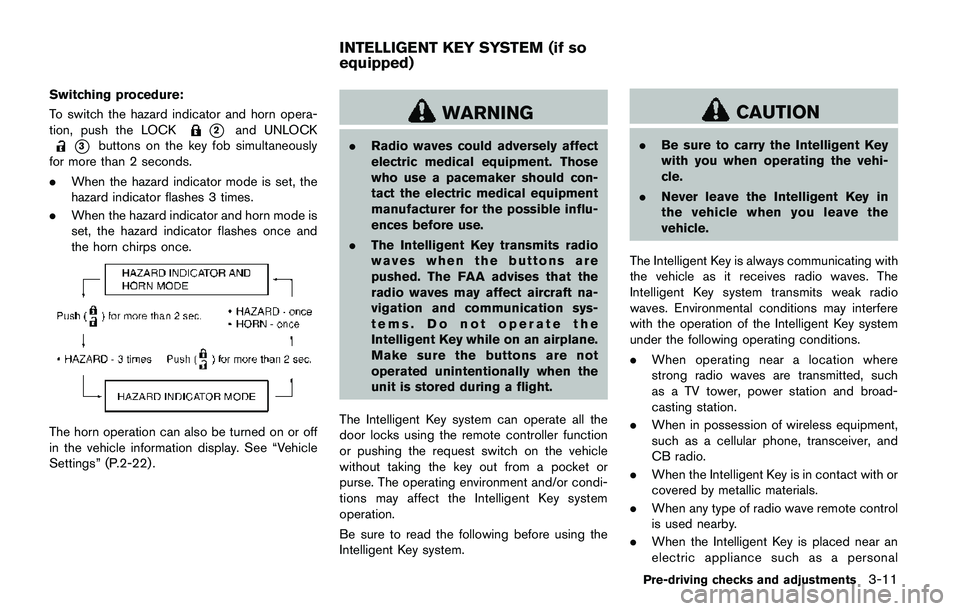
Switching procedure:
To switch the hazard indicator and horn opera-
tion, push the LOCK
*2and UNLOCK
*3buttons on the key fob simultaneously
for more than 2 seconds.
.When the hazard indicator mode is set, the
hazard indicator flashes 3 times.
.When the hazard indicator and horn mode is
set, the hazard indicator flashes once and
the horn chirps once.
The horn operation can also be turned on or off
in the vehicle information display. See “Vehicle
Settings” (P.2-22) .
WARNING
.Radio waves could adversely affect
electric medical equipment. Those
who use a pacemaker should con-
tact the electric medical equipment
manufacturer for the possible influ-
ences before use.
.The Intelligent Key transmits radio
waves when the buttons are
pushed. The FAA advises that the
radio waves may affect aircraft na-
vigation and communication sys-
tems. Do not operate the
Intelligent Key while on an airplane.
Make sure the buttons are not
operated unintentionally when the
unit is stored during a flight.
The Intelligent Key system can operate all the
door locks using the remote controller function
or pushing the request switch on the vehicle
without taking the key out from a pocket or
purse. The operating environment and/or condi-
tions may affect the Intelligent Key system
operation.
Be sure to read the following before using the
Intelligent Key system.
CAUTION
.Be sure to carry the Intelligent Key
with you when operating the vehi-
cle.
.Never leave the Intelligent Key in
the vehicle when you leave the
vehicle.
The Intelligent Key is always communicating with
the vehicle as it receives radio waves. The
Intelligent Key system transmits weak radio
waves. Environmental conditions may interfere
with the operation of the Intelligent Key system
under the following operating conditions.
.When operating near a location where
strong radio waves are transmitted, such
as a TV tower, power station and broad-
casting station.
.When in possession of wireless equipment,
such as a cellular phone, transceiver, and
CB radio.
.When the Intelligent Key is in contact with or
covered by metallic materials.
.When any type of radio wave remote control
is used nearby.
.When the Intelligent Key is placed near an
electric appliance such as a personal
Pre-driving checks and adjustments3-11
INTELLIGENT KEY SYSTEM (if so
equipped)
Page 179 of 508
3-32Pre-driving checks and adjustments
JVP0395X
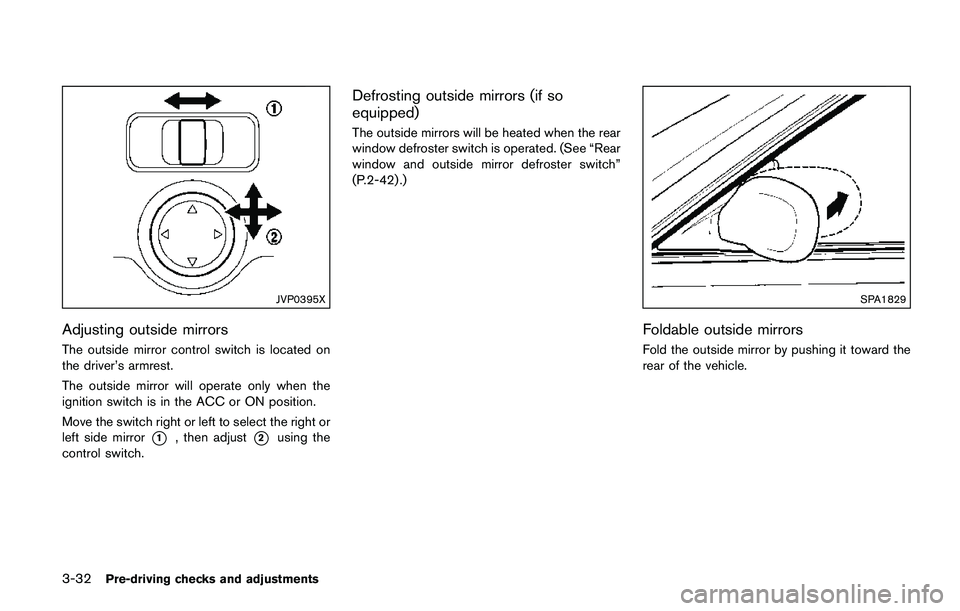
Adjusting outside mirrors
The outside mirror control switch is located on
the driver’s armrest.
The outside mirror will operate only when the
ignition switch is in the ACC or ON position.
Move the switch right or left to select the right or
left side mirror
*1, then adjust*2using the
control switch.
Defrosting outside mirrors (if so
equipped)
The outside mirrors will be heated when the rear
window defroster switch is operated. (See “Rear
window and outside mirror defroster switch”
(P.2-42) .)
SPA1829
Foldable outside mirrors
Fold the outside mirror by pushing it toward the
rear of the vehicle.