ECO mode NISSAN ROGUE 2010 Owner´s Manual
[x] Cancel search | Manufacturer: NISSAN, Model Year: 2010, Model line: ROGUE, Model: NISSAN ROGUE 2010Pages: 328, PDF Size: 2.84 MB
Page 89 of 328
Black plate (85,1)
Model "S35-D" EDITED: 2009/ 9/ 4
Seats, seat belts and supplemental restraint
system” section of this manual.
High beam indicator light
This light illuminates when the headlight high
beam is on and goes out when the low beam is
selected.
Malfunction Indicator Light (MIL)
If the malfunction indicator light illuminates
steady or blinks while the engine is running, it
may indicate a potential emission control and/or
Continuously Variable Transmission (CVT) mal-
function.
The malfunction indicator light may also illumi-
nate steady if the fuel-filler cap is loose or
missing, or if the vehicle runs out of fuel. Check
to make sure the fuel-filler cap is installed and
closed tightly, and that the vehicle has at least 3
US gallons (11.4 liters) of fuel in the fuel tank.
After a few driving trips, the
light should
turn off if no other potential emission control
system malfunction exists.
If this indicator light remains on for 20 seconds
and then blinks for 10 seconds when the engine
is not running, it indicates that the vehicle is not
ready for an emission control system inspection/
maintenance test. (See “READINESS FOR INSPECTION/MAINTENANCE (I/M) TEST” in
the “9. Technical and consumer information”
section.)
Operation:
The malfunction indicator light will illuminate in
one of two ways:
.
Malfunction indicator light illuminated steady
— An emission control system and/or CVT
malfunction has been detected. Check the
fuel-filler cap. If the fuel-filler cap is loose or
missing, tighten or install the cap and
continue to drive the vehicle. The
light
should turn off after a few driving trips. If the
light does not turn off after a few
driving trips, have the vehicle inspected by a
NISSAN dealer. You do not need to have
your vehicle towed to the dealer.
. Malfunction indicator light blinking — An
engine misfire has been detected which may
damage the emission control system.
To reduce or avoid emission control system
damage:
a) Do not drive at speeds above 45 MPH (72 km/h) .
b) Avoid hard acceleration or deceleration.
c) Avoid steep uphill grades.
d) If possible, reduce the amount of cargo being hauled or towed.
The malfunction indicator light may stop
blinking and remain illuminated.
Have the vehicle inspected by a NISSAN
dealer. You do not need to have your vehicle
towed to the dealer.
CAUTION
Continued vehicle operation without
having the emission control system
and/or CVT system checked and re-
paired as necessary could lead to poor
driveability, reduced fuel economy, and
possible damage to the emission con-
trol system.
Overdrive off indicator light (if so
equipped)
The overdrive off indicator light illuminates when
the overdrive off mode is selected.
For additional information, see ““CONTINU-
OUSLY VARIABLE TRANSMISSION (CVT)” in
the “5. Starting and driving” section of this
manual.
Instruments and controls
2-17
Page 90 of 328
Black plate (86,1)
Model "S35-D" EDITED: 2009/ 9/ 4
Security indicator light
The light blinks when the ignition switch is in the
ACC, OFF or LOCK position. This function
indicates the security system equipped on the
vehicle is operational.
If the security system is malfunctioning, this light
will remain on while the ignition switch is in the
ON position. For additional information, see
“SECURITY SYSTEMS” later in this section.
Slip indicator light
The light will blink when the Vehicle Dynamic
Control (VDC) system is operating, thus alerting
the driver to the fact that the road surface may
be slippery and the vehicle is nearing its traction
limits.
Small light indicator light
The light illuminates when the headlight switch is
turned to the
position.
Turn signal/hazard indicator lights
The light flashes when the turn signal switch
lever or hazard switch is turned on.
Vehicle Dynamic Control (VDC) off
indicator light
The light illuminates when the Vehicle Dynamic
Control (VDC) off switch is pushed to OFF. This
indicates that the VDC system is not operating.
When the VDC off indicator light and slip
indicator light illuminate with the VDC system
turned on, this light alerts the driver to the fact
that the VDC system’s fail-safe mode is operat-
ing, for example the VDC system may not be
functioning properly. Have the system checked
by a NISSAN dealer. If a malfunction occurs in
the system, the VDC system function will be
canceled but the vehicle is still driveable. For
additional information, see “VEHICLE DYNAMIC
CONTROL (VDC) SYSTEM” in the “5. Starting
and driving” section of this manual.AUDIBLE REMINDERS
Key reminder chimeThe key reminder chime sounds if the driver’s
side door is opened while the key is left in the
ignition switch and the ignition switch is in the
ACC, OFF or LOCK position. Remove the key
and take it with you when leaving the vehicle.Light reminder chimeThe light reminder chime will sound when the
driver side door is opened with the light switch
in the
or
position, and the ignitionswitch is in the ACC, OFF or LOCK position.
Turn the light switch off when you leave the
vehicle.
Brake pad wear warningThe disc brake pads have audible wear warn-
ings. When a brake pad requires replacement, it
will make a high pitched scraping sound when
the vehicle is in motion. This scraping sound will
first occur only when the brake pedal is
depressed. After more wear of the brake pad,
the sound will always be heard even if the brake
pedal is not depresse
d. Have the brakes
checked as soon as possible if the warning
sound is heard.Parking brake reminder chimeThe parking brake reminder chime will sound if
the vehicle is driven at more than 4 MPH (7
km/h) with the parking brake applied. Stop the
vehicle and release the parking brake.Seat belt warning chimeThe seat belt warning chime will sound for about
6 seconds unless the driver’s seat belt is
securely fastened.Intelligent Key door buzzer (if so
equipped)When the chime or buzzer sounds from inside
and outside the vehicle, check for the following:
2-18
Instruments and controls
Page 92 of 328
Black plate (88,1)
Model "S35-D" EDITED: 2009/ 9/ 4
SIC2045
How to arm the vehicle security system1. Close all windows.The system can be armed even if the
windows are open.
2. TurntheignitionswitchtotheLOCK position and remove the key if it is inserted.
3. Close all doors. Lock all doors. The doors can be locked with:
.the lock button
on the keyfob or
Intelligent Key (if so equipped)
. any request switch (Intelligent Key
equipped model) .
the power door lock switch
. the key — master or mechanical (In-
telligent Key equipped model)
4. Confirm that the security indicator light illuminates. The security indicator light stays
on for about 30 seconds. The vehicle
security system is now pre-armed. After
about 30 seconds the vehicle security
system automatically shifts into the armed
phase. The security light begins to flash
once every approximately 3 seconds. If,
during this 30-second pre-arm time period,
the door is unlocked, or the ignition switch is
turned to the ACC or ON position, the
system will not arm.
Even when the driver and/or passengers
are in the vehicle, the system will activate
with all doors locked with the ignition
switch in the LOCK position. When turning
the ignition switch to the ACC or ON
position, the system will be released.
Vehicle security system activationThe vehicle security system will give the follow-
ing alarm:
. The headlights blink and the horn sounds
intermittently.
. The alarm automatica lly turns off after
approximately 50 seconds. However, the alarm reactivates if the vehicle is tampered
with again.
The alarm is activated by:
. Unlocking the door without using the keyfob,
the Intelligent Key (if so equipped) the
request switch (if so equipped) or the key.
(Even if the door is opened by releasing the
door inside lock knob, the alarm will
activate.)
How to stop an activated alarmThe alarm will stop by unlocking a door by
pushing the unlock button
on the keyfob or
Intelligent Key, pushing the request switch or
using the key. The alarm will not stop if the
ignition switch is turned to the ACC or ON
position.
If the system does not operate as de-
scribed above, have it checked by a
NISSAN dealer.
NISSAN VEHICLE IMMOBILIZER SYS-
TEMThe NISSAN Vehicle Immobilizer System will not
allow the engine to start without the use of the
registered key.
If the engine fails to start using the registered
key, it may be due to interference caused by
another registered key, an automated toll road
2-20
Instruments and controls
Page 93 of 328
Black plate (89,1)
Model "S35-D" EDITED: 2009/ 9/ 4
device or automated payment device on the key
ring. Restart the engine using the following
procedures:
1. Leave the ignition switch in the ON positionfor approximately 5 seconds.
2. Turn the ignition switch to the OFF or LOCK position and wait approximately 10 seconds.
3. Repeat step 1 and 2 again.
4. Restart the engine while holding the device (which may have caused the interference)
separate from the registered key.
If this procedure allows the engine to start,
NISSAN recommends placing the regis-
tered key on a separate key ring to avoid
interference from other devices.
Statement related to section 15 of FCC
rules for NISSAN Vehicle Immobilizer
System (CONT ASSY-BCM. ANT ASSY-
IMMOBILISER)
This device complies with part 15 of the
FCC Rules and RSS-210 of Industry Cana-
da. Operation is subject to the following
two conditions;
(1) This device may not cause harmful
interference, and (2) this device must
accept any interference received, including
interference that may cause undesired operation of the device.
CHANGES OR MODIFICATIONS NOT EX-
PRESSLY APPROVED BY THE PARTY
RESPONSIBLE FOR COMPLIANCE COULD
VOID THE USER’S AUTHORITY TO OPER-
ATE THE EQUIPMENT.
SIC2045
Security indicator lightThe security indicator light is located on the
meter panel. It indicates the status of the
NISSAN Vehicle Immobilizer System.
The light blinks after the ignition switch was in
the LOCK position. This function indicates the
security systems equipped on the vehicle are
operational.
If the NISSAN Vehicle Immobilizer System is
malfunctioning, this light will remain on while the
ignition switch is in the ON position.
If the light still remains on and/or the
engine will not start, see a NISSAN dealer
for NISSAN Vehicle Immobilizer System
Instruments and controls
2-21
Page 94 of 328
Black plate (90,1)
Model "S35-D" EDITED: 2009/ 9/ 4
service as soon as possible. Please bring
all registered keys that you have when
visiting a NISSAN dealer for service.
WARNING
In freezing temperatures the washer
solution may freeze on the windshield
and obscure your vision which may lead
to an accident. Warm windshield with
the defroster before you wash the
windshield.
CAUTION
.Do not operate the washer continu-
ously for more than 30 seconds.
. Do not operate the washer if the
reservoir tank is empty.
. Do not fill the window washer
reservoir tank with washer fluid
concentrates at full strength. Some
methyl alcohol based washer fluid
concentrates may permanently stain
the grille if spilled while filling the
window washer reservoir tank.
. Pre-mix washer fluid concentrates
with water to the manufacturer’s
recommended levels before pouring
the fluid into the window washer
reservoir tank. Do not use the
window washer reservoir tank to mix the washer fluid concentrate
and water.
If the windshield wiper operation is inter-
rupted by snow or ice, the wiper may stop
moving to protect its motor. If this occurs,
turn the wiper switch to the OFF position
and remove the snow or ice that is on and
around the wiper arms. In approximately 1
minute, turn the switch on again to operate
the wiper.WINDSHIELD WIPER AND WASHER
SWITCH
2-22
Instruments and controls
Page 95 of 328
Black plate (91,1)
Model "S35-D" EDITED: 2009/ 9/ 4
SIC2821
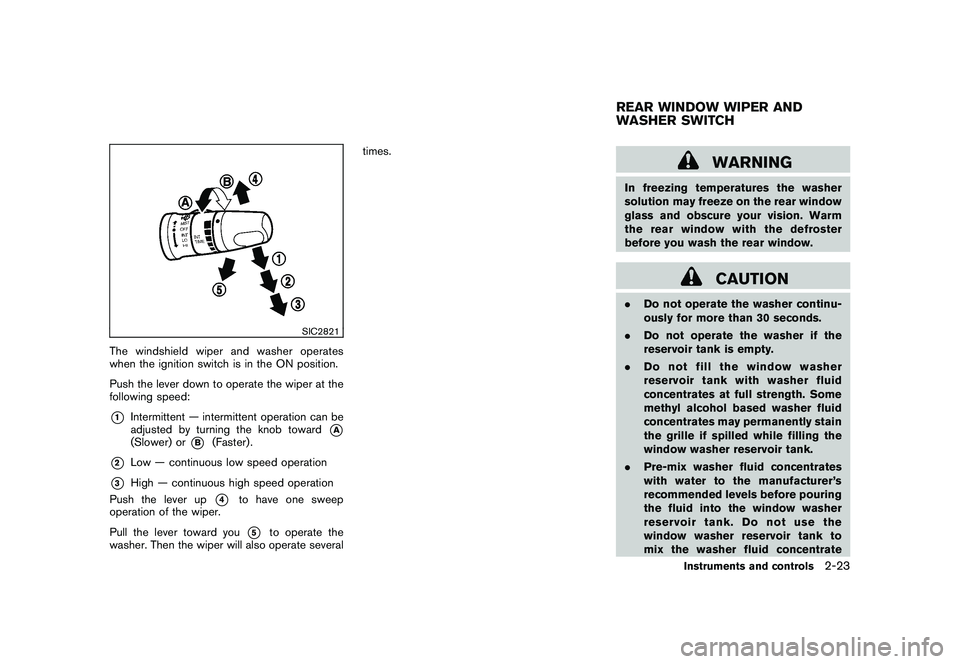
The windshield wiper and washer operates
when the ignition switch is in the ON position.
Push the lever down to operate the wiper at the
following speed:*1
Intermittent — intermittent operation can be
adjusted by turning the knob toward
*A
(Slower) or
*B
(Faster) .
*2
Low — continuous low speed operation
*3
High — continuous high speed operation
Push the lever up
*4
to have one sweep
operation of the wiper.
Pull the lever toward you*5
to operate the
washer. Then the wiper will also operate several times.
WARNING
In freezing temperatures the washer
solution may freeze on the rear window
glass and obscure your vision. Warm
the rear window with the defroster
before you wash the rear window.
CAUTION
.
Do not operate the washer continu-
ously for more than 30 seconds.
. Do not operate the washer if the
reservoir tank is empty.
. Do not fill the window washer
reservoir tank with washer fluid
concentrates at full strength. Some
methyl alcohol based washer fluid
concentrates may permanently stain
the grille if spilled while filling the
window washer reservoir tank.
. Pre-mix washer fluid concentrates
with water to the manufacturer’s
recommended levels before pouring
the fluid into the window washer
reservoir tank. Do not use the
window washer reservoir tank to
mix the washer fluid concentrateREAR WINDOW WIPER AND
WASHER SWITCH
Instruments and controls
2-23
Page 97 of 328
Black plate (93,1)
Model "S35-D" EDITED: 2009/ 9/ 4
XENON HEADLIGHTS (if so equipped)
WARNINGHIGH VOLTAGE
. When xenon headlights are on, they
produce a high voltage. To prevent
an electric shock, never attempt to
modify or disassemble. Always have
your xenon headlights replaced at a
NISSAN dealer.
. Xenon headlights provide consider-
ably more light than conventional
headlights. If they are not correctly
aimed, they might temporarily blind
an oncoming driver or the driver
ahead of you and cause a serious
accident. If headlights are not aimed
correctly, immediately take your ve-
hicle to a NISSAN dealer and have
the headlights adjusted correctly.
When the xenon headlight is initially turned on,
its brightness or color varies slightly. However,
the color and brightness will soon stabilize.
. The life of xenon headlights will be
shortened by frequent on-off opera-
tion. It is generally desirable not to turn off the headlights for short intervals
(for example, when the vehicle stops at
a traffic signal) .
. If the xenon headlight bulb is close to
burning out, the brightness will drasti-
cally decrease, the light will start
blinking, or the color of the light will
become reddish. If one or more of the
above signs appear, contact a NISSAN
dealer.
SIC2745
Type A
SIC3019
Type B
HEADLIGHT AND TURN SIGNAL
SWITCH
Instruments and controls
2-25
Page 101 of 328
Black plate (97,1)
Model "S35-D" EDITED: 2009/ 9/ 4
SIC3020
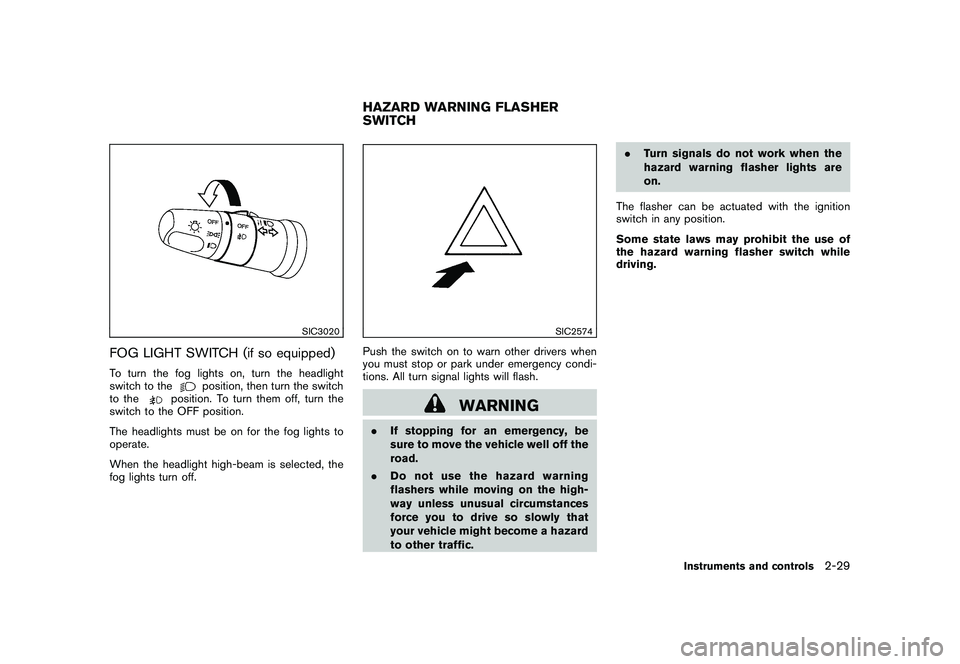
FOG LIGHT SWITCH (if so equipped)To turn the fog lights on, turn the headlight
switch to the
position, then turn the switch
to the
position. To turn them off, turn the
switch to the OFF position.
The headlights must be on for the fog lights to
operate.
When the headlight high-beam is selected, the
fog lights turn off.
SIC2574
Push the switch on to warn other drivers when
you must stop or park under emergency condi-
tions. All turn signal lights will flash.
WARNING
. If stopping for an emergency, be
sure to move the vehicle well off the
road.
. Do not use the hazard warning
flashers while moving on the high-
way unless unusual circumstances
force you to drive so slowly that
your vehicle might become a hazard
to other traffic. .
Turn signals do not work when the
hazard warning flasher lights are
on.
The flasher can be actuated with the ignition
switch in any position.
Some state laws may prohibit the use of
the hazard warning flasher switch while
driving.HAZARD WARNING FLASHER
SWITCH
Instruments and controls
2-29
Page 102 of 328
Black plate (98,1)
Model "S35-D" EDITED: 2009/ 9/ 4
SIC3404
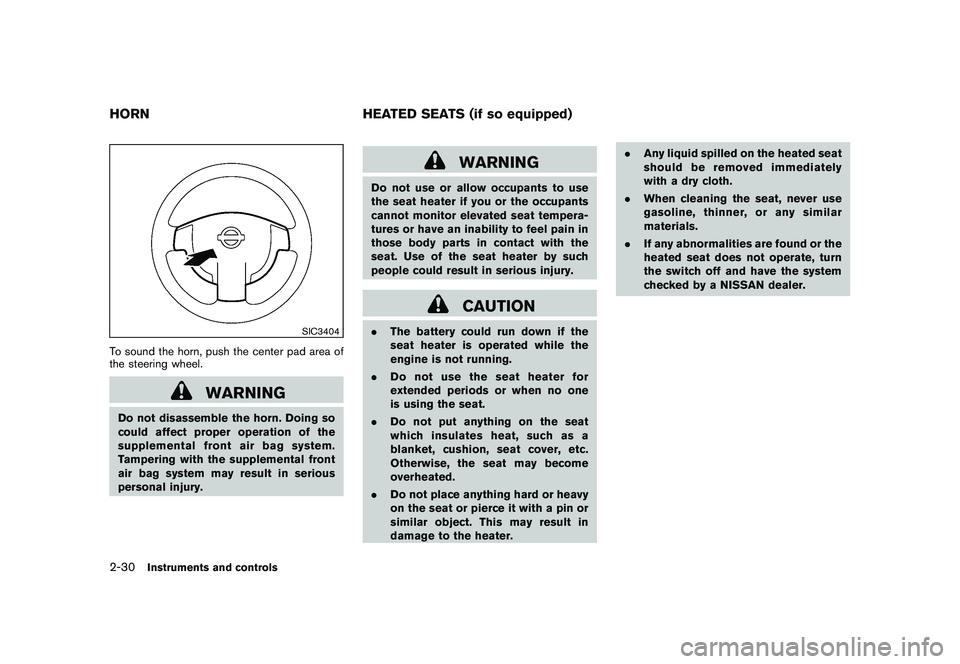
To sound the horn, push the center pad area of
the steering wheel.
WARNING
Do not disassemble the horn. Doing so
could affect proper operation of the
supplemental front air bag system.
Tampering with the supplemental front
air bag system may result in serious
personal injury.
WARNING
Do not use or allow occupants to use
the seat heater if you or the occupants
cannot monitor elevated seat tempera-
tures or have an inability to feel pain in
those body parts in contact with the
seat. Use of the seat heater by such
people could result in serious injury.
CAUTION
.The battery could run down if the
seat heater is operated while the
engine is not running.
. Do not use the seat heater for
extended periods or when no one
is using the seat.
. Do not put anything on the seat
which insulates heat, such as a
blanket, cushion, seat cover, etc.
Otherwise, the seat may become
overheated.
. Do not place anything hard or heavy
on the seat or pierce it with a pin or
similar object. This may result in
damage to the heater. .
Any liquid spilled on the heated seat
should be removed immediately
with a dry cloth.
. When cleaning the seat, never use
gasoline, thinner, or any similar
materials.
. If any abnormalities are found or the
heated seat does not operate, turn
the switch off and have the system
checked by a NISSAN dealer.
HORN HEATED SEATS (if so equipped)2-30
Instruments and controls
Page 104 of 328
Black plate (100,1)
Model "S35-D" EDITED: 2009/ 9/ 4
SIC3548
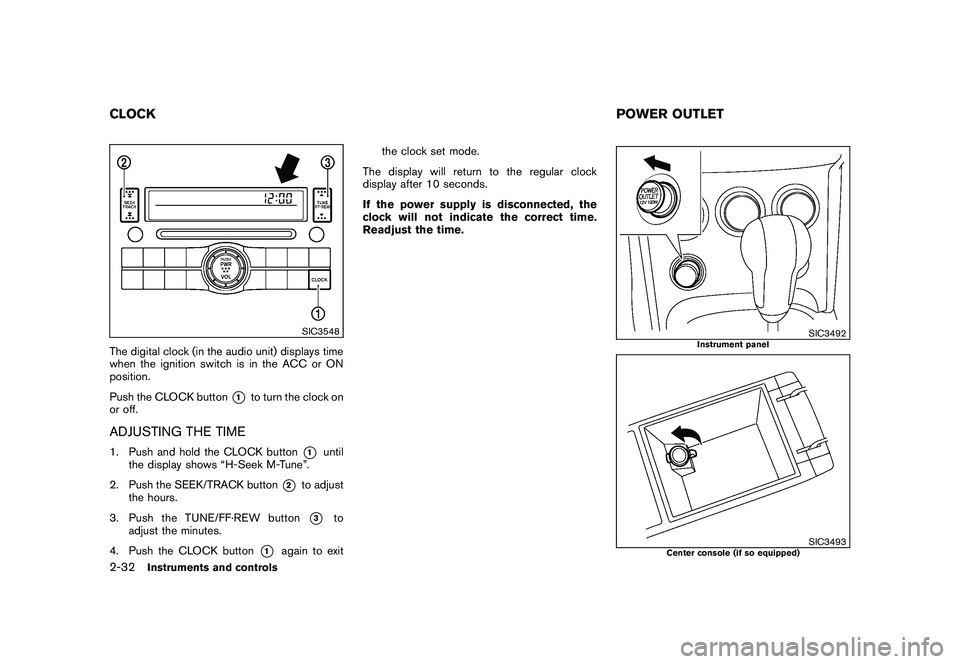
The digital clock (in the audio unit) displays time
when the ignition switch is in the ACC or ON
position.
Push the CLOCK button
*1
to turn the clock on
or off.
ADJUSTING THE TIME1. Push and hold the CLOCK button
*1
until
the display shows “H-Seek M-Tune”.
2. Push the SEEK/TRACK button
*2
to adjust
the hours.
3. Push the TUNE/ FF·REW button*3
to
adjust the minutes.
4. Push the CLOCK button
*1
again to exit the clock set mode.
The display will return to the regular clock
display after 10 seconds.
If the power supply is disconnected, the
clock will not indicate the correct time.
Readjust the time.
SIC3492
Instrument panel
SIC3493
Center console (if so equipped)
CLOCK POWER OUTLET2-32
Instruments and controls