ECO mode NISSAN ROGUE 2010 Owner´s Manual
[x] Cancel search | Manufacturer: NISSAN, Model Year: 2010, Model line: ROGUE, Model: NISSAN ROGUE 2010Pages: 328, PDF Size: 2.84 MB
Page 134 of 328
Black plate (132,1)
Model "S35-D" EDITED: 2009/ 9/ 4
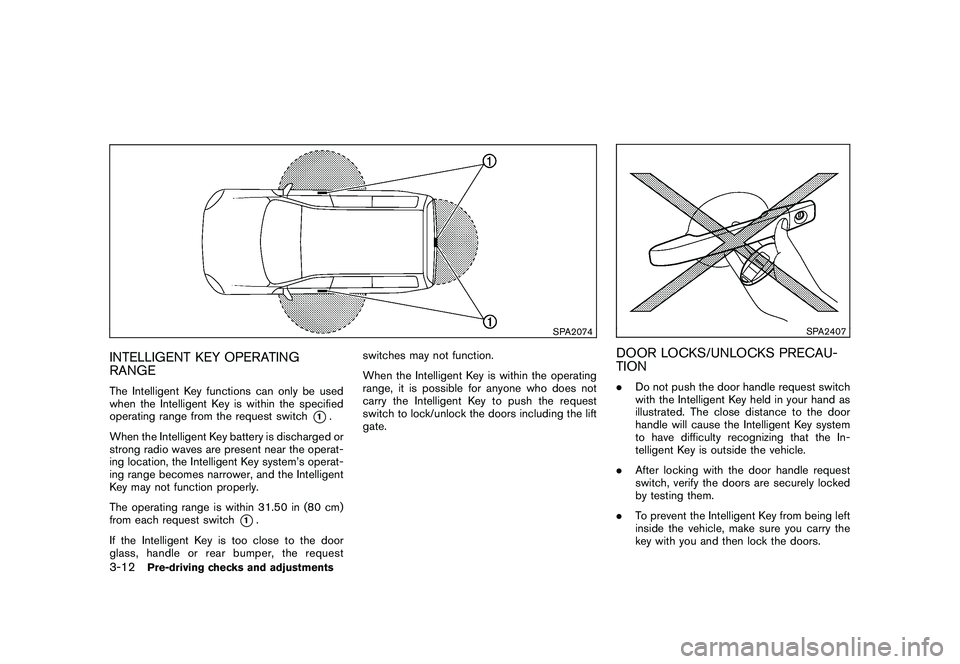
SPA2074
INTELLIGENT KEY OPERATING
RANGEThe Intelligent Key functions can only be used
when the Intelligent Key is within the specified
operating range from the request switch
*1.
When the Intelligent Key battery is discharged or
strong radio waves are present near the operat-
ing location, the Intelligent Key system’s operat-
ing range becomes narrower, and the Intelligent
Key may not function properly.
The operating range is within 31.50 in (80 cm)
from each request switch
*1.
If the Intelligent Key is too close to the door
glass, handle or rear bumper, the request switches may not function.
When the Intelligent Key is within the operating
range, it is possible for anyone who does not
carry the Intelligent Key to push the request
switch to lock/unlock the doors including the lift
gate.
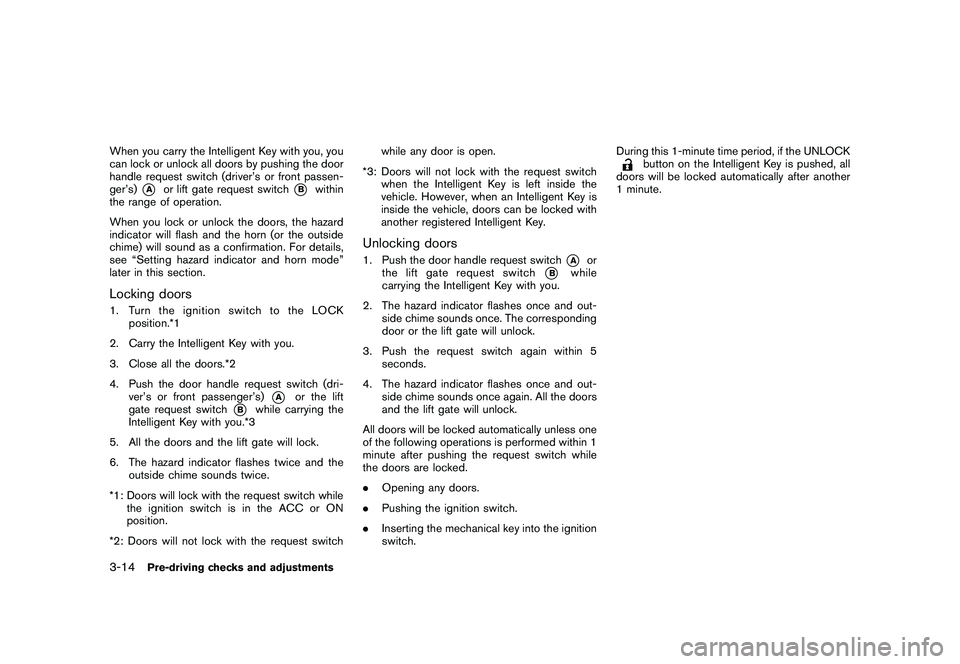
SPA2407
DOOR LOCKS/UNLOCKS PRECAU-
TION.
Do not push the door handle request switch
with the Intelligent Key held in your hand as
illustrated. The close distance to the door
handle will cause the Intelligent Key system
to have difficulty recognizing that the In-
telligent Key is outside the vehicle.
. After locking with the door handle request
switch, verify the doors are securely locked
by testing them.
. To prevent the Intelligent Key from being left
inside the vehicle, make sure you carry the
key with you and then lock the doors.
3-12
Pre-driving checks and adjustments
Page 136 of 328
Black plate (134,1)
Model "S35-D" EDITED: 2009/ 9/ 4
When you carry the Intelligent Key with you, you
can lock or unlock all doors by pushing the door
handle request switch (driver’s or front passen-
ger’s)
*A
or lift gate request switch
*B
within
the range of operation.
When you lock or unlock the doors, the hazard
indicator will flash and the horn (or the outside
chime) will sound as a confirmation. For details,
see “Setting hazard indicator and horn mode”
later in this section.
Locking doors1. TurntheignitionswitchtotheLOCK position.*1
2. Carry the Intelligent Key with you.
3. Close all the doors.*2
4. Push the door handle request switch (dri- ver’s or front passenger’s)
*A
or the lift
gate request switch
*B
while carrying the
Intelligent Key with you.*3
5. All the doors and the lift gate will lock.
6. The hazard indicator flashes twice and the outside chime sounds twice.
*1: Doors will lock with the request switch while the ignition switch is in the ACC or ON
position.
*2: Doors will not lock with the request switch while any door is open.
*3: Doors will not lock with the request switch when the Intelligent Key is left inside the
vehicle. However, when an Intelligent Key is
inside the vehicle, doors can be locked with
another registered Intelligent Key.
Unlocking doors1. Push the door handle request switch
*A
or
the lift gate request switch
*B
while
carrying the Intelligent Key with you.
2. The hazard indicator flashes once and out- side chime sounds once. The corresponding
door or the lift gate will unlock.
3. Push the request switch again within 5 seconds.
4. The hazard indicator flashes once and out- side chime sounds once again. All the doors
and the lift gate will unlock.
All doors will be locked automatically unless one
of the following operations is performed within 1
minute after pushing the request switch while
the doors are locked.
. Opening any doors.
. Pushing the ignition switch.
. Inserting the mechanical key into the ignition
switch. During this 1-minute time period, if the UNLOCK
button on the Intelligent Key is pushed, all
doors will be locked automatically after another
1 minute.
3-14
Pre-driving checks and adjustments
Page 138 of 328
Black plate (136,1)
Model "S35-D" EDITED: 2009/ 9/ 4
TROUBLESHOOTING GUIDE
SymptomPossible causeAction to take
When pushing the request switch The outside buzzer sounds for approximately 2
seconds. The doors cannot be locked.Take out the Intelligent Key from the vehicle
and push the request switch.
Turn the ignition switch to the LOCK
position and push the request switch while
carrying the Intelligent Key with you.
Close all the doors securely and push the
request switch while carrying the Intelligent
Key with you.
When closing the doors The outside buzzer sounds for approximately
10 seconds.
The ignition switch is not turned to the
LOCK position.Turn the ignition switch to the LOCK
position.
The Intelligent Key system warning light in the
instrument panel blinks in red and the outside
buzzer sounds 3 times. The Intelligent Key is not in the vehicle. Carry the Intelligent Key with you.
The outside buzzer sounds for approximately 3
seconds and all doors unlock. The Intelligent Key has been left in the
vehicle.Carry the Intelligent Key from the vehicle
and close the door.
When opening the driver’s door A warning chime sounds continuously. The ignition switch is not in the LOCK
position, or the mechanical key is
inserted into the ignition switch.Turn the ignition switch to the LOCK
position.
Remove the mechanical key from the igni-
tion switch.
When stopping the engine The P position selecting warning light in the
instrument panel blinks in red. The selector lever is not in the P (Park)
position.Shift the selector lever to the P (Park)
position.
When turning the ignition switch A warning chime sounds continuously. The ignition switch is not turned to the
LOCK position.Turn the ignition switch to the LOCK
position.
When starting the engine The Intelligent Key system warning light in the
instrument panel blinks in green. The battery charge is low.Replace the battery with a new one. (See
“BATTERY REPLACEMENT” in the “8.
Maintenance and do-it-yourself” section.)
3-16
Pre-driving checks and adjustments
Page 141 of 328
Black plate (139,1)
Model "S35-D" EDITED: 2009/ 9/ 4
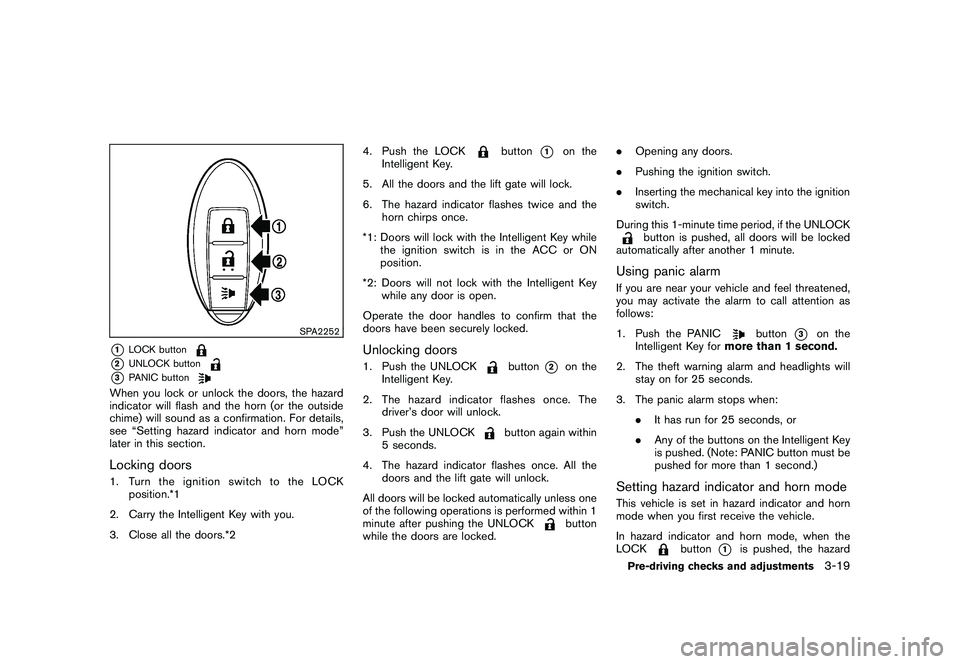
SPA2252
*1
LOCK button
*2
UNLOCK button
*3
PANIC button
When you lock or unlock the doors, the hazard
indicator will flash and the horn (or the outside
chime) will sound as a confirmation. For details,
see “Setting hazard indicator and horn mode”
later in this section.Locking doors1. TurntheignitionswitchtotheLOCKposition.*1
2. Carry the Intelligent Key with you.
3. Close all the doors.*2 4. Push the LOCK
button
*1
on the
Intelligent Key.
5. All the doors and the lift gate will lock.
6. The hazard indicator flashes twice and the horn chirps once.
*1: Doors will lock with the Intelligent Key while the ignition switch is in the ACC or ON
position.
*2: Doors will not lock with the Intelligent Key while any door is open.
Operate the door handles to confirm that the
doors have been securely locked.
Unlocking doors1. Push the UNLOCK
button
*2
on the
Intelligent Key.
2. The hazard indicator flashes once. The driver’s door will unlock.
3. Push the UNLOCK
button again within
5 seconds.
4. The hazard indicator flashes once. All the doors and the lift gate will unlock.
All doors will be locked automatically unless one
of the following operations is performed within 1
minute after pushing the UNLOCK
button
while the doors are locked. .
Opening any doors.
. Pushing the ignition switch.
. Inserting the mechanical key into the ignition
switch.
During this 1-minute time period, if the UNLOCK
button is pushed, all doors will be locked
automatically after another 1 minute.
Using panic alarmIf you are near your vehicle and feel threatened,
you may activate the alarm to call attention as
follows:
1. Push the PANIC
button
*3
on the
Intelligent Key for more than 1 second.
2. The theft warning alarm and headlights will stay on for 25 seconds.
3. The panic alarm stops when: .It has run for 25 seconds, or
. Any of the buttons on the Intelligent Key
is pushed. (Note: PANIC button must be
pushed for more than 1 second.)
Setting hazard indicator and horn modeThis vehicle is set in hazard indicator and horn
mode when you first receive the vehicle.
In hazard indicator and horn mode, when the
LOCK
button
*1
is pushed, the hazard
Pre-driving checks and adjustments
3-19
Page 143 of 328
Black plate (141,1)
Model "S35-D" EDITED: 2009/ 9/ 4
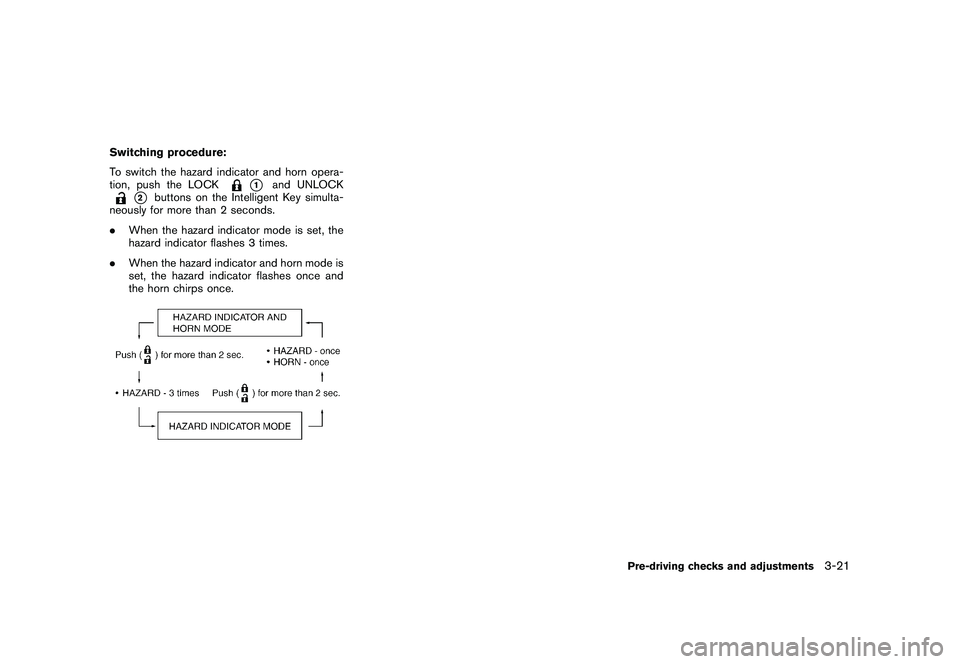
Switching procedure:
To switch the hazard indicator and horn opera-
tion, push the LOCK
*1
and UNLOCK
*2
buttons on the Intelligent Key simulta-
neously for more than 2 seconds.
. When the hazard indicator mode is set, the
hazard indicator flashes 3 times.
. When the hazard indicator and horn mode is
set, the hazard indicator flashes once and
the horn chirps once.
Pre-driving checks and adjustments
3-21
Page 151 of 328
Black plate (149,1)
Model "S35-D" EDITED: 2009/ 9/ 4
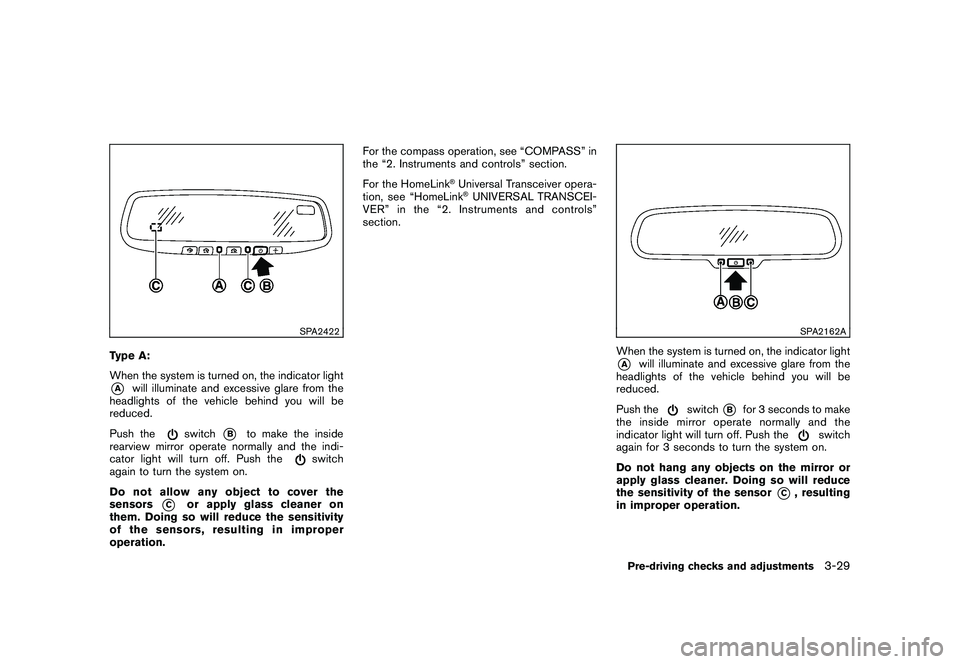
SPA2422
Type A:
When the system is turned on, the indicator light*A
will illuminate and excessive glare from the
headlights of the vehicle behind you will be
reduced.
Push the
switch
*B
to make the inside
rearview mirror operate normally and the indi-
cator light will turn off. Push the
switch
again to turn the system on.
Do not allow any object to cover the
sensors
*C
or apply glass cleaner on
them. Doing so will reduce the sensitivity
of the sensors, resulting in improper
operation. For the compass operation, see “COMPASS” in
the “2. Instruments and controls” section.
For the HomeLink
®Universal Transceiver opera-
tion, see “HomeLink®UNIVERSAL TRANSCEI-
VER” in the “2. Instruments and controls”
section.
SPA2162A
When the system is turned on, the indicator light*A
will illuminate and excessive glare from the
headlights of the vehicle behind you will be
reduced.
Push the
switch
*B
for 3 seconds to make
the inside mirror operate normally and the
indicator light will turn off. Push the
switch
again for 3 seconds to turn the system on.
Do not hang any objects on the mirror or
apply glass cleaner. Doing so will reduce
the sensitivity of the sensor
*C
, resulting
in improper operation.
Pre-driving checks and adjustments
3-29
Page 153 of 328
Black plate (13,1)
4 Heater, air conditioner, audio and phonesystems
Model "S35-D" EDITED: 2009/ 9/ 4
Ventilators ........................................................ 4-2
Heater and air conditioner .................................... 4-2
Manual air conditioner ..................................... 4-3
In-cabin microfilter .......................................... 4-5
Servicing air conditioner .................................. 4-5
Audio system .................................................... 4-6
Audio operation precautions ............................. 4-6
FM-AM radio with Compact Disc (CD) player ..... 4-13
FM-AM-SAT radio with Compact Disc (CD)
changer ..................................................... 4-17 CD care and cleaning
................................... 4-22
Steering wheel switch for audio control
(if so equipped) ........................................... 4-23
Antenna ..................................................... 4-24
Car phone or CB radio ...................................... 4-24
Bluetooth
®Hands-Free Phone System with
NISSAN voice recognition (if so equipped) ............ 4-25
Using system .............................................. 4-27
Speaker Adaptation (SA) mode ....................... 4-36
Troubleshooting guide ................................... 4-39
Page 154 of 328
Black plate (154,1)
Model "S35-D" EDITED: 2009/ 9/ 4
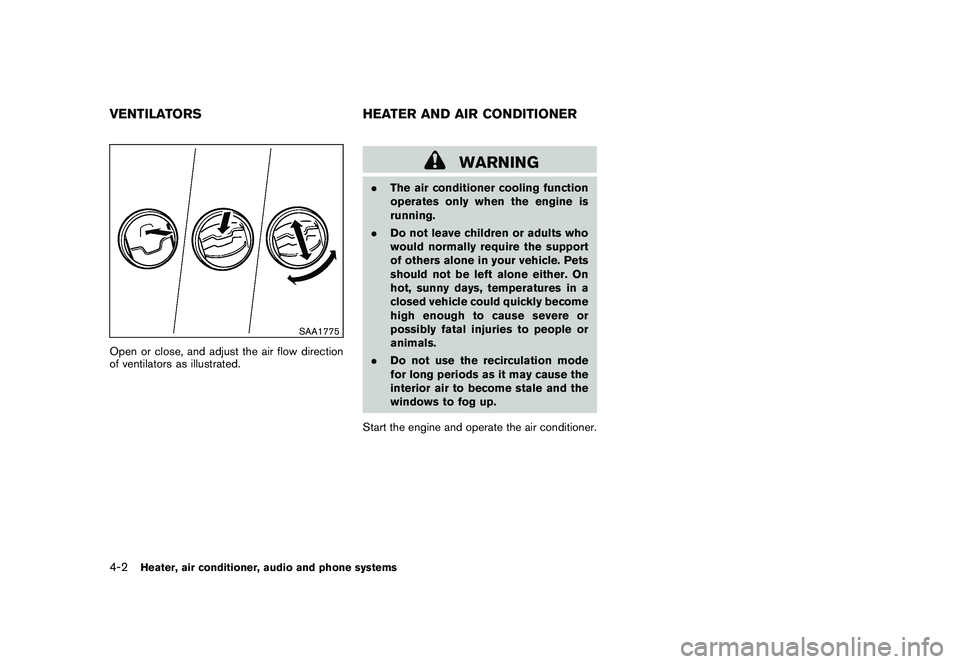
SAA1775
Open or close, and adjust the air flow direction
of ventilators as illustrated.
WARNING
.The air conditioner cooling function
operates only when the engine is
running.
. Do not leave children or adults who
would normally require the support
of others alone in your vehicle. Pets
should not be left alone either. On
hot, sunny days, temperatures in a
closed vehicle could quickly become
high enough to cause severe or
possibly fatal injuries to people or
animals.
. Do not use the recirculation mode
for long periods as it may cause the
interior air to become stale and the
windows to fog up.
Start the engine and operate the air conditioner.
VENTILATORS HEATER AND AIR CONDITIONER4-2
Heater, air conditioner, audio and phone systems
Page 157 of 328
Black plate (157,1)
Model "S35-D" EDITED: 2009/ 9/ 4
Air conditioner operationThe air conditioner system should be operated
for approximately 10 minutes at least once a
month. This helps prevent damage to the air
conditioner system due to the lack of lubrication.
Cooling:
This mode is used to cool and dehumidify the air.
1. Push the air recirculation button
to the
OFF position. (The indicator light turns off.)
2. Turn the air flow control dial to the
position.
3. Turn the fan speed control
dial to the
desired position.
4. Push the A/C button on. (The A/C indicator light will illuminate.)
5. Turn the temperature control dial to the desired position between the middle and the
cool (left) position.
. For quick cooling when the outside tem-
perature is high, push the air recirculation
button
to the ON position. Be sure to
push the air recirculation button to the OFF
position for normal cooling.
. A visible mist may be seen coming from the
ventilators in hot, humid conditions as the air
is cooled rapidly. This does not indicate a malfunction.
Dehumidified heating:
This mode is used to heat and dehumidify the
air.
1. Push the air recirculation button
to the
OFF position. (The indicator light turns off.)
2. Turn the air flow control dial to the
position.
3. Turn the fan speed control
dial to the
desired position.
4. Push the A/C button on. (The A/C indicator light will illuminate.)
5. Turn the temperature control dial to the desired position between the middle and the
hot (right) position.
Dehumidified defogging:
This mode is used to defog the windows and
dehumidify the air.
1. Turn the air flow control dial to the
position.
2. Turn the fan speed control
dial to the
desired position.
3. Push the A/C button on. (The A/C indicator light will illuminate.) 4. Turn the temperature control dial to the
desired position.
IN-CABIN MICROFILTERThe air conditioning system is equipped with an
in-cabin microfilter which collects dirt, pollen,
dust, etc. To make sure the air conditioner heats,
defogs, and ventilates efficiently, replace the
filter according to the specified maintenance log
shown in the NISSAN Service and Maintenance
Guide. To replace the filter, contact a NISSAN
dealer.
The filter should be replaced if the air flow
decreases significantly or if windows fog
up easily when operating the heater or air
conditioning system.SERVICING AIR CONDITIONERThe air conditioner system in your NISSAN is
charged with a refrigerant designed with the
environment in mind. This refrigerant will not
harm the earth’s ozone layer. Special char-
ging equipment and lubricant are required when
servicing your NISSAN air conditioner. Using
improper refrigerants or lubricants will cause
severe damage to your air conditioner system.
(See “CAPACITIES AND RECOMMENDED
FUEL/LUBRICANTS” in the “9. Technical and
consumer information” section for air conditioner
system refrigerant and lubricant recommenda-
tions.)
Heater, air conditioner, audio and phone systems
4-5
Page 159 of 328
Black plate (159,1)
Model "S35-D" EDITED: 2009/ 9/ 4
SAA0306
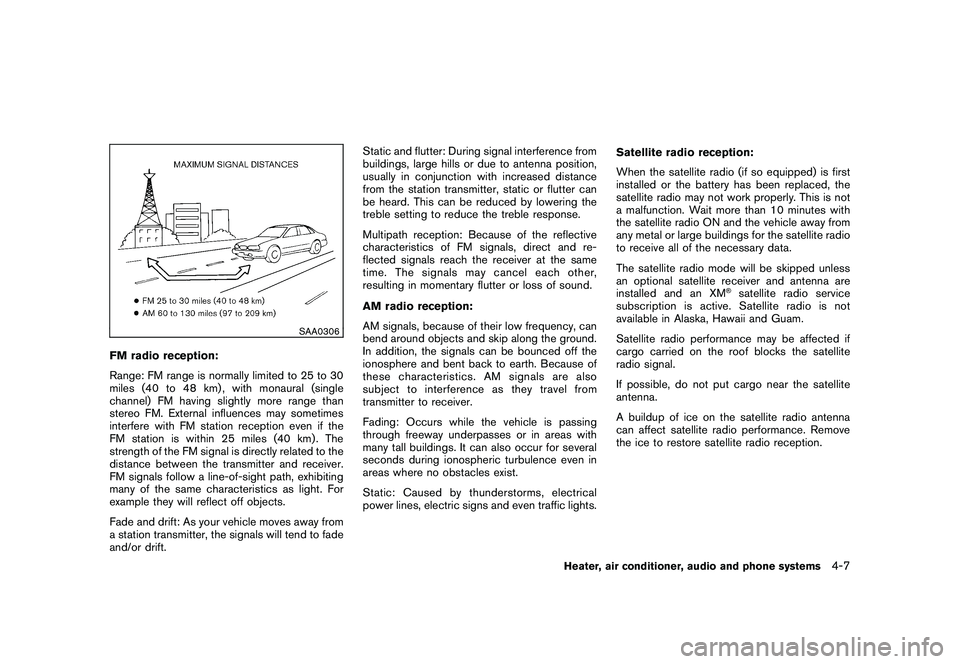
FM radio reception:
Range: FM range is normally limited to 25 to 30
miles (40 to 48 km) , with monaural (single
channel) FM having slightly more range than
stereo FM. External influences may sometimes
interfere with FM station reception even if the
FM station is within 25 miles (40 km). The
strength of the FM signal is directly related to the
distance between the transmitter and receiver.
FM signals follow a line-of-sight path, exhibiting
many of the same characteristics as light. For
example they will reflect off objects.
Fade and drift: As your vehicle moves away from
a station transmitter, the signals will tend to fade
and/or drift.Static and flutter: During signal interference from
buildings, large hills or due to antenna position,
usually in conjunction with increased distance
from the station transmitter, static or flutter can
be heard. This can be reduced by lowering the
treble setting to reduce the treble response.
Multipath reception: Because of the reflective
characteristics of FM signals, direct and re-
flected signals reach the receiver at the same
time. The signals may cancel each other,
resulting in momentary flutter or loss of sound.
AM radio reception:
AM signals, because of their low frequency, can
bend around objects and skip along the ground.
In addition, the signals can be bounced off the
ionosphere and bent back to earth. Because of
these characteristics. AM signals are also
subject to interference as they travel from
transmitter to receiver.
Fading: Occurs while the vehicle is passing
through freeway underpasses or in areas with
many tall buildings. It can also occur for several
seconds during ionospheric turbulence even in
areas where no obstacles exist.
Static: Caused by thunderstorms, electrical
power lines, electric signs and even traffic lights.
Satellite radio reception:
When the satellite radio (if so equipped) is first
installed or the battery has been replaced, the
satellite radio may not work properly. This is not
a malfunction. Wait more than 10 minutes with
the satellite radio ON and the vehicle away from
any metal or large buildings for the satellite radio
to receive all of the necessary data.
The satellite radio mode will be skipped unless
an optional satellite receiver and antenna are
installed and an XM
®satellite radio service
subscription is active. Satellite radio is not
available in Alaska, Hawaii and Guam.
Satellite radio performance may be affected if
cargo carried on the roof blocks the satellite
radio signal.
If possible, do not put cargo near the satellite
antenna.
A buildup of ice on the satellite radio antenna
can affect satellite radio performance. Remove
the ice to restore satellite radio reception.
Heater, air conditioner, audio and phone systems
4-7