light NISSAN ROGUE 2021 Owner´s Manual
[x] Cancel search | Manufacturer: NISSAN, Model Year: 2021, Model line: ROGUE, Model: NISSAN ROGUE 2021Pages: 556, PDF Size: 2.7 MB
Page 222 of 556
4-8Monitor, heater, air conditioner, audio and phone systems
.Objects viewed in the RearView
Monitor differ from actual dis-
tance because a wide-angle lens
is used.
. Objects in the RearView Monitor
will appear visually opposite
compared to when viewed in the
rearview and outside mirrors.
. Use the displayed lines as a re-
ference. The lines are highly af-
fected by the number of
occupants, fuel level, vehicle po-
sition, road conditions and road
grade.
. Make sure that the liftgate is
securely closed when backing up.
. Do not put anything on the rear-
view camera. The rearview cam-
era is installed above the license
plate.
. When washing the vehicle with
high-pressure water, be sure not
to spray it around the camera.
Otherwise, water may enter the
camera unit causing water con-
densation on the lens, a malfunc-
tion, fire or an electric shock.
. Do not strike the camera. It is a
precision instrument. Otherwise,
it may malfunction or cause da-
mage resulting in a fire or an electric shock.
The following are operating limitations
and do not represent a system malfunc-
tion:
. When the temperature is extremely
high or low, the screen may not clearly
display objects.
. When strong light directly shines on
the camera, objects may not be dis-
played clearly.
. Vertical lines may be seen in objects
on the screen. This is due to strong
reflected light from the bumper.
. The screen may flicker under fluores-
cent light.
. The colors of objects on the RearView
Monitor may differ somewhat from
the actual color of objects.
. Objects on the monitor may not be
clear in a dark environment.
. There may be a delay when switching
between views.
. If dirt, rain or snow accumulates on
the camera, the RearView Monitor
may not display objects clearly. Clean
the camera.
. Do not use wax on the camera lens.
Wipe off any wax with a clean cloth
dampened with a diluted mild clean-
ing agent, then wipe with a dry cloth.
WAE0335X
SYSTEM MAINTENANCE
CAUTION
.Do not use alcohol, benzine or
thinner to clean the camera. This
will cause discoloration.
. Do not damage the camera as the
monitor screen may be adversely
affected.
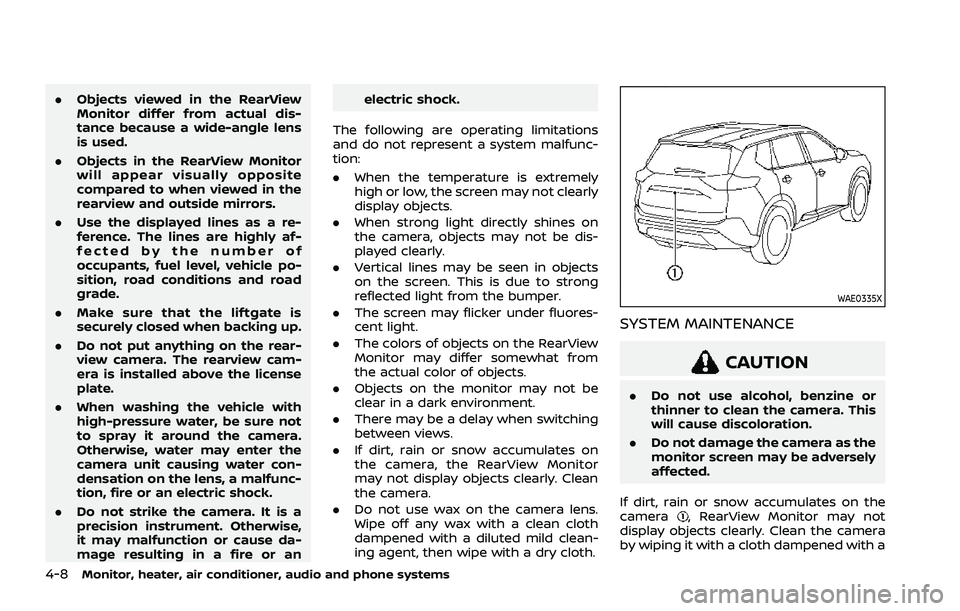
If dirt, rain or snow accumulates on the
camera
, RearView Monitor may not
display objects clearly. Clean the camera
by wiping it with a cloth dampened with a
Page 226 of 556
4-12Monitor, heater, air conditioner, audio and phone systems
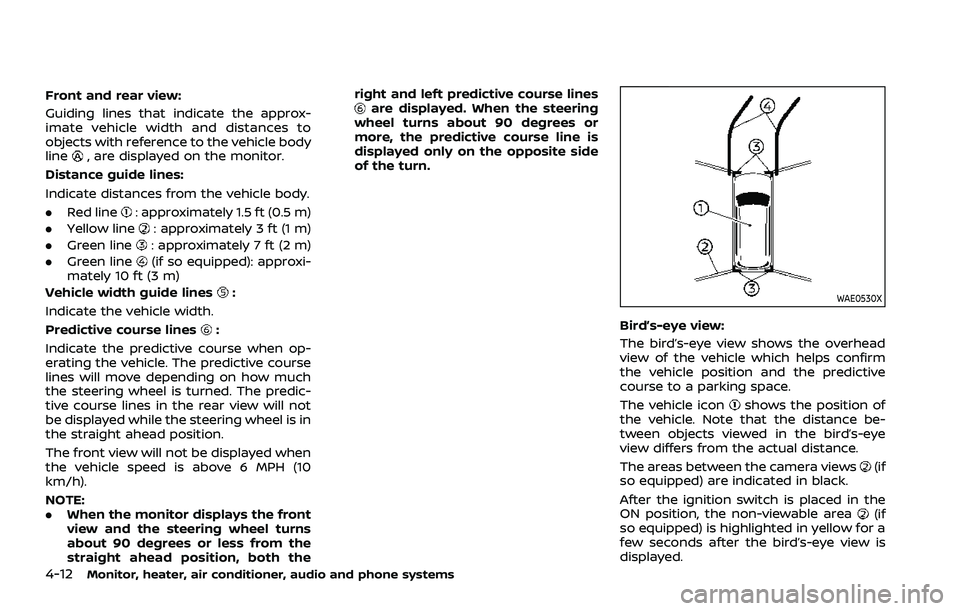
Front and rear view:
Guiding lines that indicate the approx-
imate vehicle width and distances to
objects with reference to the vehicle body
line
, are displayed on the monitor.
Distance guide lines:
Indicate distances from the vehicle body.
. Red line
: approximately 1.5 ft (0.5 m)
. Yellow line
: approximately 3 ft (1 m)
. Green line
: approximately 7 ft (2 m)
. Green line
(if so equipped): approxi-
mately 10 ft (3 m)
Vehicle width guide lines
:
Indicate the vehicle width.
Predictive course lines
:
Indicate the predictive course when op-
erating the vehicle. The predictive course
lines will move depending on how much
the steering wheel is turned. The predic-
tive course lines in the rear view will not
be displayed while the steering wheel is in
the straight ahead position.
The front view will not be displayed when
the vehicle speed is above 6 MPH (10
km/h).
NOTE:
. When the monitor displays the front
view and the steering wheel turns
about 90 degrees or less from the
straight ahead position, both the right and left predictive course lines
are displayed. When the steering
wheel turns about 90 degrees or
more, the predictive course line is
displayed only on the opposite side
of the turn.
WAE0530X
Bird’s-eye view:
The bird’s-eye view shows the overhead
view of the vehicle which helps confirm
the vehicle position and the predictive
course to a parking space.
The vehicle icon
shows the position of
the vehicle. Note that the distance be-
tween objects viewed in the bird’s-eye
view differs from the actual distance.
The areas between the camera views
(if
so equipped) are indicated in black.
After the ignition switch is placed in the
ON position, the non-viewable area
(if
so equipped) is highlighted in yellow for a
few seconds after the bird’s-eye view is
displayed.
Page 227 of 556
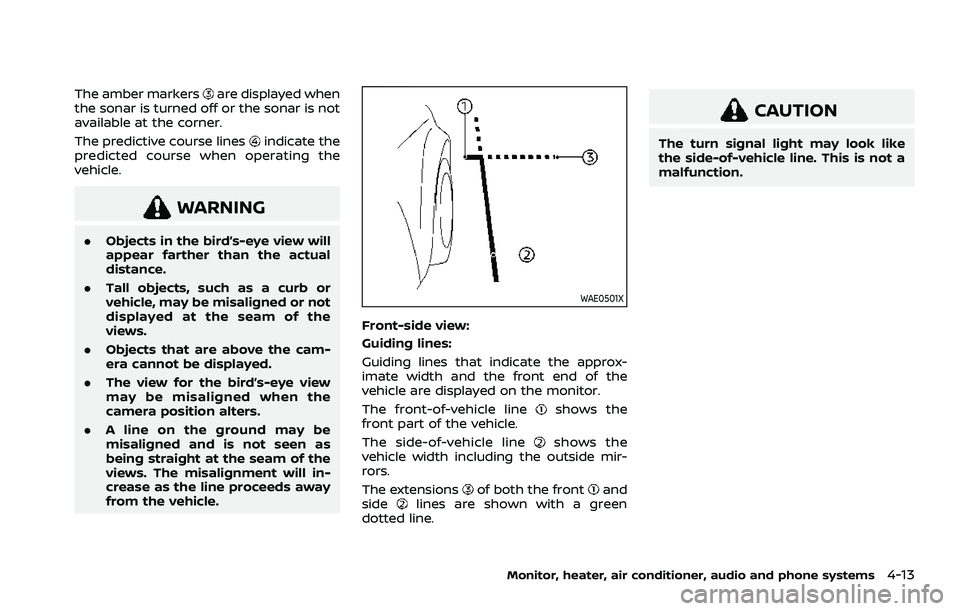
The amber markersare displayed when
the sonar is turned off or the sonar is not
available at the corner.
The predictive course lines
indicate the
predicted course when operating the
vehicle.
WARNING
. Objects in the bird’s-eye view will
appear farther than the actual
distance.
. Tall objects, such as a curb or
vehicle, may be misaligned or not
displayed at the seam of the
views.
. Objects that are above the cam-
era cannot be displayed.
. The view for the bird’s-eye view
may be misaligned when the
camera position alters.
. A line on the ground may be
misaligned and is not seen as
being straight at the seam of the
views. The misalignment will in-
crease as the line proceeds away
from the vehicle.
WAE0501X
Front-side view:
Guiding lines:
Guiding lines that indicate the approx-
imate width and the front end of the
vehicle are displayed on the monitor.
The front-of-vehicle line
shows the
front part of the vehicle.
The side-of-vehicle line
shows the
vehicle width including the outside mir-
rors.
The extensions
of both the frontand
sidelines are shown with a green
dotted line.
CAUTION
The turn signal light may look like
the side-of-vehicle line. This is not a
malfunction.
Monitor, heater, air conditioner, audio and phone systems4-13
Page 234 of 556
4-20Monitor, heater, air conditioner, audio and phone systems
not appear in the monitor.
The following are operating limitations
and do not represent a system malfunc-
tion:
.There may be a delay when switching
between views.
. When the temperature is extremely
high or low, the screen may not
display objects clearly.
. When strong light directly shines on
the camera, objects may not be dis-
played clearly.
. The screen may flicker under fluores-
cent light.
. The colors of objects on the Intelligent
Around View® Monitor may differ
somewhat from the actual color of
objects.
. Objects on the Intelligent Around
View® Monitor may not be clear and
the color of the object may differ in a
dark environment.
. There may be differences in sharpness
between each camera view of the
bird’s-eye view.
. Do not use wax on the camera lens.
Wipe off any wax with a clean cloth
that has been dampened with a
diluted mild cleaning agent, then wipe
with a dry cloth.
WAE0473X
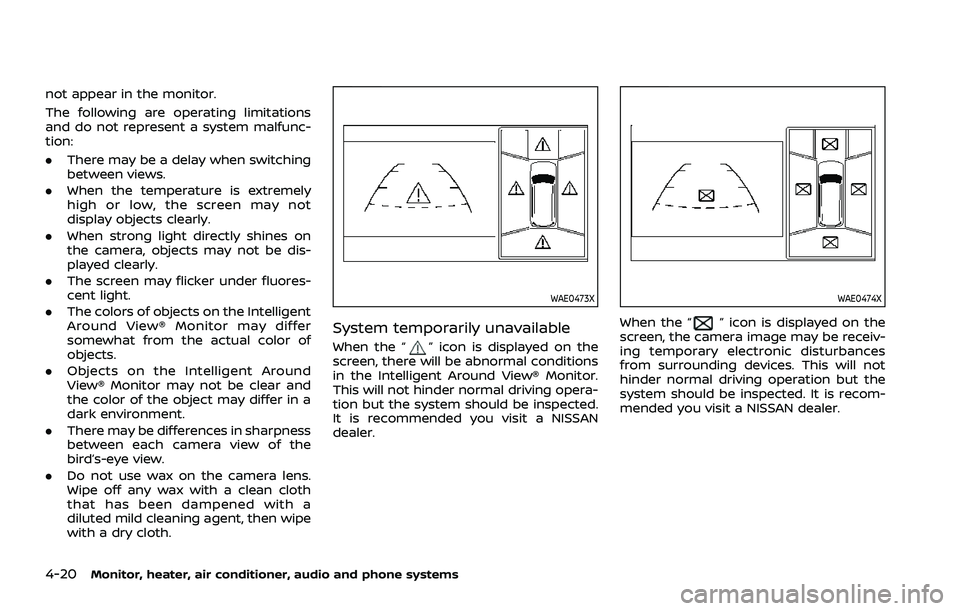
System temporarily unavailable
When the “” icon is displayed on the
screen, there will be abnormal conditions
in the Intelligent Around View® Monitor.
This will not hinder normal driving opera-
tion but the system should be inspected.
It is recommended you visit a NISSAN
dealer.
WAE0474X
When the “” icon is displayed on the
screen, the camera image may be receiv-
ing temporary electronic disturbances
from surrounding devices. This will not
hinder normal driving operation but the
system should be inspected. It is recom-
mended you visit a NISSAN dealer.
Page 238 of 556
4-24Monitor, heater, air conditioner, audio and phone systems
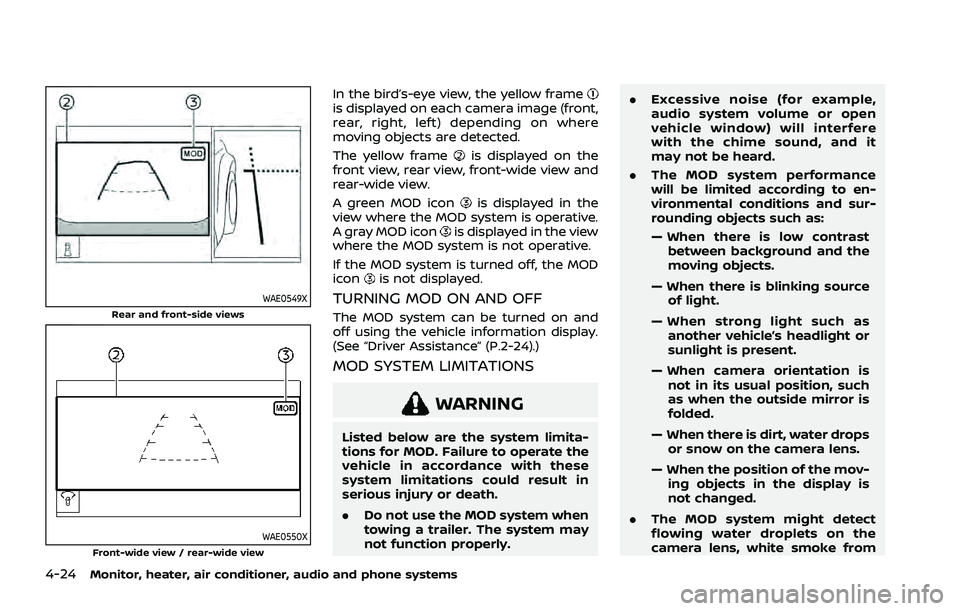
WAE0549XRear and front-side views
WAE0550XFront-wide view / rear-wide view
In the bird’s-eye view, the yellow frameis displayed on each camera image (front,
rear, right, left) depending on where
moving objects are detected.
The yellow frame
is displayed on the
front view, rear view, front-wide view and
rear-wide view.
A green MOD icon
is displayed in the
view where the MOD system is operative.
A gray MOD icon
is displayed in the view
where the MOD system is not operative.
If the MOD system is turned off, the MOD
icon
is not displayed.
TURNING MOD ON AND OFF
The MOD system can be turned on and
off using the vehicle information display.
(See “Driver Assistance” (P.2-24).)
MOD SYSTEM LIMITATIONS
WARNING
Listed below are the system limita-
tions for MOD. Failure to operate the
vehicle in accordance with these
system limitations could result in
serious injury or death.
. Do not use the MOD system when
towing a trailer. The system may
not function properly. .
Excessive noise (for example,
audio system volume or open
vehicle window) will interfere
with the chime sound, and it
may not be heard.
. The MOD system performance
will be limited according to en-
vironmental conditions and sur-
rounding objects such as:
— When there is low contrast
between background and the
moving objects.
— When there is blinking source of light.
— When strong light such as another vehicle’s headlight or
sunlight is present.
— When camera orientation is not in its usual position, such
as when the outside mirror is
folded.
— When there is dirt, water drops or snow on the camera lens.
— When the position of the mov- ing objects in the display is
not changed.
. The MOD system might detect
flowing water droplets on the
camera lens, white smoke from
Page 239 of 556
the muffler, moving shadows, etc.
. The MOD system may not func-
tion properly depending on the
speed, direction, distance or
shape of the moving objects.
. If your vehicle sustains damage
to the parts where the camera is
installed, leaving it misaligned or
bent, the sensing zone may be
altered and the MOD system may
not detect objects properly.
. When the temperature is extre-
mely high or low, the screen may
not display objects clearly. This is
not a malfunction.
NOTE:
The green MOD icon will change to
orange if one of the following has
occurred.
. When the system is malfunctioning.
. When the component temperature
reaches a high level.
. When the rear view camera has
detected a blockage.
If the icon light continues to illuminate
in orange, have the MOD system
checked. It is recommended that you
visit a NISSAN dealer for this service.
WAE0360X
SYSTEM MAINTENANCE
CAUTION
. Do not use alcohol, benzine or
thinner to clean the camera. This
will cause discoloration.
. Do not damage the camera as the
monitor screen may be adversely
affected.
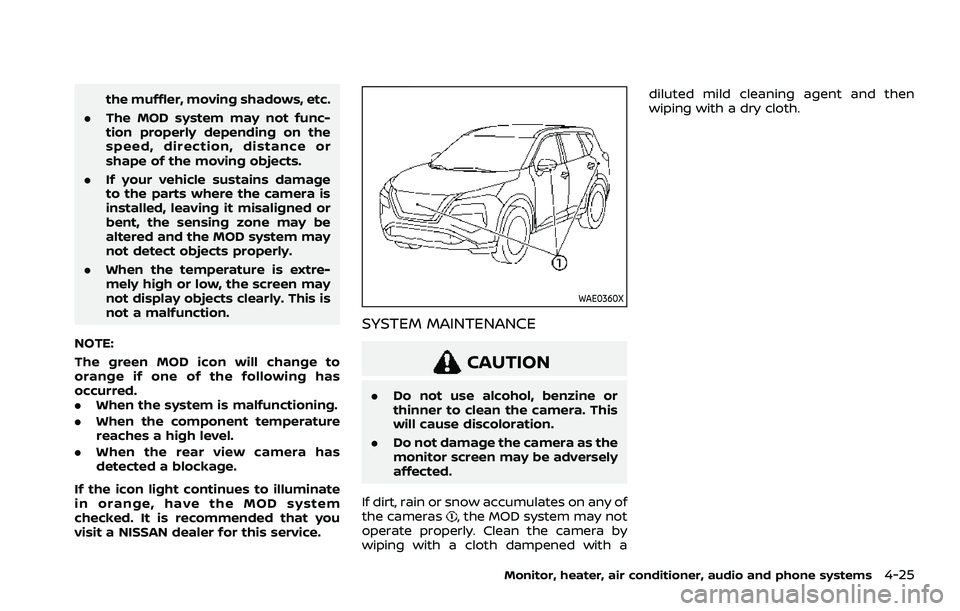
If dirt, rain or snow accumulates on any of
the cameras
, the MOD system may not
operate properly. Clean the camera by
wiping with a cloth dampened with a diluted mild cleaning agent and then
wiping with a dry cloth.
Monitor, heater, air conditioner, audio and phone systems4-25
Page 242 of 556
4-28Monitor, heater, air conditioner, audio and phone systems
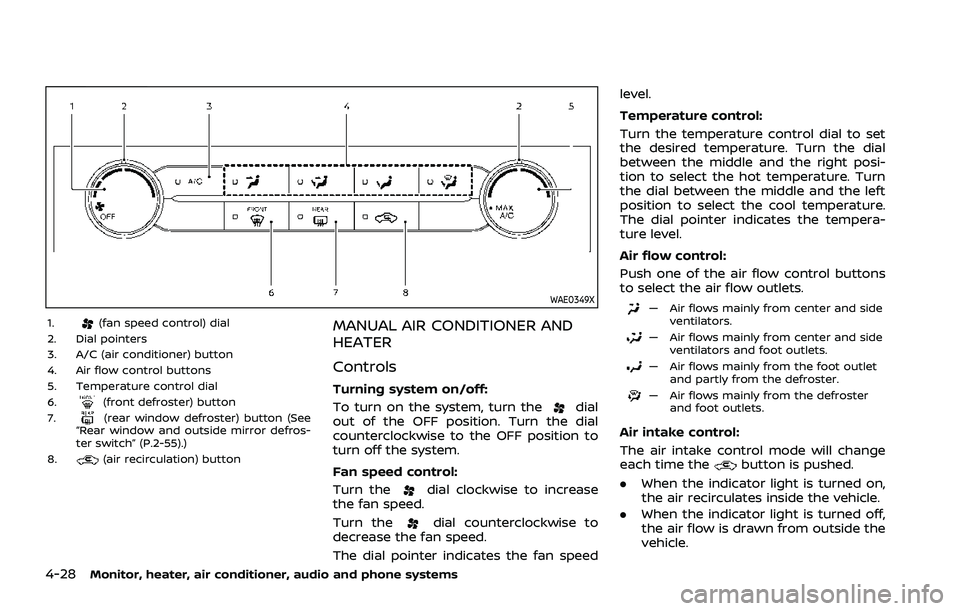
WAE0349X
1.(fan speed control) dial
2. Dial pointers
3. A/C (air conditioner) button
4. Air flow control buttons
5. Temperature control dial
6.
(front defroster) button
7.(rear window defroster) button (See
“Rear window and outside mirror defros-
ter switch” (P.2-55).)
8.
(air recirculation) button
MANUAL AIR CONDITIONER AND
HEATER
Controls
Turning system on/off:
To turn on the system, turn the
dial
out of the OFF position. Turn the dial
counterclockwise to the OFF position to
turn off the system.
Fan speed control:
Turn the
dial clockwise to increase
the fan speed.
Turn the
dial counterclockwise to
decrease the fan speed.
The dial pointer indicates the fan speed level.
Temperature control:
Turn the temperature control dial to set
the desired temperature. Turn the dial
between the middle and the right posi-
tion to select the hot temperature. Turn
the dial between the middle and the left
position to select the cool temperature.
The dial pointer indicates the tempera-
ture level.
Air flow control:
Push one of the air flow control buttons
to select the air flow outlets.
— Air flows mainly from center and side
ventilators.
— Air flows mainly from center and sideventilators and foot outlets.
— Air flows mainly from the foot outletand partly from the defroster.
— Air flows mainly from the defrosterand foot outlets.
Air intake control:
The air intake control mode will change
each time the
button is pushed.
. When the indicator light is turned on,
the air recirculates inside the vehicle.
. When the indicator light is turned off,
the air flow is drawn from outside the
vehicle.
Page 243 of 556
A/C (Air Conditioner) operation:
Push the A/C button to turn on or off the
air conditioner. When the air conditioner
is on, the A/C indicator light on the button
illuminates.
MAX A/C (Quick Air Conditioning) op-
eration:
To turn on the MAX A/C mode for
maximum cooling and dehumidifying,
turn the temperature control dial coun-
terclockwise until the dial pointer is at the
"MAX A/C" position.
When the MAX A/C mode is turned on, the
air flow mode indicator light will turn off
with the air flow mode fixed at
.
At the same time, the indicator light on
the A/C button and the air recirculation
mode will turn on.
To turn off the MAX A/C mode, turn the
temperature control dial clockwise so
that the dial pointer is out of the "MAX
A/C" position. When the MAX A/C mode is
turned off, most of the settings will return
to the previous state, while the indicator
light on the A/C button will stay on.
Heater operation
Heating:
This mode is used to direct heated air
from the foot outlets. Some air also flows
from the defroster outlets and the side
ventilator outlets.
1. Push the
button for normal heat-
ing. (The indicator light will turn off.)
2. Push the
button. (The indicator
light will turn on.)
3. Turn the
dial to the desired
position.
4. Turn the temperature control dial to the desired position between the
middle and the hot (right) position.
Ventilation:
This mode directs outside air from the
side and center ventilators.
1. Push the
button. (The indicator
light will turn off.)
2. Push the
button. (The indicator
light will turn on.)
3. Turn the
dial to the desired
position.
4. Turn the temperature control dial to the desired position. Defrosting or defogging:
This mode directs the air to the defroster
outlets to defrost/defog the windows.
1. Push the
button. (The indicator
light will turn on.)
2. Turn the
dial to the desired
position.
3. Turn the temperature control dial to the desired position between the
middle and the hot (right) position.
To remove frost from the windshield
quickly, turn the temperature control
dial to the maximum hot (right) posi-
tion and the
dial to the maximum
position.
When the front defroster mode is
selected, the air conditioner automa-
tically turns on if the outside tempera-
ture is more than slightly above
freezing. This dehumidifies the air
which helps defog the windshield.
The air recirculation indicator light
automatically turns off, allowing out-
side air to be drawn into the passen-
ger compartment to further improve
the defogging performance. The re-
circulation mode cannot be activated
in the front defroster mode.
Bi-level heating:
The bi-level mode directs warmed air to
Monitor, heater, air conditioner, audio and phone systems4-29
Page 244 of 556
4-30Monitor, heater, air conditioner, audio and phone systems
the side and center ventilators and to the
front and rear floor outlets.
1. Push the
button. (The indicator
light will turn off.)
2. Push the
button. (The indicator
light will turn on.)
3. Turn the
dial to the desired
position.
4. Turn the temperature control dial to the desired position.
Heating and defogging:
This mode heats the interior and defogs
the windows.
1. Push the
button. (The indicator
light will turn on.)
2. Turn the
dial to the desired
position.
3. Turn the temperature control dial to the maximum hot (right) position.
When the
button is pushed, the air
conditioner automatically turns on if the
outside temperature is more than slightly
above freezing. This dehumidifies the air
which helps defog the windshield. The air
recirculation indicator light automatically
turns off, allowing outside air to be drawn
into the passenger compartment to
further improve the defogging perfor-
mance. NOTE:
Clear snow and ice from the wiper
blades and air inlet in front of the
windshield. This improves heater op-
eration.
Air conditioner operation
Start the engine, turn thedial to the
desired position, and push the A/C button
to activate the air conditioner. When the
air conditioner is on, cooling and dehu-
midifying functions are added to the
heater operation. The air conditioner
cooling function operates only when the
engine is running.
Cooling:
This mode is used to cool and dehumidify
the air.
1. Push the
button. (The indicator
light will turn on.)
2. Turn the
dial to the desired
position.
3. Push the A/C button. (The indicator light will turn on.)
4. Turn the temperature control dial to the desired position between the
middle and the cool (left) position.
For quick cooling, turn on the MAX A/C
mode by turning the temperature control
dial until the dial pointer is at the "MAX
A/C" position. When the MAX A/C mode is turned on, it will activate the air recircula-
tion mode. The amount of air coming
through the ventilators is the highest it
can go when in MAX A/C mode regardless
of the position of the
dial.
Dehumidified heating:
This mode is used to heat and dehumidify
the air.
1. Push the
button. (The indicator
light will turn off.)
2. Push the
button. (The indicator
light will turn on.)
3. Turn the
dial to the desired
position.
4. Push the A/C button on. (The indicator light will turn on.)
5. Turn the temperature control dial to the desired position between the
middle and the hot (right) position.
Dehumidified defogging:
This mode is used to defog the windows
and dehumidify the air.
1. Push the
button. (The indicator
light will turn on.)
2. Turn the
dial to the desired
position.
3. Turn the temperature control dial to the desired position.
When the
ormode is selected, the
Page 245 of 556
air conditioner automatically turns on if
the outside temperature is more than
slightly above freezing. This dehumidifies
the air which helps defog the windshield.
The air recirculation mode automatically
turns off, allowing outside air to be drawn
into the passenger compartment to
further improve the defogging perfor-
mance.
The air conditioner is always turned on in
the
ormode, regardless of
whether the indicator light is on or off.
NOTE:
. The air conditioner system should
be operated for approximately 10
minutes at least once a month. This
helps prevent damage to the air
conditioner system due to the lack
of lubrication.
. A visible mist may be seen coming
from the ventilators in hot, humid
conditions as the air is cooled ra-
pidly. This does not indicate a mal-
function.
. If the engine coolant temperature
becomes too high, the air recircula-
tion mode will be activated and the
indicator light will turn on automa-
tically.
. If the engine coolant temperature
gauge indicates engine coolant tem-
perature over the normal range, turn the air conditioner off. (See “If your
vehicle overheats” (P.6-13).)
Monitor, heater, air conditioner, audio and phone systems4-31