warning NISSAN ROGUE 2021 Owner´s Manual
[x] Cancel search | Manufacturer: NISSAN, Model Year: 2021, Model line: ROGUE, Model: NISSAN ROGUE 2021Pages: 556, PDF Size: 2.7 MB
Page 230 of 556
4-16Monitor, heater, air conditioner, audio and phone systems
JVH1216X
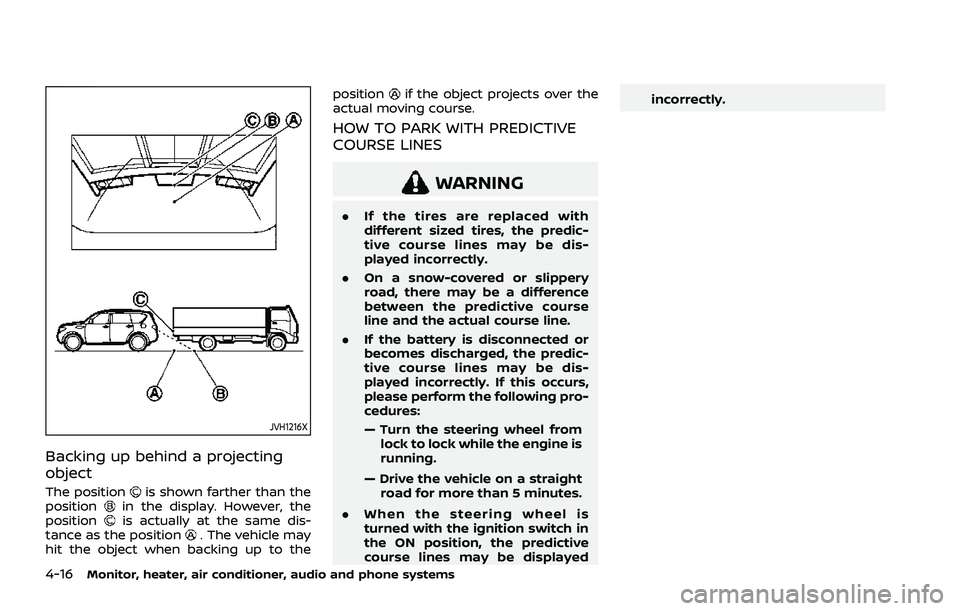
Backing up behind a projecting
object
The positionis shown farther than the
positionin the display. However, the
positionis actually at the same dis-
tance as the position. The vehicle may
hit the object when backing up to the position
if the object projects over the
actual moving course.
HOW TO PARK WITH PREDICTIVE
COURSE LINES
WARNING
. If the tires are replaced with
different sized tires, the predic-
tive course lines may be dis-
played incorrectly.
. On a snow-covered or slippery
road, there may be a difference
between the predictive course
line and the actual course line.
. If the battery is disconnected or
becomes discharged, the predic-
tive course lines may be dis-
played incorrectly. If this occurs,
please perform the following pro-
cedures:
— Turn the steering wheel from
lock to lock while the engine is
running.
— Drive the vehicle on a straight road for more than 5 minutes.
. When the steering wheel is
turned with the ignition switch in
the ON position, the predictive
course lines may be displayed incorrectly.
Page 233 of 556
INTELLIGENT AROUND VIEW®
MONITOR SYSTEM LIMITATIONS
WARNING
Listed below are the system limita-
tions for Intelligent Around View®
Monitor. Failure to operate the vehi-
cle in accordance with these system
limitations could result in serious
injury or death.
.Do not use the Intelligent Around
View® Monitor with the outside
mirrors in the stored position,
and make sure that the liftgate
is securely closed when operating
the vehicle using the Intelligent
Around View® Monitor.
. The apparent distance between
objects viewed on the Intelligent
Around View® Monitor differs
from the actual distance.
. The cameras are installed on the
front grille, the outside mirrors
and above the rear license plate.
Do not put anything on the cam-
eras.
. When washing the vehicle with
high pressure water, be sure not
to spray it around the cameras. Otherwise, water may enter the
camera unit causing water con-
densation on the lens, a malfunc-
tion, fire or an electric shock.
. Do not strike the cameras. They
are precision instruments. Doing
so could cause a malfunction or
cause damage resulting in a fire
or an electric shock.
WAE0345X
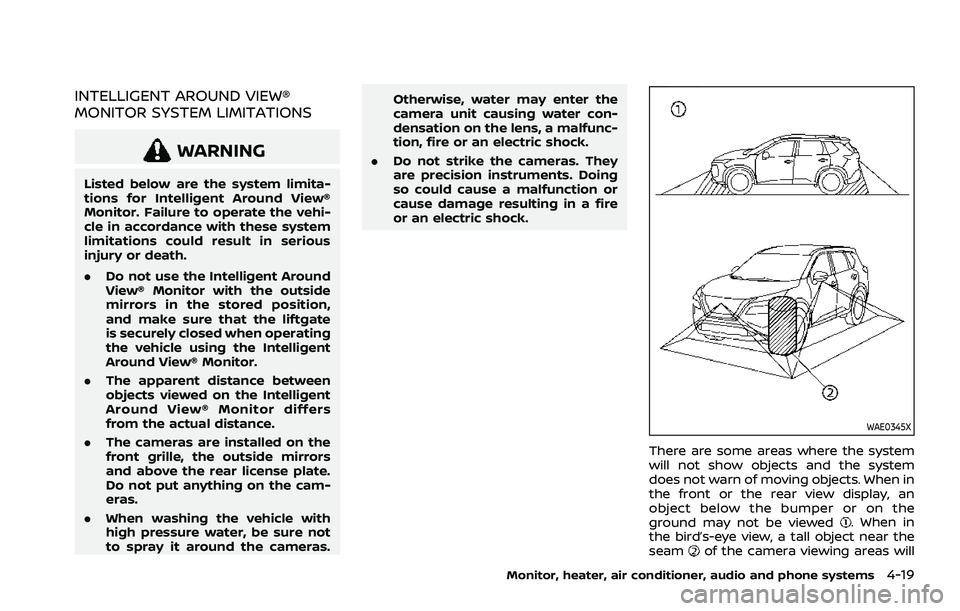
There are some areas where the system
will not show objects and the system
does not warn of moving objects. When in
the front or the rear view display, an
object below the bumper or on the
ground may not be viewed
. When in
the bird’s-eye view, a tall object near the
seam
of the camera viewing areas will
Monitor, heater, air conditioner, audio and phone systems4-19
Page 236 of 556
4-22Monitor, heater, air conditioner, audio and phone systems
WAE0475X
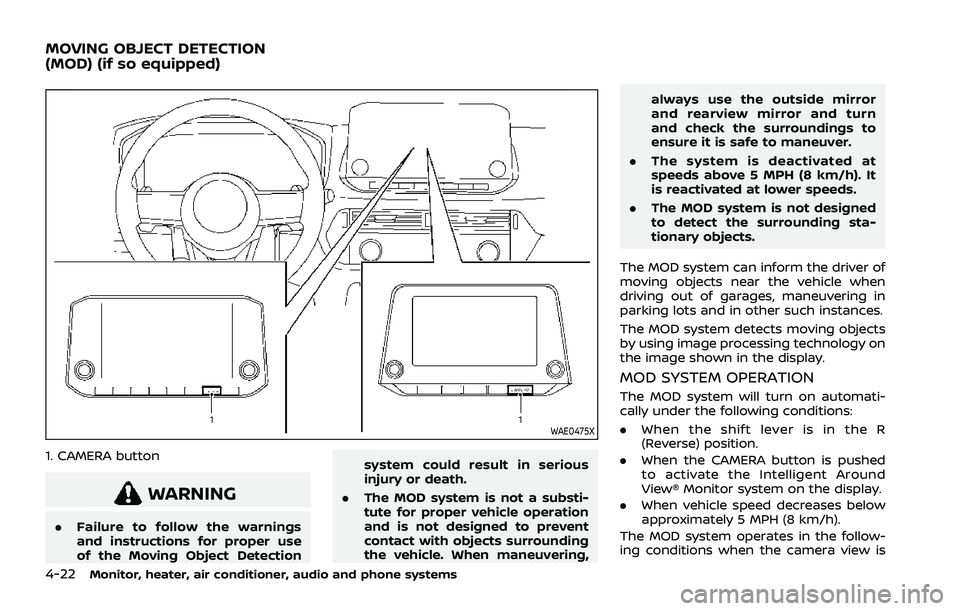
1. CAMERA button
WARNING
.Failure to follow the warnings
and instructions for proper use
of the Moving Object Detection system could result in serious
injury or death.
. The MOD system is not a substi-
tute for proper vehicle operation
and is not designed to prevent
contact with objects surrounding
the vehicle. When maneuvering, always use the outside mirror
and rearview mirror and turn
and check the surroundings to
ensure it is safe to maneuver.
. The system is deactivated at
speeds above 5 MPH (8 km/h). It
is reactivated at lower speeds.
. The MOD system is not designed
to detect the surrounding sta-
tionary objects.
The MOD system can inform the driver of
moving objects near the vehicle when
driving out of garages, maneuvering in
parking lots and in other such instances.
The MOD system detects moving objects
by using image processing technology on
the image shown in the display.
MOD SYSTEM OPERATION
The MOD system will turn on automati-
cally under the following conditions:
. When the shift lever is in the R
(Reverse) position.
. When the CAMERA button is pushed
to activate the Intelligent Around
View® Monitor system on the display.
. When vehicle speed decreases below
approximately 5 MPH (8 km/h).
The MOD system operates in the follow-
ing conditions when the camera view is
MOVING OBJECT DETECTION
(MOD) (if so equipped)
Page 238 of 556
4-24Monitor, heater, air conditioner, audio and phone systems
WAE0549XRear and front-side views
WAE0550XFront-wide view / rear-wide view
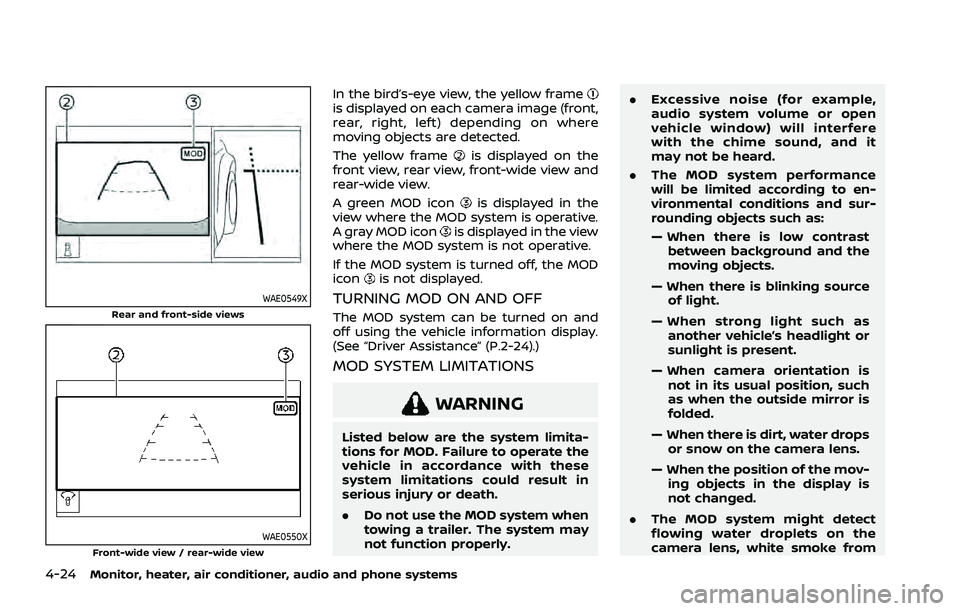
In the bird’s-eye view, the yellow frameis displayed on each camera image (front,
rear, right, left) depending on where
moving objects are detected.
The yellow frame
is displayed on the
front view, rear view, front-wide view and
rear-wide view.
A green MOD icon
is displayed in the
view where the MOD system is operative.
A gray MOD icon
is displayed in the view
where the MOD system is not operative.
If the MOD system is turned off, the MOD
icon
is not displayed.
TURNING MOD ON AND OFF
The MOD system can be turned on and
off using the vehicle information display.
(See “Driver Assistance” (P.2-24).)
MOD SYSTEM LIMITATIONS
WARNING
Listed below are the system limita-
tions for MOD. Failure to operate the
vehicle in accordance with these
system limitations could result in
serious injury or death.
. Do not use the MOD system when
towing a trailer. The system may
not function properly. .
Excessive noise (for example,
audio system volume or open
vehicle window) will interfere
with the chime sound, and it
may not be heard.
. The MOD system performance
will be limited according to en-
vironmental conditions and sur-
rounding objects such as:
— When there is low contrast
between background and the
moving objects.
— When there is blinking source of light.
— When strong light such as another vehicle’s headlight or
sunlight is present.
— When camera orientation is not in its usual position, such
as when the outside mirror is
folded.
— When there is dirt, water drops or snow on the camera lens.
— When the position of the mov- ing objects in the display is
not changed.
. The MOD system might detect
flowing water droplets on the
camera lens, white smoke from
Page 241 of 556
WARNING
.The heater and air conditioner
operate only when the engine is
running.
. Never leave children or adults
who would normally require the
support of others alone in the
vehicle. Pets should not be left
alone either. They could unknow-
ingly activate switches or con-
trols and inadvertently become
involved in a serious accident
and injure themselves. On hot,
sunny days, temperatures in a
closed vehicle could quickly be-
come high enough to cause se-
vere or possibly fatal injuries to
people or animals.
. Do not use the recirculation mode
for long periods as it may cause
the interior air to become stale
and the windows to fog up.
. Do not adjust the heating and air
conditioning controls while driv-
ing so that full attention may be
given to vehicle operation.
The heater and air conditioner operate
when the engine is running. The air blower will operate even if the engine is
turned off and the ignition switch is
placed in the ON position.
NOTE:
.
Odors from inside and outside the
vehicle can build up in the air condi-
tioner unit. Odor can enter the pas-
senger compartment through the
ventilators.
. When parking, set the heater and air
conditioner controls to turn off air
recirculation to allow fresh air into
the passenger compartment. This
should help reduce odors inside the
vehicle.
Monitor, heater, air conditioner, audio and phone systems4-27
HEATER AND AIR CONDITIONER
Page 252 of 556
4-38Monitor, heater, air conditioner, audio and phone systems
OPERATING TIPS (for automatic air
conditioner)
When the engine coolant temperature
and outside air temperature are low, the
air flow from the foot outlets may be
limited when in the automatic mode.
However, this is not a malfunction. After
the coolant temperature warms up, air
flow from the foot outlets will operate
normally.
For rear temperature control (if so
equipped):
.The purpose of the rear temperature
control is to vary the temperature of
the rear airflow.
. The amount of airflow to the rear
ventilators is primarily controlled by
the front passenger’s blower and
mode settings.
. The amount of airflow to the rear
ventilators is also affected by the rear
temperature setting. Higher rear tem-
perature settings have lower airflow
amounts than cooler temperature
settings. This condition ensures better
comfort to the head and face area,
while primary heating for the rear
passenger seats is provided through
the foot outlets.
WAE0350X
WAE0351X
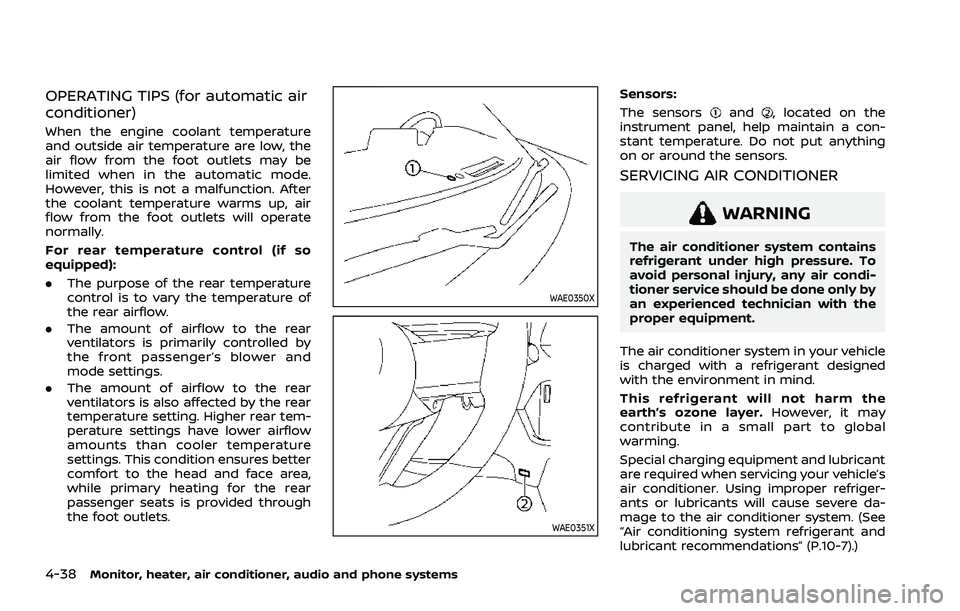
Sensors:
The sensors
and, located on the
instrument panel, help maintain a con-
stant temperature. Do not put anything
on or around the sensors.
SERVICING AIR CONDITIONER
WARNING
The air conditioner system contains
refrigerant under high pressure. To
avoid personal injury, any air condi-
tioner service should be done only by
an experienced technician with the
proper equipment.
The air conditioner system in your vehicle
is charged with a refrigerant designed
with the environment in mind.
This refrigerant will not harm the
earth’s ozone layer. However, it may
contribute in a small part to global
warming.
Special charging equipment and lubricant
are required when servicing your vehicle’s
air conditioner. Using improper refriger-
ants or lubricants will cause severe da-
mage to the air conditioner system. (See
“Air conditioning system refrigerant and
lubricant recommendations” (P.10-7).)
Page 253 of 556
A NISSAN dealer will be able to service
your environmentally friendly air condi-
tioner system.
In-cabin microfilter
The air conditioner system is equipped
with an in-cabin microfilter. To make sure
the air conditioner heats, defogs, and
ventilates efficiently, replace the filter
according the specified maintenance in-
tervals listed in the "9. Maintenance and
schedules" section. It is recommended to
visit a NISSAN dealer to replace the filter.
The filter should be replaced if the air flow
decreases significantly or if windows fog
up easily when operating the heater or air
conditioner.
SHARK FIN ANTENNA
The shark fin antenna is located on the
rear part of the vehicle roof.
The radio performance may be affected if
cargo carried on the roof blocks the radio
signal. If possible, do not put cargo near
the shark fin antenna.
A build up of ice on the shark fin antenna
can affect radio performance. Remove
the ice to restore radio reception.When installing a car phone or a CB radio
in your vehicle, be sure to observe the
following precautions, otherwise the new
equipment may adversely affect the elec-
tronic control modules and electronic
control system harness.
WARNING
.
A cellular phone should not be
used for any purpose while driv-
ing so full attention may be given
to vehicle operation. Some juris-
dictions prohibit the use of cellu-
lar phones while driving.
. If you must make a call while your
vehicle is in motion, the hands-
free cellular phone operational
mode (if so equipped) is highly
recommended. Exercise extreme
caution at all times so full atten-
tion may be given to vehicle
operation.
. If a conversation in a moving
vehicle requires you to take
notes, pull off the road to a safe
location and stop your vehicle
before doing so.
Monitor, heater, air conditioner, audio and phone systems4-39
ANTENNA CAR PHONE OR CB RADIO
Page 255 of 556
5 Starting and driving
Precautions when starting and driving ...................... 5-5Exhaust gas (carbon monoxide) ................................ 5-5
Three-way catalyst ............................................................... 5-6
Tire Pressure Monitoring System (TPMS) ........... 5-6
Avoiding collision and rollover ................................. 5-10
On-pavement and off-road
driving precautions ........................................................... 5-10
Off-road recovery ............................................................... 5-10
Rapid air pressure loss ................................................... 5-11
Drinking alcohol/drugs and driving ..................... 5-11
Driving safety precautions .......................................... 5-12
Push-button ignition switch ............................................. 5-14 Operating range for engine start function ...... 5-14
Push-button ignition switch operation ............. 5-15
Push-button ignition switch positions .............. 5-16
Emergency engine shut off ........................................ 5-16
Intelligent Key battery discharge ........................... 5-16
Before starting the engine ................................................. 5-17
Starting the engine .................................................................. 5-17 Remote engine start (if so equipped) ................. 5-18
Driving the vehicle .................................................................... 5-19 Continuously Variable
Transmission (CVT) ............................................................ 5-19
Parking brake ........................................................................\
....... 5-25 Automatic operation ........................................................ 5-25 Manual operation ............................................................. 5-27
Automatic brake hold ........................................................... 5-28 How to activate/deactivate the automatic
brake hold function ........................................................ 5-29
How to use the automatic brake
hold function ........................................................................\
5-29
Drive Mode Selector ............................................................... 5-30 OFF-ROAD mode (AWD models) ........................... 5-31
SNOW mode (AWD models) ...................................... 5-32
STANDARD mode (2WD models)/AUTO
mode (AWD models) ....................................................... 5-32
ECO mode ........................................................................\
...... 5-32
SPORT mode ........................................................................\
5-33
Driver Assistance systems ................................................. 5-34 How to enable/disable the systems ................. 5-37
Common troubleshooting guide ......................... 5-39
Traffic Sign Recognition (TSR) (if
so equipped) ........................................................................\
......... 5-43 System operation ............................................................. 5-43
How to enable/disable the TSR system ........ 5-45
System temporarily unavailable ........................... 5-45
System malfunction ....................................................... 5-45
System maintenance .................................................... 5-46
Lane Departure Warning (LDW) ..................................... 5-46 LDW system operation ................................................. 5-47
How to enable/disable the LDW system ....... 5-48
Page 256 of 556
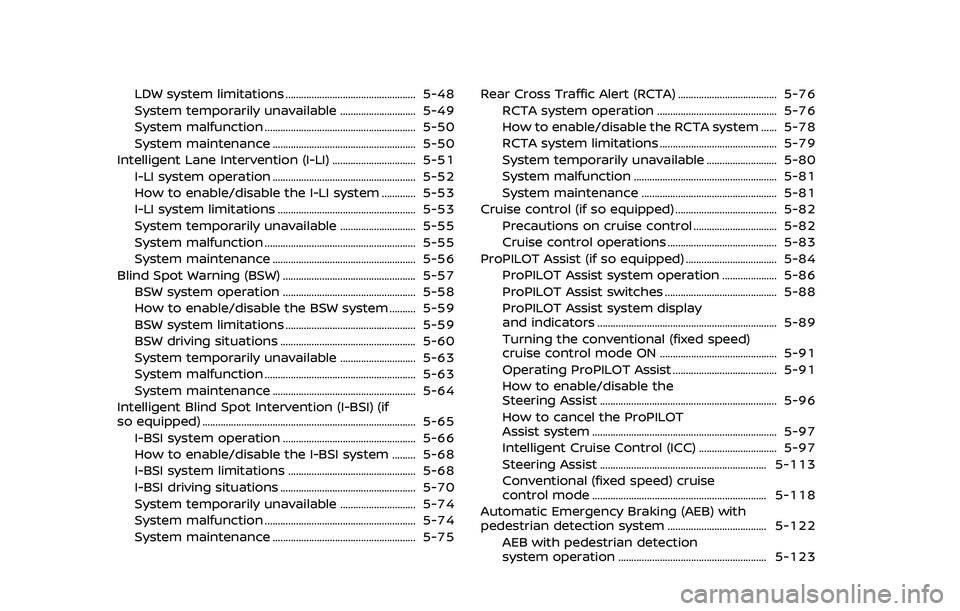
LDW system limitations .................................................. 5-48
System temporarily unavailable ............................. 5-49
System malfunction .......................................................... 5-50
System maintenance ....................................................... 5-50
Intelligent Lane Intervention (I-LI) ................................ 5-51 I-LI system operation ....................................................... 5-52
How to enable/disable the I-LI system ............. 5-53
I-LI system limitations ..................................................... 5-53
System temporarily unavailable ............................. 5-55
System malfunction .......................................................... 5-55
System maintenance ....................................................... 5-56
Blind Spot Warning (BSW) ................................................... 5-57 BSW system operation ................................................... 5-58
How to enable/disable the BSW system .......... 5-59
BSW system limitations .................................................. 5-59
BSW driving situations .................................................... 5-60
System temporarily unavailable ............................. 5-63
System malfunction .......................................................... 5-63
System maintenance ....................................................... 5-64
Intelligent Blind Spot Intervention (I-BSI) (if
so equipped) ........................................................................\
.......... 5-65
I-BSI system operation ................................................... 5-66
How to enable/disable the I-BSI system ......... 5-68
I-BSI system limitations ................................................. 5-68
I-BSI driving situations .................................................... 5-70
System temporarily unavailable ............................. 5-74
System malfunction .......................................................... 5-74
System maintenance ....................................................... 5-75 Rear Cross Traffic Alert (RCTA) ...................................... 5-76
RCTA system operation .............................................. 5-76
How to enable/disable the RCTA system ...... 5-78
RCTA system limitations ............................................. 5-79
System temporarily unavailable ........................... 5-80
System malfunction ....................................................... 5-81
System maintenance .................................................... 5-81
Cruise control (if so equipped) ....................................... 5-82
Precautions on cruise control ................................ 5-82
Cruise control operations .......................................... 5-83
ProPILOT Assist (if so equipped) ................................... 5-84
ProPILOT Assist system operation ..................... 5-86
ProPILOT Assist switches ........................................... 5-88
ProPILOT Assist system display
and indicators ..................................................................... 5-89
Turning the conventional (fixed speed)
cruise control mode ON ............................................. 5-91
Operating ProPILOT Assist ........................................ 5-91
How to enable/disable the
Steering Assist .................................................................... 5-96
How to cancel the ProPILOT
Assist system ....................................................................... 5-97
Intelligent Cruise Control (ICC) .............................. 5-97
Steering Assist ................................................................ 5-113
Conventional (fixed speed) cruise
control mode ................................................................... 5-118
Automatic Emergency Braking (AEB) with
pedestrian detection system ...................................... 5-122 AEB with pedestrian detection
system operation ......................................................... 5-123
Page 257 of 556
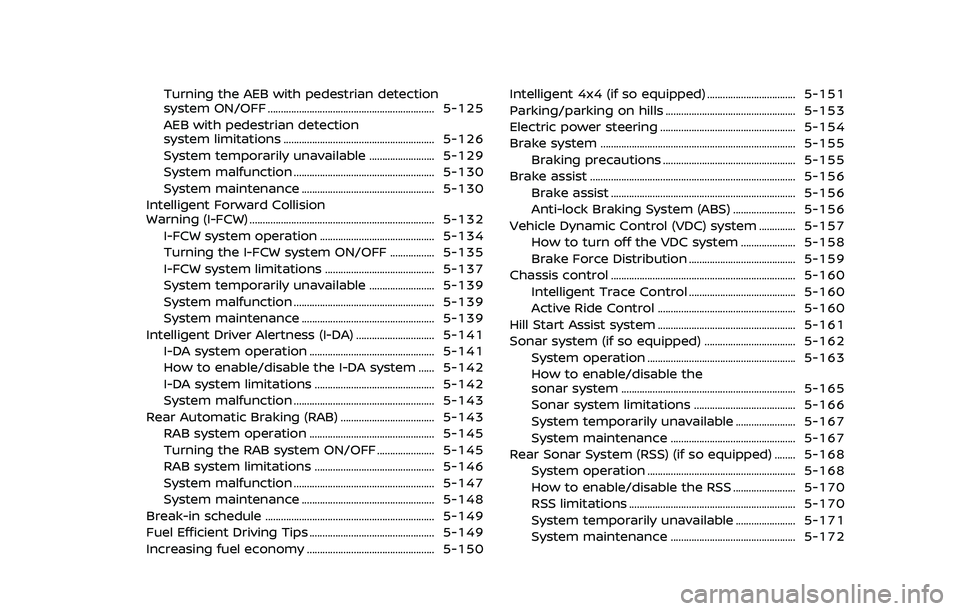
Turning the AEB with pedestrian detection
system ON/OFF ................................................................ 5-125
AEB with pedestrian detection
system limitations .......................................................... 5-126
System temporarily unavailable ......................... 5-129
System malfunction ...................................................... 5-130
System maintenance ................................................... 5-130
Intelligent Forward Collision
Warning (I-FCW) ....................................................................... 5-132 I-FCW system operation ............................................ 5-134
Turning the I-FCW system ON/OFF ................. 5-135
I-FCW system limitations .......................................... 5-137
System temporarily unavailable ......................... 5-139
System malfunction ...................................................... 5-139
System maintenance ................................................... 5-139
Intelligent Driver Alertness (I-DA) .............................. 5-141 I-DA system operation ................................................ 5-141
How to enable/disable the I-DA system ...... 5-142
I-DA system limitations .............................................. 5-142
System malfunction ...................................................... 5-143
Rear Automatic Braking (RAB) .................................... 5-143
RAB system operation ................................................ 5-145
Turning the RAB system ON/OFF ...................... 5-145
RAB system limitations .............................................. 5-146
System malfunction ...................................................... 5-147
System maintenance ................................................... 5-148
Break-in schedule ................................................................. 5-149
Fuel Efficient Driving Tips ................................................ 5-149
Increasing fuel economy ................................................. 5-150 Intelligent 4x4 (if so equipped) .................................. 5-151
Parking/parking on hills .................................................. 5-153
Electric power steering .................................................... 5-154
Brake system ........................................................................\
... 5-155
Braking precautions ................................................... 5-155
Brake assist ........................................................................\
....... 5-156 Brake assist ....................................................................... 5-156
Anti-lock Braking System (ABS) ........................ 5-156
Vehicle Dynamic Control (VDC) system .............. 5-157 How to turn off the VDC system ..................... 5-158
Brake Force Distribution ......................................... 5-159
Chassis control ....................................................................... 5-160 Intelligent Trace Control ......................................... 5-160
Active Ride Control ..................................................... 5-160
Hill Start Assist system ..................................................... 5-161
Sonar system (if so equipped) ................................... 5-162 System operation ......................................................... 5-163
How to enable/disable the
sonar system ................................................................... 5-165
Sonar system limitations ....................................... 5-166
System temporarily unavailable ....................... 5-167
System maintenance ................................................ 5-167
Rear Sonar System (RSS) (if so equipped) ........ 5-168 System operation ......................................................... 5-168
How to enable/disable the RSS ........................ 5-170
RSS limitations ................................................................ 5-170
System temporarily unavailable ....................... 5-171
System maintenance ................................................ 5-172