warning NISSAN ROGUE 2021 Owner´s Manual
[x] Cancel search | Manufacturer: NISSAN, Model Year: 2021, Model line: ROGUE, Model: NISSAN ROGUE 2021Pages: 556, PDF Size: 2.7 MB
Page 288 of 556
5-34Starting and driving
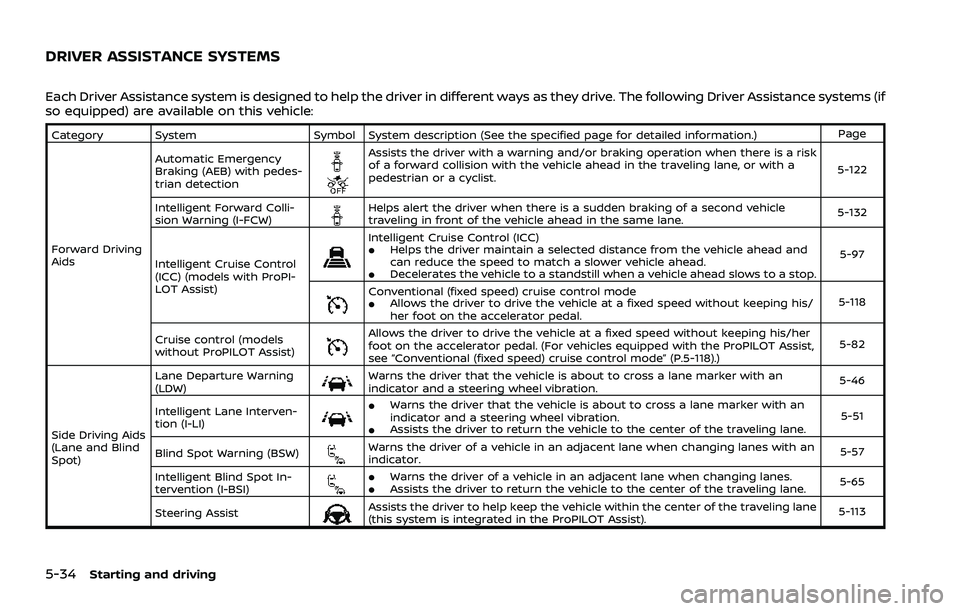
Each Driver Assistance system is designed to help the driver in different ways as they drive. The following Driver Assistance systems (if
so equipped) are available on this vehicle:
Category SystemSymbol System description (See the specified page for detailed information.) Page
Forward Driving
Aids Automatic Emergency
Braking (AEB) with pedes-
trian detection
Assists the driver with a warning and/or braking operation when there is a risk
of a forward collision with the vehicle ahead in the traveling lane, or with a
pedestrian or a cyclist.
5-122
Intelligent Forward Colli-
sion Warning (I-FCW)
Helps alert the driver when there is a sudden braking of a second vehicle
traveling in front of the vehicle ahead in the same lane. 5-132
Intelligent Cruise Control
(ICC) (models with ProPI-
LOT Assist)
Intelligent Cruise Control (ICC).Helps the driver maintain a selected distance from the vehicle ahead and
can reduce the speed to match a slower vehicle ahead.
.Decelerates the vehicle to a standstill when a vehicle ahead slows to a stop. 5-97
Conventional (fixed speed) cruise control mode.Allows the driver to drive the vehicle at a fixed speed without keeping his/
her foot on the accelerator pedal.
5-118
Cruise control (models
without ProPILOT Assist)
Allows the driver to drive the vehicle at a fixed speed without keeping his/her
foot on the accelerator pedal. (For vehicles equipped with the ProPILOT Assist,
see “Conventional (fixed speed) cruise control mode” (P.5-118).) 5-82
Side Driving Aids
(Lane and Blind
Spot) Lane Departure Warning
(LDW)
Warns the driver that the vehicle is about to cross a lane marker with an
indicator and a steering wheel vibration.
5-46
Intelligent Lane Interven-
tion (I-LI)
.Warns the driver that the vehicle is about to cross a lane marker with an
indicator and a steering wheel vibration.
.Assists the driver to return the vehicle to the center of the traveling lane. 5-51
Blind Spot Warning (BSW)
Warns the driver of a vehicle in an adjacent lane when changing lanes with an
indicator. 5-57
Intelligent Blind Spot In-
tervention (I-BSI)
.Warns the driver of a vehicle in an adjacent lane when changing lanes..Assists the driver to return the vehicle to the center of the traveling lane. 5-65
Steering Assist
Assists the driver to help keep the vehicle within the center of the traveling lane
(this system is integrated in the ProPILOT Assist). 5-113
DRIVER ASSISTANCE SYSTEMS
Page 289 of 556
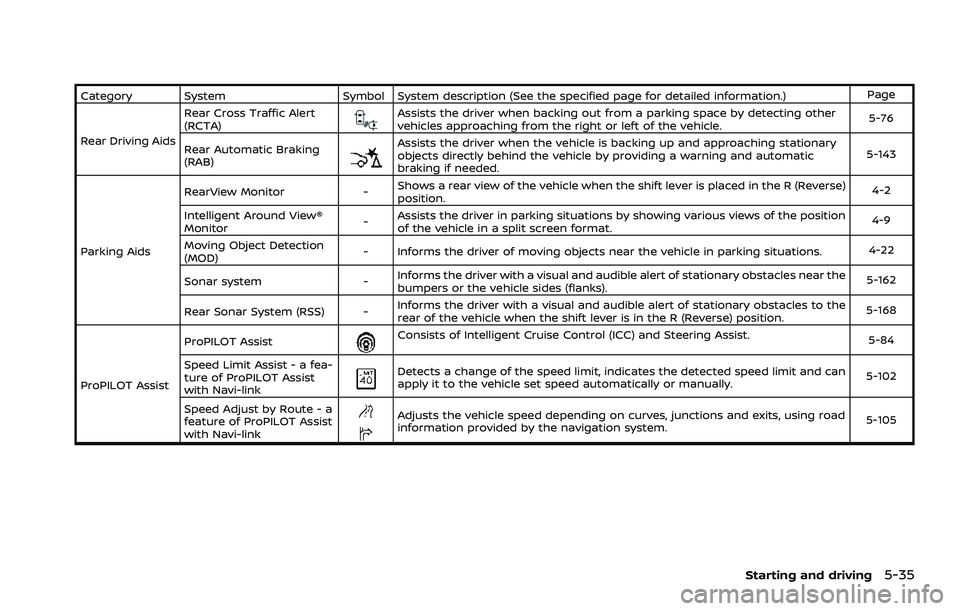
Category SystemSymbol System description (See the specified page for detailed information.) Page
Rear Driving Aids Rear Cross Traffic Alert
(RCTA)
Assists the driver when backing out from a parking space by detecting other
vehicles approaching from the right or left of the vehicle.
5-76
Rear Automatic Braking
(RAB)
Assists the driver when the vehicle is backing up and approaching stationary
objects directly behind the vehicle by providing a warning and automatic
braking if needed. 5-143
Parking Aids RearView Monitor
-Shows a rear view of the vehicle when the shift lever is placed in the R (Reverse)
position. 4-2
Intelligent Around View®
Monitor -Assists the driver in parking situations by showing various views of the position
of the vehicle in a split screen format. 4-9
Moving Object Detection
(MOD) - Informs the driver of moving objects near the vehicle in parking situations.
4-22
Sonar system -Informs the driver with a visual and audible alert of stationary obstacles near the
bumpers or the vehicle sides (flanks). 5-162
Rear Sonar System (RSS) - Informs the driver with a visual and audible alert of stationary obstacles to the
rear of the vehicle when the shift lever is in the R (Reverse) position. 5-168
ProPILOT Assist ProPILOT Assist
Consists of Intelligent Cruise Control (ICC) and Steering Assist.
5-84
Speed Limit Assist - a fea-
ture of ProPILOT Assist
with Navi-link
Detects a change of the speed limit, indicates the detected speed limit and can
apply it to the vehicle set speed automatically or manually. 5-102
Speed Adjust by Route - a
feature of ProPILOT Assist
with Navi-link
Adjusts the vehicle speed depending on curves, junctions and exits, using road
information provided by the navigation system. 5-105
Starting and driving5-35
Page 291 of 556
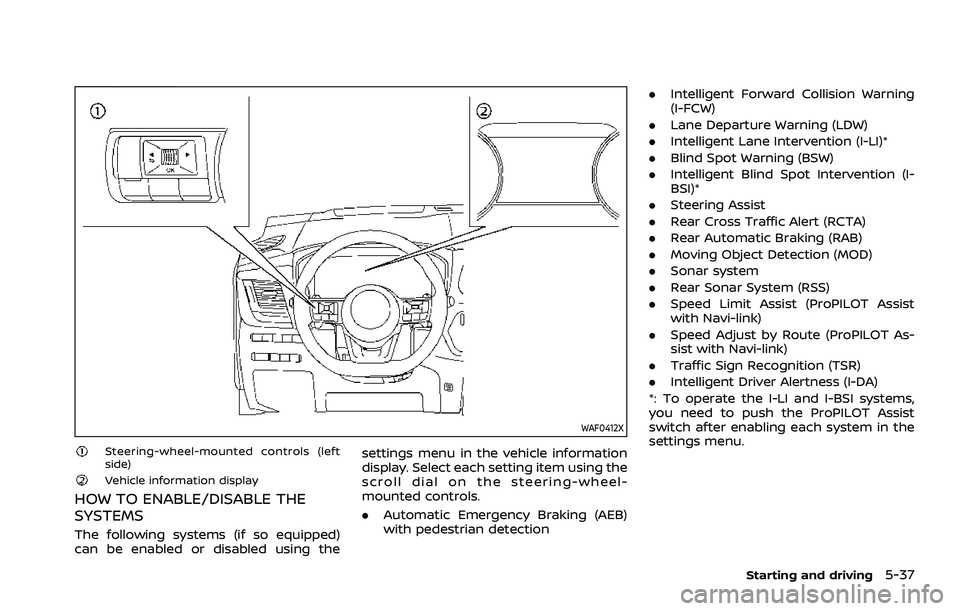
WAF0412X
Steering-wheel-mounted controls (left
side)
Vehicle information display
HOW TO ENABLE/DISABLE THE
SYSTEMS
The following systems (if so equipped)
can be enabled or disabled using thesettings menu in the vehicle information
display. Select each setting item using the
scroll dial on the steering-wheel-
mounted controls.
.
Automatic Emergency Braking (AEB)
with pedestrian detection .
Intelligent Forward Collision Warning
(I-FCW)
. Lane Departure Warning (LDW)
. Intelligent Lane Intervention (I-LI)*
. Blind Spot Warning (BSW)
. Intelligent Blind Spot Intervention (I-
BSI)*
. Steering Assist
. Rear Cross Traffic Alert (RCTA)
. Rear Automatic Braking (RAB)
. Moving Object Detection (MOD)
. Sonar system
. Rear Sonar System (RSS)
. Speed Limit Assist (ProPILOT Assist
with Navi-link)
. Speed Adjust by Route (ProPILOT As-
sist with Navi-link)
. Traffic Sign Recognition (TSR)
. Intelligent Driver Alertness (I-DA)
*: To operate the I-LI and I-BSI systems,
you need to push the ProPILOT Assist
switch after enabling each system in the
settings menu.
Starting and driving5-37
Page 292 of 556
5-38Starting and driving
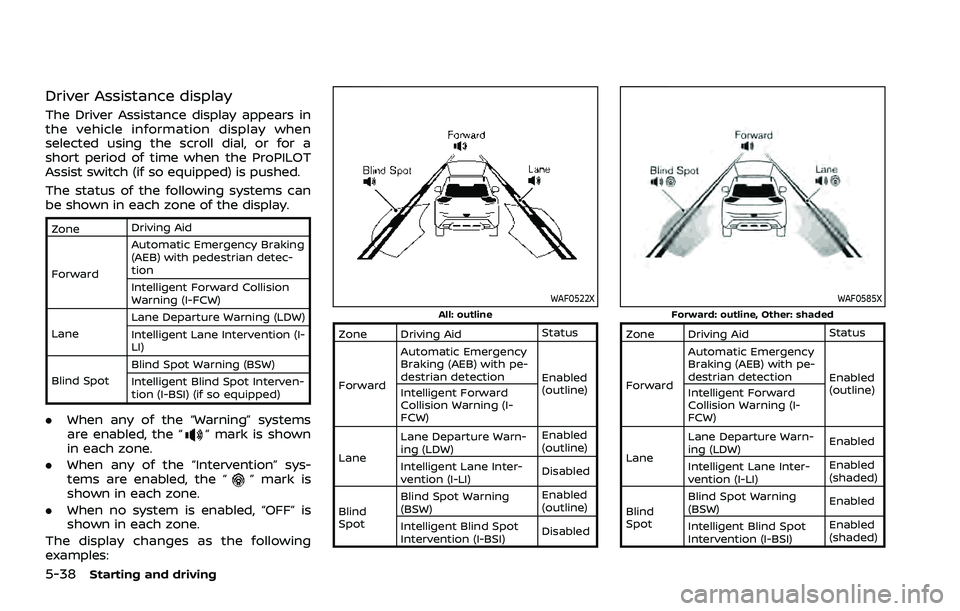
Driver Assistance display
The Driver Assistance display appears in
the vehicle information display when
selected using the scroll dial, or for a
short period of time when the ProPILOT
Assist switch (if so equipped) is pushed.
The status of the following systems can
be shown in each zone of the display.
ZoneDriving Aid
Forward Automatic Emergency Braking
(AEB) with pedestrian detec-
tion
Intelligent Forward Collision
Warning (I-FCW)
Lane Lane Departure Warning (LDW)
Intelligent Lane Intervention (I-
LI)
Blind Spot Blind Spot Warning (BSW)
Intelligent Blind Spot Interven-
tion (I-BSI) (if so equipped)
.
When any of the “Warning” systems
are enabled, the “” mark is shown
in each zone.
. When any of the “Intervention” sys-
tems are enabled, the “
” mark is
shown in each zone.
. When no system is enabled, “OFF” is
shown in each zone.
The display changes as the following
examples:
WAF0522XAll: outline
Zone Driving Aid Status
Forward Automatic Emergency
Braking (AEB) with pe-
destrian detection
Enabled
(outline)
Intelligent Forward
Collision Warning (I-
FCW)
Lane Lane Departure Warn-
ing (LDW)
Enabled
(outline)
Intelligent Lane Inter-
vention (I-LI) Disabled
Blind
Spot Blind Spot Warning
(BSW)
Enabled
(outline)
Intelligent Blind Spot
Intervention (I-BSI) Disabled
WAF0585XForward: outline, Other: shaded
Zone Driving Aid
Status
Forward Automatic Emergency
Braking (AEB) with pe-
destrian detection
Enabled
(outline)
Intelligent Forward
Collision Warning (I-
FCW)
Lane Lane Departure Warn-
ing (LDW)
Enabled
Intelligent Lane Inter-
vention (I-LI) Enabled
(shaded)
Blind
Spot Blind Spot Warning
(BSW)
Enabled
Intelligent Blind Spot
Intervention (I-BSI) Enabled
(shaded)
Page 293 of 556
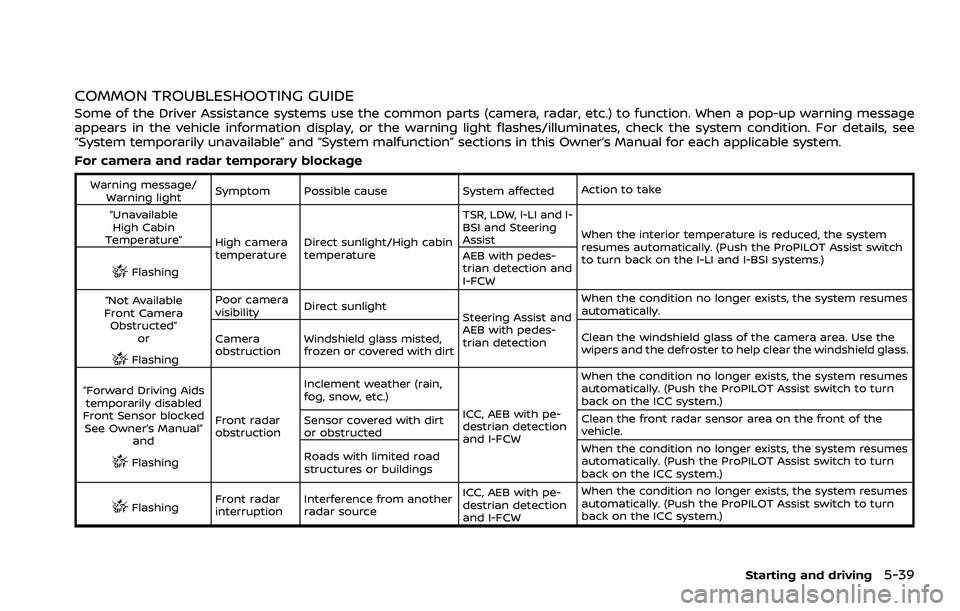
COMMON TROUBLESHOOTING GUIDE
Some of the Driver Assistance systems use the common parts (camera, radar, etc.) to function. When a pop-up warning message
appears in the vehicle information display, or the warning light flashes/illuminates, check the system condition. For details, see
“System temporarily unavailable” and “System malfunction” sections in this Owner’s Manual for each applicable system.
For camera and radar temporary blockage
Warning message/Warning light Symptom Possible cause System affected
Action to take
“Unavailable High Cabin
Temperature” High camera
temperatureDirect sunlight/High cabin
temperature TSR, LDW, I-LI and I-
BSI and Steering
Assist
When the interior temperature is reduced, the system
resumes automatically. (Push the ProPILOT Assist switch
to turn back on the I-LI and I-BSI systems.)
Flashing AEB with pedes-
trian detection and
I-FCW
“Not Available
Front Camera Obstructed”
or
Flashing Poor camera
visibility
Direct sunlight
Steering Assist and
AEB with pedes-
trian detectionWhen the condition no longer exists, the system resumes
automatically.
Camera
obstruction Windshield glass misted,
frozen or covered with dirt Clean the windshield glass of the camera area. Use the
wipers and the defroster to help clear the windshield glass.
“Forward Driving Aids temporarily disabled
Front Sensor blocked See Owner’s Manual” and
Flashing Front radar
obstruction Inclement weather (rain,
fog, snow, etc.)
ICC, AEB with pe-
destrian detection
and I-FCWWhen the condition no longer exists, the system resumes
automatically. (Push the ProPILOT Assist switch to turn
back on the ICC system.)
Sensor covered with dirt
or obstructed Clean the front radar sensor area on the front of the
vehicle.
Roads with limited road
structures or buildings When the condition no longer exists, the system resumes
automatically. (Push the ProPILOT Assist switch to turn
back on the ICC system.)
Flashing
Front radar
interruption Interference from another
radar source ICC, AEB with pe-
destrian detection
and I-FCWWhen the condition no longer exists, the system resumes
automatically. (Push the ProPILOT Assist switch to turn
back on the ICC system.)
Starting and driving5-39
Page 294 of 556
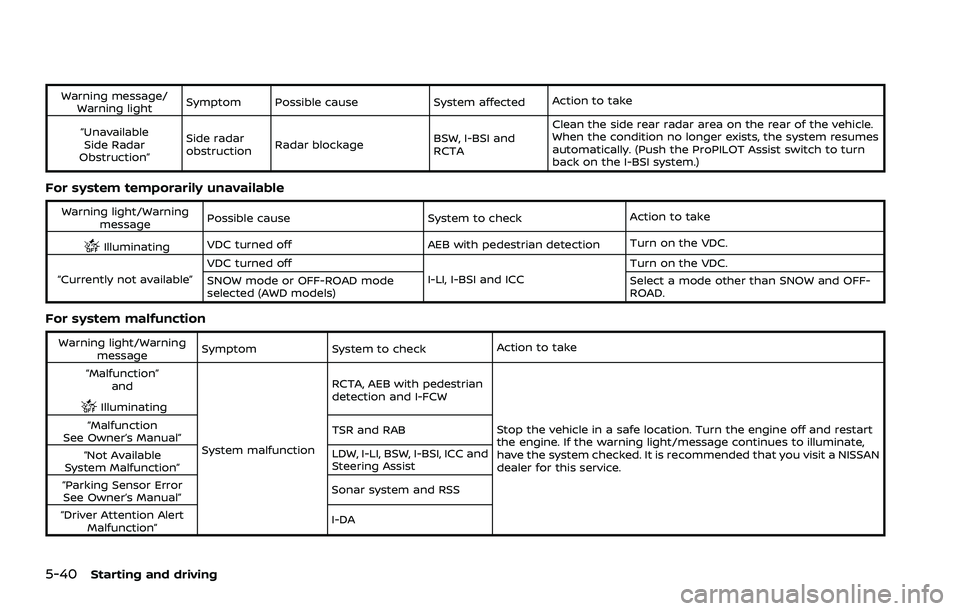
5-40Starting and driving
Warning message/Warning light Symptom Possible cause System affected
Action to take
“Unavailable Side Radar
Obstruction” Side radar
obstruction
Radar blockage
BSW, I-BSI and
RCTAClean the side rear radar area on the rear of the vehicle.
When the condition no longer exists, the system resumes
automatically. (Push the ProPILOT Assist switch to turn
back on the I-BSI system.)
For system temporarily unavailable
Warning light/Warning
message Possible cause
System to checkAction to take
IlluminatingVDC turned off AEB with pedestrian detection
Turn on the VDC.
“Currently not available” VDC turned off
I-LI, I-BSI and ICCTurn on the VDC.
SNOW mode or OFF-ROAD mode
selected (AWD models) Select a mode other than SNOW and OFF-
ROAD.
For system malfunction
Warning light/Warning
message Symptom
System to check Action to take
“Malfunction” and
Illuminating
System malfunction RCTA, AEB with pedestrian
detection and I-FCW
Stop the vehicle in a safe location. Turn the engine off and restart
the engine. If the warning light/message continues to illuminate,
have the system checked. It is recommended that you visit a NISSAN
dealer for this service.
“Malfunction
See Owner’s Manual” TSR and RAB
“Not Available
System Malfunction” LDW, I-LI, BSW, I-BSI, ICC and
Steering Assist
“Parking Sensor Error See Owner’s Manual” Sonar system and RSS
“Driver Attention Alert Malfunction” I-DA
Page 295 of 556
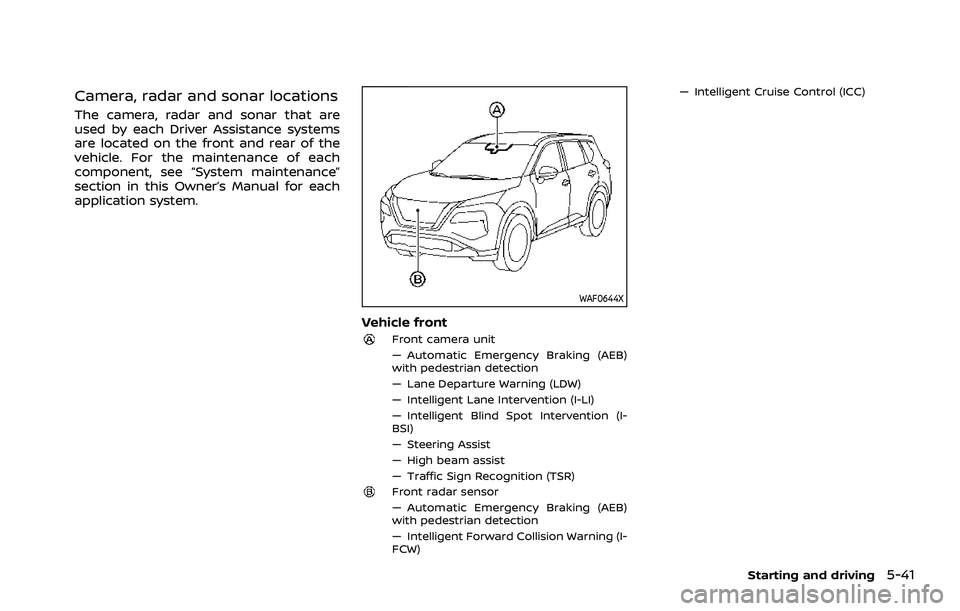
Camera, radar and sonar locations
The camera, radar and sonar that are
used by each Driver Assistance systems
are located on the front and rear of the
vehicle. For the maintenance of each
component, see “System maintenance”
section in this Owner’s Manual for each
application system.
WAF0644X
Vehicle front
Front camera unit
— Automatic Emergency Braking (AEB)
with pedestrian detection
— Lane Departure Warning (LDW)
— Intelligent Lane Intervention (I-LI)
— Intelligent Blind Spot Intervention (I-
BSI)
— Steering Assist
— High beam assist
— Traffic Sign Recognition (TSR)
Front radar sensor
— Automatic Emergency Braking (AEB)
with pedestrian detection
— Intelligent Forward Collision Warning (I-
FCW)— Intelligent Cruise Control (ICC)
Starting and driving5-41
Page 296 of 556
5-42Starting and driving
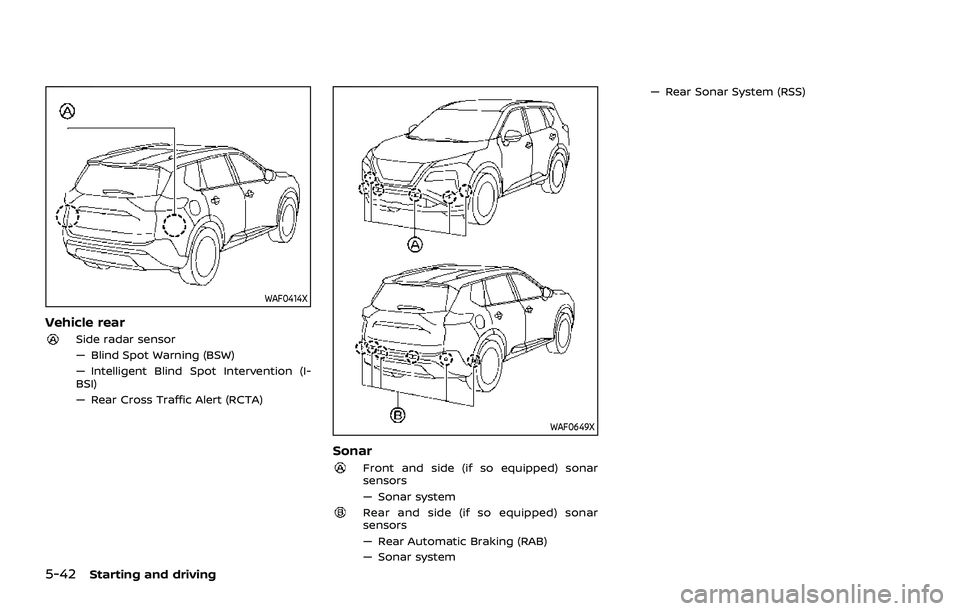
WAF0414X
Vehicle rear
Side radar sensor
— Blind Spot Warning (BSW)
— Intelligent Blind Spot Intervention (I-
BSI)
— Rear Cross Traffic Alert (RCTA)
WAF0649X
Sonar
Front and side (if so equipped) sonar
sensors
— Sonar system
Rear and side (if so equipped) sonar
sensors
— Rear Automatic Braking (RAB)
— Sonar system— Rear Sonar System (RSS)
Page 297 of 556
WAC0523X
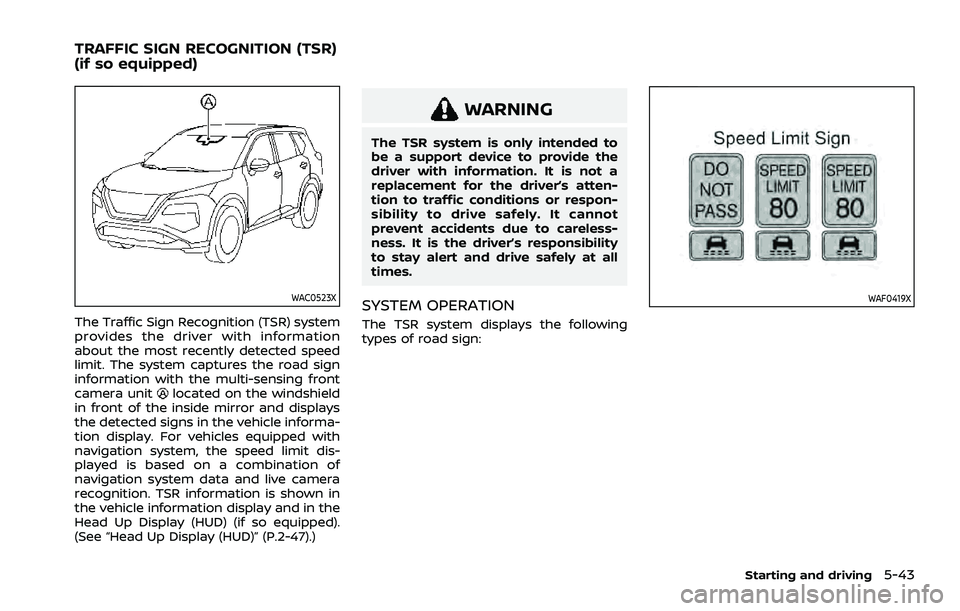
The Traffic Sign Recognition (TSR) system
provides the driver with information
about the most recently detected speed
limit. The system captures the road sign
information with the multi-sensing front
camera unit
located on the windshield
in front of the inside mirror and displays
the detected signs in the vehicle informa-
tion display. For vehicles equipped with
navigation system, the speed limit dis-
played is based on a combination of
navigation system data and live camera
recognition. TSR information is shown in
the vehicle information display and in the
Head Up Display (HUD) (if so equipped).
(See “Head Up Display (HUD)” (P.2-47).)
WARNING
The TSR system is only intended to
be a support device to provide the
driver with information. It is not a
replacement for the driver’s atten-
tion to traffic conditions or respon-
sibility to drive safely. It cannot
prevent accidents due to careless-
ness. It is the driver’s responsibility
to stay alert and drive safely at all
times.
SYSTEM OPERATION
The TSR system displays the following
types of road sign:
WAF0419X
Starting and driving5-43
TRAFFIC SIGN RECOGNITION (TSR)
(if so equipped)
Page 299 of 556
WAF0412X
Steering-wheel-mounted controls (left
side)
Vehicle information display
HOW TO ENABLE/DISABLE THE TSR
SYSTEM
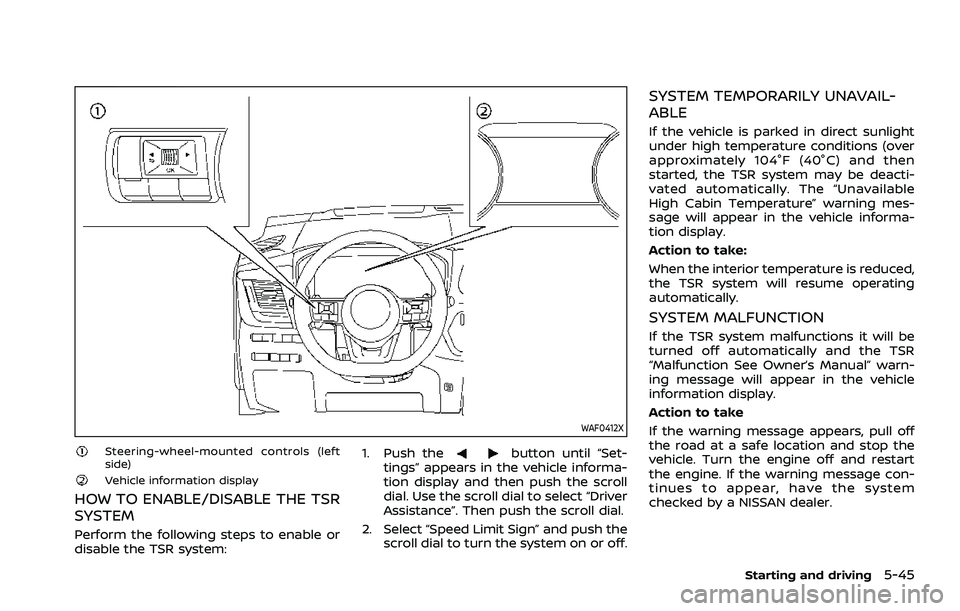
Perform the following steps to enable or
disable the TSR system:1. Push the
button until “Set-
tings” appears in the vehicle informa-
tion display and then push the scroll
dial. Use the scroll dial to select “Driver
Assistance”. Then push the scroll dial.
2. Select “Speed Limit Sign” and push the scroll dial to turn the system on or off.
SYSTEM TEMPORARILY UNAVAIL-
ABLE
If the vehicle is parked in direct sunlight
under high temperature conditions (over
approximately 104°F (40°C) and then
started, the TSR system may be deacti-
vated automatically. The “Unavailable
High Cabin Temperature” warning mes-
sage will appear in the vehicle informa-
tion display.
Action to take:
When the interior temperature is reduced,
the TSR system will resume operating
automatically.
SYSTEM MALFUNCTION
If the TSR system malfunctions it will be
turned off automatically and the TSR
“Malfunction See Owner’s Manual” warn-
ing message will appear in the vehicle
information display.
Action to take
If the warning message appears, pull off
the road at a safe location and stop the
vehicle. Turn the engine off and restart
the engine. If the warning message con-
tinues to appear, have the system
checked by a NISSAN dealer.
Starting and driving5-45