warning NISSAN ROGUE 2021 Owner´s Manual
[x] Cancel search | Manufacturer: NISSAN, Model Year: 2021, Model line: ROGUE, Model: NISSAN ROGUE 2021Pages: 556, PDF Size: 2.7 MB
Page 271 of 556
onds after the chime sounds. The
engine will start.
After step 3 is performed, when the
ignition switch is pushed without depres-
sing the brake pedal, the ignition switch
position will change to ON.
NOTE:
. When the ignition switch is pushed
to the ON position or the engine is
started by the above procedures, the
“Key Battery Low” warning appears
(on the vehicle information display)
even if the Intelligent Key is inside
the vehicle. This is not a malfunction.
To turn off the warning, touch the
ignition switch with the Intelligent
Key again.
. If the “Key Battery Low” warning
appears, replace the battery as soon
as possible. (See “Intelligent Key
battery replacement” (P.8-20).) .
Make sure the area around the vehicle
is clear.
. Check fluid levels such as engine oil,
coolant, brake fluid, and window
washer fluid as frequently as possible,
or at least whenever you refuel.
. Check that all windows and lights are
clean.
. Visually inspect tires for their appear-
ance and condition. Also check tires
for proper inflation.
. Lock all doors.
. Position seat and adjust head re-
straints/headrests.
. Adjust inside and outside mirrors.
. Fasten seat belts and ask all passen-
gers to do likewise.
. Check the operation of warning lights
when the ignition switch is placed in
the ON position. (See “Warning lights,
indicator lights and audible remin-
ders” (P.2-13).) 1. Apply the parking brake.
2. Confirm that the vehicle is in the P
(Park) position.
The Intelligent Key must be carried
when operating the ignition switch.
3. Push the ignition switch to the ON position. Depress the brake pedal and
push the ignition switch to start the
engine.
To start the engine immediately, push
and release the ignition switch while
depressing the brake pedal with the
ignition switch in any position.
.If the engine is very hard to start inextremely cold weather or when
restarting, depress the accelerator
pedal a little (approximately 1/3 to
the floor) and while holding, crank
the engine. Release the accelerator
pedal when the engine starts.
.If the engine is very hard to startbecause it is flooded, depress the
accelerator pedal all the way to the
floor and hold it. Push the ignition
switch to the ON position to start
cranking the engine. After 5 or 6
seconds, stop cranking by pushing
the ignition switch to OFF. After
cranking the engine, release the
accelerator pedal. Crank the engine
with your foot off the accelerator
pedal by depressing the brake
Starting and driving5-17
BEFORE STARTING THE ENGINE STARTING THE ENGINE
Page 273 of 556
CONTINUOUSLY VARIABLE TRANS-
MISSION (CVT)
The CVT in your vehicle is electronically
controlled to produce maximum power
and smooth operation.
The recommended operating procedures
for this transmission are shown on the
following pages. Follow these procedures
for maximum vehicle performance and
driving enjoyment.
Engine power may be automatically
reduced to protect the CVT if the engine
speed increases quickly when driving
on slippery roads or while being tested
on some dynamometers.
WARNING
.Do not depress the accelerator
pedal while shifting from P (Park)
or N (Neutral) to R (Reverse), D
(Drive), or M (Manual shift mode).
Always depress the brake pedal
until shifting is completed. Failure
to do so could cause you to lose
control and have an accident.
. Cold engine idle speed is high, so
use caution when shifting into a
forward or reverse gear before
the engine has warmed up. .
Do not downshift abruptly on
slippery roads. This may cause a
loss of control.
. Never shift to either the P (Park)
or R (Reverse) position while the
vehicle is moving forward and P
(Park) or D (Drive) position while
the vehicle is reversing. This could
cause an accident or damage the
transmission.
. Except in an emergency, do not
shift to the N (Neutral) position
while driving. Coasting with the
transmission in the N (Neutral)
position may cause serious da-
mage to the transmission.CAUTION
.To avoid possible damage to your
vehicle, when stopping the vehi-
cle on an uphill grade, do not hold
the vehicle by depressing the
accelerator pedal. The foot brake
should be used for this purpose.
. Do not hang items on the shift
lever. This may cause an accident
due to a sudden start.
Starting the vehicle
1. After starting the engine, fully depress
the foot brake pedal before attempt-
ing to place the shift position out of
the P (Park) position. This CVT is
designed so that the foot brake
pedal must be depressed before
shifting from P (Park) to any driving
position while the ignition switch is
in the ON position. The shift position
cannot be placed out of the P (Park)
position and into any of the other
positions if the ignition switch is
placed in the OFF position.
2. Keep the foot brake pedal depressed and move the shift lever into a driving
position.
3. Release the parking brake, the foot brake pedal, and then gradually start
the vehicle in motion.
CAUTION
.DEPRESS THE FOOT BRAKE PEDAL
- Shifting the shift lever to D
(Drive), R (Reverse) or M (Manual
shift mode) without depressing
the foot brake pedal causes the
vehicle to move slowly when the
engine is running. Make sure the
foot brake pedal is depressed
Starting and driving5-19
DRIVING THE VEHICLE
Page 274 of 556
5-20Starting and driving
fully and the vehicle is stopped
before shifting the shift lever.
. MAKE SURE OF THE SHIFT LEVER
POSITION - Make sure the shift
position is in the desired position
on the vehicle information dis-
play. D (Drive) and M (Manual shift
mode) are used to move forward
and R (Reverse) to back up.
. WARM UP THE ENGINE - Due to the
higher idle speeds when the en-
gine is cold, extra caution must
be exercised when shifting the
shift lever into the driving posi-
tion immediately after starting
the engine.
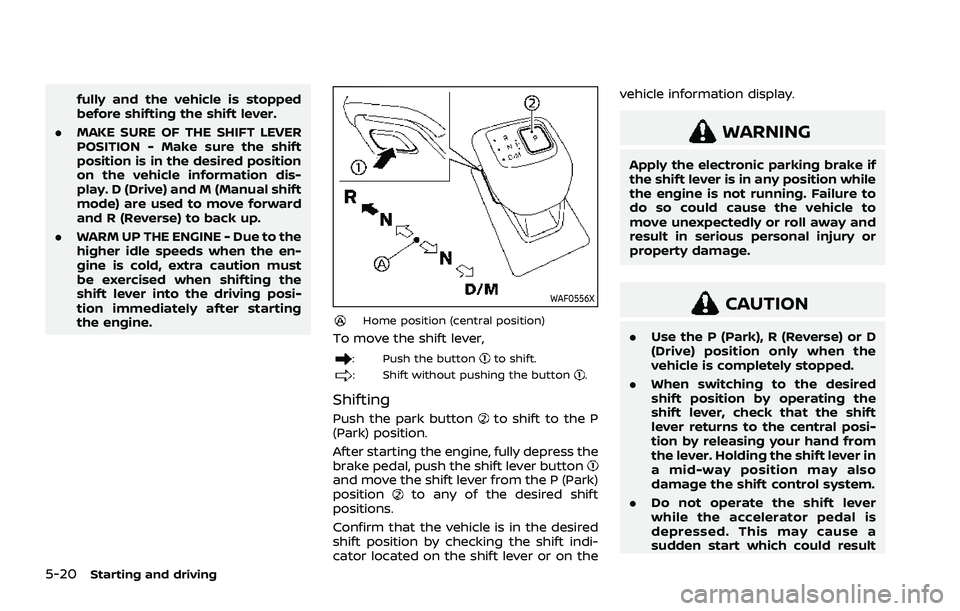
WAF0556X
Home position (central position)
To move the shift lever,
: Push the buttonto shift.
: Shift without pushing the button.
Shifting
Push the park buttonto shift to the P
(Park) position.
After starting the engine, fully depress the
brake pedal, push the shift lever button
and move the shift lever from the P (Park)
positionto any of the desired shift
positions.
Confirm that the vehicle is in the desired
shift position by checking the shift indi-
cator located on the shift lever or on the vehicle information display.
WARNING
Apply the electronic parking brake if
the shift lever is in any position while
the engine is not running. Failure to
do so could cause the vehicle to
move unexpectedly or roll away and
result in serious personal injury or
property damage.
CAUTION
.
Use the P (Park), R (Reverse) or D
(Drive) position only when the
vehicle is completely stopped.
. When switching to the desired
shift position by operating the
shift lever, check that the shift
lever returns to the central posi-
tion by releasing your hand from
the lever. Holding the shift lever in
a mid-way position may also
damage the shift control system.
. Do not operate the shift lever
while the accelerator pedal is
depressed. This may cause a
sudden start which could result
Page 276 of 556
5-22Starting and driving
N (Neutral):
Neither the forward nor reverse gear is
engaged. The engine can be started in
this position. You may shift to the N
(Neutral) position and restart a stalled
engine while the vehicle is moving.
You can select this position by holding
the shift lever at this position for 0.5
seconds.
D (Drive):
Use this position for all normal forward
driving. The CVT changes gears automa-
tically. All forward gears are available.If
the vehicle is placed in the D (Drive)
position while the vehicle is reversing,
the chime will sound and the vehicle will
switch into the N (Neutral) position.
Neutral hold mode function
This function enables you to turn off the
engine with the vehicle in the N (Neutral)
position. While this function is activated,
the vehicle can be moved by pushing with
hand (when car washing) even if the
ignition switch is in the OFF position.
When using this function, release the
electronic parking brake.
WARNING
. Use this function on a level sur-
face only. Failure to do so may
cause the vehicle to move acci-
dentally and could result in a
collision or serious personal in-
jury.
. Do not use this function for a
purpose other than car washing.
. When the ignition switch is placed
in the ON position after activating
this function, depress the brake
pedal to stop the vehicle because
the shift lever is in the N (Neutral)
position.
. If this function is not activated
regardless of proper operation,
transmission may malfunction. It
is recommended that you visit a
NISSAN dealer for this service.
To activate the Neutral hold mode, per-
form the following operations.
1. Push the ignition switch to start the engine.
2. Release the electronic parking brake.
3. Depress and hold the brake pedal. 4. Push the P position switch.
5. Slide the shift lever to the N (Neutral)
position, and hold it for 0.5 second
until “N” appears in the vehicle infor-
mation display.
6. Slide the shift lever to the N (Neutral) position again, and hold it for 0.5
second, until a message “Neutral Hold
Mode has been activated” appears in
the vehicle information display. (See
“66. Neutral Hold Mode activated in-
dicator” (P.2-42).)
7. Place the ignition switch in the OFF position. The engine will turn off with
holding the N (Neutral) position.
To exit the Neutral hold mode, place the
vehicle in other than N (Neutral) position.
NOTE:
. It is necessary to perform the steps
4 through 6 within approximately 5
seconds to prevent incorrect opera-
tion.
. When the ignition switch is placed in
the OFF position while the shift lever
is in the N (Neutral) position, a
message will appear in the vehicle
information display. (See “65. Neu-
tral Hold Mode guidance indicator”
(P.2-42).)
. If the Neutral hold mode is unavail-
able, a message will appear in the
Page 279 of 556
WARNING
When the high fluid temperature
protection mode or fail-safe opera-
tion occurs, vehicle speed may be
gradually reduced. The reduced
speed may be lower than other
traffic, which could increase the
chance of a collision. Be especially
careful when driving. If necessary,
pull to the side of the road at a safe
place and allow the transmission to
return to normal operation, or have it
repaired if necessary.
WARNING
.Never drive the vehicle with the
parking brake applied. The brake
will overheat and fail to operate
and will lead to an accident.
. Never release the parking brake
from outside the vehicle. If the
vehicle moves, it will be impossi-
ble to push the foot brake pedal
and will lead to an accident.
. Never use the shift lever in place
of the parking brake. When park-
ing, be sure the parking brake is
fully applied.
. To help avoid risk of injury or
death through unintended opera-
tion of the vehicle and/or its
systems, do not leave children,
people who require the assis-
tance of others or pets unat-
tended in your vehicle.
Additionally, the temperature in-
side a closed vehicle on a warm
day can quickly become high
enough to cause a significant risk
of injury or death to people and
pets.
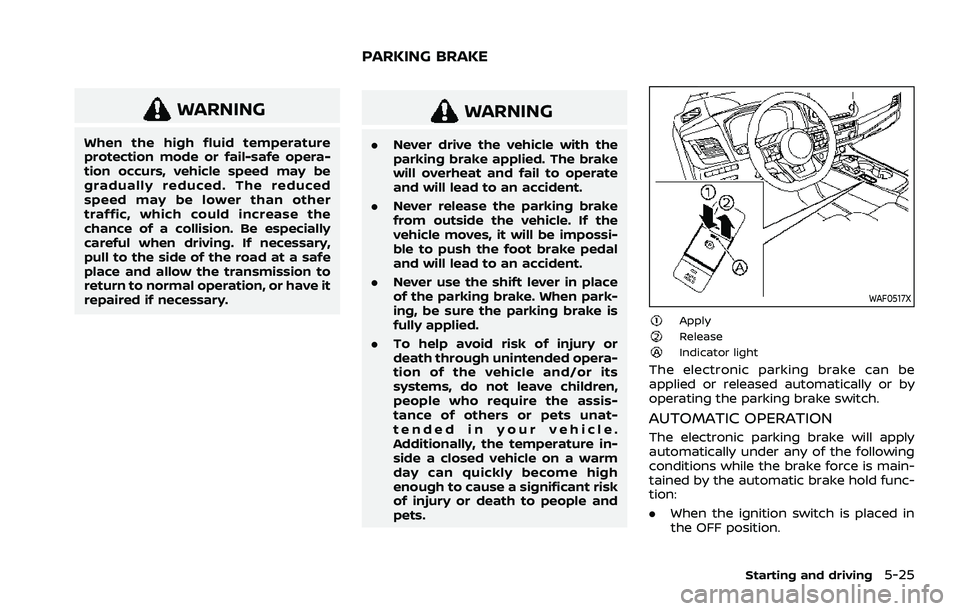
WAF0517X
ApplyReleaseIndicator light
The electronic parking brake can be
applied or released automatically or by
operating the parking brake switch.
AUTOMATIC OPERATION
The electronic parking brake will apply
automatically under any of the following
conditions while the brake force is main-
tained by the automatic brake hold func-
tion:
.When the ignition switch is placed in
the OFF position.
Starting and driving5-25
PARKING BRAKE
Page 280 of 556
5-26Starting and driving
.When the shift position is placed in the
P (Park) position.
. When the driver’s door is opened.
. When the driver’s seat belt is unfas-
tened.
The electronic parking brake is automati-
cally released as soon as the vehicle
starts while the accelerator pedal is
depressed under the following condi-
tions.
. While the engine is running.
. When the shift position is in the D
(Drive) or R (Reverse) position.
. When the driver’s door is closed.
The electronic parking brake is automati-
cally released within 5 seconds after the
shift position is placed in the D (Drive) or R
(Reverse) position even if the driver’s door
is opened. Be sure to close the door
before starting the vehicle.
WARNING
. When the automatic brake hold
function is activated, the electro-
nic parking brake will not be
automatically applied when the
engine is stopped without using
the ignition switch (for example,
by engine stalling). Without the vehicle stationary,
the electronic parking brake will
not be automatically applied
even if the engine is turned off
with the ignition switch.
. Before leaving the vehicle, place
the shift position in the P (Park)
position and check that the elec-
tronic parking brake warning
light is illuminated to confirm
that the electronic parking brake
is applied. The electronic parking
brake warning light will remain
on for a period of time after the
driver’s door is locked.
CAUTION
When parking in an area where the
outside temperature is below 32°F
(0°C), the electronic parking brake, if
applied, may freeze in place and may
be difficult to release.
For safe parking, it is recommended
that you place the shift position in
the P (Park) position and securely
block the wheels. NOTE:
.
To keep the electronic parking brake
released after the engine is turned
off, place the ignition switch in the
OFF position, depress the brake
pedal and push down the parking
brake switch before opening the
driver’s door.
. If a malfunction occurs in the elec-
tronic parking brake system (for
example, due to battery discharge),
it is recommended to contact a
NISSAN dealer.
. Under the following conditions, the
electronic parking brake will auto-
matically be applied and the brake
force of the automatic brake hold
will be released.
—The braking force is applied by
the automatic brake hold function
for 3 minutes or longer.
— The vehicle is placed in the P
(Park) position.
— The driver’s seat belt is unfas-
tened.
— The driver’s door is opened.
— The ignition switch is placed in
the OFF position.
— The electronic parking brake is
applied manually.
Page 281 of 556
—If a malfunction occurs in the
automatic brake hold function.
. Make sure that the electronic park-
ing brake system warning light (yel-
low) is OFF before starting the
vehicle.
MANUAL OPERATION
To apply: When the vehicle is stopped,
pull the parking brake switchup. (The
electronic parking brake will apply even if
the ignition switch is placed in the OFF
position.) The indicator light
on the
switch and the electronic parking brake
warning light PARK or
(red) will
illuminate.
To release: With the ignition switch in the
ON position, depress the brake pedal and
push the parking brake switch down
.
The indicator lightand the electronic
parking brake warning light (red) will turn
off.
Before driving, check that the electronic
parking brake warning light (red) turns
off. For additional information, see “Warn-
ing lights, indicator lights and audible
reminders” (P.2-13).
NOTE:
. While the electronic parking brake is
applied or released, an operating
sound is heard from the lower side
of the rear seat. This is normal and does not indicate a malfunction.
. When the electronic parking brake is
frequently applied and released in a
short period of time, the electronic
parking brake system warning light
(yellow) may blink and the electronic
parking brake may not operate in
order to prevent the electronic park-
ing brake system from overheating.
If this occurs, operate the parking
brake switch again after waiting
approximately 1 minute.
. If the electronic parking brake must
be applied while driving in an emer-
gency, pull up and hold the parking
brake switch. When you release the
parking brake switch, the electronic
parking brake will be released.
. While pulling up the parking brake
switch during driving, the electronic
parking brake is applied and a chime
sounds. The electronic parking
brake warning light (red) and the
indicator light on the parking brake
switch illuminate. This does not in-
dicate a malfunction. The electronic
parking brake warning light (red)
and the indicator light on the park-
ing brake switch will turn off when
the electronic parking brake is re-
leased. .
When pulling the parking brake
switch up with the ignition switch
in the OFF position, the indicator
light on the parking brake switch
will continue to illuminate for a short
period of time.
When towing a trailer
Depending on the weight of the vehicle
and trailer and the steepness of the slope,
there may be a tendency for the vehicle
to move backwards when starting from a
standstill. When this occurs, you can use
the parking brake switch in the same way
as a conventional lever type parking
brake.
Before starting on sloping roads when
towing a trailer, be sure to read the
following to prevent the vehicle from
moving backward unintentionally.
.Release the parking brake switch as
soon as the engine is delivering en-
ough torque to the wheels.
Starting and driving5-27
Page 282 of 556
5-28Starting and driving
The automatic brake hold function main-
tains the braking force without the driver
having to depress the brake pedal when
the vehicle is stopped at a traffic light or
intersection. As soon as the driver de-
presses the accelerator pedal again, the
automatic brake hold function is deacti-
vated and the braking force is released.
The operating status of the automatic
brake hold can be displayed on the
vehicle information display.
WARNING
.The automatic brake hold func-
tion is not designed to hold the
vehicle on a steep hill or slippery
road. Never use the automatic
brake hold when the vehicle is
stopped on a steep hill or slippery
road. Failure to do so may cause
the vehicle to move.
. The automatic brake hold warn-
ing may appear in the vehicle
information display to request
that the driver retake control by
depressing the brake pedal.
. When the automatic brake hold
function is activated but fails to
maintain the vehicle at a stand-
still, depress the brake pedal to
stop the vehicle. If the vehicle unexpectedly moves due to out-
side conditions, the chime may
sound and automatic brake hold
warning may illuminate in the
vehicle information display.
. Be sure to deactivate the auto-
matic brake hold function when
using a car wash or towing your
vehicle.
. Make sure to push the park but-
ton to shift to the P (Park) posi-
tion and apply the electronic
parking brake when parking your
vehicle, riding on or off the vehi-
cle, or loading luggage. Failure to
do so could cause the vehicle to
move or roll away unexpectedly
and result in serious personal
injury or property damage.
. If any of the following conditions
occur, the automatic brake hold
function may not function. Have
the system checked promptly. It
is recommended that you visit a
NISSAN dealer for this service.
Failure to operate the vehicle in
accordance with these conditions
could cause the vehicle to move
or roll away unexpectedly and
result in serious personal injury
or property damage. — A warning message appears
in the vehicle information dis-
play.
— The indicator light on the automatic brake hold switch
does not illuminate when the
switch is pushed.
. The automatic brake hold func-
tion will not be activated if the
slip indicator light, electronic
parking brake system warning
light or master warning light illu-
minates and the Chassis Control
System Error warning message
appears in the vehicle informa-
tion display.
. To maintain the braking force to
keep the vehicle to a standstill, a
noise may be heard. This is not a
malfunction.
AUTOMATIC BRAKE HOLD
Page 283 of 556
WAF0516X
HOW TO ACTIVATE/DEACTIVATE
THE AUTOMATIC BRAKE HOLD
FUNCTION
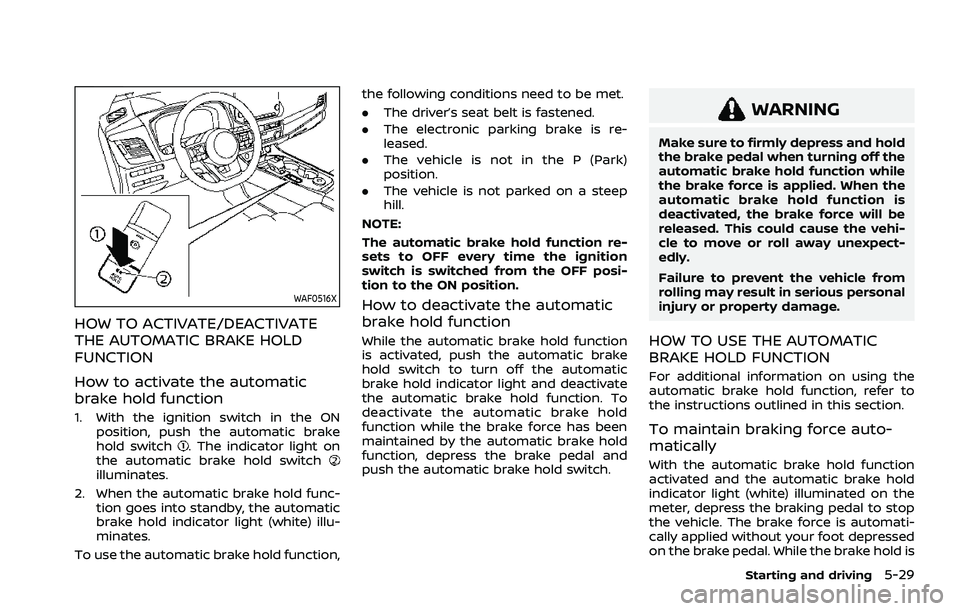
How to activate the automatic
brake hold function
1. With the ignition switch in the ONposition, push the automatic brake
hold switch
. The indicator light on
the automatic brake hold switch
illuminates.
2. When the automatic brake hold func- tion goes into standby, the automatic
brake hold indicator light (white) illu-
minates.
To use the automatic brake hold function, the following conditions need to be met.
.
The driver’s seat belt is fastened.
. The electronic parking brake is re-
leased.
. The vehicle is not in the P (Park)
position.
. The vehicle is not parked on a steep
hill.
NOTE:
The automatic brake hold function re-
sets to OFF every time the ignition
switch is switched from the OFF posi-
tion to the ON position.
How to deactivate the automatic
brake hold function
While the automatic brake hold function
is activated, push the automatic brake
hold switch to turn off the automatic
brake hold indicator light and deactivate
the automatic brake hold function. To
deactivate the automatic brake hold
function while the brake force has been
maintained by the automatic brake hold
function, depress the brake pedal and
push the automatic brake hold switch.
WARNING
Make sure to firmly depress and hold
the brake pedal when turning off the
automatic brake hold function while
the brake force is applied. When the
automatic brake hold function is
deactivated, the brake force will be
released. This could cause the vehi-
cle to move or roll away unexpect-
edly.
Failure to prevent the vehicle from
rolling may result in serious personal
injury or property damage.
HOW TO USE THE AUTOMATIC
BRAKE HOLD FUNCTION
For additional information on using the
automatic brake hold function, refer to
the instructions outlined in this section.
To maintain braking force auto-
matically
With the automatic brake hold function
activated and the automatic brake hold
indicator light (white) illuminated on the
meter, depress the braking pedal to stop
the vehicle. The brake force is automati-
cally applied without your foot depressed
on the brake pedal. While the brake hold is
Starting and driving5-29
Page 285 of 556
WAF0540XVehicle information display: 2WD models
WAF0541XVehicle information display: AWD models
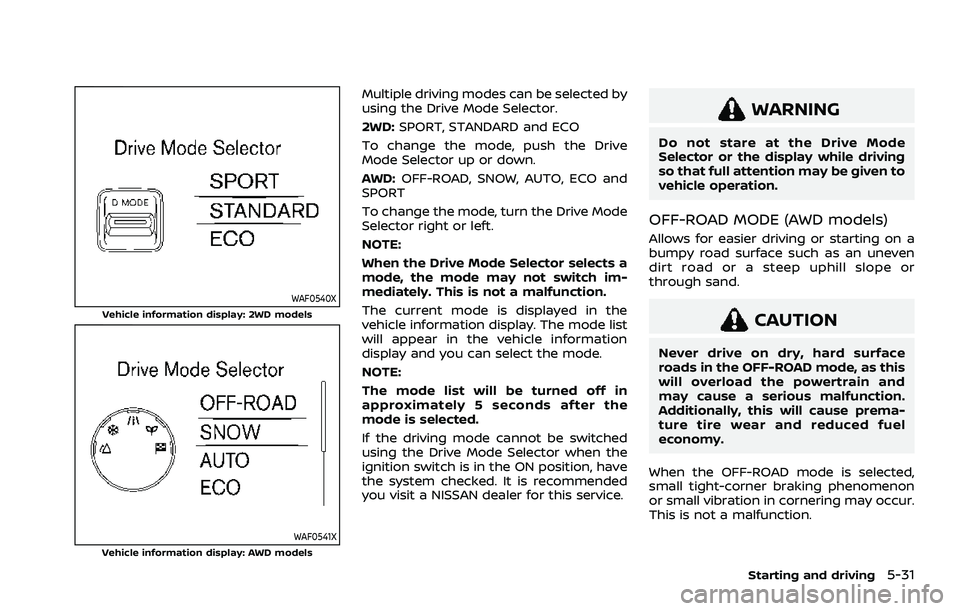
Multiple driving modes can be selected by
using the Drive Mode Selector.
2WD:SPORT, STANDARD and ECO
To change the mode, push the Drive
Mode Selector up or down.
AWD: OFF-ROAD, SNOW, AUTO, ECO and
SPORT
To change the mode, turn the Drive Mode
Selector right or left.
NOTE:
When the Drive Mode Selector selects a
mode, the mode may not switch im-
mediately. This is not a malfunction.
The current mode is displayed in the
vehicle information display. The mode list
will appear in the vehicle information
display and you can select the mode.
NOTE:
The mode list will be turned off in
approximately 5 seconds after the
mode is selected.
If the driving mode cannot be switched
using the Drive Mode Selector when the
ignition switch is in the ON position, have
the system checked. It is recommended
you visit a NISSAN dealer for this service.
WARNING
Do not stare at the Drive Mode
Selector or the display while driving
so that full attention may be given to
vehicle operation.
OFF-ROAD MODE (AWD models)
Allows for easier driving or starting on a
bumpy road surface such as an uneven
dirt road or a steep uphill slope or
through sand.
CAUTION
Never drive on dry, hard surface
roads in the OFF-ROAD mode, as this
will overload the powertrain and
may cause a serious malfunction.
Additionally, this will cause prema-
ture tire wear and reduced fuel
economy.
When the OFF-ROAD mode is selected,
small tight-corner braking phenomenon
or small vibration in cornering may occur.
This is not a malfunction.
Starting and driving5-31