warning NISSAN ROGUE 2021 Owner´s Manual
[x] Cancel search | Manufacturer: NISSAN, Model Year: 2021, Model line: ROGUE, Model: NISSAN ROGUE 2021Pages: 556, PDF Size: 2.7 MB
Page 206 of 556
3-30Pre-driving checks and adjustments
Close the fuel-filler door after refueling.
If you need to refuel from a portable fuel
container, use the funnel supplied with
your vehicle. (See “When refueling from a
portable fuel container” (P.3-30).)
CAUTION
.Do not attempt to open the flaps
on the fuel-filler opening using
any tool other than the fuel pump
nozzle.
. This fuel-filler opening is only
conformable to normal fuel pump
nozzles at gas stations. Using a
nozzle with a small diameter may
damage the opening and the fuel
system.
. If fuel is spilled on the vehicle
body, flush it away with water to
avoid paint damage.
WARNING
.Gasoline is extremely flammable
and highly explosive under cer-
tain conditions. You could be
burned or seriously injured if it is
misused or mishandled. Always stop engine and do not smoke or
allow open flames or sparks near
the vehicle when refueling.
. Do not attempt to top off the fuel
tank after the fuel pump nozzle
shuts off automatically. Contin-
ued refueling may cause fuel
overflow, resulting in fuel spray
and possibly a fire.
. Never pour fuel into the throttle
body to attempt to start your
vehicle.
. Do not fill a portable fuel contain-
er in the vehicle or trailer. Static
electricity can cause an explosion
of flammable liquid, vapor or gas
in any vehicle or trailer. To reduce
the risk of serious injury or death
when filling portable fuel contain-
ers:
— Always place the container on
the ground when filling.
— Do not use electronic devices when filling.
— Keep the pump nozzle in con- tact with the container while
you are filling it.
— Use only approved portable fuel containers for flammable
liquid.
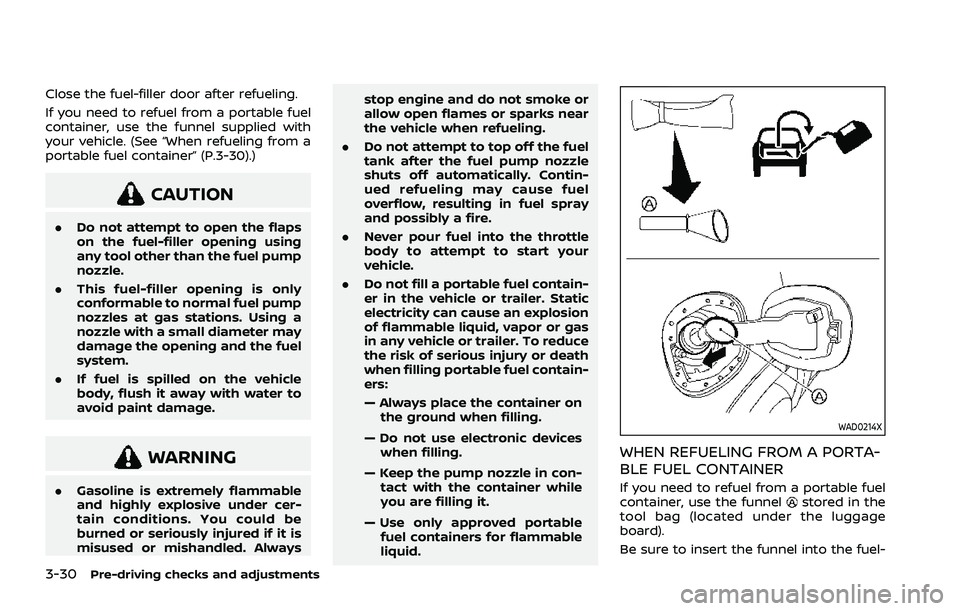
WAD0214X
WHEN REFUELING FROM A PORTA-
BLE FUEL CONTAINER
If you need to refuel from a portable fuel
container, use the funnelstored in the
tool bag (located under the luggage
board).
Be sure to insert the funnel into the fuel-
Page 207 of 556
filler opening slowly and fully. Insert the
nozzle of the portable fuel container into
the opening along the funnel and fill the
fuel tank.
After refueling, remove the funnel from
the fuel-filler opening. Wipe the funnel
clean and return it to the tool bag.
CAUTION
.Do not insert the nozzle of the
portable fuel container directly
into the fuel-filler opening. Doing
so may damage the opening and
the fuel system.
. Use only the funnel provided with
your vehicle. Otherwise, the fuel-
filler opening and the fuel system
may be damaged.
WARNING
.Do not adjust the steering wheel
while driving. You could lose con-
trol of your vehicle and cause an
accident.
. Do not adjust the steering wheel
any closer to you than is neces-
sary for proper steering opera-
tion and comfort. The driver’s air
bag inflates with great force. If
you are unrestrained, leaning for-
ward, sitting sideways or out of
position in any way, you are at
greater risk of injury or death in a
crash. You may also receive ser-
ious or fatal injuries from the air
bag if you are up against it when
it inflates. Always sit back against
the seatback and as far away as
practical from the steering wheel.
Always use the seat belts.
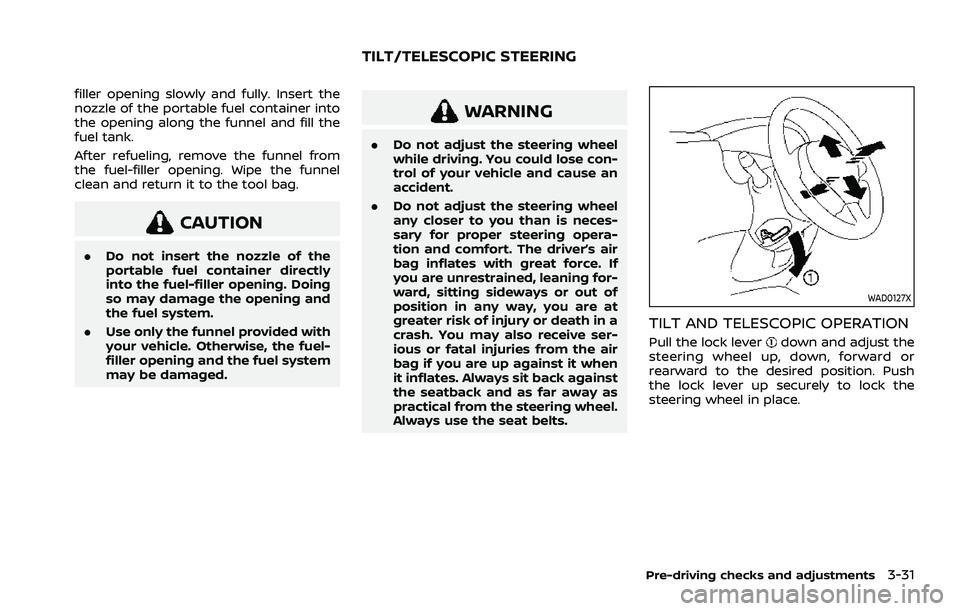
WAD0127X
TILT AND TELESCOPIC OPERATION
Pull the lock leverdown and adjust the
steering wheel up, down, forward or
rearward to the desired position. Push
the lock lever up securely to lock the
steering wheel in place.
Pre-driving checks and adjustments3-31
TILT/TELESCOPIC STEERING
Page 209 of 556
could damage the sunshade.
The rear sunshades are equipped on the
rear seat windows.
To raise the sunshade, pull the knob
up
and hang the sunshade on the hooks.
To store the sunshade, remove the sun-
shade from the hooks and lower it.
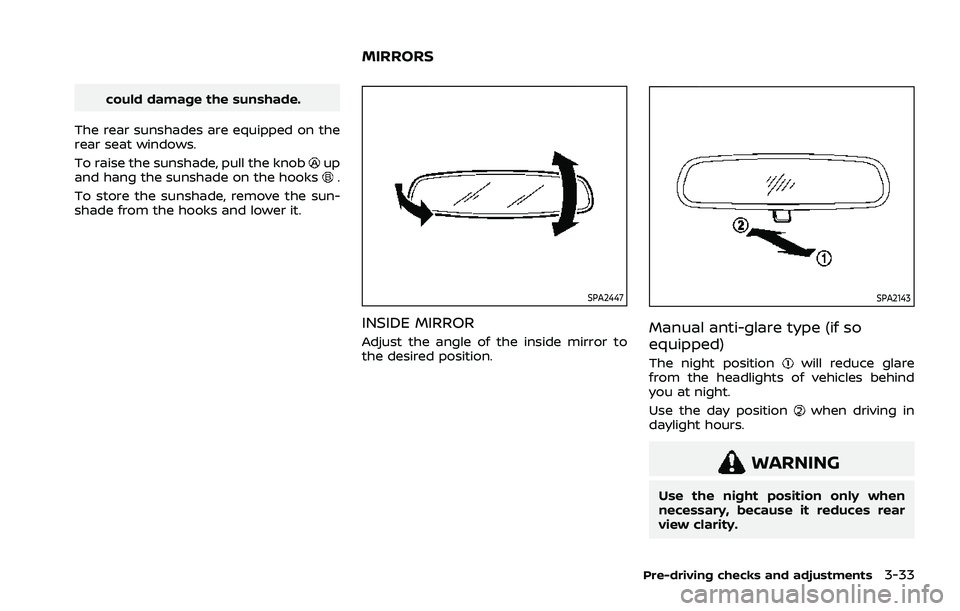
SPA2447
INSIDE MIRROR
Adjust the angle of the inside mirror to
the desired position.
SPA2143
Manual anti-glare type (if so
equipped)
The night positionwill reduce glare
from the headlights of vehicles behind
you at night.
Use the day position
when driving in
daylight hours.
WARNING
Use the night position only when
necessary, because it reduces rear
view clarity.
Pre-driving checks and adjustments3-33
MIRRORS
Page 210 of 556
3-34Pre-driving checks and adjustments
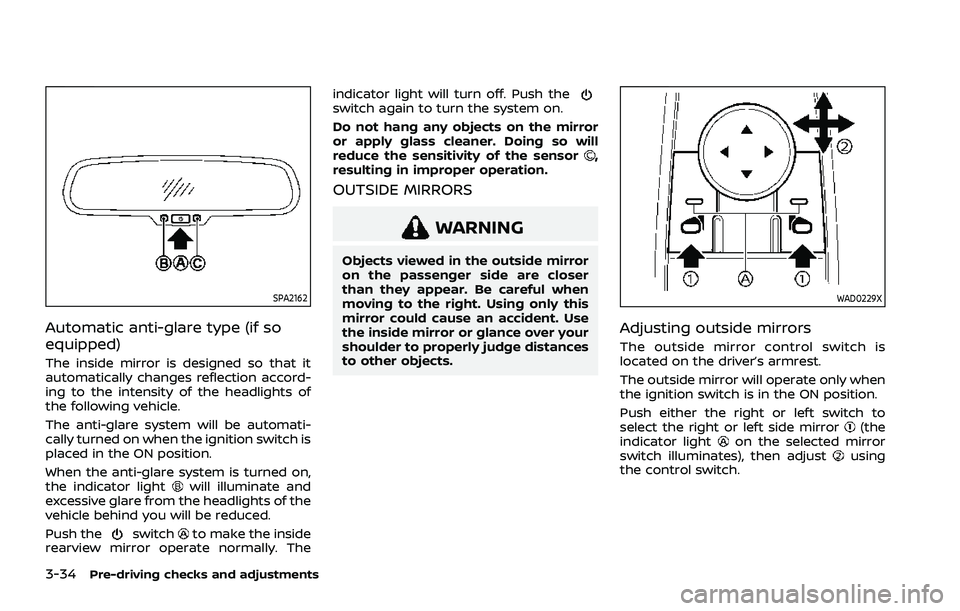
SPA2162
Automatic anti-glare type (if so
equipped)
The inside mirror is designed so that it
automatically changes reflection accord-
ing to the intensity of the headlights of
the following vehicle.
The anti-glare system will be automati-
cally turned on when the ignition switch is
placed in the ON position.
When the anti-glare system is turned on,
the indicator light
will illuminate and
excessive glare from the headlights of the
vehicle behind you will be reduced.
Push the
switchto make the inside
rearview mirror operate normally. The indicator light will turn off. Push the
switch again to turn the system on.
Do not hang any objects on the mirror
or apply glass cleaner. Doing so will
reduce the sensitivity of the sensor
,
resulting in improper operation.
OUTSIDE MIRRORS
WARNING
Objects viewed in the outside mirror
on the passenger side are closer
than they appear. Be careful when
moving to the right. Using only this
mirror could cause an accident. Use
the inside mirror or glance over your
shoulder to properly judge distances
to other objects.
WAD0229X
Adjusting outside mirrors
The outside mirror control switch is
located on the driver’s armrest.
The outside mirror will operate only when
the ignition switch is in the ON position.
Push either the right or left switch to
select the right or left side mirror
(the
indicator lighton the selected mirror
switch illuminates), then adjustusing
the control switch.
Page 216 of 556
4-2Monitor, heater, air conditioner, audio and phone systems
For models with NissanConnect® System,
refer to NissanConnect® Owner’s Manual
that includes the following information.
Available functions may vary depending
on the models and specifications.
.Audio
. Hands-Free Phone
. Apple CarPlay®
. Android Auto
TM
.NissanConnect® Services powered by
SiriusXM®
. Navigation system
. Voice recognition
. Information and settings viewable on
NissanConnect®
WAE0334X
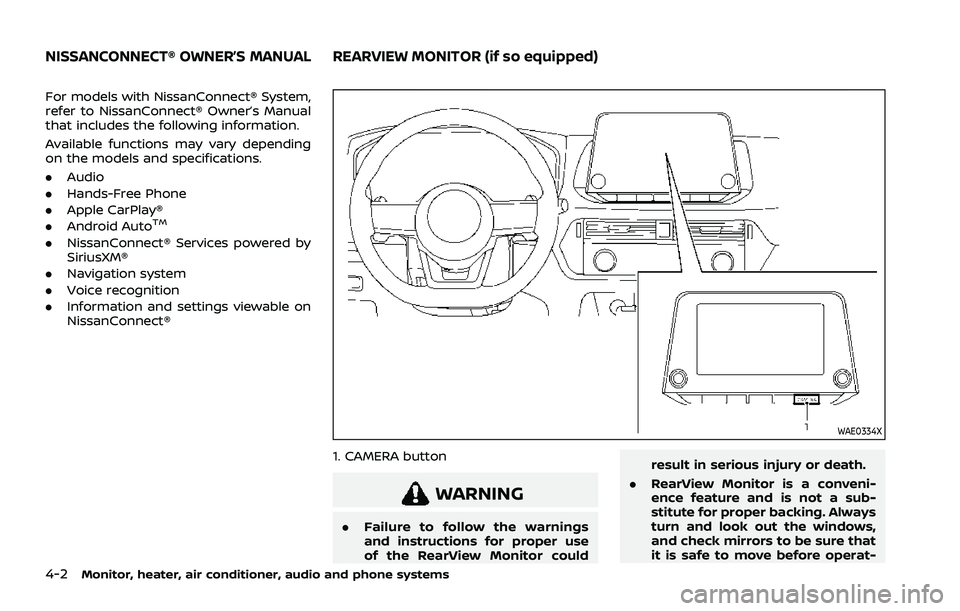
1. CAMERA button
WARNING
.Failure to follow the warnings
and instructions for proper use
of the RearView Monitor could result in serious injury or death.
. RearView Monitor is a conveni-
ence feature and is not a sub-
stitute for proper backing. Always
turn and look out the windows,
and check mirrors to be sure that
it is safe to move before operat-
NISSANCONNECT® OWNER’S MANUALREARVIEW MONITOR (if so equipped)
Page 219 of 556
WAE0288X
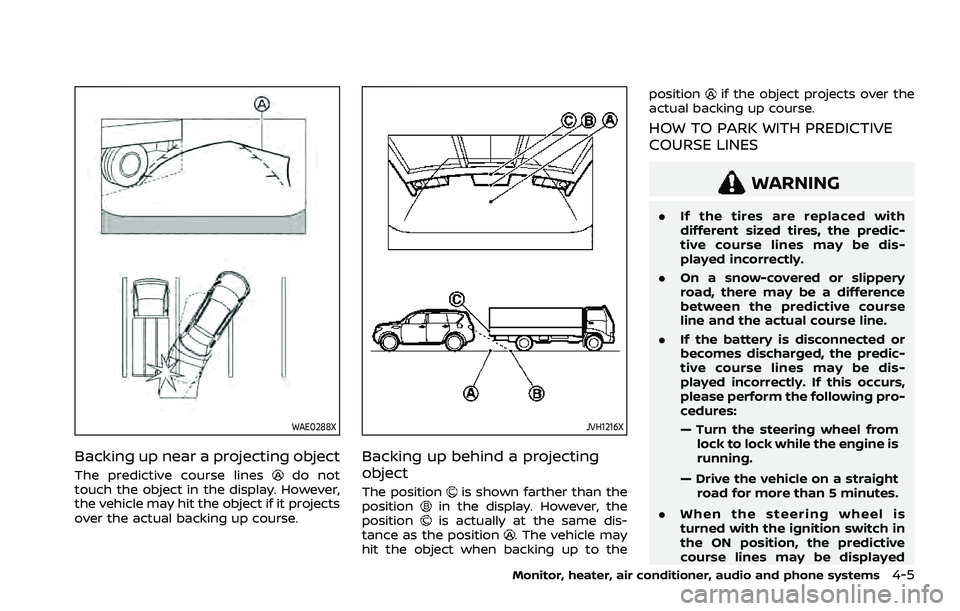
Backing up near a projecting object
The predictive course linesdo not
touch the object in the display. However,
the vehicle may hit the object if it projects
over the actual backing up course.
JVH1216X
Backing up behind a projecting
object
The positionis shown farther than the
positionin the display. However, the
positionis actually at the same dis-
tance as the position. The vehicle may
hit the object when backing up to the position
if the object projects over the
actual backing up course.
HOW TO PARK WITH PREDICTIVE
COURSE LINES
WARNING
. If the tires are replaced with
different sized tires, the predic-
tive course lines may be dis-
played incorrectly.
. On a snow-covered or slippery
road, there may be a difference
between the predictive course
line and the actual course line.
. If the battery is disconnected or
becomes discharged, the predic-
tive course lines may be dis-
played incorrectly. If this occurs,
please perform the following pro-
cedures:
— Turn the steering wheel from
lock to lock while the engine is
running.
— Drive the vehicle on a straight road for more than 5 minutes.
. When the steering wheel is
turned with the ignition switch in
the ON position, the predictive
course lines may be displayed
Monitor, heater, air conditioner, audio and phone systems4-5
Page 221 of 556
5. When the vehicle is parked in thespace completely, place the shift posi-
tion to the P (Park) position and apply
the parking brake.
WAE0034X
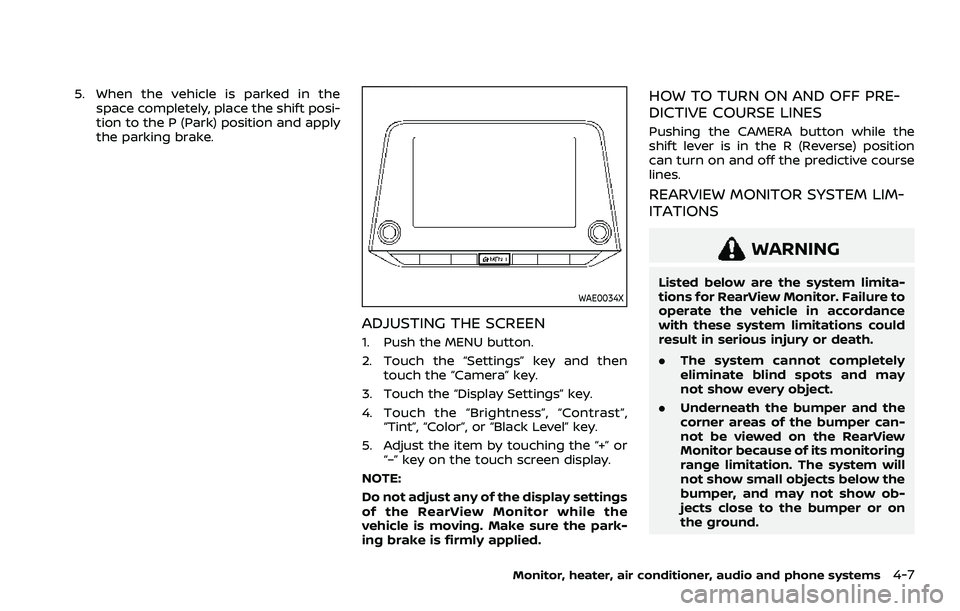
ADJUSTING THE SCREEN
1. Push the MENU button.
2. Touch the “Settings” key and thentouch the “Camera” key.
3. Touch the “Display Settings” key.
4. Touch the “Brightness”, “Contrast”, “Tint”, “Color”, or “Black Level” key.
5. Adjust the item by touching the “+” or “–” key on the touch screen display.
NOTE:
Do not adjust any of the display settings
of the RearView Monitor while the
vehicle is moving. Make sure the park-
ing brake is firmly applied.
HOW TO TURN ON AND OFF PRE-
DICTIVE COURSE LINES
Pushing the CAMERA button while the
shift lever is in the R (Reverse) position
can turn on and off the predictive course
lines.
REARVIEW MONITOR SYSTEM LIM-
ITATIONS
WARNING
Listed below are the system limita-
tions for RearView Monitor. Failure to
operate the vehicle in accordance
with these system limitations could
result in serious injury or death.
. The system cannot completely
eliminate blind spots and may
not show every object.
. Underneath the bumper and the
corner areas of the bumper can-
not be viewed on the RearView
Monitor because of its monitoring
range limitation. The system will
not show small objects below the
bumper, and may not show ob-
jects close to the bumper or on
the ground.
Monitor, heater, air conditioner, audio and phone systems4-7
Page 223 of 556
diluted mild cleaning agent and then
wiping it with a dry cloth.
WAE0475X
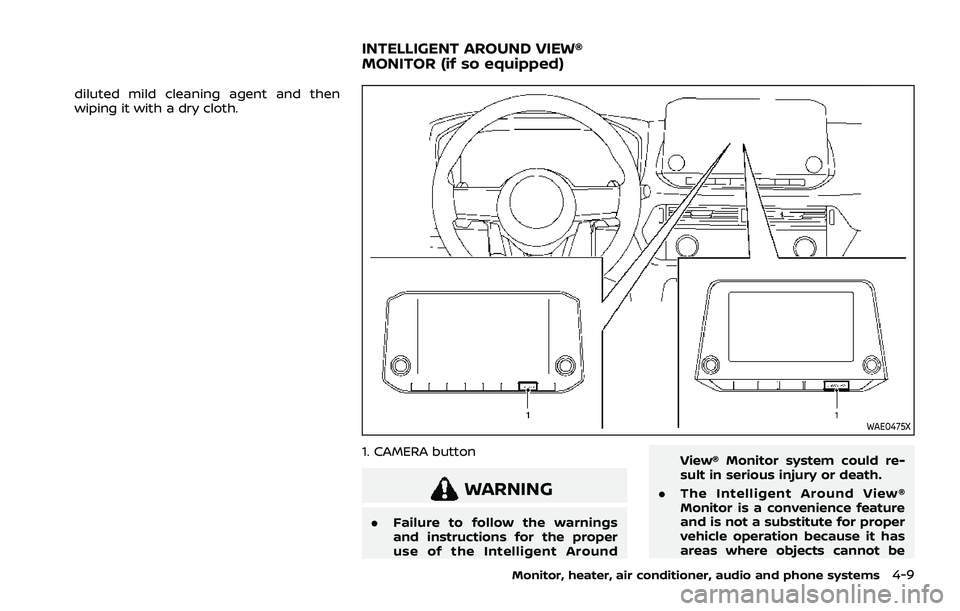
1. CAMERA button
WARNING
.Failure to follow the warnings
and instructions for the proper
use of the Intelligent Around View® Monitor system could re-
sult in serious injury or death.
. The Intelligent Around View®
Monitor is a convenience feature
and is not a substitute for proper
vehicle operation because it has
areas where objects cannot be
Monitor, heater, air conditioner, audio and phone systems4-9
INTELLIGENT AROUND VIEW®
MONITOR (if so equipped)
Page 225 of 556
after the CAMERA button has been
pushed with the shift lever in a position
other than the R (Reverse) position.
Available views
WARNING
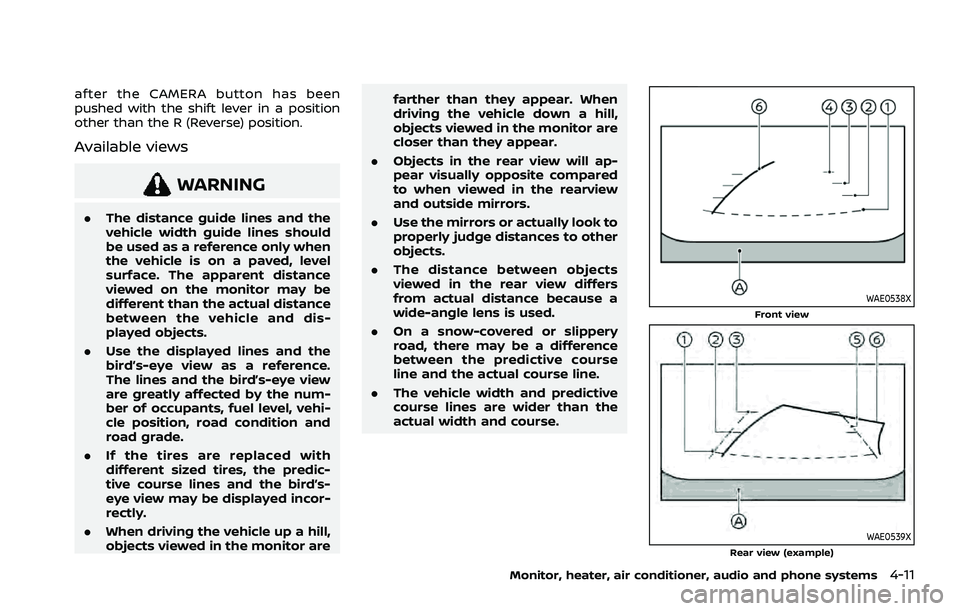
.The distance guide lines and the
vehicle width guide lines should
be used as a reference only when
the vehicle is on a paved, level
surface. The apparent distance
viewed on the monitor may be
different than the actual distance
between the vehicle and dis-
played objects.
. Use the displayed lines and the
bird’s-eye view as a reference.
The lines and the bird’s-eye view
are greatly affected by the num-
ber of occupants, fuel level, vehi-
cle position, road condition and
road grade.
. If the tires are replaced with
different sized tires, the predic-
tive course lines and the bird’s-
eye view may be displayed incor-
rectly.
. When driving the vehicle up a hill,
objects viewed in the monitor are farther than they appear. When
driving the vehicle down a hill,
objects viewed in the monitor are
closer than they appear.
. Objects in the rear view will ap-
pear visually opposite compared
to when viewed in the rearview
and outside mirrors.
. Use the mirrors or actually look to
properly judge distances to other
objects.
. The distance between objects
viewed in the rear view differs
from actual distance because a
wide-angle lens is used.
. On a snow-covered or slippery
road, there may be a difference
between the predictive course
line and the actual course line.
. The vehicle width and predictive
course lines are wider than the
actual width and course.
WAE0538XFront view
WAE0539XRear view (example)
Monitor, heater, air conditioner, audio and phone systems4-11
Page 227 of 556
The amber markersare displayed when
the sonar is turned off or the sonar is not
available at the corner.
The predictive course lines
indicate the
predicted course when operating the
vehicle.
WARNING
. Objects in the bird’s-eye view will
appear farther than the actual
distance.
. Tall objects, such as a curb or
vehicle, may be misaligned or not
displayed at the seam of the
views.
. Objects that are above the cam-
era cannot be displayed.
. The view for the bird’s-eye view
may be misaligned when the
camera position alters.
. A line on the ground may be
misaligned and is not seen as
being straight at the seam of the
views. The misalignment will in-
crease as the line proceeds away
from the vehicle.
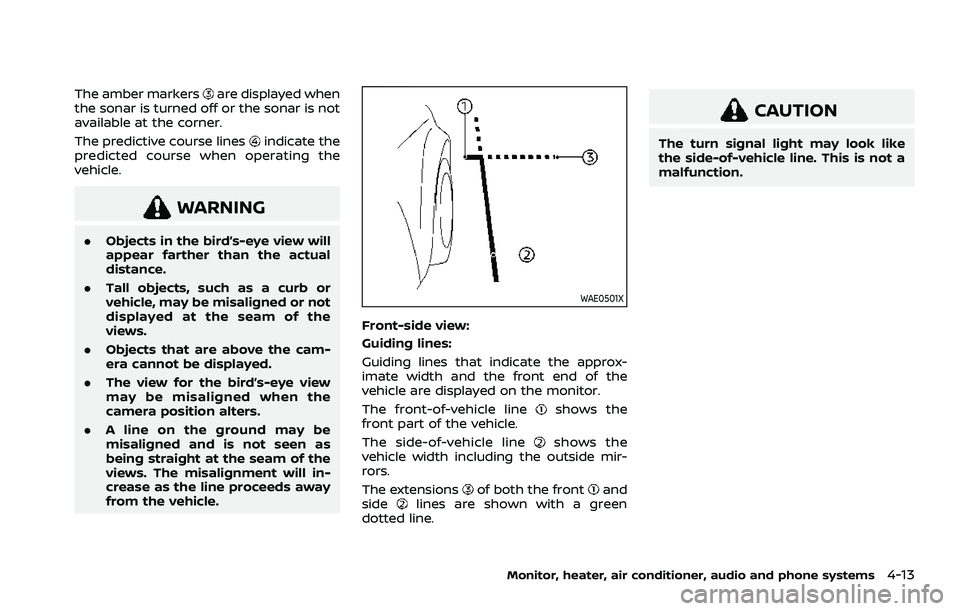
WAE0501X
Front-side view:
Guiding lines:
Guiding lines that indicate the approx-
imate width and the front end of the
vehicle are displayed on the monitor.
The front-of-vehicle line
shows the
front part of the vehicle.
The side-of-vehicle line
shows the
vehicle width including the outside mir-
rors.
The extensions
of both the frontand
sidelines are shown with a green
dotted line.
CAUTION
The turn signal light may look like
the side-of-vehicle line. This is not a
malfunction.
Monitor, heater, air conditioner, audio and phone systems4-13