change time NISSAN ROGUE 2021 Owner´s Manual
[x] Cancel search | Manufacturer: NISSAN, Model Year: 2021, Model line: ROGUE, Model: NISSAN ROGUE 2021Pages: 556, PDF Size: 2.7 MB
Page 147 of 556
High beam assist
The high beam assist system will operate
when the vehicle is driven at speeds of
approximately 19 MPH (30 km/h) and
above. If an oncoming vehicle or leading
vehicle appears in front of your vehicle
when the headlight high beam is on, the
headlight will be switched to the low
beam automatically.
Precautions on high beam assist:
WARNING
.The high beam assist system is a
convenience but it is not a sub-
stitute for safe driving operation.
The driver should remain alert at
all times, ensure safe driving
practices and switch the high
beams and low beam manually
when necessary.
. The high beam or low beam may
not switch automatically under
the following conditions. Switch
the high beam and low beam
manually.
— During bad weather (rain, fog,
snow, wind, etc.).
— When a light source similar to a headlight or tail light is in the vicinity of the vehicle.
— When the headlights of the oncoming vehicle or the lead-
ing vehicle are turned off,
when the color of the light is
affected due to foreign mate-
rials on the lights, or when the
light beam is out of position.
— When there is a sudden, con- tinuous change in brightness.
— When driving on a road that passes over rolling hills, or a
road that has level differ-
ences.
— When driving on a road with many curves.
— When a sign or mirror-like surface is reflecting intense
light towards the front of the
vehicle.
— When the container, etc. being towed by a leading vehicle is
reflecting intense light.
— When a headlight on your vehicle is damaged or dirty.
— When the vehicle is leaning at an angle due to a punctured
tire, being towed, etc. .
The timing of switching the low
beam and high beam may
change under the following situa-
tions.
— The brightness of the head-
lights of the oncoming vehicle
or leading vehicle.
— The movement and direction of the oncoming vehicle and
the leading vehicle.
— When only one light on the oncoming vehicle or the lead-
ing vehicle is illuminated.
— When the oncoming vehicle or the leading vehicle is a two-
wheeled vehicle.
— Road conditions (incline, curve, the road surface, etc.).
— The number of passengers and the amount of cargo.
Instruments and controls2-59
Page 150 of 556
2-62Instruments and controls
WAC0323XExample
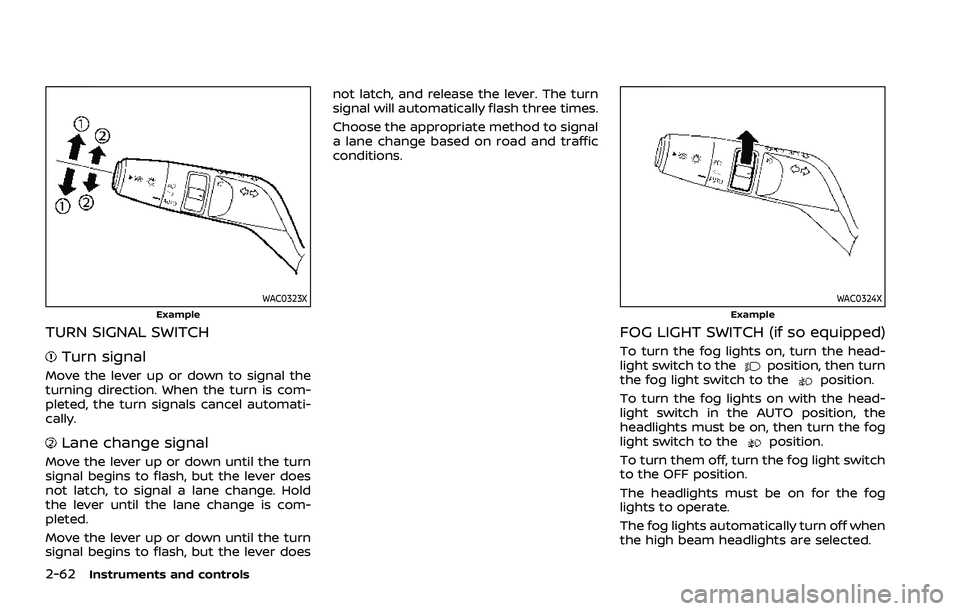
TURN SIGNAL SWITCH
Turn signal
Move the lever up or down to signal the
turning direction. When the turn is com-
pleted, the turn signals cancel automati-
cally.
Lane change signal
Move the lever up or down until the turn
signal begins to flash, but the lever does
not latch, to signal a lane change. Hold
the lever until the lane change is com-
pleted.
Move the lever up or down until the turn
signal begins to flash, but the lever doesnot latch, and release the lever. The turn
signal will automatically flash three times.
Choose the appropriate method to signal
a lane change based on road and traffic
conditions.
WAC0324XExample
FOG LIGHT SWITCH (if so equipped)
To turn the fog lights on, turn the head-
light switch to theposition, then turn
the fog light switch to theposition.
To turn the fog lights on with the head-
light switch in the AUTO position, the
headlights must be on, then turn the fog
light switch to the
position.
To turn them off, turn the fog light switch
to the OFF position.
The headlights must be on for the fog
lights to operate.
The fog lights automatically turn off when
the high beam headlights are selected.
Page 242 of 556
4-28Monitor, heater, air conditioner, audio and phone systems
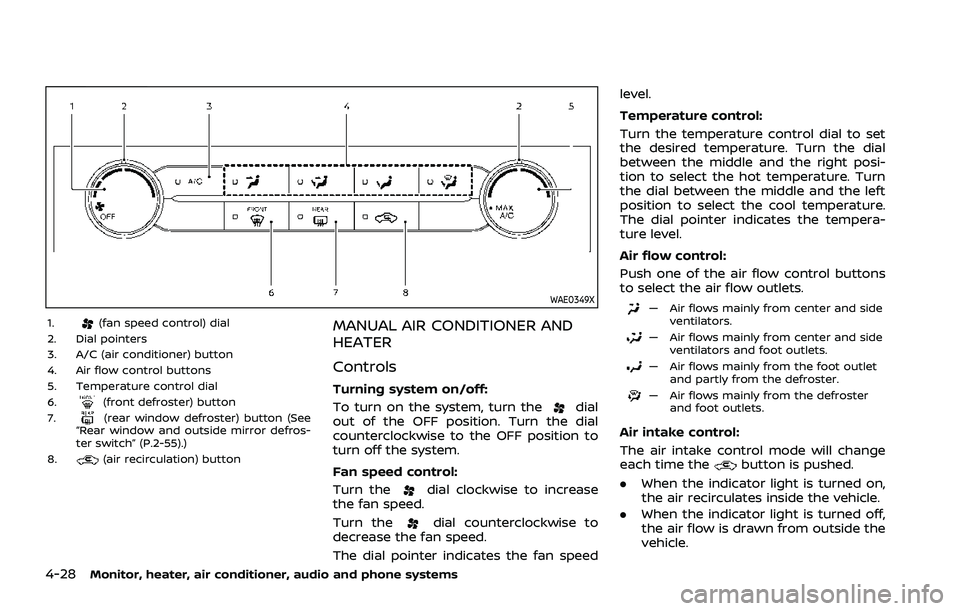
WAE0349X
1.(fan speed control) dial
2. Dial pointers
3. A/C (air conditioner) button
4. Air flow control buttons
5. Temperature control dial
6.
(front defroster) button
7.(rear window defroster) button (See
“Rear window and outside mirror defros-
ter switch” (P.2-55).)
8.
(air recirculation) button
MANUAL AIR CONDITIONER AND
HEATER
Controls
Turning system on/off:
To turn on the system, turn the
dial
out of the OFF position. Turn the dial
counterclockwise to the OFF position to
turn off the system.
Fan speed control:
Turn the
dial clockwise to increase
the fan speed.
Turn the
dial counterclockwise to
decrease the fan speed.
The dial pointer indicates the fan speed level.
Temperature control:
Turn the temperature control dial to set
the desired temperature. Turn the dial
between the middle and the right posi-
tion to select the hot temperature. Turn
the dial between the middle and the left
position to select the cool temperature.
The dial pointer indicates the tempera-
ture level.
Air flow control:
Push one of the air flow control buttons
to select the air flow outlets.
— Air flows mainly from center and side
ventilators.
— Air flows mainly from center and sideventilators and foot outlets.
— Air flows mainly from the foot outletand partly from the defroster.
— Air flows mainly from the defrosterand foot outlets.
Air intake control:
The air intake control mode will change
each time the
button is pushed.
. When the indicator light is turned on,
the air recirculates inside the vehicle.
. When the indicator light is turned off,
the air flow is drawn from outside the
vehicle.
Page 247 of 556
2. Turn the temperature control dial onthe corresponding side to set the
desired temperature.
.You can individually set tempera-tures for the driver’s side and front
passenger’s side when the indica-
tor light on the SYNC button is not
illuminated.
A visible mist may be seen coming from
the ventilators in hot, humid conditions as
the air is cooled rapidly. This does not
indicate a malfunction.
Heating (A/C OFF):
The air conditioner does not activate in
this mode. Use this mode when you only
need to heat.
1. Push the AUTO button on. (The in- dicator light on the button will illumi-
nate.)
2. Push the A/C button. (The indicator light will turn off.)
3. Turn the temperature control dial on the corresponding side to set the
desired temperature.
.You can individually set tempera-
tures for the driver’s side and front
passenger’s side when the indica-
tor light on the SYNC button is not
illuminated.
.The temperature of the passengercompartment will be maintained
automatically. Air flow distribution
and fan speed are also controlled
automatically.
NOTE:
. Do not set the temperature lower
than the outside air temperature or
the system may not work properly.
. Not recommended if windows fog
up.
Dehumidified defrosting or defogging:
1. Push the
button. (The indicator
light on the button will turn on.)
2. Turn the temperature control dial on the corresponding side to set the
desired temperature.
.To quickly remove ice from theoutside of the windows, use the
button to set the fan speed to
maximum.
.As soon as possible after the wind- shield is clean, push the AUTO
button to return to the automatic
mode.
.When thebutton is pushed, the
air conditioner will automatically be
turned on at outside temperatures
more than slightly above freezing.
The air recirculation mode auto-
matically turns off, allowing outside air to be drawn into the passenger
compartment to further improve
the defogging performance.
Manual operation
Fan speed control:
Push the
buttons to manually control
the fan speed.
Air intake control:
The air intake control mode will change
each time the
button is pushed.
. When the indicator light is turned on,
the air recirculates inside the vehicle.
. When the indicator light is turned off,
the air flow is drawn from outside the
vehicle.
. To switch to automatic control mode,
push and hold the
button for
about 2 seconds. The indicator light
will blink, and then the air intake will
be controlled automatically.
Air flow control:
Pushing the
button manually con-
trols air flow and selects the air outlet:
Monitor, heater, air conditioner, audio and phone systems4-33
Page 259 of 556
WARNING
.Do not leave children or adults
who would normally require the
support of others alone in your
vehicle. Pets should not be left
alone either. They could acciden-
tally injure themselves or others
through inadvertent operation of
the vehicle. Also, on hot, sunny
days, temperatures in a closed
vehicle could quickly become
high enough to cause severe or
possibly fatal injuries to people or
animals.
. Properly secure all cargo with
ropes or straps to help prevent it
from sliding or shifting. Do not
place cargo higher than the seat-
backs. In a sudden stop or colli-
sion, unsecured cargo could
cause personal injury.
EXHAUST GAS (carbon monoxide)
WARNING
.Do not breathe exhaust gas; it
contains colorless and odorless
carbon monoxide. Carbon mon- oxide is dangerous. It can cause
unconsciousness or death.
. If you suspect that exhaust fumes
are entering the vehicle, drive
with all windows fully open, and
have the vehicle inspected imme-
diately.
. Do not run the engine in closed
spaces such as a garage.
. Do not park the vehicle with the
engine running for an extended
period of time.
. Keep the liftgate closed while
driving, otherwise exhaust gas
could be drawn into the passen-
ger compartment. If you must
drive with the liftgate open, fol-
low these precautions:
— Open all the windows.
— Turn the air recirculation
mode off and set the fan
speed control to the highest
level to circulate the air.
. If a special body or other equip-
ment is added for recreational or
other usage, follow the manufac-
turer’s recommendation to pre-
vent carbon monoxide entry into
the vehicle. (Some recreational
vehicle appliances such as stoves, refrigerators, heaters, etc. may
also generate carbon monoxide.)
. If electrical wiring or other cable
connections must pass to a trailer
through the seal on the liftgate or
the body, follow the manufac-
turer’s recommendation to pre-
vent carbon monoxide entry into
the vehicle.
. The exhaust system and body
should be inspected by a quali-
fied mechanic whenever:
— Your vehicle is raised while
being serviced.
— You suspect that exhaust fumes are entering into the
passenger compartment.
— You notice a change in the sound of the exhaust system.
— You have had an accident involving damage to the ex-
haust system, underbody, or
rear of the vehicle.
Starting and driving5-5
PRECAUTIONS WHEN STARTING
AND DRIVING
Page 265 of 556
.If you decide that it is not safe toreturn the vehicle to the road sur-
face based on vehicle, road or
traffic conditions, gradually slow
the vehicle to a stop in a safe place
off the road.
RAPID AIR PRESSURE LOSS
Rapid air pressure loss or a “blow-out” can
occur if the tire is punctured or is
damaged due to hitting a curb or pothole.
Rapid air pressure loss can also be caused
by driving on under-inflated tires.
Rapid air pressure loss can affect the
handling and stability of the vehicle,
especially at highway speeds.
Help prevent rapid air pressure loss by
maintaining the correct air pressure and
visually inspect the tires for wear and
damage. See “Wheels and tires” (P.8-25) of
this manual.
If a tire rapidly loses air pressure or
“blows-out” while driving, maintain con-
trol of the vehicle by following the proce-
dure below. Please note that this
procedure is only a general guide. The
vehicle must be driven as appropriate
based on the conditions of the vehicle,
road and traffic.
WARNING
The following actions can increase
the chance of losing control of the
vehicle if there is a sudden loss of tire
air pressure. Losing control of the
vehicle may cause a collision and
result in personal injury.
. The vehicle generally moves or
pulls in the direction of the flat
tire.
. Do not rapidly apply the brakes.
. Do not rapidly release the accel-
erator pedal.
. Do not rapidly turn the steering
wheel.
1. Remain calm and do not overreact.
2. Maintain a firm grip on the steering wheel with both hands and try to hold
a straight course.
3. When appropriate, slowly release the accelerator pedal to gradually slow
the vehicle.
4. Gradually steer the vehicle to a safe location off the road and away from
traffic if possible. 5. Lightly apply the brake pedal to gra-
dually stop the vehicle.
6. Turn on the hazard warning flashers and either contact a roadside emer-
gency service to change the tire or see
“Changing a flat tire” (P.6-4) of this
Owner’s Manual.
DRINKING ALCOHOL/DRUGS AND
DRIVING
WARNING
Never drive under the influence of
alcohol or drugs. Alcohol in the
bloodstream reduces coordination,
delays reaction time and impairs
judgement. Driving after drinking
alcohol increases the likelihood of
being involved in an accident injuring
yourself and others. Additionally, if
you are injured in an accident, alco-
hol can increase the severity of the
injury.
NISSAN is committed to safe driving.
However, you must choose not to drive
under the influence of alcohol. Every year
thousands of people are injured or killed
in alcohol-related accidents. Although the
local laws vary on what is considered to
be legally intoxicated, the fact is that
Starting and driving5-11
Page 269 of 556
start the engine.
.The cargo room area is not included in
the operating range but the Intelligent
Key may function.
. If the Intelligent Key is placed on the
instrument panel, inside the glove box
or door pocket, the Intelligent Key may
not function.
. If the Intelligent Key is placed near the
door or window outside the vehicle,
the Intelligent Key may function.
If the battery of the Intelligent Key is
discharged, see “Intelligent Key battery
discharge” (P.5-16).
PUSH-BUTTON IGNITION SWITCH
OPERATION
CAUTION
. Do not leave the vehicle for ex-
tended periods of time when the
ignition switch is in the ON posi-
tion and the engine is not run-
ning. This can discharge the
battery.
. Use electrical accessories with
the engine running to avoid dis-
charging the vehicle battery. If
you must use accessories while
the engine is not running, do not use them for extended periods of
time and do not use multiple
electrical accessories at the same
time.
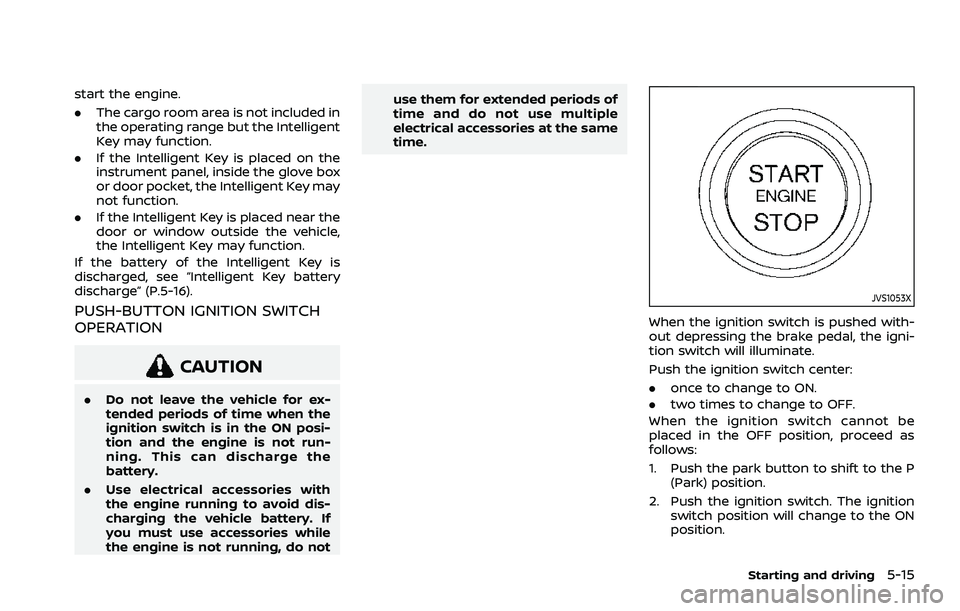
JVS1053X
When the ignition switch is pushed with-
out depressing the brake pedal, the igni-
tion switch will illuminate.
Push the ignition switch center:
.
once to change to ON.
. two times to change to OFF.
When the ignition switch cannot be
placed in the OFF position, proceed as
follows:
1. Push the park button to shift to the P (Park) position.
2. Push the ignition switch. The ignition switch position will change to the ON
position.
Starting and driving5-15
Page 286 of 556
5-32Starting and driving
SNOW MODE (AWD models)
This mode makes it easier to start and
run from snowy roads and frozen roads.
CAUTION
Never drive on dry, hard surface
roads in the SNOW mode, as this will
overload the powertrain and may
cause a serious malfunction. Addi-
tionally, this will cause premature
tire wear and reduced fuel economy.
When the SNOW mode is selected, small
vibration in cornering may occur. This is
not a malfunction.
STANDARD MODE (2WD models)/
AUTO MODE (AWD models)
This is the standard mode that is most
suitable for normal driving.
This mode will be selected first each time
the ignition switch is placed in the ON
position.
ECO MODE
Assists the driver’s ECO-driving. The en-
gine and transmission points are adjusted
for improved fuel economy, providing
such a driving features as smooth start-
ing or constant cruising.
NOTE:
Selecting the ECO mode will not neces-
sarily improve fuel economy as many
driving factors influence its effective-
ness.
Operation
Select the ECO mode using the Drive
Mode Selector. The ECO indicator illumi-
nates.
When the accelerator pedal is depressed
within the range of economy drive, the
ECO indicator illuminates in green. When
the accelerator pedal is depressed above
the range of economy drive, the ECO
indicator turns off.
The ECO indicator will not illuminate in
the following cases:
. When the shift lever is in the R
(Reverse) position.
. When the vehicle speed is below 2
MPH (3.2 km/h) or over 90 MPH (144
km/h). .
When the cruise control (if so
equipped) or the Intelligent Cruise
Control (ICC) system (if so equipped)
is operated.
ECO Mode Customize
The “ECO Mode Customize” is a function
that can change the priority from the
Cruise Control (if so equipped) or the
Intelligent Cruise Control (ICC) function
to fuel efficiency improvements. It can be
set when the ECO mode is selected. To
activate or deactivate this function, see
“ECO Mode Setting” (P.2-26).
.Cruise Control
When the setting is ON, the fuel
efficiency while cruising will be im-
proved by lowering the acceleration
target from normal (setting OFF)
mode.
NOTE:
When the vehicle speed is reduced (for
example, when the vehicle is driven on
an uphill road from a flat road), it will
take more time to return to the pre-
viously set speed than normal mode.
Page 292 of 556
5-38Starting and driving
Driver Assistance display
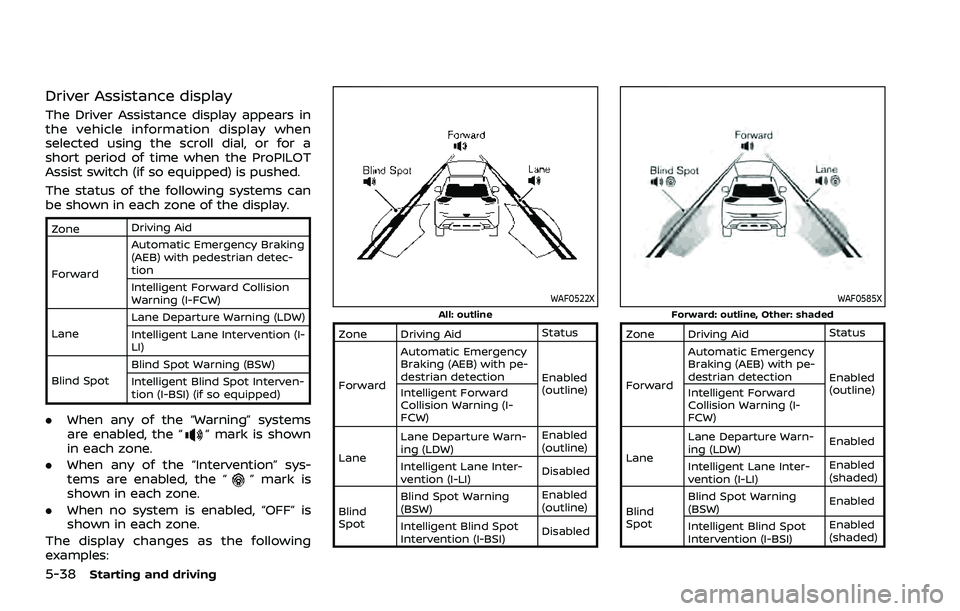
The Driver Assistance display appears in
the vehicle information display when
selected using the scroll dial, or for a
short period of time when the ProPILOT
Assist switch (if so equipped) is pushed.
The status of the following systems can
be shown in each zone of the display.
ZoneDriving Aid
Forward Automatic Emergency Braking
(AEB) with pedestrian detec-
tion
Intelligent Forward Collision
Warning (I-FCW)
Lane Lane Departure Warning (LDW)
Intelligent Lane Intervention (I-
LI)
Blind Spot Blind Spot Warning (BSW)
Intelligent Blind Spot Interven-
tion (I-BSI) (if so equipped)
.
When any of the “Warning” systems
are enabled, the “” mark is shown
in each zone.
. When any of the “Intervention” sys-
tems are enabled, the “
” mark is
shown in each zone.
. When no system is enabled, “OFF” is
shown in each zone.
The display changes as the following
examples:
WAF0522XAll: outline
Zone Driving Aid Status
Forward Automatic Emergency
Braking (AEB) with pe-
destrian detection
Enabled
(outline)
Intelligent Forward
Collision Warning (I-
FCW)
Lane Lane Departure Warn-
ing (LDW)
Enabled
(outline)
Intelligent Lane Inter-
vention (I-LI) Disabled
Blind
Spot Blind Spot Warning
(BSW)
Enabled
(outline)
Intelligent Blind Spot
Intervention (I-BSI) Disabled
WAF0585XForward: outline, Other: shaded
Zone Driving Aid
Status
Forward Automatic Emergency
Braking (AEB) with pe-
destrian detection
Enabled
(outline)
Intelligent Forward
Collision Warning (I-
FCW)
Lane Lane Departure Warn-
ing (LDW)
Enabled
Intelligent Lane Inter-
vention (I-LI) Enabled
(shaded)
Blind
Spot Blind Spot Warning
(BSW)
Enabled
Intelligent Blind Spot
Intervention (I-BSI) Enabled
(shaded)
Page 298 of 556
5-44Starting and driving
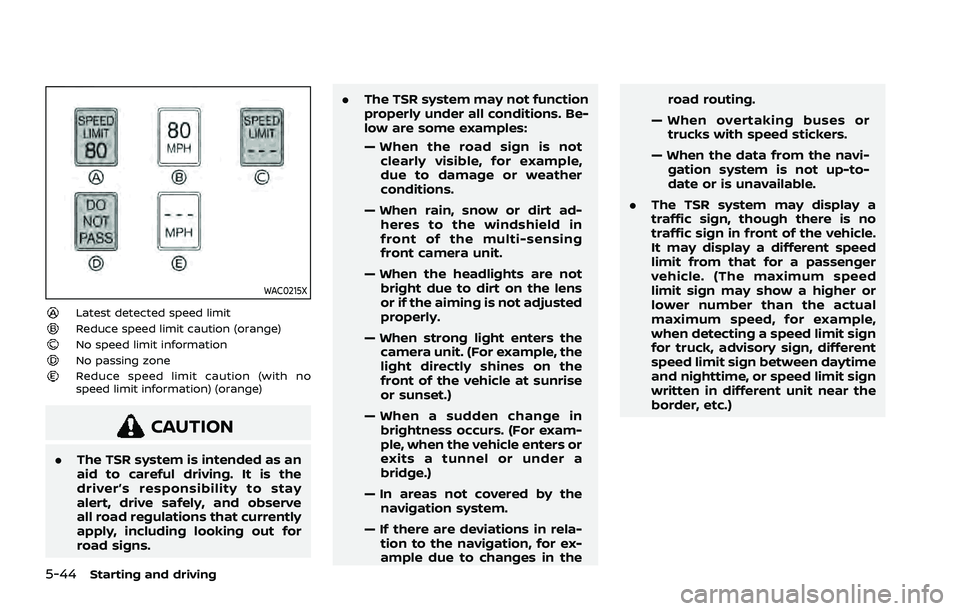
WAC0215X
Latest detected speed limitReduce speed limit caution (orange)No speed limit informationNo passing zoneReduce speed limit caution (with no
speed limit information) (orange)
CAUTION
.The TSR system is intended as an
aid to careful driving. It is the
driver’s responsibility to stay
alert, drive safely, and observe
all road regulations that currently
apply, including looking out for
road signs. .
The TSR system may not function
properly under all conditions. Be-
low are some examples:
— When the road sign is not
clearly visible, for example,
due to damage or weather
conditions.
— When rain, snow or dirt ad- heres to the windshield in
front of the multi-sensing
front camera unit.
— When the headlights are not bright due to dirt on the lens
or if the aiming is not adjusted
properly.
— When strong light enters the camera unit. (For example, the
light directly shines on the
front of the vehicle at sunrise
or sunset.)
— When a sudden change in brightness occurs. (For exam-
ple, when the vehicle enters or
exits a tunnel or under a
bridge.)
— In areas not covered by the navigation system.
— If there are deviations in rela- tion to the navigation, for ex-
ample due to changes in the road routing.
— When overtaking buses or trucks with speed stickers.
— When the data from the navi- gation system is not up-to-
date or is unavailable.
. The TSR system may display a
traffic sign, though there is no
traffic sign in front of the vehicle.
It may display a different speed
limit from that for a passenger
vehicle. (The maximum speed
limit sign may show a higher or
lower number than the actual
maximum speed, for example,
when detecting a speed limit sign
for truck, advisory sign, different
speed limit sign between daytime
and nighttime, or speed limit sign
written in different unit near the
border, etc.)