change time NISSAN ROGUE 2021 Owner´s Manual
[x] Cancel search | Manufacturer: NISSAN, Model Year: 2021, Model line: ROGUE, Model: NISSAN ROGUE 2021Pages: 556, PDF Size: 2.7 MB
Page 307 of 556
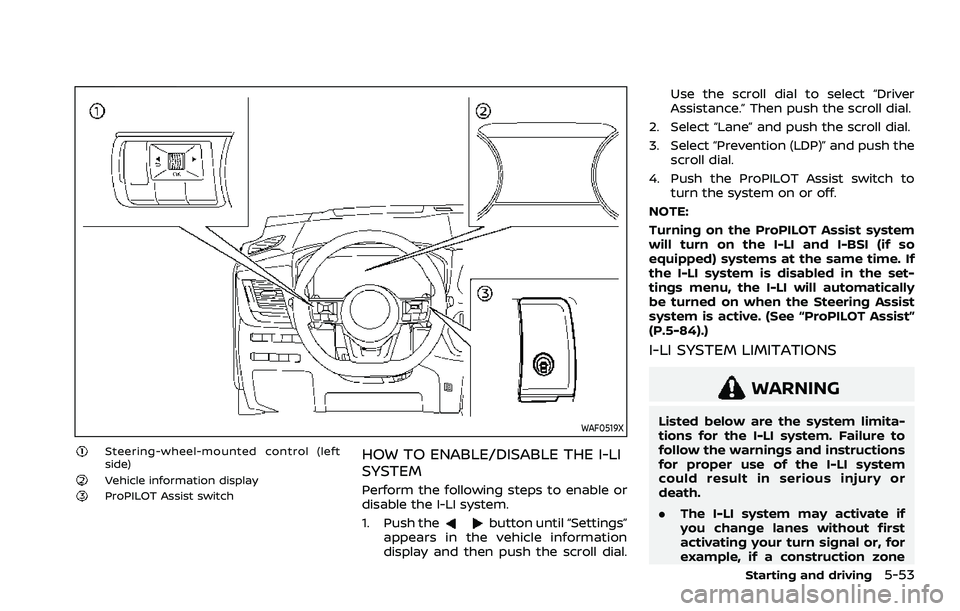
WAF0519X
Steering-wheel-mounted control (left
side)
Vehicle information displayProPILOT Assist switch
HOW TO ENABLE/DISABLE THE I-LI
SYSTEM
Perform the following steps to enable or
disable the I-LI system.
1. Push the
button until “Settings”
appears in the vehicle information
display and then push the scroll dial. Use the scroll dial to select “Driver
Assistance.” Then push the scroll dial.
2. Select “Lane” and push the scroll dial.
3. Select “Prevention (LDP)” and push the scroll dial.
4. Push the ProPILOT Assist switch to turn the system on or off.
NOTE:
Turning on the ProPILOT Assist system
will turn on the I-LI and I-BSI (if so
equipped) systems at the same time. If
the I-LI system is disabled in the set-
tings menu, the I-LI will automatically
be turned on when the Steering Assist
system is active. (See “ProPILOT Assist”
(P.5-84).)
I-LI SYSTEM LIMITATIONS
WARNING
Listed below are the system limita-
tions for the I-LI system. Failure to
follow the warnings and instructions
for proper use of the I-LI system
could result in serious injury or
death.
. The I-LI system may activate if
you change lanes without first
activating your turn signal or, for
example, if a construction zone
Starting and driving5-53
Page 308 of 556
5-54Starting and driving
directs traffic to cross an existing
lane marker. If this occurs you
may need to apply corrective
steering to complete your lane
change.
. Because the I-LI may not activate
under the road, weather, and lane
marker conditions described in
this section, it may not activate
every time your vehicle begins to
leave its lane and you will need to
apply corrective steering.
. The I-LI system will not operate at
speeds below approximately 37
MPH (60 km/h) or if it cannot
detect lane markers.
. When the I-LI system is operating,
avoid excessive or sudden steer-
ing maneuvers. Otherwise, you
could lose control of the vehicle.
. Do not use the I-LI system under
the following conditions as it may
not function properly:
— During bad weather (rain, fog,
snow, etc.).
— When driving on slippery roads, such as on ice or snow.
— When driving on winding or uneven roads. — When there is a lane closure
due to road repairs.
— When driving in a makeshift or temporary lane.
— When driving on roads where the lane width is too narrow.
— When driving without normal tire conditions (for example,
tire wear, low tire pressure,
installation of spare tire, tire
chains, non-standard wheels).
— When the vehicle is equipped with non-original brake parts
or suspension parts.
— When towing a trailer or other vehicle.
— On roads where there are multiple parallel lane markers;
lane markers that are faded or
not painted clearly; yellow
painted lane markers; non-
standard lane markers; or
lane markers covered with
water, dirt, snow, etc.
— On roads where discontinued lane markers are still detect-
able.
— On roads where there are sharp curves. — On roads where there are
sharply contrasting objects,
such as shadows, snow,
water, wheel ruts, seams or
lines remaining after road re-
pairs. (The I-LI system could
detect these items as lane
markers.)
— On roads where the traveling lane merges or separates.
— When the vehicle’s traveling direction does not align with
the lane marker.
— When traveling close to the vehicle in front of you, which
obstructs the lane camera
unit detection range.
— When rain, snow or dirt ad- heres to the windshield in
front of the lane camera unit.
— When the headlights are not bright due to dirt on the lens
or if the aiming is not adjusted
properly.
— When strong light enters the lane camera unit. (For exam-
ple, the light directly shines on
the front of the vehicle at
sunrise or sunset.)
Page 348 of 556
5-94Starting and driving
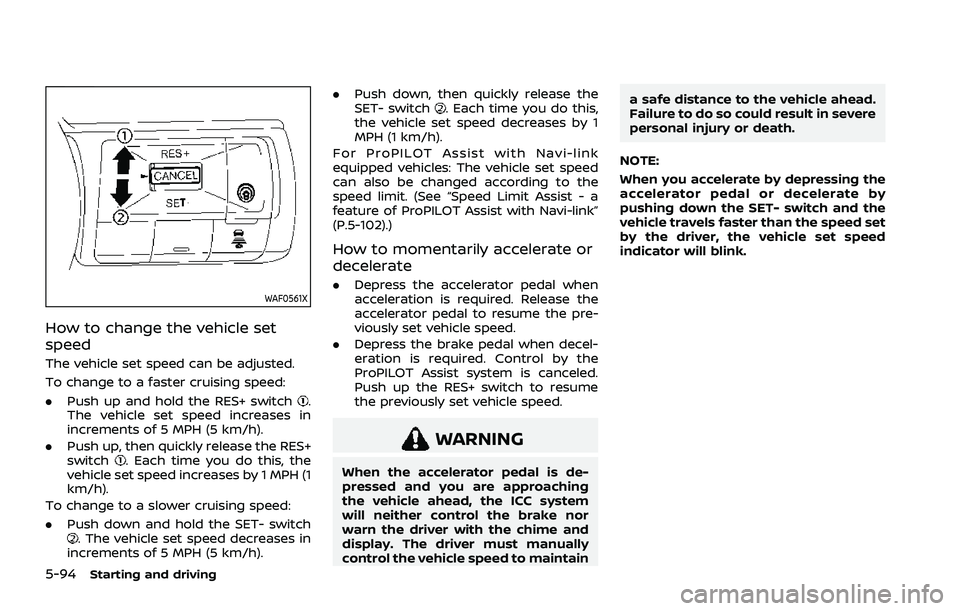
WAF0561X
How to change the vehicle set
speed
The vehicle set speed can be adjusted.
To change to a faster cruising speed:
.Push up and hold the RES+ switch
.
The vehicle set speed increases in
increments of 5 MPH (5 km/h).
. Push up, then quickly release the RES+
switch
. Each time you do this, the
vehicle set speed increases by 1 MPH (1
km/h).
To change to a slower cruising speed:
. Push down and hold the SET- switch
. The vehicle set speed decreases in
increments of 5 MPH (5 km/h). .
Push down, then quickly release the
SET- switch
. Each time you do this,
the vehicle set speed decreases by 1
MPH (1 km/h).
For ProPILOT Assist with Navi-link
equipped vehicles: The vehicle set speed
can also be changed according to the
speed limit. (See “Speed Limit Assist - a
feature of ProPILOT Assist with Navi-link”
(P.5-102).)
How to momentarily accelerate or
decelerate
. Depress the accelerator pedal when
acceleration is required. Release the
accelerator pedal to resume the pre-
viously set vehicle speed.
. Depress the brake pedal when decel-
eration is required. Control by the
ProPILOT Assist system is canceled.
Push up the RES+ switch to resume
the previously set vehicle speed.
WARNING
When the accelerator pedal is de-
pressed and you are approaching
the vehicle ahead, the ICC system
will neither control the brake nor
warn the driver with the chime and
display. The driver must manually
control the vehicle speed to maintain a safe distance to the vehicle ahead.
Failure to do so could result in severe
personal injury or death.
NOTE:
When you accelerate by depressing the
accelerator pedal or decelerate by
pushing down the SET- switch and the
vehicle travels faster than the speed set
by the driver, the vehicle set speed
indicator will blink.
Page 349 of 556
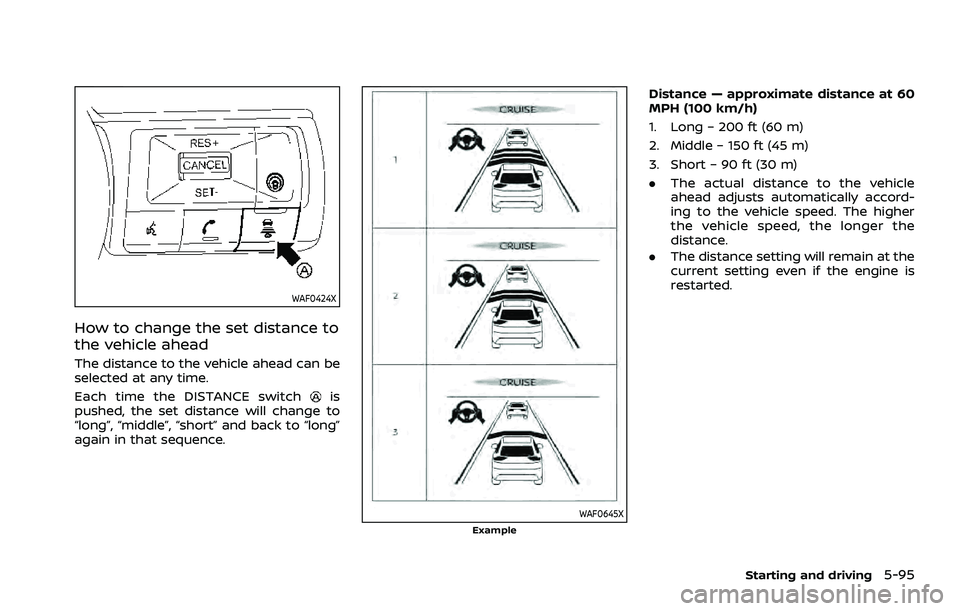
WAF0424X
How to change the set distance to
the vehicle ahead
The distance to the vehicle ahead can be
selected at any time.
Each time the DISTANCE switch
is
pushed, the set distance will change to
“long”, “middle”, “short” and back to “long”
again in that sequence.
WAF0645XExample
Distance — approximate distance at 60
MPH (100 km/h)
1. Long – 200 ft (60 m)
2. Middle – 150 ft (45 m)
3. Short – 90 ft (30 m)
. The actual distance to the vehicle
ahead adjusts automatically accord-
ing to the vehicle speed. The higher
the vehicle speed, the longer the
distance.
. The distance setting will remain at the
current setting even if the engine is
restarted.
Starting and driving5-95
Page 356 of 556
5-102Starting and driving
The warning chime will not sound when:
.Your vehicle approaches other vehi-
cles that are parked or moving slowly.
. The accelerator pedal is depressed,
overriding the system.
NOTE:
The approach warning chime may
sound and the system display may
flash when the radar sensor detects
objects on the side of the vehicle or on
the side of the road. This may cause the
ICC system to decelerate or accelerate
the vehicle. The radar sensor may de-
tect these objects when the vehicle is
driven on winding, narrow, or hilly roads
or when the vehicle is entering or
exiting a curve. In these cases, you will
have to manually control the proper
distance ahead of your vehicle.
Also, the sensor sensitivity can be af-
fected by vehicle operation (steering
maneuver or driving position in the
lane) or traffic or vehicle conditions
(for example, if a vehicle is being driven
with some damage).Acceleration when passing
When the ICC system is engaged above
44 MPH (70 km/h) and following a slower
vehicle (below the vehicle set speed), and
the turn signal is activated to the left, the
ICC system will automatically start to
accelerate the vehicle to help initiate
passing on the left and will begin to
reduce the distance to vehicle directly
ahead. Only the left side turn signal
operates this feature. As the driver steers
the vehicle and moves into the passing
lane, if no vehicle is detected ahead the
ICC system will continue to accelerate to
the vehicle set speed. If another vehicle is
detected ahead, then the vehicle will
accelerate up to the following speed of
that vehicle. If the vehicle is not steered
into the left lane to pass, the acceleration
will stop after a short time and regain the
set following distance. Acceleration can
be stopped at any point by depressing
the brake pedal or the CANCEL switch on
the steering wheel.
WARNING
In order to reduce the risk of a
collision that may result in serious
injury or death, please be aware of
the following: .
This function is only activated
with the left turn signal and will
briefly accelerate the vehicle even
if a lane change is not initiated.
This can include non-passing si-
tuations such as left side exits.
. Ensure that when passing an-
other vehicle, the adjacent lane
is clear before initiating the pass.
Sudden changes in traffic may
occur while passing. Always
manually steer or brake as
needed. Never solely rely on the
system.
Speed Limit Assist - a feature of
ProPILOT Assist with Navi-link (if so
equipped)
WARNING
Listed below are the system limita-
tions for the Speed Limit Assist. Fail-
ure to operate the vehicle in
accordance with these system lim-
itations could result in serious injury
or death:
.It is the driver’s responsibility to
select the proper speed, follow all
traffic regulations and observe
Page 359 of 556
To deactivate the system, select “OFF”.
NOTE:
The system will retain current settings
in the vehicle information display even
if the engine is restarted.
Speed Adjust by Route - a feature
of ProPILOT Assist with Navi-link (if
so equipped)
WARNING
Listed below are the system limita-
tions for the Speed Adjust by Route.
Failure to operate the vehicle in
accordance with these system lim-
itations could result in serious injury
or death:
.There are limitations to the Speed
Adjust by Route system capabil-
ity. The system does not function
in all driving, traffic, weather and
road conditions. It is the driver’s
responsibility to stay alert, drive
safely, and be in control of the
vehicle at all times.
. The Speed Adjust by Route sys-
tem does not brake the vehicle to
a stop. Whenever necessary, the
driver must apply appropriate
braking. .
It is the driver’s responsibility to
select the proper speed, follow all
traffic regulations and observe
other road users.
. The Speed Adjust by Route sys-
tem will not function in Hawaii or
US island territories.
. The Speed Adjust by Route may
not operate properly in some
road and traffic conditions, the
system may unexpectedly
change the speed. The driver
must manually control the vehicle
speed.
Below are some examples:
— When the data from the navi-
gation system is not up-to-
date or is unavailable.
— When not driving along the route suggested by the navi-
gation system.
— When the navigation system is recalculating the route.
— When driving in countries or areas not covered by the na-
vigation system.
— When driving on a road under construction or newly con-
structed road. — When driving near a road split
or junction.
— When driving in bad weather or poor road conditions.
When the ProPILOT Assist with Navi-link is
active on a limited access freeway (as
identified in the navigation map data), the
Speed Adjust by Route uses road infor-
mation provided by the navigation sys-
tem and can adjust the vehicle speed
depending on curves, junctions and exits.
The system may not always reduce speed
for all curves, junctions or exits and the
driver may need to apply additional brak-
ing at any time.
When the vehicle is through the curve or
junction, the vehicle will accelerate again
to the set speed. When exiting the limited
access freeway, the driver will need to
apply braking at the end of the exit.
NOTE:
. The system does not operate when
the accelerator pedal is depressed.
. The system may not operate de-
pending on the set distance to the
vehicle ahead and vehicles detected
ahead.
Starting and driving5-105
Page 375 of 556
WAF0428X
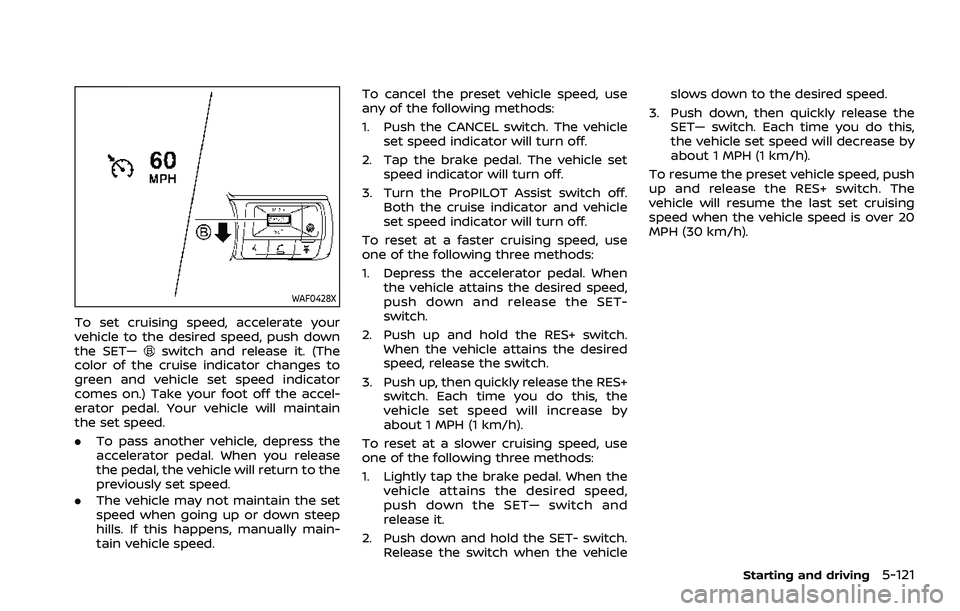
To set cruising speed, accelerate your
vehicle to the desired speed, push down
the SET—
switch and release it. (The
color of the cruise indicator changes to
green and vehicle set speed indicator
comes on.) Take your foot off the accel-
erator pedal. Your vehicle will maintain
the set speed.
. To pass another vehicle, depress the
accelerator pedal. When you release
the pedal, the vehicle will return to the
previously set speed.
. The vehicle may not maintain the set
speed when going up or down steep
hills. If this happens, manually main-
tain vehicle speed. To cancel the preset vehicle speed, use
any of the following methods:
1. Push the CANCEL switch. The vehicle
set speed indicator will turn off.
2. Tap the brake pedal. The vehicle set speed indicator will turn off.
3. Turn the ProPILOT Assist switch off. Both the cruise indicator and vehicle
set speed indicator will turn off.
To reset at a faster cruising speed, use
one of the following three methods:
1. Depress the accelerator pedal. When the vehicle attains the desired speed,
push down and release the SET-
switch.
2. Push up and hold the RES+ switch. When the vehicle attains the desired
speed, release the switch.
3. Push up, then quickly release the RES+ switch. Each time you do this, the
vehicle set speed will increase by
about 1 MPH (1 km/h).
To reset at a slower cruising speed, use
one of the following three methods:
1. Lightly tap the brake pedal. When the vehicle attains the desired speed,
push down the SET— switch and
release it.
2. Push down and hold the SET- switch. Release the switch when the vehicle slows down to the desired speed.
3. Push down, then quickly release the SET— switch. Each time you do this,
the vehicle set speed will decrease by
about 1 MPH (1 km/h).
To resume the preset vehicle speed, push
up and release the RES+ switch. The
vehicle will resume the last set cruising
speed when the vehicle speed is over 20
MPH (30 km/h).
Starting and driving5-121
Page 381 of 556
— If there is interference byother radar sources.
— When your vehicle’s position or movement is changed
quickly or significantly (for
example, lane change, turning
vehicle, abrupt steering, sud-
den acceleration or decelera-
tion).
— When your vehicle or the ve- hicle, pedestrian or cyclist
ahead moves quickly or sig-
nificantly such that the sys-
tem cannot detect and react
in time (for example, pedes-
trian moving quickly toward
the vehicle at close range,
vehicle cutting in, changing
lanes, making a turn, steering
abruptly, sudden acceleration
or deceleration).
— When the vehicle, pedestrian or cyclist is offset from the
vehicle’s forward path.
— If the speed difference be- tween the two vehicles is
small.
— The pedestrian’s profile is par- tially obscured or unidentifi-
able; for example, due to transporting luggage, push-
ing a stroller, wearing bulky
or very loose-fitting clothing
or accessories, or being in a
unique posture (such as rais-
ing hands).
— There is poor contrast of a person to the background,
such as having clothing color
or pattern which is similar to
the background.
— For approximately 15 seconds after starting the engine
— If the vehicle ahead has a unique or unusual shape, ex-
tremely low or high clearance
heights, or unusual cargo
loading or is narrow (for ex-
ample, a motorcycle).
— When the vehicle, pedestrian or cyclist is located near a
traffic sign, a reflective area
(for example, water on road),
or is in a shadow.
— When multiple pedestrians or cyclists are grouped together.
— When the view of the pedes- trian or cyclist is obscured by
a vehicle or other object. — While towing a trailer or other
vehicle.
. The system performance may be
degraded in the following condi-
tions:
— The vehicle is driven on a
slippery road.
— The vehicle is driven on a slope.
— Excessively heavy baggage is loaded in the rear seat or the
cargo area of your vehicle.
. The system is designed to auto-
matically check the sensor (radar
and camera)’s functionality, with-
in certain limitations. The system
may not detect some forms of
obstruction of the sensor area
such as ice, snow or stickers, for
example. In these cases, the sys-
tem may not be able to warn the
driver properly. Be sure that you
check, clean and clear sensor
areas regularly.
. In some road and traffic condi-
tions, the AEB with pedestrian
detection system may unexpect-
edly apply partial braking. When
acceleration is necessary, de-
press the accelerator pedal to
Starting and driving5-127
Page 395 of 556
WARNING
Failure to follow the warnings and
instructions for proper use of the I-
DA system could result in serious
injury or death.
.The I–DA system is only a warning
to inform the driver of a potential
lack of driver attention or drowsi-
ness. It will not steer the vehicle
or prevent loss of control.
. The I–DA system does not detect
and provide an alert of the dri-
ver’s lack of attention or fatigue
in every situation.
. It is the driver’s responsibility to:
— Stay alert.
— Drive safely.
— Keep the vehicle in the travel- ing lane.
— Be in control of the vehicle at all times.
— Avoid driving when tired.
— Avoid distractions (texting, etc). The I–DA system helps alert the driver if
the system detects a lack of attention or
driving fatigue.
The system monitors driving style and
steering behavior over a period of time,
and it detects changes from the normal
pattern. If the system detects that driver
attention is decreasing over a period of
time, the system uses audible and visual
warnings to suggest that the driver take a
break.
WAF0641XExample
I-DA SYSTEM OPERATION
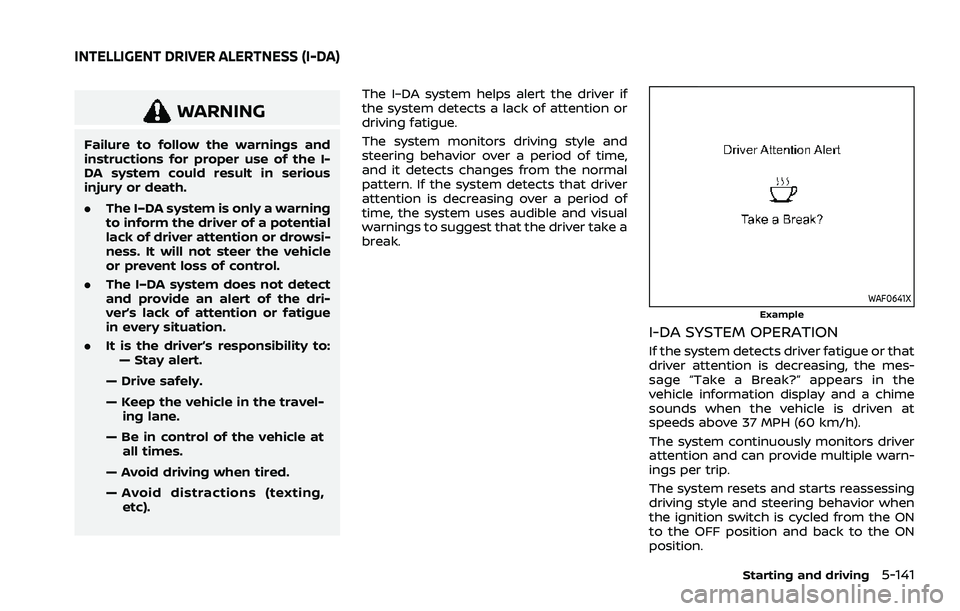
If the system detects driver fatigue or that
driver attention is decreasing, the mes-
sage “Take a Break?” appears in the
vehicle information display and a chime
sounds when the vehicle is driven at
speeds above 37 MPH (60 km/h).
The system continuously monitors driver
attention and can provide multiple warn-
ings per trip.
The system resets and starts reassessing
driving style and steering behavior when
the ignition switch is cycled from the ON
to the OFF position and back to the ON
position.
Starting and driving5-141
INTELLIGENT DRIVER ALERTNESS (I-DA)
Page 401 of 556
narrow tunnel, a parking lot
gate) near the side of the
vehicle.
— There are bumps, protrusions, or manhole covers on the
road surface.
— The vehicle is driving through a draped flag or a curtain.
— The vehicle is driving on a steep hill.
— There is an accumulation of snow or ice behind the vehi-
cle.
— An ultrasonic wave source, such as another vehicle’s so-
nar, is near the vehicle.
. Once the automatic brake control
operates, it does not operate
again if the vehicle approaches
the same obstacle.
. The automatic brake control can
only operate for a short period of
time. Therefore, the driver must
depress the brake pedal.
. In the following situations, the
RAB system may not operate
properly or may not function
sufficiently: — The vehicle is driven in bad
weather (rain, fog, snow, etc.).
— The vehicle is driven on a steep hill.
— The vehicle’s posture is chan- ged (e.g., when driving over a
bump).
— The vehicle is driven on a slippery road.
— The vehicle is turned sharply by turning the steering wheel
fully.
— Snow chains are used.
— Wheels or tires other than NISSAN recommended are
used.
— The brakes are cold at low ambient temperatures or im-
mediately after driving has
started.
— The braking force becomes poor due to wet brakes after
driving through a puddle or
washing the vehicle.
. Turn the RAB system off in the
following conditions to prevent
the occurrence of an unexpected
accident resulting from sudden
system operation: — The vehicle is towed.
— The vehicle is carried on a
flatbed truck.
— The vehicle is on the chassis dynamometer.
— The vehicle drives on an un- even road surface.
— Suspension parts other than those designated as genuine
parts are used. (If the vehicle
height or the vehicle body
inclination is changed, the
system may not detect an
obstacle correctly.)
. Excessive noise (e.g., audio sys-
tem volume, an open vehicle win-
dow) will interfere with the chime
sound, and it may not be heard.
SYSTEM MALFUNCTION
If the RAB system malfunctions, it will be
turned off automatically, the RAB system
OFF warning light will illuminate, and the
“Malfunction See Owner’s Manual” warn-
ing message will appear in the vehicle
information display.
Starting and driving5-147