fuel NISSAN ROGUE 2021 Owner´s Manual
[x] Cancel search | Manufacturer: NISSAN, Model Year: 2021, Model line: ROGUE, Model: NISSAN ROGUE 2021Pages: 556, PDF Size: 2.7 MB
Page 177 of 556

3 Pre-driving checks and adjustments
Keys ........................................................................\
................................. 3-3Intelligent Key ........................................................................\
... 3-3
Doors ........................................................................\
.............................. 3-5
Locking with key .................................................................... 3-5
Locking with inside lock knob ..................................... 3-6
Locking with power door lock switch ................... 3-6
Automatic door locks ......................................................... 3-7
Child safety rear door lock ............................................. 3-7
Intelligent Key system .............................................................. 3-7 Intelligent Key operating range (models with
request switch) ........................................................................\
3-9
Door locks/unlocks precaution (models with
request switch) ..................................................................... 3-10
Intelligent Key operation (models with
request switch) ..................................................................... 3-11
Battery saver system ....................................................... 3-12
Warning lights and audible reminders .............. 3-12
Troubleshooting guide ................................................... 3-13
How to use remote keyless entry function ...... 3-15
Remote engine start (if so equipped) ....................... 3-19
Remote engine start operating range ............... 3-20
Remote starting the engine ....................................... 3-20
Extending engine run time ......................................... 3-20
Canceling a remote engine start ........................... 3-21
Conditions the remote engine start will
not work ........................................................................\
............. 3-21 Hood ........................................................................\
............................ 3-22
Liftgate ........................................................................\
...................... 3-23
Operating manual liftgate (if
so equipped) ........................................................................\
. 3-23
Operating power liftgate (if so equipped) ...... 3-24
Motion-activated liftgate (if
so equipped) ........................................................................\
. 3-26
Garage mode system (if so equipped) ............ 3-27
Auto closure (if so equipped) .................................. 3-28
liftgate release lever ....................................................... 3-28
Fuel-filler door ........................................................................\
..... 3-29 Opening the fuel-filler door ...................................... 3-29
How to refuel ....................................................................... 3-29
When refueling from a portable
fuel container ...................................................................... 3-30
Tilt/telescopic steering ........................................................ 3-31
Tilt and telescopic operation .................................. 3-31
Sun visors ........................................................................\
................ 3-32
Rear sunshade (if so equipped) .................................... 3-32
Mirrors ........................................................................\
...................... 3-33
Inside mirror ........................................................................\
. 3-33
Outside mirrors .................................................................. 3-34
Vanity mirror ........................................................................\
3-36
Memory seat (if so equipped) ......................................... 3-36 Memory storage function .......................................... 3-36
Page 205 of 556
CAUTION
.Avoid applying direct water pres-
sure, such as high-pressured
sprayer, on or around the fuel-
filler door.
. Be sure to close the fuel-filler
door before using an automatic
car wash or a high-pressured car
wash.
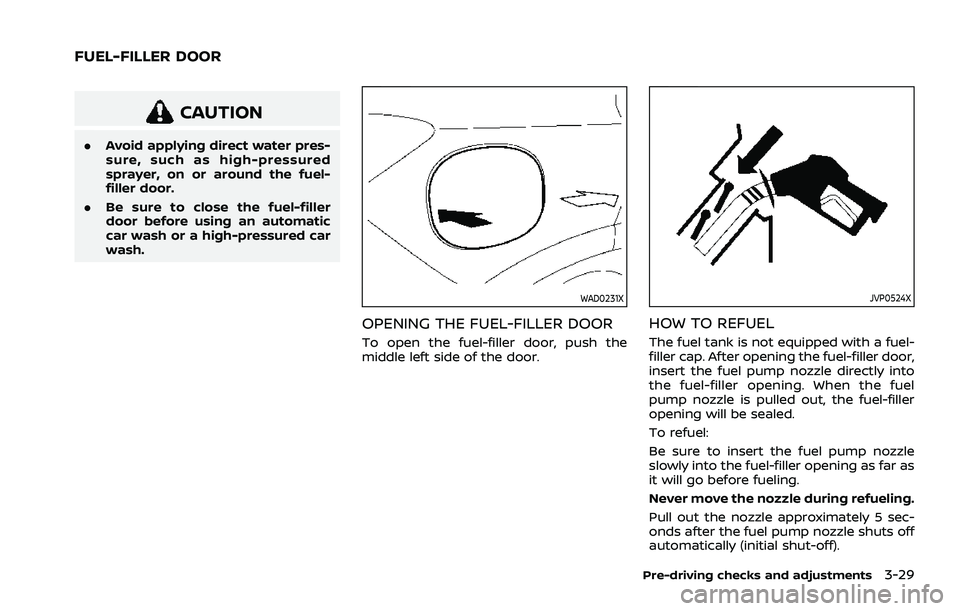
WAD0231X
OPENING THE FUEL-FILLER DOOR
To open the fuel-filler door, push the
middle left side of the door.
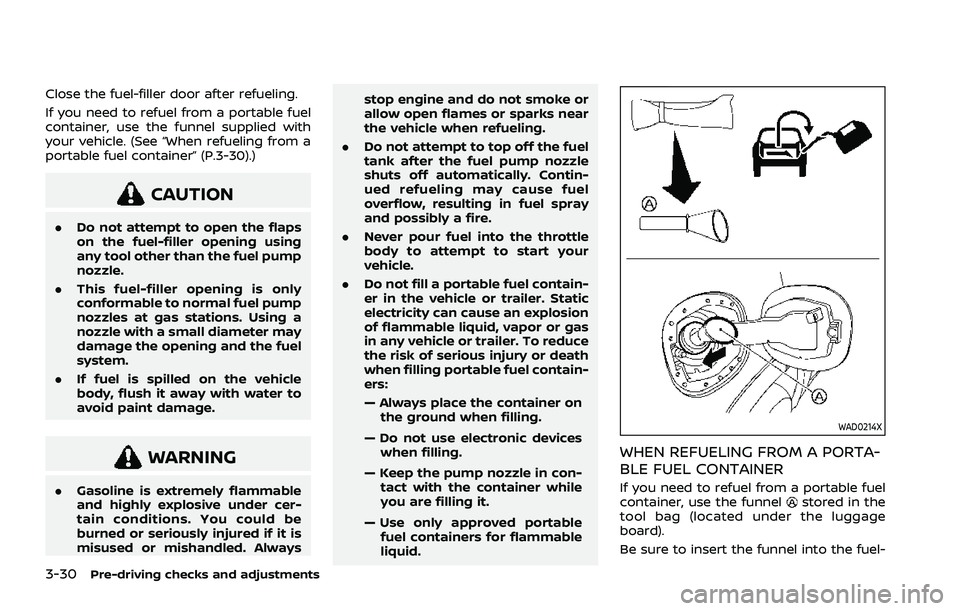
JVP0524X
HOW TO REFUEL
The fuel tank is not equipped with a fuel-
filler cap. After opening the fuel-filler door,
insert the fuel pump nozzle directly into
the fuel-filler opening. When the fuel
pump nozzle is pulled out, the fuel-filler
opening will be sealed.
To refuel:
Be sure to insert the fuel pump nozzle
slowly into the fuel-filler opening as far as
it will go before fueling.
Never move the nozzle during refueling.
Pull out the nozzle approximately 5 sec-
onds after the fuel pump nozzle shuts off
automatically (initial shut-off).
Pre-driving checks and adjustments3-29
FUEL-FILLER DOOR
Page 206 of 556
3-30Pre-driving checks and adjustments
Close the fuel-filler door after refueling.
If you need to refuel from a portable fuel
container, use the funnel supplied with
your vehicle. (See “When refueling from a
portable fuel container” (P.3-30).)
CAUTION
.Do not attempt to open the flaps
on the fuel-filler opening using
any tool other than the fuel pump
nozzle.
. This fuel-filler opening is only
conformable to normal fuel pump
nozzles at gas stations. Using a
nozzle with a small diameter may
damage the opening and the fuel
system.
. If fuel is spilled on the vehicle
body, flush it away with water to
avoid paint damage.
WARNING
.Gasoline is extremely flammable
and highly explosive under cer-
tain conditions. You could be
burned or seriously injured if it is
misused or mishandled. Always stop engine and do not smoke or
allow open flames or sparks near
the vehicle when refueling.
. Do not attempt to top off the fuel
tank after the fuel pump nozzle
shuts off automatically. Contin-
ued refueling may cause fuel
overflow, resulting in fuel spray
and possibly a fire.
. Never pour fuel into the throttle
body to attempt to start your
vehicle.
. Do not fill a portable fuel contain-
er in the vehicle or trailer. Static
electricity can cause an explosion
of flammable liquid, vapor or gas
in any vehicle or trailer. To reduce
the risk of serious injury or death
when filling portable fuel contain-
ers:
— Always place the container on
the ground when filling.
— Do not use electronic devices when filling.
— Keep the pump nozzle in con- tact with the container while
you are filling it.
— Use only approved portable fuel containers for flammable
liquid.
WAD0214X
WHEN REFUELING FROM A PORTA-
BLE FUEL CONTAINER
If you need to refuel from a portable fuel
container, use the funnelstored in the
tool bag (located under the luggage
board).
Be sure to insert the funnel into the fuel-
Page 207 of 556
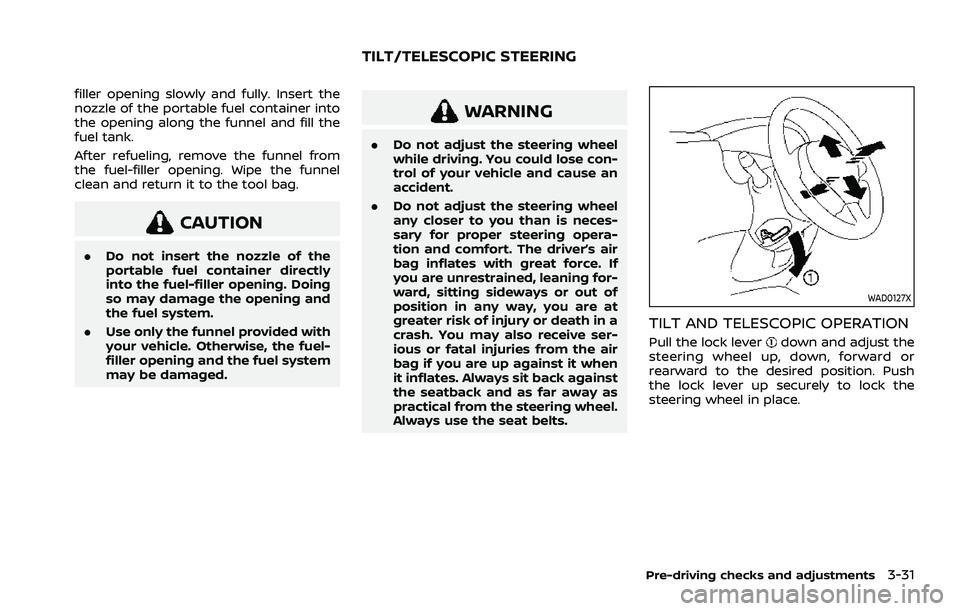
filler opening slowly and fully. Insert the
nozzle of the portable fuel container into
the opening along the funnel and fill the
fuel tank.
After refueling, remove the funnel from
the fuel-filler opening. Wipe the funnel
clean and return it to the tool bag.
CAUTION
.Do not insert the nozzle of the
portable fuel container directly
into the fuel-filler opening. Doing
so may damage the opening and
the fuel system.
. Use only the funnel provided with
your vehicle. Otherwise, the fuel-
filler opening and the fuel system
may be damaged.
WARNING
.Do not adjust the steering wheel
while driving. You could lose con-
trol of your vehicle and cause an
accident.
. Do not adjust the steering wheel
any closer to you than is neces-
sary for proper steering opera-
tion and comfort. The driver’s air
bag inflates with great force. If
you are unrestrained, leaning for-
ward, sitting sideways or out of
position in any way, you are at
greater risk of injury or death in a
crash. You may also receive ser-
ious or fatal injuries from the air
bag if you are up against it when
it inflates. Always sit back against
the seatback and as far away as
practical from the steering wheel.
Always use the seat belts.
WAD0127X
TILT AND TELESCOPIC OPERATION
Pull the lock leverdown and adjust the
steering wheel up, down, forward or
rearward to the desired position. Push
the lock lever up securely to lock the
steering wheel in place.
Pre-driving checks and adjustments3-31
TILT/TELESCOPIC STEERING
Page 222 of 556
4-8Monitor, heater, air conditioner, audio and phone systems
.Objects viewed in the RearView
Monitor differ from actual dis-
tance because a wide-angle lens
is used.
. Objects in the RearView Monitor
will appear visually opposite
compared to when viewed in the
rearview and outside mirrors.
. Use the displayed lines as a re-
ference. The lines are highly af-
fected by the number of
occupants, fuel level, vehicle po-
sition, road conditions and road
grade.
. Make sure that the liftgate is
securely closed when backing up.
. Do not put anything on the rear-
view camera. The rearview cam-
era is installed above the license
plate.
. When washing the vehicle with
high-pressure water, be sure not
to spray it around the camera.
Otherwise, water may enter the
camera unit causing water con-
densation on the lens, a malfunc-
tion, fire or an electric shock.
. Do not strike the camera. It is a
precision instrument. Otherwise,
it may malfunction or cause da-
mage resulting in a fire or an electric shock.
The following are operating limitations
and do not represent a system malfunc-
tion:
. When the temperature is extremely
high or low, the screen may not clearly
display objects.
. When strong light directly shines on
the camera, objects may not be dis-
played clearly.
. Vertical lines may be seen in objects
on the screen. This is due to strong
reflected light from the bumper.
. The screen may flicker under fluores-
cent light.
. The colors of objects on the RearView
Monitor may differ somewhat from
the actual color of objects.
. Objects on the monitor may not be
clear in a dark environment.
. There may be a delay when switching
between views.
. If dirt, rain or snow accumulates on
the camera, the RearView Monitor
may not display objects clearly. Clean
the camera.
. Do not use wax on the camera lens.
Wipe off any wax with a clean cloth
dampened with a diluted mild clean-
ing agent, then wipe with a dry cloth.
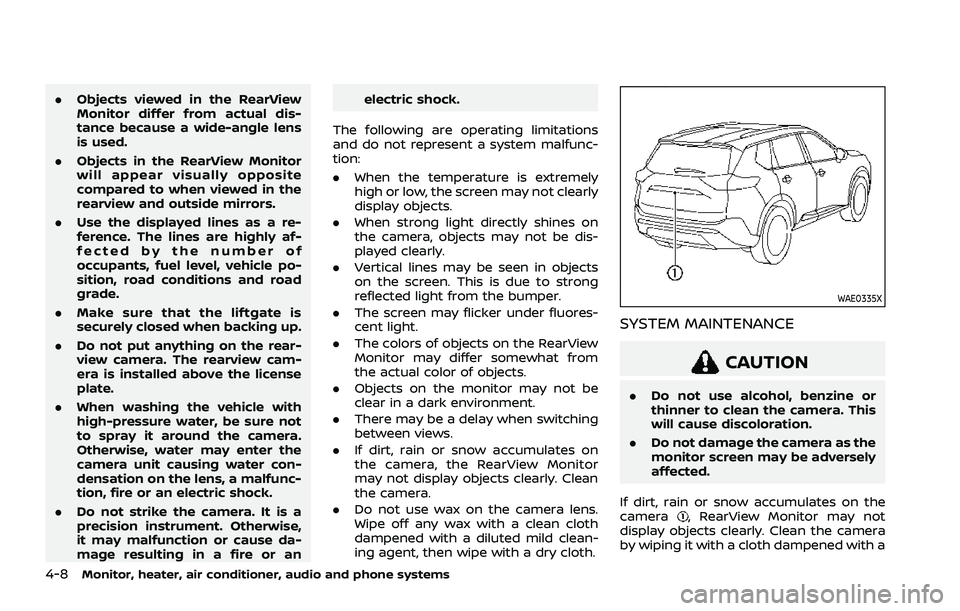
WAE0335X
SYSTEM MAINTENANCE
CAUTION
.Do not use alcohol, benzine or
thinner to clean the camera. This
will cause discoloration.
. Do not damage the camera as the
monitor screen may be adversely
affected.
If dirt, rain or snow accumulates on the
camera
, RearView Monitor may not
display objects clearly. Clean the camera
by wiping it with a cloth dampened with a
Page 225 of 556
after the CAMERA button has been
pushed with the shift lever in a position
other than the R (Reverse) position.
Available views
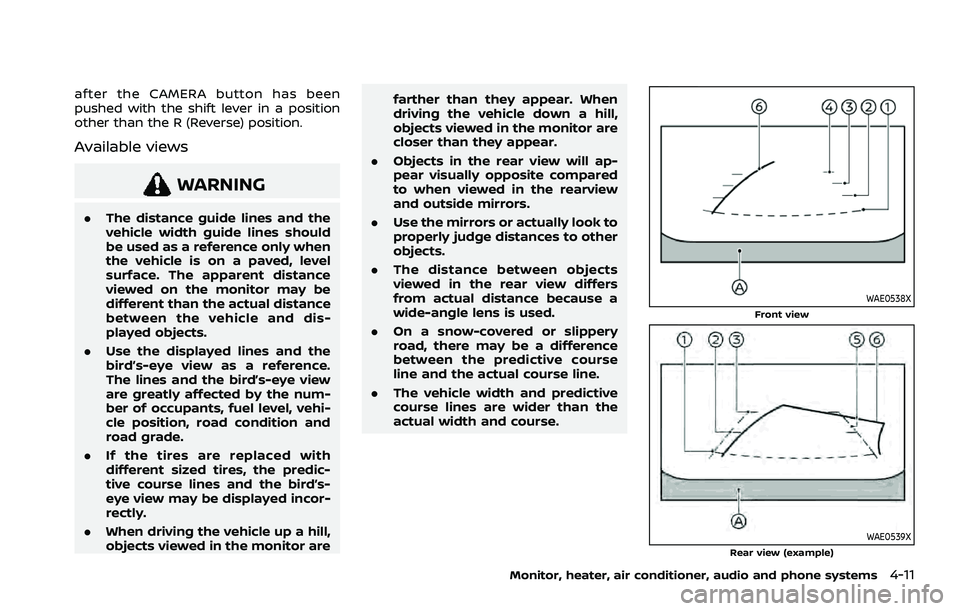
WARNING
.The distance guide lines and the
vehicle width guide lines should
be used as a reference only when
the vehicle is on a paved, level
surface. The apparent distance
viewed on the monitor may be
different than the actual distance
between the vehicle and dis-
played objects.
. Use the displayed lines and the
bird’s-eye view as a reference.
The lines and the bird’s-eye view
are greatly affected by the num-
ber of occupants, fuel level, vehi-
cle position, road condition and
road grade.
. If the tires are replaced with
different sized tires, the predic-
tive course lines and the bird’s-
eye view may be displayed incor-
rectly.
. When driving the vehicle up a hill,
objects viewed in the monitor are farther than they appear. When
driving the vehicle down a hill,
objects viewed in the monitor are
closer than they appear.
. Objects in the rear view will ap-
pear visually opposite compared
to when viewed in the rearview
and outside mirrors.
. Use the mirrors or actually look to
properly judge distances to other
objects.
. The distance between objects
viewed in the rear view differs
from actual distance because a
wide-angle lens is used.
. On a snow-covered or slippery
road, there may be a difference
between the predictive course
line and the actual course line.
. The vehicle width and predictive
course lines are wider than the
actual width and course.
WAE0538XFront view
WAE0539XRear view (example)
Monitor, heater, air conditioner, audio and phone systems4-11
Page 257 of 556
Turning the AEB with pedestrian detection
system ON/OFF ................................................................ 5-125
AEB with pedestrian detection
system limitations .......................................................... 5-126
System temporarily unavailable ......................... 5-129
System malfunction ...................................................... 5-130
System maintenance ................................................... 5-130
Intelligent Forward Collision
Warning (I-FCW) ....................................................................... 5-132 I-FCW system operation ............................................ 5-134
Turning the I-FCW system ON/OFF ................. 5-135
I-FCW system limitations .......................................... 5-137
System temporarily unavailable ......................... 5-139
System malfunction ...................................................... 5-139
System maintenance ................................................... 5-139
Intelligent Driver Alertness (I-DA) .............................. 5-141 I-DA system operation ................................................ 5-141
How to enable/disable the I-DA system ...... 5-142
I-DA system limitations .............................................. 5-142
System malfunction ...................................................... 5-143
Rear Automatic Braking (RAB) .................................... 5-143
RAB system operation ................................................ 5-145
Turning the RAB system ON/OFF ...................... 5-145
RAB system limitations .............................................. 5-146
System malfunction ...................................................... 5-147
System maintenance ................................................... 5-148
Break-in schedule ................................................................. 5-149
Fuel Efficient Driving Tips ................................................ 5-149
Increasing fuel economy ................................................. 5-150 Intelligent 4x4 (if so equipped) .................................. 5-151
Parking/parking on hills .................................................. 5-153
Electric power steering .................................................... 5-154
Brake system ........................................................................\
... 5-155
Braking precautions ................................................... 5-155
Brake assist ........................................................................\
....... 5-156 Brake assist ....................................................................... 5-156
Anti-lock Braking System (ABS) ........................ 5-156
Vehicle Dynamic Control (VDC) system .............. 5-157 How to turn off the VDC system ..................... 5-158
Brake Force Distribution ......................................... 5-159
Chassis control ....................................................................... 5-160 Intelligent Trace Control ......................................... 5-160
Active Ride Control ..................................................... 5-160
Hill Start Assist system ..................................................... 5-161
Sonar system (if so equipped) ................................... 5-162 System operation ......................................................... 5-163
How to enable/disable the
sonar system ................................................................... 5-165
Sonar system limitations ....................................... 5-166
System temporarily unavailable ....................... 5-167
System maintenance ................................................ 5-167
Rear Sonar System (RSS) (if so equipped) ........ 5-168 System operation ......................................................... 5-168
How to enable/disable the RSS ........................ 5-170
RSS limitations ................................................................ 5-170
System temporarily unavailable ....................... 5-171
System maintenance ................................................ 5-172
Page 260 of 556
5-6Starting and driving
THREE-WAY CATALYST
The three-way catalyst is an emission
control device installed in the exhaust
system. Exhaust gases in the three-way
catalyst are burned at high temperatures
to help reduce pollutants.
WARNING
.The exhaust gas and the exhaust
system are very hot. Keep people,
animals and flammable materials
away from the exhaust system
components.
. Do not stop or park the vehicle
over flammable materials such as
dry grass, wastepaper or rags.
They may ignite and cause a fire.
CAUTION
.Do not use leaded gasoline. De-
posits from leaded gasoline will
seriously reduce the three-way
catalyst’s ability to help reduce
exhaust pollutants.
. Keep your engine tuned up. Mal-
functions in the ignition, fuel in-
jection, or electrical systems can cause overrich fuel flow into the
three-way catalyst, causing it to
overheat. Do not keep driving if
the engine misfires, or if notice-
able loss of performance or other
unusual operating conditions are
detected. Have the vehicle in-
spected. It is recommended you
visit a NISSAN dealer for this
service.
. Avoid driving with an extremely
low fuel level. Running out of fuel
could cause the engine to misfire,
damaging the three-way catalyst.
. Do not race the engine while
warming it up.
. Do not push or tow your vehicle
to start the engine.
TIRE PRESSURE MONITORING SYS-
TEM (TPMS)
Each tire, including the spare, should be
checked monthly when cold and inflated
to the inflation pressure recommended
by the vehicle manufacturer on the ve-
hicle placard or tire inflation pressure
label. (If your vehicle has tires of a
different size than the size indicated on
the vehicle placard or tire inflation pres-
sure label, you should determine the
proper tire inflation pressure for those tires.)
As an added safety feature, your vehicle
has been equipped with a Tire Pressure
Monitoring System (TPMS) that illumi-
nates a low tire pressure telltale when
one or more of your tires is significantly
under-inflated. Accordingly, when the low
tire pressure telltale illuminates, you
should stop and check your tires as soon
as possible, and inflate them to the
proper pressure. Driving on a significantly
under-inflated tire causes the tire to
overheat and can lead to tire failure.
Under-inflation also reduces fuel effi-
ciency and tire tread life, and may affect
the vehicle’s handling and stopping abil-
ity.
Please note that the TPMS is not a
substitute for proper tire maintenance,
and it is the driver’s responsibility to
maintain correct tire pressure, even if
under-inflation has not reached the level
to trigger illumination of the TPMS low
tire pressure telltale.
Your vehicle has also been equipped with
a TPMS malfunction indicator to indicate
when the system is not operating prop-
erly. The TPMS malfunction indicator is
combined with the low tire pressure tell-
tale. When the system detects a malfunc-
tion, the telltale will flash for
approximately one minute and then re-
Page 271 of 556
onds after the chime sounds. The
engine will start.
After step 3 is performed, when the
ignition switch is pushed without depres-
sing the brake pedal, the ignition switch
position will change to ON.
NOTE:
. When the ignition switch is pushed
to the ON position or the engine is
started by the above procedures, the
“Key Battery Low” warning appears
(on the vehicle information display)
even if the Intelligent Key is inside
the vehicle. This is not a malfunction.
To turn off the warning, touch the
ignition switch with the Intelligent
Key again.
. If the “Key Battery Low” warning
appears, replace the battery as soon
as possible. (See “Intelligent Key
battery replacement” (P.8-20).) .
Make sure the area around the vehicle
is clear.
. Check fluid levels such as engine oil,
coolant, brake fluid, and window
washer fluid as frequently as possible,
or at least whenever you refuel.
. Check that all windows and lights are
clean.
. Visually inspect tires for their appear-
ance and condition. Also check tires
for proper inflation.
. Lock all doors.
. Position seat and adjust head re-
straints/headrests.
. Adjust inside and outside mirrors.
. Fasten seat belts and ask all passen-
gers to do likewise.
. Check the operation of warning lights
when the ignition switch is placed in
the ON position. (See “Warning lights,
indicator lights and audible remin-
ders” (P.2-13).) 1. Apply the parking brake.
2. Confirm that the vehicle is in the P
(Park) position.
The Intelligent Key must be carried
when operating the ignition switch.
3. Push the ignition switch to the ON position. Depress the brake pedal and
push the ignition switch to start the
engine.
To start the engine immediately, push
and release the ignition switch while
depressing the brake pedal with the
ignition switch in any position.
.If the engine is very hard to start inextremely cold weather or when
restarting, depress the accelerator
pedal a little (approximately 1/3 to
the floor) and while holding, crank
the engine. Release the accelerator
pedal when the engine starts.
.If the engine is very hard to startbecause it is flooded, depress the
accelerator pedal all the way to the
floor and hold it. Push the ignition
switch to the ON position to start
cranking the engine. After 5 or 6
seconds, stop cranking by pushing
the ignition switch to OFF. After
cranking the engine, release the
accelerator pedal. Crank the engine
with your foot off the accelerator
pedal by depressing the brake
Starting and driving5-17
BEFORE STARTING THE ENGINE STARTING THE ENGINE
Page 278 of 556
5-24Starting and driving
1M(1st):
Use this position when climbing steep
hills slowly or driving slowly through deep
snow, or for maximum engine braking on
steep downhill grades.
. Remember not to drive at high speeds
for extended periods of time in lower
than 8th gear. This reduces fuel econ-
omy.
. Pulling the same paddle shifter twice
will shift the ranges in succession.
However, if this motion is rapidly done,
the second shifting may not be com-
pleted properly.
. In the manual shift mode, the trans-
mission may not shift to the se-
lected gear. This helps maintain
driving performance and reduces
the chance of vehicle damage or
loss of control.
. When this situation occurs, the Con-
tinuously Variable Transmission
(CVT) position indicator will blink
and the chime will sound.
. In the manual shift mode, the trans-
mission may shift up automatically
to a higher range than selected if the
engine speed is too high. When the
vehicle speed decreases, the trans-
mission automatically shifts down
and shifts to 1st gear before the
vehicle comes to a stop. .
CVT operation is limited to automatic
drive mode when CVT fluid tempera-
ture is extremely low even if manual
shift mode is selected. This is not a
malfunction. When CVT fluid warms
up, manual shift mode can be se-
lected.
. When the CVT fluid temperature is
high, the shift range may upshift in
lower rpm than usual. This is not a
malfunction.
Accelerator downshift - in D (Drive)
position -
For passing or climbing hills, depress the
accelerator pedal to the floor. This shifts
the transmission down into a lower gear,
depending on the vehicle speed.
High fluid temperature protection
mode
This transmission has a high fluid tem-
perature protection mode. If the fluid
temperature becomes too high, (for ex-
ample, when climbing steep grades in
high temperatures with heavy loads, such
as when towing a trailer), engine power
and, under some conditions, vehicle
speed will be decreased automatically to
reduce the chance of transmission da-
mage. Vehicle speed can be controlled
with the accelerator pedal, but the engine and vehicle speed may be limited.
Fail-safe
When the fail-safe operation occurs, the
Continuously Variable Transmission will
not be shifted into the selected driving
position.
If the vehicle is driven under extreme
conditions, such as excessive wheel
spinning and subsequent hard braking,
the fail-safe system may be activated.
The Malfunction Indicator Light (MIL)
may come on to indicate the fail-safe
mode is activated. For additional infor-
mation, refer to “Malfunction Indicator
Light (MIL)” (P.2-19). This will occur even
if all electrical circuits are functioning
properly. In this case, place the ignition
switch in the OFF position and wait for
10 seconds. Then place the ignition
switch back in the ON position. The
vehicle should return to its normal
operating condition. (The MIL may be
illuminated even when the vehicle has
returned to its normal operating condi-
tion.) If it does not return to its normal
operating condition, have the transmis-
sion checked and repaired, if necessary,
by a NISSAN dealer.