fuel NISSAN ROGUE 2021 Owner´s Manual
[x] Cancel search | Manufacturer: NISSAN, Model Year: 2021, Model line: ROGUE, Model: NISSAN ROGUE 2021Pages: 556, PDF Size: 2.7 MB
Page 285 of 556
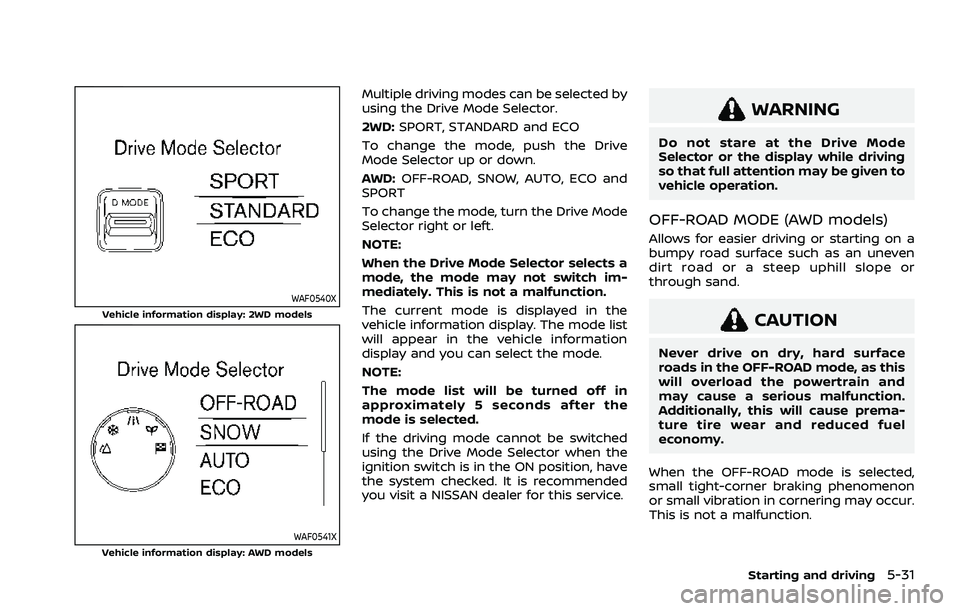
WAF0540XVehicle information display: 2WD models
WAF0541XVehicle information display: AWD models
Multiple driving modes can be selected by
using the Drive Mode Selector.
2WD:SPORT, STANDARD and ECO
To change the mode, push the Drive
Mode Selector up or down.
AWD: OFF-ROAD, SNOW, AUTO, ECO and
SPORT
To change the mode, turn the Drive Mode
Selector right or left.
NOTE:
When the Drive Mode Selector selects a
mode, the mode may not switch im-
mediately. This is not a malfunction.
The current mode is displayed in the
vehicle information display. The mode list
will appear in the vehicle information
display and you can select the mode.
NOTE:
The mode list will be turned off in
approximately 5 seconds after the
mode is selected.
If the driving mode cannot be switched
using the Drive Mode Selector when the
ignition switch is in the ON position, have
the system checked. It is recommended
you visit a NISSAN dealer for this service.
WARNING
Do not stare at the Drive Mode
Selector or the display while driving
so that full attention may be given to
vehicle operation.
OFF-ROAD MODE (AWD models)
Allows for easier driving or starting on a
bumpy road surface such as an uneven
dirt road or a steep uphill slope or
through sand.
CAUTION
Never drive on dry, hard surface
roads in the OFF-ROAD mode, as this
will overload the powertrain and
may cause a serious malfunction.
Additionally, this will cause prema-
ture tire wear and reduced fuel
economy.
When the OFF-ROAD mode is selected,
small tight-corner braking phenomenon
or small vibration in cornering may occur.
This is not a malfunction.
Starting and driving5-31
Page 286 of 556
5-32Starting and driving
SNOW MODE (AWD models)
This mode makes it easier to start and
run from snowy roads and frozen roads.
CAUTION
Never drive on dry, hard surface
roads in the SNOW mode, as this will
overload the powertrain and may
cause a serious malfunction. Addi-
tionally, this will cause premature
tire wear and reduced fuel economy.
When the SNOW mode is selected, small
vibration in cornering may occur. This is
not a malfunction.
STANDARD MODE (2WD models)/
AUTO MODE (AWD models)
This is the standard mode that is most
suitable for normal driving.
This mode will be selected first each time
the ignition switch is placed in the ON
position.
ECO MODE
Assists the driver’s ECO-driving. The en-
gine and transmission points are adjusted
for improved fuel economy, providing
such a driving features as smooth start-
ing or constant cruising.
NOTE:
Selecting the ECO mode will not neces-
sarily improve fuel economy as many
driving factors influence its effective-
ness.
Operation
Select the ECO mode using the Drive
Mode Selector. The ECO indicator illumi-
nates.
When the accelerator pedal is depressed
within the range of economy drive, the
ECO indicator illuminates in green. When
the accelerator pedal is depressed above
the range of economy drive, the ECO
indicator turns off.
The ECO indicator will not illuminate in
the following cases:
. When the shift lever is in the R
(Reverse) position.
. When the vehicle speed is below 2
MPH (3.2 km/h) or over 90 MPH (144
km/h). .
When the cruise control (if so
equipped) or the Intelligent Cruise
Control (ICC) system (if so equipped)
is operated.
ECO Mode Customize
The “ECO Mode Customize” is a function
that can change the priority from the
Cruise Control (if so equipped) or the
Intelligent Cruise Control (ICC) function
to fuel efficiency improvements. It can be
set when the ECO mode is selected. To
activate or deactivate this function, see
“ECO Mode Setting” (P.2-26).
.Cruise Control
When the setting is ON, the fuel
efficiency while cruising will be im-
proved by lowering the acceleration
target from normal (setting OFF)
mode.
NOTE:
When the vehicle speed is reduced (for
example, when the vehicle is driven on
an uphill road from a flat road), it will
take more time to return to the pre-
viously set speed than normal mode.
Page 287 of 556
Tire Pres ECO advice
The “Tire Pres ECO advice” is a function to
show an ECO advice message in the
vehicle information display when low tire
pressure is detected. To activate or deac-
tivate this function, see “ECO Mode
Setting” (P.2-26).
When the setting is ON, the ECO Drive
Report display shows "See Tire Pres-
sures". You can switch the display to the
Tire Pressures display by pushing the
button on the steering wheel.
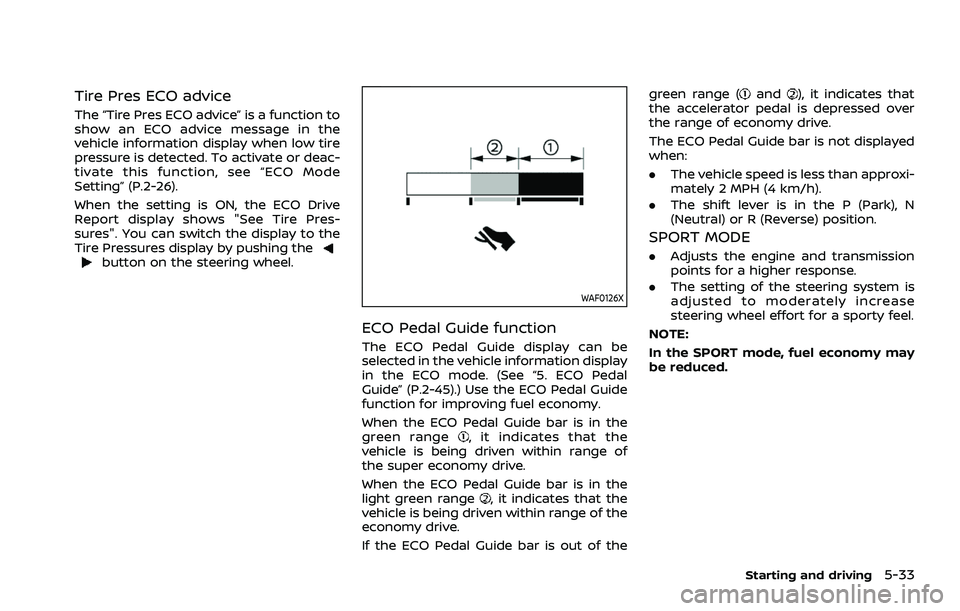
WAF0126X
ECO Pedal Guide function
The ECO Pedal Guide display can be
selected in the vehicle information display
in the ECO mode. (See “5. ECO Pedal
Guide” (P.2-45).) Use the ECO Pedal Guide
function for improving fuel economy.
When the ECO Pedal Guide bar is in the
green range
, it indicates that the
vehicle is being driven within range of
the super economy drive.
When the ECO Pedal Guide bar is in the
light green range
, it indicates that the
vehicle is being driven within range of the
economy drive.
If the ECO Pedal Guide bar is out of the green range (
and), it indicates that
the accelerator pedal is depressed over
the range of economy drive.
The ECO Pedal Guide bar is not displayed
when:
. The vehicle speed is less than approxi-
mately 2 MPH (4 km/h).
. The shift lever is in the P (Park), N
(Neutral) or R (Reverse) position.
SPORT MODE
.Adjusts the engine and transmission
points for a higher response.
. The setting of the steering system is
adjusted to moderately increase
steering wheel effort for a sporty feel.
NOTE:
In the SPORT mode, fuel economy may
be reduced.
Starting and driving5-33
Page 403 of 556
.When washing the vehicle using a
high-pressure washer, do not apply
direct washer pressure on the sonar
sensors. This may cause a malfunction
of the sonar sensors.
CAUTION
During the first 1,200 miles (2,000
km), follow these recommendations
to obtain maximum engine perfor-
mance and ensure the future relia-
bility and economy of your new
vehicle. Failure to follow these re-
commendations may result in shor-
tened engine life and reduced engine
performance.
. Avoid driving for long periods at con-
stant speed, either fast or slow. Do not
run the engine over 4,000 rpm.
. Do not accelerate at full throttle in any
gear.
. Avoid quick starts.
. Avoid hard braking as much as possi-
ble.
. Do not tow a trailer for the first 500
miles (800 km). Your engine, axle or
other parts could be damaged. Follow these easy-to-use Fuel Efficient
Driving Tips to help you achieve the most
fuel economy from your vehicle.
1. Use smooth accelerator and brake
pedal application.
.Avoid rapid starts and stops..Use smooth, gentle accelerator andbrake application whenever possi-
ble.
.Maintain constant speed whilecommuting and coast whenever
possible.
2. Maintain constant speed.
.Look ahead to try and anticipate and minimize stops.
.Synchronizing your speed with traf-fic lights allows you to reduce your
number of stops.
.Maintaining a steady speed canminimize red light stops and im-
prove fuel efficiency.
3. Use air conditioning (A/C) at higher vehicle speeds.
.Below 40 MPH (64 km/h), it is moreefficient to open windows to cool
the vehicle due to reduced engine
load.
.Above 40 MPH (64 km/h), it is more
efficient to use A/C to cool the
vehicle due to increased aerody-
namic drag.
Starting and driving5-149
BREAK-IN SCHEDULE FUEL EFFICIENT DRIVING TIPS
Page 404 of 556
5-150Starting and driving
.Recirculating the cool air in thecabin when the A/C is on reduces
cooling load.
4. Drive at economical speeds and dis- tances.
.Observing the speed limit and notexceeding 60 MPH (97 km/h)
(where legally allowed) can improve
fuel efficiency due to reduced aero-
dynamic drag.
.Maintaining a safe following dis-tance behind other vehicles re-
duces unnecessary braking.
.Safely monitoring traffic to antici- pate changes in speed permits
reduced braking and smooth accel-
eration changes.
.Select a gear range suitable to roadconditions.
5. Use cruise control.
.Using cruise control during highway driving helps maintain a steady
speed.
.Cruise control is particularly effec-tive in providing fuel savings when
driving on flat terrains.
6. Plan for the shortest route.
.Utilize a map or navigation system to determine the best route to save
time. 7. Avoid idling.
.Shutting off your engine when safe
for stops exceeding 30-60 seconds
saves fuel and reduces emissions.
8. Buy an automated pass for toll roads.
.Automated passes permit drivers to use special lanes to maintain cruis-
ing speed through the toll and
avoid stopping and starting.
9. Winter warm up.
.Limit idling time to minimize impact to fuel economy.
.Vehicles typically need no morethan 30 seconds of idling at start-
up to effectively circulate the en-
gine oil before driving.
.Your vehicle will reach its ideal
operating temperature more
quickly while driving versus idling.
10. Keeping your vehicle cool.
.Park your vehicle in a covered parking area or in the shade when-
ever possible.
.When entering a hot vehicle, open- ing the windows will help to reduce
the inside temperature faster, re-
sulting in reduced demand on your
A/C system. .
Keep your engine tuned up.
. Follow the recommended scheduled
maintenance.
. Keep the tires inflated to the correct
pressure. Low tire pressure increases
tire wear and lowers fuel economy.
. Keep the wheels in correct alignment.
Improper alignment increases tire
wear and lowers fuel economy.
. Use the recommended viscosity en-
gine oil. (See “Engine oil and oil filter
recommendation” (P.10-6).)
INCREASING FUEL ECONOMY
Page 454 of 556
7-8Appearance and care
Temperature
A temperature increase will accelerate
the rate of corrosion to those parts which
are not well ventilated.
Air pollution
Industrial pollution, the presence of salt in
the air in coastal areas, or heavy road salt
use will accelerate the corrosion process.
Road salt will also accelerate the disin-
tegration of paint surfaces.
TO PROTECT YOUR VEHICLE FROM
CORROSION
.Wash and wax your vehicle often to
keep the vehicle clean.
. Always check for minor damage to the
paint and repair it as soon as possible.
. Keep drain holes at the bottom of the
doors open to avoid water accumula-
tion.
. Check the underbody for accumula-
tion of sand, dirt or salt. If present,
wash with water as soon as possible.
CAUTION
.NEVER remove dirt, sand or other
debris from the passenger com-
partment by washing it out with a
hose. Remove dirt with a vacuum cleaner.
. Never allow water or other liquids
to come in contact with electronic
components inside the vehicle as
this may damage them.
Chemicals used for road surface deicing
are extremely corrosive. They accelerate
corrosion and deterioration of underbody
components such as the exhaust system,
fuel and brake lines, brake cables, floor
pan and fenders.
In winter, the underbody must be
cleaned periodically.
For additional protection against rust and
corrosion, which may be required in some
areas, it is recommended you consult a
NISSAN dealer.
Page 456 of 556
8-2Do-it-yourself
When performing any inspection or main-
tenance work on your vehicle, always
take care to prevent serious accidental
injury to yourself or damage to the
vehicle. The following are general precau-
tions which should be closely observed.
WARNING
.Park the vehicle on a level sur-
face, apply the parking brake
securely and block the wheels to
prevent the vehicle from moving.
Push the park button to shift to
the P (Park) position.
. Be sure the ignition switch is in
the OFF position when perform-
ing any parts replacement or
repairs.
. If you must work with the engine
running, keep your hands, cloth-
ing, hair and tools away from
moving fans, belts and any other
moving parts.
. It is advisable to secure or re-
move any loose clothing and
remove any jewelry, such as
rings, watches, etc. before work-
ing on your vehicle. .
Always wear eye protection
whenever you work on your ve-
hicle.
. If you must run the engine in an
enclosed space such as a garage,
be sure there is proper ventilation
for exhaust gases to escape.
. Never get under the vehicle while
it is supported only by a jack. If it
is necessary to work under the
vehicle, support it with safety
stands.
. Because the fuel lines are under
high pressure even when the
engine is off, it is recommended
you visit a NISSAN dealer for
service of the fuel filter or fuel
lines.
. Keep smoking materials, flame
and sparks away from fuel and
the battery.
. On gasoline engine models with
the Multiport Fuel Injection (MFI)
system, the fuel filter and fuel
lines should be serviced because
the fuel lines are under high
pressure even when the engine
is turned off. It is recommended
that you visit a NISSAN dealer for
this service. .
Your vehicle is equipped with an
automatic engine cooling fan. It
may come on at any time without
warning, even if the ignition
switch is in the OFF position and
the engine is not running. To
avoid injury, always disconnect
the negative battery cable before
working near the fan.
CAUTION
.Do not work under the hood while
the engine is hot. Turn the engine
off and wait until it cools down.
. Avoid direct contact with used
engine oil and coolant. Impro-
perly disposed engine oil, and
engine coolant and/or other ve-
hicle fluids can damage the en-
vironment. Always conform to
local regulations for disposal of
vehicle fluid.
. Never leave the engine or the CVT
related component harnesses
disconnected while the ignition
switch is in the ON position.
. Never connect or disconnect the
battery or any transistorized
component while the ignition
MAINTENANCE PRECAUTIONS
Page 469 of 556
Always replace spark plugs with recom-
mended or equivalent ones.
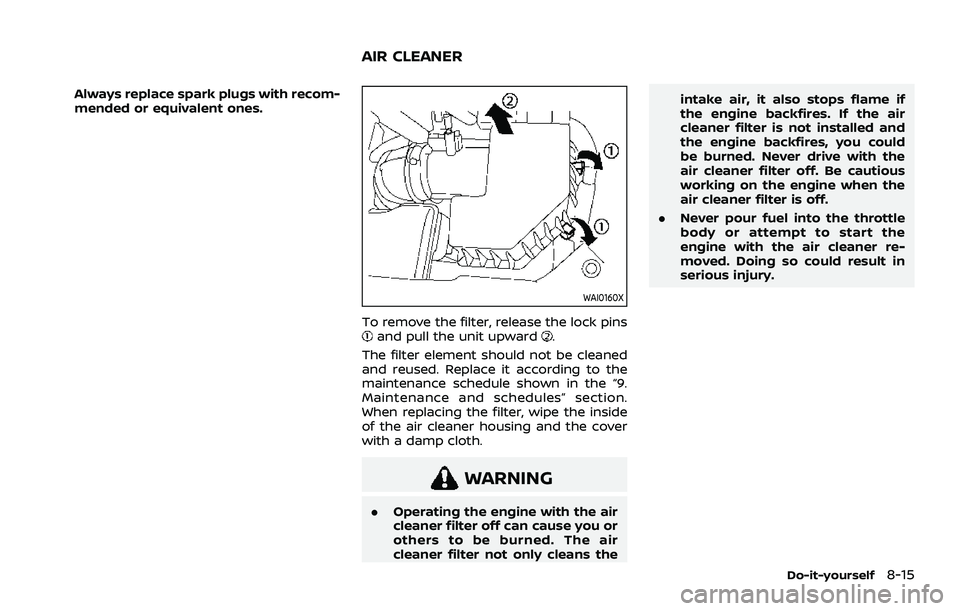
WAI0160X
To remove the filter, release the lock pinsand pull the unit upward.
The filter element should not be cleaned
and reused. Replace it according to the
maintenance schedule shown in the “9.
Maintenance and schedules” section.
When replacing the filter, wipe the inside
of the air cleaner housing and the cover
with a damp cloth.
WARNING
. Operating the engine with the air
cleaner filter off can cause you or
others to be burned. The air
cleaner filter not only cleans the intake air, it also stops flame if
the engine backfires. If the air
cleaner filter is not installed and
the engine backfires, you could
be burned. Never drive with the
air cleaner filter off. Be cautious
working on the engine when the
air cleaner filter is off.
. Never pour fuel into the throttle
body or attempt to start the
engine with the air cleaner re-
moved. Doing so could result in
serious injury.
Do-it-yourself8-15
AIR CLEANER
Page 496 of 556
9-4Maintenance and schedules
Seats:Check seat position controls such
as seat adjusters, seatback recliners, etc.
to ensure they operate smoothly and that
all latches lock securely in every position.
Check that the head restraints/headrests
move up and down smoothly and that
the locks (if so equipped) hold securely in
all latched positions.
Steering wheel: Check for changes in the
steering conditions, such as excessive
free play, hard steering or strange noises.
Warning lights and chimes: Make sure
that all warning lights and chimes are
operating properly.
Windshield defroster: Check that the air
comes out of the defroster outlets prop-
erly and in sufficient quantity when oper-
ating the heater or air conditioner.
Windshield wiper and washer*: Check
that the wipers and washers operate
properly and that the wipers do not
streak.
Under the hood and vehicle
The maintenance items listed here should
be checked periodically (for example,
each time you check the engine oil or
refuel).
Battery*: This vehicle is equipped with a
sealed maintenance free battery. It is
recommended that you visit a NISSAN dealer for service.
NOTE:
Care should be taken to avoid situations
that can lead to potential battery dis-
charge and potential no-start condi-
tions such as:
1.
Installation or extended use of elec-
tronic accessories that consume
battery power when the engine is
not running (Phone chargers, GPS,
DVD players, etc.)
2. Vehicle is not driven regularly and/
or only driven short distances.
In these cases, the battery may need to
be charged to maintain battery health.
Brake fluid level*: Make sure that the
brake fluid level is between the MAX and
MIN lines on the reservoir.
Engine coolant level*: Check the coolant
level when the engine is cold.
Engine drive belt*: Make sure that the
drive belt is not frayed, worn, cracked or
oily.
Engine oil level*: Check the level after
parking the vehicle on a level surface and
turning off the engine. Wait more than 10
minutes for the oil to drain back into the
oil pan.
Exhaust system: Make sure there are no
loose supports, cracks or holes. If the sound of the exhaust seems unusual or
there is a smell of exhaust fumes, im-
mediately have the exhaust system in-
spected. It is recommended you visit a
NISSAN dealer for this service. (See “Pre-
cautions when starting and driving” (P.5-
5) for exhaust gas (carbon monoxide).)
Fluid leaks:
Check under the vehicle for
fuel, oil, water or other fluid leaks after the
vehicle has been parked for a while. Water
dripping from the air conditioner after use
is normal. If you should notice any leaks
or if gasoline fumes are evident, check for
the cause and have it corrected immedi-
ately.
Radiator and hoses: Check the front of
the radiator and clean off any dirt, insects,
leaves, etc., that may have accumulated.
Make sure the hoses have no cracks,
deformation, rot or loose connections.
Underbody: The underbody is frequently
exposed to corrosive substances such as
those used on icy roads or to control
dust. It is very important to remove these
substances, otherwise rust will form on
the floor pan, frame, fuel lines and around
the exhaust system. At the end of winter,
the underbody should be thoroughly
flushed with plain water, being careful to
clean those areas where mud and dirt
may accumulate. For additional informa-
tion, see “Cleaning exterior” (P.7-2).
Page 497 of 556
Windshield washer fluid*:Check that
there is adequate fluid in the reservoir.The following descriptions are provided
to give you a better understanding of the
scheduled maintenance items that
should be regularly checked or replaced.
The maintenance schedule indicates at
which mileage/time intervals each item
requires service.
In addition to scheduled maintenance,
your vehicle requires that some items be
checked during normal day-to-day op-
eration. Refer to “General maintenance”
(P.9-2).
Items marked with “*” are recommended
by NISSAN for reliable vehicle operation.
You are not required to perform main-
tenance on these items in order to
maintain the warranties which come with
your vehicle. Other maintenance items
and intervals are required.
When applicable, additional information
can be found in the “8. Do-it-yourself”
section of this manual.
NOTE:
NISSAN does not advocate the use of
non-OEM approved aftermarket flush-
ing systems and strongly advises
against performing these services on a
NISSAN product. Many of the aftermar-
ket flushing systems use non-OEM ap-
proved chemicals or solvents, the use of
which has not been validated by
NISSAN. For recommended fuel, lubricants,
fluids, grease, and refrigerant, refer to
“Capacities and recommended fluids/
lubricants” (P.10-3) of this manual.
EMISSION CONTROL SYSTEM MAIN-
TENANCE
Drive belt*:
Check engine drive belt for wear, fraying
or cracking and for proper tension. Re-
place any damaged drive belt.
Engine air filter:
Replace at specified intervals. When driv-
ing for prolonged periods in dusty condi-
tions, check/replace the filter more
frequently.
Engine coolant*:
Replace coolant at the specified interval.
When adding or replacing coolant, be
sure to use only Genuine NISSAN Long
Life Antifreeze/Coolant (blue) or equiva-
lent with the proper mixture. (Refer to
“Engine cooling system” (P.8-4) to deter-
mine the proper mixture for your area.)
NOTE:
Mixing any other type of coolant or the
use of non-distilled water may reduce
the recommended service interval of
the coolant.
Maintenance and schedules9-5
EXPLANATION OF SCHEDULED
MAINTENANCE ITEMS