steering wheel NISSAN ROGUE 2021 Owner´s Manual
[x] Cancel search | Manufacturer: NISSAN, Model Year: 2021, Model line: ROGUE, Model: NISSAN ROGUE 2021Pages: 556, PDF Size: 2.7 MB
Page 261 of 556
main continuously illuminated. This se-
quence will continue upon subsequent
vehicle start-ups as long as the malfunc-
tion exists. When the malfunction indica-
tor is illuminated, the system may not be
able to detect or signal low tire pressure
as intended. TPMS malfunctions may
occur for a variety of reasons, including
the installation of replacement or alter-
nate tires or wheels on the vehicle that
prevent the TPMS from functioning prop-
erly. Always check the TPMS malfunction
telltale after replacing one or more tires
or wheels on your vehicle to ensure that
the replacement or alternate tires and
wheels allow the TPMS to continue to
function properly.
Additional information
.Since the spare tire is not equipped
with the TPMS, the TPMS does not
monitor the tire pressure of the spare
tire.
. The TPMS will activate only when the
vehicle is driven at speeds above 16
MPH (25 km/h). Also, this system may
not detect a sudden drop in tire
pressure (for example a flat tire while
driving).
. The low tire pressure warning light
does not automatically turn off when
the tire pressure is adjusted. After the
tire is inflated to the recommended pressure, the vehicle must be driven at
speeds above 16 MPH (25 km/h) to
activate the TPMS and turn off the low
tire pressure warning light. Use a tire
pressure gauge to check the tire
pressure.
. The “Tire Pressure Low - Add Air”
warning appears in the vehicle infor-
mation display when the low tire
pressure warning light is illuminated
and low tire pressure is detected. The
“Tire Pressure Low - Add Air” warning
turns off when the low tire pressure
warning light turns off.
The “Tire Pressure Low - Add Air”
warning does not appear if the low
tire pressure warning light illuminates
to indicate a TPMS malfunction.
. Tire pressure rises and falls depending
on the heat caused by the vehicle’s
operation and the outside tempera-
ture. Do not reduce the tire pressure
after driving because the tire pressure
rises after driving. Low outside tem-
perature can lower the temperature
of the air inside the tire which can
cause a lower tire inflation pressure.
This may cause the low tire pressure
warning light to illuminate. If the
warning light illuminates in low ambi-
ent temperature, check the tire pres-
sure for all four tires. .
You can also check the tire pressure of
all tires (except the spare tire) in the
vehicle information display. (See “Trip
computer” (P.2-44).)
For additional information, see “Low tire
pressure warning light” (P.2-18) and “Tire
Pressure Monitoring System (TPMS)” (P.6-
3).
WARNING
. If the low tire pressure warning
light illuminates while driving,
avoid sudden steering maneu-
vers or abrupt braking, reduce
vehicle speed, pull off the road
to a safe location and stop the
vehicle as soon as possible. Driv-
ing with under-inflated tires may
permanently damage the tires
and increase the likelihood of tire
failure. Serious vehicle damage
could occur and may lead to an
accident and could result in ser-
ious personal injury. Check the
tire pressure for all four tires.
Adjust the tire pressure to the
recommended COLD tire pressure
shown on the Tire and Loading
Information label to turn the low
tire pressure warning light OFF. If
you have a flat tire, replace it with
Starting and driving5-7
Page 264 of 556
5-10Starting and driving
AVOIDING COLLISION AND ROLL-
OVER
WARNING
Failure to operate this vehicle in a
safe and prudent manner may result
in loss of control or an accident.
Be alert and drive defensively at all times.
Obey all traffic regulations. Avoid exces-
sive speed, high speed cornering, or
sudden steering maneuvers, because
these driving practices could cause you
to lose control of your vehicle. As with
any vehicle, a loss of control could
result in a collision with other vehicles
or objects, or cause the vehicle to roll-
over, particularly if the loss of control
causes the vehicle to slide sideways. Be
attentive at all times, and avoid driving
when tired. Never drive when under the
influence of alcohol or drugs (including
prescription or over-the-counter drugs
which may cause drowsiness). Always
wear your seat belt as outlined in “Seat
belts” (P.1-13) of this manual, and also
instruct your passengers to do so.
Seat belts help reduce the risk of injury in
collisions and rollovers. In a rollover
crash, an unbelted or improperly belted person is significantly more likely to be
injured or killed than a person properly
wearing a seat belt.
ON-PAVEMENT AND OFF-ROAD
DRIVING PRECAUTIONS
Utility vehicles have a significantly high-
er rollover rate than other types of
vehicles.
They have higher ground clearance than
passenger cars to make them capable of
performing in a variety of on-pavement
and off-road applications. This gives them
a higher center of gravity than ordinary
cars. An advantage of higher ground
clearance is a better view of the road,
allowing you to anticipate problems.
However, they are not designed for cor-
nering at the same speeds as conven-
tional passenger cars any more than low-
slung sports cars are designed to perform
satisfactorily under off-road conditions. If
at all possible, avoid sharp turns or abrupt
maneuvers, particularly at high speeds. As
with other vehicles of this type, failure to
operate this vehicle correctly may result
in loss of control or vehicle rollover. Seat
belts help reduce the risk of injury in
collisions and rollovers. In a rollover crash,
an unbelted or improperly belted person
is significantly more likely to be injured or
killed than a person properly wearing a
seat belt.Be sure to read “Driving safety precau-
tions” (P.5-12).
OFF-ROAD RECOVERY
If the right side or left side wheels leave
the road surface, maintain control of the
vehicle by following the procedure below.
Please note that this procedure is only a
general guide. The vehicle must be driven
as appropriate based on the conditions of
the vehicle, road and traffic.
1. Remain calm and do not overreact.
2. Do not apply the brakes.
3. Maintain a firm grip on the steering
wheel with both hands and try to hold
a straight course.
4. When appropriate, slowly release the accelerator pedal to gradually slow
the vehicle.
5. If there is nothing in the way, steer the vehicle to follow the road while the
vehicle speed is reduced. Do not
attempt to drive the vehicle back onto
the road surface until vehicle speed is
reduced.
6. When it is safe to do so, gradually turn the steering wheel until both tires
return to the road surface. When all
tires are on the road surface, steer the
vehicle to stay in the appropriate
driving lane.
Page 265 of 556
.If you decide that it is not safe toreturn the vehicle to the road sur-
face based on vehicle, road or
traffic conditions, gradually slow
the vehicle to a stop in a safe place
off the road.
RAPID AIR PRESSURE LOSS
Rapid air pressure loss or a “blow-out” can
occur if the tire is punctured or is
damaged due to hitting a curb or pothole.
Rapid air pressure loss can also be caused
by driving on under-inflated tires.
Rapid air pressure loss can affect the
handling and stability of the vehicle,
especially at highway speeds.
Help prevent rapid air pressure loss by
maintaining the correct air pressure and
visually inspect the tires for wear and
damage. See “Wheels and tires” (P.8-25) of
this manual.
If a tire rapidly loses air pressure or
“blows-out” while driving, maintain con-
trol of the vehicle by following the proce-
dure below. Please note that this
procedure is only a general guide. The
vehicle must be driven as appropriate
based on the conditions of the vehicle,
road and traffic.
WARNING
The following actions can increase
the chance of losing control of the
vehicle if there is a sudden loss of tire
air pressure. Losing control of the
vehicle may cause a collision and
result in personal injury.
. The vehicle generally moves or
pulls in the direction of the flat
tire.
. Do not rapidly apply the brakes.
. Do not rapidly release the accel-
erator pedal.
. Do not rapidly turn the steering
wheel.
1. Remain calm and do not overreact.
2. Maintain a firm grip on the steering wheel with both hands and try to hold
a straight course.
3. When appropriate, slowly release the accelerator pedal to gradually slow
the vehicle.
4. Gradually steer the vehicle to a safe location off the road and away from
traffic if possible. 5. Lightly apply the brake pedal to gra-
dually stop the vehicle.
6. Turn on the hazard warning flashers and either contact a roadside emer-
gency service to change the tire or see
“Changing a flat tire” (P.6-4) of this
Owner’s Manual.
DRINKING ALCOHOL/DRUGS AND
DRIVING
WARNING
Never drive under the influence of
alcohol or drugs. Alcohol in the
bloodstream reduces coordination,
delays reaction time and impairs
judgement. Driving after drinking
alcohol increases the likelihood of
being involved in an accident injuring
yourself and others. Additionally, if
you are injured in an accident, alco-
hol can increase the severity of the
injury.
NISSAN is committed to safe driving.
However, you must choose not to drive
under the influence of alcohol. Every year
thousands of people are injured or killed
in alcohol-related accidents. Although the
local laws vary on what is considered to
be legally intoxicated, the fact is that
Starting and driving5-11
Page 266 of 556
5-12Starting and driving
alcohol affects all people differently and
most people underestimate the effects of
alcohol.
Remember, drinking and driving don’t
mix! And that is true for drugs, too (over-
the-counter, prescription, and illegal
drugs). Don’t drive if your ability to oper-
ate your vehicle is impaired by alcohol,
drugs, or some other physical condition.
DRIVING SAFETY PRECAUTIONS
Your vehicle is designed for both normal
and off-road use. However, avoid driving
in deep water or mud as your vehicle is
mainly designed for leisure use, unlike a
conventional off-road vehicle.
Remember that Two-Wheel Drive (2WD)
models are less capable than All-Wheel
Drive (AWD) models for rough road driving
and extrication when stuck in deep snow,
mud, or the like.
Please observe the following precautions:
WARNING
.Drive carefully when off the road
and avoid dangerous areas. Every
person who drives or rides in this
vehicle should be seated with
their seat belt fastened. This will
keep you and your passengers in position when driving over rough
terrain.
. Do not drive across steep slopes.
Instead drive either straight up or
straight down the slopes. Off-
road vehicles can tip over side-
ways much more easily than they
can forward or backward.
. Many hills are too steep for any
vehicle. If you drive up them, you
may stall. If you drive down them,
you may not be able to control
your speed. If you drive across
them, you may roll over.
. Do not shift ranges while driving
on downhill grades as this could
cause loss of control of the vehi-
cle.
. Stay alert when driving to the top
of a hill. At the top there could be
a drop-off or other hazard that
could cause an accident.
. If your engine stalls or you cannot
make it to the top of a steep hill,
never attempt to turn around.
Your vehicle could tip or roll over.
Always back straight down in R
(Reverse) range. Never back down
in N (Neutral), using only the
brake, as this could cause loss of
control. .
Heavy braking going down a hill
could cause your brakes to over-
heat and fade, resulting in loss of
control and an accident. Apply
brakes lightly and use a low
range to control your speed.
. Unsecured cargo can be thrown
around when driving over rough
terrain. Properly secure all cargo
so it will not be thrown forward
and cause injury to you or your
passengers.
. To avoid raising the center of
gravity excessively, do not exceed
the rated capacity of the roof rack
(if so equipped) and evenly dis-
tribute the load. Secure heavy
loads in the cargo area as far
forward and as low as possible.
Do not equip the vehicle with tires
larger than specified in this man-
ual. This could cause your vehicle
to roll over.
. Do not grip the inside or spokes
of the steering wheel when driv-
ing off-road. The steering wheel
could move suddenly and injure
your hands. Instead drive with
your fingers and thumbs on the
outside of the rim.
Page 277 of 556
vehicle information display. (See “67.
Neutral Hold Mode was not activated
indicator” (P.2-42).) To activate the
Neutral hold mode, wait for a while
without shifting operation and then
perform the operations again.
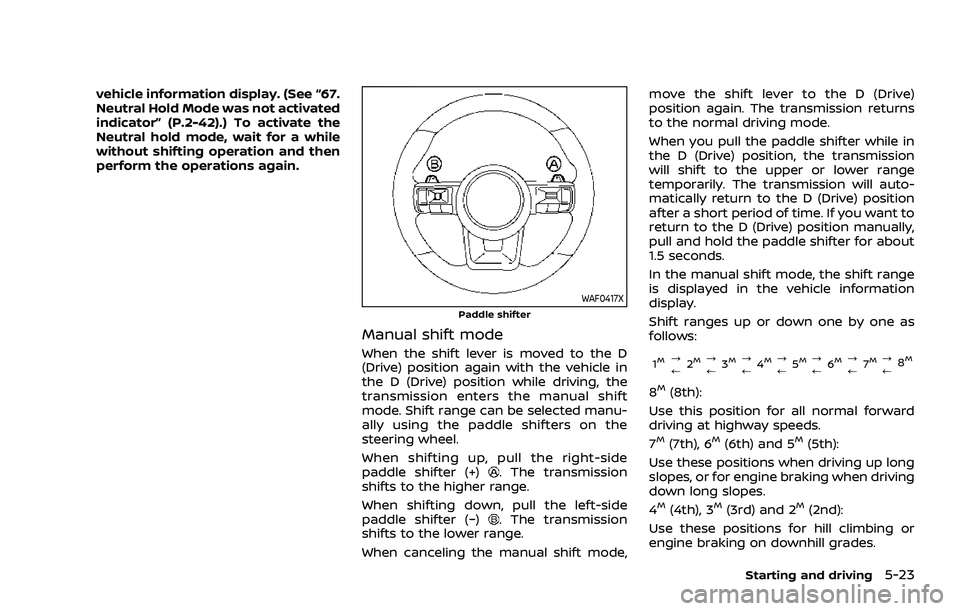
WAF0417XPaddle shifter
Manual shift mode
When the shift lever is moved to the D
(Drive) position again with the vehicle in
the D (Drive) position while driving, the
transmission enters the manual shift
mode. Shift range can be selected manu-
ally using the paddle shifters on the
steering wheel.
When shifting up, pull the right-side
paddle shifter (+)
. The transmission
shifts to the higher range.
When shifting down, pull the left-side
paddle shifter (−)
. The transmission
shifts to the lower range.
When canceling the manual shift mode, move the shift lever to the D (Drive)
position again. The transmission returns
to the normal driving mode.
When you pull the paddle shifter while in
the D (Drive) position, the transmission
will shift to the upper or lower range
temporarily. The transmission will auto-
matically return to the D (Drive) position
after a short period of time. If you want to
return to the D (Drive) position manually,
pull and hold the paddle shifter for about
1.5 seconds.
In the manual shift mode, the shift range
is displayed in the vehicle information
display.
Shift ranges up or down one by one as
follows:
1M?
/
2M?
/ 3M?
/4M?
/5M?
/ 6M?
/ 7M?
/8M
8M(8th):
Use this position for all normal forward
driving at highway speeds.
7
M(7th), 6M(6th) and 5M(5th):
Use these positions when driving up long
slopes, or for engine braking when driving
down long slopes.
4
M(4th), 3M(3rd) and 2M(2nd):
Use these positions for hill climbing or
engine braking on downhill grades.
Starting and driving5-23
Page 287 of 556
Tire Pres ECO advice
The “Tire Pres ECO advice” is a function to
show an ECO advice message in the
vehicle information display when low tire
pressure is detected. To activate or deac-
tivate this function, see “ECO Mode
Setting” (P.2-26).
When the setting is ON, the ECO Drive
Report display shows "See Tire Pres-
sures". You can switch the display to the
Tire Pressures display by pushing the
button on the steering wheel.
WAF0126X
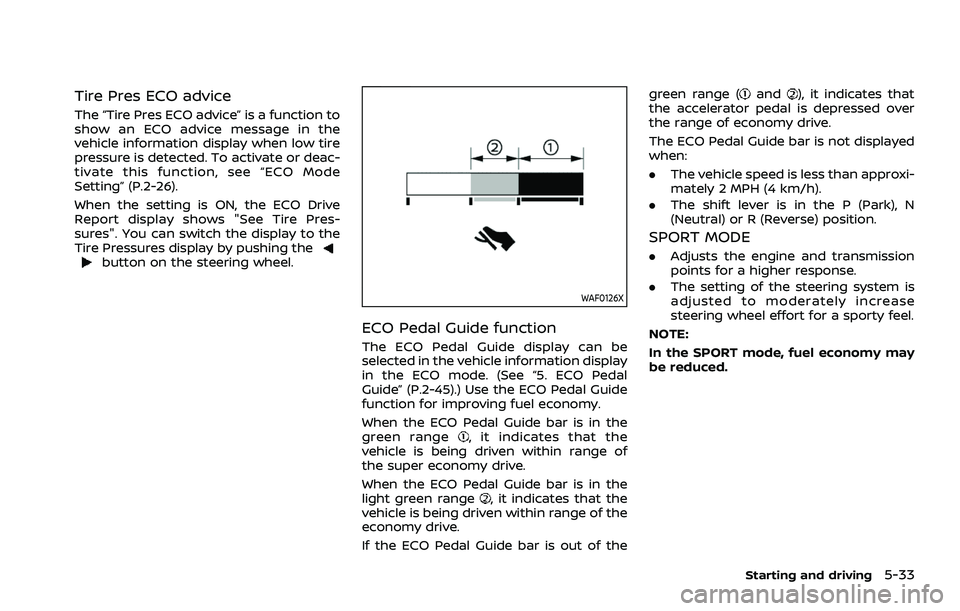
ECO Pedal Guide function
The ECO Pedal Guide display can be
selected in the vehicle information display
in the ECO mode. (See “5. ECO Pedal
Guide” (P.2-45).) Use the ECO Pedal Guide
function for improving fuel economy.
When the ECO Pedal Guide bar is in the
green range
, it indicates that the
vehicle is being driven within range of
the super economy drive.
When the ECO Pedal Guide bar is in the
light green range
, it indicates that the
vehicle is being driven within range of the
economy drive.
If the ECO Pedal Guide bar is out of the green range (
and), it indicates that
the accelerator pedal is depressed over
the range of economy drive.
The ECO Pedal Guide bar is not displayed
when:
. The vehicle speed is less than approxi-
mately 2 MPH (4 km/h).
. The shift lever is in the P (Park), N
(Neutral) or R (Reverse) position.
SPORT MODE
.Adjusts the engine and transmission
points for a higher response.
. The setting of the steering system is
adjusted to moderately increase
steering wheel effort for a sporty feel.
NOTE:
In the SPORT mode, fuel economy may
be reduced.
Starting and driving5-33
Page 288 of 556
5-34Starting and driving
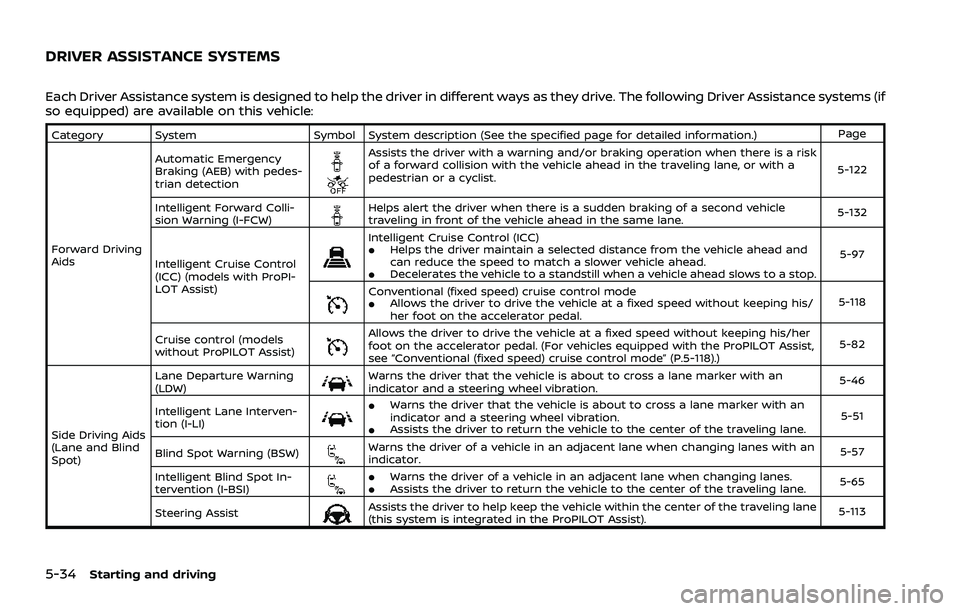
Each Driver Assistance system is designed to help the driver in different ways as they drive. The following Driver Assistance systems (if
so equipped) are available on this vehicle:
Category SystemSymbol System description (See the specified page for detailed information.) Page
Forward Driving
Aids Automatic Emergency
Braking (AEB) with pedes-
trian detection
Assists the driver with a warning and/or braking operation when there is a risk
of a forward collision with the vehicle ahead in the traveling lane, or with a
pedestrian or a cyclist.
5-122
Intelligent Forward Colli-
sion Warning (I-FCW)
Helps alert the driver when there is a sudden braking of a second vehicle
traveling in front of the vehicle ahead in the same lane. 5-132
Intelligent Cruise Control
(ICC) (models with ProPI-
LOT Assist)
Intelligent Cruise Control (ICC).Helps the driver maintain a selected distance from the vehicle ahead and
can reduce the speed to match a slower vehicle ahead.
.Decelerates the vehicle to a standstill when a vehicle ahead slows to a stop. 5-97
Conventional (fixed speed) cruise control mode.Allows the driver to drive the vehicle at a fixed speed without keeping his/
her foot on the accelerator pedal.
5-118
Cruise control (models
without ProPILOT Assist)
Allows the driver to drive the vehicle at a fixed speed without keeping his/her
foot on the accelerator pedal. (For vehicles equipped with the ProPILOT Assist,
see “Conventional (fixed speed) cruise control mode” (P.5-118).) 5-82
Side Driving Aids
(Lane and Blind
Spot) Lane Departure Warning
(LDW)
Warns the driver that the vehicle is about to cross a lane marker with an
indicator and a steering wheel vibration.
5-46
Intelligent Lane Interven-
tion (I-LI)
.Warns the driver that the vehicle is about to cross a lane marker with an
indicator and a steering wheel vibration.
.Assists the driver to return the vehicle to the center of the traveling lane. 5-51
Blind Spot Warning (BSW)
Warns the driver of a vehicle in an adjacent lane when changing lanes with an
indicator. 5-57
Intelligent Blind Spot In-
tervention (I-BSI)
.Warns the driver of a vehicle in an adjacent lane when changing lanes..Assists the driver to return the vehicle to the center of the traveling lane. 5-65
Steering Assist
Assists the driver to help keep the vehicle within the center of the traveling lane
(this system is integrated in the ProPILOT Assist). 5-113
DRIVER ASSISTANCE SYSTEMS
Page 291 of 556
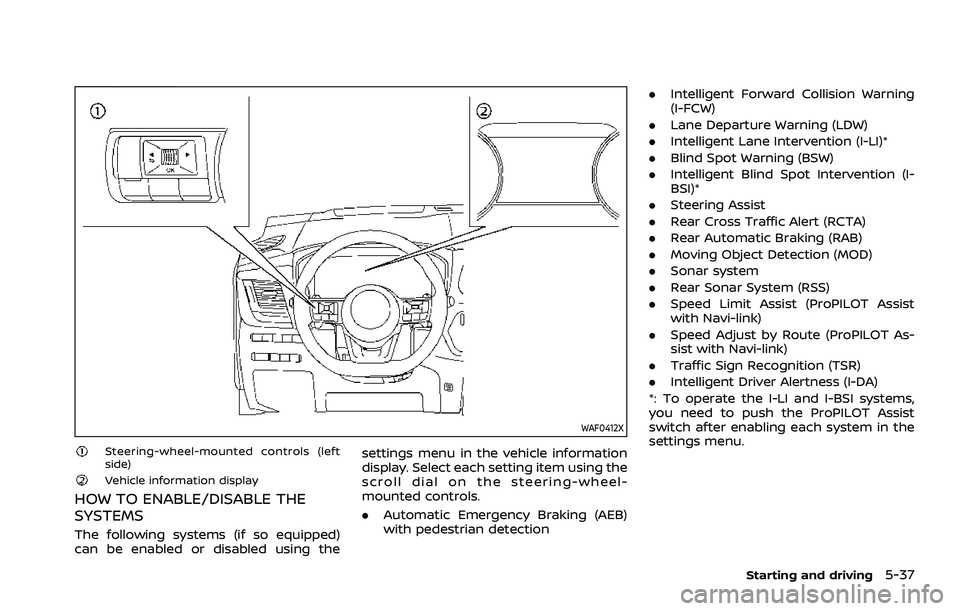
WAF0412X
Steering-wheel-mounted controls (left
side)
Vehicle information display
HOW TO ENABLE/DISABLE THE
SYSTEMS
The following systems (if so equipped)
can be enabled or disabled using thesettings menu in the vehicle information
display. Select each setting item using the
scroll dial on the steering-wheel-
mounted controls.
.
Automatic Emergency Braking (AEB)
with pedestrian detection .
Intelligent Forward Collision Warning
(I-FCW)
. Lane Departure Warning (LDW)
. Intelligent Lane Intervention (I-LI)*
. Blind Spot Warning (BSW)
. Intelligent Blind Spot Intervention (I-
BSI)*
. Steering Assist
. Rear Cross Traffic Alert (RCTA)
. Rear Automatic Braking (RAB)
. Moving Object Detection (MOD)
. Sonar system
. Rear Sonar System (RSS)
. Speed Limit Assist (ProPILOT Assist
with Navi-link)
. Speed Adjust by Route (ProPILOT As-
sist with Navi-link)
. Traffic Sign Recognition (TSR)
. Intelligent Driver Alertness (I-DA)
*: To operate the I-LI and I-BSI systems,
you need to push the ProPILOT Assist
switch after enabling each system in the
settings menu.
Starting and driving5-37
Page 299 of 556
WAF0412X
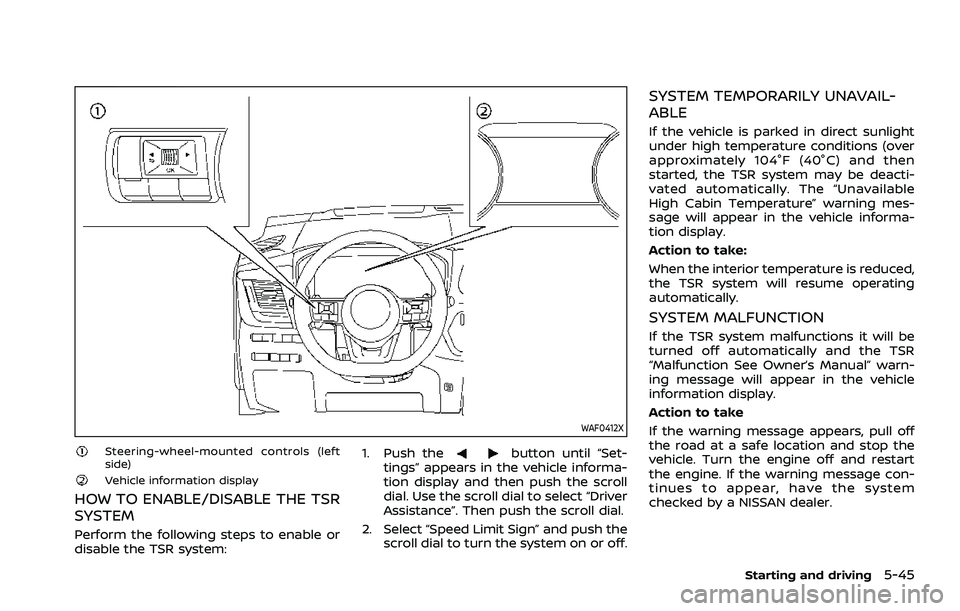
Steering-wheel-mounted controls (left
side)
Vehicle information display
HOW TO ENABLE/DISABLE THE TSR
SYSTEM
Perform the following steps to enable or
disable the TSR system:1. Push the
button until “Set-
tings” appears in the vehicle informa-
tion display and then push the scroll
dial. Use the scroll dial to select “Driver
Assistance”. Then push the scroll dial.
2. Select “Speed Limit Sign” and push the scroll dial to turn the system on or off.
SYSTEM TEMPORARILY UNAVAIL-
ABLE
If the vehicle is parked in direct sunlight
under high temperature conditions (over
approximately 104°F (40°C) and then
started, the TSR system may be deacti-
vated automatically. The “Unavailable
High Cabin Temperature” warning mes-
sage will appear in the vehicle informa-
tion display.
Action to take:
When the interior temperature is reduced,
the TSR system will resume operating
automatically.
SYSTEM MALFUNCTION
If the TSR system malfunctions it will be
turned off automatically and the TSR
“Malfunction See Owner’s Manual” warn-
ing message will appear in the vehicle
information display.
Action to take
If the warning message appears, pull off
the road at a safe location and stop the
vehicle. Turn the engine off and restart
the engine. If the warning message con-
tinues to appear, have the system
checked by a NISSAN dealer.
Starting and driving5-45
Page 300 of 556
5-46Starting and driving
SYSTEM MAINTENANCE
The TSR system uses the same multi-
sensing front camera unit that is used by
the Lane Departure Warning (LDW) sys-
tem, located in front of the inside mirror.
For maintenance of the camera, see
“System maintenance” (P.5-50).WARNING
Failure to follow the warnings and
instructions for proper use of the
LDW system could result in serious
injury or death.
.This system is only a warning
device to inform the driver of a
potential unintended lane depar-
ture. It will not steer the vehicle or
prevent loss of control. It is the
driver’s responsibility to stay
alert, drive safely, keep the vehi-
cle in the traveling lane, and be in
control of the vehicle at all times.
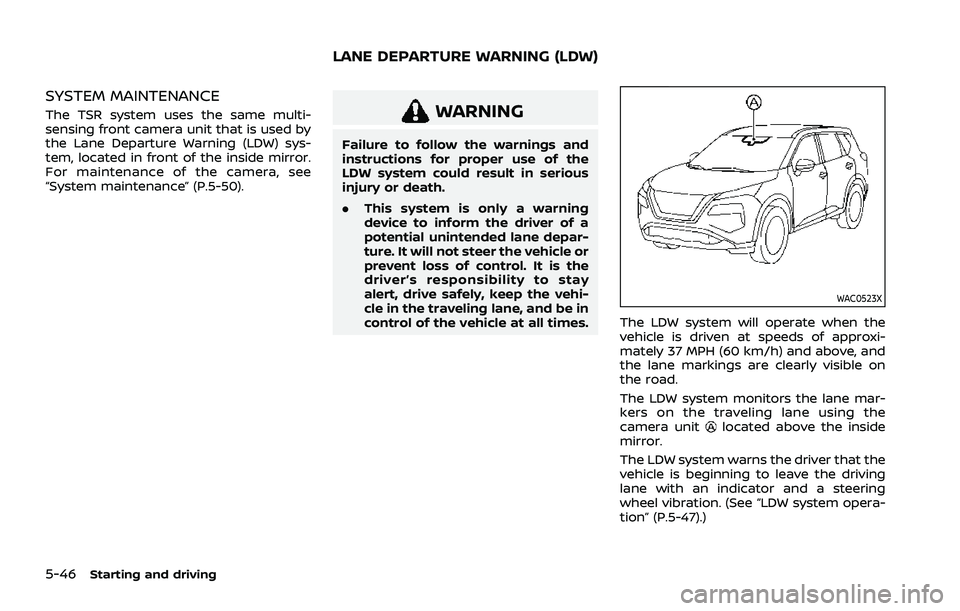
WAC0523X
The LDW system will operate when the
vehicle is driven at speeds of approxi-
mately 37 MPH (60 km/h) and above, and
the lane markings are clearly visible on
the road.
The LDW system monitors the lane mar-
kers on the traveling lane using the
camera unit
located above the inside
mirror.
The LDW system warns the driver that the
vehicle is beginning to leave the driving
lane with an indicator and a steering
wheel vibration. (See “LDW system opera-
tion” (P.5-47).)
LANE DEPARTURE WARNING (LDW)