steering wheel NISSAN ROGUE 2021 Owner´s Manual
[x] Cancel search | Manufacturer: NISSAN, Model Year: 2021, Model line: ROGUE, Model: NISSAN ROGUE 2021Pages: 556, PDF Size: 2.7 MB
Page 322 of 556
5-68Starting and driving
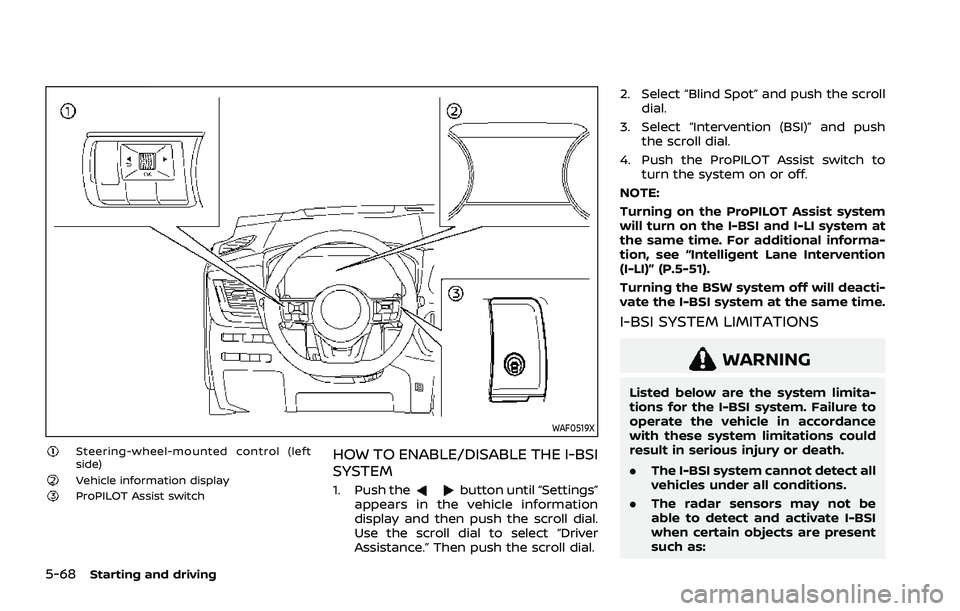
WAF0519X
Steering-wheel-mounted control (left
side)
Vehicle information displayProPILOT Assist switch
HOW TO ENABLE/DISABLE THE I-BSI
SYSTEM
1. Push thebutton until “Settings”
appears in the vehicle information
display and then push the scroll dial.
Use the scroll dial to select “Driver
Assistance.” Then push the scroll dial. 2. Select “Blind Spot” and push the scroll
dial.
3. Select “Intervention (BSI)” and push the scroll dial.
4. Push the ProPILOT Assist switch to turn the system on or off.
NOTE:
Turning on the ProPILOT Assist system
will turn on the I-BSI and I-LI system at
the same time. For additional informa-
tion, see “Intelligent Lane Intervention
(I-LI)” (P.5-51).
Turning the BSW system off will deacti-
vate the I-BSI system at the same time.
I-BSI SYSTEM LIMITATIONS
WARNING
Listed below are the system limita-
tions for the I-BSI system. Failure to
operate the vehicle in accordance
with these system limitations could
result in serious injury or death.
. The I-BSI system cannot detect all
vehicles under all conditions.
. The radar sensors may not be
able to detect and activate I-BSI
when certain objects are present
such as:
Page 324 of 556
5-70Starting and driving
properly.
— When strong light enters a lane camera unit. (For exam-
ple: light directly shines on the
front of the vehicle at sunrise
or sunset.)
— When a sudden change in brightness occurs. (For exam-
ple: when the vehicle enters or
exits a tunnel or under a
bridge.)
. Do not use the I-BSI system under
the following conditions because
the system may not function
properly.
— During bad weather. (For ex-
ample: rain, fog, snow, etc.)
— When driving on slippery roads, such as on ice or snow,
etc.
— When driving on winding or uneven roads.
— When there is a lane closure due to road repairs.
— When driving in a makeshift or temporary lane.
— When driving on roads where the lane width is too narrow. — When driving with a tire that is
not within normal tire condi-
tions (for example, tire wear,
low tire pressure, installation
of spare tire, tire chains, non-
standard wheels).
— When the vehicle is equipped with non-original steering
parts or suspension parts.
— When towing a trailer or other vehicle.
. Excessive noise (for example,
audio system volume, open vehi-
cle window) will interfere with the
chime sound, and it may not be
heard.I-BSI DRIVING SITUATIONS
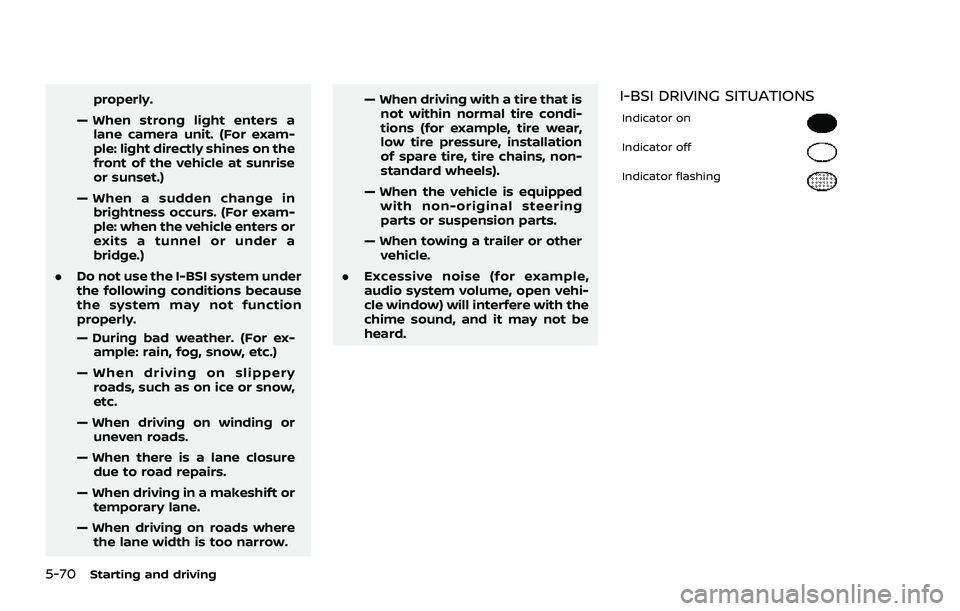
Indicator on
Indicator off
Indicator flashing
Page 330 of 556
5-76Starting and driving
WARNING
Failure to follow the warnings and
instructions for proper use of the
RCTA system could result in serious
injury or death.
.The RCTA system is not a replace-
ment for proper driving proce-
dures and is not designed to
prevent contact with vehicles or
objects. When backing out of a
parking space, always use the
side and rear mirrors and turn
and look in the direction your
vehicle will move. Never rely so-
lely on the RCTA system.
The RCTA system will assist you when
backing out from a parking space. When
the vehicle is in reverse, the system is
designed to detect other vehicles ap-
proaching from the right or left of the
vehicle. If the system detects cross traffic,
it will alert you.
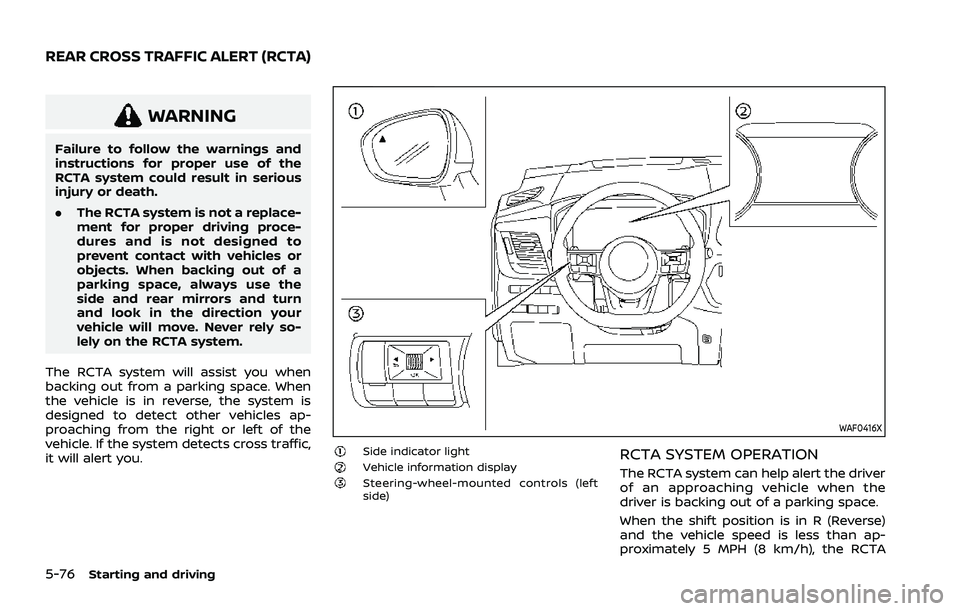
WAF0416X
Side indicator lightVehicle information displaySteering-wheel-mounted controls (left
side)
RCTA SYSTEM OPERATION
The RCTA system can help alert the driver
of an approaching vehicle when the
driver is backing out of a parking space.
When the shift position is in R (Reverse)
and the vehicle speed is less than ap-
proximately 5 MPH (8 km/h), the RCTA
REAR CROSS TRAFFIC ALERT (RCTA)
Page 332 of 556
5-78Starting and driving
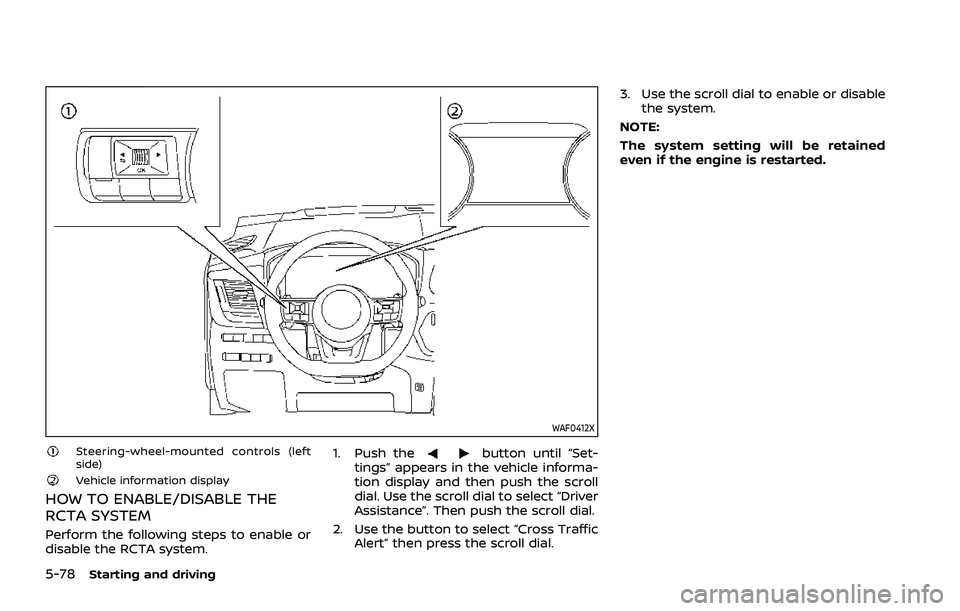
WAF0412X
Steering-wheel-mounted controls (left
side)
Vehicle information display
HOW TO ENABLE/DISABLE THE
RCTA SYSTEM
Perform the following steps to enable or
disable the RCTA system.1. Push the
button until “Set-
tings” appears in the vehicle informa-
tion display and then push the scroll
dial. Use the scroll dial to select “Driver
Assistance”. Then push the scroll dial.
2. Use the button to select “Cross Traffic Alert” then press the scroll dial. 3. Use the scroll dial to enable or disable
the system.
NOTE:
The system setting will be retained
even if the engine is restarted.
Page 338 of 556
5-84Starting and driving
Cancelling cruising speed
Use any one of the following methods to
cancel the vehicle set speed. (“Standby
Push RES+ to resume” message appears
in the display.)
.Push the CANCEL switch.
. Tap the foot brake pedal.
. Push the Cruise ON/OFF switch. The
cruise indicator will turn off. This section contains the information
about the following system features:
.
ProPILOT Assist (general system op-
eration)
. ProPILOT Assist with Navi-link (addi-
tional functionality, if so equipped)
WARNING
Failure to follow the warnings and
instructions for proper use of the
ProPILOT Assist system could result
in serious injury or death.
.ProPILOT Assist is not a self-driv-
ing system. Within the limits of its
capabilities, as described in this
manual, it helps the driver with
certain driving activities.
. The ProPILOT Assist system is not
a replacement for proper driving
procedures and is not designed
to correct careless, inattentive or
absent-minded driving. ProPILOT
Assist will not always steer the
vehicle to keep it in the lane. The
ProPILOT Assist system is not
designed to prevent loss of con-
trol. It is the driver’s responsibility
to stay alert, drive safely, keep
the vehicle in the traveling lane,
and be in control of the vehicle at all times.
. There are limitations to the Pro-
PILOT Assist system capability.
The ProPILOT Assist system does
not function in all driving, traffic,
weather, and road conditions. It is
the driver’s responsibility to stay
alert, drive safely, keep the vehi-
cle in the traveling lane, and be in
control of the vehicle at all times.
. The ProPILOT Assist system is
only an aid to assist the driver
and is not a collision warning or
avoidance device.
. The ProPILOT Assist system is for
highway use only and is not
intended for city driving. Failure
to apply the brakes or steer the
vehicle when necessary may re-
sult in a serious accident.
. Always observe posted speed
limits and do not set the speed
over them.
. Never take your hands off the
steering wheel when driving. Al-
ways keep your hands on the
steering wheel and drive your
vehicle safely.
. Never unfasten your safety belt
when using ProPILOT Assist.
Doing so automatically cancels
PROPILOT ASSIST (if so equipped)
Page 340 of 556
5-86Starting and driving
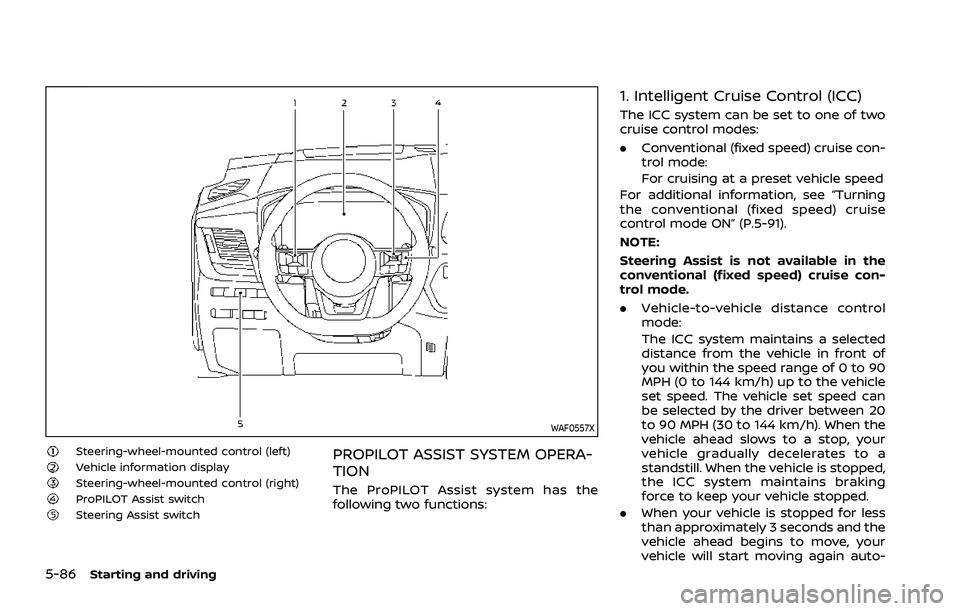
WAF0557X
Steering-wheel-mounted control (left)Vehicle information displaySteering-wheel-mounted control (right)ProPILOT Assist switchSteering Assist switch
PROPILOT ASSIST SYSTEM OPERA-
TION
The ProPILOT Assist system has the
following two functions:
1. Intelligent Cruise Control (ICC)
The ICC system can be set to one of two
cruise control modes:
.Conventional (fixed speed) cruise con-
trol mode:
For cruising at a preset vehicle speed
For additional information, see “Turning
the conventional (fixed speed) cruise
control mode ON” (P.5-91).
NOTE:
Steering Assist is not available in the
conventional (fixed speed) cruise con-
trol mode.
. Vehicle-to-vehicle distance control
mode:
The ICC system maintains a selected
distance from the vehicle in front of
you within the speed range of 0 to 90
MPH (0 to 144 km/h) up to the vehicle
set speed. The vehicle set speed can
be selected by the driver between 20
to 90 MPH (30 to 144 km/h). When the
vehicle ahead slows to a stop, your
vehicle gradually decelerates to a
standstill. When the vehicle is stopped,
the ICC system maintains braking
force to keep your vehicle stopped.
. When your vehicle is stopped for less
than approximately 3 seconds and the
vehicle ahead begins to move, your
vehicle will start moving again auto-
Page 347 of 556
down, the vehicle set speed is 20 MPH
(30 km/h).
NOTE:
When the I-LI and I-BSI systems are
enabled in the settings menu of the
vehicle information display, turning the
ProPILOT Assist system on will turn on
the I-LI and I-BSI systems at the same
time. If the I-LI system is disabled in the
settings menu, the I-LI system will
automatically be turned on when the
Steering Assist system is active. For
additional information, see “Intelligent
Lane Intervention (I-LI)” (P.5-51), “Intelli-
gent Lane Intervention (I-LI)” (P.5-115)
and “Intelligent Blind Spot Intervention
(I-BSI)” (P.5-65).
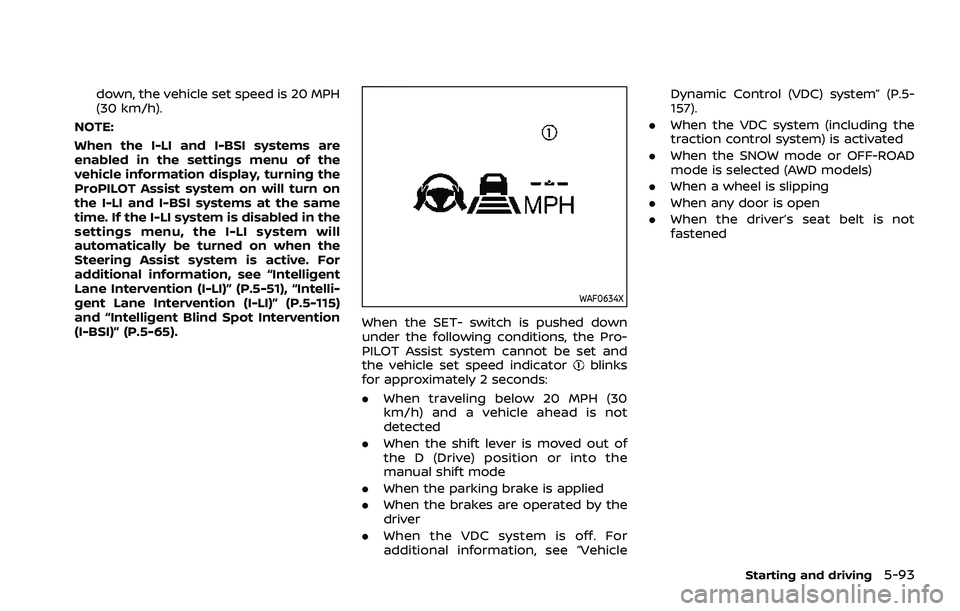
WAF0634X
When the SET- switch is pushed down
under the following conditions, the Pro-
PILOT Assist system cannot be set and
the vehicle set speed indicator
blinks
for approximately 2 seconds:
. When traveling below 20 MPH (30
km/h) and a vehicle ahead is not
detected
. When the shift lever is moved out of
the D (Drive) position or into the
manual shift mode
. When the parking brake is applied
. When the brakes are operated by the
driver
. When the VDC system is off. For
additional information, see “Vehicle Dynamic Control (VDC) system” (P.5-
157).
. When the VDC system (including the
traction control system) is activated
. When the SNOW mode or OFF-ROAD
mode is selected (AWD models)
. When a wheel is slipping
. When any door is open
. When the driver’s seat belt is not
fastened
Starting and driving5-93
Page 350 of 556
5-96Starting and driving
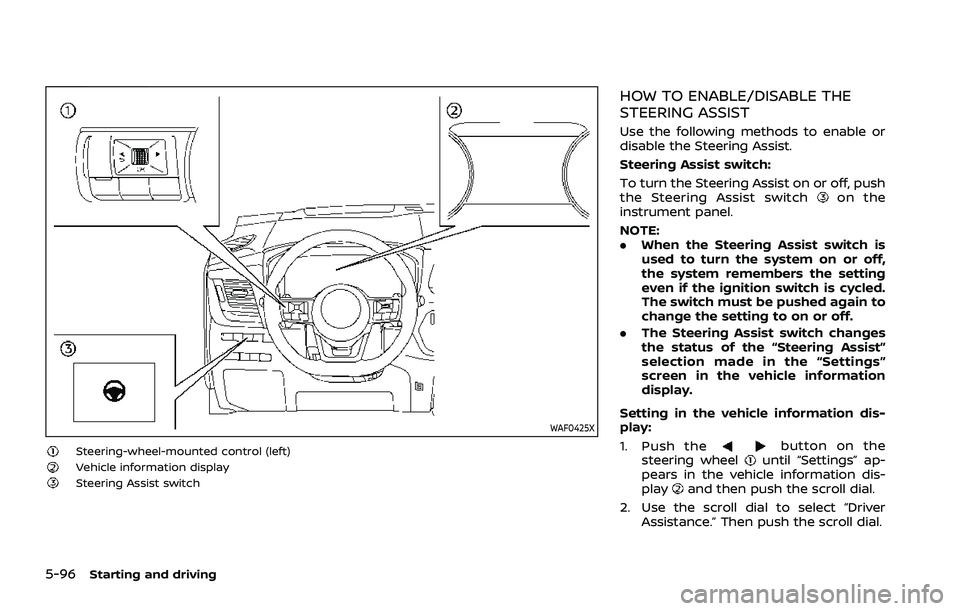
WAF0425X
Steering-wheel-mounted control (left)Vehicle information displaySteering Assist switch
HOW TO ENABLE/DISABLE THE
STEERING ASSIST
Use the following methods to enable or
disable the Steering Assist.
Steering Assist switch:
To turn the Steering Assist on or off, push
the Steering Assist switch
on the
instrument panel.
NOTE:
. When the Steering Assist switch is
used to turn the system on or off,
the system remembers the setting
even if the ignition switch is cycled.
The switch must be pushed again to
change the setting to on or off.
. The Steering Assist switch changes
the status of the “Steering Assist”
selection made in the “Settings”
screen in the vehicle information
display.
Setting in the vehicle information dis-
play:
1. Push the
button on the
steering wheeluntil “Settings” ap-
pears in the vehicle information dis-
play
and then push the scroll dial.
2. Use the scroll dial to select “Driver Assistance.” Then push the scroll dial.
Page 351 of 556
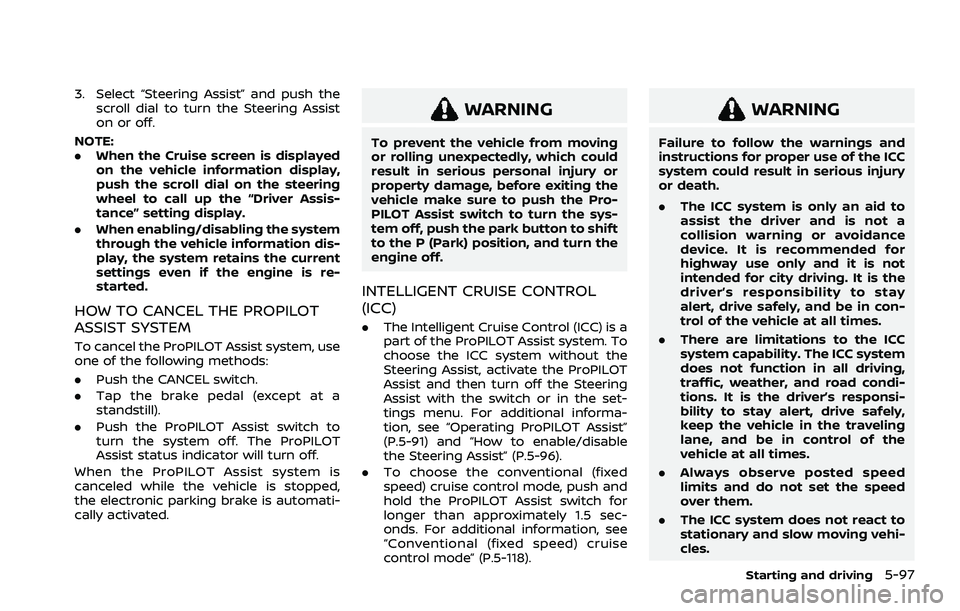
3. Select “Steering Assist” and push thescroll dial to turn the Steering Assist
on or off.
NOTE:
. When the Cruise screen is displayed
on the vehicle information display,
push the scroll dial on the steering
wheel to call up the “Driver Assis-
tance” setting display.
. When enabling/disabling the system
through the vehicle information dis-
play, the system retains the current
settings even if the engine is re-
started.
HOW TO CANCEL THE PROPILOT
ASSIST SYSTEM
To cancel the ProPILOT Assist system, use
one of the following methods:
.Push the CANCEL switch.
. Tap the brake pedal (except at a
standstill).
. Push the ProPILOT Assist switch to
turn the system off. The ProPILOT
Assist status indicator will turn off.
When the ProPILOT Assist system is
canceled while the vehicle is stopped,
the electronic parking brake is automati-
cally activated.
WARNING
To prevent the vehicle from moving
or rolling unexpectedly, which could
result in serious personal injury or
property damage, before exiting the
vehicle make sure to push the Pro-
PILOT Assist switch to turn the sys-
tem off, push the park button to shift
to the P (Park) position, and turn the
engine off.
INTELLIGENT CRUISE CONTROL
(ICC)
. The Intelligent Cruise Control (ICC) is a
part of the ProPILOT Assist system. To
choose the ICC system without the
Steering Assist, activate the ProPILOT
Assist and then turn off the Steering
Assist with the switch or in the set-
tings menu. For additional informa-
tion, see “Operating ProPILOT Assist”
(P.5-91) and “How to enable/disable
the Steering Assist” (P.5-96).
. To choose the conventional (fixed
speed) cruise control mode, push and
hold the ProPILOT Assist switch for
longer than approximately 1.5 sec-
onds. For additional information, see
“Conventional (fixed speed) cruise
control mode” (P.5-118).
WARNING
Failure to follow the warnings and
instructions for proper use of the ICC
system could result in serious injury
or death.
.The ICC system is only an aid to
assist the driver and is not a
collision warning or avoidance
device. It is recommended for
highway use only and it is not
intended for city driving. It is the
driver’s responsibility to stay
alert, drive safely, and be in con-
trol of the vehicle at all times.
. There are limitations to the ICC
system capability. The ICC system
does not function in all driving,
traffic, weather, and road condi-
tions. It is the driver’s responsi-
bility to stay alert, drive safely,
keep the vehicle in the traveling
lane, and be in control of the
vehicle at all times.
. Always observe posted speed
limits and do not set the speed
over them.
. The ICC system does not react to
stationary and slow moving vehi-
cles.
Starting and driving5-97
Page 356 of 556
5-102Starting and driving
The warning chime will not sound when:
.Your vehicle approaches other vehi-
cles that are parked or moving slowly.
. The accelerator pedal is depressed,
overriding the system.
NOTE:
The approach warning chime may
sound and the system display may
flash when the radar sensor detects
objects on the side of the vehicle or on
the side of the road. This may cause the
ICC system to decelerate or accelerate
the vehicle. The radar sensor may de-
tect these objects when the vehicle is
driven on winding, narrow, or hilly roads
or when the vehicle is entering or
exiting a curve. In these cases, you will
have to manually control the proper
distance ahead of your vehicle.
Also, the sensor sensitivity can be af-
fected by vehicle operation (steering
maneuver or driving position in the
lane) or traffic or vehicle conditions
(for example, if a vehicle is being driven
with some damage).Acceleration when passing
When the ICC system is engaged above
44 MPH (70 km/h) and following a slower
vehicle (below the vehicle set speed), and
the turn signal is activated to the left, the
ICC system will automatically start to
accelerate the vehicle to help initiate
passing on the left and will begin to
reduce the distance to vehicle directly
ahead. Only the left side turn signal
operates this feature. As the driver steers
the vehicle and moves into the passing
lane, if no vehicle is detected ahead the
ICC system will continue to accelerate to
the vehicle set speed. If another vehicle is
detected ahead, then the vehicle will
accelerate up to the following speed of
that vehicle. If the vehicle is not steered
into the left lane to pass, the acceleration
will stop after a short time and regain the
set following distance. Acceleration can
be stopped at any point by depressing
the brake pedal or the CANCEL switch on
the steering wheel.
WARNING
In order to reduce the risk of a
collision that may result in serious
injury or death, please be aware of
the following: .
This function is only activated
with the left turn signal and will
briefly accelerate the vehicle even
if a lane change is not initiated.
This can include non-passing si-
tuations such as left side exits.
. Ensure that when passing an-
other vehicle, the adjacent lane
is clear before initiating the pass.
Sudden changes in traffic may
occur while passing. Always
manually steer or brake as
needed. Never solely rely on the
system.
Speed Limit Assist - a feature of
ProPILOT Assist with Navi-link (if so
equipped)
WARNING
Listed below are the system limita-
tions for the Speed Limit Assist. Fail-
ure to operate the vehicle in
accordance with these system lim-
itations could result in serious injury
or death:
.It is the driver’s responsibility to
select the proper speed, follow all
traffic regulations and observe