steering wheel NISSAN ROGUE 2021 Owner´s Manual
[x] Cancel search | Manufacturer: NISSAN, Model Year: 2021, Model line: ROGUE, Model: NISSAN ROGUE 2021Pages: 556, PDF Size: 2.7 MB
Page 95 of 556
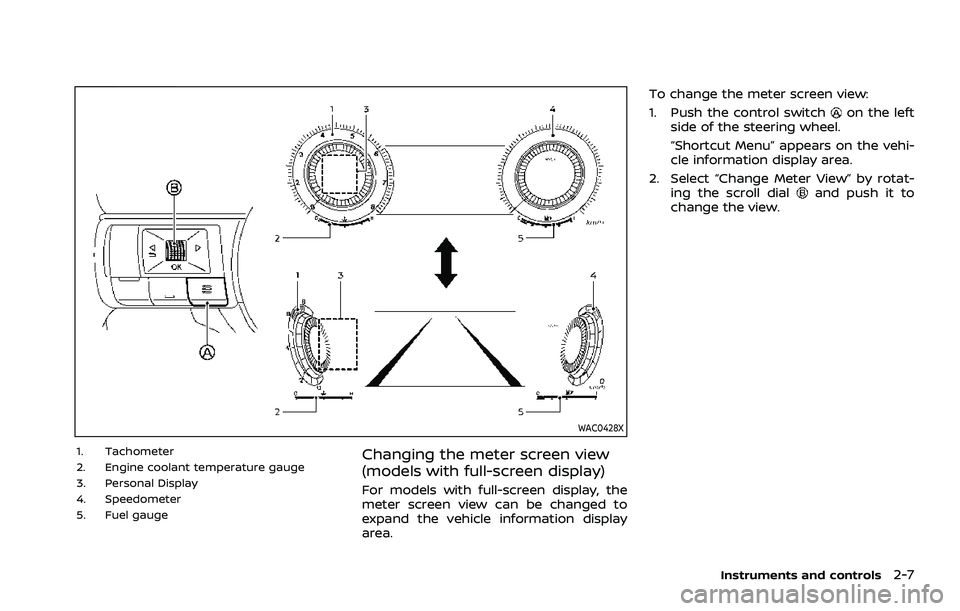
WAC0428X
1. Tachometer
2. Engine coolant temperature gauge
3. Personal Display
4. Speedometer
5. Fuel gaugeChanging the meter screen view
(models with full-screen display)
For models with full-screen display, the
meter screen view can be changed to
expand the vehicle information display
area.To change the meter screen view:
1. Push the control switch
on the left
side of the steering wheel.
“Shortcut Menu” appears on the vehi-
cle information display area.
2. Select “Change Meter View” by rotat- ing the scroll dial
and push it to
change the view.
Instruments and controls2-7
Page 100 of 556
2-12Instruments and controls
: The average fuel economy since the
last reset will be displayed.
: The best fuel economy of the past
history will be displayed.
When the “See Tire Pressure” message
appears in the ECO Drive Report, the
display can be switched to the Tire
Pressures display by pushing the scroll
dial on the steering wheel to show an
additional message.
Page 104 of 556

2-16Instruments and controls
.The engine oil pressure warning
light is not designed to indicate a
low oil level. The oil level should
be checked using the dipstick.
(See “Engine oil” (P.8-5).)
Hands OFF warning light (if so
equipped)
When the Steering Assist is activated, it
monitors the driver’s steering wheel op-
eration. If the steering wheel is not
operated or the driver takes his/her
hands off the steering wheel for a period
of time, the warning light illuminates. If
the driver does not operate the steering
wheel after the warning light has been
illuminated, an audible alert sounds and
the warning flashes in the vehicle infor-
mation display, followed by a quick brake
application to request the driver to take
control of the vehicle again. If the driver
remains unresponsive, the vehicle will
automatically turn on the hazard lights
and slow to a complete stop. (See “Steer-
ing Assist” (P.5-113).)
Master warning light
When the ignition switch is in the ON
position, the master warning light illumi-
nates if a warning message appears in
the vehicle information display.
See “Vehicle information display” (P.2-22).
Seat belt warning light and
chime
The light and chime remind you to fasten
the seat belts.
The light illuminates whenever the igni-
tion switch is placed in the ON position,
and will remain illuminated until the seat
belts are fastened.
The seat belt warning light for the front
passenger will illuminate if the seat belt is
not fastened when the front passenger’s
seat is occupied.
When the vehicle speed exceeds 10 MPH
(15 km/h), the light will continue to blink
for about 95 seconds until the driver’s
seat belt is fastened and the light will
blink unless the front passenger’s seat
belts is securely fastened and the chime
will sound for about 95 seconds unless
the front passenger’s seat belt is securely
fastened.
When the ignition switch is placed in the
ON position, the chime will sound for about 6 seconds unless the driver’s seat
belt is securely fastened.
When the vehicle speed exceeds 10 MPH
(15 km/h), the chime will sound unless the
rear passenger’s seat belts are securely
fastened. The chime will continue to
sound for about 35 seconds until the rear
passenger’s seat belts are fastened.
For additional information, refer to “Seat
belt warning light and chime” (P.1-15).Supplemental air bag warning
light
After placing the ignition switch in the ON
position, the supplemental air bag warn-
ing light will illuminate. The supplemental
air bag warning light will turn off after
about 7 seconds if the supplemental front
air bag and supplemental side air bag,
curtain air bag systems and/or preten-
sioner seat belt are operational.
If any of the following conditions occur,
the front air bag, side air bag, curtain air
bag and pretensioner systems need ser-
vicing.
. The supplemental air bag warning
light remains on after approximately
7 seconds.
. The supplemental air bag warning
light flashes intermittently.
Page 105 of 556

.The supplemental air bag warning
light does not illuminate at all.
It is recommended you visit a NISSAN
dealer for these services.
Unless checked and repaired, the Supple-
mental Restraint Systems and/or the
pretensioners may not function properly.
For additional information, see “Supple-
mental Restraint System (SRS)” (P.1-46).
WARNING
If the supplemental air bag warning
light is on, it could mean that the
front air bag, side air bag, curtain air
bag and/or pretensioner systems
will not operate in an accident. To
help avoid injury to yourself or
others, have your vehicle checked. It
is recommended you visit a NISSAN
dealer for this service.
WARNING/INDICATOR LIGHTS (yel-
low)
See “Vehicle information display” (P.2-22).
orAnti-lock Braking Sys-
tem (ABS) warning light
When the ignition switch is in the ON
position, the Anti-lock Braking System
(ABS) warning light illuminates and then
turns off. This indicates the ABS is opera-
tional.
If the ABS warning light illuminates while
the engine is running, or while driving, it
may indicate the ABS is not functioning
properly. Have the system checked. It is
recommended you visit a NISSAN dealer
for this service.
If an ABS malfunction occurs, the anti-
lock function is turned off. The brake
system then operates normally, but with-
out anti-lock assistance. (See “Brake sys-
tem” (P.5-155).)
Automatic Emergency Braking
(AEB) system OFF warning light
When the ignition switch is in the ON
position, the AEB system OFF warning
light illuminates. After starting the engine,
the warning light turns off.
This light illuminates when the AEB with
pedestrian detection system is set to OFF
on the vehicle information display.
If the light illuminates or flashes when the
AEB with pedestrian detection system is ON, it may indicate that the system is
unavailable. See “Automatic Emergency
Braking (AEB) with pedestrian detection
system” (P.5-122) or “Intelligent Forward
Collision Warning (I-FCW)” (P.5-132).
Electric power steering warn-
ing light
When the ignition switch is in the ON
position, the electric power steering
warning light illuminates. After starting
the engine, the electric power steering
warning light turns off. This indicates the
electric power steering is operational.
If the electric power steering warning
light illuminates while the engine is run-
ning, it may indicate the electric power
steering is not functioning properly and
may need servicing. Have the system
checked. It is recommended that you visit
a NISSAN dealer for this service.
When the electric power steering warning
light illuminates with the engine running,
the power assist to the steering will cease
operation but you will still have control of
the vehicle. At this time, greater steering
efforts are required to operate the steer-
ing wheel, especially in sharp turns and at
low speeds.
(See “Electric power steering” (P.5-154).)
Instruments and controls2-17
Page 111 of 556
.Audio information
. Navigation - turn by turn
. Indicators and warnings
. Tire pressure information
. Other information
CHANGING THE METER SCREEN
VIEW (models with full-screen dis-
play)
For the model with full-screen display, the
meter screen view can be changed to
expand the vehicle information display
area. See “Changing the meter screen
view (models with full-screen display)”
(P.2-7) for how to change the view.
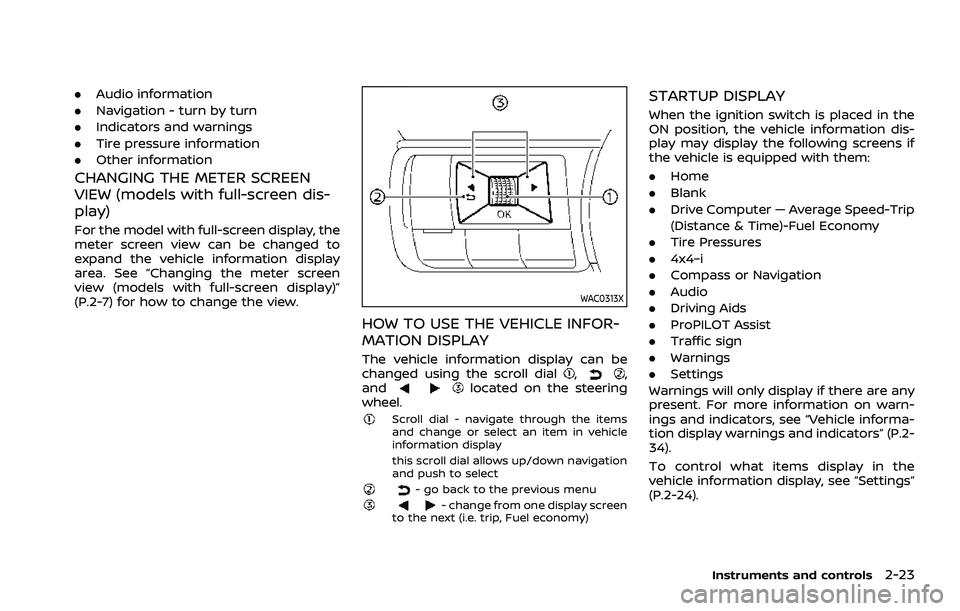
WAC0313X
HOW TO USE THE VEHICLE INFOR-
MATION DISPLAY
The vehicle information display can be
changed using the scroll dial,,
andlocated on the steering
wheel.
Scroll dial - navigate through the items
and change or select an item in vehicle
information display
this scroll dial allows up/down navigation
and push to select
- go back to the previous menu- change from one display screen
to the next (i.e. trip, Fuel economy)
STARTUP DISPLAY
When the ignition switch is placed in the
ON position, the vehicle information dis-
play may display the following screens if
the vehicle is equipped with them:
. Home
. Blank
. Drive Computer — Average Speed-Trip
(Distance & Time)-Fuel Economy
. Tire Pressures
. 4x4–i
. Compass or Navigation
. Audio
. Driving Aids
. ProPILOT Assist
. Traffic sign
. Warnings
. Settings
Warnings will only display if there are any
present. For more information on warn-
ings and indicators, see “Vehicle informa-
tion display warnings and indicators” (P.2-
34).
To control what items display in the
vehicle information display, see “Settings”
(P.2-24).
Instruments and controls2-23
Page 117 of 556
.Alert Only
When selected, only the alert is dis-
played.
. OFF
When selected, no alert or horn will be
active.
(See “Rear Door Alert” (P.2-65).)
Maintenance
The maintenance mode allows user to set
alerts for the reminding of maintenance
intervals. To change an item:
Select “Maintenance” using the scroll dial
and push it.
. Oil Control System (if so equipped)
. Oil and Filter
. Tire
. Other
Oil Control System (if so equipped):
The Oil Control System can be accessed
in the Maintenance portion of the vehicle
information display settings.
Engine oil information informs the dis-
tance to oil change. Never exceed one
year or 10,000 miles (16,000 km) between
oil change intervals for the PR25DD en-
gine.
Display when
ignition is ON Display timing
Action Required
Engine
Oil Ser-
vice due in xxxmiles Remaining oil
life is less than
940 miles (1,500
km). Plan to have
your vehicle ser-
viced.
Engine
Oil Ser-
vice due Remaining oil
life is 0 miles (0
km). Have your vehi-
cle serviced
within two
weeks or less
than 500 miles
(800 km).
The oil change interval cannot be ad-
justed manually.
The distance to oil change interval is
calculated depending on the driving con-
ditions and set automatically by the oil
control system. A reminder will be dis-
played when approaching the end of the
service interval.
When the Factory Reset option is selected
in the vehicle information display, the oil
control system will also be reset to initial
value. Please change the engine oil when
Factory Reset is selected.
CAUTION
If the oil replacement indicator is
displayed, change the engine oil
within two weeks or less than 500
miles (800 km).
Operating the vehicle with deterio-
rated oil can damage the engine.
To reset oil control system:
1. Place the ignition switch in the ON position.
2. Push the
andbuttons on the
steering wheel until “Settings” appears
in the vehicle information display. Use
the scroll dial to select “Maintenance”.
Then, push the scroll dial.
3. Select the “Oil Control System” and push the scroll dial.
4. Push the scroll dial according to the reset instructions displayed at the
bottom of the “Oil Control System”
maintenance screen.
Oil and Filter:
This indicator appears when user set
distance comes for changing the engine
oil and filter. You can set or reset the
distance for checking or replacing these
items. For scheduled maintenance items
Instruments and controls2-29
Page 128 of 556
2-40Instruments and controls
44. Unavailable Side Radar Ob-
struction warning
This warning appears when the following
systems become unavailable because a
radar blockage is detected.
.Blind Spot Warning (BSW)
. Intelligent Blind Spot Intervention (I-
BSI) (if so equipped)
. Rear Cross Traffic Alert (RCTA)
(See “Blind Spot Warning (BSW)” (P.5-57),
“Intelligent Blind Spot Intervention (I-BSI)”
(P.5-65) or “Rear Cross Traffic Alert (RCTA)”
(P.5-76).)
45. I-LI ON indicator/I-BSI ON indi-
cator/ProPILOT Assist status indi-
cator
This indicator appears when the following
systems are turned on:
. Intelligent Lane Intervention (I-LI)
. Intelligent Blind Spot Intervention (I-
BSI) (if so equipped)
. ProPILOT Assist (if so equipped)
See “Intelligent Lane Intervention (I-LI)”
(P.5-51), “Intelligent Blind Spot Intervention
(I-BSI)” (P.5-65) or “ProPILOT Assist” (P.5-
84).
46. Steering Assist indicator (if so
equipped)
This indicator appears when the Steering
Assist system is engaged.
See “ProPILOT Assist” (P.5-84).
47. Hands on detection warning (if
so equipped)
This warning may appear when the
Steering Assist system is engaged and
the following condition(s) occur:
. When not holding the steering wheel
. When there is no steering wheel
operation
Hold on the steering wheel immediately.
When the steering operation is detected,
the warning turns off and the Steering
Assist function is automatically restored.
For additional information, refer to “Pro-
PILOT Assist” (P.5-84).
48. Press Brake Pedal indicator (if
so equipped)
This message may appear when the
Intelligent Cruise Control (ICC) system is
engaged and the following condition
occurs:
. While the vehicle is stopped by the ICC
system, the driver’s door is opened but
the electronic parking brake was not
activated. Step on the brake pedal immediately.
49. Not Available Poor Road Condi-
tions warning (if so equipped)
This warning appears when the following
systems become unavailable because the
road is slippery.
.
Intelligent Lane Intervention (I-LI)
. Intelligent Blind Spot Intervention (I-
BSI) (if so equipped)
. Intelligent Cruise Control (ICC) (if so
equipped)
(See “Intelligent Lane Intervention (I-LI)”
(P.5-51), “Intelligent Blind Spot Intervention
(I-BSI)” (P.5-65) or “Intelligent Cruise Con-
trol (ICC)” (P.5-97).)
50. Not Available Seat Belt Not
Fastened indicator (if so equipped)
This message may appear when the
Intelligent Cruise Control (ICC) system is
engaged.
Under the following condition, the ICC
system is automatically canceled:
. When the driver’s seat belt is not
fastened.
The ICC system cannot be used when the
driver’s seat belt is not fastened.
Page 132 of 556
2-44Instruments and controls
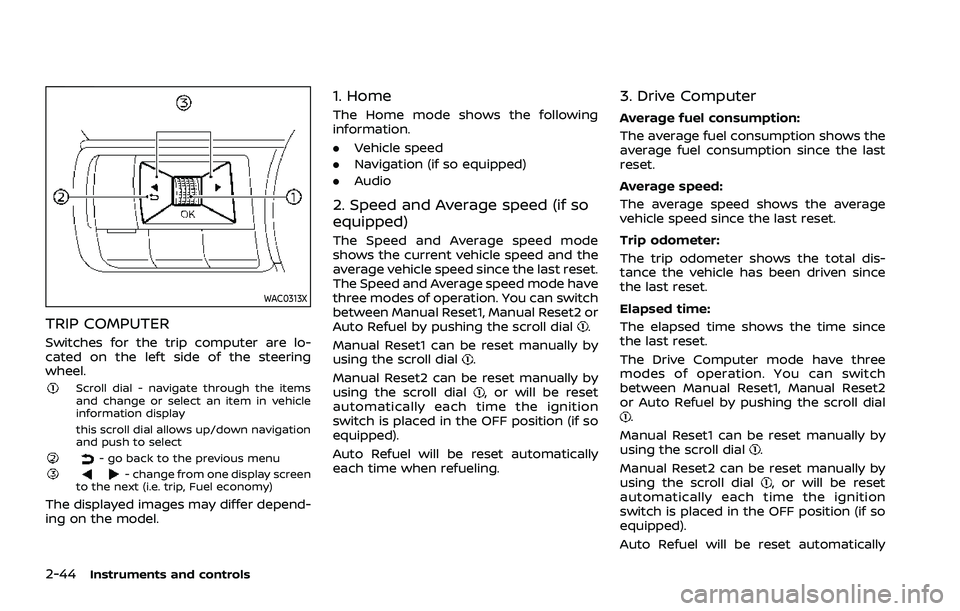
WAC0313X
TRIP COMPUTER
Switches for the trip computer are lo-
cated on the left side of the steering
wheel.
Scroll dial - navigate through the items
and change or select an item in vehicle
information display
this scroll dial allows up/down navigation
and push to select
- go back to the previous menu- change from one display screen
to the next (i.e. trip, Fuel economy)
The displayed images may differ depend-
ing on the model.
1. Home
The Home mode shows the following
information.
. Vehicle speed
. Navigation (if so equipped)
. Audio
2. Speed and Average speed (if so
equipped)
The Speed and Average speed mode
shows the current vehicle speed and the
average vehicle speed since the last reset.
The Speed and Average speed mode have
three modes of operation. You can switch
between Manual Reset1, Manual Reset2 or
Auto Refuel by pushing the scroll dial
.
Manual Reset1 can be reset manually by
using the scroll dial
.
Manual Reset2 can be reset manually by
using the scroll dial
, or will be reset
automatically each time the ignition
switch is placed in the OFF position (if so
equipped).
Auto Refuel will be reset automatically
each time when refueling.
3. Drive Computer
Average fuel consumption:
The average fuel consumption shows the
average fuel consumption since the last
reset.
Average speed:
The average speed shows the average
vehicle speed since the last reset.
Trip odometer:
The trip odometer shows the total dis-
tance the vehicle has been driven since
the last reset.
Elapsed time:
The elapsed time shows the time since
the last reset.
The Drive Computer mode have three
modes of operation. You can switch
between Manual Reset1, Manual Reset2
or Auto Refuel by pushing the scroll dial
.
Manual Reset1 can be reset manually by
using the scroll dial
.
Manual Reset2 can be reset manually by
using the scroll dial
, or will be reset
automatically each time the ignition
switch is placed in the OFF position (if so
equipped).
Auto Refuel will be reset automatically
Page 151 of 556
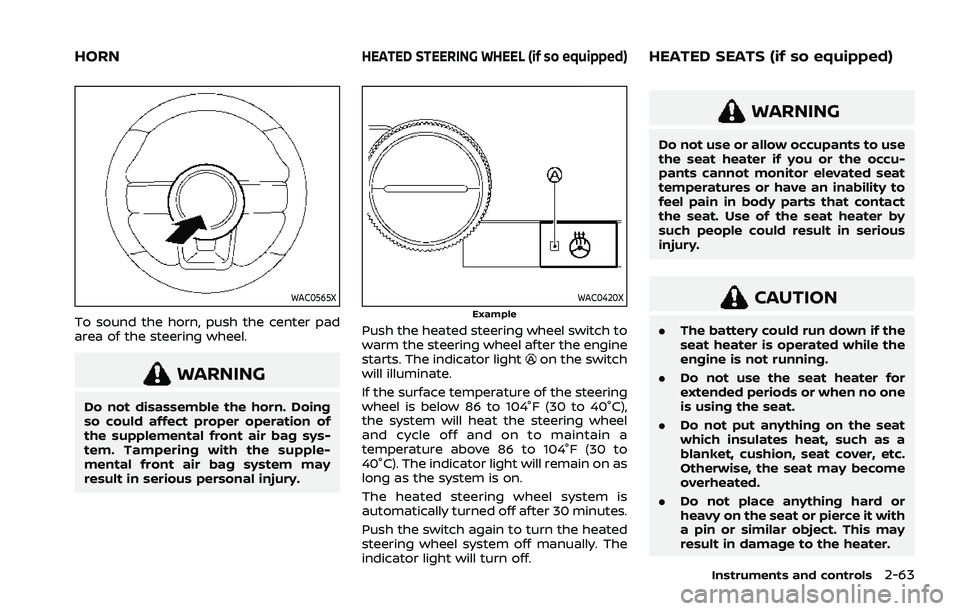
WAC0565X
To sound the horn, push the center pad
area of the steering wheel.
WARNING
Do not disassemble the horn. Doing
so could affect proper operation of
the supplemental front air bag sys-
tem. Tampering with the supple-
mental front air bag system may
result in serious personal injury.
WAC0420XExample
Push the heated steering wheel switch to
warm the steering wheel after the engine
starts. The indicator light
on the switch
will illuminate.
If the surface temperature of the steering
wheel is below 86 to 104°F (30 to 40°C),
the system will heat the steering wheel
and cycle off and on to maintain a
temperature above 86 to 104°F (30 to
40°C). The indicator light will remain on as
long as the system is on.
The heated steering wheel system is
automatically turned off after 30 minutes.
Push the switch again to turn the heated
steering wheel system off manually. The
indicator light will turn off.
WARNING
Do not use or allow occupants to use
the seat heater if you or the occu-
pants cannot monitor elevated seat
temperatures or have an inability to
feel pain in body parts that contact
the seat. Use of the seat heater by
such people could result in serious
injury.
CAUTION
. The battery could run down if the
seat heater is operated while the
engine is not running.
. Do not use the seat heater for
extended periods or when no one
is using the seat.
. Do not put anything on the seat
which insulates heat, such as a
blanket, cushion, seat cover, etc.
Otherwise, the seat may become
overheated.
. Do not place anything hard or
heavy on the seat or pierce it with
a pin or similar object. This may
result in damage to the heater.
Instruments and controls2-63
HORNHEATED STEERING WHEEL (if so equipped)HEATED SEATS (if so equipped)
Page 207 of 556
filler opening slowly and fully. Insert the
nozzle of the portable fuel container into
the opening along the funnel and fill the
fuel tank.
After refueling, remove the funnel from
the fuel-filler opening. Wipe the funnel
clean and return it to the tool bag.
CAUTION
.Do not insert the nozzle of the
portable fuel container directly
into the fuel-filler opening. Doing
so may damage the opening and
the fuel system.
. Use only the funnel provided with
your vehicle. Otherwise, the fuel-
filler opening and the fuel system
may be damaged.
WARNING
.Do not adjust the steering wheel
while driving. You could lose con-
trol of your vehicle and cause an
accident.
. Do not adjust the steering wheel
any closer to you than is neces-
sary for proper steering opera-
tion and comfort. The driver’s air
bag inflates with great force. If
you are unrestrained, leaning for-
ward, sitting sideways or out of
position in any way, you are at
greater risk of injury or death in a
crash. You may also receive ser-
ious or fatal injuries from the air
bag if you are up against it when
it inflates. Always sit back against
the seatback and as far away as
practical from the steering wheel.
Always use the seat belts.
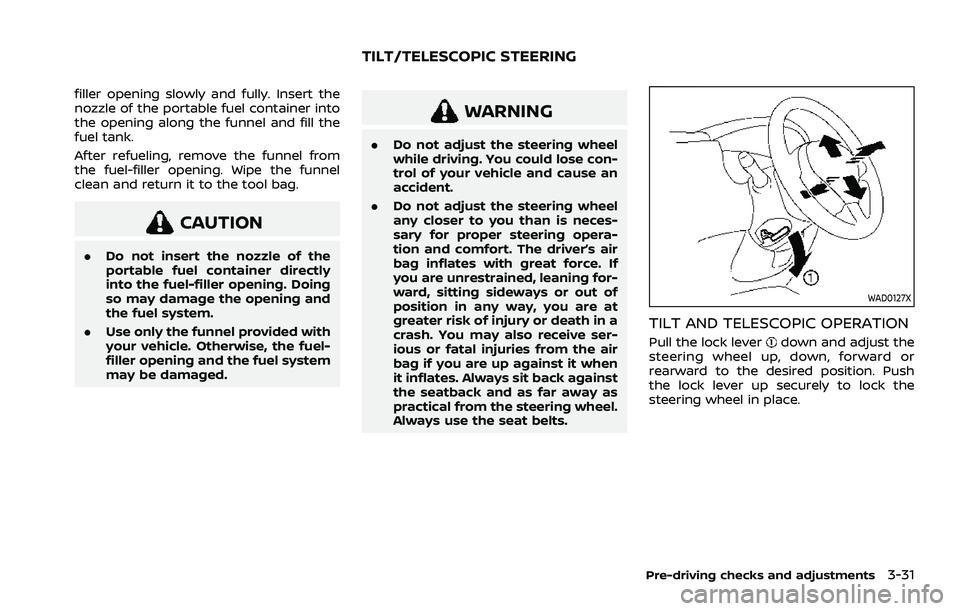
WAD0127X
TILT AND TELESCOPIC OPERATION
Pull the lock leverdown and adjust the
steering wheel up, down, forward or
rearward to the desired position. Push
the lock lever up securely to lock the
steering wheel in place.
Pre-driving checks and adjustments3-31
TILT/TELESCOPIC STEERING