belt NISSAN ROGUE 2021 Owner´s Manual
[x] Cancel search | Manufacturer: NISSAN, Model Year: 2021, Model line: ROGUE, Model: NISSAN ROGUE 2021Pages: 556, PDF Size: 2.7 MB
Page 86 of 556
1-66Safety — Seats, seat belts and supplemental restraint system
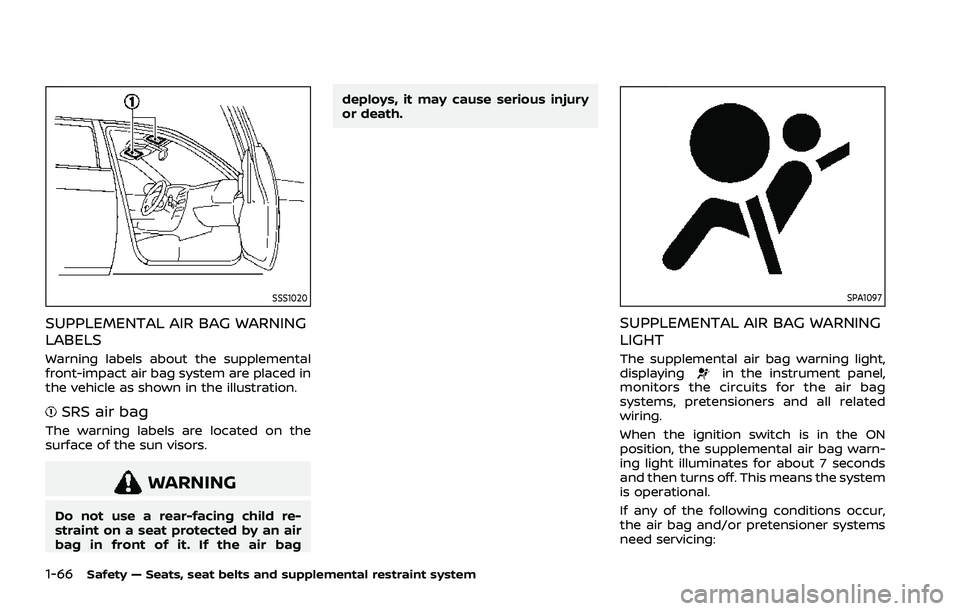
SSS1020
SUPPLEMENTAL AIR BAG WARNING
LABELS
Warning labels about the supplemental
front-impact air bag system are placed in
the vehicle as shown in the illustration.
SRS air bag
The warning labels are located on the
surface of the sun visors.
WARNING
Do not use a rear-facing child re-
straint on a seat protected by an air
bag in front of it. If the air bagdeploys, it may cause serious injury
or death.
SPA1097
SUPPLEMENTAL AIR BAG WARNING
LIGHT
The supplemental air bag warning light,
displayingin the instrument panel,
monitors the circuits for the air bag
systems, pretensioners and all related
wiring.
When the ignition switch is in the ON
position, the supplemental air bag warn-
ing light illuminates for about 7 seconds
and then turns off. This means the system
is operational.
If any of the following conditions occur,
the air bag and/or pretensioner systems
need servicing:
Page 87 of 556
.The supplemental air bag warning
light remains on after approximately
7 seconds.
. The supplemental air bag warning
light flashes intermittently.
. The supplemental air bag warning
light does not come on at all.
Under these conditions, the air bag and/
or pretensioner systems may not operate
properly. They must be checked and
repaired. It is recommended you visit a
NISSAN dealer for this service.
WARNING
If the supplemental air bag warning
light is on, it could mean that the
front air bag, knee air bag, side air
bag, curtain air bag and/or preten-
sioner systems will not operate in an
accident. To help avoid injury to
yourself or others, have your vehicle
checked as soon as possible. It is
recommended you visit a NISSAN
dealer for this service.
REPAIR AND REPLACEMENT PRO-
CEDURE
The front air bags, knee air bags, side air
bags, curtain air bags and pretensioners
are designed to activate on a one-time-
only basis. As a reminder, unless it is
damaged, the supplemental air bag
warning light will remain illuminated after
inflation has occurred. These systems
should be repaired and/or replaced as
soon as possible. It is recommended you
visit a NISSAN dealer for this service.
When maintenance work is required on
the vehicle, the front air bags, knee air
bags, side air bags, curtain air bags and
pretensioners and related parts should be
pointed out to the person performing the
maintenance. The ignition switch should
always be in the OFF position when
working under the hood or inside the
vehicle.
WARNING
. Once a front air bag, knee air bag,
side air bag or curtain air bag has
inflated, the air bag module will
not function again and must be
replaced. Additionally, the acti-
vated pretensioners must also
be replaced. The air bag module and pretensioner should be re-
placed. It is recommended you
visit a NISSAN dealer for this
service. However, the air bag
modules and pretensioner sys-
tem cannot be repaired.
. The front air bag, knee air bag,
side air bag and curtain air bag
systems, and pretensioner sys-
tem should be inspected if there
is any damage to the front end or
side portion of the vehicle. It is
recommended you visit a NISSAN
dealer for this service.
. If you need to dispose of a sup-
plemental air bag or pretensioner
or scrap the vehicle, it is recom-
mended you visit a NISSAN deal-
er. Correct supplemental air bag
and pretensioner system dispo-
sal procedures are set forth in the
appropriate NISSAN Service Man-
ual. Incorrect disposal procedures
could cause personal injury.
. If there is an impact to your
vehicle from any direction, your
Occupant Classification Sensor
(OCS) should be checked to verify
it is still functioning correctly. It is
recommended that you visit a
NISSAN dealer for this service.
The OCS should be checked even
Safety — Seats, seat belts and supplemental restraint system1-67
Page 88 of 556
1-68Safety — Seats, seat belts and supplemental restraint system
if no air bags deploy as a result of
the impact. Failure to verify prop-
er OCS function may result in an
improper air bag deployment re-
sulting in injury or death.
Page 101 of 556
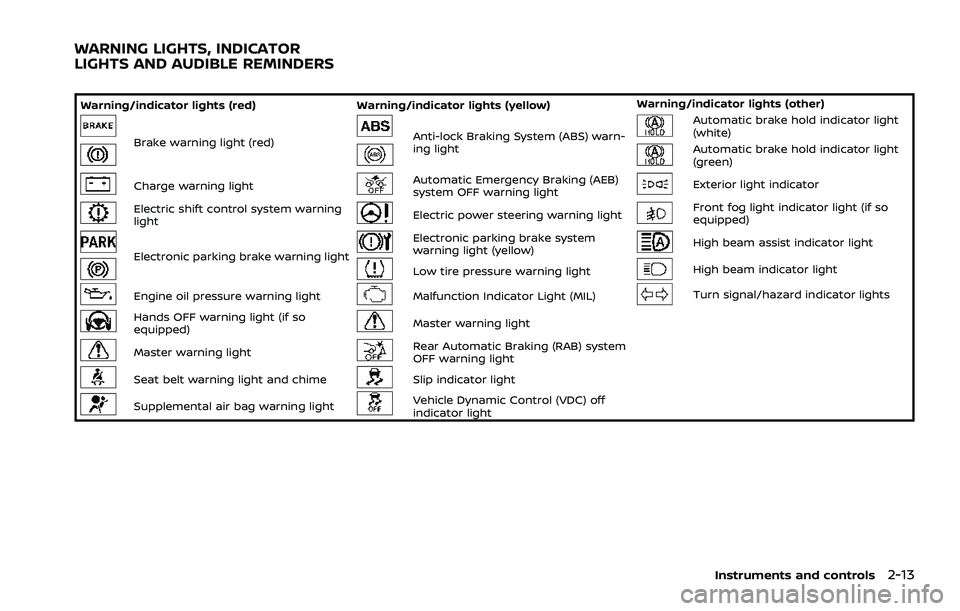
Warning/indicator lights (red)Warning/indicator lights (yellow) Warning/indicator lights (other)
Brake warning light (red)Anti-lock Braking System (ABS) warn-
ing lightAutomatic brake hold indicator light
(white)
Automatic brake hold indicator light
(green)
Charge warning lightAutomatic Emergency Braking (AEB)
system OFF warning lightExterior light indicator
Electric shift control system warning
lightElectric power steering warning lightFront fog light indicator light (if so
equipped)
Electronic parking brake warning light
Electronic parking brake system
warning light (yellow)High beam assist indicator light
Low tire pressure warning lightHigh beam indicator light
Engine oil pressure warning lightMalfunction Indicator Light (MIL)Turn signal/hazard indicator lights
Hands OFF warning light (if so
equipped)Master warning light
Master warning lightRear Automatic Braking (RAB) system
OFF warning light
Seat belt warning light and chimeSlip indicator light
Supplemental air bag warning lightVehicle Dynamic Control (VDC) off
indicator light
Instruments and controls2-13
WARNING LIGHTS, INDICATOR
LIGHTS AND AUDIBLE REMINDERS
Page 102 of 556
2-14Instruments and controls
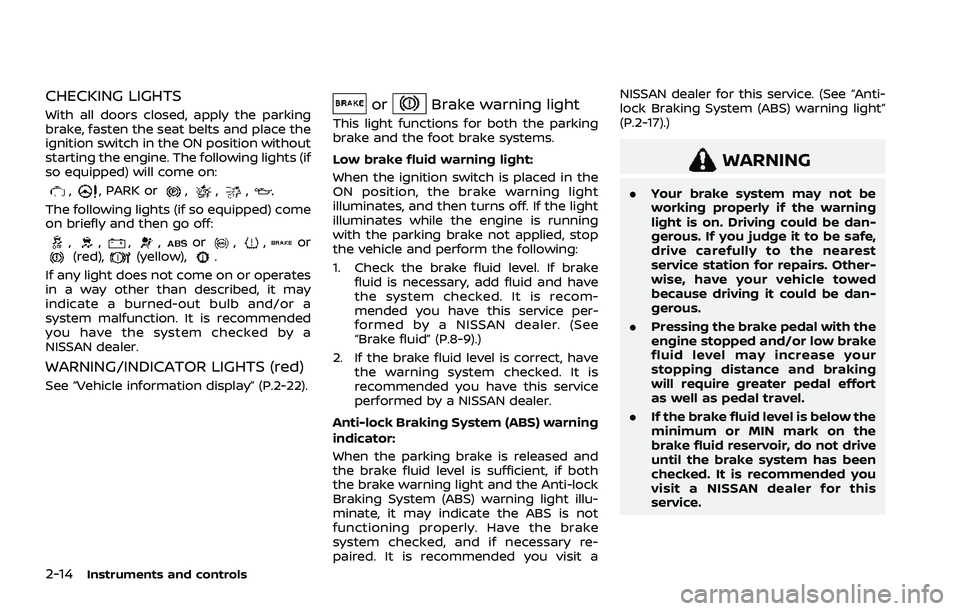
CHECKING LIGHTS
With all doors closed, apply the parking
brake, fasten the seat belts and place the
ignition switch in the ON position without
starting the engine. The following lights (if
so equipped) will come on:
,, PARK or,,,
The following lights (if so equipped) come
on briefly and then go off:
,,,,or,,or(red),(yellow),.
If any light does not come on or operates
in a way other than described, it may
indicate a burned-out bulb and/or a
system malfunction. It is recommended
you have the system checked by a
NISSAN dealer.
WARNING/INDICATOR LIGHTS (red)
See “Vehicle information display” (P.2-22).
orBrake warning light
This light functions for both the parking
brake and the foot brake systems.
Low brake fluid warning light:
When the ignition switch is placed in the
ON position, the brake warning light
illuminates, and then turns off. If the light
illuminates while the engine is running
with the parking brake not applied, stop
the vehicle and perform the following:
1. Check the brake fluid level. If brake fluid is necessary, add fluid and have
the system checked. It is recom-
mended you have this service per-
formed by a NISSAN dealer. (See
“Brake fluid” (P.8-9).)
2. If the brake fluid level is correct, have the warning system checked. It is
recommended you have this service
performed by a NISSAN dealer.
Anti-lock Braking System (ABS) warning
indicator:
When the parking brake is released and
the brake fluid level is sufficient, if both
the brake warning light and the Anti-lock
Braking System (ABS) warning light illu-
minate, it may indicate the ABS is not
functioning properly. Have the brake
system checked, and if necessary re-
paired. It is recommended you visit a NISSAN dealer for this service. (See “Anti-
lock Braking System (ABS) warning light”
(P.2-17).)
WARNING
.
Your brake system may not be
working properly if the warning
light is on. Driving could be dan-
gerous. If you judge it to be safe,
drive carefully to the nearest
service station for repairs. Other-
wise, have your vehicle towed
because driving it could be dan-
gerous.
. Pressing the brake pedal with the
engine stopped and/or low brake
fluid level may increase your
stopping distance and braking
will require greater pedal effort
as well as pedal travel.
. If the brake fluid level is below the
minimum or MIN mark on the
brake fluid reservoir, do not drive
until the brake system has been
checked. It is recommended you
visit a NISSAN dealer for this
service.
Page 103 of 556

Charge warning light
When the ignition switch is in the ON
position, the charge warning light illumi-
nates and then turns off.
If the light illuminates while the engine is
running, it may indicate the charging
system is not functioning properly. Turn
the engine off and check the alternator
belt. If the belt is loose, broken, missing or
if the light remains on, have your vehicle
serviced immediately. It is recommended
you visit a NISSAN dealer for this service.
CAUTION
Do not continue driving if the alter-
nator belt is loose, broken or miss-
ing.
Electric shift control system
warning light
When the ignition switch is in the ON
position, the electric shift control system
warning light illuminates, and then turns
off. This indicates the electric shift control
system is operational.
The electric shift control system warning
light illuminates when a malfunction oc- curs in the electric shift control system.
When the master warning light illumi-
nates, the chime sounds and the follow-
ing message is displayed in the vehicle
information display: “When parked apply
parking brake”.
When the ignition switch is placed in the
OFF position, the chime sounds continu-
ously. Ensure the parking brake is applied.
Have the system checked by a NISSAN
dealer.
orElectronic parking
brake warning light
The electronic parking brake warning
light indicates that the electronic parking
brake system is operating.
When the ignition switch is placed in the
ON position, the electronic parking brake
warning light illuminates. When the en-
gine is started and the parking brake is
released, the warning light turns off.
If the parking brake is not released, the
electronic parking brake warning light
remains on. Be sure that the electronic
parking brake warning light has turned
off before driving. (See “Parking brake”
(P.5-25).)
If the electronic parking brake warning
light illuminates or flashes while the
electronic parking brake system warning light
(yellow) illuminates, it may
indicate that the electronic parking brake
system is not functioning properly. Have
the system checked, and if necessary
repaired. It is recommended you visit a
NISSAN dealer for this service.
Engine oil pressure warning
light
This light warns of low engine oil pres-
sure. When the ignition switch is in the ON
position, the engine oil pressure warning
light illuminates. After starting the engine,
the engine oil pressure warning light
turns off. This indicates that the oil
pressure sensors in the engine are opera-
tional.
If the engine oil pressure warning light
illuminates or blinks while the engine is
running, it may indicate that the engine
oil pressure is low.
Stop the vehicle safely as soon as possi-
ble. Stop the engine immediately and call
a NISSAN dealer.
CAUTION
. Running the engine with the en-
gine oil pressure warning light
illuminated could cause serious
damage to the engine.
Instruments and controls2-15
Page 104 of 556

2-16Instruments and controls
.The engine oil pressure warning
light is not designed to indicate a
low oil level. The oil level should
be checked using the dipstick.
(See “Engine oil” (P.8-5).)
Hands OFF warning light (if so
equipped)
When the Steering Assist is activated, it
monitors the driver’s steering wheel op-
eration. If the steering wheel is not
operated or the driver takes his/her
hands off the steering wheel for a period
of time, the warning light illuminates. If
the driver does not operate the steering
wheel after the warning light has been
illuminated, an audible alert sounds and
the warning flashes in the vehicle infor-
mation display, followed by a quick brake
application to request the driver to take
control of the vehicle again. If the driver
remains unresponsive, the vehicle will
automatically turn on the hazard lights
and slow to a complete stop. (See “Steer-
ing Assist” (P.5-113).)
Master warning light
When the ignition switch is in the ON
position, the master warning light illumi-
nates if a warning message appears in
the vehicle information display.
See “Vehicle information display” (P.2-22).
Seat belt warning light and
chime
The light and chime remind you to fasten
the seat belts.
The light illuminates whenever the igni-
tion switch is placed in the ON position,
and will remain illuminated until the seat
belts are fastened.
The seat belt warning light for the front
passenger will illuminate if the seat belt is
not fastened when the front passenger’s
seat is occupied.
When the vehicle speed exceeds 10 MPH
(15 km/h), the light will continue to blink
for about 95 seconds until the driver’s
seat belt is fastened and the light will
blink unless the front passenger’s seat
belts is securely fastened and the chime
will sound for about 95 seconds unless
the front passenger’s seat belt is securely
fastened.
When the ignition switch is placed in the
ON position, the chime will sound for about 6 seconds unless the driver’s seat
belt is securely fastened.
When the vehicle speed exceeds 10 MPH
(15 km/h), the chime will sound unless the
rear passenger’s seat belts are securely
fastened. The chime will continue to
sound for about 35 seconds until the rear
passenger’s seat belts are fastened.
For additional information, refer to “Seat
belt warning light and chime” (P.1-15).Supplemental air bag warning
light
After placing the ignition switch in the ON
position, the supplemental air bag warn-
ing light will illuminate. The supplemental
air bag warning light will turn off after
about 7 seconds if the supplemental front
air bag and supplemental side air bag,
curtain air bag systems and/or preten-
sioner seat belt are operational.
If any of the following conditions occur,
the front air bag, side air bag, curtain air
bag and pretensioner systems need ser-
vicing.
. The supplemental air bag warning
light remains on after approximately
7 seconds.
. The supplemental air bag warning
light flashes intermittently.
Page 123 of 556
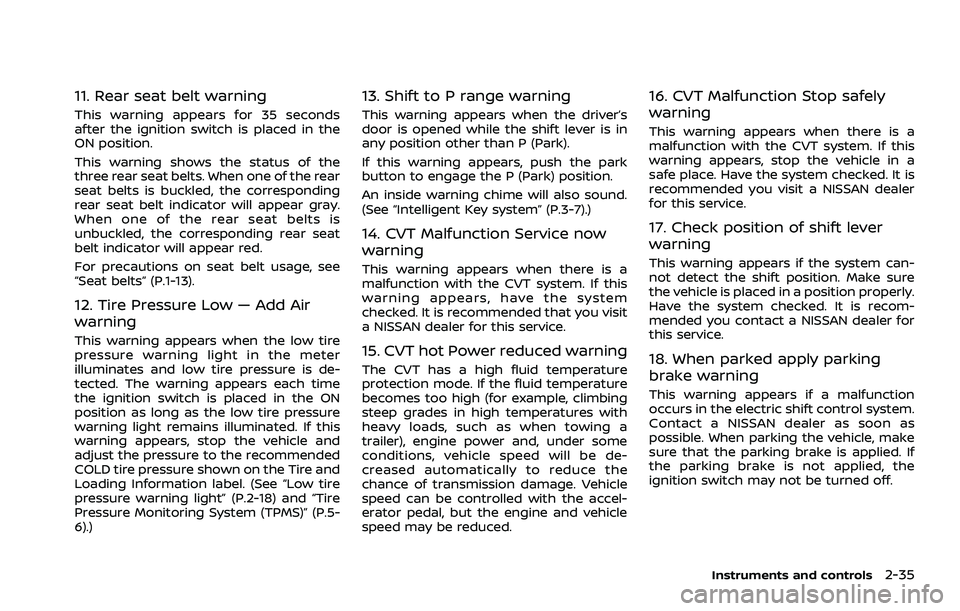
11. Rear seat belt warning
This warning appears for 35 seconds
after the ignition switch is placed in the
ON position.
This warning shows the status of the
three rear seat belts. When one of the rear
seat belts is buckled, the corresponding
rear seat belt indicator will appear gray.
When one of the rear seat belts is
unbuckled, the corresponding rear seat
belt indicator will appear red.
For precautions on seat belt usage, see
“Seat belts” (P.1-13).
12. Tire Pressure Low — Add Air
warning
This warning appears when the low tire
pressure warning light in the meter
illuminates and low tire pressure is de-
tected. The warning appears each time
the ignition switch is placed in the ON
position as long as the low tire pressure
warning light remains illuminated. If this
warning appears, stop the vehicle and
adjust the pressure to the recommended
COLD tire pressure shown on the Tire and
Loading Information label. (See “Low tire
pressure warning light” (P.2-18) and “Tire
Pressure Monitoring System (TPMS)” (P.5-
6).)
13. Shift to P range warning
This warning appears when the driver’s
door is opened while the shift lever is in
any position other than P (Park).
If this warning appears, push the park
button to engage the P (Park) position.
An inside warning chime will also sound.
(See “Intelligent Key system” (P.3-7).)
14. CVT Malfunction Service now
warning
This warning appears when there is a
malfunction with the CVT system. If this
warning appears, have the system
checked. It is recommended that you visit
a NISSAN dealer for this service.
15. CVT hot Power reduced warning
The CVT has a high fluid temperature
protection mode. If the fluid temperature
becomes too high (for example, climbing
steep grades in high temperatures with
heavy loads, such as when towing a
trailer), engine power and, under some
conditions, vehicle speed will be de-
creased automatically to reduce the
chance of transmission damage. Vehicle
speed can be controlled with the accel-
erator pedal, but the engine and vehicle
speed may be reduced.
16. CVT Malfunction Stop safely
warning
This warning appears when there is a
malfunction with the CVT system. If this
warning appears, stop the vehicle in a
safe place. Have the system checked. It is
recommended you visit a NISSAN dealer
for this service.
17. Check position of shift lever
warning
This warning appears if the system can-
not detect the shift position. Make sure
the vehicle is placed in a position properly.
Have the system checked. It is recom-
mended you contact a NISSAN dealer for
this service.
18. When parked apply parking
brake warning
This warning appears if a malfunction
occurs in the electric shift control system.
Contact a NISSAN dealer as soon as
possible. When parking the vehicle, make
sure that the parking brake is applied. If
the parking brake is not applied, the
ignition switch may not be turned off.
Instruments and controls2-35
Page 128 of 556
2-40Instruments and controls
44. Unavailable Side Radar Ob-
struction warning
This warning appears when the following
systems become unavailable because a
radar blockage is detected.
.Blind Spot Warning (BSW)
. Intelligent Blind Spot Intervention (I-
BSI) (if so equipped)
. Rear Cross Traffic Alert (RCTA)
(See “Blind Spot Warning (BSW)” (P.5-57),
“Intelligent Blind Spot Intervention (I-BSI)”
(P.5-65) or “Rear Cross Traffic Alert (RCTA)”
(P.5-76).)
45. I-LI ON indicator/I-BSI ON indi-
cator/ProPILOT Assist status indi-
cator
This indicator appears when the following
systems are turned on:
. Intelligent Lane Intervention (I-LI)
. Intelligent Blind Spot Intervention (I-
BSI) (if so equipped)
. ProPILOT Assist (if so equipped)
See “Intelligent Lane Intervention (I-LI)”
(P.5-51), “Intelligent Blind Spot Intervention
(I-BSI)” (P.5-65) or “ProPILOT Assist” (P.5-
84).
46. Steering Assist indicator (if so
equipped)
This indicator appears when the Steering
Assist system is engaged.
See “ProPILOT Assist” (P.5-84).
47. Hands on detection warning (if
so equipped)
This warning may appear when the
Steering Assist system is engaged and
the following condition(s) occur:
. When not holding the steering wheel
. When there is no steering wheel
operation
Hold on the steering wheel immediately.
When the steering operation is detected,
the warning turns off and the Steering
Assist function is automatically restored.
For additional information, refer to “Pro-
PILOT Assist” (P.5-84).
48. Press Brake Pedal indicator (if
so equipped)
This message may appear when the
Intelligent Cruise Control (ICC) system is
engaged and the following condition
occurs:
. While the vehicle is stopped by the ICC
system, the driver’s door is opened but
the electronic parking brake was not
activated. Step on the brake pedal immediately.
49. Not Available Poor Road Condi-
tions warning (if so equipped)
This warning appears when the following
systems become unavailable because the
road is slippery.
.
Intelligent Lane Intervention (I-LI)
. Intelligent Blind Spot Intervention (I-
BSI) (if so equipped)
. Intelligent Cruise Control (ICC) (if so
equipped)
(See “Intelligent Lane Intervention (I-LI)”
(P.5-51), “Intelligent Blind Spot Intervention
(I-BSI)” (P.5-65) or “Intelligent Cruise Con-
trol (ICC)” (P.5-97).)
50. Not Available Seat Belt Not
Fastened indicator (if so equipped)
This message may appear when the
Intelligent Cruise Control (ICC) system is
engaged.
Under the following condition, the ICC
system is automatically canceled:
. When the driver’s seat belt is not
fastened.
The ICC system cannot be used when the
driver’s seat belt is not fastened.
Page 171 of 556
WARNING
.In an accident you could be
thrown from the vehicle through
an open moonroof. Always use
seat belts and child restraints.
. Do not allow anyone to stand up
or extend any portion of their
body out of the moonroof open-
ing while the vehicle is in motion
or while the moonroof is closing.
CAUTION
.Remove water drops, snow, ice or
sand from the moonroof before
opening.
. Do not place any heavy object on
the moonroof or surrounding
area.
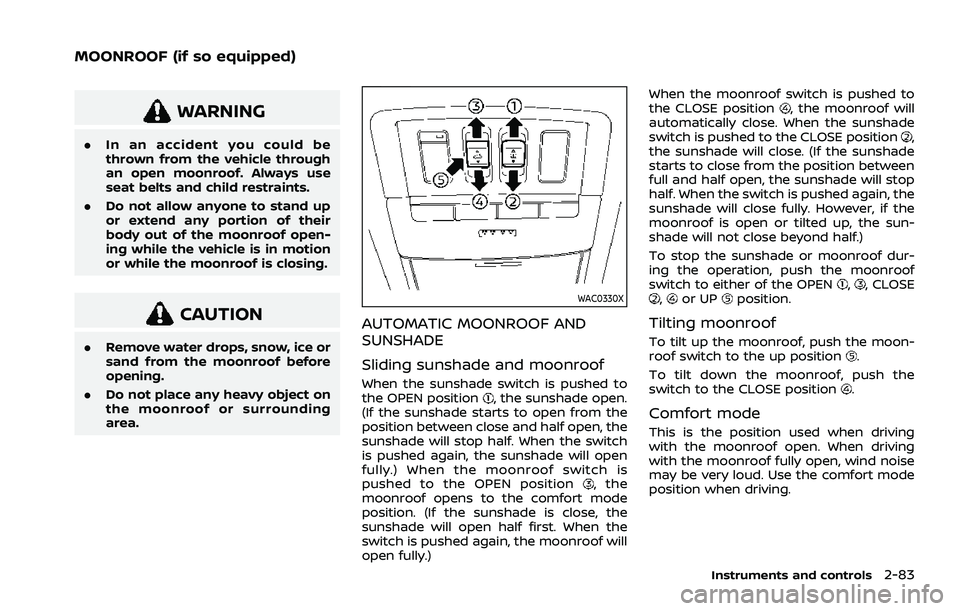
WAC0330X
AUTOMATIC MOONROOF AND
SUNSHADE
Sliding sunshade and moonroof
When the sunshade switch is pushed to
the OPEN position, the sunshade open.
(If the sunshade starts to open from the
position between close and half open, the
sunshade will stop half. When the switch
is pushed again, the sunshade will open
fully.) When the moonroof switch is
pushed to the OPEN position
, the
moonroof opens to the comfort mode
position. (If the sunshade is close, the
sunshade will open half first. When the
switch is pushed again, the moonroof will
open fully.) When the moonroof switch is pushed to
the CLOSE position
, the moonroof will
automatically close. When the sunshade
switch is pushed to the CLOSE position
,
the sunshade will close. (If the sunshade
starts to close from the position between
full and half open, the sunshade will stop
half. When the switch is pushed again, the
sunshade will close fully. However, if the
moonroof is open or tilted up, the sun-
shade will not close beyond half.)
To stop the sunshade or moonroof dur-
ing the operation, push the moonroof
switch to either of the OPEN
,, CLOSE,or UPposition.
Tilting moonroof
To tilt up the moonroof, push the moon-
roof switch to the up position.
To tilt down the moonroof, push the
switch to the CLOSE position
.
Comfort mode
This is the position used when driving
with the moonroof open. When driving
with the moonroof fully open, wind noise
may be very loud. Use the comfort mode
position when driving.
Instruments and controls2-83
MOONROOF (if so equipped)