steering NISSAN ROGUE 2021 Owner´s Manual
[x] Cancel search | Manufacturer: NISSAN, Model Year: 2021, Model line: ROGUE, Model: NISSAN ROGUE 2021Pages: 556, PDF Size: 2.7 MB
Page 207 of 556
filler opening slowly and fully. Insert the
nozzle of the portable fuel container into
the opening along the funnel and fill the
fuel tank.
After refueling, remove the funnel from
the fuel-filler opening. Wipe the funnel
clean and return it to the tool bag.
CAUTION
.Do not insert the nozzle of the
portable fuel container directly
into the fuel-filler opening. Doing
so may damage the opening and
the fuel system.
. Use only the funnel provided with
your vehicle. Otherwise, the fuel-
filler opening and the fuel system
may be damaged.
WARNING
.Do not adjust the steering wheel
while driving. You could lose con-
trol of your vehicle and cause an
accident.
. Do not adjust the steering wheel
any closer to you than is neces-
sary for proper steering opera-
tion and comfort. The driver’s air
bag inflates with great force. If
you are unrestrained, leaning for-
ward, sitting sideways or out of
position in any way, you are at
greater risk of injury or death in a
crash. You may also receive ser-
ious or fatal injuries from the air
bag if you are up against it when
it inflates. Always sit back against
the seatback and as far away as
practical from the steering wheel.
Always use the seat belts.
WAD0127X
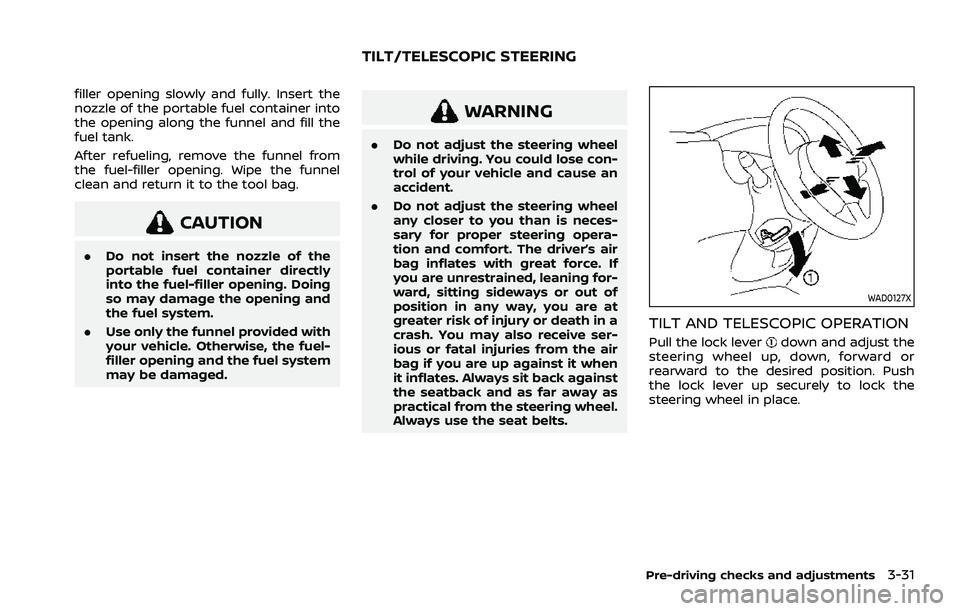
TILT AND TELESCOPIC OPERATION
Pull the lock leverdown and adjust the
steering wheel up, down, forward or
rearward to the desired position. Push
the lock lever up securely to lock the
steering wheel in place.
Pre-driving checks and adjustments3-31
TILT/TELESCOPIC STEERING
Page 218 of 556
4-4Monitor, heater, air conditioner, audio and phone systems
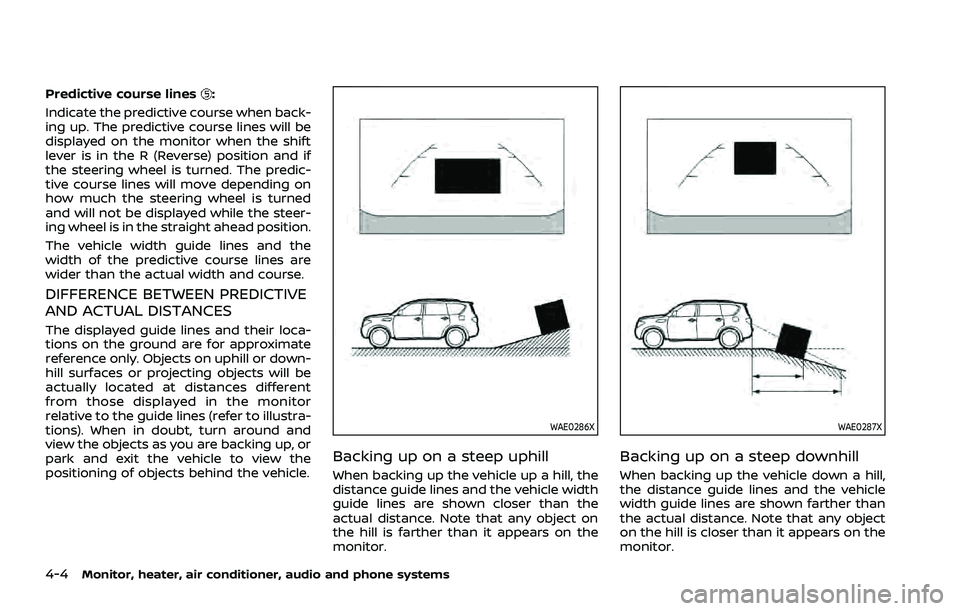
Predictive course lines:
Indicate the predictive course when back-
ing up. The predictive course lines will be
displayed on the monitor when the shift
lever is in the R (Reverse) position and if
the steering wheel is turned. The predic-
tive course lines will move depending on
how much the steering wheel is turned
and will not be displayed while the steer-
ing wheel is in the straight ahead position.
The vehicle width guide lines and the
width of the predictive course lines are
wider than the actual width and course.
DIFFERENCE BETWEEN PREDICTIVE
AND ACTUAL DISTANCES
The displayed guide lines and their loca-
tions on the ground are for approximate
reference only. Objects on uphill or down-
hill surfaces or projecting objects will be
actually located at distances different
from those displayed in the monitor
relative to the guide lines (refer to illustra-
tions). When in doubt, turn around and
view the objects as you are backing up, or
park and exit the vehicle to view the
positioning of objects behind the vehicle.
WAE0286X
Backing up on a steep uphill
When backing up the vehicle up a hill, the
distance guide lines and the vehicle width
guide lines are shown closer than the
actual distance. Note that any object on
the hill is farther than it appears on the
monitor.
WAE0287X
Backing up on a steep downhill
When backing up the vehicle down a hill,
the distance guide lines and the vehicle
width guide lines are shown farther than
the actual distance. Note that any object
on the hill is closer than it appears on the
monitor.
Page 219 of 556
WAE0288X
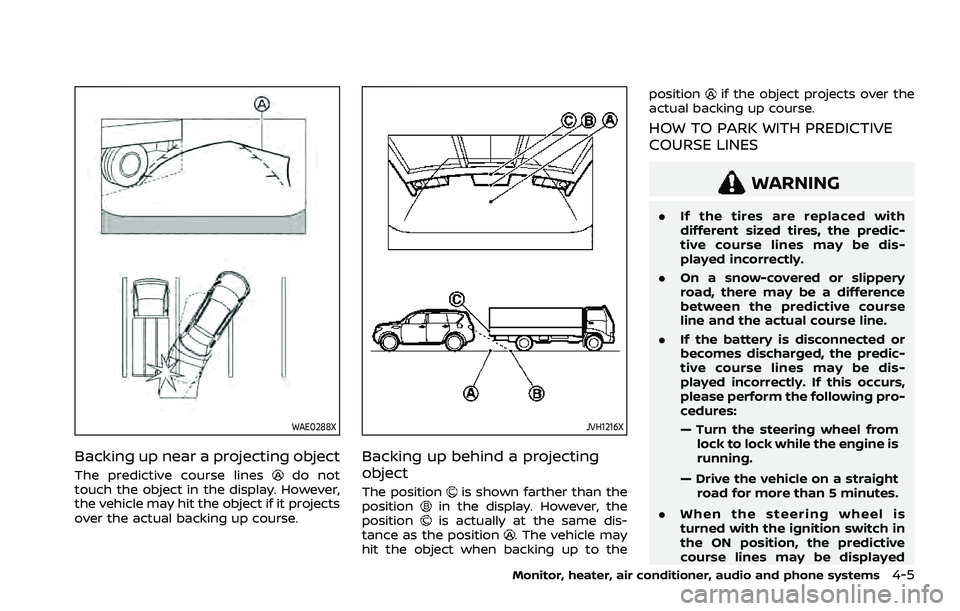
Backing up near a projecting object
The predictive course linesdo not
touch the object in the display. However,
the vehicle may hit the object if it projects
over the actual backing up course.
JVH1216X
Backing up behind a projecting
object
The positionis shown farther than the
positionin the display. However, the
positionis actually at the same dis-
tance as the position. The vehicle may
hit the object when backing up to the position
if the object projects over the
actual backing up course.
HOW TO PARK WITH PREDICTIVE
COURSE LINES
WARNING
. If the tires are replaced with
different sized tires, the predic-
tive course lines may be dis-
played incorrectly.
. On a snow-covered or slippery
road, there may be a difference
between the predictive course
line and the actual course line.
. If the battery is disconnected or
becomes discharged, the predic-
tive course lines may be dis-
played incorrectly. If this occurs,
please perform the following pro-
cedures:
— Turn the steering wheel from
lock to lock while the engine is
running.
— Drive the vehicle on a straight road for more than 5 minutes.
. When the steering wheel is
turned with the ignition switch in
the ON position, the predictive
course lines may be displayed
Monitor, heater, air conditioner, audio and phone systems4-5
Page 220 of 556
4-6Monitor, heater, air conditioner, audio and phone systems
incorrectly.
WAE0289X
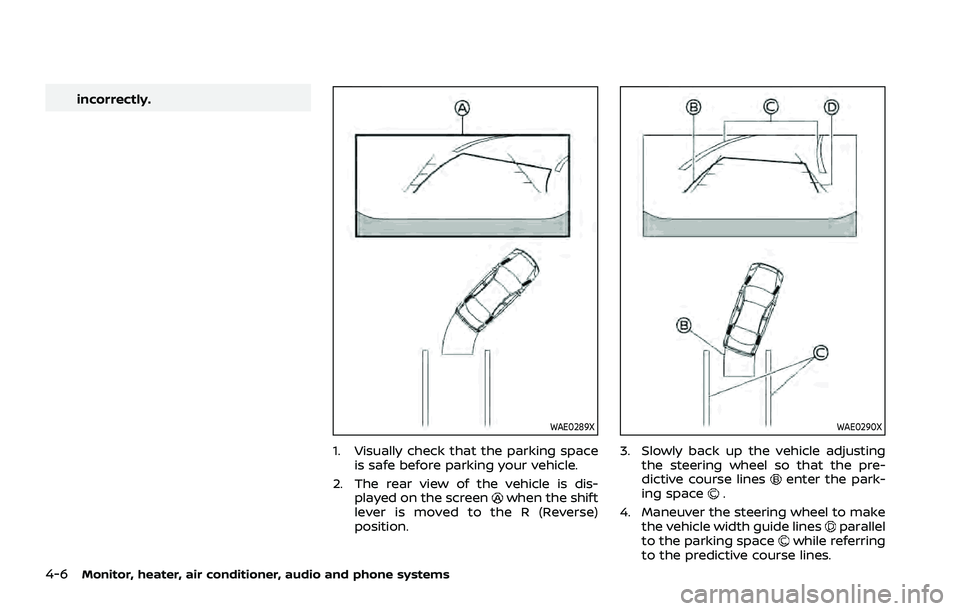
1. Visually check that the parking spaceis safe before parking your vehicle.
2. The rear view of the vehicle is dis- played on the screen
when the shift
lever is moved to the R (Reverse)
position.
WAE0290X
3. Slowly back up the vehicle adjusting the steering wheel so that the pre-
dictive course lines
enter the park-
ing space.
4. Maneuver the steering wheel to make the vehicle width guide lines
parallel
to the parking spacewhile referring
to the predictive course lines.
Page 226 of 556
4-12Monitor, heater, air conditioner, audio and phone systems
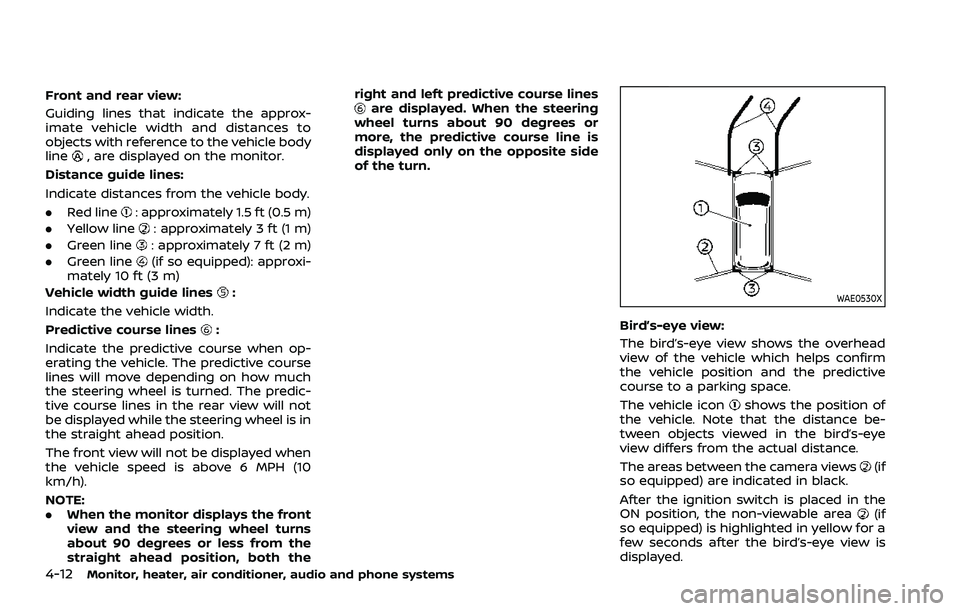
Front and rear view:
Guiding lines that indicate the approx-
imate vehicle width and distances to
objects with reference to the vehicle body
line
, are displayed on the monitor.
Distance guide lines:
Indicate distances from the vehicle body.
. Red line
: approximately 1.5 ft (0.5 m)
. Yellow line
: approximately 3 ft (1 m)
. Green line
: approximately 7 ft (2 m)
. Green line
(if so equipped): approxi-
mately 10 ft (3 m)
Vehicle width guide lines
:
Indicate the vehicle width.
Predictive course lines
:
Indicate the predictive course when op-
erating the vehicle. The predictive course
lines will move depending on how much
the steering wheel is turned. The predic-
tive course lines in the rear view will not
be displayed while the steering wheel is in
the straight ahead position.
The front view will not be displayed when
the vehicle speed is above 6 MPH (10
km/h).
NOTE:
. When the monitor displays the front
view and the steering wheel turns
about 90 degrees or less from the
straight ahead position, both the right and left predictive course lines
are displayed. When the steering
wheel turns about 90 degrees or
more, the predictive course line is
displayed only on the opposite side
of the turn.
WAE0530X
Bird’s-eye view:
The bird’s-eye view shows the overhead
view of the vehicle which helps confirm
the vehicle position and the predictive
course to a parking space.
The vehicle icon
shows the position of
the vehicle. Note that the distance be-
tween objects viewed in the bird’s-eye
view differs from the actual distance.
The areas between the camera views
(if
so equipped) are indicated in black.
After the ignition switch is placed in the
ON position, the non-viewable area
(if
so equipped) is highlighted in yellow for a
few seconds after the bird’s-eye view is
displayed.
Page 228 of 556
4-14Monitor, heater, air conditioner, audio and phone systems
WAE0540XFront-wide view
WAE0541XRear-wide view
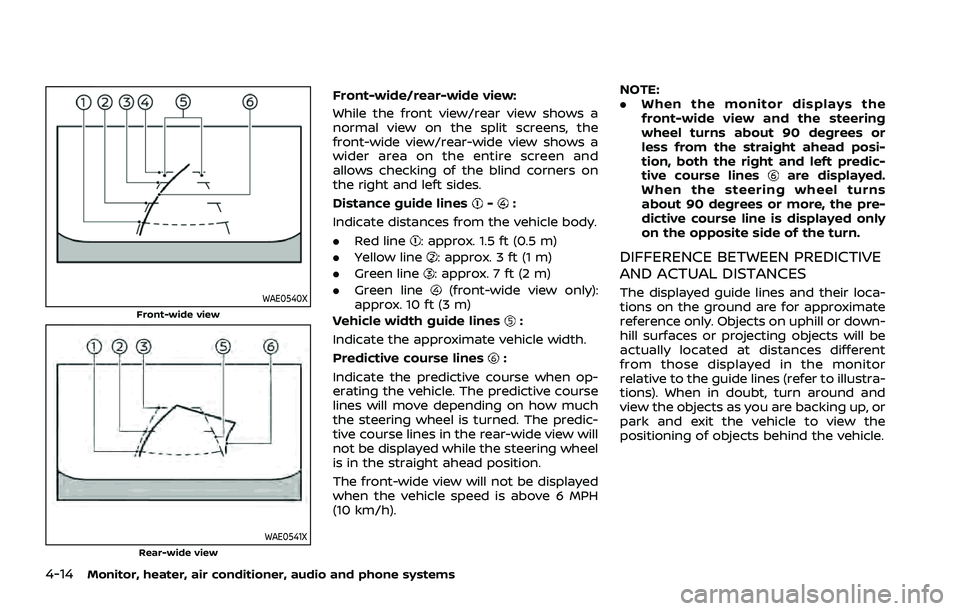
Front-wide/rear-wide view:
While the front view/rear view shows a
normal view on the split screens, the
front-wide view/rear-wide view shows a
wider area on the entire screen and
allows checking of the blind corners on
the right and left sides.
Distance guide lines
-:
Indicate distances from the vehicle body.
. Red line
: approx. 1.5 ft (0.5 m)
. Yellow line
: approx. 3 ft (1 m)
. Green line
: approx. 7 ft (2 m)
. Green line
(front-wide view only):
approx. 10 ft (3 m)
Vehicle width guide lines
:
Indicate the approximate vehicle width.
Predictive course lines
:
Indicate the predictive course when op-
erating the vehicle. The predictive course
lines will move depending on how much
the steering wheel is turned. The predic-
tive course lines in the rear-wide view will
not be displayed while the steering wheel
is in the straight ahead position.
The front-wide view will not be displayed
when the vehicle speed is above 6 MPH
(10 km/h). NOTE:
.
When the monitor displays the
front-wide view and the steering
wheel turns about 90 degrees or
less from the straight ahead posi-
tion, both the right and left predic-
tive course lines
are displayed.
When the steering wheel turns
about 90 degrees or more, the pre-
dictive course line is displayed only
on the opposite side of the turn.
DIFFERENCE BETWEEN PREDICTIVE
AND ACTUAL DISTANCES
The displayed guide lines and their loca-
tions on the ground are for approximate
reference only. Objects on uphill or down-
hill surfaces or projecting objects will be
actually located at distances different
from those displayed in the monitor
relative to the guide lines (refer to illustra-
tions). When in doubt, turn around and
view the objects as you are backing up, or
park and exit the vehicle to view the
positioning of objects behind the vehicle.
Page 230 of 556
4-16Monitor, heater, air conditioner, audio and phone systems
JVH1216X
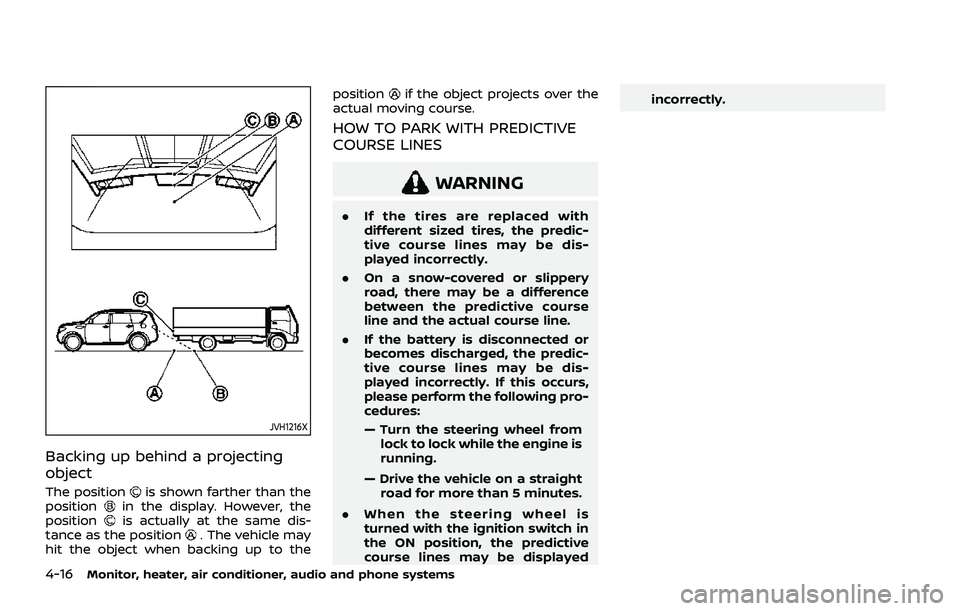
Backing up behind a projecting
object
The positionis shown farther than the
positionin the display. However, the
positionis actually at the same dis-
tance as the position. The vehicle may
hit the object when backing up to the position
if the object projects over the
actual moving course.
HOW TO PARK WITH PREDICTIVE
COURSE LINES
WARNING
. If the tires are replaced with
different sized tires, the predic-
tive course lines may be dis-
played incorrectly.
. On a snow-covered or slippery
road, there may be a difference
between the predictive course
line and the actual course line.
. If the battery is disconnected or
becomes discharged, the predic-
tive course lines may be dis-
played incorrectly. If this occurs,
please perform the following pro-
cedures:
— Turn the steering wheel from
lock to lock while the engine is
running.
— Drive the vehicle on a straight road for more than 5 minutes.
. When the steering wheel is
turned with the ignition switch in
the ON position, the predictive
course lines may be displayed incorrectly.
Page 231 of 556
WAE0546X
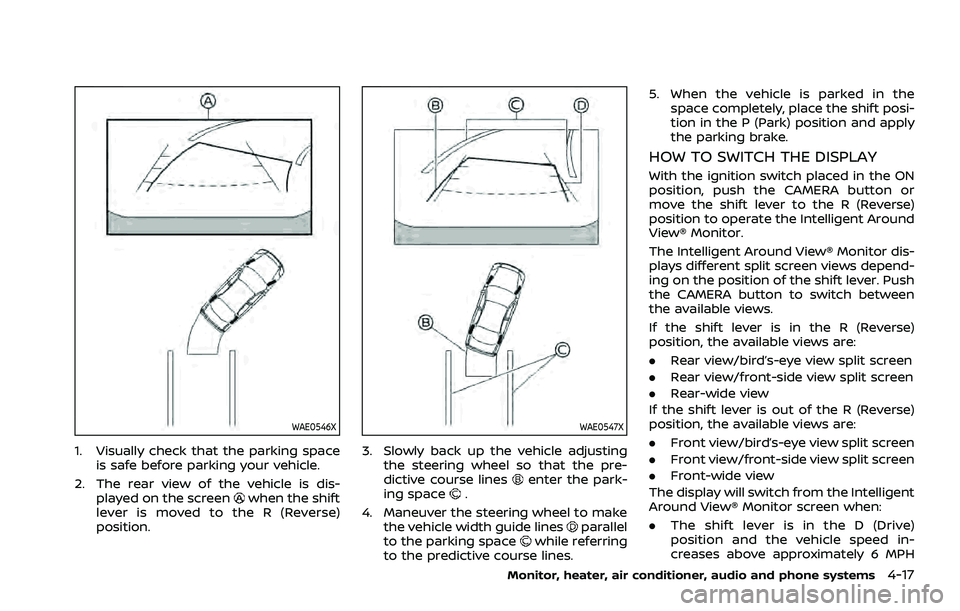
1. Visually check that the parking spaceis safe before parking your vehicle.
2. The rear view of the vehicle is dis- played on the screen
when the shift
lever is moved to the R (Reverse)
position.
WAE0547X
3. Slowly back up the vehicle adjusting the steering wheel so that the pre-
dictive course lines
enter the park-
ing space.
4. Maneuver the steering wheel to make the vehicle width guide lines
parallel
to the parking spacewhile referring
to the predictive course lines. 5. When the vehicle is parked in the
space completely, place the shift posi-
tion in the P (Park) position and apply
the parking brake.
HOW TO SWITCH THE DISPLAY
With the ignition switch placed in the ON
position, push the CAMERA button or
move the shift lever to the R (Reverse)
position to operate the Intelligent Around
View® Monitor.
The Intelligent Around View® Monitor dis-
plays different split screen views depend-
ing on the position of the shift lever. Push
the CAMERA button to switch between
the available views.
If the shift lever is in the R (Reverse)
position, the available views are:
.Rear view/bird’s-eye view split screen
. Rear view/front-side view split screen
. Rear-wide view
If the shift lever is out of the R (Reverse)
position, the available views are:
. Front view/bird’s-eye view split screen
. Front view/front-side view split screen
. Front-wide view
The display will switch from the Intelligent
Around View® Monitor screen when:
. The shift lever is in the D (Drive)
position and the vehicle speed in-
creases above approximately 6 MPH
Monitor, heater, air conditioner, audio and phone systems4-17
Page 246 of 556
4-32Monitor, heater, air conditioner, audio and phone systems
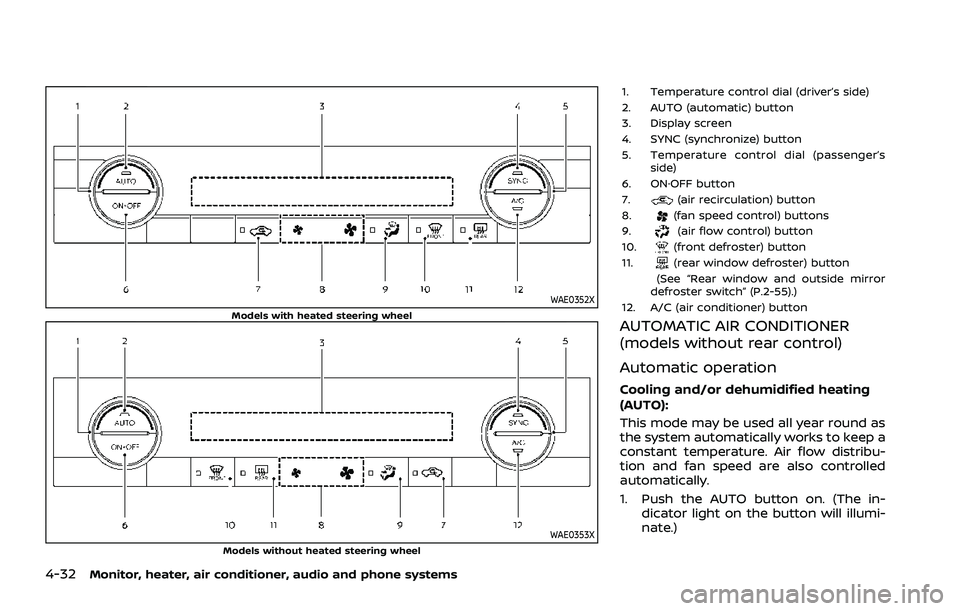
WAE0352XModels with heated steering wheel
WAE0353XModels without heated steering wheel
1. Temperature control dial (driver’s side)
2. AUTO (automatic) button
3. Display screen
4. SYNC (synchronize) button
5. Temperature control dial (passenger’sside)
6. ON·OFF button
7.
(air recirculation) button
8.(fan speed control) buttons
9.(air flow control) button
10.(front defroster) button
11.(rear window defroster) button
(See “Rear window and outside mirror
defroster switch” (P.2-55).)
12. A/C (air conditioner) button
AUTOMATIC AIR CONDITIONER
(models without rear control)
Automatic operation
Cooling and/or dehumidified heating
(AUTO):
This mode may be used all year round as
the system automatically works to keep a
constant temperature. Air flow distribu-
tion and fan speed are also controlled
automatically.
1. Push the AUTO button on. (The in- dicator light on the button will illumi-
nate.)
Page 248 of 556
4-34Monitor, heater, air conditioner, audio and phone systems
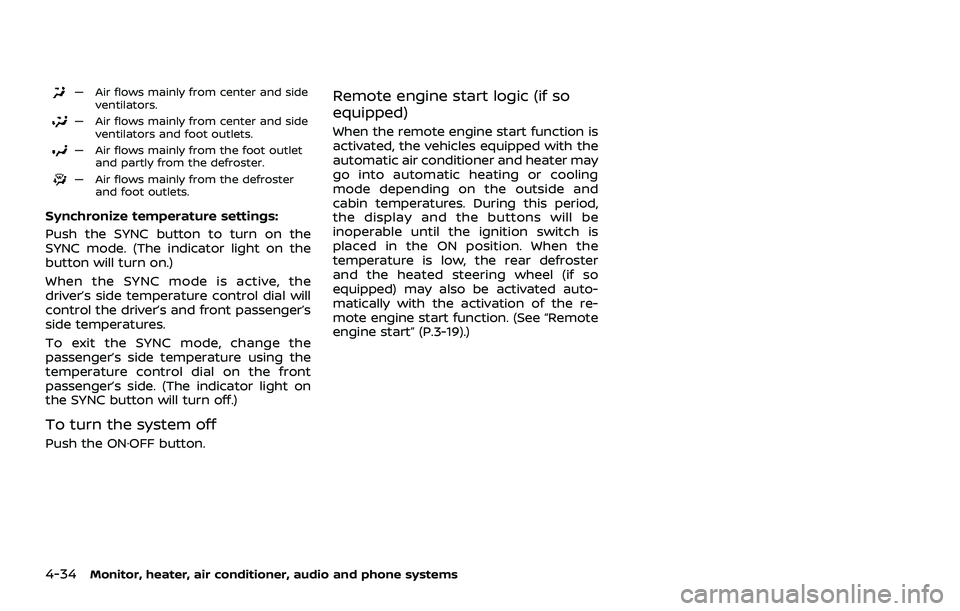
— Air flows mainly from center and sideventilators.
— Air flows mainly from center and sideventilators and foot outlets.
— Air flows mainly from the foot outletand partly from the defroster.
— Air flows mainly from the defrosterand foot outlets.
Synchronize temperature settings:
Push the SYNC button to turn on the
SYNC mode. (The indicator light on the
button will turn on.)
When the SYNC mode is active, the
driver’s side temperature control dial will
control the driver’s and front passenger’s
side temperatures.
To exit the SYNC mode, change the
passenger’s side temperature using the
temperature control dial on the front
passenger’s side. (The indicator light on
the SYNC button will turn off.)
To turn the system off
Push the ON·OFF button.
Remote engine start logic (if so
equipped)
When the remote engine start function is
activated, the vehicles equipped with the
automatic air conditioner and heater may
go into automatic heating or cooling
mode depending on the outside and
cabin temperatures. During this period,
the display and the buttons will be
inoperable until the ignition switch is
placed in the ON position. When the
temperature is low, the rear defroster
and the heated steering wheel (if so
equipped) may also be activated auto-
matically with the activation of the re-
mote engine start function. (See “Remote
engine start” (P.3-19).)