warning NISSAN ROGUE 2021 Owner´s Manual
[x] Cancel search | Manufacturer: NISSAN, Model Year: 2021, Model line: ROGUE, Model: NISSAN ROGUE 2021Pages: 556, PDF Size: 2.7 MB
Page 127 of 556
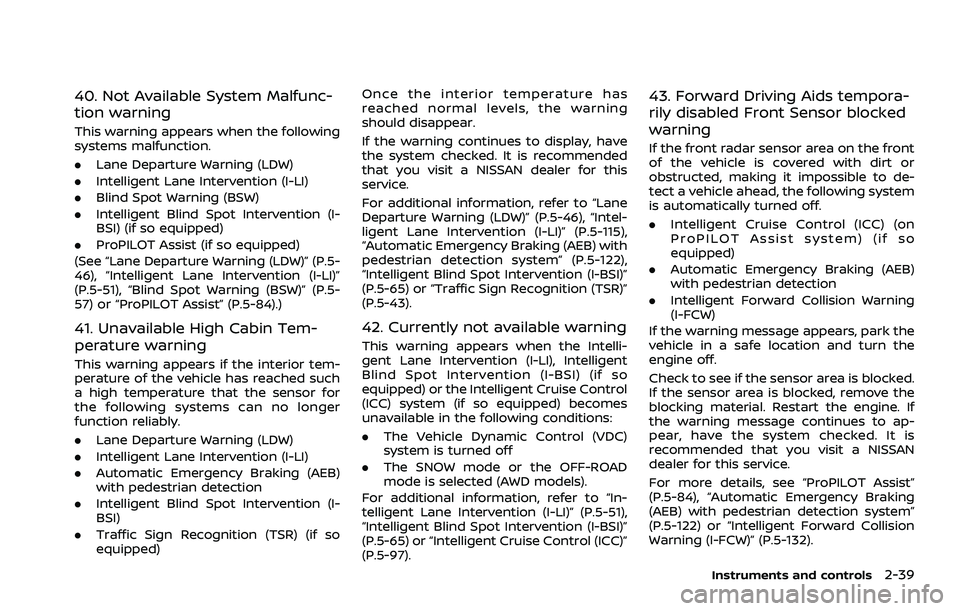
40. Not Available System Malfunc-
tion warning
This warning appears when the following
systems malfunction.
.Lane Departure Warning (LDW)
. Intelligent Lane Intervention (I-LI)
. Blind Spot Warning (BSW)
. Intelligent Blind Spot Intervention (I-
BSI) (if so equipped)
. ProPILOT Assist (if so equipped)
(See “Lane Departure Warning (LDW)” (P.5-
46), “Intelligent Lane Intervention (I-LI)”
(P.5-51), “Blind Spot Warning (BSW)” (P.5-
57) or “ProPILOT Assist” (P.5-84).)
41. Unavailable High Cabin Tem-
perature warning
This warning appears if the interior tem-
perature of the vehicle has reached such
a high temperature that the sensor for
the following systems can no longer
function reliably.
. Lane Departure Warning (LDW)
. Intelligent Lane Intervention (I-LI)
. Automatic Emergency Braking (AEB)
with pedestrian detection
. Intelligent Blind Spot Intervention (I-
BSI)
. Traffic Sign Recognition (TSR) (if so
equipped) Once the interior temperature has
reached normal levels, the warning
should disappear.
If the warning continues to display, have
the system checked. It is recommended
that you visit a NISSAN dealer for this
service.
For additional information, refer to “Lane
Departure Warning (LDW)” (P.5-46), “Intel-
ligent Lane Intervention (I-LI)” (P.5-115),
“Automatic Emergency Braking (AEB) with
pedestrian detection system” (P.5-122),
“Intelligent Blind Spot Intervention (I-BSI)”
(P.5-65) or “Traffic Sign Recognition (TSR)”
(P.5-43).
42. Currently not available warning
This warning appears when the Intelli-
gent Lane Intervention (I-LI), Intelligent
Blind Spot Intervention (I-BSI) (if so
equipped) or the Intelligent Cruise Control
(ICC) system (if so equipped) becomes
unavailable in the following conditions:
.
The Vehicle Dynamic Control (VDC)
system is turned off
. The SNOW mode or the OFF-ROAD
mode is selected (AWD models).
For additional information, refer to “In-
telligent Lane Intervention (I-LI)” (P.5-51),
“Intelligent Blind Spot Intervention (I-BSI)”
(P.5-65) or “Intelligent Cruise Control (ICC)”
(P.5-97).
43. Forward Driving Aids tempora-
rily disabled Front Sensor blocked
warning
If the front radar sensor area on the front
of the vehicle is covered with dirt or
obstructed, making it impossible to de-
tect a vehicle ahead, the following system
is automatically turned off.
. Intelligent Cruise Control (ICC) (on
ProPILOT Assist system) (if so
equipped)
. Automatic Emergency Braking (AEB)
with pedestrian detection
. Intelligent Forward Collision Warning
(I-FCW)
If the warning message appears, park the
vehicle in a safe location and turn the
engine off.
Check to see if the sensor area is blocked.
If the sensor area is blocked, remove the
blocking material. Restart the engine. If
the warning message continues to ap-
pear, have the system checked. It is
recommended that you visit a NISSAN
dealer for this service.
For more details, see “ProPILOT Assist”
(P.5-84), “Automatic Emergency Braking
(AEB) with pedestrian detection system”
(P.5-122) or “Intelligent Forward Collision
Warning (I-FCW)” (P.5-132).
Instruments and controls2-39
Page 128 of 556
2-40Instruments and controls
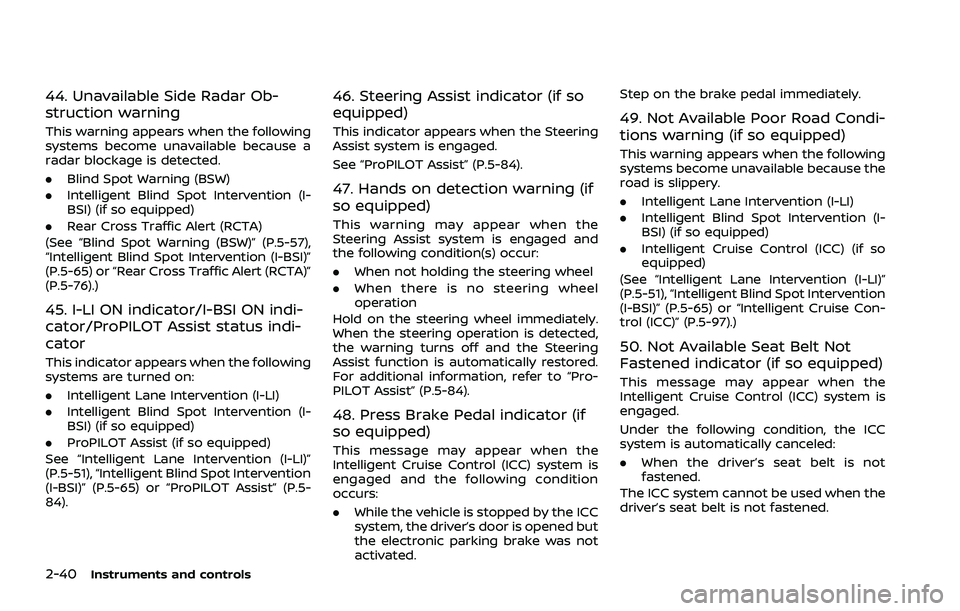
44. Unavailable Side Radar Ob-
struction warning
This warning appears when the following
systems become unavailable because a
radar blockage is detected.
.Blind Spot Warning (BSW)
. Intelligent Blind Spot Intervention (I-
BSI) (if so equipped)
. Rear Cross Traffic Alert (RCTA)
(See “Blind Spot Warning (BSW)” (P.5-57),
“Intelligent Blind Spot Intervention (I-BSI)”
(P.5-65) or “Rear Cross Traffic Alert (RCTA)”
(P.5-76).)
45. I-LI ON indicator/I-BSI ON indi-
cator/ProPILOT Assist status indi-
cator
This indicator appears when the following
systems are turned on:
. Intelligent Lane Intervention (I-LI)
. Intelligent Blind Spot Intervention (I-
BSI) (if so equipped)
. ProPILOT Assist (if so equipped)
See “Intelligent Lane Intervention (I-LI)”
(P.5-51), “Intelligent Blind Spot Intervention
(I-BSI)” (P.5-65) or “ProPILOT Assist” (P.5-
84).
46. Steering Assist indicator (if so
equipped)
This indicator appears when the Steering
Assist system is engaged.
See “ProPILOT Assist” (P.5-84).
47. Hands on detection warning (if
so equipped)
This warning may appear when the
Steering Assist system is engaged and
the following condition(s) occur:
. When not holding the steering wheel
. When there is no steering wheel
operation
Hold on the steering wheel immediately.
When the steering operation is detected,
the warning turns off and the Steering
Assist function is automatically restored.
For additional information, refer to “Pro-
PILOT Assist” (P.5-84).
48. Press Brake Pedal indicator (if
so equipped)
This message may appear when the
Intelligent Cruise Control (ICC) system is
engaged and the following condition
occurs:
. While the vehicle is stopped by the ICC
system, the driver’s door is opened but
the electronic parking brake was not
activated. Step on the brake pedal immediately.
49. Not Available Poor Road Condi-
tions warning (if so equipped)
This warning appears when the following
systems become unavailable because the
road is slippery.
.
Intelligent Lane Intervention (I-LI)
. Intelligent Blind Spot Intervention (I-
BSI) (if so equipped)
. Intelligent Cruise Control (ICC) (if so
equipped)
(See “Intelligent Lane Intervention (I-LI)”
(P.5-51), “Intelligent Blind Spot Intervention
(I-BSI)” (P.5-65) or “Intelligent Cruise Con-
trol (ICC)” (P.5-97).)
50. Not Available Seat Belt Not
Fastened indicator (if so equipped)
This message may appear when the
Intelligent Cruise Control (ICC) system is
engaged.
Under the following condition, the ICC
system is automatically canceled:
. When the driver’s seat belt is not
fastened.
The ICC system cannot be used when the
driver’s seat belt is not fastened.
Page 129 of 556
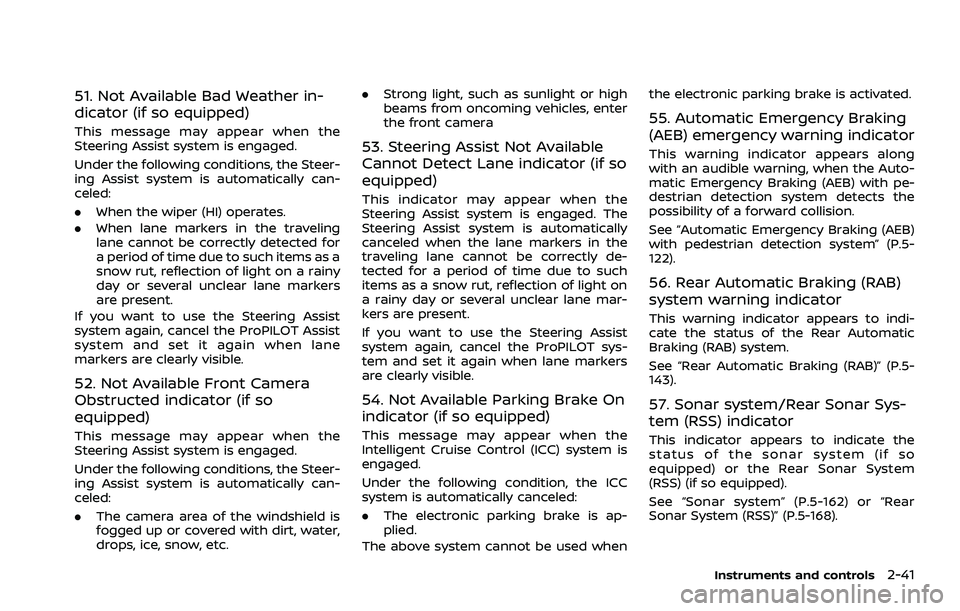
51. Not Available Bad Weather in-
dicator (if so equipped)
This message may appear when the
Steering Assist system is engaged.
Under the following conditions, the Steer-
ing Assist system is automatically can-
celed:
.When the wiper (HI) operates.
. When lane markers in the traveling
lane cannot be correctly detected for
a period of time due to such items as a
snow rut, reflection of light on a rainy
day or several unclear lane markers
are present.
If you want to use the Steering Assist
system again, cancel the ProPILOT Assist
system and set it again when lane
markers are clearly visible.
52. Not Available Front Camera
Obstructed indicator (if so
equipped)
This message may appear when the
Steering Assist system is engaged.
Under the following conditions, the Steer-
ing Assist system is automatically can-
celed:
. The camera area of the windshield is
fogged up or covered with dirt, water,
drops, ice, snow, etc. .
Strong light, such as sunlight or high
beams from oncoming vehicles, enter
the front camera
53. Steering Assist Not Available
Cannot Detect Lane indicator (if so
equipped)
This indicator may appear when the
Steering Assist system is engaged. The
Steering Assist system is automatically
canceled when the lane markers in the
traveling lane cannot be correctly de-
tected for a period of time due to such
items as a snow rut, reflection of light on
a rainy day or several unclear lane mar-
kers are present.
If you want to use the Steering Assist
system again, cancel the ProPILOT sys-
tem and set it again when lane markers
are clearly visible.
54. Not Available Parking Brake On
indicator (if so equipped)
This message may appear when the
Intelligent Cruise Control (ICC) system is
engaged.
Under the following condition, the ICC
system is automatically canceled:
.The electronic parking brake is ap-
plied.
The above system cannot be used when the electronic parking brake is activated.
55. Automatic Emergency Braking
(AEB) emergency warning indicator
This warning indicator appears along
with an audible warning, when the Auto-
matic Emergency Braking (AEB) with pe-
destrian detection system detects the
possibility of a forward collision.
See “Automatic Emergency Braking (AEB)
with pedestrian detection system” (P.5-
122).
56. Rear Automatic Braking (RAB)
system warning indicator
This warning indicator appears to indi-
cate the status of the Rear Automatic
Braking (RAB) system.
See “Rear Automatic Braking (RAB)” (P.5-
143).
57. Sonar system/Rear Sonar Sys-
tem (RSS) indicator
This indicator appears to indicate the
status of the sonar system (if so
equipped) or the Rear Sonar System
(RSS) (if so equipped).
See “Sonar system” (P.5-162) or “Rear
Sonar System (RSS)” (P.5-168).
Instruments and controls2-41
Page 130 of 556
2-42Instruments and controls
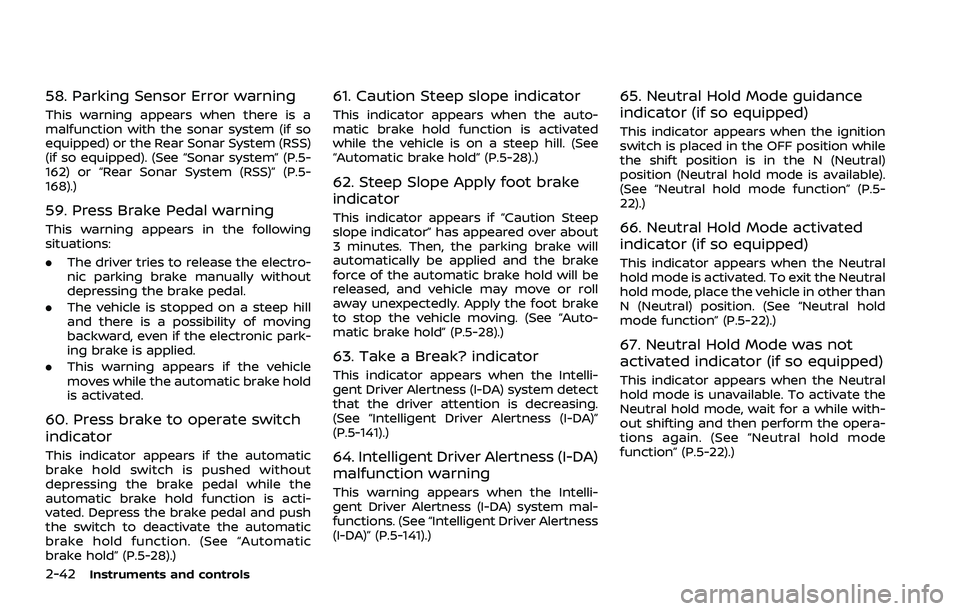
58. Parking Sensor Error warning
This warning appears when there is a
malfunction with the sonar system (if so
equipped) or the Rear Sonar System (RSS)
(if so equipped). (See “Sonar system” (P.5-
162) or “Rear Sonar System (RSS)” (P.5-
168).)
59. Press Brake Pedal warning
This warning appears in the following
situations:
.The driver tries to release the electro-
nic parking brake manually without
depressing the brake pedal.
. The vehicle is stopped on a steep hill
and there is a possibility of moving
backward, even if the electronic park-
ing brake is applied.
. This warning appears if the vehicle
moves while the automatic brake hold
is activated.
60. Press brake to operate switch
indicator
This indicator appears if the automatic
brake hold switch is pushed without
depressing the brake pedal while the
automatic brake hold function is acti-
vated. Depress the brake pedal and push
the switch to deactivate the automatic
brake hold function. (See “Automatic
brake hold” (P.5-28).)
61. Caution Steep slope indicator
This indicator appears when the auto-
matic brake hold function is activated
while the vehicle is on a steep hill. (See
“Automatic brake hold” (P.5-28).)
62. Steep Slope Apply foot brake
indicator
This indicator appears if “Caution Steep
slope indicator” has appeared over about
3 minutes. Then, the parking brake will
automatically be applied and the brake
force of the automatic brake hold will be
released, and vehicle may move or roll
away unexpectedly. Apply the foot brake
to stop the vehicle moving. (See “Auto-
matic brake hold” (P.5-28).)
63. Take a Break? indicator
This indicator appears when the Intelli-
gent Driver Alertness (I-DA) system detect
that the driver attention is decreasing.
(See “Intelligent Driver Alertness (I-DA)”
(P.5-141).)
64. Intelligent Driver Alertness (I-DA)
malfunction warning
This warning appears when the Intelli-
gent Driver Alertness (I-DA) system mal-
functions. (See “Intelligent Driver Alertness
(I-DA)” (P.5-141).)
65. Neutral Hold Mode guidance
indicator (if so equipped)
This indicator appears when the ignition
switch is placed in the OFF position while
the shift position is in the N (Neutral)
position (Neutral hold mode is available).
(See “Neutral hold mode function” (P.5-
22).)
66. Neutral Hold Mode activated
indicator (if so equipped)
This indicator appears when the Neutral
hold mode is activated. To exit the Neutral
hold mode, place the vehicle in other than
N (Neutral) position. (See “Neutral hold
mode function” (P.5-22).)
67. Neutral Hold Mode was not
activated indicator (if so equipped)
This indicator appears when the Neutral
hold mode is unavailable. To activate the
Neutral hold mode, wait for a while with-
out shifting and then perform the opera-
tions again. (See “Neutral hold mode
function” (P.5-22).)
Page 133 of 556
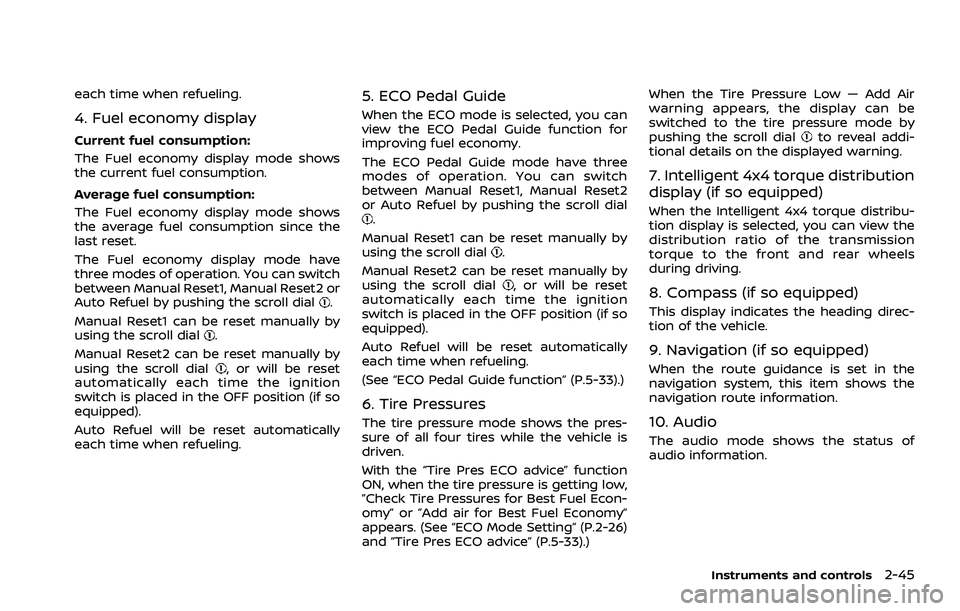
each time when refueling.
4. Fuel economy display
Current fuel consumption:
The Fuel economy display mode shows
the current fuel consumption.
Average fuel consumption:
The Fuel economy display mode shows
the average fuel consumption since the
last reset.
The Fuel economy display mode have
three modes of operation. You can switch
between Manual Reset1, Manual Reset2 or
Auto Refuel by pushing the scroll dial
.
Manual Reset1 can be reset manually by
using the scroll dial
.
Manual Reset2 can be reset manually by
using the scroll dial
, or will be reset
automatically each time the ignition
switch is placed in the OFF position (if so
equipped).
Auto Refuel will be reset automatically
each time when refueling.
5. ECO Pedal Guide
When the ECO mode is selected, you can
view the ECO Pedal Guide function for
improving fuel economy.
The ECO Pedal Guide mode have three
modes of operation. You can switch
between Manual Reset1, Manual Reset2
or Auto Refuel by pushing the scroll dial
.
Manual Reset1 can be reset manually by
using the scroll dial
.
Manual Reset2 can be reset manually by
using the scroll dial
, or will be reset
automatically each time the ignition
switch is placed in the OFF position (if so
equipped).
Auto Refuel will be reset automatically
each time when refueling.
(See “ECO Pedal Guide function” (P.5-33).)
6. Tire Pressures
The tire pressure mode shows the pres-
sure of all four tires while the vehicle is
driven.
With the “Tire Pres ECO advice” function
ON, when the tire pressure is getting low,
”Check Tire Pressures for Best Fuel Econ-
omy” or ”Add air for Best Fuel Economy”
appears. (See “ECO Mode Setting” (P.2-26)
and “Tire Pres ECO advice” (P.5-33).) When the Tire Pressure Low — Add Air
warning appears, the display can be
switched to the tire pressure mode by
pushing the scroll dial
to reveal addi-
tional details on the displayed warning.
7. Intelligent 4x4 torque distribution
display (if so equipped)
When the Intelligent 4x4 torque distribu-
tion display is selected, you can view the
distribution ratio of the transmission
torque to the front and rear wheels
during driving.
8. Compass (if so equipped)
This display indicates the heading direc-
tion of the vehicle.
9. Navigation (if so equipped)
When the route guidance is set in the
navigation system, this item shows the
navigation route information.
10. Audio
The audio mode shows the status of
audio information.
Instruments and controls2-45
Page 134 of 556
2-46Instruments and controls
11. Driver Assistance
The Driver Assistance mode shows the
operating condition for the following
systems.
.Forward:
— Automatic Emergency Braking
(AEB) with pedestrian detection
system
— Intelligent Forward Collision Warn- ing (I-FCW)
. Lane:
— Lane Departure Warning (LDW)
— Intelligent Lane Intervention (I-LI)
. Blind Spot:
— Blind Spot Warning (BSW)
— Intelligent Blind Spot Intervention
(I-BSI) (if so equipped)
For more details, see “Automatic Emer-
gency Braking (AEB) with pedestrian de-
tection system” (P.5-122), “Lane Departure
Warning (LDW)” (P.5-46), “Intelligent Lane
Intervention (I-LI)” (P.5-51), “Blind Spot
Warning (BSW)” (P.5-57) or “Intelligent
Blind Spot Intervention (I-BSI)” (P.5-65).
12. ProPILOT Assist (if so equipped)
The ProPILOT Assist mode shows the
operating conditions for the following
systems:
. Intelligent Cruise Control (ICC)
. Steering Assist
The display will also be shown when the
ProPILOT Assist is turned on. For addi-
tional information, see “ProPILOT Assist”
(P.5-84).
13. Traffic Sign Recognition (if so
equipped)
The Traffic Sign Recognition (TSR) system
provides the driver with information
about the most recently detected speed
limit. See “Traffic Sign Recognition (TSR)”
(P.5-43) for more details.WAC0521X
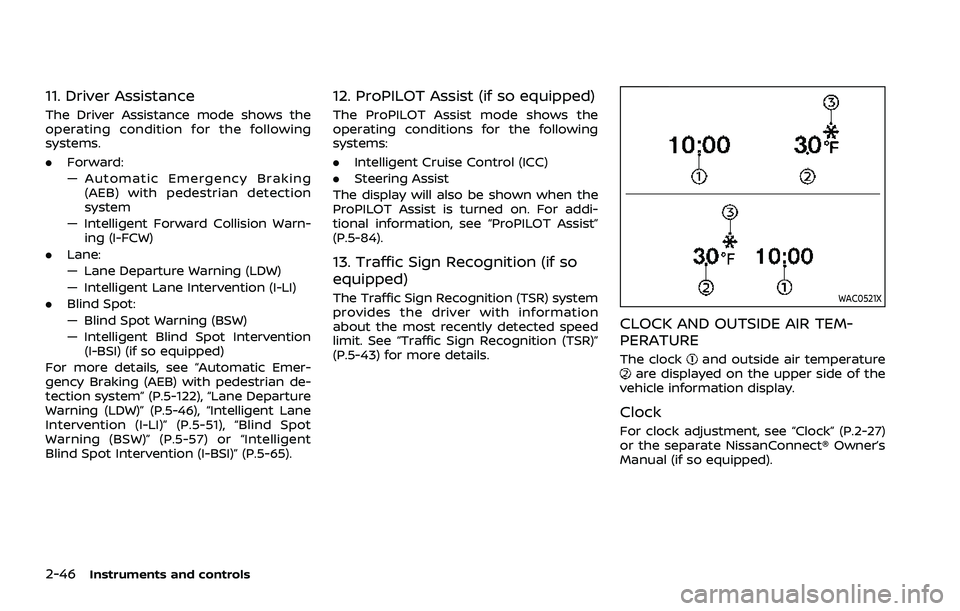
CLOCK AND OUTSIDE AIR TEM-
PERATURE
The clockand outside air temperatureare displayed on the upper side of the
vehicle information display.
Clock
For clock adjustment, see “Clock” (P.2-27)
or the separate NissanConnect® Owner’s
Manual (if so equipped).
Page 135 of 556
Outside air temperature (°F or °C)
The outside air temperature is displayed
in °F or °C in the range of −40 to 140°F (−40
to 60°C).
The outside air temperature mode in-
cludes a low temperature warning fea-
ture. If the outside air temperature is
below 27°F (−3°C), the indicator
is
displayed.
The outside temperature sensor is lo-
cated in front of the radiator. The sensor
may be affected by road or engine heat,
wind directions and other driving condi-
tions. The display may differ from the
actual outside temperature or the tem-
perature displayed on various signs or
billboards.
WAC0417X
WAC0544X
WARNING
. Failure to properly adjust the
brightness and position of the
displayed image may interfere
with the driver’s ability to see
through the windshield, which
could cause an accident leading
to severe injury or death.
. Do not use the Head Up Display
(HUD) for extended periods of
time as that can cause you to
not see other vehicles, pedes-
trians or objects, which could
cause an accident leading to se-
vere injury or death.
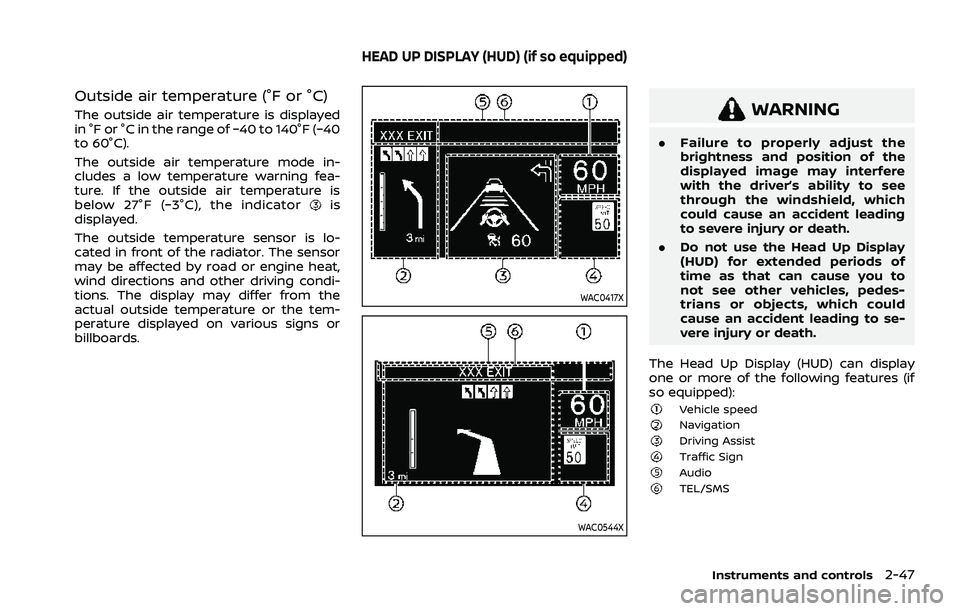
The Head Up Display (HUD) can display
one or more of the following features (if
so equipped):
Vehicle speedNavigationDriving AssistTraffic SignAudioTEL/SMS
Instruments and controls2-47
HEAD UP DISPLAY (HUD) (if so equipped)
Page 138 of 556
2-50Instruments and controls
DRIVER ASSISTANCE/NAVIGATION/
TRAFFIC SIGN/AUDIO/TEL/SMS
LINKING
The HUD will display Driver Assistance and
navigation information.
The Driver Assistance display will show
warning situations for the following sys-
tems:
.Automatic Emergency Braking (AEB)
with pedestrian detection
. Intelligent Forward Collision Warning
(I-FCW)
. Lane Departure Warning (LDW)
. Intelligent Lane Intervention (I-LI)
. Hands-free warning (for vehicles with
ProPILOT Assist) (if so equipped)
The Navigation System linking display will
show the following items:
. Intersection names
. Arrows indicating turning direction
. Distance to the next intersection
. Recommended lane indicator
The Traffic Signs Recognition (TSR) sys-
tem linking display will show the following
items:
. Speed Limit Sign
. No Entry Sign The Audio System linking display will
show the following items:
.
Songs
. Radio stations
The TEL/SMS linking display will show the
following item:
. Caller’s name or phone number
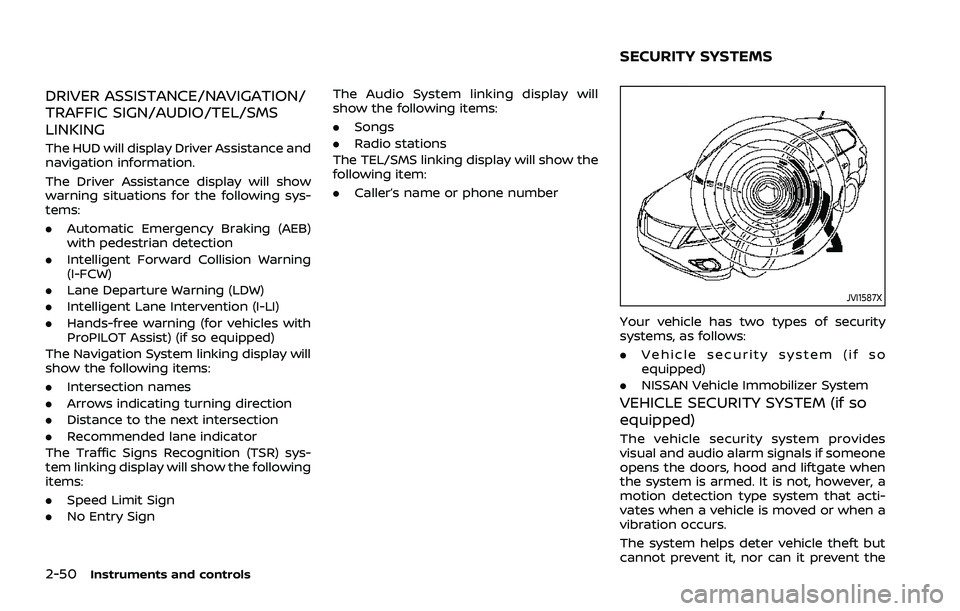
JVI1587X
Your vehicle has two types of security
systems, as follows:
.Vehicle security system (if so
equipped)
. NISSAN Vehicle Immobilizer System
VEHICLE SECURITY SYSTEM (if so
equipped)
The vehicle security system provides
visual and audio alarm signals if someone
opens the doors, hood and liftgate when
the system is armed. It is not, however, a
motion detection type system that acti-
vates when a vehicle is moved or when a
vibration occurs.
The system helps deter vehicle theft but
cannot prevent it, nor can it prevent the
SECURITY SYSTEMS
Page 140 of 556
2-52Instruments and controls
This device complies with Part 15 of the
FCC Rules. Operation is subject to the
following two conditions: (1) This device
may not cause harmful interference,
and (2) this device must accept any
interference received, including inter-
ference that may cause undesired op-
eration.
Note: Changes or modifications not
expressly approved by the party re-
sponsible for compliance could void
the user’s authority to operate the
equipment.
For Canada:
IC ID : 7812D–HFM401
This device complies with Industry Ca-
nada licence-exempt RSS standard(s).
Operation is subject to the following
two conditions: (1) this device may not
cause interference, and (2) this device
must accept any interference, including
interference that may cause undesired
operation of the device.
WARNING
In freezing temperatures the washer
solution may freeze on the wind-
shield and obscure your vision which
may lead to an accident. Warm wind-
shield with the defroster before you
wash the windshield.
CAUTION
.Do not operate the washer con-
tinuously for more than 30 sec-
onds.
. Do not operate the washer if the
reservoir tank is empty.
. Do not fill the window washer
reservoir tank with washer fluid
concentrates at full strength.
Some methyl alcohol based
washer fluid concentrates may
permanently stain the grille if
spilled while filling the window
washer reservoir tank.
. Pre-mix washer fluid concen-
trates with water to the manu-
facturer’s recommended levels
before pouring the fluid into the
window washer reservoir tank. Do not use the window washer re-
servoir tank to mix the washer
fluid concentrate and water.
If the windshield wiper operation is
interrupted by snow or ice, the wiper
may stop moving to protect its motor. If
this occurs, turn the wiper switch to the
OFF position and remove the snow or
ice that is on and around the wiper
arms. In approximately 1 minute, turn
the switch on again to operate the
wiper.
WIPER AND WASHER SWITCH
Page 141 of 556
WAC0317X
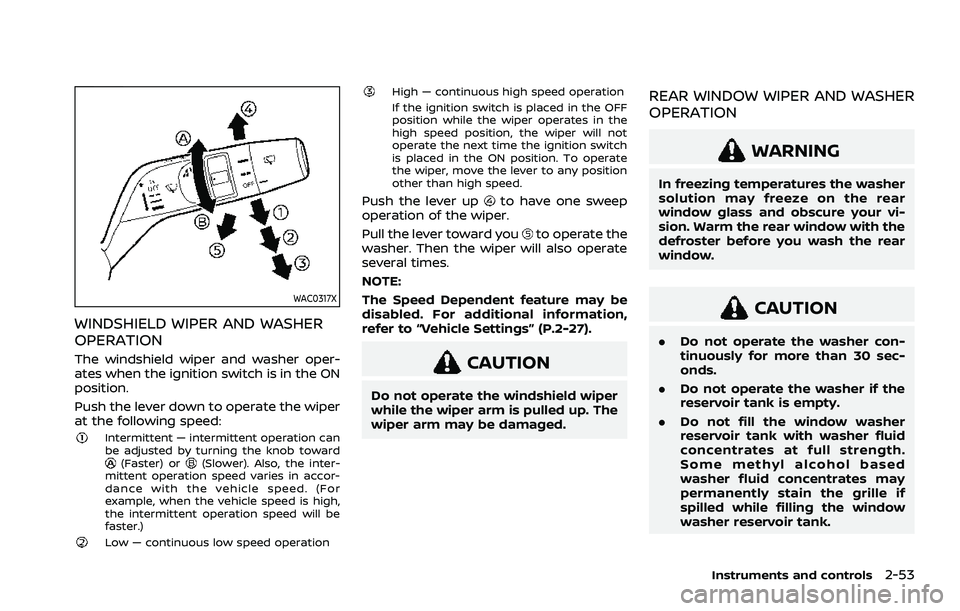
WINDSHIELD WIPER AND WASHER
OPERATION
The windshield wiper and washer oper-
ates when the ignition switch is in the ON
position.
Push the lever down to operate the wiper
at the following speed:
Intermittent — intermittent operation can
be adjusted by turning the knob toward
(Faster) or(Slower). Also, the inter-
mittent operation speed varies in accor-
dance with the vehicle speed. (For
example, when the vehicle speed is high,
the intermittent operation speed will be
faster.)
Low — continuous low speed operation
High — continuous high speed operation
If the ignition switch is placed in the OFF
position while the wiper operates in the
high speed position, the wiper will not
operate the next time the ignition switch
is placed in the ON position. To operate
the wiper, move the lever to any position
other than high speed.
Push the lever upto have one sweep
operation of the wiper.
Pull the lever toward you
to operate the
washer. Then the wiper will also operate
several times.
NOTE:
The Speed Dependent feature may be
disabled. For additional information,
refer to “Vehicle Settings” (P.2-27).
CAUTION
Do not operate the windshield wiper
while the wiper arm is pulled up. The
wiper arm may be damaged.
REAR WINDOW WIPER AND WASHER
OPERATION
WARNING
In freezing temperatures the washer
solution may freeze on the rear
window glass and obscure your vi-
sion. Warm the rear window with the
defroster before you wash the rear
window.
CAUTION
. Do not operate the washer con-
tinuously for more than 30 sec-
onds.
. Do not operate the washer if the
reservoir tank is empty.
. Do not fill the window washer
reservoir tank with washer fluid
concentrates at full strength.
Some methyl alcohol based
washer fluid concentrates may
permanently stain the grille if
spilled while filling the window
washer reservoir tank.
Instruments and controls2-53