wheel NISSAN ROGUE 2021 Owner´s Manual
[x] Cancel search | Manufacturer: NISSAN, Model Year: 2021, Model line: ROGUE, Model: NISSAN ROGUE 2021Pages: 556, PDF Size: 2.7 MB
Page 371 of 556
tions (for example, tire wear,
abnormal tire pressure, instal-
lation of a spare tire, tire
chains, non-standard wheels)
— When the vehicle is equipped with non-original brake or
suspension parts
— When an object such as a sticker or cargo obstructs the
camera
— When excessively heavy bag- gage is loaded in the rear seat
or luggage area of your vehi-
cle
— When the vehicle load capa- city is exceeded
— When towing a trailer or other vehicle
. Excessive noise will interfere with
the warning chime sound, and
the beep may not be heard.
. For the ProPILOT Assist system to
operate properly, the windshield
in front of the camera must be
clean. Replace worn wiper blades.
The correct size wiper blades
must be used to help make sure
the windshield is kept clean. Only
use Genuine NISSAN wiper blades,
or equivalent wiper blades, that are specifically designed for use
on your vehicle model and model
year. It is recommended that you
visit your NISSAN dealer for the
correct parts for your vehicle.
Steering Assist temporary standby
Automatic standby due to driving op-
eration:
When the driver activates the turn signal,
the Steering Assist is temporarily placed
in a standby mode. (The Steering Assist
restarts automatically when the operat-
ing conditions are met again.)
Automatic standby:
In the following cases, “Not Available
Front Camera Obstructed” warning mes-
sage appears in the vehicle information
display, along with the chime, and the
Steering Assist is placed in a temporary
standby mode. (The Steering Assist re-
starts automatically when the operating
conditions are met again.)
.
When lane markers on both sides are
no longer detected
. When a vehicle ahead is no longer
detected under approximately 37 MPH
(60 km/h) NOTE:
For ProPILOT Assist with Navi-link
equipped vehicles on a limited access
freeway as identified in the navigation
map data, the Steering Assist system
may continue to operate with visible
lane markers on the both sides, even
when the vehicle speed is below ap-
proximately 37 MPH (60 km/h) and a
vehicle is not detected ahead.
Steering Assist cancel
Under the following conditions, the Steer-
ing Assist cancels, and the Steering Assist
status indicator and the Steering Assist
indicator turn off:
.
When unusual lane markers appear in
the traveling lane or when the lane
marker cannot be correctly detected
for some time due to certain condi-
tions (for example, a snow rut, the
reflection of light on a rainy day, the
presence of several unclear lane mar-
kers)
. When the windshield wiper operates
in the high speed operation (the
Steering Assist is disabled when the
wiper operates for more than approxi-
mately 10 seconds)
Starting and driving5-117
Page 377 of 556
WAF0429X
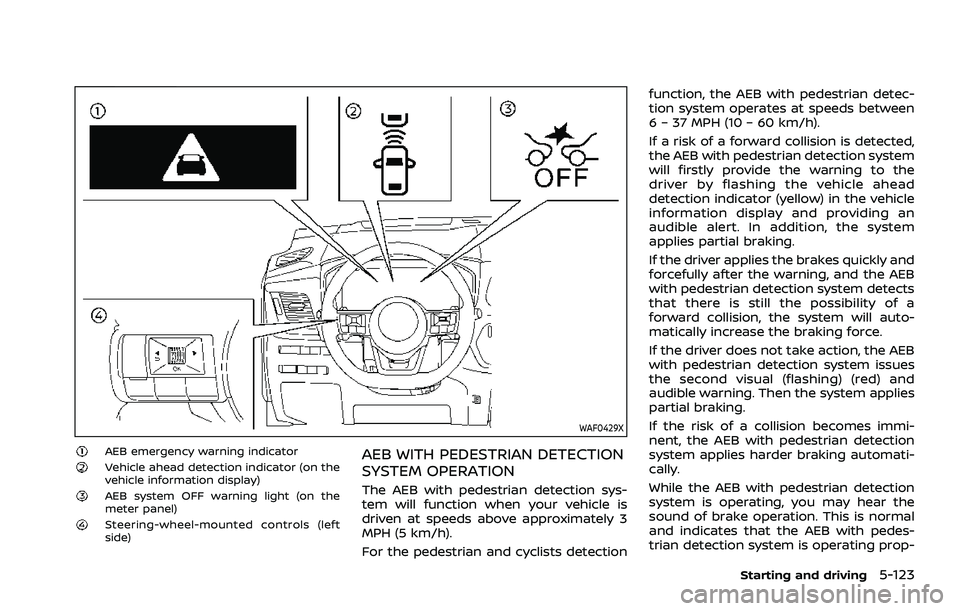
AEB emergency warning indicatorVehicle ahead detection indicator (on the
vehicle information display)
AEB system OFF warning light (on the
meter panel)
Steering-wheel-mounted controls (left
side)
AEB WITH PEDESTRIAN DETECTION
SYSTEM OPERATION
The AEB with pedestrian detection sys-
tem will function when your vehicle is
driven at speeds above approximately 3
MPH (5 km/h).
For the pedestrian and cyclists detectionfunction, the AEB with pedestrian detec-
tion system operates at speeds between
6 – 37 MPH (10 – 60 km/h).
If a risk of a forward collision is detected,
the AEB with pedestrian detection system
will firstly provide the warning to the
driver by flashing the vehicle ahead
detection indicator (yellow) in the vehicle
information display and providing an
audible alert. In addition, the system
applies partial braking.
If the driver applies the brakes quickly and
forcefully after the warning, and the AEB
with pedestrian detection system detects
that there is still the possibility of a
forward collision, the system will auto-
matically increase the braking force.
If the driver does not take action, the AEB
with pedestrian detection system issues
the second visual (flashing) (red) and
audible warning. Then the system applies
partial braking.
If the risk of a collision becomes immi-
nent, the AEB with pedestrian detection
system applies harder braking automati-
cally.
While the AEB with pedestrian detection
system is operating, you may hear the
sound of brake operation. This is normal
and indicates that the AEB with pedes-
trian detection system is operating prop-
Starting and driving5-123
Page 378 of 556
5-124Starting and driving
erly.
NOTE:
The vehicle’s stop lights come on when
braking is performed by the AEB with
pedestrian detection system.
Depending on vehicle speed and distance
to the vehicle, pedestrian or cyclists
ahead, as well as driving and roadway
conditions, the system may help the
driver avoid a forward collision or may
help mitigate the consequences of a
collision should one be unavoidable.
If the driver is handling the steering
wheel, accelerating or braking, the AEB
with pedestrian detection system will
function later or will not function.
The automatic braking will cease under
the following conditions:
.When the steering wheel is turned as
far as necessary to avoid a collision.
. When the accelerator pedal is de-
pressed.
. When there is no longer a vehicle,
pedestrian detected ahead.
If the AEB with pedestrian detection
system has stopped the vehicle, the
vehicle will remain at a standstill for
approximately 2 seconds before the
brakes are released.
When the brake pedal is depressed while the brake is applied by the system, you
may feel the pedal effort is changed and
may hear a sound and vibration noise.
This is normal and does not indicate a
malfunction. In addition, the braking force
can be increased by adding the pedal
effort.
Page 379 of 556
WAF0430X
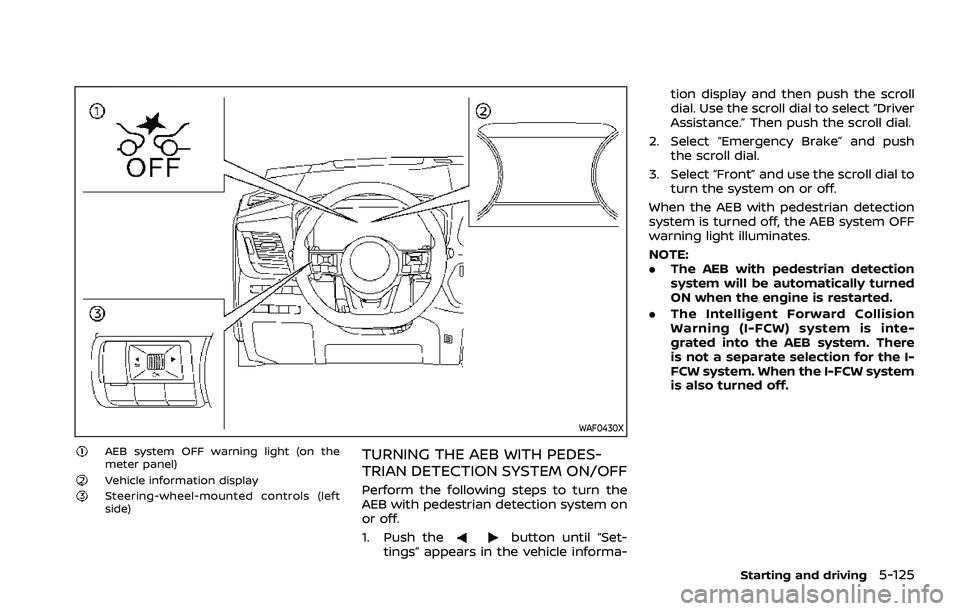
AEB system OFF warning light (on the
meter panel)
Vehicle information displaySteering-wheel-mounted controls (left
side)
TURNING THE AEB WITH PEDES-
TRIAN DETECTION SYSTEM ON/OFF
Perform the following steps to turn the
AEB with pedestrian detection system on
or off.
1. Push the
button until “Set-
tings” appears in the vehicle informa- tion display and then push the scroll
dial. Use the scroll dial to select “Driver
Assistance.” Then push the scroll dial.
2. Select “Emergency Brake” and push the scroll dial.
3. Select “Front” and use the scroll dial to turn the system on or off.
When the AEB with pedestrian detection
system is turned off, the AEB system OFF
warning light illuminates.
NOTE:
. The AEB with pedestrian detection
system will be automatically turned
ON when the engine is restarted.
. The Intelligent Forward Collision
Warning (I-FCW) system is inte-
grated into the AEB system. There
is not a separate selection for the I-
FCW system. When the I-FCW system
is also turned off.
Starting and driving5-125
Page 380 of 556
5-126Starting and driving
AEB WITH PEDESTRIAN DETECTION
SYSTEM LIMITATIONS
WARNING
Listed below are the system limita-
tions for the AEB with pedestrian
detection system. Failure to operate
the vehicle in accordance with these
system limitations could result in
serious injury or death.
.The AEB with pedestrian detec-
tion system cannot detect all
vehicles, pedestrians or cyclists
under all conditions.
. The AEB with pedestrian detec-
tion system does not detect the
following:
— Pedestrians that are small (for
example, children), in a sitting
position, operating toys/ska-
teboards, on scooters or in
wheelchairs, or not in an up-
right standing or walking po-
sition.
— Animals of any size.
— Obstacles (for example, cargo or debris) on the roadway or
roadside. — Oncoming or crossing vehi-
cles.
— Vehicles where the tires are difficult to see or the shape of
the rear of the vehicle is un-
clear or obstructed.
— Parked vehicles.
. The AEB with pedestrian detec-
tion system has some perfor-
mance limitations.
— If a stationary vehicle is in the
vehicle’s path, the system will
not function when the vehicle
approaches the stationary ve-
hicle at speeds over approxi-
mately 50 MPH (80 km/h).
— Pedestrian and cyclist detec- tion will not function when the
vehicle is driven at speeds
over approximately 37 MPH
(60 km/h) or below approxi-
mately 6 MPH (10 km/h).
. For pedestrians, the AEB with
pedestrian detection system will
not issue the first warning.
. The AEB with pedestrian detec-
tion system may not function
properly or detect a vehicle, pe-
destrian or cyclist ahead in the
following conditions: — In poor visibility conditions
(such as rain, snow, fog, dust
storms, sand storms, smoke,
and road spray from other
vehicles).
— If dirt, ice, snow, fog or other material is covering the radar
sensor area or camera area of
the windshield.
— If strong light (for example, sunlight or high beams) en-
ters the front camera or a
sudden change in brightness
occurs (for example, entering
a tunnel or driving in light-
ning).
— In dark or dimly lit conditions, such as at night or in tunnels,
including cases where your
vehicle’s headlights are off or
dim, or the tail lights of the
vehicle ahead are off.
— When the direction of the camera is misaligned.
— When driving on a steep downhill slope, on roads with
sharp curves, and/or bumpy
or dirt roads.
Page 389 of 556
WAF0430X
AEB system OFF warning light (on the
meter panel)
Vehicle information displaySteering-wheel-mounted controls (left
side)
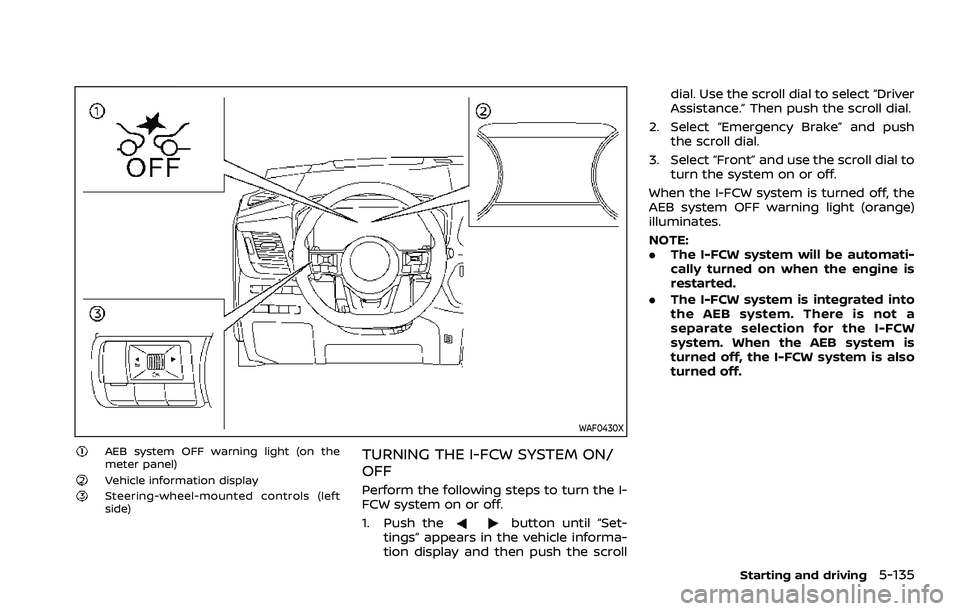
TURNING THE I-FCW SYSTEM ON/
OFF
Perform the following steps to turn the I-
FCW system on or off.
1. Push the
button until “Set-
tings” appears in the vehicle informa-
tion display and then push the scroll dial. Use the scroll dial to select “Driver
Assistance.” Then push the scroll dial.
2. Select “Emergency Brake” and push the scroll dial.
3. Select “Front” and use the scroll dial to turn the system on or off.
When the I-FCW system is turned off, the
AEB system OFF warning light (orange)
illuminates.
NOTE:
. The I-FCW system will be automati-
cally turned on when the engine is
restarted.
. The I-FCW system is integrated into
the AEB system. There is not a
separate selection for the I-FCW
system. When the AEB system is
turned off, the I-FCW system is also
turned off.
Starting and driving5-135
Page 396 of 556
5-142Starting and driving
WAF0412X
Steering-wheel-mounted control (left
side)
Vehicle information display
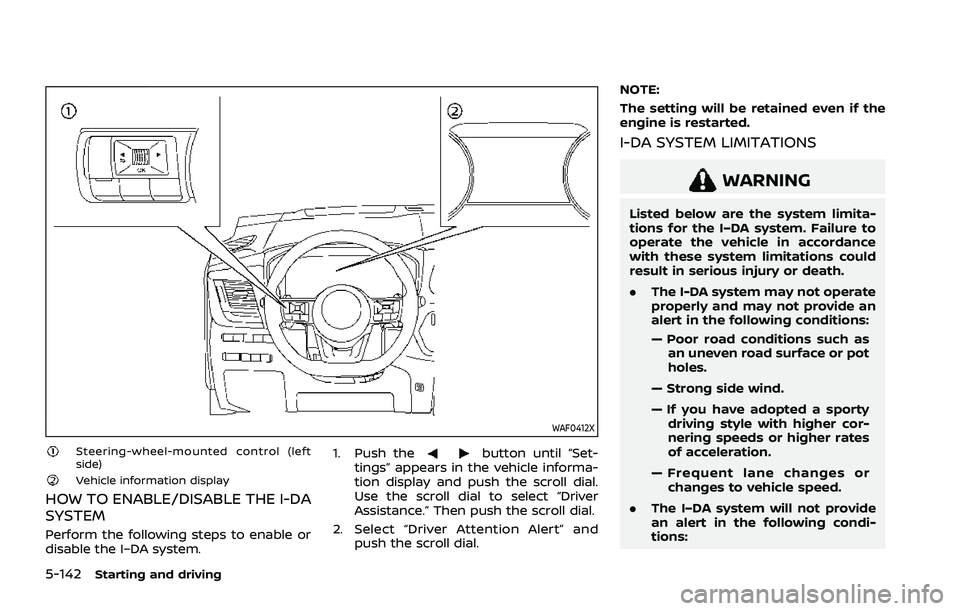
HOW TO ENABLE/DISABLE THE I-DA
SYSTEM
Perform the following steps to enable or
disable the I–DA system.1. Push the
button until “Set-
tings” appears in the vehicle informa-
tion display and push the scroll dial.
Use the scroll dial to select “Driver
Assistance.” Then push the scroll dial.
2. Select “Driver Attention Alert” and push the scroll dial. NOTE:
The setting will be retained even if the
engine is restarted.
I-DA SYSTEM LIMITATIONS
WARNING
Listed below are the system limita-
tions for the I–DA system. Failure to
operate the vehicle in accordance
with these system limitations could
result in serious injury or death.
.
The I-DA system may not operate
properly and may not provide an
alert in the following conditions:
— Poor road conditions such as
an uneven road surface or pot
holes.
— Strong side wind.
— If you have adopted a sporty driving style with higher cor-
nering speeds or higher rates
of acceleration.
— Frequent lane changes or changes to vehicle speed.
. The I–DA system will not provide
an alert in the following condi-
tions:
Page 398 of 556
5-144Starting and driving
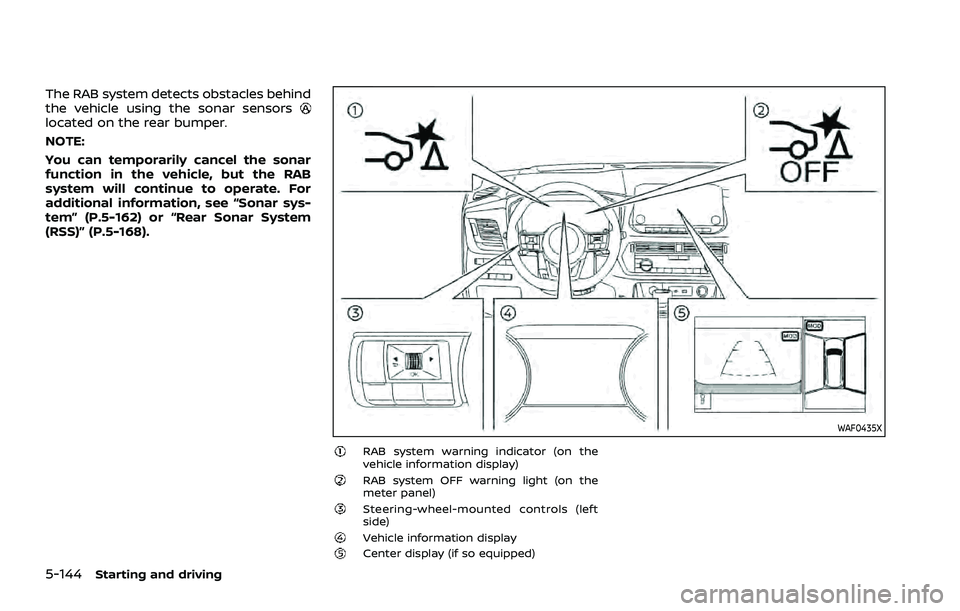
The RAB system detects obstacles behind
the vehicle using the sonar sensors
located on the rear bumper.
NOTE:
You can temporarily cancel the sonar
function in the vehicle, but the RAB
system will continue to operate. For
additional information, see “Sonar sys-
tem” (P.5-162) or “Rear Sonar System
(RSS)” (P.5-168).
WAF0435X
RAB system warning indicator (on the
vehicle information display)
RAB system OFF warning light (on the
meter panel)
Steering-wheel-mounted controls (left
side)
Vehicle information displayCenter display (if so equipped)
Page 399 of 556
RAB SYSTEM OPERATION
When the shift lever is in the R (Reverse)
position and the vehicle speed is less than
approximately 9 MPH (15 km/h), the RAB
system operates.
If a risk of a collision with an obstacle is
detected when your vehicle is backing up,
the RAB system warning indicator will
flash in the vehicle information display, a
red frame will appear in the center display
(models with the Intelligent Around View®
Monitor system), and the system will
chime three times. The system will then
automatically apply the brakes. After the
automatic brake application, the driver
must depress the brake pedal to maintain
brake pressure.
NOTE:
.The stop lights of the vehicle come
on when braking is performed by
the RAB system.
. When the brakes operate, a noise
may be heard. This is not a malfunc-
tion.
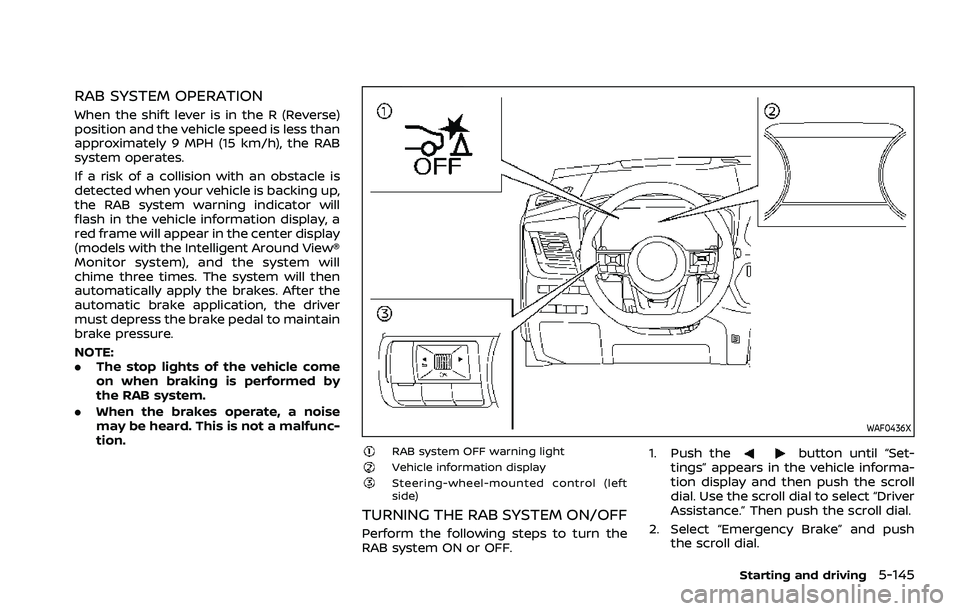
WAF0436X
RAB system OFF warning lightVehicle information displaySteering-wheel-mounted control (left
side)
TURNING THE RAB SYSTEM ON/OFF
Perform the following steps to turn the
RAB system ON or OFF. 1. Push the
button until “Set-
tings” appears in the vehicle informa-
tion display and then push the scroll
dial. Use the scroll dial to select “Driver
Assistance.” Then push the scroll dial.
2. Select “Emergency Brake” and push the scroll dial.
Starting and driving5-145
Page 401 of 556
narrow tunnel, a parking lot
gate) near the side of the
vehicle.
— There are bumps, protrusions, or manhole covers on the
road surface.
— The vehicle is driving through a draped flag or a curtain.
— The vehicle is driving on a steep hill.
— There is an accumulation of snow or ice behind the vehi-
cle.
— An ultrasonic wave source, such as another vehicle’s so-
nar, is near the vehicle.
. Once the automatic brake control
operates, it does not operate
again if the vehicle approaches
the same obstacle.
. The automatic brake control can
only operate for a short period of
time. Therefore, the driver must
depress the brake pedal.
. In the following situations, the
RAB system may not operate
properly or may not function
sufficiently: — The vehicle is driven in bad
weather (rain, fog, snow, etc.).
— The vehicle is driven on a steep hill.
— The vehicle’s posture is chan- ged (e.g., when driving over a
bump).
— The vehicle is driven on a slippery road.
— The vehicle is turned sharply by turning the steering wheel
fully.
— Snow chains are used.
— Wheels or tires other than NISSAN recommended are
used.
— The brakes are cold at low ambient temperatures or im-
mediately after driving has
started.
— The braking force becomes poor due to wet brakes after
driving through a puddle or
washing the vehicle.
. Turn the RAB system off in the
following conditions to prevent
the occurrence of an unexpected
accident resulting from sudden
system operation: — The vehicle is towed.
— The vehicle is carried on a
flatbed truck.
— The vehicle is on the chassis dynamometer.
— The vehicle drives on an un- even road surface.
— Suspension parts other than those designated as genuine
parts are used. (If the vehicle
height or the vehicle body
inclination is changed, the
system may not detect an
obstacle correctly.)
. Excessive noise (e.g., audio sys-
tem volume, an open vehicle win-
dow) will interfere with the chime
sound, and it may not be heard.
SYSTEM MALFUNCTION
If the RAB system malfunctions, it will be
turned off automatically, the RAB system
OFF warning light will illuminate, and the
“Malfunction See Owner’s Manual” warn-
ing message will appear in the vehicle
information display.
Starting and driving5-147