audio NISSAN ROGUE 2021 Owner´s Manual
[x] Cancel search | Manufacturer: NISSAN, Model Year: 2021, Model line: ROGUE, Model: NISSAN ROGUE 2021Pages: 556, PDF Size: 2.7 MB
Page 7 of 556
Illustrated table of contents0
Safety — Seats, seat belts and supplemental restraint
system1
Instruments and controls
Pre-driving checks and adjustments
Monitor, heater, air conditioner, audio and phone
systems
Starting and driving
In case of emergency
Appearance and care
Do-it-yourself
Maintenance and schedules
Technical and consumer information
2
3
4
5
6
7
8
9
10
Table of
Contents
Index11
Page 14 of 556
0-6Illustrated table of contents
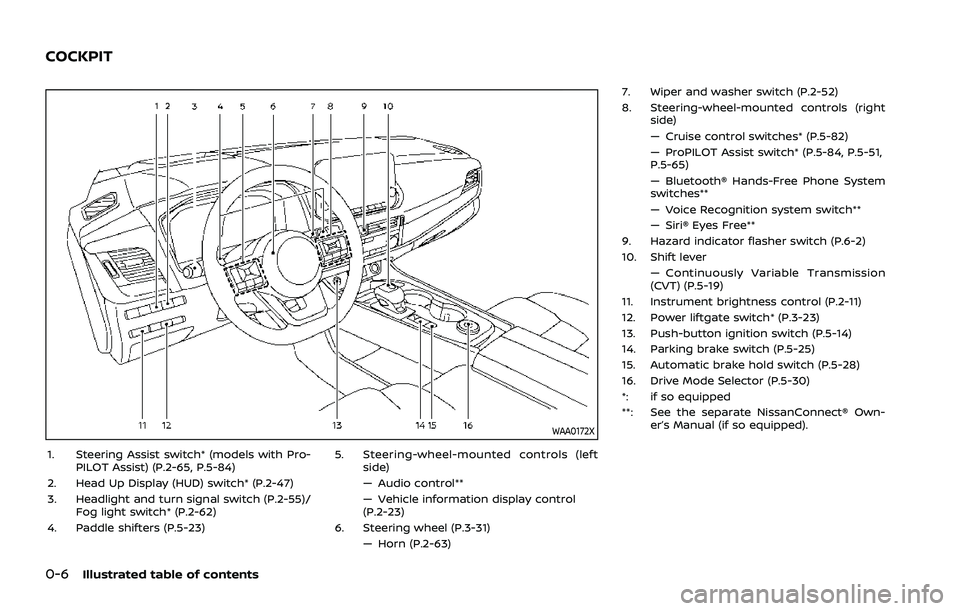
WAA0172X
1. Steering Assist switch* (models with Pro-PILOT Assist) (P.2-65, P.5-84)
2. Head Up Display (HUD) switch* (P.2-47)
3. Headlight and turn signal switch (P.2-55)/ Fog light switch* (P.2-62)
4. Paddle shifters (P.5-23) 5. Steering-wheel-mounted controls (left
side)
— Audio control**
— Vehicle information display control
(P.2-23)
6. Steering wheel (P.3-31) — Horn (P.2-63) 7. Wiper and washer switch (P.2-52)
8. Steering-wheel-mounted controls (right
side)
— Cruise control switches* (P.5-82)
— ProPILOT Assist switch* (P.5-84, P.5-51,
P.5-65)
— Bluetooth® Hands-Free Phone System
switches**
— Voice Recognition system switch**
— Siri® Eyes Free**
9. Hazard indicator flasher switch (P.6-2)
10. Shift lever — Continuously Variable Transmission
(CVT) (P.5-19)
11. Instrument brightness control (P.2-11)
12. Power liftgate switch* (P.3-23)
13. Push-button ignition switch (P.5-14)
14. Parking brake switch (P.5-25)
15. Automatic brake hold switch (P.5-28)
16. Drive Mode Selector (P.5-30)
*: if so equipped
**: See the separate NissanConnect® Own- er’s Manual (if so equipped).
COCKPIT
Page 15 of 556
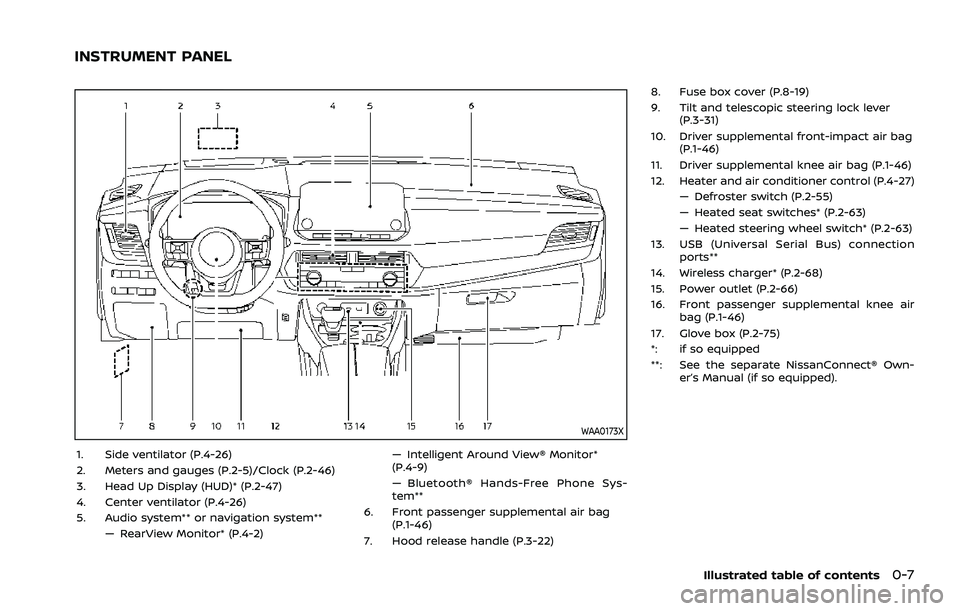
WAA0173X
1. Side ventilator (P.4-26)
2. Meters and gauges (P.2-5)/Clock (P.2-46)
3. Head Up Display (HUD)* (P.2-47)
4. Center ventilator (P.4-26)
5. Audio system** or navigation system**— RearView Monitor* (P.4-2) — Intelligent Around View® Monitor*
(P.4-9)
— Bluetooth® Hands-Free Phone Sys-
tem**
6. Front passenger supplemental air bag (P.1-46)
7. Hood release handle (P.3-22) 8. Fuse box cover (P.8-19)
9. Tilt and telescopic steering lock lever
(P.3-31)
10. Driver supplemental front-impact air bag (P.1-46)
11. Driver supplemental knee air bag (P.1-46)
12. Heater and air conditioner control (P.4-27) — Defroster switch (P.2-55)
— Heated seat switches* (P.2-63)
— Heated steering wheel switch* (P.2-63)
13. USB (Universal Serial Bus) connection ports**
14. Wireless charger* (P.2-68)
15. Power outlet (P.2-66)
16. Front passenger supplemental knee air bag (P.1-46)
17. Glove box (P.2-75)
*: if so equipped
**: See the separate NissanConnect® Own- er’s Manual (if so equipped).
Illustrated table of contents0-7
INSTRUMENT PANEL
Page 89 of 556

2 Instruments and controls
Cockpit ........................................................................\
.......................... 2-3
Instrument panel ........................................................................\
.. 2-4
Meters and gauges ..................................................................... 2-5Models with analog meter and
color display ........................................................................\
....... 2-5
Models with full-screen display .................................. 2-6
Speedometer and odometer ........................................ 2-8
Tachometer ........................................................................\
........ 2-9
Engine coolant temperature gauge ....................... 2-9
Fuel gauge ........................................................................\
........ 2-10
Instrument brightness control ................................. 2-11
Continuously Variable Transmission (CVT)
position indicator ................................................................ 2-11
ECO Drive Report ................................................................ 2-11
Warning lights, indicator lights and
audible reminders ..................................................................... 2-13
Checking lights ..................................................................... 2-14
Warning/indicator lights (red) ................................... 2-14
Warning/indicator lights (yellow) ........................... 2-17
Warning/indicator lights (other) ............................. 2-21
Audible reminders .............................................................. 2-22
Vehicle information display ............................................... 2-22 Changing the meter screen view
(models with full-screen display) ............................ 2-23
How to use the vehicle
information display ........................................................... 2-23 Startup display ................................................................... 2-23
Settings ........................................................................\
............ 2-24
Vehicle information display warnings
and indicators ..................................................................... 2-34
Trip computer ..................................................................... 2-44
Clock and outside air temperature ................... 2-46
Head Up Display (HUD) (if so equipped) .................. 2-47 How to use the HUD ...................................................... 2-49
Driver Assistance/Navigation/Traffic
Sign/Audio/TEL/SMS linking ................................... 2-50
Security systems ....................................................................... 2-50 Vehicle Security System (if so equipped) ...... 2-50
NISSAN Vehicle Immobilizer System ................. 2-51
Wiper and washer switch ................................................... 2-52 Windshield wiper and washer operation ...... 2-53
Rear window wiper and
washer operation ............................................................. 2-53
Rear window and outside mirror
(if so equipped) defroster switch ................................. 2-55
Headlight and turn signal switch ................................ 2-55
Headlight switch ............................................................... 2-55
Turn signal switch ........................................................... 2-62
Fog light switch (if so equipped) ......................... 2-62
Horn ........................................................................\
............................. 2-63
Heated steering wheel (if so equipped) .................. 2-63
Page 91 of 556
WAA0172X
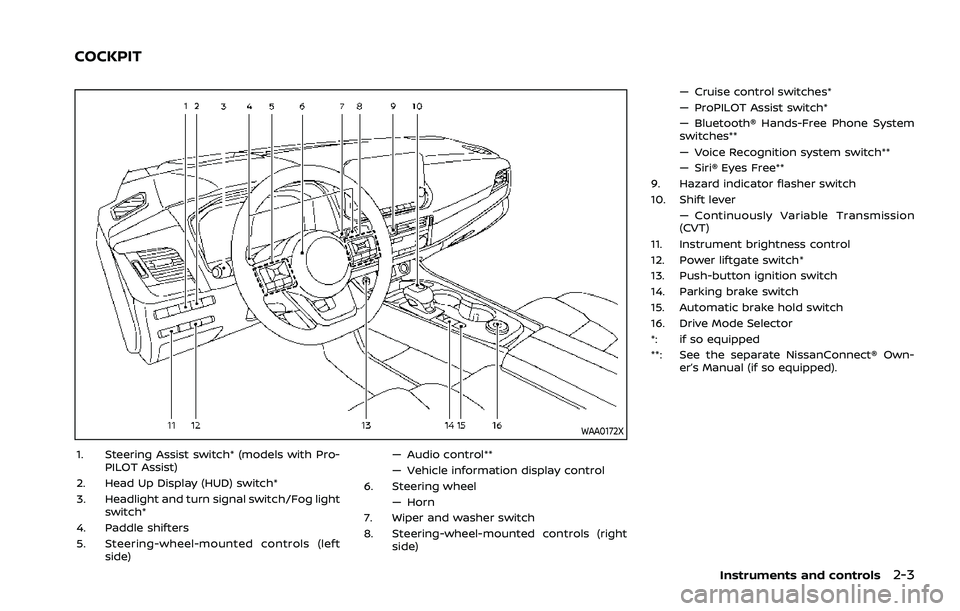
1. Steering Assist switch* (models with Pro-PILOT Assist)
2. Head Up Display (HUD) switch*
3. Headlight and turn signal switch/Fog light switch*
4. Paddle shifters
5. Steering-wheel-mounted controls (left side) — Audio control**
— Vehicle information display control
6. Steering wheel
— Horn
7. Wiper and washer switch
8. Steering-wheel-mounted controls (right side) — Cruise control switches*
— ProPILOT Assist switch*
— Bluetooth® Hands-Free Phone System
switches**
— Voice Recognition system switch**
— Siri® Eyes Free**
9. Hazard indicator flasher switch
10. Shift lever — Continuously Variable Transmission
(CVT)
11. Instrument brightness control
12. Power liftgate switch*
13. Push-button ignition switch
14. Parking brake switch
15. Automatic brake hold switch
16. Drive Mode Selector
*: if so equipped
**: See the separate NissanConnect® Own- er’s Manual (if so equipped).
Instruments and controls2-3
COCKPIT
Page 92 of 556

2-4Instruments and controls
WAA0173X
1. Side ventilator
2. Meters and gauges/Clock
3. Head Up Display (HUD)*
4. Center ventilator
5. Audio system** or navigation system**— RearView Monitor*
— Intelligent Around View® Monitor* — Bluetooth® Hands-Free Phone Sys-
tem**
6. Front passenger supplemental air bag
7. Hood release handle
8. Fuse box cover
9. Tilt and telescopic steering lock lever
10. Driver supplemental front-impact air bag 11. Driver supplemental knee air bag
12. Heater and air conditioner control
— Defroster switch
— Heated seat switches*
— Heated steering wheel switch*
13. USB (Universal Serial Bus) connection ports**
14. Wireless charger*
15. Power outlet
16. Front passenger supplemental knee air bag
17. Glove box
*: if so equipped
**: See the separate NissanConnect® Own- er’s Manual (if so equipped).
INSTRUMENT PANEL
Page 111 of 556
.Audio information
. Navigation - turn by turn
. Indicators and warnings
. Tire pressure information
. Other information
CHANGING THE METER SCREEN
VIEW (models with full-screen dis-
play)
For the model with full-screen display, the
meter screen view can be changed to
expand the vehicle information display
area. See “Changing the meter screen
view (models with full-screen display)”
(P.2-7) for how to change the view.
WAC0313X
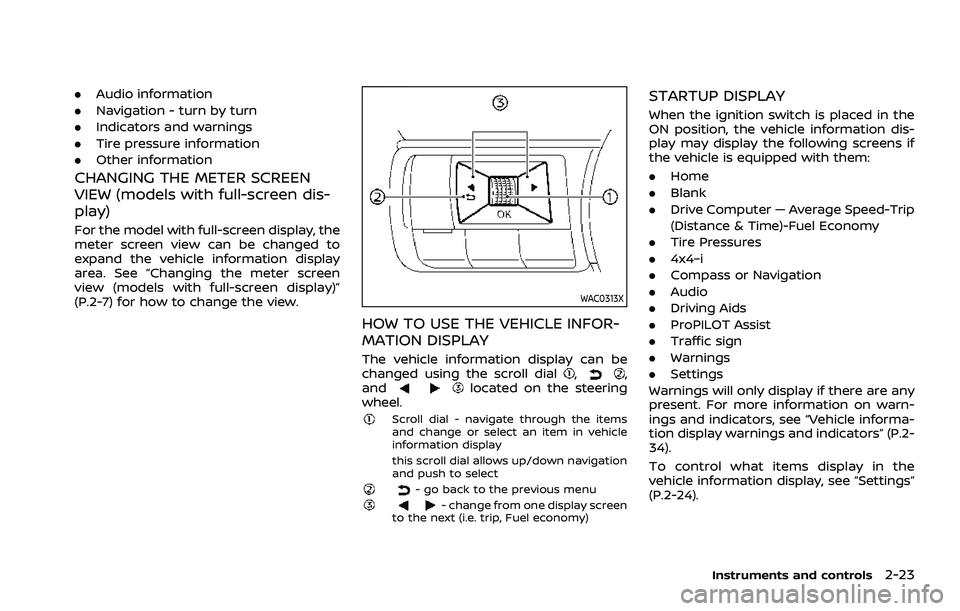
HOW TO USE THE VEHICLE INFOR-
MATION DISPLAY
The vehicle information display can be
changed using the scroll dial,,
andlocated on the steering
wheel.
Scroll dial - navigate through the items
and change or select an item in vehicle
information display
this scroll dial allows up/down navigation
and push to select
- go back to the previous menu- change from one display screen
to the next (i.e. trip, Fuel economy)
STARTUP DISPLAY
When the ignition switch is placed in the
ON position, the vehicle information dis-
play may display the following screens if
the vehicle is equipped with them:
. Home
. Blank
. Drive Computer — Average Speed-Trip
(Distance & Time)-Fuel Economy
. Tire Pressures
. 4x4–i
. Compass or Navigation
. Audio
. Driving Aids
. ProPILOT Assist
. Traffic sign
. Warnings
. Settings
Warnings will only display if there are any
present. For more information on warn-
ings and indicators, see “Vehicle informa-
tion display warnings and indicators” (P.2-
34).
To control what items display in the
vehicle information display, see “Settings”
(P.2-24).
Instruments and controls2-23
Page 114 of 556
2-26Instruments and controls
— Manual Reset2
— Auto Refuel
. Trip
— Manual Reset1
— Manual Reset2
— Auto Refuel
. Gear position
. Average speed
— Manual Reset1
— Manual Reset2
— Auto Refuel
Head-Up Display (if so equipped)
To change the status or turn on or off any
of the systems displayed in the “Head-Up
Display” menu, use the scroll dial
to
select and change a menu item:
. Brightness
. Height
. Rotation
. Contents selection
— Navigation (if so equipped)
— Driving Assist
— Speed Limit Sign
— Audio
— TEL/SMS
. Reset
(See “Head Up Display (HUD)” (P.2-47).)
ECO Mode Setting
This setting allows user to change the
ECO mode system settings.
To change the status or turn on or off any
of the systems displayed in the “ECO
Mode Settings” menu, use the scroll dial
to select and change a menu item:
. ECO Customize
— Cruise Control
. ECO Drive Assist
— ECO Indicator
— ECO Drive Report
. View History
To reset the View History:
1) Select “View History” using the
scroll dial
and push it.
2) Push the scroll dial
.
3) Select “Yes” by pushing the scroll dial
.
. Tire Pres ECO advice
Push the scroll dial
to turn the “Tire
Pres ECO advice” ON/OFF.
TPMS Setting
The following submenu appears.
Page 132 of 556
2-44Instruments and controls
WAC0313X
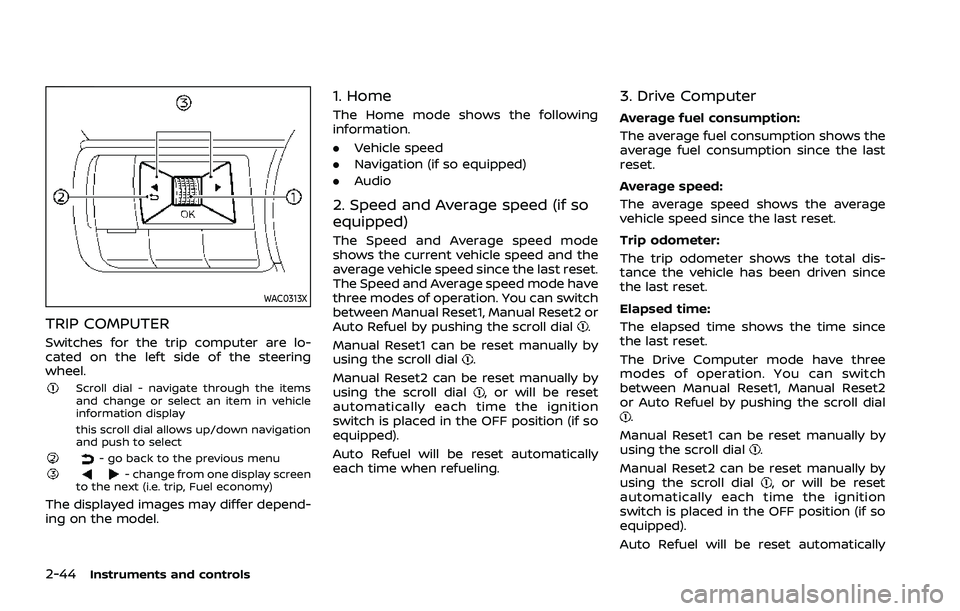
TRIP COMPUTER
Switches for the trip computer are lo-
cated on the left side of the steering
wheel.
Scroll dial - navigate through the items
and change or select an item in vehicle
information display
this scroll dial allows up/down navigation
and push to select
- go back to the previous menu- change from one display screen
to the next (i.e. trip, Fuel economy)
The displayed images may differ depend-
ing on the model.
1. Home
The Home mode shows the following
information.
. Vehicle speed
. Navigation (if so equipped)
. Audio
2. Speed and Average speed (if so
equipped)
The Speed and Average speed mode
shows the current vehicle speed and the
average vehicle speed since the last reset.
The Speed and Average speed mode have
three modes of operation. You can switch
between Manual Reset1, Manual Reset2 or
Auto Refuel by pushing the scroll dial
.
Manual Reset1 can be reset manually by
using the scroll dial
.
Manual Reset2 can be reset manually by
using the scroll dial
, or will be reset
automatically each time the ignition
switch is placed in the OFF position (if so
equipped).
Auto Refuel will be reset automatically
each time when refueling.
3. Drive Computer
Average fuel consumption:
The average fuel consumption shows the
average fuel consumption since the last
reset.
Average speed:
The average speed shows the average
vehicle speed since the last reset.
Trip odometer:
The trip odometer shows the total dis-
tance the vehicle has been driven since
the last reset.
Elapsed time:
The elapsed time shows the time since
the last reset.
The Drive Computer mode have three
modes of operation. You can switch
between Manual Reset1, Manual Reset2
or Auto Refuel by pushing the scroll dial
.
Manual Reset1 can be reset manually by
using the scroll dial
.
Manual Reset2 can be reset manually by
using the scroll dial
, or will be reset
automatically each time the ignition
switch is placed in the OFF position (if so
equipped).
Auto Refuel will be reset automatically
Page 133 of 556
each time when refueling.
4. Fuel economy display
Current fuel consumption:
The Fuel economy display mode shows
the current fuel consumption.
Average fuel consumption:
The Fuel economy display mode shows
the average fuel consumption since the
last reset.
The Fuel economy display mode have
three modes of operation. You can switch
between Manual Reset1, Manual Reset2 or
Auto Refuel by pushing the scroll dial
.
Manual Reset1 can be reset manually by
using the scroll dial
.
Manual Reset2 can be reset manually by
using the scroll dial
, or will be reset
automatically each time the ignition
switch is placed in the OFF position (if so
equipped).
Auto Refuel will be reset automatically
each time when refueling.
5. ECO Pedal Guide
When the ECO mode is selected, you can
view the ECO Pedal Guide function for
improving fuel economy.
The ECO Pedal Guide mode have three
modes of operation. You can switch
between Manual Reset1, Manual Reset2
or Auto Refuel by pushing the scroll dial
.
Manual Reset1 can be reset manually by
using the scroll dial
.
Manual Reset2 can be reset manually by
using the scroll dial
, or will be reset
automatically each time the ignition
switch is placed in the OFF position (if so
equipped).
Auto Refuel will be reset automatically
each time when refueling.
(See “ECO Pedal Guide function” (P.5-33).)
6. Tire Pressures
The tire pressure mode shows the pres-
sure of all four tires while the vehicle is
driven.
With the “Tire Pres ECO advice” function
ON, when the tire pressure is getting low,
”Check Tire Pressures for Best Fuel Econ-
omy” or ”Add air for Best Fuel Economy”
appears. (See “ECO Mode Setting” (P.2-26)
and “Tire Pres ECO advice” (P.5-33).) When the Tire Pressure Low — Add Air
warning appears, the display can be
switched to the tire pressure mode by
pushing the scroll dial
to reveal addi-
tional details on the displayed warning.
7. Intelligent 4x4 torque distribution
display (if so equipped)
When the Intelligent 4x4 torque distribu-
tion display is selected, you can view the
distribution ratio of the transmission
torque to the front and rear wheels
during driving.
8. Compass (if so equipped)
This display indicates the heading direc-
tion of the vehicle.
9. Navigation (if so equipped)
When the route guidance is set in the
navigation system, this item shows the
navigation route information.
10. Audio
The audio mode shows the status of
audio information.
Instruments and controls2-45