USB port NISSAN ROGUE SPORT 2017 User Guide
[x] Cancel search | Manufacturer: NISSAN, Model Year: 2017, Model line: ROGUE SPORT, Model: NISSAN ROGUE SPORT 2017Pages: 512, PDF Size: 3.33 MB
Page 249 of 512

4-70Heater, air conditioner, audio and phone systems
iPod® player operation
Connecting iPod®:
To connect an iPod® to the vehicle so that
the iPod® can be controlled with the
audio system controls and touch screen,
use the USB connection port located on
the lower part of the instrument panel.
(See “USB (Universal Serial Bus) connec-
tion port” (P.4-74).) Connect the iPod®-
specific end of the cable to the iPod® and
the USB end of the cable to the USB
connection port on the vehicle. If your
iPod® supports charging via a USB con-
nection, its battery will be charged while
connected to the vehicle with the ignition
switch placed in the ACC or ON position.
While connected to the vehicle, the iPod®
may only be able to be operated by the
vehicle audio controls.
To disconnect the iPod® from the vehicle,
remove the USB end of the cable from the
USB connection port on the vehicle, then
remove the cable from the iPod®.
Compatibility:
The following models are compatible:
.iPod Classic® 5th generation (firmware
version 1.3.0 or later)
. iPod Classic® 6th generation (firmware
version 2.0.1 or later) .
iPod Classic® 6th (6.1) generation (firm-
ware version 2.0.1 or later)
. iPod Classic® 6th (6.2) generation
(firmware version 2.0.4 or later)
. iPod Touch® 2nd generation (firmware
version 4.2.1 or later)*
. iPod Touch® 3rd generation (firmware
version 5.1.1 or later)
. iPod Touch® 4th generation (firmware
version 6.1.3 or later)
. iPod Touch® 5th generation (firmware
version 6.1.3 or later)
. iPod nano® - 2nd generation (firm-
ware version 1.1.3 or later)
. iPod nano® - 3rd generation (firmware
version 1.1.3 or later)
. iPod nano® - 4th generation (firmware
version 1.0.4 or later)
. iPod nano® - 5th generation (firmware
version 1.0.2 or later)
. iPod nano® - 6th generation (firmware
version 1.2 or later)
. iPod nano® - 7th generation (firmware
version 1.2 or later)
. iPhone® 3G (firmware version 4.2.1 or
later)
. iPhone® 3GS (firmware version 5.1.1or
later)
. iPhone® 4 (firmware version 6.1.3 or
later) .
iPhone® 4S (firmware version 6.1.3 or
later)
. iPhone® 5 (firmware version 6.1.3 or
later)
* Some features of this iPod® may not be
fully functional.
Make sure that your iPod® firmware is
updated to the version indicated above.
Page 253 of 512
4-74Heater, air conditioner, audio and phone systems
USB (Universal Serial Bus) CON-
NECTION PORT
WARNING
Do not connect, disconnect or oper-
ate the USB device while driving.
Doing so can be a distraction. If
distracted you could lose control of
your vehicle and cause an accident
or serious injury.
CAUTION
.Do not force the USB device into
the USB connection port. Insert-
ing a USB device tilted or upside-
down into the port may damage
the port. Make sure that the USB
device is connected correctly to
the USB connection port.
. Do not grab the USB connection
port cover (if so equipped) when
pulling a USB device out of the
port. This could damage the port
and the cover.
. Do not leave a USB cable in a
place where it can be pulled
unintentionally. Pulling the cable may damage the port.
Refer to your device manufacturer’s own-
er information regarding the proper use
and care of the device.
JVH0683X
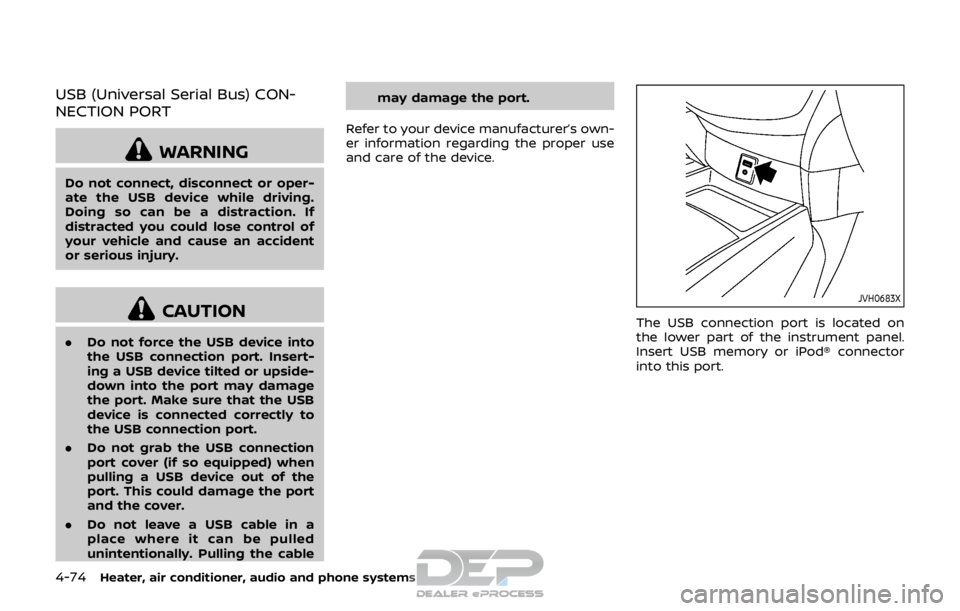
The USB connection port is located on
the lower part of the instrument panel.
Insert USB memory or iPod® connector
into this port.
Page 256 of 512
ANTENNA
To remove the antenna, hold the bottom
of the antenna and turn it counterclock-
wise.
To install the antenna, turn the antenna
clockwise and tighten.
CAUTION
.To avoid damaging or deforming
the antenna, be sure to remove
the antenna under the following
conditions.
— The vehicle enters a garage
with a low ceiling.
— The vehicle is covered with a car cover.
. Be sure that antenna is removed
before the vehicle enters an auto-
matic car wash.
. Always properly tighten the an-
tenna rod during installation.
Otherwise, the antenna rod may
break during vehicle operation.
SAA0451
CD/USB MEMORY CARE AND
CLEANING
CD
.Handle a CD by its edges. Never touch
the surface of the disc. Do not bend
the disc.
. Always place the discs in the storage
case when they are not being used.
. To clean a disc, wipe the surface from
the center to the outer edge using a
clean, soft cloth. Do not wipe the disc
using a circular motion.
Do not use a conventional record
cleaner or alcohol intended for indus-
trial use. .
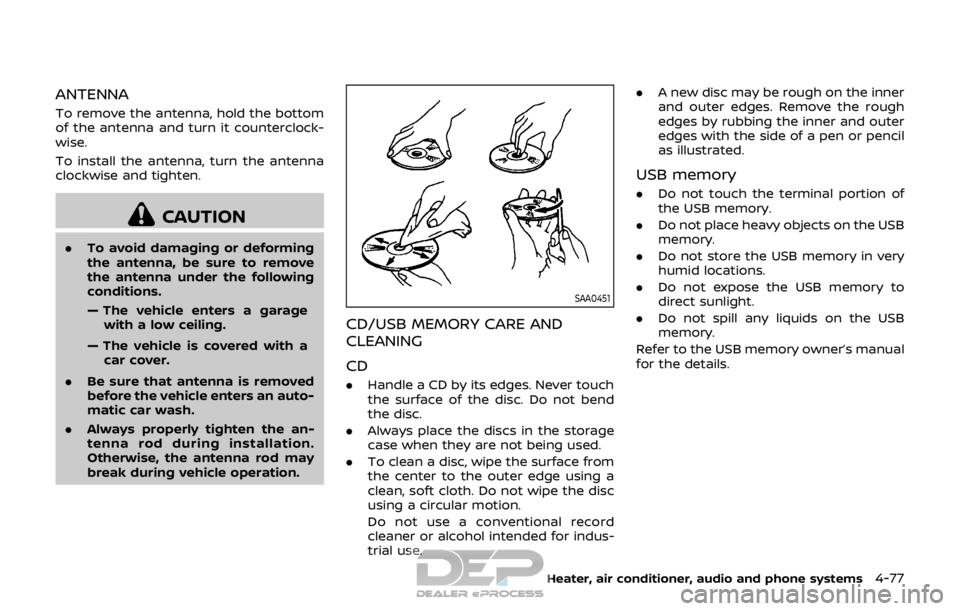
A new disc may be rough on the inner
and outer edges. Remove the rough
edges by rubbing the inner and outer
edges with the side of a pen or pencil
as illustrated.
USB memory
.Do not touch the terminal portion of
the USB memory.
. Do not place heavy objects on the USB
memory.
. Do not store the USB memory in very
humid locations.
. Do not expose the USB memory to
direct sunlight.
. Do not spill any liquids on the USB
memory.
Refer to the USB memory owner’s manual
for the details.
Heater, air conditioner, audio and phone systems4-77
Page 257 of 512

4-78Heater, air conditioner, audio and phone systems
This vehicle is equipped with smartphone
Integration technology. This allows many
compatible smartphone applications to
be displayed and easily controlled
through the vehicle’s touch screen.
NOTE:
A compatible smartphone and registra-
tion is required to use mobile applica-
tions or to access connected features of
certain vehicle applications.
REGISTERING WITH NISSANCON-
NECTSMMOBILE APPS
To use the smartphone Integration fea-
ture, it is necessary for the user to
register. In order to register, visit the
NissanConnect
SMwebsite and sign up or
create an account through the prompts
on the NissanConnect
SMMobile Apps.
Once registered, download the Nissan-
Connect
SMMobile Apps from your com-
patible phone’s application download
source and then log into the application.
If you already have an account created
through the App, please log in.
NissanConnect
SMwebsite:
For U.S.
www.nissanusa.com/connect/
For Canada
www.nissan.ca/nissanconnect (English)
www.nissan.ca/nissanconnect/fr (French)
CONNECT PHONE
To use this feature, a compatible smart-
phone must be connected via Bluetooth®
or USB connection port to the vehicle. For
more information on connecting your
phone, see “Bluetooth® Hands-Free
Phone System (models with navigation
system)” (P.4-93).
NOTE:
.
For iPhone®, NissanConnect
SMMo-
bile Apps REQUIRES the phone to be
plugged in via USB connection port.
. For Android phones, NissanCon-
nect
SMMobile Apps REQUIRES the
phone to be paired via Bluetooth®.
APPLICATION DOWNLOAD
Once connected, the NissanConnectSM
Mobile Apps will search your phone to
determine which compatible applications
are currently installed. The user will then
choose which apps they want to bring
into their vehicle from the list of apps
within the “Manage My Apps” section of
the NissanConnect
SMMobile Apps on
their smartphone. The vehicle will then
download the in-vehicle interface for
each of these compatible applications.
Once downloaded, the user can access
their selected smartphone applications
through the vehicle touch screen. For more information on application avail-
ability see NissanConnect
SMwebsite.
NissanConnectSMwebsite:
For U.S.
www.nissanusa.com/connect/
For Canada
www.nissan.ca/nissanconnect (English)
www.nissan.ca/nissanconnect/fr
(French)
NISSANCONNECTSMMOBILE APPS
SMARTPHONE INTEGRATION (if so
equipped)
Page 509 of 512

11-6
Siri® Eyes Free ................................................................ 4-79
Soft bottle holders...................................................... 2-54
Spare tire............................................................. 8-40, 10-7
Spark plugs....................................................................... 8-14
Speedometer ...................................................................... 2-6
SRSPrecautions on SRS ............................................ 1-40
Standard maintenance ............................................... 9-7
Starting Before starting the engine............................ 5-17
Jump starting ............................................................. 6-9
Precautions when starting
and driving.................................................................... 5-4
Push starting............................................................ 6-11
Starting the engine.............................. 5-18, 5-19
Status light, Front passenger air bag ......... 1-48
Steering Electric power steering................................ 5-105
Heated steering wheel ..................................... 2-49
Steering wheel switch for
audio controls ......................................................... 4-75
Tilt/telescopic steering .................................... 3-29
Storage ........................................................................\
........ 2-54
Sun visors ........................................................................\
.. 3-30
Sunglasses holder....................................................... 2-56
Supplemental air bag warning labels ......... 1-56
Supplemental air bag
warning light .................................................... 1-57, 2-15
Supplemental Restraint System (SRS) ........ 1-40
Switch Audio control steering wheel switch ..... 4-75
Blind Spot Warning (BSW) switch ............ 2-51
Fog light switch ..................................................... 2-48
Hazard warning flasher switch .................... 6-2
Headlight switch ................................................... 2-43
Ignition switch ........................................................ 5-12
Intelligent 4x4 LOCK switch ........................ 2-52 Intelligent Auto Headlight switch ............ 2-43
Intelligent Lane Intervention (I-LI)
switch ........................................................................\
... 2-51
Power door lock switch ..................................... 3-7
Rear window and outside mirror
defroster switch .................................................... 2-42
Turn signal switch ............................................... 2-48
Vehicle dynamic control (VDC)
off switch .................................................................... 2-52
T
Tachometer........................................................................\
.. 2-7
Temperature gauge, Engine coolant
temperature gauge ....................................................... 2-7
Theft (NISSAN Vehicle Immobilizer
System), Engine start ............................................... 2-38
Three-way catalyst......................................................... 5-4
Tilt/telescopic steering ........................................... 3-29
Tire pressure, Low tire pressure
warning light ................................................................... 2-13
Tires
Flat tire........................................................................\
..... 6-3
Low tire pressure warning system ........... 5-5
Tire and Loading
information label................................ 8-31, 10-10
Tire chains.................................................................. 8-36
Tire dressing................................................................ 7-4
Tire pressure ............................................................ 8-29
Tire pressure monitoring
system (TPMS)................................................. 5-5, 6-3
Tire rotation.............................................................. 8-37
Types of tires ........................................................... 8-35
Uniform tire quality grading .................... 10-16
Wheel/tire size ........................................................ 10-7
Wheels and tires .................................................... 8-29
Touch screen ...................................................................... 4-4 Towing
Tow truck towing................................................. 6-13
Towing a trailer.................................................. 10-14
TPMS, Tire pressure monitoring system....... 5-5 TPMS with Easy Fill Tire Alert......................... 5-7
TPMS, Tire pressure warning system .............. 6-3
Trailer towing .............................................................. 10-14
Transmission Continuously Variable Transmission ..... 5-13
Continuously Variable Transmission
(CVT) fluid....................................................................... 8-9
Driving with CVT (Continuously
Variable Transmission)..................................... 5-20
Driving with manual transmission.......... 5-25
Transmission shift lever lock release ..... 5-24
Transmitter (See remote keyless
entry system) ...................................................................... 3-8
Transmitter, With Intelligent Key system
(See Intelligent Key system) ................................ 3-18
Traveling or registering in
another country ........................................................... 10-8
Trip computer ................................................................ 2-34
Trip odometer ................................................................ 2-34
Turn signal switch ...................................................... 2-48
U
Underbody cleaning ...................................................... 7-3
Uniform tire quality grading ............................ 10-16
USB (Universal Serial Bus)
connection port............................................................ 4-74
V
Vanity mirror ................................................................... 3-33
Vanity mirror lights .................................................... 2-67
Variable voltage control system ..................... 8-13