belt NISSAN TEANA 2008 Owners Manual
[x] Cancel search | Manufacturer: NISSAN, Model Year: 2008, Model line: TEANA, Model: NISSAN TEANA 2008Pages: 5121, PDF Size: 69.03 MB
Page 3004 of 5121
PRECAUTIONS
INT-27
< PRECAUTION >
C
D
E
F
G
H
I
K
L
MA
B
INT
N
O
P
PRECAUTION
PRECAUTIONS
Precaution for Supplemental Restraint System (SRS) "AIR BAG" and "SEAT BELT
PRE-TENSIONER"
INFOID:0000000003819210
The Supplemental Restraint System such as “AIR BAG” and “SEAT BELT PRE-TENSIONER”, used along
with a front seat belt, helps to reduce the risk or severity of injury to the driver and front passenger for certain
types of collision. This system includes seat belt switch inputs and dual stage front air bag modules. The SRS
system uses the seat belt switches to determine the front air bag deployment, and may only deploy one front
air bag, depending on the severity of a collision and whether the front occupants are belted or unbelted.
Information necessary to service the system safely is included in the “SRS AIRBAG” and “SEAT BELT” of this
Service Manual.
WARNING:
• To avoid rendering the SRS inoperative, which could increase the risk of personal injury or death in
the event of a collision which would result in air bag inflation, all maintenance must be performed by
an authorized NISSAN/INFINITI dealer.
Improper maintenance, including incorrect removal and installation of the SRS, can lead to personal
injury caused by unintentional activation of the system. For removal of Spiral Cable and Air Bag
Module, see the “SRS AIRBAG”.
Never use electrical test equipment on any circuit related to the SRS unless instructed to in this Ser-
vice Manual. SRS wiring harnesses can be identified by yellow and/or orange harnesses or harness
connectors.
Precaution Necessary for Steering Wheel Rotation after Battery Disconnect
INFOID:0000000003819211
NOTE:
Before removing and installing any control units, first turn the push-button ignition switch to the LOCK posi-
tion, then disconnect both battery cables.
After finishing work, confirm that all control unit connectors are connected properly, then re-connect both
battery cables.
Always use CONSULT-III to perform self-diagnosis as a part of each function inspection after finishing work.
If a DTC is detected, perform trouble diagnosis according to self-diagnosis results.
This vehicle is equipped with a push-button ignition switch and a steering lock unit.
If the battery is disconnected or discharged, the steering wheel will lock and cannot be turned.
If turning the steering wheel is required with the battery disconnected or discharged, follow the procedure
below before starting the repair operation.
OPERATION PROCEDURE
1. Connect both battery cables.
NOTE:
Supply power using jumper cables if battery is discharged.
2. Turn the push-button ignition switch to ACC position.
(At this time, the steering lock will be released.)
3. Disconnect both battery cables. The steering lock will remain released with both battery cables discon-
nected and the steering wheel can be turned.
4. Perform the necessary repair operation.
5. When the repair work is completed, re-connect both battery cables. With the brake pedal released, turn
the push-button ignition switch from ACC position to ON position, then to LOCK position. (The steering
wheel will lock when the push-button ignition switch is turned to LOCK position.)
6. Perform self-diagnosis check of all control units using CONSULT-III.
Page 3018 of 5121
BODY SIDE TRIM
INT-41
< ON-VEHICLE REPAIR >
C
D
E
F
G
H
I
K
L
MA
B
INT
N
O
P
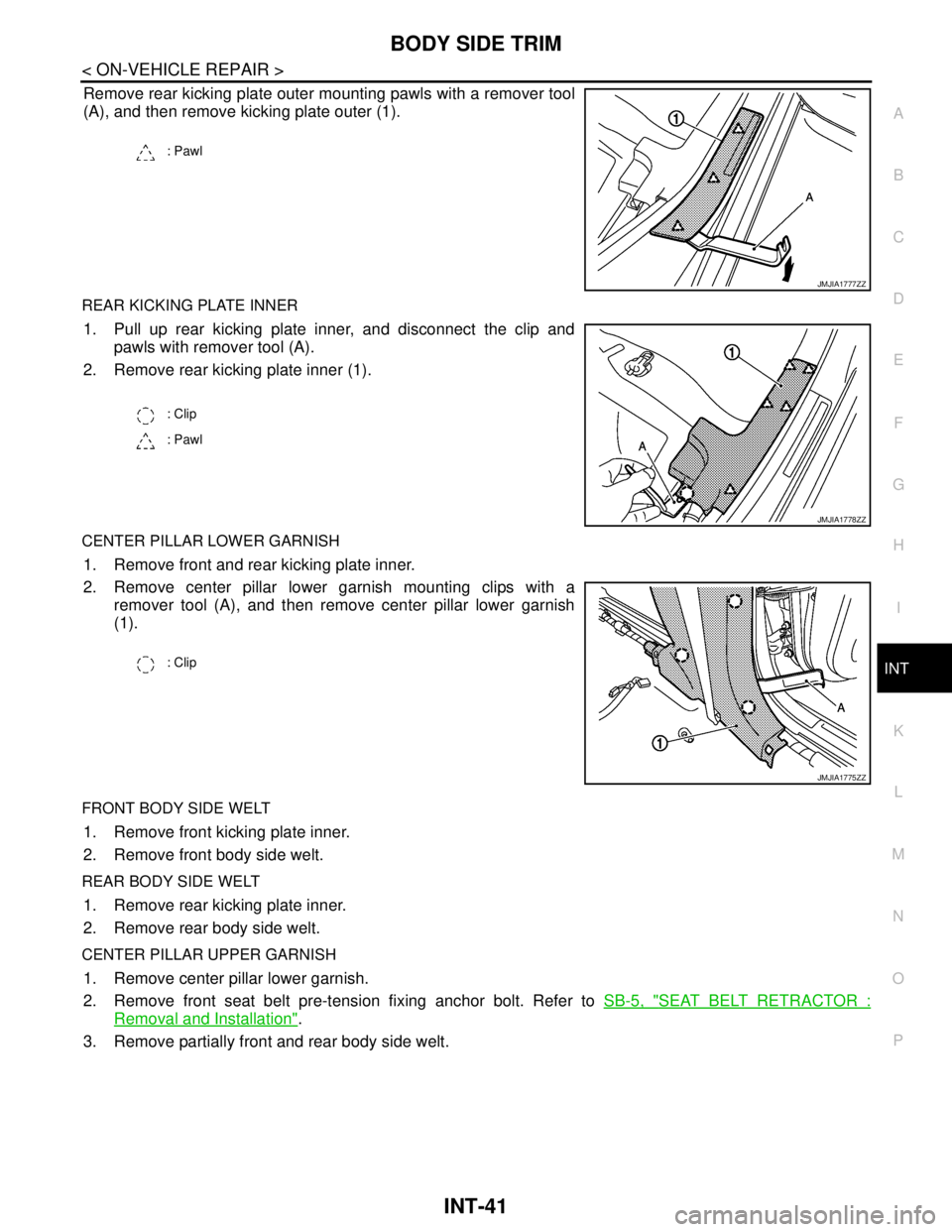
Remove rear kicking plate outer mounting pawls with a remover tool
(A), and then remove kicking plate outer (1).
REAR KICKING PLATE INNER
1. Pull up rear kicking plate inner, and disconnect the clip and
pawls with remover tool (A).
2. Remove rear kicking plate inner (1).
CENTER PILLAR LOWER GARNISH
1. Remove front and rear kicking plate inner.
2. Remove center pillar lower garnish mounting clips with a
remover tool (A), and then remove center pillar lower garnish
(1).
FRONT BODY SIDE WELT
1. Remove front kicking plate inner.
2. Remove front body side welt.
REAR BODY SIDE WELT
1. Remove rear kicking plate inner.
2. Remove rear body side welt.
CENTER PILLAR UPPER GARNISH
1. Remove center pillar lower garnish.
2. Remove front seat belt pre-tension fixing anchor bolt. Refer to SB-5, "
SEAT BELT RETRACTOR :
Removal and Installation".
3. Remove partially front and rear body side welt.
: Pawl
JMJIA1777ZZ
: Clip
: Pawl
JMJIA1778ZZ
: Clip
JMJIA1775ZZ
Page 3019 of 5121
INT-42
< ON-VEHICLE REPAIR >
BODY SIDE TRIM
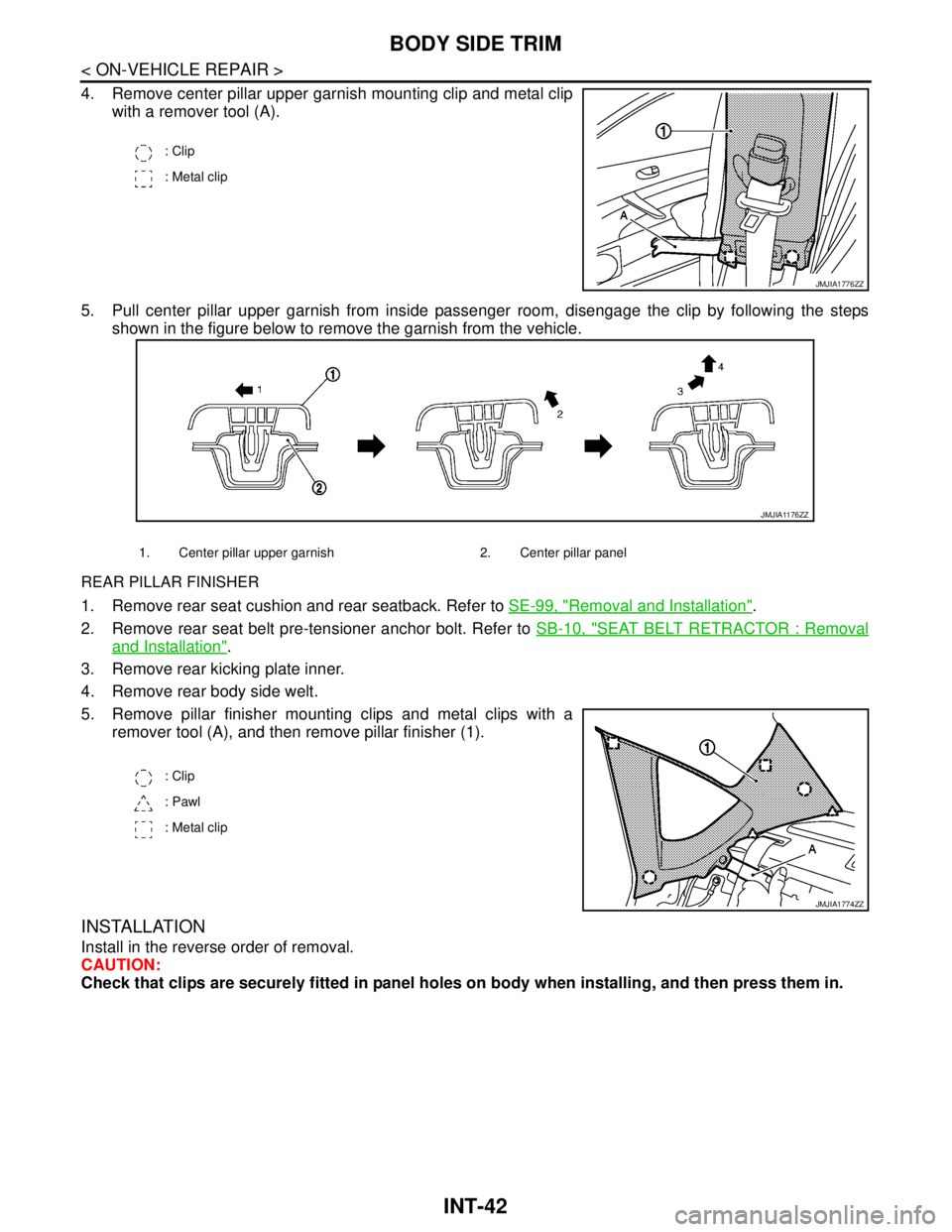
4. Remove center pillar upper garnish mounting clip and metal clip
with a remover tool (A).
5. Pull center pillar upper garnish from inside passenger room, disengage the clip by following the steps
shown in the figure below to remove the garnish from the vehicle.
REAR PILLAR FINISHER
1. Remove rear seat cushion and rear seatback. Refer to SE-99, "Removal and Installation".
2. Remove rear seat belt pre-tensioner anchor bolt. Refer to SB-10, "
SEAT BELT RETRACTOR : Removal
and Installation".
3. Remove rear kicking plate inner.
4. Remove rear body side welt.
5. Remove pillar finisher mounting clips and metal clips with a
remover tool (A), and then remove pillar finisher (1).
INSTALLATION
Install in the reverse order of removal.
CAUTION:
Check that clips are securely fitted in panel holes on body when installing, and then press them in.
: Clip
: Metal clip
JMJIA1776ZZ
1. Center pillar upper garnish 2. Center pillar panel
JMJIA1176ZZ
: Clip
: Pawl
: Metal clip
JMJIA1774ZZ
Page 3020 of 5121
REAR PARCEL SHELF FINISHER
INT-43
< ON-VEHICLE REPAIR >
C
D
E
F
G
H
I
K
L
MA
B
INT
N
O
P
REAR PARCEL SHELF FINISHER
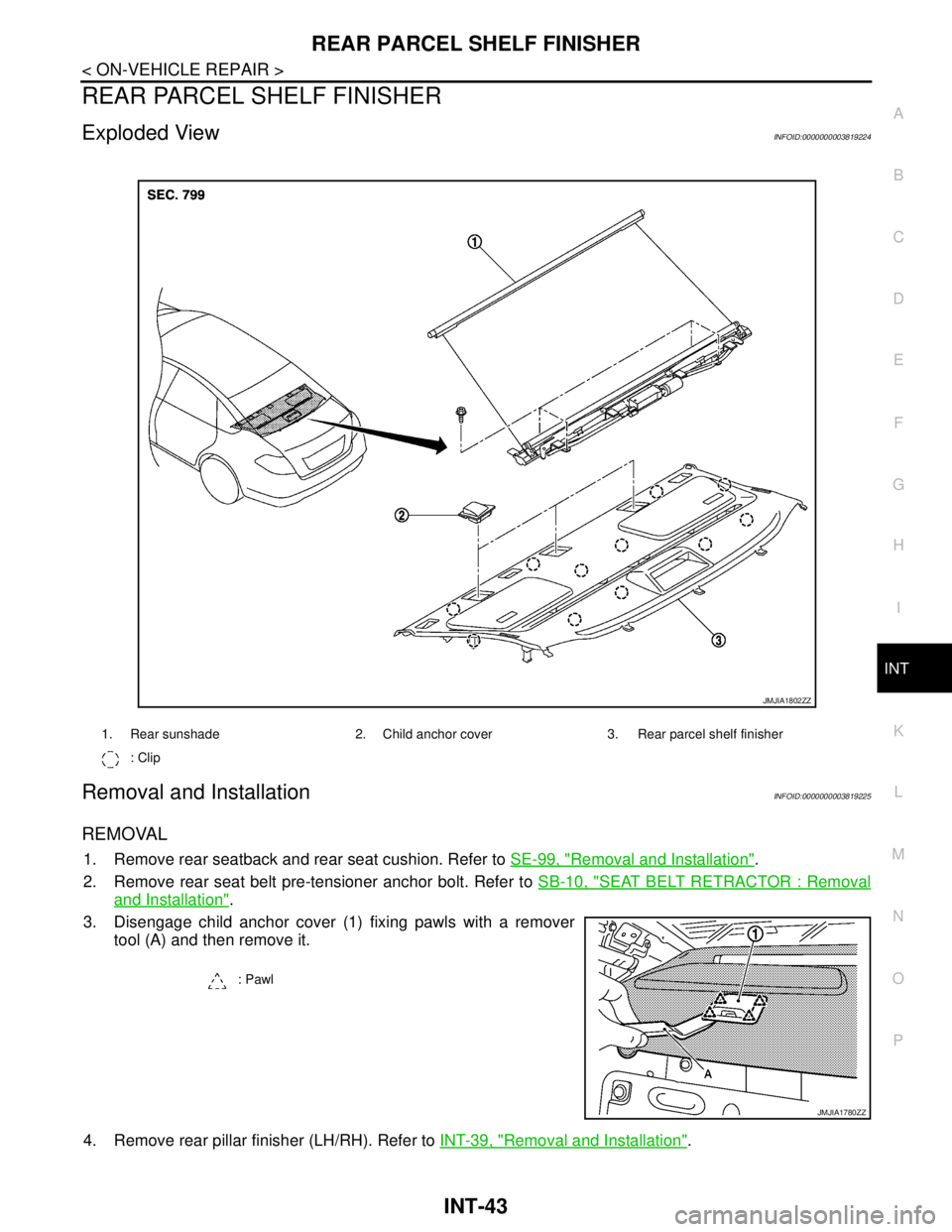
Exploded ViewINFOID:0000000003819224
Removal and InstallationINFOID:0000000003819225
REMOVAL
1. Remove rear seatback and rear seat cushion. Refer to SE-99, "Removal and Installation".
2. Remove rear seat belt pre-tensioner anchor bolt. Refer to SB-10, "
SEAT BELT RETRACTOR : Removal
and Installation".
3. Disengage child anchor cover (1) fixing pawls with a remover
tool (A) and then remove it.
4. Remove rear pillar finisher (LH/RH). Refer to INT-39, "
Removal and Installation".
1. Rear sunshade 2. Child anchor cover 3. Rear parcel shelf finisher
: Clip
JMJIA1802ZZ
: Pawl
JMJIA1780ZZ
Page 3024 of 5121
FLOOR TRIM
INT-47
< ON-VEHICLE REPAIR >
C
D
E
F
G
H
I
K
L
MA
B
INT
N
O
P
FLOOR TRIM
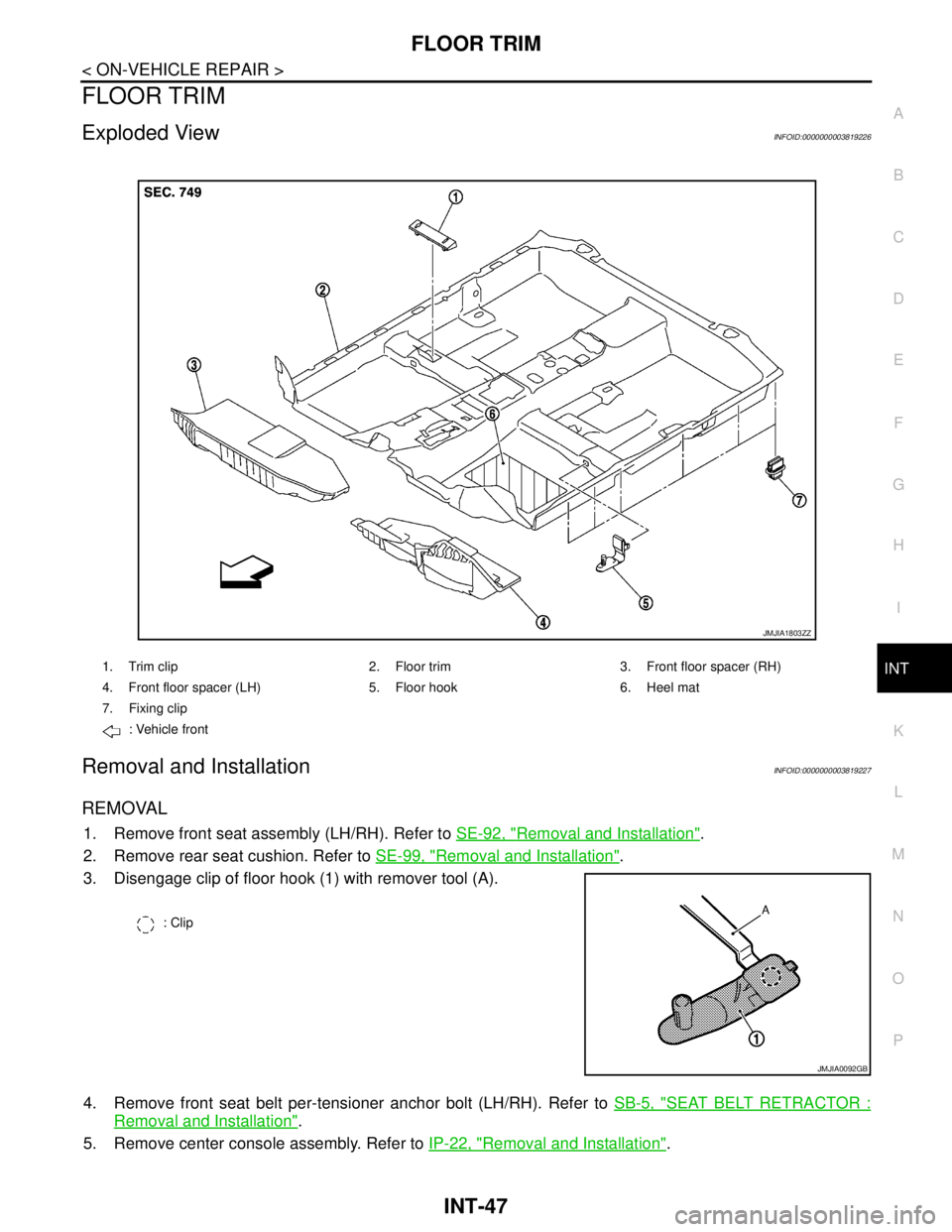
Exploded ViewINFOID:0000000003819226
Removal and InstallationINFOID:0000000003819227
REMOVAL
1. Remove front seat assembly (LH/RH). Refer to SE-92, "Removal and Installation".
2. Remove rear seat cushion. Refer to SE-99, "
Removal and Installation".
3. Disengage clip of floor hook (1) with remover tool (A).
4. Remove front seat belt per-tensioner anchor bolt (LH/RH). Refer to SB-5, "
SEAT BELT RETRACTOR :
Removal and Installation".
5. Remove center console assembly. Refer to IP-22, "
Removal and Installation".
1. Trim clip 2. Floor trim 3. Front floor spacer (RH)
4. Front floor spacer (LH) 5. Floor hook 6. Heel mat
7. Fixing clip
: Vehicle front
JMJIA1803ZZ
: Clip
JMJIA0092GB
Page 3041 of 5121

IP-1
BODY INTERIOR
C
DE
F
G H
I
K L
M
SECTION IP
A
B
IP
N
O P
CONTENTS
INSTRUMENT PANEL
SYMPTOM DIAGNOSIS ..... ..........................2
SQUEAK AND RATTLE TROUBLE DIAG-
NOSES ........................ ........................................
2
Work Flow ........................................................... ......2
Inspection Procedure ................................................4
Diagnostic Worksheet ...............................................6
PRECAUTION ...............................................8
PRECAUTIONS .............................................. .....8
Precaution for Supplemental Restraint System
(SRS) "AIR BAG" and "SEAT BELT PRE-TEN-
SIONER" ............................................................. ......
8
Precaution Necessary for Steering Wheel Rota-
tion after Battery Disconnect .....................................
8
Precaution .................................................................8
PREPARATION ...........................................10
PREPARATION .................................................10
Commercial Service Tools ................................. ....10
ON-VEHICLE REPAIR .................................11
INSTRUMENT PANEL ASSEMBLY .................11
Exploded View ..................................................... ....11
Removal and Installation .........................................12
CENTER CONSOLE ASSEMBLY ....................22
Exploded View .........................................................22
Removal and Installation .........................................22
Disassembly and Assembly .....................................26
Page 3048 of 5121

IP-8
< PRECAUTION >
PRECAUTIONS
PRECAUTION
PRECAUTIONS
Precaution for Supplemental Restraint System (SRS) "AIR BAG" and "SEAT BELT
PRE-TENSIONER"
INFOID:0000000003819818
The Supplemental Restraint System such as “AIR BAG” and “SEAT BELT PRE-TENSIONER”, used along
with a front seat belt, helps to reduce the risk or severity of injury to the driver and front passenger for certain
types of collision. Information necessary to service the system safely is included in the “SRS AIRBAG” and
“SEAT BELT” of this Service Manual.
WARNING:
• To avoid rendering the SRS inoperative, which could increase the risk of personal injury or death in
the event of a collision which would result in air bag inflation, all maintenance must be performed by
an authorized NISSAN/INFINITI dealer.
Improper maintenance, including incorrect removal and installation of the SRS, can lead to personal
injury caused by unintentional activation of the system. For removal of Spiral Cable and Air Bag
Module, see the “SRS AIRBAG”.
Never use electrical test equipment on any circuit related to the SRS unless instructed to in this Ser-
vice Manual. SRS wiring harnesses can be identified by yellow and/or orange harnesses or harness
connectors.
Precaution Necessary for Steering Wheel Rotation after Battery Disconnect
INFOID:0000000003819825
NOTE:
Before removing and installing any control units, first turn the push-button ignition switch to the LOCK posi-
tion, then disconnect both battery cables.
After finishing work, confirm that all control unit connectors are connected properly, then re-connect both
battery cables.
Always use CONSULT-III to perform self-diagnosis as a part of each function inspection after finishing work.
If a DTC is detected, perform trouble diagnosis according to self-diagnosis results.
This vehicle is equipped with a push-button ignition switch and a steering lock unit.
If the battery is disconnected or discharged, the steering wheel will lock and cannot be turned.
If turning the steering wheel is required with the battery disconnected or discharged, follow the procedure
below before starting the repair operation.
OPERATION PROCEDURE
1. Connect both battery cables.
NOTE:
Supply power using jumper cables if battery is discharged.
2. Turn the push-button ignition switch to ACC position.
(At this time, the steering lock will be released.)
3. Disconnect both battery cables. The steering lock will remain released with both battery cables discon-
nected and the steering wheel can be turned.
4. Perform the necessary repair operation.
5. When the repair work is completed, re-connect both battery cables. With the brake pedal released, turn
the push-button ignition switch from ACC position to ON position, then to LOCK position. (The steering
wheel will lock when the push-button ignition switch is turned to LOCK position.)
6. Perform self-diagnosis check of all control units using CONSULT-III.
PrecautionINFOID:0000000003751401
Disconnect both battery cables in advance.
Disconnect air bag system line in advance.
Never tamper with or force air bag lid open, as this may adversely affect air bag performance.
Be careful not to scratch pad and other parts.
When removing or disassembling any part, be careful not to damage or deform it. Protect parts, which may
get in the way with a shop cloth.
When removing parts with a screwdriver or other tool, cover the tool surface by vinyl tape to protect parts.
Page 3068 of 5121

LAN
LAN-1
ELECTRICAL & POWER CONTROL
C
DE
F
G H
I
J
K L
B
SECTION LAN
A
O P
N
CONTENTS
LAN SYSTEM
CAN FUNDAMENTAL
PRECAUTION ................ ...............................
4
PRECAUTIONS .............................................. .....4
Precautions for Trouble Diagnosis ...................... ......4
Precautions for Harness Repair ................................4
FUNCTION DIAGNOSIS ...............................5
CAN COMMUNICATION SYSTEM ................ .....5
System Description ............................................. ......5
System Diagram ........................................................5
CAN Communication Control Circuit .........................6
DIAG ON CAN .....................................................7
Description .......................................................... ......7
System Diagram ........................................................7
TROUBLE DIAGNOSIS ......................................8
Condition of Error Detection ................................ ......8
Symptom When Error Occurs in CAN Communi-
cation System ...................................................... ......
8
CAN Diagnosis with CONSULT-III ..........................11
Self-Diagnosis .........................................................11
CAN Diagnostic Support Monitor ............................11
How to Use CAN Communication Signal Chart ......13
BASIC INSPECTION ...................................14
DIAGNOSIS AND REPAIR WORKFLOW ..... ....14
Trouble Diagnosis Flow Chart ............................. ....14
Trouble Diagnosis Procedure ..................................14
CAN
HOW TO USE THIS MANU AL .....................
19
HOW TO USE THIS SECTION ....................... ....19
Caution ................................................................ ....19
Abbreviation List ......................................................19
PRECAUTION ..............................................20
PRECAUTIONS .................................................20
Precaution for Supplemental Restraint System
(SRS) "AIR BAG" and "SEAT BELT PRE-TEN-
SIONER" ............................................................. ....
20
Precautions for Trouble Diagnosis ..........................20
Precautions for Harness Repair ..............................20
BASIC INSPECTION ...................................21
DIAGNOSIS AND REPAIR WORKFLOW ........21
Interview Sheet .................................................... ....21
FUNCTION DIAGNOSIS ..............................22
CAN COMMUNICATION SYSTEM ...................22
CAN System Specification Chart ......................... ....22
CAN Communication Signal Chart ..........................22
COMPONENT DIAGNOSIS .........................26
CAN COMMUNICATION SYSTEM ...................26
Component Parts Location .................................. ....26
Wiring Diagram - CAN SYSTEM - ...........................27
MALFUNCTION AREA CHART ........................31
Main Line ............................................................. ....31
Branch Line .............................................................31
Short Circuit .............................................................31
MAIN LINE BETWEEN ADP AND M&A CIR-
CUIT ..................................................................
32
Diagnosis Procedure ...............................................32
MAIN LINE BETWEEN M&A AND DLC CIR-
CUIT ..................................................................
33
Diagnosis Procedure ...............................................33
MAIN LINE BETWEEN DLC AND ABS CIR-
CUIT ..................................................................
34
Diagnosis Procedure ...............................................34
ECM BRANCH LINE CIRCUIT .........................35
Diagnosis Procedure ...............................................35
Page 3087 of 5121
![NISSAN TEANA 2008 Owners Manual LAN-20
< PRECAUTION >[CAN]
PRECAUTIONS
PRECAUTION
PRECAUTIONS
Precaution for Supplemental Restraint System (SRS) "AIR BAG" and "SEAT BELT
PRE-TENSIONER"
INFOID:0000000003850219
The Supplemental Restr](/img/5/57391/w960_57391-3086.png "NISSAN TEANA 2008 Owners Manual LAN-20
< PRECAUTION >[CAN]
PRECAUTIONS
PRECAUTION
PRECAUTIONS
Precaution for Supplemental Restraint System (SRS) \"AIR BAG\" and \"SEAT BELT
PRE-TENSIONER\"
INFOID:0000000003850219
The Supplemental Restr")
LAN-20
< PRECAUTION >[CAN]
PRECAUTIONS
PRECAUTION
PRECAUTIONS
Precaution for Supplemental Restraint System (SRS) "AIR BAG" and "SEAT BELT
PRE-TENSIONER"
INFOID:0000000003850219
The Supplemental Restraint System such as “AIR BAG” and “SEAT BELT PRE-TENSIONER”, used along
with a front seat belt, helps to reduce the risk or severity of injury to the driver and front passenger for certain
types of collision. Information necessary to service the system safely is included in the “SRS AIRBAG” and
“SEAT BELT” of this Service Manual.
WARNING:
To avoid rendering the SRS inoperative, which could increase the risk of personal injury or death in
the event of a collision which would result in air bag inflation, all maintenance must be performed by
an authorized NISSAN/INFINITI dealer.
Improper maintenance, including incorrect removal and installation of the SRS, can lead to personal
injury caused by unintentional activation of the system. For removal of Spiral Cable and Air Bag
Module, see the “SRS AIRBAG”.
Never use electrical test equipment on any circuit related to the SRS unless instructed to in this Ser-
vice Manual. SRS wiring harnesses can be identified by yellow and/or orange harnesses or harness
connectors.
Precautions for Trouble DiagnosisINFOID:0000000003767681
CAUTION:
Never apply 7.0 V or more to the measurement terminal.
Use a tester with open terminal voltage of 7.0 V or less.
Turn the ignition switch OFF and disconnect the battery cable from the negative terminal when
checking the harness.
Precautions for Harness RepairINFOID:0000000003767682
Solder the repaired area and wrap tape around the soldered area.
NOTE:
A fray of twisted lines must be within 110 mm (4.33 in).
Bypass connection is never allowed at the repaired area.
NOTE:
Bypass connection may cause CAN communication error. The
spliced wire becomes separated and the characteristics of twisted
line are lost.
Replace the applicable harness as an assembly if error is detected on the shield lines of CAN communica-
tion line.
SKIB8766E
SKIB8767E
Page 3182 of 5121
LU-10
< ON-VEHICLE MAINTENANCE >
OIL FILTER
OIL FILTER
Removal and InstallationINFOID:0000000003793124
REMOVAL
CAUTION:
Oil filter is provided with relief valve. Use genuine NISSAN oil filter or equivalent.
Be careful not to get burned when engine and engine oil may be hot.
When removing, prepare a shop cloth to absorb any engine oil leakage or spillage.
Never allow engine oil to adhere to drive belt.
Completely wipe off any engine oil that adheres to engine and vehicle.
1. Remove splash guard (RH). Refer to EXT-22, "
FENDER PROTECTOR : Exploded View".
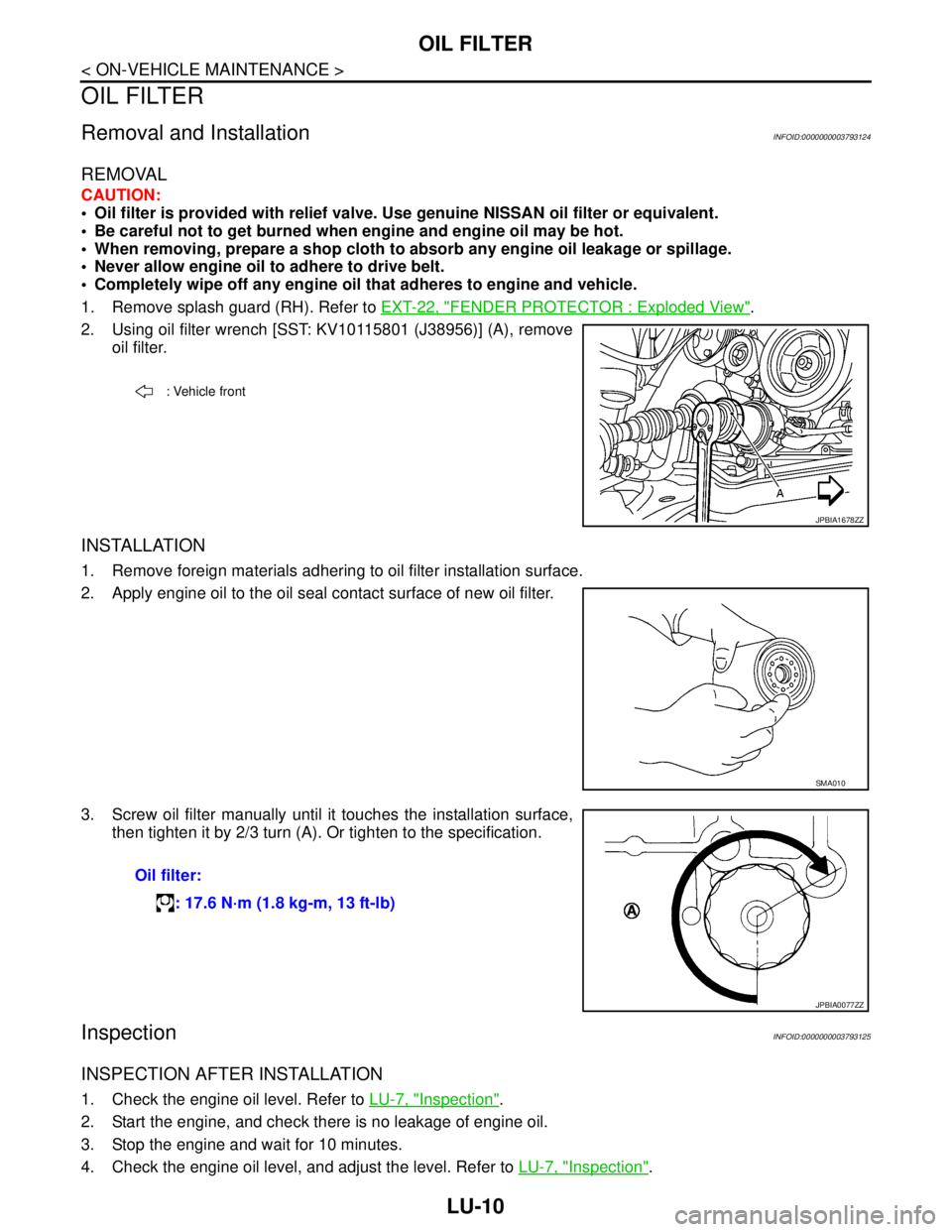
2. Using oil filter wrench [SST: KV10115801 (J38956)] (A), remove
oil filter.
INSTALLATION
1. Remove foreign materials adhering to oil filter installation surface.
2. Apply engine oil to the oil seal contact surface of new oil filter.
3. Screw oil filter manually until it touches the installation surface,
then tighten it by 2/3 turn (A). Or tighten to the specification.
InspectionINFOID:0000000003793125
INSPECTION AFTER INSTALLATION
1. Check the engine oil level. Refer to LU-7, "Inspection".
2. Start the engine, and check there is no leakage of engine oil.
3. Stop the engine and wait for 10 minutes.
4. Check the engine oil level, and adjust the level. Refer to LU-7, "
Inspection".
: Vehicle front
JPBIA1678ZZ
SMA010
Oil filter:
: 17.6 N·m (1.8 kg-m, 13 ft-lb)
JPBIA0077ZZ