ignition NISSAN TEANA 2008 Service Manual
[x] Cancel search | Manufacturer: NISSAN, Model Year: 2008, Model line: TEANA, Model: NISSAN TEANA 2008Pages: 5121, PDF Size: 69.03 MB
Page 2986 of 5121
REAR SUNSHADE SWITCH
INT-9
< COMPONENT DIAGNOSIS >
C
D
E
F
G
H
I
K
L
MA
B
INT
N
O
P
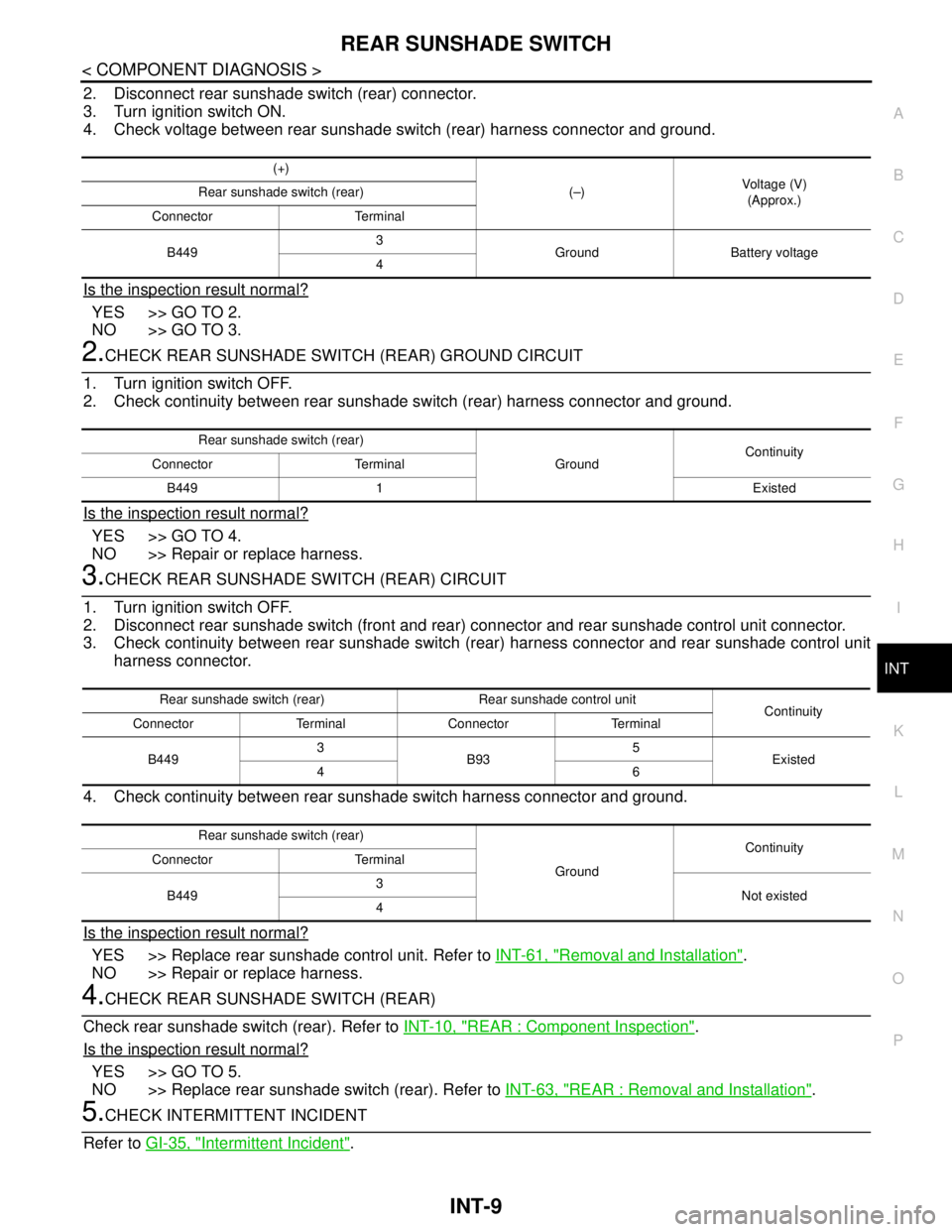
2. Disconnect rear sunshade switch (rear) connector.
3. Turn ignition switch ON.
4. Check voltage between rear sunshade switch (rear) harness connector and ground.
Is the inspection result normal?
YES >> GO TO 2.
NO >> GO TO 3.
2.CHECK REAR SUNSHADE SWITCH (REAR) GROUND CIRCUIT
1. Turn ignition switch OFF.
2. Check continuity between rear sunshade switch (rear) harness connector and ground.
Is the inspection result normal?
YES >> GO TO 4.
NO >> Repair or replace harness.
3.CHECK REAR SUNSHADE SWITCH (REAR) CIRCUIT
1. Turn ignition switch OFF.
2. Disconnect rear sunshade switch (front and rear) connector and rear sunshade control unit connector.
3. Check continuity between rear sunshade switch (rear) harness connector and rear sunshade control unit
harness connector.
4. Check continuity between rear sunshade switch harness connector and ground.
Is the inspection result normal?
YES >> Replace rear sunshade control unit. Refer to INT-61, "Removal and Installation".
NO >> Repair or replace harness.
4.CHECK REAR SUNSHADE SWITCH (REAR)
Check rear sunshade switch (rear). Refer to INT-10, "
REAR : Component Inspection".
Is the inspection result normal?
YES >> GO TO 5.
NO >> Replace rear sunshade switch (rear). Refer to INT-63, "
REAR : Removal and Installation".
5.CHECK INTERMITTENT INCIDENT
Refer to GI-35, "
Intermittent Incident".
(+)
(–)Voltage (V)
(Approx.) Rear sunshade switch (rear)
Connector Terminal
B4493
Ground Battery voltage
4
Rear sunshade switch (rear)
GroundContinuity
Connector Terminal
B449 1 Existed
Rear sunshade switch (rear) Rear sunshade control unit
Continuity
Connector Terminal Connector Terminal
B4493
B935
Existed
46
Rear sunshade switch (rear)
GroundContinuity
Connector Terminal
B4493
Not existed
4
Page 2987 of 5121
INT-10
< COMPONENT DIAGNOSIS >
REAR SUNSHADE SWITCH
>> INSPECTION END
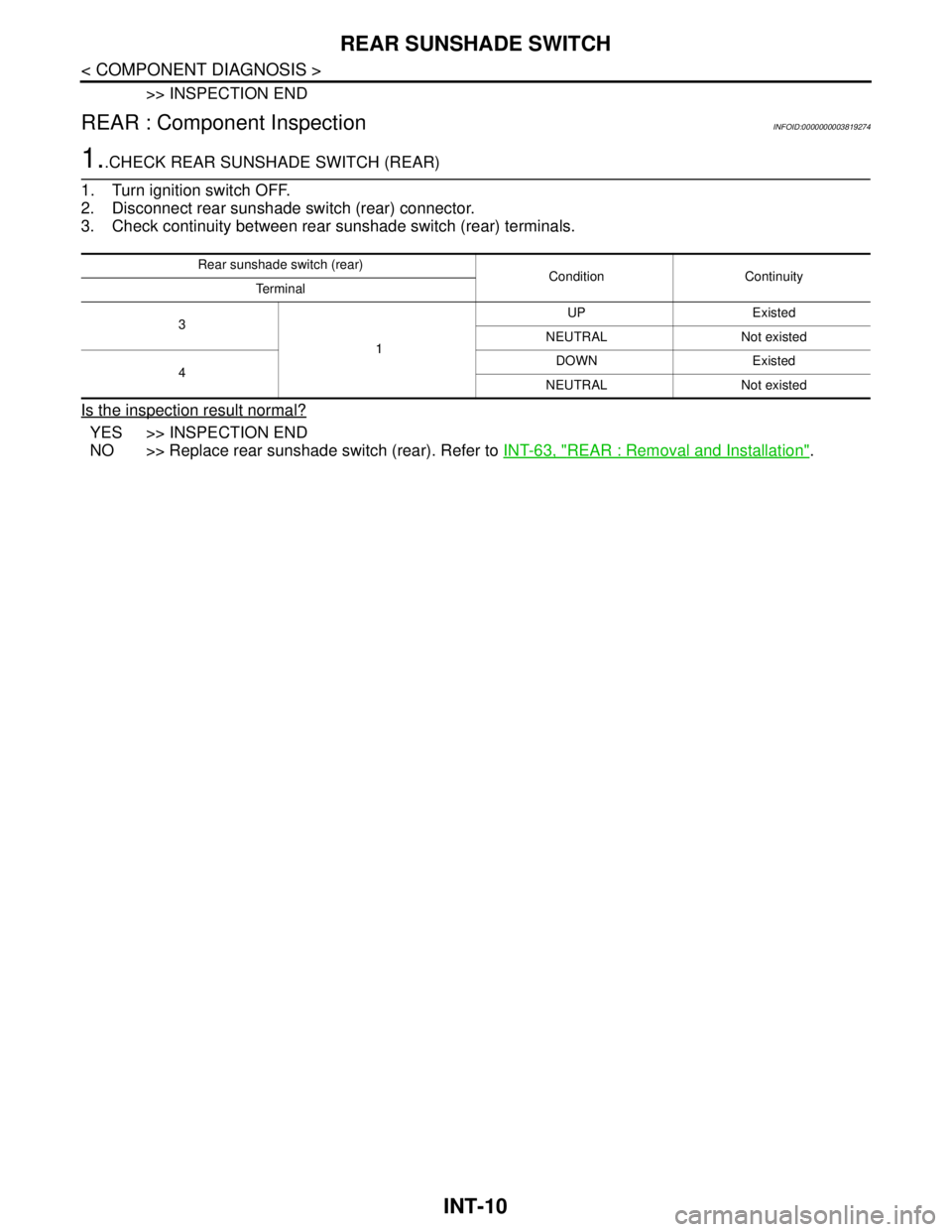
REAR : Component InspectionINFOID:0000000003819274
1..CHECK REAR SUNSHADE SWITCH (REAR)
1. Turn ignition switch OFF.
2. Disconnect rear sunshade switch (rear) connector.
3. Check continuity between rear sunshade switch (rear) terminals.
Is the inspection result normal?
YES >> INSPECTION END
NO >> Replace rear sunshade switch (rear). Refer to INT-63, "
REAR : Removal and Installation".
Rear sunshade switch (rear)
Condition Continuity
Te r m i n a l
3
1UP Existed
NEUTRAL Not existed
4DOWN Existed
NEUTRAL Not existed
Page 2988 of 5121
REAR SUNSHADE MOTOR
INT-11
< COMPONENT DIAGNOSIS >
C
D
E
F
G
H
I
K
L
MA
B
INT
N
O
P
REAR SUNSHADE MOTOR
DescriptionINFOID:0000000003866171
When rear sunshade switch (front and rear) signals are received, rear sunshade moves upwards or down-
wards.
Component Function CheckINFOID:0000000003866172
1.CHECK REAR SUNSHADE MOTOR OPERATION
Check rear sunshade motor operation with rear sunshade switch (front and rear).
Is the inspection result normal?
YES >> Rear sunshade motor is OK.
NO >> Refer to INT-11, "
Diagnosis Procedure".
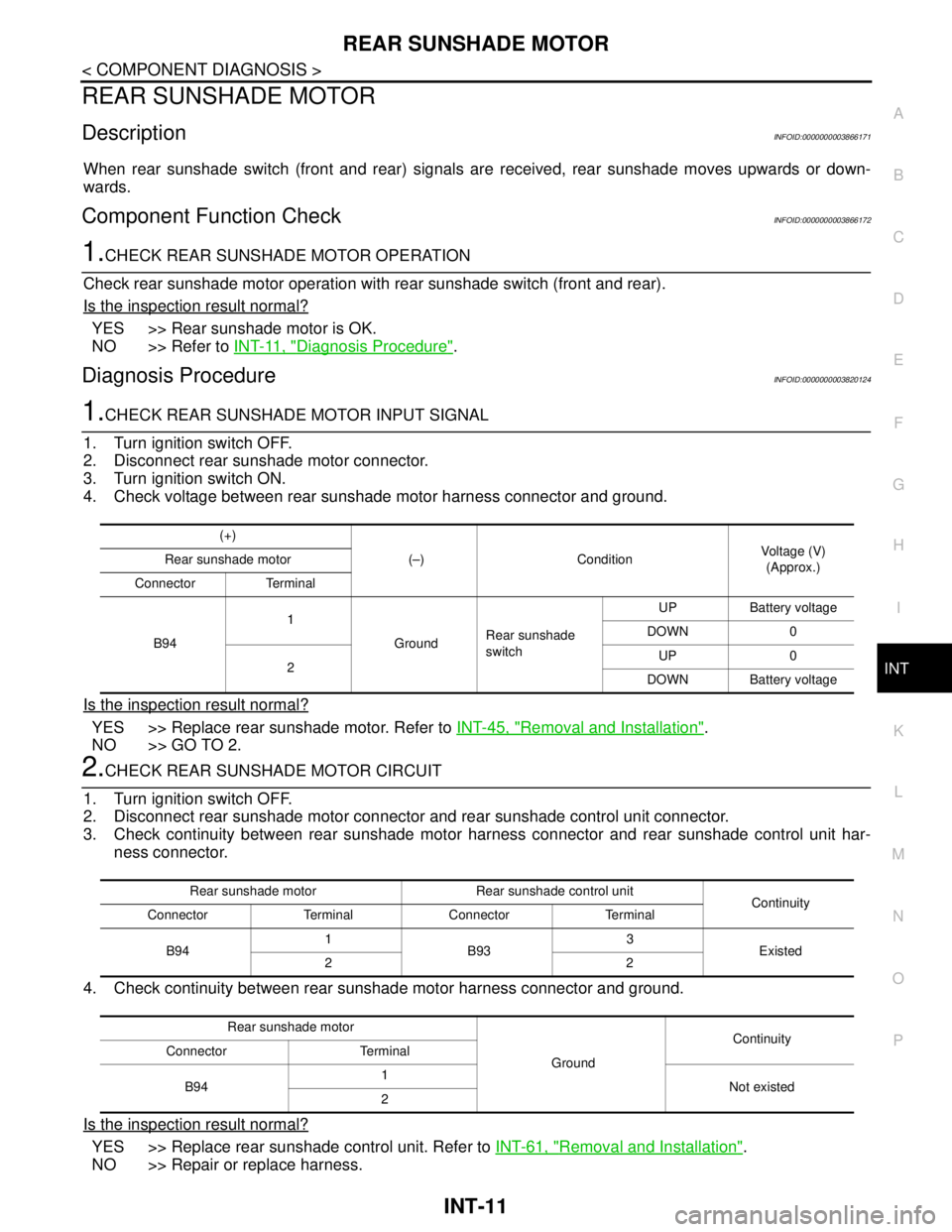
Diagnosis ProcedureINFOID:0000000003820124
1.CHECK REAR SUNSHADE MOTOR INPUT SIGNAL
1. Turn ignition switch OFF.
2. Disconnect rear sunshade motor connector.
3. Turn ignition switch ON.
4. Check voltage between rear sunshade motor harness connector and ground.
Is the inspection result normal?
YES >> Replace rear sunshade motor. Refer to INT-45, "Removal and Installation".
NO >> GO TO 2.
2.CHECK REAR SUNSHADE MOTOR CIRCUIT
1. Turn ignition switch OFF.
2. Disconnect rear sunshade motor connector and rear sunshade control unit connector.
3. Check continuity between rear sunshade motor harness connector and rear sunshade control unit har-
ness connector.
4. Check continuity between rear sunshade motor harness connector and ground.
Is the inspection result normal?
YES >> Replace rear sunshade control unit. Refer to INT-61, "Removal and Installation".
NO >> Repair or replace harness.
(+)
(–) ConditionVoltage (V)
(Approx.) Rear sunshade motor
Connector Terminal
B941
GroundRear sunshade
switchUP Battery voltage
DOWN 0
2UP 0
DOWN Battery voltage
Rear sunshade motor Rear sunshade control unit
Continuity
Connector Terminal Connector Terminal
B941
B933
Existed
22
Rear sunshade motor
GroundContinuity
Connector Terminal
B941
Not existed
2
Page 2989 of 5121
INT-12
< COMPONENT DIAGNOSIS >
REVERSE SIGNAL CIRCUIT
REVERSE SIGNAL CIRCUIT
DescriptionINFOID:0000000003866177
Reverse input signal is sent to rear sunshade control unit.
Component Function CheckINFOID:0000000003866178
1.CHECK REVERSE INPUT SIGNAL
Check when shifting the selector lever to the R position with the rear sunshade moved to the downward posi-
tion.
Is the inspection result normal?
YES >> Reverse input signal is OK.
NO >> Refer to INT-12, "
Diagnosis Procedure".
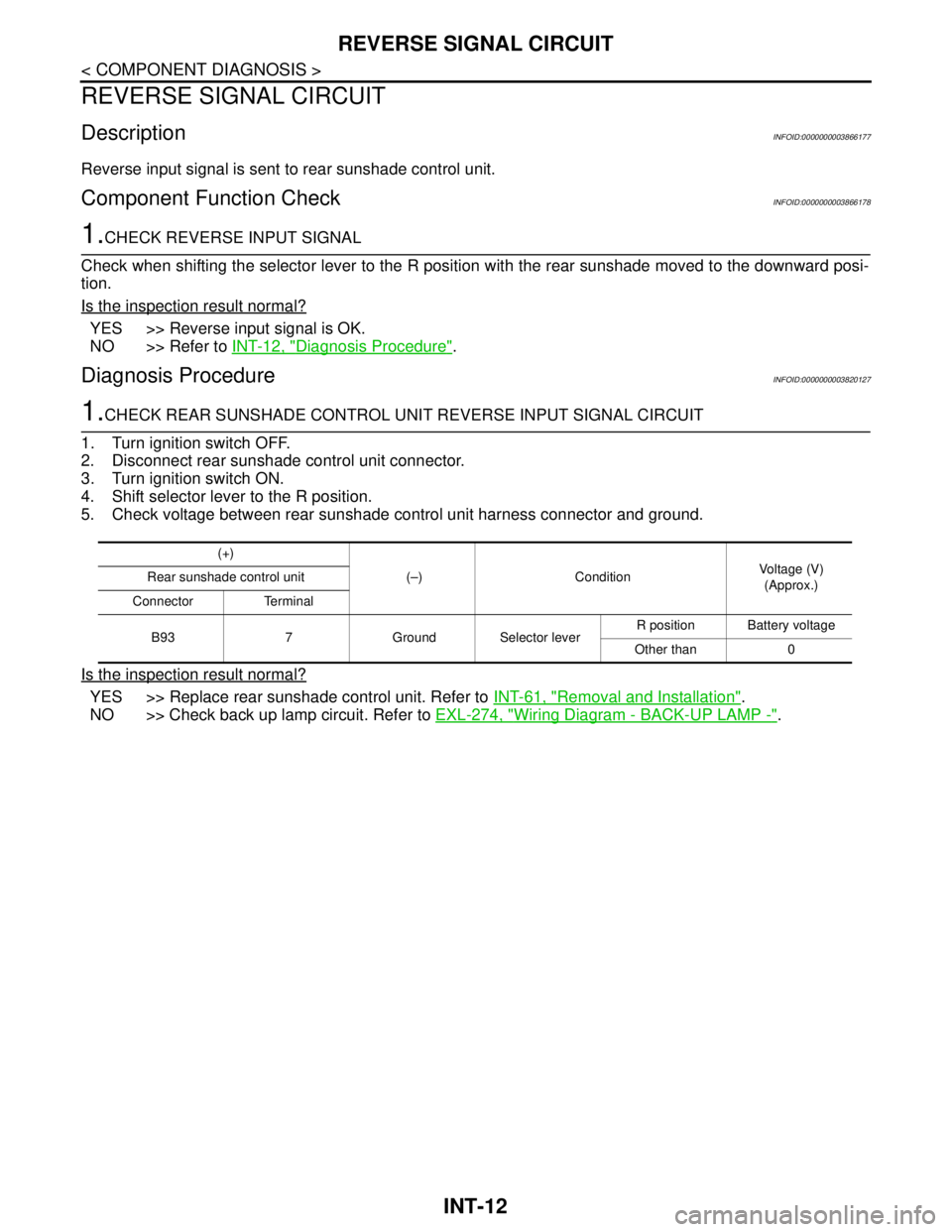
Diagnosis ProcedureINFOID:0000000003820127
1.CHECK REAR SUNSHADE CONTROL UNIT REVERSE INPUT SIGNAL CIRCUIT
1. Turn ignition switch OFF.
2. Disconnect rear sunshade control unit connector.
3. Turn ignition switch ON.
4. Shift selector lever to the R position.
5. Check voltage between rear sunshade control unit harness connector and ground.
Is the inspection result normal?
YES >> Replace rear sunshade control unit. Refer to INT-61, "Removal and Installation".
NO >> Check back up lamp circuit. Refer to EXL-274, "
Wiring Diagram - BACK-UP LAMP -".
(+)
(–) ConditionVoltage (V)
(Approx.) Rear sunshade control unit
Connector Terminal
B93 7 Ground Selector leverR position Battery voltage
Other than 0
Page 2990 of 5121
REAR SUNSHADE CONTROL UNIT
INT-13
< ECU DIAGNOSIS >
C
D
E
F
G
H
I
K
L
MA
B
INT
N
O
P
ECU DIAGNOSIS
REAR SUNSHADE CONTROL UNIT
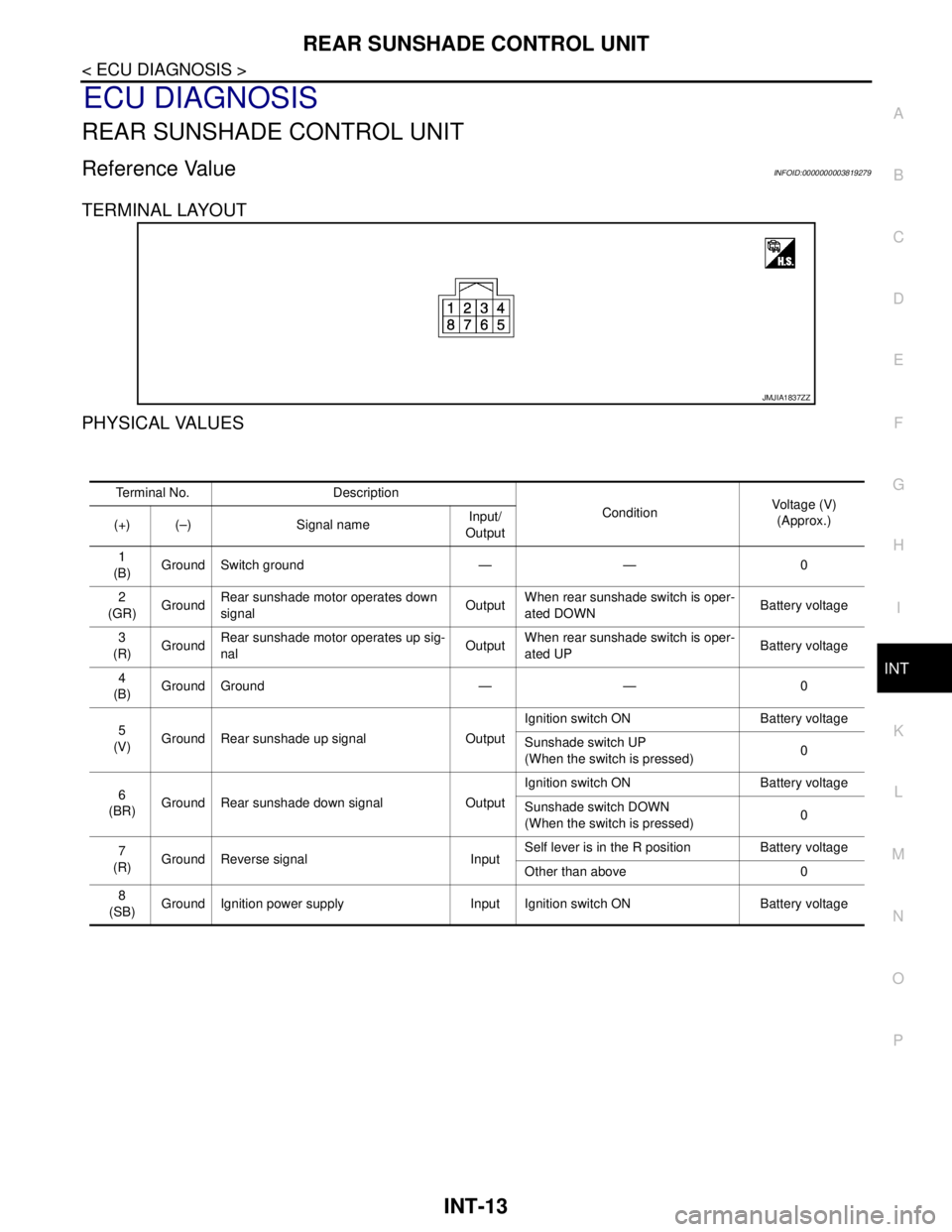
Reference ValueINFOID:0000000003819279
TERMINAL LAYOUT
PHYSICAL VALUES
JMJIA1837ZZ
Terminal No. Description
ConditionVoltage (V)
(Approx.)
(+) (–) Signal nameInput/
Output
1
(B)Ground Switch ground — — 0
2
(GR)GroundRear sunshade motor operates down
signalOutputWhen rear sunshade switch is oper-
ated DOWNBattery voltage
3
(R)GroundRear sunshade motor operates up sig-
nalOutputWhen rear sunshade switch is oper-
ated UPBattery voltage
4
(B)Ground Ground — — 0
5
(V)Ground Rear sunshade up signal OutputIgnition switch ON Battery voltage
Sunshade switch UP
(When the switch is pressed)0
6
(BR)Ground Rear sunshade down signal OutputIgnition switch ON Battery voltage
Sunshade switch DOWN
(When the switch is pressed)0
7
(R)Ground Reverse signal InputSelf lever is in the R position Battery voltage
Other than above 0
8
(SB)Ground Ignition power supply Input Ignition switch ON Battery voltage
Page 3004 of 5121
PRECAUTIONS
INT-27
< PRECAUTION >
C
D
E
F
G
H
I
K
L
MA
B
INT
N
O
P
PRECAUTION
PRECAUTIONS
Precaution for Supplemental Restraint System (SRS) "AIR BAG" and "SEAT BELT
PRE-TENSIONER"
INFOID:0000000003819210
The Supplemental Restraint System such as “AIR BAG” and “SEAT BELT PRE-TENSIONER”, used along
with a front seat belt, helps to reduce the risk or severity of injury to the driver and front passenger for certain
types of collision. This system includes seat belt switch inputs and dual stage front air bag modules. The SRS
system uses the seat belt switches to determine the front air bag deployment, and may only deploy one front
air bag, depending on the severity of a collision and whether the front occupants are belted or unbelted.
Information necessary to service the system safely is included in the “SRS AIRBAG” and “SEAT BELT” of this
Service Manual.
WARNING:
• To avoid rendering the SRS inoperative, which could increase the risk of personal injury or death in
the event of a collision which would result in air bag inflation, all maintenance must be performed by
an authorized NISSAN/INFINITI dealer.
Improper maintenance, including incorrect removal and installation of the SRS, can lead to personal
injury caused by unintentional activation of the system. For removal of Spiral Cable and Air Bag
Module, see the “SRS AIRBAG”.
Never use electrical test equipment on any circuit related to the SRS unless instructed to in this Ser-
vice Manual. SRS wiring harnesses can be identified by yellow and/or orange harnesses or harness
connectors.
Precaution Necessary for Steering Wheel Rotation after Battery Disconnect
INFOID:0000000003819211
NOTE:
Before removing and installing any control units, first turn the push-button ignition switch to the LOCK posi-
tion, then disconnect both battery cables.
After finishing work, confirm that all control unit connectors are connected properly, then re-connect both
battery cables.
Always use CONSULT-III to perform self-diagnosis as a part of each function inspection after finishing work.
If a DTC is detected, perform trouble diagnosis according to self-diagnosis results.
This vehicle is equipped with a push-button ignition switch and a steering lock unit.
If the battery is disconnected or discharged, the steering wheel will lock and cannot be turned.
If turning the steering wheel is required with the battery disconnected or discharged, follow the procedure
below before starting the repair operation.
OPERATION PROCEDURE
1. Connect both battery cables.
NOTE:
Supply power using jumper cables if battery is discharged.
2. Turn the push-button ignition switch to ACC position.
(At this time, the steering lock will be released.)
3. Disconnect both battery cables. The steering lock will remain released with both battery cables discon-
nected and the steering wheel can be turned.
4. Perform the necessary repair operation.
5. When the repair work is completed, re-connect both battery cables. With the brake pedal released, turn
the push-button ignition switch from ACC position to ON position, then to LOCK position. (The steering
wheel will lock when the push-button ignition switch is turned to LOCK position.)
6. Perform self-diagnosis check of all control units using CONSULT-III.
Page 3048 of 5121
IP-8
< PRECAUTION >
PRECAUTIONS
PRECAUTION
PRECAUTIONS
Precaution for Supplemental Restraint System (SRS) "AIR BAG" and "SEAT BELT
PRE-TENSIONER"
INFOID:0000000003819818
The Supplemental Restraint System such as “AIR BAG” and “SEAT BELT PRE-TENSIONER”, used along
with a front seat belt, helps to reduce the risk or severity of injury to the driver and front passenger for certain
types of collision. Information necessary to service the system safely is included in the “SRS AIRBAG” and
“SEAT BELT” of this Service Manual.
WARNING:
• To avoid rendering the SRS inoperative, which could increase the risk of personal injury or death in
the event of a collision which would result in air bag inflation, all maintenance must be performed by
an authorized NISSAN/INFINITI dealer.
Improper maintenance, including incorrect removal and installation of the SRS, can lead to personal
injury caused by unintentional activation of the system. For removal of Spiral Cable and Air Bag
Module, see the “SRS AIRBAG”.
Never use electrical test equipment on any circuit related to the SRS unless instructed to in this Ser-
vice Manual. SRS wiring harnesses can be identified by yellow and/or orange harnesses or harness
connectors.
Precaution Necessary for Steering Wheel Rotation after Battery Disconnect
INFOID:0000000003819825
NOTE:
Before removing and installing any control units, first turn the push-button ignition switch to the LOCK posi-
tion, then disconnect both battery cables.
After finishing work, confirm that all control unit connectors are connected properly, then re-connect both
battery cables.
Always use CONSULT-III to perform self-diagnosis as a part of each function inspection after finishing work.
If a DTC is detected, perform trouble diagnosis according to self-diagnosis results.
This vehicle is equipped with a push-button ignition switch and a steering lock unit.
If the battery is disconnected or discharged, the steering wheel will lock and cannot be turned.
If turning the steering wheel is required with the battery disconnected or discharged, follow the procedure
below before starting the repair operation.
OPERATION PROCEDURE
1. Connect both battery cables.
NOTE:
Supply power using jumper cables if battery is discharged.
2. Turn the push-button ignition switch to ACC position.
(At this time, the steering lock will be released.)
3. Disconnect both battery cables. The steering lock will remain released with both battery cables discon-
nected and the steering wheel can be turned.
4. Perform the necessary repair operation.
5. When the repair work is completed, re-connect both battery cables. With the brake pedal released, turn
the push-button ignition switch from ACC position to ON position, then to LOCK position. (The steering
wheel will lock when the push-button ignition switch is turned to LOCK position.)
6. Perform self-diagnosis check of all control units using CONSULT-III.
PrecautionINFOID:0000000003751401
Disconnect both battery cables in advance.
Disconnect air bag system line in advance.
Never tamper with or force air bag lid open, as this may adversely affect air bag performance.
Be careful not to scratch pad and other parts.
When removing or disassembling any part, be careful not to damage or deform it. Protect parts, which may
get in the way with a shop cloth.
When removing parts with a screwdriver or other tool, cover the tool surface by vinyl tape to protect parts.
Page 3052 of 5121

IP-12
< ON-VEHICLE REPAIR >
INSTRUMENT PANEL ASSEMBLY
Removal and Installation
INFOID:0000000003816778
WORK STEP
When removing instrument panel assembly, combination meter, instrument finisher A, instrument finisher B,
AV C/U (audio unit) or center console assembly take steps in the order shown by the number below.
1. Optical sensor 2. Center speaker grille 3. Sunload sensor
4. Speaker grille LH 5. Front squawker LH 6. Instrument side finisher LH
7. Side ventilator grille LH 8. Combination meter 9. Cluster lid A
10. Instrument lower panel LH 11. Fuse block lid 12. Instrument finisher A
13. Steering column upper cover 14. Steering column lower cover 15. Instrument finisher D
16. Instrument finisher E 17. Glove box lid 18. Glove box assembly
19. Glove box damper 20. Illumination lamp 21. Front passenger air bag module
22. Side ventilator grille RH 23. Instrument side finisher RH 24. Instrument panel assembly
25. Front squawker RH 26. Speaker grille RH 27. Center speaker
28. Display unit 29. Cluster lid D 30. Cluster lid upper finisher
31. AV C/U (audio unit) 32. Instrument finisher B 33. Push button ignition switch
34. Cluster lid C 35. Cluster lid lower finisher 36. Socket and bulb
37. DVD player 38. Instrument side panel RH 39. Glove box mask
Refer to GI-4, "
Components" for symbols in the figure.
PA R T SINSTRUMENT
PA N E L
ASSEMBLYCOMBINATION
METERINSTRUMENT
FINISHER AINSTRUMENT
FINISHER BAV C / U
(audio unit)CENTER
CONSOLE
ASSEMBLY
Instrument finisher D [1] [1] [1] [1]
Instrument finisher E [2] [2] [2]
Front body side welt LH [3] [2] [1] [1] [3]
Front pillar garnish LH [4]
Speaker grille LH [5]
Front squawker LH [6]
Instrument side finisher LH [7] [3] [2] [2] [4]
Fuse block lid [8] [4] [3] [3] [5]
Instrument lower panel LH [9] [5] [4] [4] [6]
Instrument lower cover LH [10][7]
Front body side welt RH [11] [5] [8]
Front pillar garnish RH [12]
Speaker grille RH [13]
Front squawker RH [14]
Instrument side finisher RH [15] [6] [9]
Glove box assembly [16] [7] [10]
DVD player [17]
Instrument side panel RH [18] [8] [11]
Instrument lower cover RH [19][12]
Selector lever knob [20][13]
Console switch panel [21][14]
Console finisher assembly [22][15]
Position indicator plate [23][16]
Console rear finisher [24][17]
Center console assembly [25][18]
Page 3053 of 5121
![NISSAN TEANA 2008 Service Manual INSTRUMENT PANEL ASSEMBLY
IP-13
< ON-VEHICLE REPAIR >
C
D
E
F
G
H
I
K
L
MA
B
IP
N
O
P
[ ]: Number indicates step in removal procedures.
REMOVAL
1. Remove instrument finisher D.
Remove instrument fi](/img/5/57391/w960_57391-3052.png "NISSAN TEANA 2008 Service Manual INSTRUMENT PANEL ASSEMBLY
IP-13
< ON-VEHICLE REPAIR >
C
D
E
F
G
H
I
K
L
MA
B
IP
N
O
P
[ ]: Number indicates step in removal procedures.
REMOVAL
1. Remove instrument finisher D.
Remove instrument fi")
INSTRUMENT PANEL ASSEMBLY
IP-13
< ON-VEHICLE REPAIR >
C
D
E
F
G
H
I
K
L
MA
B
IP
N
O
P
[ ]: Number indicates step in removal procedures.
REMOVAL
1. Remove instrument finisher D.
Remove instrument finisher D (1) fixing clips with remover tool
(A).
Pull back instrument finisher D, and then remove instrument
finisher D.
2. Remove instrument finisher E.
Remove instrument finisher E (1) fixing clips with remover tool
(A).
Pull back instrument finisher E, and then remove instrument
finisher E.
3. Remove front body side welt LH. Refer to INT-39, "
Removal and Installation".
4. Remove front pillar garnish LH. Refer to INT-39, "
Removal and Installation".
Steering wheel [26]
Steering column cover [27] [6] [9]
Combination switch [28] [7] [10]
Spiral cable [29]
Instrument finisher A [30] [8] [5] [11]
Cluster lid A [31] [9] [12]
Combination meter [32] [10]
Cluster lid D [33]
Push button ignition switch [34] [13]
Cluster lid lower finisher [35] [14]
Cluster lid C [36] [15]
Instrument finisher B [16]
AV C/U (audio unit) [37] [3]
Display unit [38]
Center speaker grille [39]
Center speaker [40]
Instrument panel assembly [41]
: Clip
JMJIA1892ZZ
: Clip
JMJIA1893ZZ
Page 3059 of 5121
INSTRUMENT PANEL ASSEMBLY
IP-19
< ON-VEHICLE REPAIR >
C
D
E
F
G
H
I
K
L
MA
B
IP
N
O
P
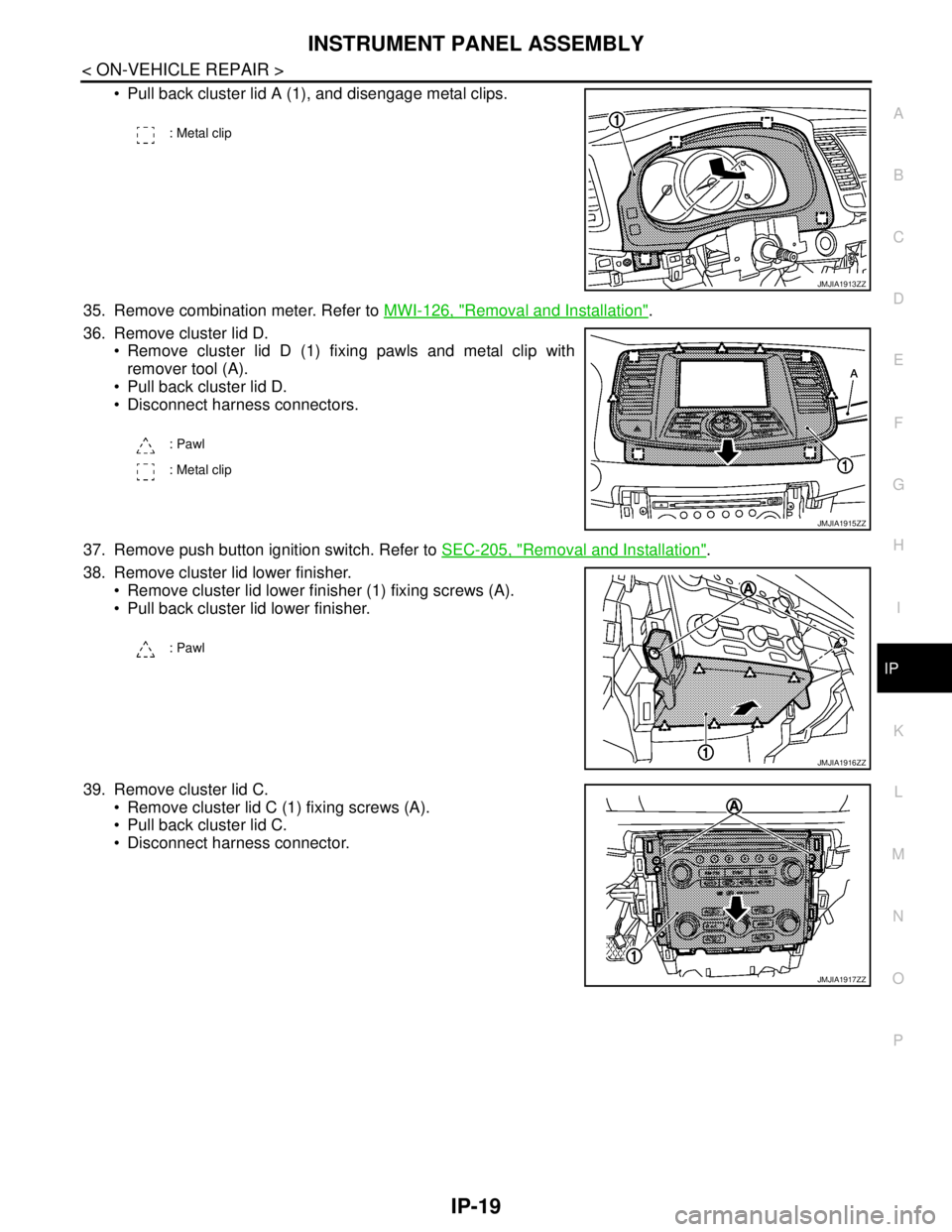
Pull back cluster lid A (1), and disengage metal clips.
35. Remove combination meter. Refer to MWI-126, "
Removal and Installation".
36. Remove cluster lid D.
Remove cluster lid D (1) fixing pawls and metal clip with
remover tool (A).
Pull back cluster lid D.
Disconnect harness connectors.
37. Remove push button ignition switch. Refer to SEC-205, "
Removal and Installation".
38. Remove cluster lid lower finisher.
Remove cluster lid lower finisher (1) fixing screws (A).
Pull back cluster lid lower finisher.
39. Remove cluster lid C.
Remove cluster lid C (1) fixing screws (A).
Pull back cluster lid C.
Disconnect harness connector.
: Metal clip
JMJIA1913ZZ
: Pawl
: Metal clip
JMJIA1915ZZ
: Pawl
JMJIA1916ZZ
JMJIA1917ZZ