ignition NISSAN TEANA 2008 Service Manual
[x] Cancel search | Manufacturer: NISSAN, Model Year: 2008, Model line: TEANA, Model: NISSAN TEANA 2008Pages: 5121, PDF Size: 69.03 MB
Page 2902 of 5121

INTERIOR ROOM LAMP CONTROL CIRCUIT
INL-23
< COMPONENT DIAGNOSIS >
C
D
E
F
G
H
I
J
K
MA
B
INL
N
O
P
Does continuity exist?
YES >> Replace the map lamp.
NO >> Repair the harnesses or connectors.
3.CHECK INTERIOR ROOM LAMP CONTROL SHORT CIRCUIT
1. Turn ignition switch OFF.
2. Disconnect BCM connector and map lamp connector.
3. Check continuity between BCM harness connector and ground.
Does continuity exist?
YES >> Repair the harnesses or connectors.
NO >> Replace BCM.
BCM Map lamp
Continuity
Connector Terminal Connector Terminal
M119 19 R19 2 Existed
BCM
GroundContinuity
Connector Terminal
M119 19 Not existed
Page 2903 of 5121
INL-24
< COMPONENT DIAGNOSIS >
STEP LAMP CIRCUIT
STEP LAMP CIRCUIT
DescriptionINFOID:0000000003774561
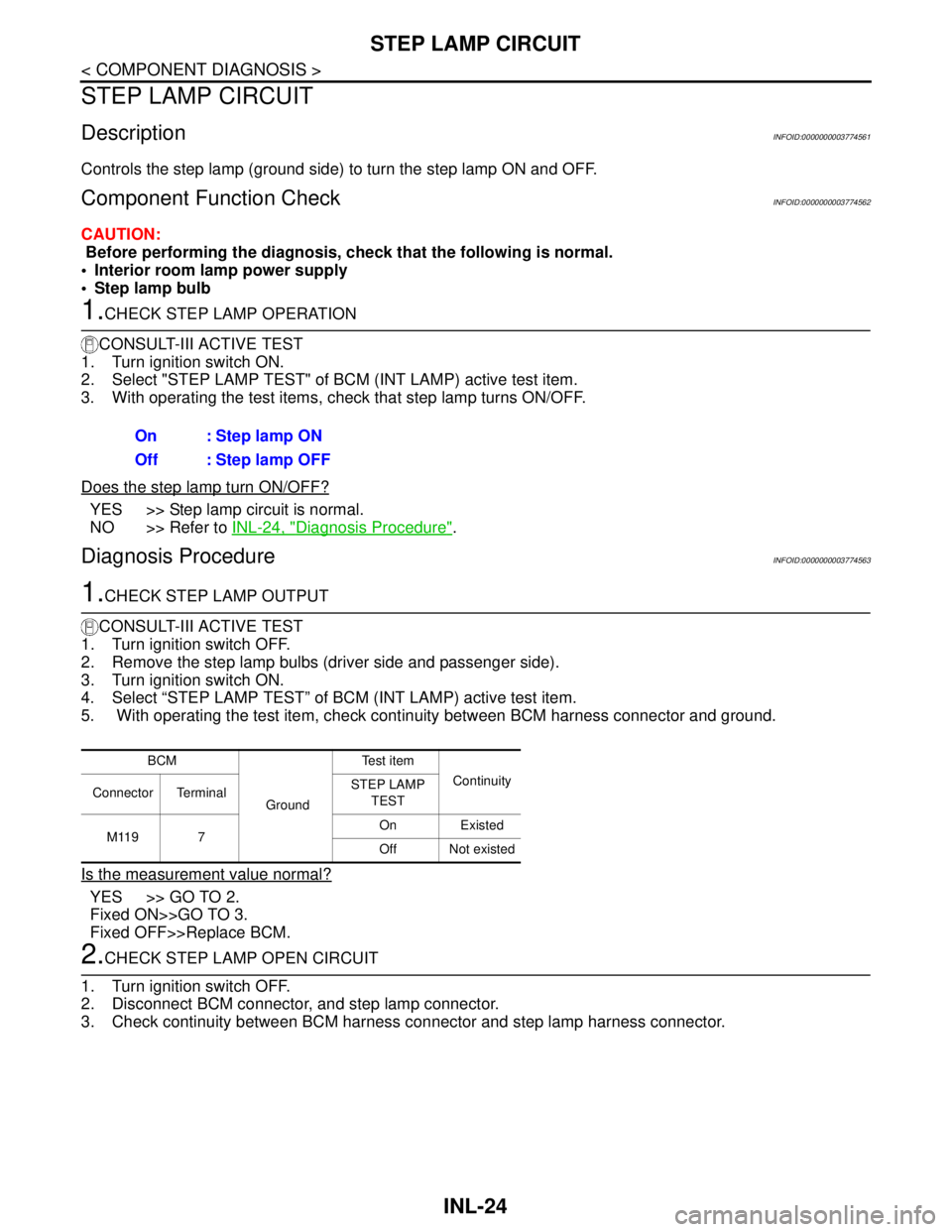
Controls the step lamp (ground side) to turn the step lamp ON and OFF.
Component Function CheckINFOID:0000000003774562
CAUTION:
Before performing the diagnosis, check that the following is normal.
Interior room lamp power supply
Step lamp bulb
1.CHECK STEP LAMP OPERATION
CONSULT-III ACTIVE TEST
1. Turn ignition switch ON.
2. Select "STEP LAMP TEST" of BCM (INT LAMP) active test item.
3. With operating the test items, check that step lamp turns ON/OFF.
Does the step lamp turn ON/OFF?
YES >> Step lamp circuit is normal.
NO >> Refer to INL-24, "
Diagnosis Procedure".
Diagnosis ProcedureINFOID:0000000003774563
1.CHECK STEP LAMP OUTPUT
CONSULT-III ACTIVE TEST
1. Turn ignition switch OFF.
2. Remove the step lamp bulbs (driver side and passenger side).
3. Turn ignition switch ON.
4. Select “STEP LAMP TEST” of BCM (INT LAMP) active test item.
5. With operating the test item, check continuity between BCM harness connector and ground.
Is the measurement value normal?
YES >> GO TO 2.
Fixed ON>>GO TO 3.
Fixed OFF>>Replace BCM.
2.CHECK STEP LAMP OPEN CIRCUIT
1. Turn ignition switch OFF.
2. Disconnect BCM connector, and step lamp connector.
3. Check continuity between BCM harness connector and step lamp harness connector. On : Step lamp ON
Off : Step lamp OFF
BCM
GroundTe s t i t e m
Continuity
Connector TerminalSTEP LAMP
TEST
M119 7On Existed
Off Not existed
Page 2904 of 5121

STEP LAMP CIRCUIT
INL-25
< COMPONENT DIAGNOSIS >
C
D
E
F
G
H
I
J
K
MA
B
INL
N
O
P
Does continuity exist?
YES >> Replace step lamp.
NO >> Repair harnesses or connectors.
3.CHECK STEP LAMP SHORT CIRCUIT
1. Turn ignition switch OFF.
2. Check continuity between BCM harness connector and ground.
Does continuity exist?
YES >> Repair the harnesses or connectors.
NO >> Replace BCM.
BCM Step lamp
Continuity
Connec-
torTerminal Connector Terminal
M119 7Driver
sideD17 2
Existed
Passen-
ger sideD51 2
BCM
GroundContinuity
Connector Terminal
M119 7 Not existed
Page 2905 of 5121
INL-26
< COMPONENT DIAGNOSIS >
TRUNK ROOM LAMP CIRCUIT
TRUNK ROOM LAMP CIRCUIT
DescriptionINFOID:0000000003812232
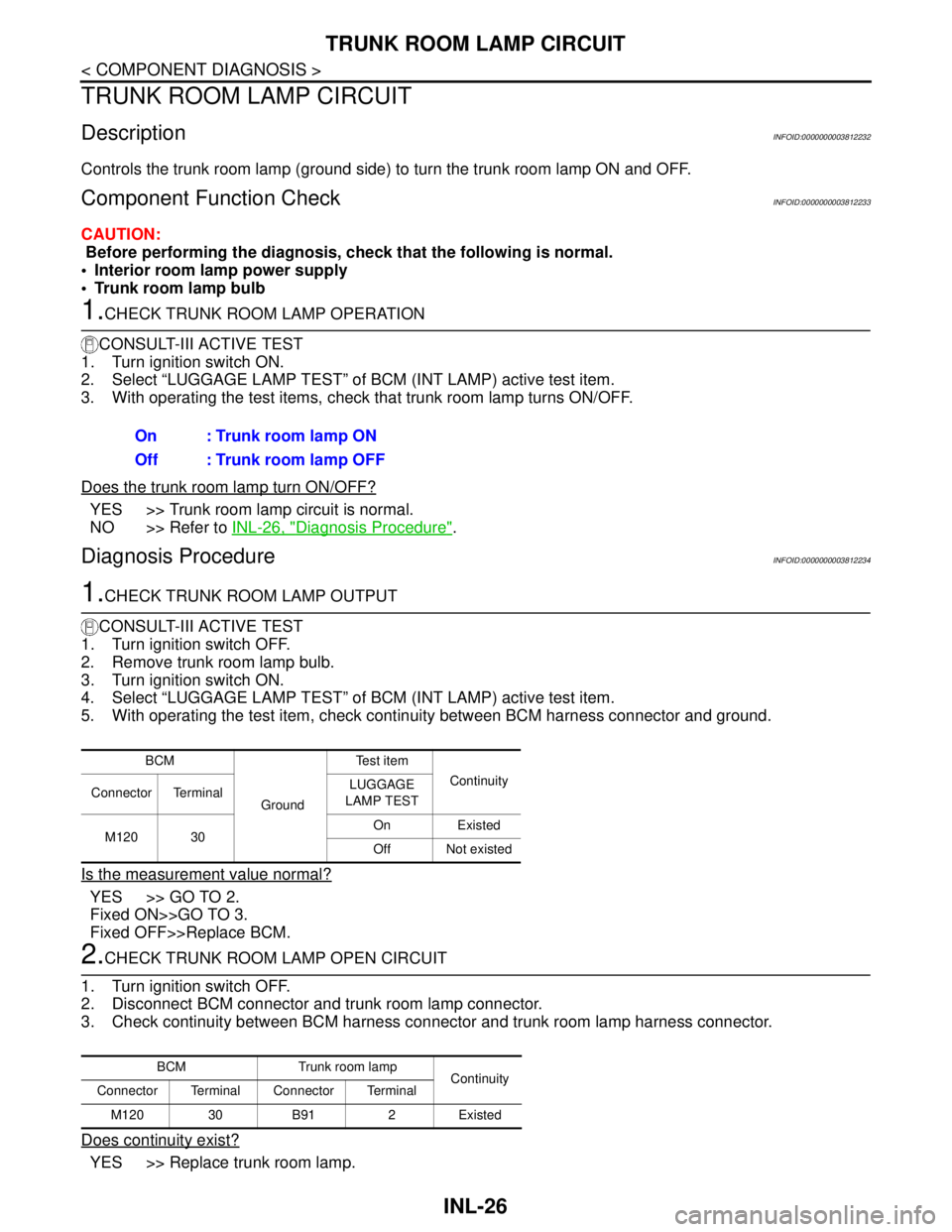
Controls the trunk room lamp (ground side) to turn the trunk room lamp ON and OFF.
Component Function CheckINFOID:0000000003812233
CAUTION:
Before performing the diagnosis, check that the following is normal.
Interior room lamp power supply
Trunk room lamp bulb
1.CHECK TRUNK ROOM LAMP OPERATION
CONSULT-III ACTIVE TEST
1. Turn ignition switch ON.
2. Select “LUGGAGE LAMP TEST” of BCM (INT LAMP) active test item.
3. With operating the test items, check that trunk room lamp turns ON/OFF.
Does the trunk room lamp turn ON/OFF?
YES >> Trunk room lamp circuit is normal.
NO >> Refer to INL-26, "
Diagnosis Procedure".
Diagnosis ProcedureINFOID:0000000003812234
1.CHECK TRUNK ROOM LAMP OUTPUT
CONSULT-III ACTIVE TEST
1. Turn ignition switch OFF.
2. Remove trunk room lamp bulb.
3. Turn ignition switch ON.
4. Select “LUGGAGE LAMP TEST” of BCM (INT LAMP) active test item.
5. With operating the test item, check continuity between BCM harness connector and ground.
Is the measurement value normal?
YES >> GO TO 2.
Fixed ON>>GO TO 3.
Fixed OFF>>Replace BCM.
2.CHECK TRUNK ROOM LAMP OPEN CIRCUIT
1. Turn ignition switch OFF.
2. Disconnect BCM connector and trunk room lamp connector.
3. Check continuity between BCM harness connector and trunk room lamp harness connector.
Does continuity exist?
YES >> Replace trunk room lamp.On : Trunk room lamp ON
Off : Trunk room lamp OFF
BCM
GroundTe s t i t e m
Continuity
Connector TerminalLUGGAGE
LAMP TEST
M120 30On Existed
Off Not existed
BCM Trunk room lamp
Continuity
Connector Terminal Connector Terminal
M120 30 B91 2 Existed
Page 2906 of 5121

TRUNK ROOM LAMP CIRCUIT
INL-27
< COMPONENT DIAGNOSIS >
C
D
E
F
G
H
I
J
K
MA
B
INL
N
O
P
NO >> Repair harnesses or connectors.
3.CHECK TRUNK ROOM LAMP SHORT CIRCUIT
1. Turn ignition switch OFF.
2. Disconnect BCM connector and trunk room lamp connector.
3. Check continuity between BCM harness connector and ground.
Does continuity exist?
YES >> Repair harnesses or connectors.
NO >> Replace BCM.
BCM
GroundContinuity
Connector Terminal
M120 30 Not existed
Page 2907 of 5121
INL-28
< COMPONENT DIAGNOSIS >
PUSH-BUTTON IGNITION SWITCH ILLUMINATION CIRCUIT
PUSH-BUTTON IGNITION SWITCH ILLUMINATION CIRCUIT
DescriptionINFOID:0000000003774564
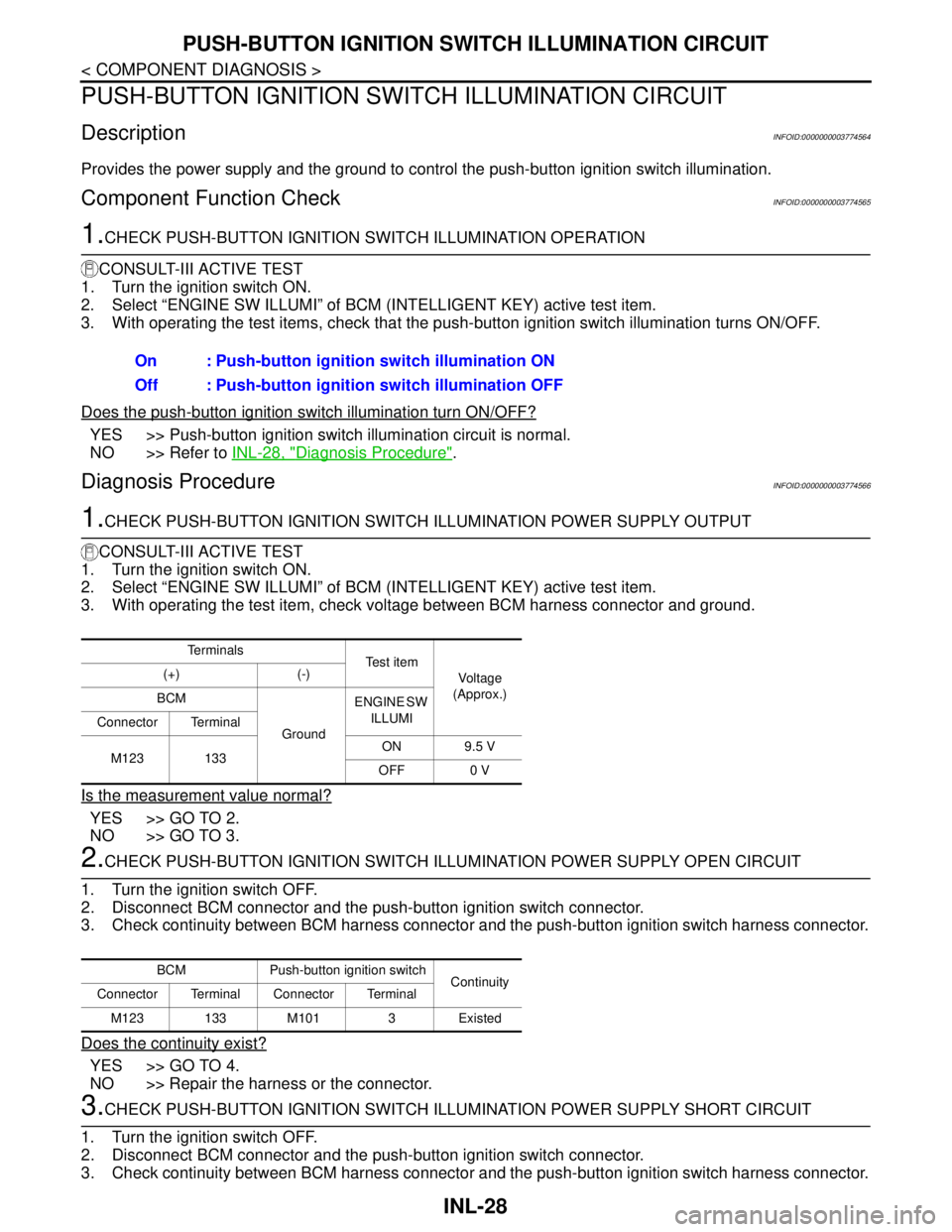
Provides the power supply and the ground to control the push-button ignition switch illumination.
Component Function CheckINFOID:0000000003774565
1.CHECK PUSH-BUTTON IGNITION SWITCH ILLUMINATION OPERATION
CONSULT-III ACTIVE TEST
1. Turn the ignition switch ON.
2. Select “ENGINE SW ILLUMI” of BCM (INTELLIGENT KEY) active test item.
3. With operating the test items, check that the push-button ignition switch illumination turns ON/OFF.
Does the push-button ignition switch illumination turn ON/OFF?
YES >> Push-button ignition switch illumination circuit is normal.
NO >> Refer to INL-28, "
Diagnosis Procedure".
Diagnosis ProcedureINFOID:0000000003774566
1.CHECK PUSH-BUTTON IGNITION SWITCH ILLUMINATION POWER SUPPLY OUTPUT
CONSULT-III ACTIVE TEST
1. Turn the ignition switch ON.
2. Select “ENGINE SW ILLUMI” of BCM (INTELLIGENT KEY) active test item.
3. With operating the test item, check voltage between BCM harness connector and ground.
Is the measurement value normal?
YES >> GO TO 2.
NO >> GO TO 3.
2.CHECK PUSH-BUTTON IGNITION SWITCH ILLUMINATION POWER SUPPLY OPEN CIRCUIT
1. Turn the ignition switch OFF.
2. Disconnect BCM connector and the push-button ignition switch connector.
3. Check continuity between BCM harness connector and the push-button ignition switch harness connector.
Does the continuity exist?
YES >> GO TO 4.
NO >> Repair the harness or the connector.
3.CHECK PUSH-BUTTON IGNITION SWITCH ILLUMINATION POWER SUPPLY SHORT CIRCUIT
1. Turn the ignition switch OFF.
2. Disconnect BCM connector and the push-button ignition switch connector.
3. Check continuity between BCM harness connector and the push-button ignition switch harness connector.On : Push-button ignition switch illumination ON
Off : Push-button ignition switch illumination OFF
Te r m i n a l s
Te s t i t e m
Voltag e
(Approx.) (+) (-)
BCM
GroundENGINE SW
ILLUMI
Connector Terminal
M123 133ON 9.5 V
OFF 0 V
BCM Push-button ignition switch
Continuity
Connector Terminal Connector Terminal
M123 133 M101 3 Existed
Page 2908 of 5121

PUSH-BUTTON IGNITION SWITCH ILLUMINATION CIRCUIT
INL-29
< COMPONENT DIAGNOSIS >
C
D
E
F
G
H
I
J
K
MA
B
INL
N
O
P
Does the continuity exist?
YES >> Repair the harness or the connector.
NO >> Replace BCM.
4.CHECK PUSH-BUTTON IGNITION SWITCH ILLUMINATION GROUND CIRCUIT
Check continuity between the push-button ignition switch harness connector and ground.
Does the continuity exist?
YES >> Replace push-button ignition switch.
NO >> Repair the harness or the connector.
BCM
GroundContinuity
Connector Terminal
M123 133 Not existed
Push-button ignition switch
GroundContinuity
Connector Terminal
M101 2 Existed
Page 2934 of 5121

BCM (BODY CONTROL MODULE)
INL-55
< ECU DIAGNOSIS >
C
D
E
F
G
H
I
J
K
MA
B
INL
N
O
P
REQ SW -RRNOTE:
The item is indicated, but not monitored. Off
REQ SW -RRNOTE:
The item is indicated, but not monitored. Off
REQ SW -BD/TRTrunk lid opener request switch is not pressed Off
Trunk lid opener request switch is pressed On
PUSH SWPush-button ignition switch (push switch) is not pressed Off
Push-button ignition switch (push switch) is pressed On
IGN RLY2 -F/BIgnition switch in OFF or ACC position Off
Ignition switch in ON position On
CLUCH SWNOTE:
The item is indicated, but not monitored. Off
BRAKE SW 1The brake pedal is not depressed On
The brake pedal is depressed Off
DETE/CANCL SWSelector lever in P position Off
Selector lever in any position other than P On
SFT PN/N SWSelector lever in any position other than P and N Off
Selector lever in P or N position On
S/L -LOCKSteering is locked Off
Steering is unlocked On
S/L -UNLOCKSteering is unlocked Off
Steering is locked On
S/L RELAY-F/BIgnition switch in OFF or ACC position Off
Ignition switch in ON position On
UNLK SEN -DRDriver door is unlocked Off
Driver door is locked On
PUSH SW -IPDMPush-button ignition switch (push-switch) is not pressed Off
Push-button ignition switch (push-switch) is pressed On
IGN RLY1 -F/BIgnition switch in OFF or ACC position Off
Ignition switch in ON position On
DETE SW -IPDMSelector lever in P position Off
Selector lever in any position other than P On
SFT PN -IPDMSelector lever in any position other than P and N Off
Selector lever in P or N position On
SFT P -METSelector lever in any position other than P Off
Selector lever in P position On
SFT N -METSelector lever in any position other than N Off
Selector lever in N position On
ENGINE STATEEngine stopped Stop
While the engine stalls Stall
At engine cranking Crank
Engine running Run
S/L LOCK-IPDMSteering is locked Off
Steering is unlocked On Monitor Item Condition Value/Status
Page 2935 of 5121

INL-56
< ECU DIAGNOSIS >
BCM (BODY CONTROL MODULE)
S/L UNLK-IPDMSteering is unlocked Off
Steering is locked On
S/L RELAY-REQIgnition switch in OFF or ACC position Off
Ignition switch in ON position On
VEH SPEED 1 While driving Equivalent to speedometer reading
VEH SPEED 2 While driving Equivalent to speedometer reading
DOOR STAT-DRDriver door is locked LOCK
Wait with selective UNLOCK operation (5 seconds) READY
Driver door is unlocked UNLOCK
DOOR STAT-ASPassenger door is locked LOCK
Wait with selective UNLOCK operation (5 seconds) READY
Passenger door is unlocked UNLOCK
ID OK FLAGIgnition switch in ACC or ON position Reset
Ignition switch in OFF position Set
PRMT ENG STRTThe engine start is prohibited Reset
The engine start is permitted Set
PRMT RKE STRTNOTE:
The item is indicated, but not monitored. Reset
KEY SW -SLOTThe key is not inserted into key slot Off
The key is inserted into key slot On
RKE OPE COUN1 During the operation of the key Operation frequency of the key
RKE OPE COUN2NOTE:
The item is indicated, but not monitored. —
CONFRM ID ALLThe key ID that the key slot receives does not accord with any key
ID registered to BCM.Ye t
The key ID that the key slot receives accords with any key ID regis-
tered to BCM.Done
CONFIRM ID4The key ID that the key slot receives does not accord with the fourth
key ID registered to BCM.Ye t
The key ID that the key slot receives accords with the fourth key ID
registered to BCM.Done
CONFIRM ID3The key ID that the key slot receives does not accord with the third
key ID registered to BCM.Ye t
The key ID that the key slot receives accords with the third key ID
registered to BCM.Done
CONFIRM ID2The key ID that the key slot receives does not accord with the sec-
ond key ID registered to BCM.Ye t
The key ID that the key slot receives accords with the second key
ID registered to BCM.Done
CONFIRM ID1The key ID that the key slot receives does not accord with the first
key ID registered to BCM.Ye t
The key ID that the key slot receives accords with the first key ID
registered to BCM.Done
TP 4The ID of fourth key is not registered to BCM Yet
The ID of fourth key is registered to BCM Done
TP 3The ID of third key is not registered to BCM Yet
The ID of third key is registered to BCM Done Monitor Item Condition Value/Status
Page 2937 of 5121

INL-58
< ECU DIAGNOSIS >
BCM (BODY CONTROL MODULE)
PHYSICAL VALUES
Te r m i n a l N o .
(Wire color)Description
ConditionVa l u e
(Approx.)
Signal nameInput/
Output +–
1
(W/B)GroundBattery power sup-
plyInput Ignition switch OFF Battery voltage
2
(R/Y)GroundP/W power supply
(BAT)Output Ignition switch OFF Battery voltage
3
(L/W)GroundP/W power supply
(IGN)Output Ignition switch ON Battery voltage
4
(P/W)GroundInterior room lamp
power supplyOutputInterior room lamp battery saver is activated.
(Cuts the interior room lamp power supply)0 V
Interior room lamp battery saver is not activat-
ed.
(Outputs the interior room lamp power supply)Battery voltage
5
(G/Y)GroundPassenger door
UNLOCKOutput Passenger doorUNLOCK (Actuator is ac-
tivated)Battery voltage
Other than UNLOCK (Ac-
tuator is not activated)0 V
7
(R/W)Ground Step lamp Output Step lampON 0 V
OFF Battery voltage
8
(V)Ground All doors LOCK Output All doorsLOCK (Actuator is acti-
vated)Battery voltage
Other than LOCK (Actua-
tor is not activated)0 V
9
(G)GroundDriver door UN-
LOCKOutput Driver doorUNLOCK (Actuator is ac-
tivated)Battery voltage
Other than UNLOCK (Ac-
tuator is not activated)0 V
10
(G/Y)GroundRear RH door and
rear LH door UN-
LOCKOutputRear RH door
and rear LH doorUNLOCK (Actuator is ac-
tivated)Battery voltage
Other than UNLOCK (Ac-
tuator is not activated)0 V
11
(Y/R)GroundBattery power sup-
plyInput Ignition switch OFF Battery voltage
13
(B)Ground Ground — Ignition switch ON 0 V
15
(Y)Ground ACC indicator lamp Output Ignition switchOFF (LOCK indicator is
not illuminated)Battery voltage
ACC or ON 0 V
17
(G/B)GroundTurn signal RH
(Front and door mir-
ror)OutputIgnition switch
ONTurn signal switch OFF 0 V
Turn signal switch RH
6.5 V
PKID0926E