cooling NISSAN TEANA 2008 Service Manual
[x] Cancel search | Manufacturer: NISSAN, Model Year: 2008, Model line: TEANA, Model: NISSAN TEANA 2008Pages: 5121, PDF Size: 69.03 MB
Page 3204 of 5121
MA-16
< ON-VEHICLE MAINTENANCE >
ENGINE MAINTENANCE
Watch water temperature gauge so as not to overheat engine.
9. Stop the engine and cool down to less than approximately 50°C (122°F).
Cool down using fan to reduce the time.
If necessary, refill radiator up to filler neck with engine coolant.
CAUTION:
Never adhere the engine coolant to electronic equipments. (alternator etc.)
10. Refill reservoir tank to “MAX” level line with engine coolant.
11. Repeat steps 7 through 10 two or more times with radiator cap installed until engine coolant level no
longer drops.
12. Check cooling system for leakage with engine running.
13. Warm up the engine, and check for sound of engine coolant flow while running engine from idle up to
3,000 rpm with heater temperature controller set at several position between “COOL” and “WARM”.
Sound may be noticeable at heater unit.
14. Repeat step 13 three times.
15. If sound is heard, bleed air from cooling system by repeating step 5, and steps from 7 to 14 until engine
coolant level no longer drops.
ENGINE COOLANT : FlushingINFOID:0000000003862452
1. Install reservoir tank if removed, and radiator drain plug.
CAUTION:
Be sure to clean drain plug and install with new O-ring.
If water drain plugs on cylinder block are removed, close and tighten them. Refer to EM-110, "
Dis-
assembly and Assembly".
2. Remove air duct assembly and air cleaner cases (upper and lower) assembly. Refer to EM-26, "
Exploded
View".
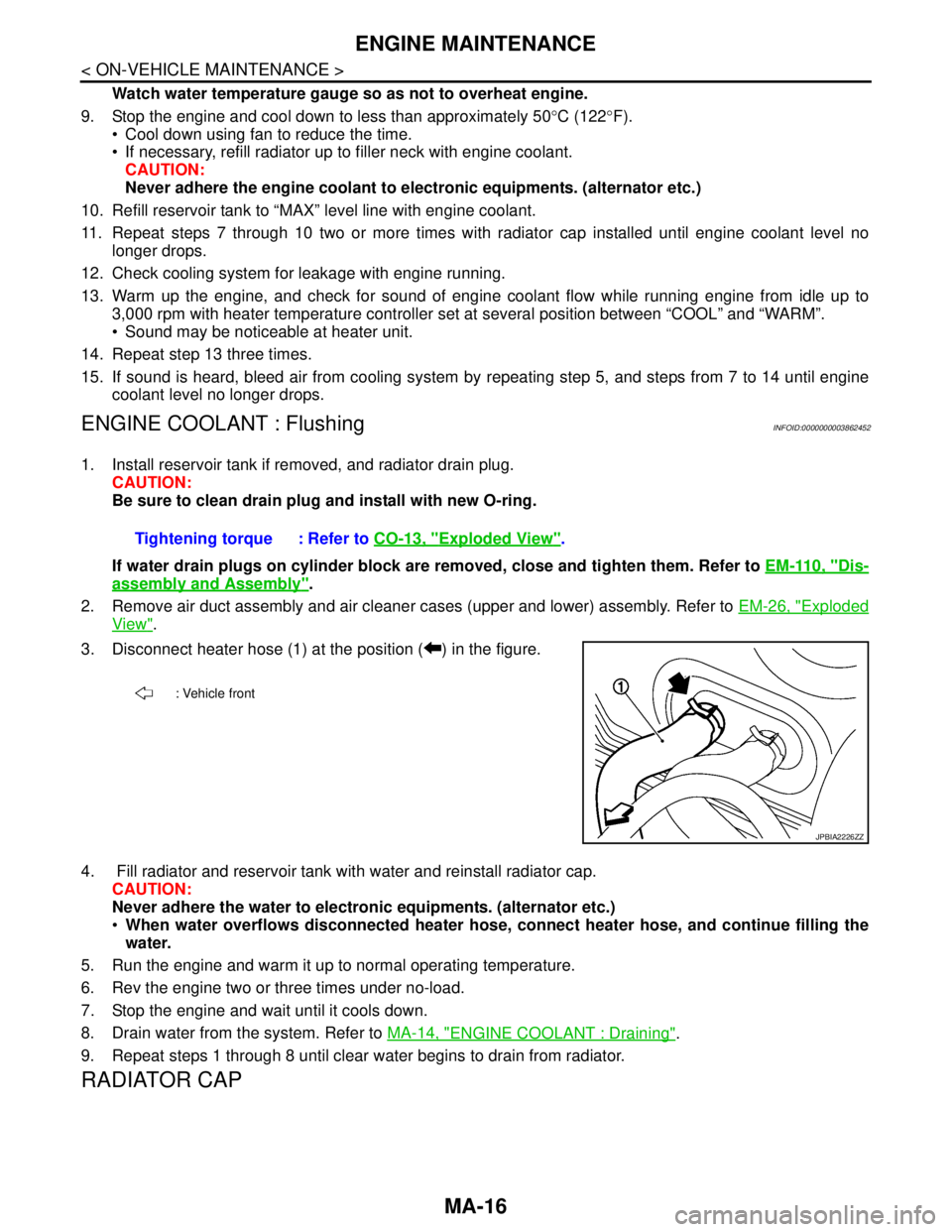
3. Disconnect heater hose (1) at the position ( ) in the figure.
4. Fill radiator and reservoir tank with water and reinstall radiator cap.
CAUTION:
Never adhere the water to electronic equipments. (alternator etc.)
When water overflows disconnected heater hose, connect heater hose, and continue filling the
water.
5. Run the engine and warm it up to normal operating temperature.
6. Rev the engine two or three times under no-load.
7. Stop the engine and wait until it cools down.
8. Drain water from the system. Refer to MA-14, "
ENGINE COOLANT : Draining".
9. Repeat steps 1 through 8 until clear water begins to drain from radiator.
RADIATOR CAP
Tightening torque : Refer to CO-13, "Exploded View".
: Vehicle front
JPBIA2226ZZ
Page 3205 of 5121
ENGINE MAINTENANCE
MA-17
< ON-VEHICLE MAINTENANCE >
C
D
E
F
G
H
I
J
K
L
MB
MAN
OA
RADIATOR CAP : InspectionINFOID:0000000003862453
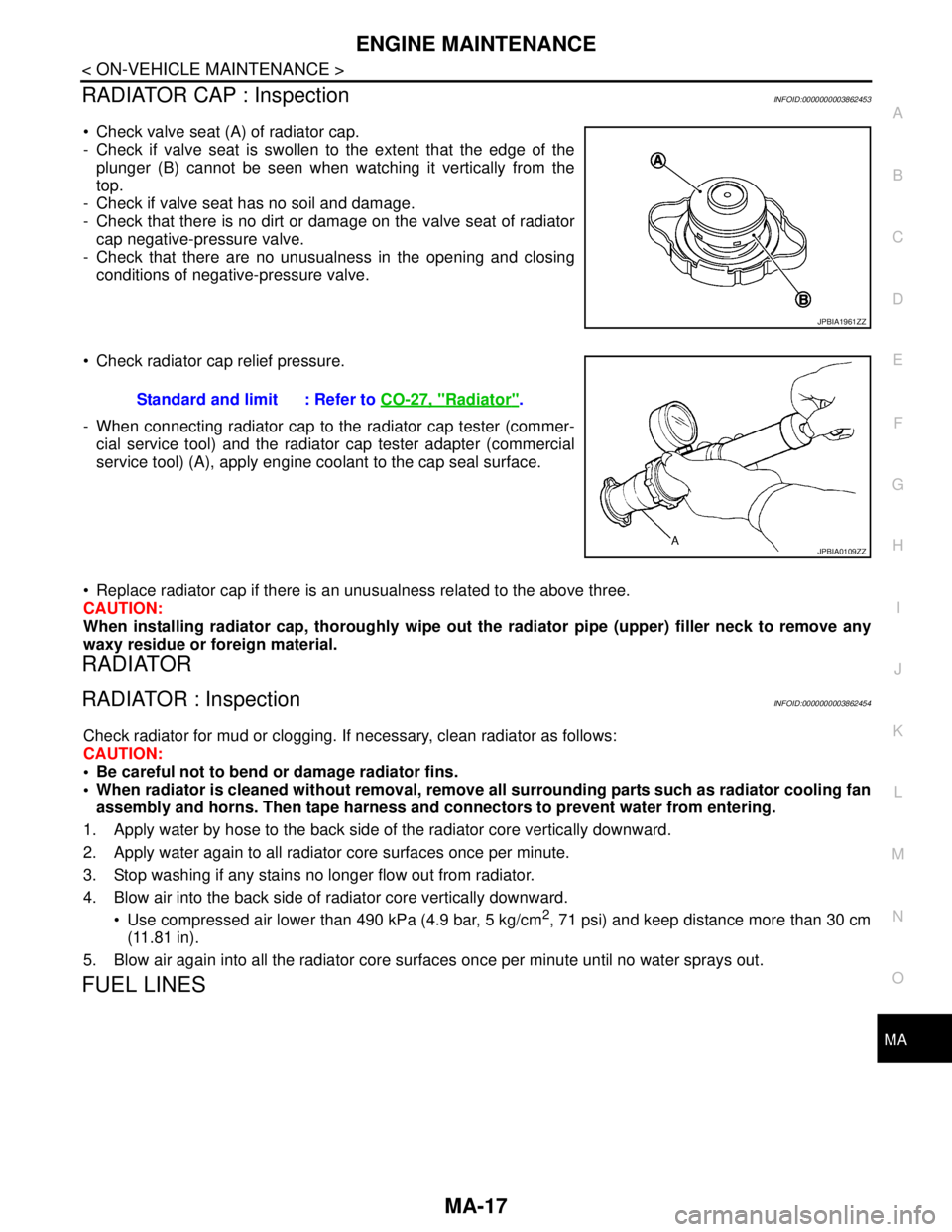
Check valve seat (A) of radiator cap.
- Check if valve seat is swollen to the extent that the edge of the
plunger (B) cannot be seen when watching it vertically from the
top.
- Check if valve seat has no soil and damage.
- Check that there is no dirt or damage on the valve seat of radiator
cap negative-pressure valve.
- Check that there are no unusualness in the opening and closing
conditions of negative-pressure valve.
Check radiator cap relief pressure.
- When connecting radiator cap to the radiator cap tester (commer-
cial service tool) and the radiator cap tester adapter (commercial
service tool) (A), apply engine coolant to the cap seal surface.
Replace radiator cap if there is an unusualness related to the above three.
CAUTION:
When installing radiator cap, thoroughly wipe out the radiator pipe (upper) filler neck to remove any
waxy residue or foreign material.
RADIATOR
RADIATOR : InspectionINFOID:0000000003862454
Check radiator for mud or clogging. If necessary, clean radiator as follows:
CAUTION:
Be careful not to bend or damage radiator fins.
When radiator is cleaned without removal, remove all surrounding parts such as radiator cooling fan
assembly and horns. Then tape harness and connectors to prevent water from entering.
1. Apply water by hose to the back side of the radiator core vertically downward.
2. Apply water again to all radiator core surfaces once per minute.
3. Stop washing if any stains no longer flow out from radiator.
4. Blow air into the back side of radiator core vertically downward.
Use compressed air lower than 490 kPa (4.9 bar, 5 kg/cm
2, 71 psi) and keep distance more than 30 cm
(11.81 in).
5. Blow air again into all the radiator core surfaces once per minute until no water sprays out.
FUEL LINES
JPBIA1961ZZ
Standard and limit : Refer to CO-27, "Radiator".
JPBIA0109ZZ
Page 3221 of 5121
CHASSIS MAINTENANCE
MA-33
< ON-VEHICLE MAINTENANCE >
C
D
E
F
G
H
I
J
K
L
MB
MAN
OA
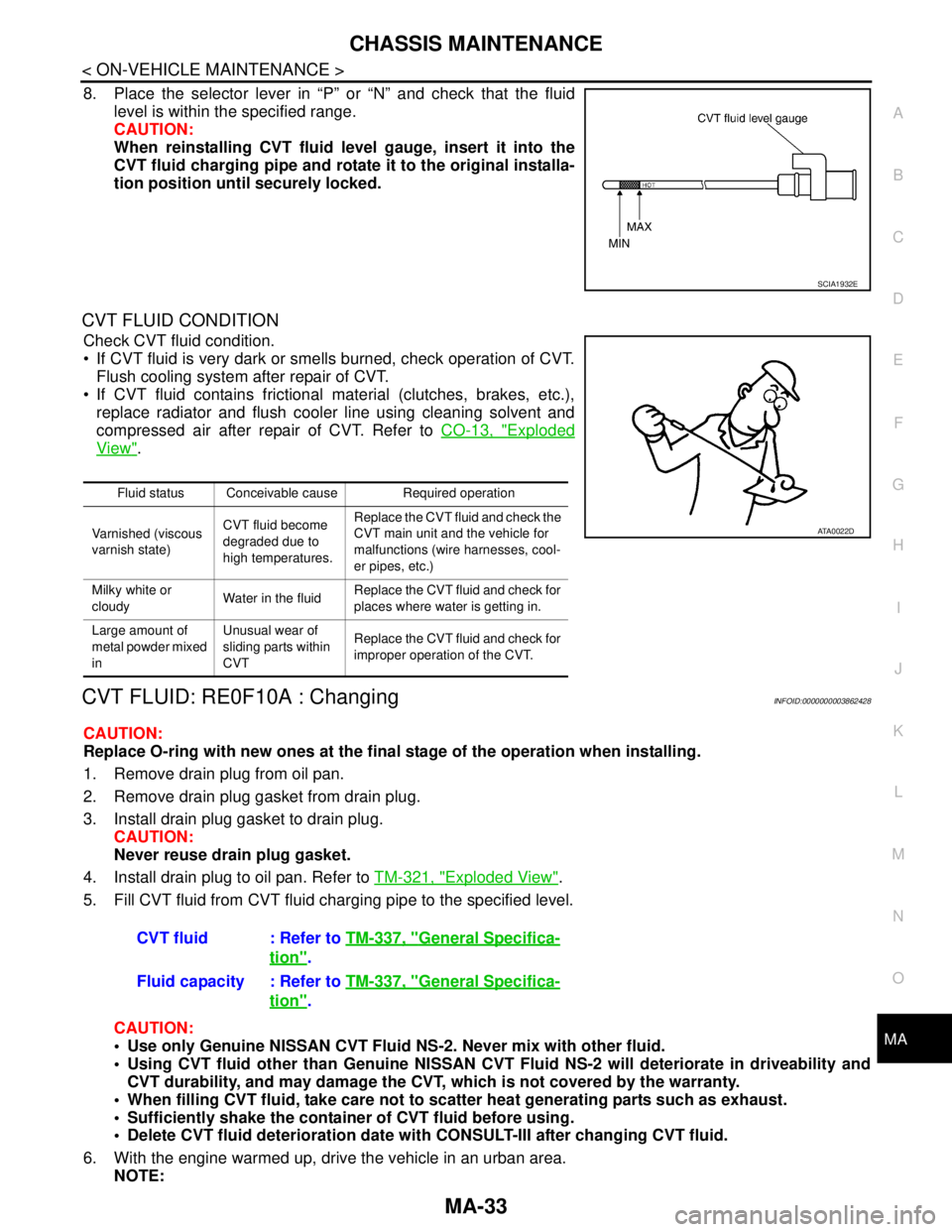
8. Place the selector lever in “P” or “N” and check that the fluid
level is within the specified range.
CAUTION:
When reinstalling CVT fluid level gauge, insert it into the
CVT fluid charging pipe and rotate it to the original installa-
tion position until securely locked.
CVT FLUID CONDITION
Check CVT fluid condition.
If CVT fluid is very dark or smells burned, check operation of CVT.
Flush cooling system after repair of CVT.
If CVT fluid contains frictional material (clutches, brakes, etc.),
replace radiator and flush cooler line using cleaning solvent and
compressed air after repair of CVT. Refer to CO-13, "
Exploded
View".
CVT FLUID: RE0F10A : ChangingINFOID:0000000003862428
CAUTION:
Replace O-ring with new ones at the final stage of the operation when installing.
1. Remove drain plug from oil pan.
2. Remove drain plug gasket from drain plug.
3. Install drain plug gasket to drain plug.
CAUTION:
Never reuse drain plug gasket.
4. Install drain plug to oil pan. Refer to TM-321, "
Exploded View".
5. Fill CVT fluid from CVT fluid charging pipe to the specified level.
CAUTION:
Use only Genuine NISSAN CVT Fluid NS-2. Never mix with other fluid.
Using CVT fluid other than Genuine NISSAN CVT Fluid NS-2 will deteriorate in driveability and
CVT durability, and may damage the CVT, which is not covered by the warranty.
When filling CVT fluid, take care not to scatter heat generating parts such as exhaust.
Sufficiently shake the container of CVT fluid before using.
Delete CVT fluid deterioration date with CONSULT-III after changing CVT fluid.
6. With the engine warmed up, drive the vehicle in an urban area.
NOTE:
SCIA1932E
Fluid status Conceivable cause Required operation
Varnished (viscous
varnish state)CVT fluid become
degraded due to
high temperatures.Replace the CVT fluid and check the
CVT main unit and the vehicle for
malfunctions (wire harnesses, cool-
er pipes, etc.)
Milky white or
cloudyWater in the fluidReplace the CVT fluid and check for
places where water is getting in.
Large amount of
metal powder mixed
inUnusual wear of
sliding parts within
CVTReplace the CVT fluid and check for
improper operation of the CVT.
ATA0022D
CVT fluid : Refer to TM-337, "General Specifica-
tion".
Fluid capacity : Refer to TM-337, "
General Specifica-
tion".
Page 3223 of 5121
CHASSIS MAINTENANCE
MA-35
< ON-VEHICLE MAINTENANCE >
C
D
E
F
G
H
I
J
K
L
MB
MAN
OA
CVT FLUID CONDITION
Check CVT fluid condition.
If CVT fluid is very dark or smells burned, check operation of CVT.
Flush cooling system after repair of CVT.
If CVT fluid contains frictional material (clutches, brakes, etc.),
replace radiator and flush cooler line using cleaning solvent and
compressed air after repair of CVT. Refer to CO-13, "
Exploded
View".
CVT FLUID: RE0F09B : ChangingINFOID:0000000003862430
CAUTION:
Replace O-ring with new ones at the final stage of the operation when installing.
1. Remove drain plug from oil pan.
2. Remove drain plug gasket from drain plug.
3. Install drain plug gasket to drain plug.
CAUTION:
Never reuse drain plug gasket.
4. Install drain plug to oil pan.
5. Fill CVT fluid from CVT fluid charging pipe to the specified level.
CAUTION:
Use only Genuine NISSAN CVT Fluid NS-2. Never mix with other fluid.
Using CVT fluid other than Genuine NISSAN CVT Fluid NS-2 will deteriorate in driveability and
CVT durability, and may damage the CVT, which is not covered by the warranty.
When filling CVT fluid, take care not to scatter heat generating parts such as exhaust.
Sufficiently shake the container of CVT fluid before using.
Delete CVT fluid deterioration date with CONSULT-III after changing CVT fluid. Refer to TM-37,
"CONSULT-III Function (TRANSMISSION)".
6. With the engine warmed up, drive the vehicle in an urban area.
NOTE:
When ambient temperature is 20°C (68°F), it takes about 10 minutes for the CVT fluid to warm up to 50 to
80°C (122 to 176°F).
7. Check CVT fluid level and condition.
8. Repeat steps 1 to 5 if CVT fluid has been contaminated.
WHEELS (BONDING WEIGHT TYPE)
WHEELS (BONDING WEIGHT TYPE) : AdjustmentINFOID:0000000003911590
BALANCING WHEELS (BONDING WEIGHT TYPE)
Fluid status Conceivable cause Required operation
Varnished (viscous
varnish state)CVT fluid becomes
degraded due to
high temperatures.Replace the CVT fluid and check the
CVT main unit and the vehicle for
malfunctions (wire harnesses, cool-
er pipes, etc.)
Milky white or
cloudyWater in the fluidReplace the CVT fluid and check for
places where water is getting in.
Large amount of
metal powder mixed
inUnusual wear of
sliding parts within
CVTReplace the CVT fluid and check for
improper operation of the CVT.
ATA0022D
Drain plug – tightening torque : Refer to TM-159, "Exploded View"
CVT fluid : Refer to TM-174, "General Specification".
Fluid capacity : Refer to TM-174, "
General Specification".
Page 3360 of 5121

MWI-106
< ECU DIAGNOSIS >
IPDM E/R (INTELLIGENT POWER DISTRIBUTION MODULE ENGINE ROOM)
28
(SB)GroundPush-button ignition
switchInputPress the push-button ignition switch 0 V
Release the push-button ignition switch Battery voltage
30
(BR)Ground Starter relay control InputIgnition
switch ONSelector lever in any posi-
tion other than P or N0 V
Selector lever P or N Battery voltage
32
(V)GroundSteering lock unit condi-
tion-1InputSteering lock is activated 0 V
Steering lock is deactivated Battery voltage
33
(G)GroundSteering lock unit condi-
tion-2InputSteering lock is activated Battery voltage
Steering lock is deactivated 0 V
34
(O)Ground Cooling fan relay-3 control InputCooling fan stopped Battery voltage
Cooling fan at HI operation 0 V
35
(P)GroundCooling fan relay-1 power
supplyInputCooling fan stopped Battery voltage
Cooling fan at LO operation 6.0 V
36
(G)Ground Battery power supply Input Ignition switch OFF Battery voltage
38
(GR)GroundCooling fan relay-1 power
supplyOutputCooling fan not operating 0 V
Cooling fan at LO operation 6.0 V
39
(P)—CAN-LInput/
Output——
40
(L)—CAN-HInput/
Output——
41
(B)Ground Ground — Ignition switch ON 0 V
42
(SB)Ground Cooling fan relay-2 control InputCooling fan stopped Battery voltage
Cooling fan MID operating
Cooling fan HI operating0 V
43
(Y)GroundControl device
(Detention switch)InputIgnition
switch ONPress the selector button
(selector lever P)Battery voltage
Selector lever in any po-
sition other than P
Release the selector
button (selector lever P)0 V
44
(G)Ground Horn relay control InputThe horn is deactivated Battery voltage
The horn is activated 0 V
45
(O)Ground Horn switch InputThe horn is deactivated Battery voltage
The horn is activated 0 V
46
(BR)Ground Starter relay control InputIgnition
switch ONSelector lever in any posi-
tion other than P or N0 V
Selector lever P or N Battery voltage
48
(Y/R)Ground A/C relay power supply OutputEngine
runningA/C switch OFF 0 V
A/C switch ON
(A/C compressor is oper-
ating)Battery voltage Te r m i n a l N o .
(Wire color)Description
ConditionVa l u e
(Approx.)
Signal nameInput/
Output +−
Page 3368 of 5121

MWI-114
< ECU DIAGNOSIS >
IPDM E/R (INTELLIGENT POWER DISTRIBUTION MODULE ENGINE ROOM)
If No CAN Communication Is Available With BCM
IGNITION RELAY MALFUNCTION DETECTION FUNCTION
IPDM E/R monitors the voltage at the contact circuit and excitation coil circuit of the ignition relay inside it.
IPDM E/R judges the ignition relay error if the voltage differs between the contact circuit and the excitation
coil circuit.
If the ignition relay cannot turn OFF due to contact seizure, it activates the tail lamp relay for 10 minutes to
alert the user to the ignition relay malfunction when the ignition switch is turned OFF.
FRONT WIPER CONTROL
IPDM E/R detects front wiper stop position by a front wiper auto stop signal.
When a front wiper auto stop signal is in the conditions listed below, IPDM E/R stops power supply to wiper
after repeating a front wiper 10 seconds activation and 20 seconds stop five times.
Control part Fail-safe operation
Cooling fan Turns ON the cooling fan relay-2 and the cooling fan relay-3 when ignition switch is
turned ON (Cooling fan operates at HI)
Turns OFF the cooling fan relay-1, the cooling fan relay-2 and the cooling fan relay-3
when the ignition switch is turned OFF (Cooling fan does not operate)
A/C compressor A/C relay OFF
Alternator Outputs the power generation command signal (PWM signal) 0%
Control part Fail-safe operation
Headlamp Turns ON the headlamp low relay when the ignition switch is turned ON
Turns OFF the headlamp low relay when the ignition switch is turned OFF
Headlamp high relay OFF
Parking lamps
License plate lamps
Illuminations
Tail lamps Turns ON the tail lamp relay when the ignition switch is turned ON
Turns OFF the tail lamp relay when the ignition switch is turned OFF
Front wiper The status just before activation of fail-safe control is maintained until the ignition
switch is turned OFF while the front wiper is operating at LO or HI speed.
The wiper is operated at LO speed until the ignition switch is turned OFF if the fail-
safe control is activated while the front wiper is set in the INT mode and the front wiper
motor is operating.
Front fog lamps Front fog lamp relay OFF
Horn Horn OFF
Ignition relay The status just before activation of fail-safe is maintained.
Starter motor Starter control relay OFF
Steering lock unit Steering lock relay OFF
Headlamp washer relay Headlamp washer relay OFF
Voltage judgment
IPDM E/R judgment Operation
Ignition relay contact sideIgnition relay excitation coil
side
ON ON Ignition relay ON normal —
OFF OFF Ignition relay OFF normal —
ON OFF Ignition relay ON stuck Detects DTC “B2098: IGN RELAY ON”
Turns ON the tail lamp relay for 10 min-
utes
OFF ON Ignition relay OFF stuck Detects DTC “B2099: IGN RELAY OFF”
Page 3396 of 5121
![NISSAN TEANA 2008 Service Manual PCS
RELAY CONTROL SYSTEM
PCS-5
< FUNCTION DIAGNOSIS >[IPDM E/R]
C
D
E
F
G
H
I
J
K
L B A
O
P N
NOTE:
BCM controls the starter relay.Control relay Input/output Transmit unit Control part Reference page](/img/5/57391/w960_57391-3395.png "NISSAN TEANA 2008 Service Manual PCS
RELAY CONTROL SYSTEM
PCS-5
< FUNCTION DIAGNOSIS >[IPDM E/R]
C
D
E
F
G
H
I
J
K
L B A
O
P N
NOTE:
BCM controls the starter relay.Control relay Input/output Transmit unit Control part Reference page")
PCS
RELAY CONTROL SYSTEM
PCS-5
< FUNCTION DIAGNOSIS >[IPDM E/R]
C
D
E
F
G
H
I
J
K
L B A
O
P N
NOTE:
BCM controls the starter relay.Control relay Input/output Transmit unit Control part Reference page
• Headlamp low relay
Headlamp high relay Low beam request signal
High beam request signalBCM (CAN) Headlamp low
Headlamp highEXL-11
(Xenon headlamp)
EXL-200
(Halogen headlamp)
Front fog lamp relay Front fog light request signal BCM (CAN) Front fog lampEXL-17
(Xenon headlamp)
EXL-204
(Halogen headlamp)
Tail lamp relay Position light request signal BCM (CAN) Parking lamp
Side marker lamp
License plate lamp
Tail lampEXL-21
(Xenon headlamp)
EXL-208
(Halogen headlamp)
IlluminationsINL-12
Front wiper relay
Front wiper high relayFront wiper request signal BCM (CAN)
Front wiperWW-5
Front wiper auto stop signal Front wiper motor
Horn relay Theft warning horn request
signal
Horn reminder signalBCM (CAN) Horn (low)
Horn (high)SEC-17
Starter relayNOTE
Starter control relayStarter control relay signal BCM (CAN)
Starter motorSEC-104SEC-102
Steering lock unit condition
signalSteering lock unit
Starter relay control signal TCM
Steering lock relaySteering lock relay signal BCM (CAN)
Steering lock unitSEC-69
Steering lock unit condition
signalSteering lock unit
Control device (Detention
switch) signalControl device (Detention
switch)
A/C relayA/C compressor request sig-
nalECM (CAN)A/C compressor
(magnet clutch)HAC-36
(Without 7-inch dis-
play)
HAC-154
(With 7-inch display)
Cooling fan relay-1
Cooling fan relay-2
Cooling fan relay-3Cooling fan speed request sig-
nalECM (CAN) Cooling fan motor-
1
Cooling fan motor-
2EC-60
Headlamp washer relayHeadlamp washer request
signalBCM (CAN) Headlamp washerWW-10
Ignition relayIgnition switch ON signal BCM (CAN)
Ignition relay PCS-17Vehicle speed signal Combination meter (CAN)
Push-button ignition switch
signalPush-button ignition
switch
Page 3402 of 5121
![NISSAN TEANA 2008 Service Manual PCS
DIAGNOSIS SYSTEM (IPDM E/R)
PCS-11
< FUNCTION DIAGNOSIS >[IPDM E/R]
C
D
E
F
G
H
I
J
K
L B A
O
P N
DIAGNOSIS SYSTEM (IPDM E/R)
Diagnosis DescriptionINFOID:0000000003773267
AUTO ACTIVE TEST
Descript](/img/5/57391/w960_57391-3401.png "NISSAN TEANA 2008 Service Manual PCS
DIAGNOSIS SYSTEM (IPDM E/R)
PCS-11
< FUNCTION DIAGNOSIS >[IPDM E/R]
C
D
E
F
G
H
I
J
K
L B A
O
P N
DIAGNOSIS SYSTEM (IPDM E/R)
Diagnosis DescriptionINFOID:0000000003773267
AUTO ACTIVE TEST
Descript")
PCS
DIAGNOSIS SYSTEM (IPDM E/R)
PCS-11
< FUNCTION DIAGNOSIS >[IPDM E/R]
C
D
E
F
G
H
I
J
K
L B A
O
P N
DIAGNOSIS SYSTEM (IPDM E/R)
Diagnosis DescriptionINFOID:0000000003773267
AUTO ACTIVE TEST
Description
In auto active test mode, the IPDM E/R sends a drive signal to the following systems to check their operation.
Oil pressure warning lamp
Front wiper (LO, HI)
Parking lamps
License plate lamps
Tail lamps
Front fog lamps
Headlamps (LO, HI)
A/C compressor (magnet clutch)
Cooling fan
Operation Procedure
1. Close the hood and lift the wiper arms from the windshield. (Prevent windshield damage due to wiper
operation)
NOTE:
When auto active test is performed with hood opened, sprinkle water on windshield beforehand.
2. Turn ignition switch OFF.
3. Turn the ignition switch ON, and within 20 seconds, press the driver door switch 10 times. Then turn the
ignition switch OFF.
CAUTION:
Close passenger door.
4. Turn the ignition switch ON within 10 seconds. After that the horn sounds once and the auto active test
starts.
5. The oil pressure warning lamp starts blinking when the auto active test starts.
6. After a series of the following operations is repeated 3 times, auto active test is completed.
NOTE:
When auto active test mode has to be cancelled halfway through test, turn ignition switch OFF.
CAUTION:
• If auto active test mode cannot be actuated, check door switch system. Refer to DLK-57,
"ComponentFunctionCheck".
Do not start the engine.
Inspection in Auto Active Test Mode
When auto active test mode is actuated, the following 5 steps are repeated 3 times.
Operation
sequenceInspection location Operation
A Oil pressure warning lamp Blinks continuously during operation of auto active test
1 Front wiper LO for 5 seconds → HI for 5 seconds
2Parking lamps
License plate lamps
Tail lamps
Front fog lamps10 seconds
3 Headlamps LO ⇔ HI 5 times
4 A/C compressor (magnet clutch) ON ⇔ OFF 5 times
5 Cooling fan LO for 5 seconds → MID for 3 seconds → HI for 2 seconds
Page 3404 of 5121
![NISSAN TEANA 2008 Service Manual PCS
DIAGNOSIS SYSTEM (IPDM E/R)
PCS-13
< FUNCTION DIAGNOSIS >[IPDM E/R]
C
D
E
F
G
H
I
J
K
L B A
O
P N
CONSULT-III Function (IPDM E/R)INFOID:0000000003773268
APPLICATION ITEM
CONSULT-III performs the f](/img/5/57391/w960_57391-3403.png "NISSAN TEANA 2008 Service Manual PCS
DIAGNOSIS SYSTEM (IPDM E/R)
PCS-13
< FUNCTION DIAGNOSIS >[IPDM E/R]
C
D
E
F
G
H
I
J
K
L B A
O
P N
CONSULT-III Function (IPDM E/R)INFOID:0000000003773268
APPLICATION ITEM
CONSULT-III performs the f")
PCS
DIAGNOSIS SYSTEM (IPDM E/R)
PCS-13
< FUNCTION DIAGNOSIS >[IPDM E/R]
C
D
E
F
G
H
I
J
K
L B A
O
P N
CONSULT-III Function (IPDM E/R)INFOID:0000000003773268
APPLICATION ITEM
CONSULT-III performs the following functions via CAN communication with IPDM E/R.
SELF DIAGNOSTIC RESULT
Refer to PCS-33, "DTCIndex".
DATA MONITOR
Monitor item
Cooling fan does not operatePerform auto active test.
Does the cooling fan operate?YES ECM signal input circuit
CAN communication signal
between ECM and IPDM E/
R
NO Harness or connector be-
tween IPDM E/R and cool-
ing fan motor
Harness or connector be-
tween IPDM E/R and cool-
ing fan relay
Cooling fan motor
Cooling fan relay
IPDM E/R Symptom Inspection contents Possible cause
Diagnosis mode Description
Ecu Identification Allows confirmation of IPDM E/R part number.
Self Diagnostic Result Displays the diagnosis results judged by IPDM E/R.
Data Monitor Displays the real-time input/output data from IPDM E/R input/output data.
Active Test IPDM E/R can provide a drive signal to electronic components to check their operations.
CAN Diag Support Monitor The results of transmit/receive diagnosis of CAN communication can be read.
Monitor Item
[Unit]MAIN SIG-
NALSDescription
MOTOR FAN REQ
[1/2/3/4]×Displays the value of the cooling fan speed request signal received from ECM via
CAN communication.
AC COMP REQ
[Off/On]×Displays the status of the A/C compressor request signal received from ECM via
CAN communication.
TAIL&CLR REQ
[Off/On]×Displays the status of the position light request signal received from BCM via CAN
communication.
HL LO REQ
[Off/On]×Displays the status of the low beam request signal received from BCM via CAN
communication.
HL HI REQ
[Off/On]×Displays the status of the high beam request signal received from BCM via CAN
communication.
FR FOG REQ
[Off/On]×Displays the status of the front fog light request signal received from BCM via
CAN communication.
FR WIP REQ
[Stop/1LOW/Low/Hi]×Displays the status of the front wiper request signal received from BCM via CAN
communication.
WIP AUTO STOP
[STOP P/ACT P]×Displays the status of the front wiper auto stop signal judged by IPDM E/R.
WIP PROT
[Off/BLOCK]×Displays the status of the front wiper fail-safe operation judged by IPDM E/R.
IGN RLY1 -REQ
[Off/On]Displays the status of the ignition switch ON signal received from BCM via CAN
communication.
Page 3405 of 5121
![NISSAN TEANA 2008 Service Manual PCS-14
< FUNCTION DIAGNOSIS >[IPDM E/R]
DIAGNOSIS SYSTEM (IPDM E/R)
ACTIVE TEST
Te s t i t e m
IGN RLY
[Off/On]×Displays the status of the ignition relay judged by IPDM E/R.
PUSH SW
[Off/On]Displays](/img/5/57391/w960_57391-3404.png "NISSAN TEANA 2008 Service Manual PCS-14
< FUNCTION DIAGNOSIS >[IPDM E/R]
DIAGNOSIS SYSTEM (IPDM E/R)
ACTIVE TEST
Te s t i t e m
IGN RLY
[Off/On]×Displays the status of the ignition relay judged by IPDM E/R.
PUSH SW
[Off/On]Displays")
PCS-14
< FUNCTION DIAGNOSIS >[IPDM E/R]
DIAGNOSIS SYSTEM (IPDM E/R)
ACTIVE TEST
Te s t i t e m
IGN RLY
[Off/On]×Displays the status of the ignition relay judged by IPDM E/R.
PUSH SW
[Off/On]Displays the status of the push-button ignition switch judged by IPDM E/R.
INTER/NP SW
[Off/On]Displays the status of the shift position judged by IPDM E/R.
ST RLY CONT
[Off/On]Displays the status of the starter relay status signal received from BCM via CAN
communication.
IHBT RLY -REQ
[Off/On]Displays the status of the starter control relay signal received from BCM via CAN
communication.
ST/INHI RLY
[Off/ ST /INHI/UNKWN]Displays the status of the starter relay and starter control relay judged by IPDM
E/R.
DETENT SW
[Off/On]Displays the status of the control device (detention switch) judged by IPDM E/R.
S/L RLY -REQ
[Off/On]Displays the status of the steering lock relay signal received from BCM via CAN
communication.
S/L STATE
[LOCK/UNLOCK/UNKWN]Displays the status of the steering lock judged by IPDM E/R.
DTRL REQ
[Off]NOTE:
The item is indicated, but not monitored.
OIL P SW
[Open/Close]Displays the status of the oil pressure switch judged by IPDM E/R.
HOOD SW
[Off/On]Displays the status of the hood switch judged by IPDM E/R.
HL WASHER REQ
[Off]Display the status of the headlamp washer request signal received from BCM via
CAN communication.
THFT HRN REQ
[Off/On]Displays the status of the theft warning horn request signal received from BCM
via CAN communication.
HORN CHIRP
[Off/On]Displays the status of the horn reminder signal received from BCM via CAN com-
munication.
CRNRNG LMP REQ
[Off]NOTE:
The item is indicated, but not monitored. Monitor Item
[Unit]MAIN SIG-
NALSDescription
Test item Operation Description
CORNERING LAMPOff
NOTE:
The item is indicated, but cannot be tested. LH
RH
HORN On Operates horn relay for 20 ms.
FRONT WIPEROff OFF
Lo Operates the front wiper relay.
Hi Operates the front wiper relay and front wiper high relay.
MOTOR FAN1OFF
2 Operates the cooling fan relay-1.
3 Operates the cooling fan relay-2.
4 Operates the cooling fan relay-2 and cooling fan relay-3.
HEAD LAMP WASHER On Operates the headlamp washer relay for 1 s.