Condition NISSAN TEANA 2008 Service Manual
[x] Cancel search | Manufacturer: NISSAN, Model Year: 2008, Model line: TEANA, Model: NISSAN TEANA 2008Pages: 5121, PDF Size: 69.03 MB
Page 3515 of 5121
![NISSAN TEANA 2008 Service Manual PCS-124
< SYMPTOM DIAGNOSIS >[POWER DISTRIBUTION SYSTEM]
PUSH-BUTTON IGNITION SWITCH DOES NOT OPERATE
PUSH-BUTTON IGNITION SWITCH DOES NOT OPERATE
DescriptionINFOID:0000000003805779
Before performin](/img/5/57391/w960_57391-3514.png "NISSAN TEANA 2008 Service Manual PCS-124
< SYMPTOM DIAGNOSIS >[POWER DISTRIBUTION SYSTEM]
PUSH-BUTTON IGNITION SWITCH DOES NOT OPERATE
PUSH-BUTTON IGNITION SWITCH DOES NOT OPERATE
DescriptionINFOID:0000000003805779
Before performin")
PCS-124
< SYMPTOM DIAGNOSIS >[POWER DISTRIBUTION SYSTEM]
PUSH-BUTTON IGNITION SWITCH DOES NOT OPERATE
PUSH-BUTTON IGNITION SWITCH DOES NOT OPERATE
DescriptionINFOID:0000000003805779
Before performing the diagnosis in the following table, check “Work Flow”. Refer to PCS-35, "Work Flow".
Check that vehicle is under the condition shown in “Conditions of vehicle” before starting diagnosis, and
check each symptom.
Conditions of Vehicle (Operating Conditions)
“ENGINE START BY I-KEY” in “WORK SUPPORT” is ON when setting on CONSULT-III.
One or more of Intelligent Keys with registered Intelligent Key ID is in the vehicle.
Diagnosis ProcedureINFOID:0000000003805780
1.CHECK PUSH-BUTTON IGNITION SWITCH
Check push-button ignition switch.
Refer to PCS-63, "
ComponentFunctionCheck".
Is the inspection normal?
YES >> GO TO 2.
NO >> Repair or replace malfunctioning parts.
2.CONFIRM THE OPERATION
Confirm the operation again.
Is the inspection normal?
YES >> Check intermittent incident. Refer to GI-35, "Intermittent Incident".
NO >> GO TO 1.
Page 3516 of 5121
![NISSAN TEANA 2008 Service Manual PCS
PUSH-BUTTON IGNITION SWITCH POSITION INDICATOR DOES NOT ILLUMI-
NATE
PCS-125
< SYMPTOM DIAGNOSIS >[POWER DISTRIBUTION SYSTEM]
C
D
E
F
G
H
I
J
K
L B A
O
P N
PUSH-BUTTON IGNITION SWITCH POSITION IND](/img/5/57391/w960_57391-3515.png "NISSAN TEANA 2008 Service Manual PCS
PUSH-BUTTON IGNITION SWITCH POSITION INDICATOR DOES NOT ILLUMI-
NATE
PCS-125
< SYMPTOM DIAGNOSIS >[POWER DISTRIBUTION SYSTEM]
C
D
E
F
G
H
I
J
K
L B A
O
P N
PUSH-BUTTON IGNITION SWITCH POSITION IND")
PCS
PUSH-BUTTON IGNITION SWITCH POSITION INDICATOR DOES NOT ILLUMI-
NATE
PCS-125
< SYMPTOM DIAGNOSIS >[POWER DISTRIBUTION SYSTEM]
C
D
E
F
G
H
I
J
K
L B A
O
P N
PUSH-BUTTON IGNITION SWITCH POSITION INDICATOR DOES NOT IL-
LUMINATE
DescriptionINFOID:0000000003805781
Before performing the diagnosis in the following table, check “Work Flow”. Refer to PCS-35, "Work Flow".
Check that vehicle is under the condition shown in “Conditions of vehicle” before starting diagnosis, and
check each symptom.
Conditions of Vehicle (Operating Conditions)
“ENGINE START BY I-KEY” in “WORK SUPPORT” is ON when setting on CONSULT-III.
One or more of Intelligent Keys with registered Intelligent Key ID is in the vehicle.
Diagnosis ProcedureINFOID:0000000003805782
1.CHECK PUSH-BUTTON IGNITION SWITCH INDICATOR
Check push-button ignition switch indicator.
Refer to PCS-66, "
ComponentFunctionCheck".
Is the inspection result normal?
YES >> GO TO 2.
NO >> Repair or replace the malfunctioning parts.
2.CONFIRM THE OPERATION
Confirm the operation again.
Is the result normal?
YES >> Check intermittent incident. Refer to GI-35, "Intermittent Incident".
NO >> GO TO 1.
Page 3521 of 5121
![NISSAN TEANA 2008 Service Manual PG
BATTERY
PG-3
< BASIC INSPECTION >[POWER SUPPLY&GROUND CIRCUIT]
C
D
E
F
G
H
I
J
K
L B A
O
P N
BASIC INSPECTION
BATTERY
How to Handle BatteryINFOID:0000000003809460
CAUTION:
• If it becomes necessa](/img/5/57391/w960_57391-3520.png "NISSAN TEANA 2008 Service Manual PG
BATTERY
PG-3
< BASIC INSPECTION >[POWER SUPPLY&GROUND CIRCUIT]
C
D
E
F
G
H
I
J
K
L B A
O
P N
BASIC INSPECTION
BATTERY
How to Handle BatteryINFOID:0000000003809460
CAUTION:
• If it becomes necessa")
PG
BATTERY
PG-3
< BASIC INSPECTION >[POWER SUPPLY&GROUND CIRCUIT]
C
D
E
F
G
H
I
J
K
L B A
O
P N
BASIC INSPECTION
BATTERY
How to Handle BatteryINFOID:0000000003809460
CAUTION:
• If it becomes necessary to start the engine with a booster battery and jumper cables, use a 12-volt
booster battery.
After connecting battery cables, ensure that they are tightly clamped to battery terminals for good
contact.
Never add distilled water through the hole used to check specific gravity.
METHODS OF PREVENTING OVER-DISCHARGE
The following precautions must be taken to prevent over-discharging a battery.
• The battery surface (particularly its top) should always be kept
clean and dry.
The terminal connections should be clean and tight.
At every routine maintenance, check the electrolyte level.
This also applies to batteries designated as “low maintenance” and
“maintenance-free”.
When the vehicle is not going to be used over a long period of
time, disconnect the battery cable from the negative terminal. (If
the vehicle has an extended storage switch, turn it off.)
Check the charge condition of the battery.
Periodically check the specific gravity of the electrolyte. Keep a
close check on charge condition to prevent over-discharge.
CHECKING ELECTROLYTE LEVEL
WARNING:
Never allow battery fluid to come in contact with skin, eyes, fabrics, or painted surfaces. After touch-
ing a battery, never touch or rub your eyes until you have thoroughly washed your hands. If acid con-
tacts eyes, skin or clothing, immediately flush with water for 15 minutes and seek medical attention.
MEL040F
ELA0349D
MEL042F
Page 3600 of 5121
![NISSAN TEANA 2008 Service Manual PG-82
< COMPONENT DIAGNOSIS >[POWER SUPPLY&GROUND CIRCUIT]
POWER SUPPLY ROUTING CIRCUIT
Fuse
INFOID:0000000003792666
If fuse is blown, be sure to eliminate cause of malfunction before
installing new](/img/5/57391/w960_57391-3599.png "NISSAN TEANA 2008 Service Manual PG-82
< COMPONENT DIAGNOSIS >[POWER SUPPLY&GROUND CIRCUIT]
POWER SUPPLY ROUTING CIRCUIT
Fuse
INFOID:0000000003792666
If fuse is blown, be sure to eliminate cause of malfunction before
installing new")
PG-82
< COMPONENT DIAGNOSIS >[POWER SUPPLY&GROUND CIRCUIT]
POWER SUPPLY ROUTING CIRCUIT
Fuse
INFOID:0000000003792666
If fuse is blown, be sure to eliminate cause of malfunction before
installing new fuse.
Use fuse of specified rating. Never use fuse of more than specified
rating.
Do not partially install fuse; always insert it into fuse holder prop-
erly.
Remove fuse for “ELECTRICAL PARTS (BAT)” if vehicle is not
used for a long period of time.
Fusible LinkINFOID:0000000003792667
A melted fusible link can be detected either by visual inspection or by feeling with finger tip. If its condition is
questionable, use circuit tester or test lamp.
CAUTION:
If fusible link should melt, it is possible that critical circuit (power supply or large current carrying
circuit) is shorted. In such a case, carefully check and eliminate cause of malfunction.
Never wrap outside of fusible link with vinyl tape. Important: Never let fusible link touch any other
wiring harness, vinyl or rubber parts.
Circuit BreakerINFOID:0000000003792668
The PTC thermistor generates heat in response to current flow. The
temperature (and resistance) of the thermistor element varies with
current flow. Excessive current flow will cause the element's temper-
ature to rise. When the temperature reaches a specified level, the
electrical resistance will rise sharply to control the circuit current.
Reduced current flow will cause the element to cool. Resistance falls
accordingly and normal circuit current flow is allowed to resume.
CEL083
1. Fusible link
JPMIA1018ZZ
SEL109W
Page 3634 of 5121
PWC-4
< BASIC INSPECTION >
DIAGNOSIS AND REPAIR WORKFLOW
BASIC INSPECTION
DIAGNOSIS AND REPAIR WORKFLOW
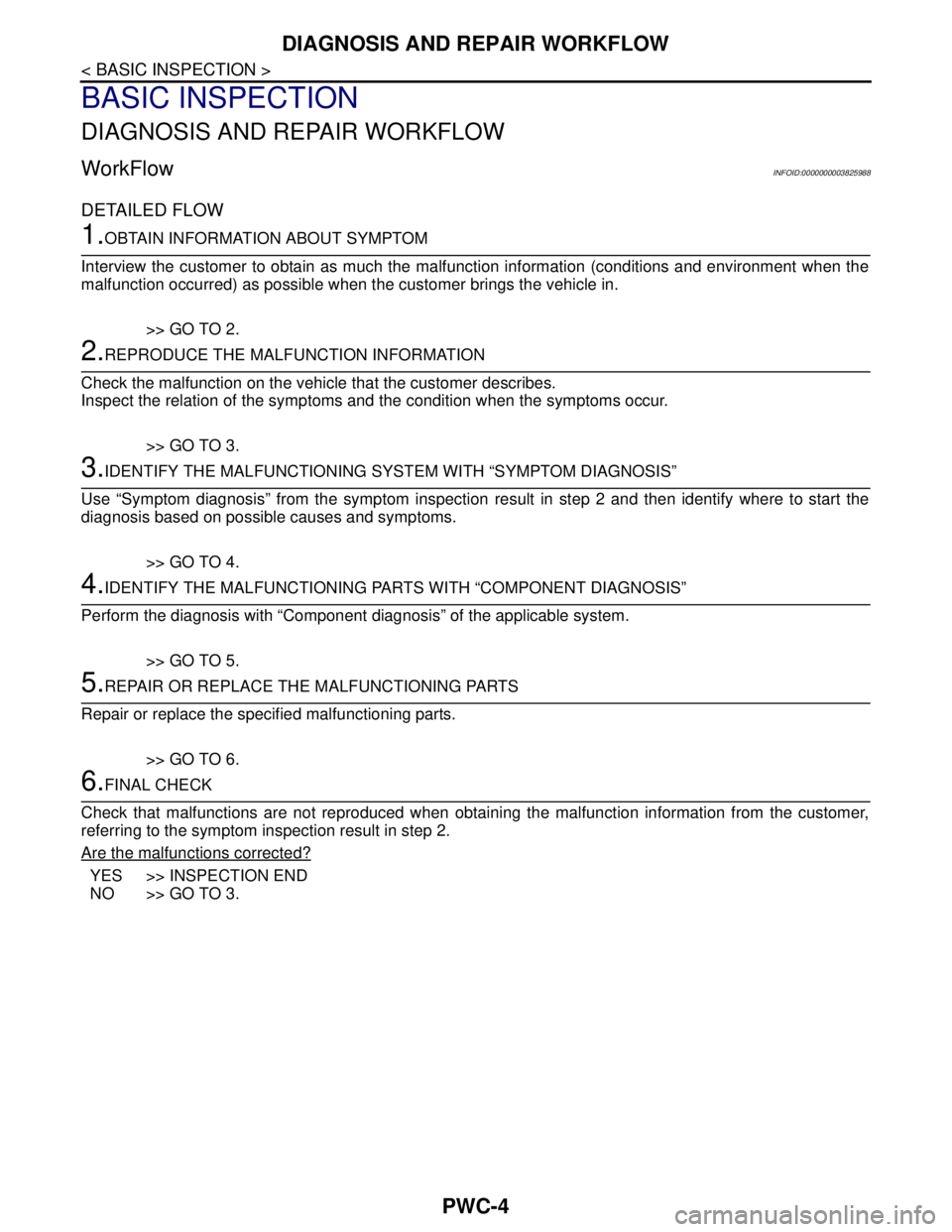
WorkFlowINFOID:0000000003825988
DETAILED FLOW
1.OBTAIN INFORMATION ABOUT SYMPTOM
Interview the customer to obtain as much the malfunction information (conditions and environment when the
malfunction occurred) as possible when the customer brings the vehicle in.
>> GO TO 2.
2.REPRODUCE THE MALFUNCTION INFORMATION
Check the malfunction on the vehicle that the customer describes.
Inspect the relation of the symptoms and the condition when the symptoms occur.
>> GO TO 3.
3.IDENTIFY THE MALFUNCTIONING SYSTEM WITH “SYMPTOM DIAGNOSIS”
Use “Symptom diagnosis” from the symptom inspection result in step 2 and then identify where to start the
diagnosis based on possible causes and symptoms.
>> GO TO 4.
4.IDENTIFY THE MALFUNCTIONING PARTS WITH “COMPONENT DIAGNOSIS”
Perform the diagnosis with “Component diagnosis” of the applicable system.
>> GO TO 5.
5.REPAIR OR REPLACE THE MALFUNCTIONING PARTS
Repair or replace the specified malfunctioning parts.
>> GO TO 6.
6.FINAL CHECK
Check that malfunctions are not reproduced when obtaining the malfunction information from the customer,
referring to the symptom inspection result in step 2.
Are the malfunctions corrected?
YES >> INSPECTION END
NO >> GO TO 3.
Page 3635 of 5121
INSPECTION AND ADJUSTMENT
PWC-5
< BASIC INSPECTION >
C
D
E
F
G
H
I
J
L
MA
B
PWC
N
O
P
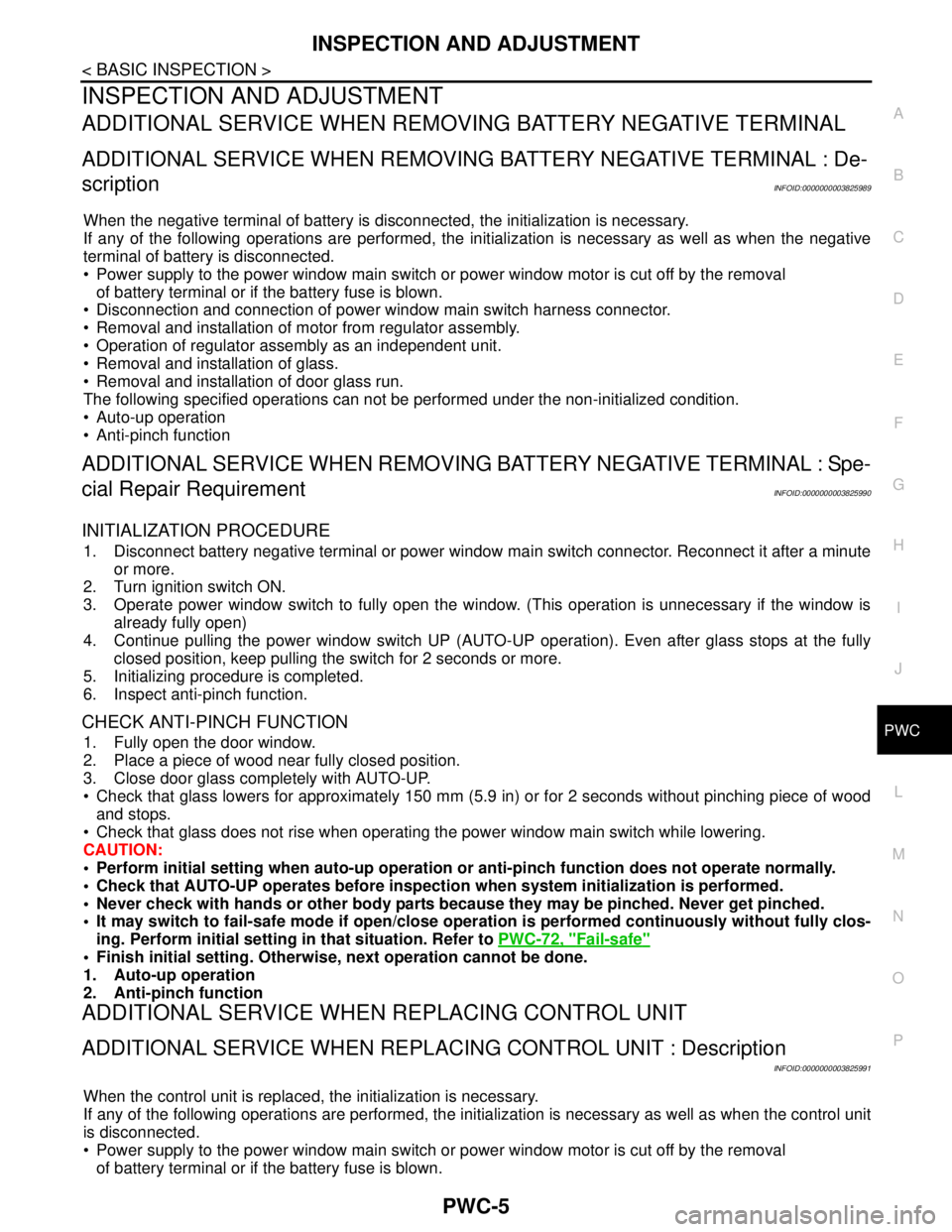
INSPECTION AND ADJUSTMENT
ADDITIONAL SERVICE WHEN REMOVING BATTERY NEGATIVE TERMINAL
ADDITIONAL SERVICE WHEN REMOVING BATTERY NEGATIVE TERMINAL : De-
scription
INFOID:0000000003825989
When the negative terminal of battery is disconnected, the initialization is necessary.
If any of the following operations are performed, the initialization is necessary as well as when the negative
terminal of battery is disconnected.
Power supply to the power window main switch or power window motor is cut off by the removal
of battery terminal or if the battery fuse is blown.
Disconnection and connection of power window main switch harness connector.
Removal and installation of motor from regulator assembly.
Operation of regulator assembly as an independent unit.
Removal and installation of glass.
Removal and installation of door glass run.
The following specified operations can not be performed under the non-initialized condition.
Auto-up operation
Anti-pinch function
ADDITIONAL SERVICE WHEN REMOVING BATTERY NEGATIVE TERMINAL : Spe-
cial Repair Requirement
INFOID:0000000003825990
INITIALIZATION PROCEDURE
1. Disconnect battery negative terminal or power window main switch connector. Reconnect it after a minute
or more.
2. Turn ignition switch ON.
3. Operate power window switch to fully open the window. (This operation is unnecessary if the window is
already fully open)
4. Continue pulling the power window switch UP (AUTO-UP operation). Even after glass stops at the fully
closed position, keep pulling the switch for 2 seconds or more.
5. Initializing procedure is completed.
6. Inspect anti-pinch function.
CHECK ANTI-PINCH FUNCTION
1. Fully open the door window.
2. Place a piece of wood near fully closed position.
3. Close door glass completely with AUTO-UP.
Check that glass lowers for approximately 150 mm (5.9 in) or for 2 seconds without pinching piece of wood
and stops.
Check that glass does not rise when operating the power window main switch while lowering.
CAUTION:
• Perform initial setting when auto-up operation or anti-pinch function does not operate normally.
Check that AUTO-UP operates before inspection when system initialization is performed.
Never check with hands or other body parts because they may be pinched. Never get pinched.
It may switch to fail-safe mode if open/close operation is performed continuously without fully clos-
ing. Perform initial setting in that situation. Refer to PWC-72, "
Fail-safe"
Finish initial setting. Otherwise, next operation cannot be done.
1. Auto-up operation
2. Anti-pinch function
ADDITIONAL SERVICE WHEN REPLACING CONTROL UNIT
ADDITIONAL SERVICE WHEN REPLACING CONTROL UNIT : Description
INFOID:0000000003825991
When the control unit is replaced, the initialization is necessary.
If any of the following operations are performed, the initialization is necessary as well as when the control unit
is disconnected.
Power supply to the power window main switch or power window motor is cut off by the removal
of battery terminal or if the battery fuse is blown.
Page 3636 of 5121

PWC-6
< BASIC INSPECTION >
INSPECTION AND ADJUSTMENT
Disconnection and connection of power window main switch harness connector.
Removal and installation of motor from regulator assembly.
Disconnection and connection of battery negative terminal.
Removal and installation of glass.
Removal and installation of door glass run.
The following specified operations can not be performed under the non-initialized condition.
Auto-up operation
Anti-pinch function
ADDITIONAL SERVICE WHEN REPLACING CONTROL UNIT : Special Repair Re-
quirement
INFOID:0000000003825992
INITIALIZATION PROCEDURE
1. Disconnect battery negative terminal or power window main switch connector. Reconnect it after a minute
or more.
2. Turn ignition switch ON.
3. Operate power window switch to fully open the window. (This operation is unnecessary if the window is
already fully open)
4. Continue pulling the power window switch UP (AUTO-UP operation). Even after glass stops at the fully
closed position, keep pulling the switch for 2 seconds or more.
5. Initializing procedure is completed.
6. Inspect anti-pinch function.
CHECK ANTI-PINCH FUNCTION
1. Fully open the door window.
2. Place a piece of wood near fully closed position.
3. Close door glass completely with AUTO-UP.
Check that glass lowers for approximately 150 mm (5.9 in) or for 2 seconds without pinching piece of wood
and stops.
Check that glass does not rise when operating the power window main switch while lowering.
CAUTION:
Perform initial setting when auto-up operation or anti-pinch function does not operate normally.
Check that AUTO-UP operates before inspection when system initialization is performed.
Never check with hands or other body parts because they may be pinched. Never get pinched.
It may switch to fail-safe mode if open/close operation is performed continuously without fully clos-
ing. Perform initial setting in that situation. Refer to PWC-72, "
Fail-safe"
Finish initial setting. Otherwise, next operation cannot be done.
1. Auto-up operation
2. Anti-pinch function
Page 3637 of 5121
POWER WINDOW SYSTEM
PWC-7
< FUNCTION DIAGNOSIS >
C
D
E
F
G
H
I
J
L
MA
B
PWC
N
O
P
FUNCTION DIAGNOSIS
POWER WINDOW SYSTEM
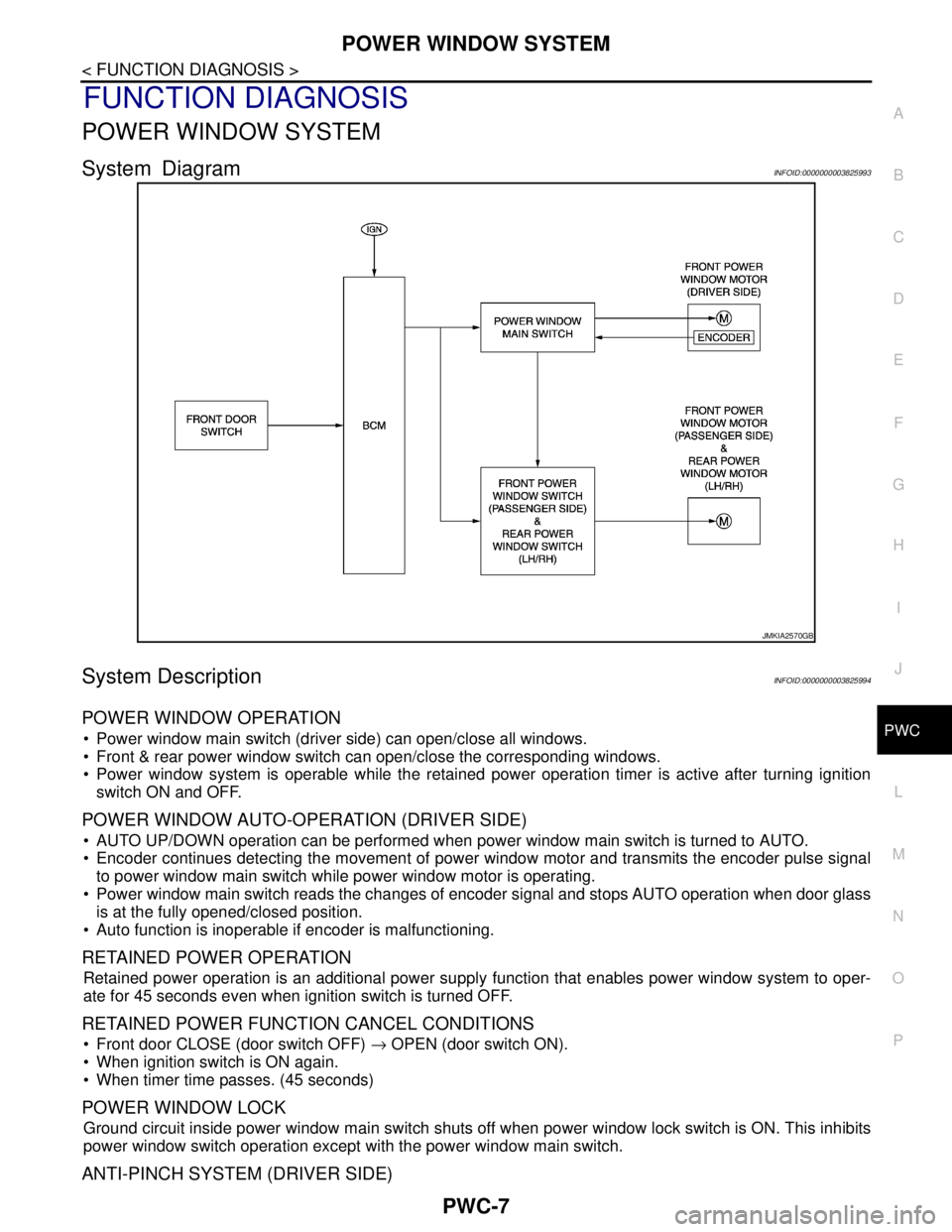
System DiagramINFOID:0000000003825993
System DescriptionINFOID:0000000003825994
POWER WINDOW OPERATION
Power window main switch (driver side) can open/close all windows.
Front & rear power window switch can open/close the corresponding windows.
Power window system is operable while the retained power operation timer is active after turning ignition
switch ON and OFF.
POWER WINDOW AUTO-OPERATION (DRIVER SIDE)
AUTO UP/DOWN operation can be performed when power window main switch is turned to AUTO.
Encoder continues detecting the movement of power window motor and transmits the encoder pulse signal
to power window main switch while power window motor is operating.
Power window main switch reads the changes of encoder signal and stops AUTO operation when door glass
is at the fully opened/closed position.
Auto function is inoperable if encoder is malfunctioning.
RETAINED POWER OPERATION
Retained power operation is an additional power supply function that enables power window system to oper-
ate for 45 seconds even when ignition switch is turned OFF.
RETAINED POWER FUNCTION CANCEL CONDITIONS
Front door CLOSE (door switch OFF) → OPEN (door switch ON).
When ignition switch is ON again.
When timer time passes. (45 seconds)
POWER WINDOW LOCK
Ground circuit inside power window main switch shuts off when power window lock switch is ON. This inhibits
power window switch operation except with the power window main switch.
ANTI-PINCH SYSTEM (DRIVER SIDE)
JMKIA2570GB
Page 3638 of 5121
PWC-8
< FUNCTION DIAGNOSIS >
POWER WINDOW SYSTEM
Pinch foreign material in the door glass during AUTO-UP operation. and it is The anti-pinch function lowers
the door glass 150 mm (5.9 in) or for 2 seconds when detected.
Encoder continues detecting the movement of front power window motor (driver side) and transmits the
encoder pulse signal to power window main switch while front power window motor (driver side) is operating.
Resistance is applied to the front power window motor (driver side) rotation that changes the frequency of
encoder pulse signal if foreign material is trapped in the door glass.
Power window main switch lowers the window glass 150 mm (5.9in) for 2 seconds after it detects encoder
pulse signal frequency change.
OPERATION CONDITION
When front door glass (driver side) AUTO-UP operation is performed (anti-pinch function does not operate just
before the door glass closes and is fully closed)
NOTE:
Depending on environment and driving conditions, if a similar impact or load is applied to the door glass, it
may lower.
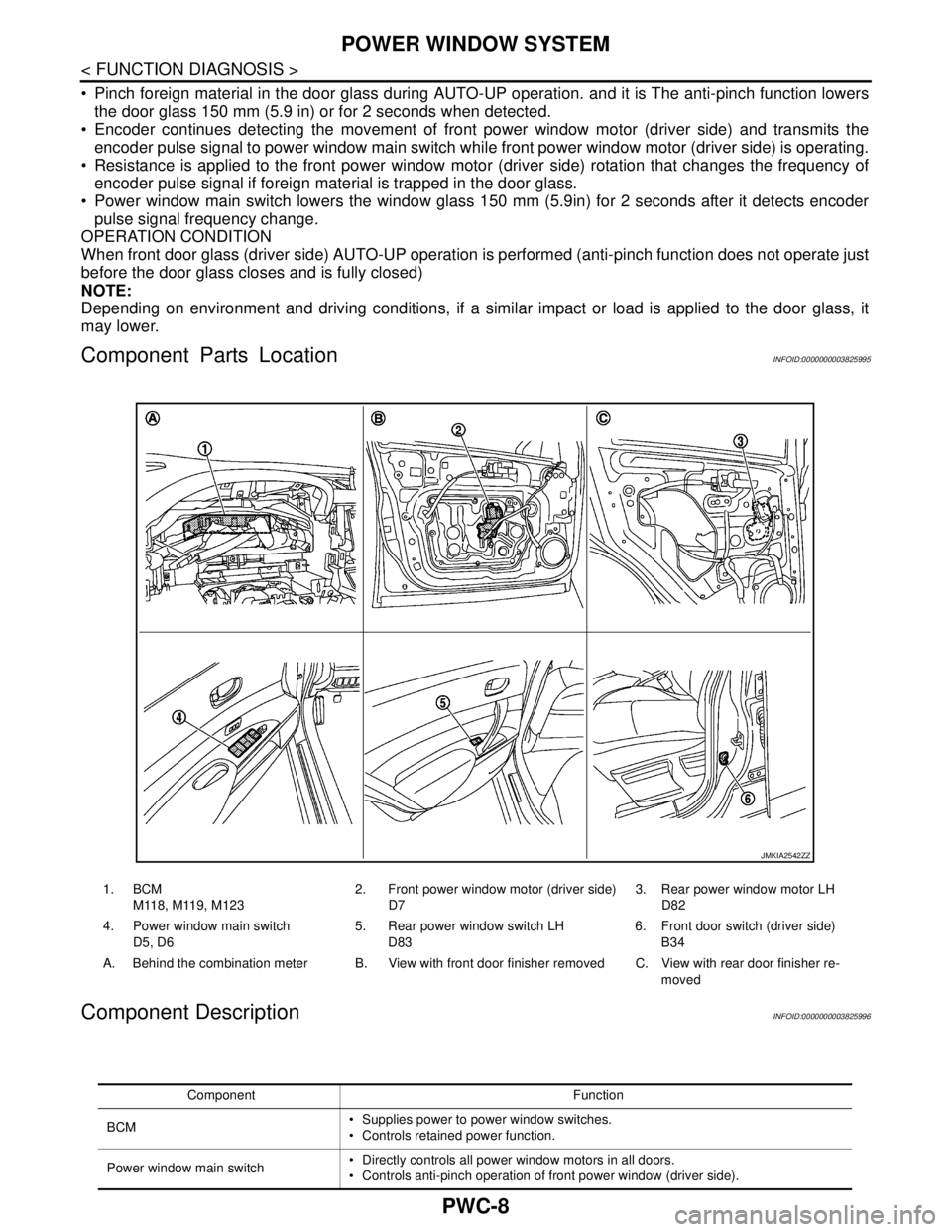
Component Parts LocationINFOID:0000000003825995
Component DescriptionINFOID:0000000003825996
1. BCM
M118, M119, M1232. Front power window motor (driver side)
D73. Rear power window motor LH
D82
4. Power window main switch
D5, D65. Rear power window switch LH
D836. Front door switch (driver side)
B34
A. Behind the combination meter B. View with front door finisher removed C. View with rear door finisher re-
moved
JMKIA2542ZZ
Component Function
BCM Supplies power to power window switches.
Controls retained power function.
Power window main switch Directly controls all power window motors in all doors.
Controls anti-pinch operation of front power window (driver side).
Page 3639 of 5121

POWER WINDOW SYSTEM
PWC-9
< FUNCTION DIAGNOSIS >
C
D
E
F
G
H
I
J
L
MA
B
PWC
N
O
P
Front power window switch (passenger
side)Controls power window motor of front passenger side door.
Rear power window switch (LH & RH) Controls power window motor of rear right and left doors.
Front power window motor (driver side) Integrates the encoder and power window motor.
Starts operating with signals from power window main switch.
Transmits front power window motor (driver side) rotation as a pulse signal to power
window main switch.
Front power window motor (passenger
side)Starts operating with signals from power window main switch & front power window
switch (passenger side).
Rear power window motor (LH & RH)Starts operating with signals from power window main switch & rear power window
switch (LH & RH).
Front door switch (driver side & passen-
ger side)Detects door open/close condition and input to BCM. Component Function