Condition NISSAN TEANA 2008 Service Manual
[x] Cancel search | Manufacturer: NISSAN, Model Year: 2008, Model line: TEANA, Model: NISSAN TEANA 2008Pages: 5121, PDF Size: 69.03 MB
Page 3655 of 5121
POWER WINDOW MOTOR
PWC-25
< COMPONENT DIAGNOSIS >
C
D
E
F
G
H
I
J
L
MA
B
PWC
N
O
P
REAR RH : Diagnosis ProcedureINFOID:0000000003826024
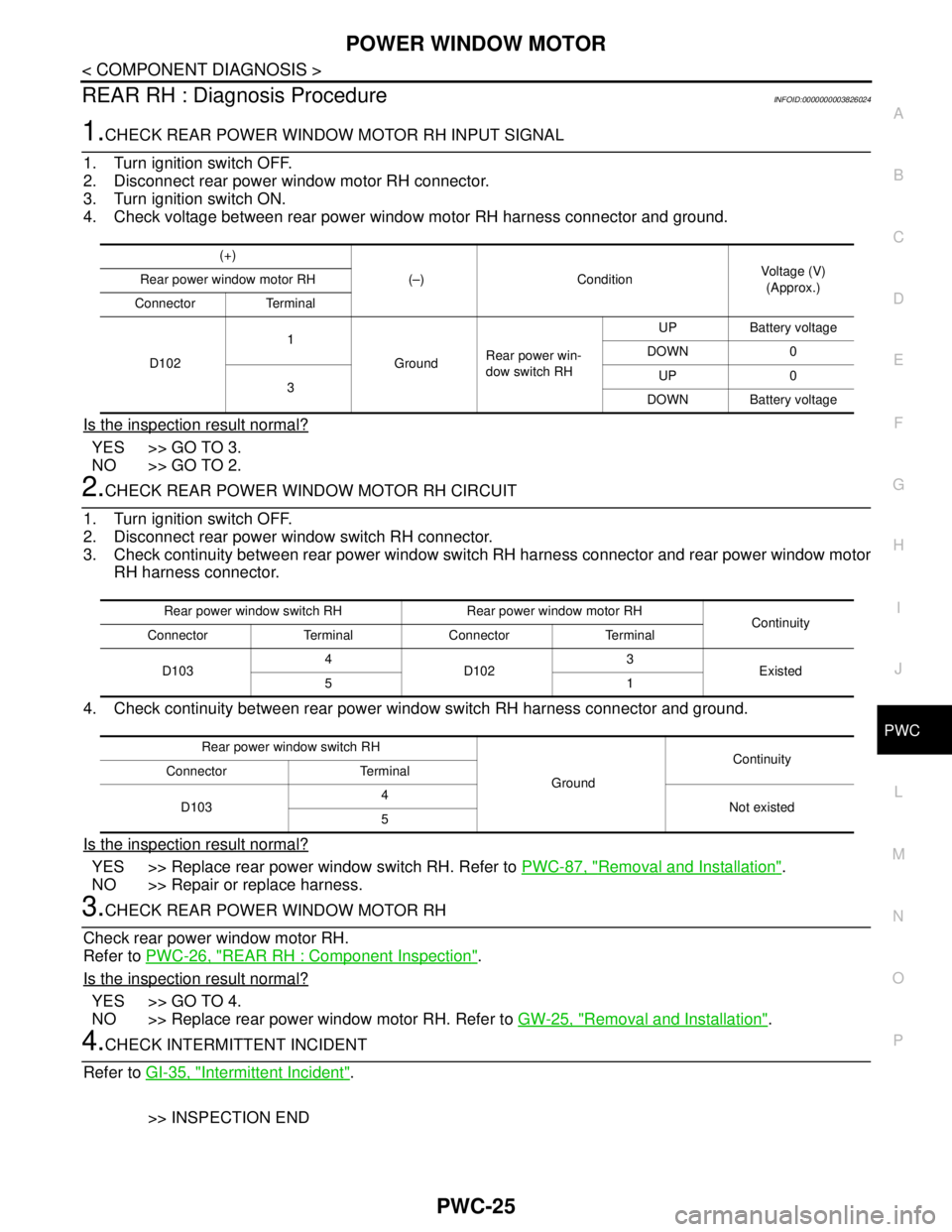
1.CHECK REAR POWER WINDOW MOTOR RH INPUT SIGNAL
1. Turn ignition switch OFF.
2. Disconnect rear power window motor RH connector.
3. Turn ignition switch ON.
4. Check voltage between rear power window motor RH harness connector and ground.
Is the inspection result normal?
YES >> GO TO 3.
NO >> GO TO 2.
2.CHECK REAR POWER WINDOW MOTOR RH CIRCUIT
1. Turn ignition switch OFF.
2. Disconnect rear power window switch RH connector.
3. Check continuity between rear power window switch RH harness connector and rear power window motor
RH harness connector.
4. Check continuity between rear power window switch RH harness connector and ground.
Is the inspection result normal?
YES >> Replace rear power window switch RH. Refer to PWC-87, "Removal and Installation".
NO >> Repair or replace harness.
3.CHECK REAR POWER WINDOW MOTOR RH
Check rear power window motor RH.
Refer to PWC-26, "
REAR RH : Component Inspection".
Is the inspection result normal?
YES >> GO TO 4.
NO >> Replace rear power window motor RH. Refer to GW-25, "
Removal and Installation".
4.CHECK INTERMITTENT INCIDENT
Refer to GI-35, "
Intermittent Incident".
>> INSPECTION END
(+)
(–) ConditionVoltage (V)
(Approx.) Rear power window motor RH
Connector Terminal
D1021
GroundRear power win-
dow switch RH UP Battery voltage
DOWN 0
3UP 0
DOWN Battery voltage
Rear power window switch RHRear power window motor RH
Continuity
Connector Terminal Connector Terminal
D1034
D1023
Existed
51
Rear power window switch RH
GroundContinuity
Connector Terminal
D1034
Not existed
5
Page 3656 of 5121

PWC-26
< COMPONENT DIAGNOSIS >
POWER WINDOW MOTOR
REAR RH : Component Inspection
INFOID:0000000003826025
COMPONENT INSPECTION
1.CHECK REAR POWER WINDOW MOTOR RH
1. Turn ignition switch OFF.
2. Disconnect rear power window motor RH connector.
3. Check motor operation by connecting the battery voltage directly to rear power window motor RH connec-
tor.
Is the inspection result normal?
YES >> INSPECTION END
NO >> Replace rear power window motor RH. Refer to GW-25, "
Removal and Installation".
Rear power window motor RHTe r m i n a l
Motor condition
(+) (–)
D10231DOWN
13UP
Page 3657 of 5121
DOOR SWITCH
PWC-27
< COMPONENT DIAGNOSIS >
C
D
E
F
G
H
I
J
L
MA
B
PWC
N
O
P
DOOR SWITCH
DescriptionINFOID:0000000003857784
Detects door open/closed condition.
Component Function CheckINFOID:0000000003857785
1.CHECK FUNCTION
Check front door switches (“DOOR SW-DR”, “DOOR SW-AS”) in “Data Monitor” mode with CONSULT-III.
Is the inspection result normal?
YES >> Front door switch is OK.
NO >> Refer to PWC-27, "
Diagnosis Procedure".
Diagnosis ProcedureINFOID:0000000003857786
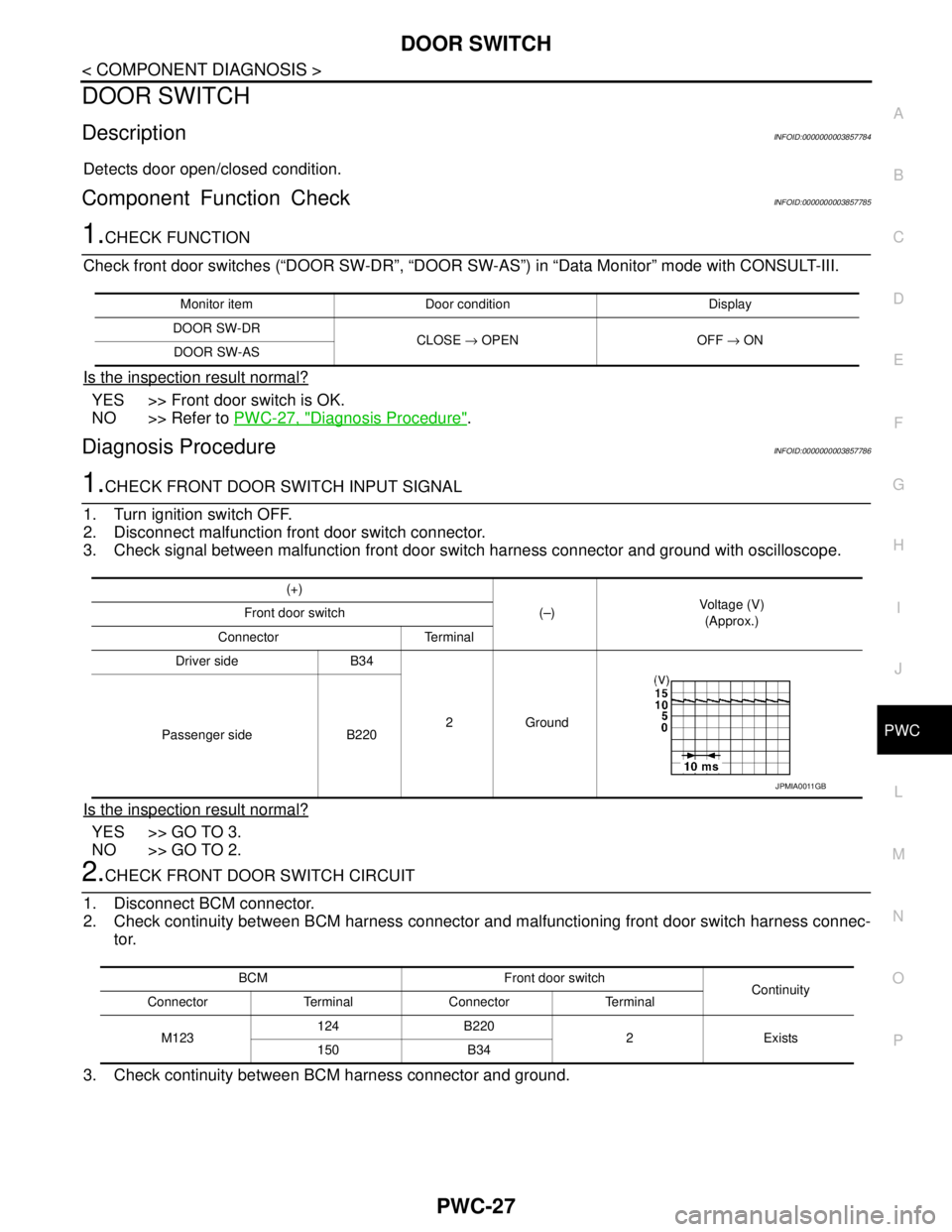
1.CHECK FRONT DOOR SWITCH INPUT SIGNAL
1. Turn ignition switch OFF.
2. Disconnect malfunction front door switch connector.
3. Check signal between malfunction front door switch harness connector and ground with oscilloscope.
Is the inspection result normal?
YES >> GO TO 3.
NO >> GO TO 2.
2.CHECK FRONT DOOR SWITCH CIRCUIT
1. Disconnect BCM connector.
2. Check continuity between BCM harness connector and malfunctioning front door switch harness connec-
tor.
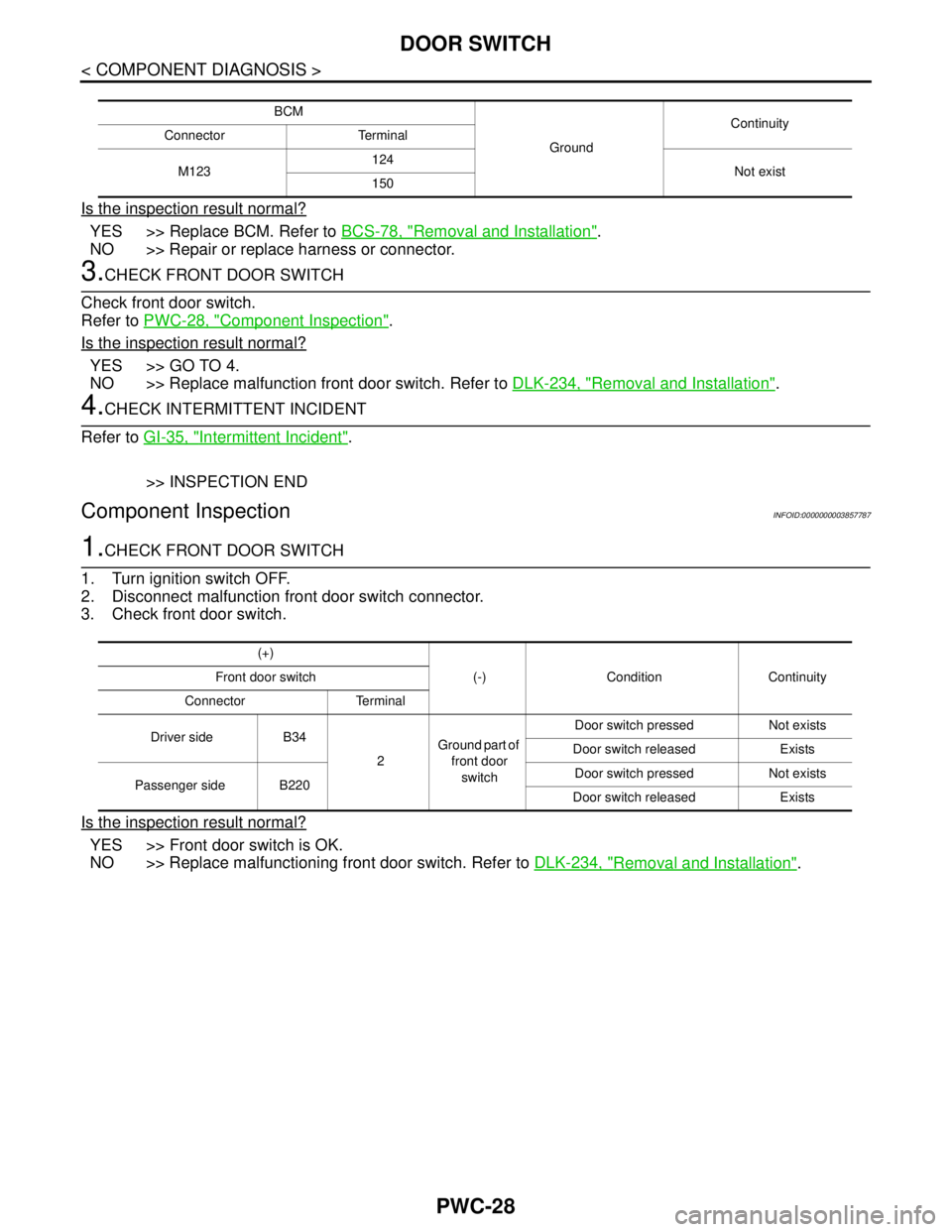
3. Check continuity between BCM harness connector and ground.
Monitor item Door condition Display
DOOR SW-DR
CLOSE → OPEN OFF → ON
DOOR SW-AS
(+)
(–)Voltage (V)
(Approx.) Front door switch
Connector Terminal
Driver side B34
2Ground
Passenger side B220
JPMIA0011GB
BCM Front door switch
Continuity
Connector Terminal Connector Terminal
M123124 B220
2 Exists
150 B34
Page 3658 of 5121
PWC-28
< COMPONENT DIAGNOSIS >
DOOR SWITCH
Is the inspection result normal?
YES >> Replace BCM. Refer to BCS-78, "Removal and Installation".
NO >> Repair or replace harness or connector.
3.CHECK FRONT DOOR SWITCH
Check front door switch.
Refer to PWC-28, "
Component Inspection".
Is the inspection result normal?
YES >> GO TO 4.
NO >> Replace malfunction front door switch. Refer to DLK-234, "
Removal and Installation".
4.CHECK INTERMITTENT INCIDENT
Refer to GI-35, "
Intermittent Incident".
>> INSPECTION END
Component InspectionINFOID:0000000003857787
1.CHECK FRONT DOOR SWITCH
1. Turn ignition switch OFF.
2. Disconnect malfunction front door switch connector.
3. Check front door switch.
Is the inspection result normal?
YES >> Front door switch is OK.
NO >> Replace malfunctioning front door switch. Refer to DLK-234, "
Removal and Installation".
BCM
GroundContinuity
Connector Terminal
M123124
Not exist
150
(+)
(-) Condition Continuity Front door switch
Connector Terminal
Driver side B34
2Ground part of
front door
switch Door switch pressed Not exists
Door switch released Exists
Passenger side B220Door switch pressed Not exists
Door switch released Exists
Page 3659 of 5121
ENCODER CIRCUIT
PWC-29
< COMPONENT DIAGNOSIS >
C
D
E
F
G
H
I
J
L
MA
B
PWC
N
O
P
ENCODER CIRCUIT
DescriptionINFOID:0000000003826026
Detects condition of the front power window motor (driver side) operation and transmits to power window main
switch as pulse signal.
Component Function CheckINFOID:0000000003826027
1.CHECK ENCODER OPERATION
Check front driver side door glass and perform AUTO open/close operation normally via power window main
switch.
Is the inspection result normal?
YES >> Encoder operation is OK.
NO >> Refer to PWC-29, "
Diagnosis Procedure"
Diagnosis ProcedureINFOID:0000000003826028
Encoder Circuit Check
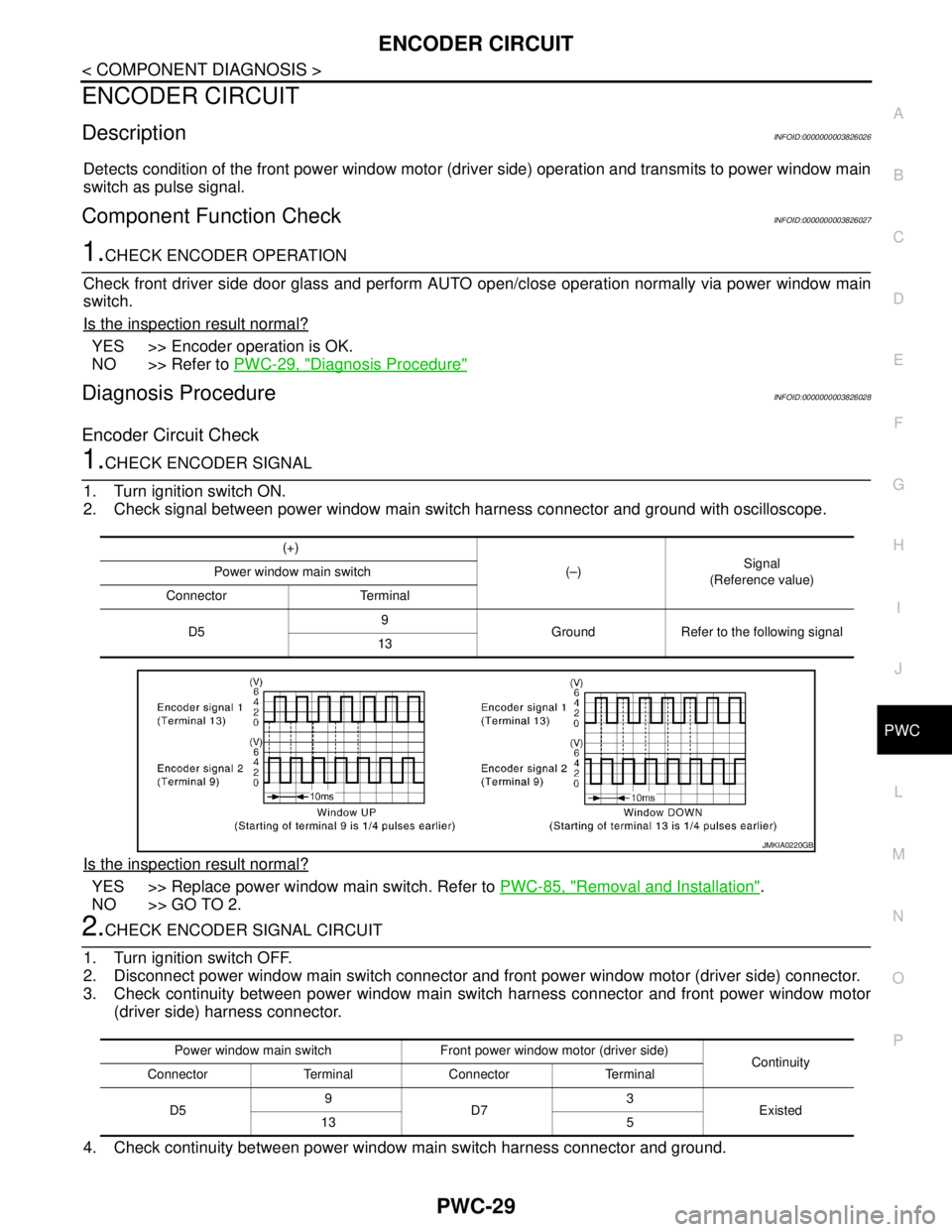
1.CHECK ENCODER SIGNAL
1. Turn ignition switch ON.
2. Check signal between power window main switch harness connector and ground with oscilloscope.
Is the inspection result normal?
YES >> Replace power window main switch. Refer to PWC-85, "Removal and Installation".
NO >> GO TO 2.
2.CHECK ENCODER SIGNAL CIRCUIT
1. Turn ignition switch OFF.
2. Disconnect power window main switch connector and front power window motor (driver side) connector.
3. Check continuity between power window main switch harness connector and front power window motor
(driver side) harness connector.
4. Check continuity between power window main switch harness connector and ground.
(+)
(–)Signal
(Reference value) Power window main switch
Connector Terminal
D59
Ground Refer to the following signal
13
JMKIA0220GB
Power window main switch Front power window motor (driver side)
Continuity
Connector Terminal Connector Terminal
D59
D73
Existed
13 5
Page 3662 of 5121

PWC-32
< ECU DIAGNOSIS >
BCM (BODY CONTROL MODULE)
ECU DIAGNOSIS
BCM (BODY CONTROL MODULE)
Reference ValueINFOID:0000000003888235
VALUES ON THE DIAGNOSIS TOOL
CONSULT-III MONITOR ITEM
Monitor Item Condition Value/Status
FR WIPER HIOther than front wiper switch HI Off
Front wiper switch HI On
FR WIPER LOWOther than front wiper switch LO Off
Front wiper switch LO On
FR WASHER SWFront washer switch OFF Off
Front washer switch ON On
FR WIPER INTOther than front wiper switch INT Off
Front wiper switch INT On
FR WIPER STOPFront wiper is not in STOP position Off
Front wiper is in STOP position On
INT VOLUME Wiper intermittent dial is in a dial position 1 - 7 Wiper intermittent dial position
TURN SIGNAL ROther than turn signal switch RH Off
Turn signal switch RH On
TURN SIGNAL LOther than turn signal switch LH Off
Turn signal switch LH On
TAIL LAMP SWOther than lighting switch 1ST and 2ND Off
Lighting switch 1ST or 2ND On
HI BEAM SWOther than lighting switch HI Off
Lighting switch HI On
HEAD LAMP SW 1Other than lighting switch 2ND Off
Lighting switch 2ND On
HEAD LAMP SW 2Other than lighting switch 2ND Off
Lighting switch 2ND On
PASSING SWOther than lighting switch PASS Off
Lighting switch PASS On
AUTO LIGHT SWOther than lighting switch AUTO Off
Lighting switch AUTO On
FR FOG SWFront fog lamp switch OFF Off
Front fog lamp switch ON On
RR FOG SWRear fog lamp switch OFF Off
Rear fog lamp switch ON On
DOOR SW-DRDriver door closed Off
Driver door opened On
DOOR SW-ASPassenger door closed Off
Passenger door opened On
DOOR SW-RRRear RH door closed Off
Rear RH door opened On
Page 3663 of 5121

BCM (BODY CONTROL MODULE)
PWC-33
< ECU DIAGNOSIS >
C
D
E
F
G
H
I
J
L
MA
B
PWC
N
O
P
DOOR SW-RLRear LH door closed Off
Rear LH door opened On
DOOR SW-BKNOTE:
The item is indicated, but not monitored. Off
CDL LOCK SWOther than power door lock switch LOCK Off
Power door lock switch LOCK On
CDL UNLOCK SWOther than power door lock switch UNLOCK Off
Power door lock switch UNLOCK On
KEY CYL LK-SWNOTE:
The item is indicated, but not monitored. Off
KEY CYL UN-SWNOTE:
The item is indicated, but not monitored. Off
KEY CYL SW-TRNOTE:
The item is indicated, but not monitored. Off
HAZARD SWHazard switch is OFF Off
Hazard switch is ON On
REAR DEF SW
NOTE:
At model with BOSE au-
dio system this item is in-
dicated, but is not
monitored.Rear window defogger switch is OFF Off
Rear window defogger switch is ON On
TR CANCEL SWNOTE:
The item is indicated, but not monitored. Off
TR/BD OPEN SWTrunk lid opener switch OFF Off
While the trunk lid opener switch is turned ON On
TRNK/HAT MNTRTrunk lid closed Off
Trunk lid opened On
RKE-LOCKLOCK button of the key is not pressed Off
LOCK button of the key is pressed On
RKE-UNLOCKUNLOCK button of the key is not pressed Off
UNLOCK button of the key is pressed On
RKE-TR/BDTRUNK OPEN button of the key is not pressed Off
TRUNK OPEN button of the key is pressed On
RKE-PANICNOTE:
The item is indicated, but not monitored. Off
RKE-P/W OPENNOTE:
The item is indicated, but not monitored. Off
RKE-MODE CHGLOCK/UNLOCK button of the key is not pressed and held simulta-
neouslyOff
LOCK/UNLOCK button of the key is pressed and held simulta-
neouslyOn
OPTICAL SENSORBright outside of the vehicle Close to 5 V
Dark outside of the vehicle Close to 0 V
REQ SW -DRDriver door request switch is not pressed Off
Driver door request switch is pressed On
REQ SW -ASPassenger door request switch is not pressed Off
Passenger door request switch is pressed On Monitor Item Condition Value/Status
Page 3664 of 5121

PWC-34
< ECU DIAGNOSIS >
BCM (BODY CONTROL MODULE)
REQ SW -RRNOTE:
The item is indicated, but not monitored. Off
REQ SW -RRNOTE:
The item is indicated, but not monitored. Off
REQ SW -BD/TRTrunk lid opener request switch is not pressed Off
Trunk lid opener request switch is pressed On
PUSH SWPush-button ignition switch (push switch) is not pressed Off
Push-button ignition switch (push switch) is pressed On
IGN RLY2 -F/BIgnition switch in OFF or ACC position Off
Ignition switch in ON position On
CLUCH SWNOTE:
The item is indicated, but not monitored. Off
BRAKE SW 1The brake pedal is not depressed On
The brake pedal is depressed Off
DETE/CANCL SWSelector lever in P position Off
Selector lever in any position other than P On
SFT PN/N SWSelector lever in any position other than P and N Off
Selector lever in P or N position On
S/L -LOCKSteering is locked Off
Steering is unlocked On
S/L -UNLOCKSteering is unlocked Off
Steering is locked On
S/L RELAY-F/BIgnition switch in OFF or ACC position Off
Ignition switch in ON position On
UNLK SEN -DRDriver door is unlocked Off
Driver door is locked On
PUSH SW -IPDMPush-button ignition switch (push-switch) is not pressed Off
Push-button ignition switch (push-switch) is pressed On
IGN RLY1 -F/BIgnition switch in OFF or ACC position Off
Ignition switch in ON position On
DETE SW -IPDMSelector lever in P position Off
Selector lever in any position other than P On
SFT PN -IPDMSelector lever in any position other than P and N Off
Selector lever in P or N position On
SFT P -METSelector lever in any position other than P Off
Selector lever in P position On
SFT N -METSelector lever in any position other than N Off
Selector lever in N position On
ENGINE STATEEngine stopped Stop
While the engine stalls Stall
At engine cranking Crank
Engine running Run
S/L LOCK-IPDMSteering is locked Off
Steering is unlocked On Monitor Item Condition Value/Status
Page 3665 of 5121

BCM (BODY CONTROL MODULE)
PWC-35
< ECU DIAGNOSIS >
C
D
E
F
G
H
I
J
L
MA
B
PWC
N
O
P
S/L UNLK-IPDMSteering is unlocked Off
Steering is locked On
S/L RELAY-REQIgnition switch in OFF or ACC position Off
Ignition switch in ON position On
VEH SPEED 1 While driving Equivalent to speedometer reading
VEH SPEED 2 While driving Equivalent to speedometer reading
DOOR STAT-DRDriver door is locked LOCK
Wait with selective UNLOCK operation (5 seconds) READY
Driver door is unlocked UNLOCK
DOOR STAT-ASPassenger door is locked LOCK
Wait with selective UNLOCK operation (5 seconds) READY
Passenger door is unlocked UNLOCK
ID OK FLAGIgnition switch in ACC or ON position Reset
Ignition switch in OFF position Set
PRMT ENG STRTThe engine start is prohibited Reset
The engine start is permitted Set
PRMT RKE STRTNOTE:
The item is indicated, but not monitored. Reset
KEY SW -SLOTThe key is not inserted into key slot Off
The key is inserted into key slot On
RKE OPE COUN1 During the operation of the key Operation frequency of the key
RKE OPE COUN2NOTE:
The item is indicated, but not monitored. —
CONFRM ID ALLThe key ID that the key slot receives does not accord with any key
ID registered to BCM.Ye t
The key ID that the key slot receives accords with any key ID regis-
tered to BCM.Done
CONFIRM ID4The key ID that the key slot receives does not accord with the fourth
key ID registered to BCM.Ye t
The key ID that the key slot receives accords with the fourth key ID
registered to BCM.Done
CONFIRM ID3The key ID that the key slot receives does not accord with the third
key ID registered to BCM.Ye t
The key ID that the key slot receives accords with the third key ID
registered to BCM.Done
CONFIRM ID2The key ID that the key slot receives does not accord with the sec-
ond key ID registered to BCM.Ye t
The key ID that the key slot receives accords with the second key
ID registered to BCM.Done
CONFIRM ID1The key ID that the key slot receives does not accord with the first
key ID registered to BCM.Ye t
The key ID that the key slot receives accords with the first key ID
registered to BCM.Done
TP 4The ID of fourth key is not registered to BCM Yet
The ID of fourth key is registered to BCM Done
TP 3The ID of third key is not registered to BCM Yet
The ID of third key is registered to BCM Done Monitor Item Condition Value/Status
Page 3666 of 5121
PWC-36
< ECU DIAGNOSIS >
BCM (BODY CONTROL MODULE)
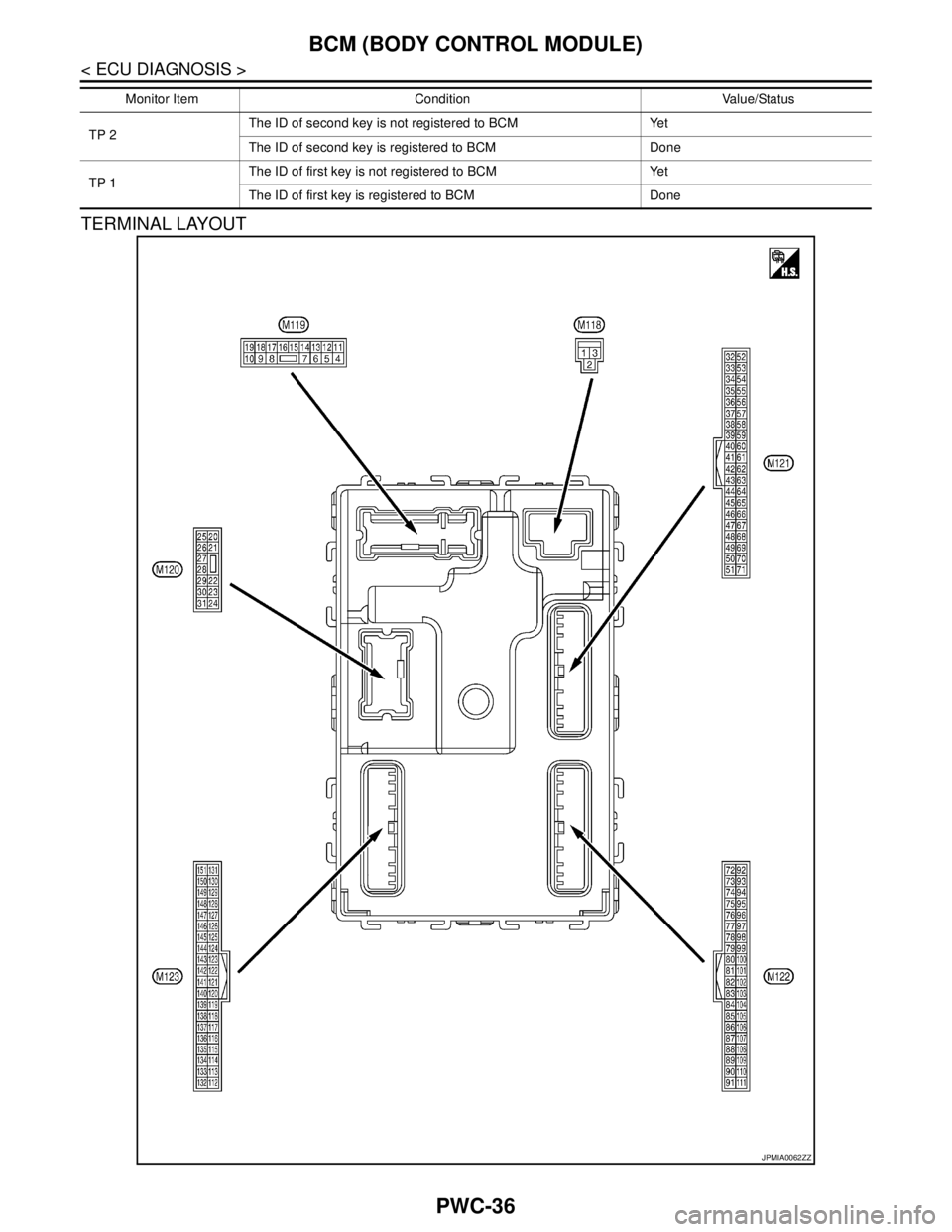
TERMINAL LAYOUT
TP 2The ID of second key is not registered to BCM Yet
The ID of second key is registered to BCM Done
TP 1The ID of first key is not registered to BCM Yet
The ID of first key is registered to BCM Done Monitor Item Condition Value/Status
JPMIA0062ZZ