fuse NISSAN TEANA 2008 Service Manual
[x] Cancel search | Manufacturer: NISSAN, Model Year: 2008, Model line: TEANA, Model: NISSAN TEANA 2008Pages: 5121, PDF Size: 69.03 MB
Page 2383 of 5121
![NISSAN TEANA 2008 Service Manual EXL-354
< ON-VEHICLE REPAIR >[HALOGEN TYPE]
REAR COMBINATION LAMP
REAR COMBINATION LAMP
Exploded ViewINFOID:0000000003894373
REMOVAL
DISASSEMBLY
Removal and InstallationINFOID:0000000003894374
CAUTION](/img/5/57391/w960_57391-2382.png "NISSAN TEANA 2008 Service Manual EXL-354
< ON-VEHICLE REPAIR >[HALOGEN TYPE]
REAR COMBINATION LAMP
REAR COMBINATION LAMP
Exploded ViewINFOID:0000000003894373
REMOVAL
DISASSEMBLY
Removal and InstallationINFOID:0000000003894374
CAUTION")
EXL-354
< ON-VEHICLE REPAIR >[HALOGEN TYPE]
REAR COMBINATION LAMP
REAR COMBINATION LAMP
Exploded ViewINFOID:0000000003894373
REMOVAL
DISASSEMBLY
Removal and InstallationINFOID:0000000003894374
CAUTION:
Disconnect the battery negative terminal or remove the fuse.
REMOVAL
1. Remove the rear combination lamp finisher.
2. Remove the rear combination lamp mounting bolts.
3. Pull the rear combination lamp toward outside of the vehicle. And then remove the rear combination lamp.
4. Disconnect the rear combination lamp connector.
INSTALLATION
Install in the reverse order of removal.
1. Rear combination lamp 2. Rear combination lamp finisher
JPLIA1097ZZ
1. Back-up lamp bulb 2. Back-up lamp bulb socket 3. Rear turn signal lamp bulb socket
4. Rear turn signal lamp bulb
JPLIA1098ZZ
Page 2384 of 5121
![NISSAN TEANA 2008 Service Manual REAR COMBINATION LAMP
EXL-355
< ON-VEHICLE REPAIR >[HALOGEN TYPE]
C
D
E
F
G
H
I
J
K
MA
B
EXL
N
O
P
ReplacementINFOID:0000000003894375
CAUTION:
Disconnect the battery negative terminal or remove the](/img/5/57391/w960_57391-2383.png "NISSAN TEANA 2008 Service Manual REAR COMBINATION LAMP
EXL-355
< ON-VEHICLE REPAIR >[HALOGEN TYPE]
C
D
E
F
G
H
I
J
K
MA
B
EXL
N
O
P
ReplacementINFOID:0000000003894375
CAUTION:
Disconnect the battery negative terminal or remove the")
REAR COMBINATION LAMP
EXL-355
< ON-VEHICLE REPAIR >[HALOGEN TYPE]
C
D
E
F
G
H
I
J
K
MA
B
EXL
N
O
P
ReplacementINFOID:0000000003894375
CAUTION:
Disconnect the battery negative terminal or remove the fuse.
Never touch the glass of bulb directly by hand. Keep grease and other oily matters away from it.
Never touch bulb by hand while it is lit or right after being turned off.
Never leave bulb out of lamp reflector for a long time because dust, moisture smoke, etc. may affect
the performance of lamp. When replacing bulb, be sure to replace it with new one.
STOP/TAIL LAMP
Replacement integral with rear combination lamp. Refer to EXL-354, "Exploded View".
REAR TURN SIGNAL LAMP BULB
1. Remove the rear combination lamp. Refer to EXL-354, "Exploded View".
2. Rotate the rear turn signal lamp bulb socket counterclockwise, and unlock it.
3. Remove the bulb from the rear turn signal lamp bulb socket.
BACK-UP LAMP BULB
1. Remove the rear combination lamp. Refer to EXL-354, "Exploded View".
2. Rotate the back-up lamp bulb socket counterclockwise, and unlock it.
3. Remove the bulb from the back-up lamp bulb socket.
Page 2385 of 5121
![NISSAN TEANA 2008 Service Manual EXL-356
< ON-VEHICLE REPAIR >[HALOGEN TYPE]
HIGH-MOUNTED STOP LAMP
HIGH-MOUNTED STOP LAMP
Exploded ViewINFOID:0000000003894376
Removal and InstallationINFOID:0000000003894377
CAUTION:
Disconnect batte](/img/5/57391/w960_57391-2384.png "NISSAN TEANA 2008 Service Manual EXL-356
< ON-VEHICLE REPAIR >[HALOGEN TYPE]
HIGH-MOUNTED STOP LAMP
HIGH-MOUNTED STOP LAMP
Exploded ViewINFOID:0000000003894376
Removal and InstallationINFOID:0000000003894377
CAUTION:
Disconnect batte")
EXL-356
< ON-VEHICLE REPAIR >[HALOGEN TYPE]
HIGH-MOUNTED STOP LAMP
HIGH-MOUNTED STOP LAMP
Exploded ViewINFOID:0000000003894376
Removal and InstallationINFOID:0000000003894377
CAUTION:
Disconnect battery negative terminal or remove the fuse.
REMOVAL
1. Remove the rear parcel shelf finisher. Refer to INT-43, "Exploded View".
2. Remove the screw. And then disconnect the connector.
3. Remove the high-mounted stop lamp.
INSTALLATION
Install in the reverse order of removal.
1. High-mounted stop lamp 2. Rear parcel shelf finisher
JPLIA1099ZZ
Page 2386 of 5121
![NISSAN TEANA 2008 Service Manual REAR FOG LAMP
EXL-357
< ON-VEHICLE REPAIR >[HALOGEN TYPE]
C
D
E
F
G
H
I
J
K
MA
B
EXL
N
O
P
REAR FOG LAMP
Exploded ViewINFOID:0000000003894378
Removal and InstallationINFOID:0000000003894379
CAUTION:
D](/img/5/57391/w960_57391-2385.png "NISSAN TEANA 2008 Service Manual REAR FOG LAMP
EXL-357
< ON-VEHICLE REPAIR >[HALOGEN TYPE]
C
D
E
F
G
H
I
J
K
MA
B
EXL
N
O
P
REAR FOG LAMP
Exploded ViewINFOID:0000000003894378
Removal and InstallationINFOID:0000000003894379
CAUTION:
D")
REAR FOG LAMP
EXL-357
< ON-VEHICLE REPAIR >[HALOGEN TYPE]
C
D
E
F
G
H
I
J
K
MA
B
EXL
N
O
P
REAR FOG LAMP
Exploded ViewINFOID:0000000003894378
Removal and InstallationINFOID:0000000003894379
CAUTION:
Disconnect battery negative terminal or remove the fuse.
REMOVAL
1. Disconnect the rear fog lamp connector.
2. Remove the nuts. And then remove the rear fog lamp rim.
3. Remove the screw. And then remove the rear fog lamp from the rear fog lamp rim.
INSTALLATION
Installation is the reverse order of removal.
ReplacementINFOID:0000000003894380
CAUTION:
Disconnect the battery negative terminal or remove the fuse.
Never touch the glass of bulb directly by hand. Keep grease and other oily matters away from it.
Never touch bulb by hand while it is lit or right after being turned off.
Never leave bulb out of lamp reflector for a long time because dust, moisture smoke, etc. may affect
the performance of lamp. When replacing bulb, be sure to replace it with new one.
REAR FOG LAMP BULB
1. Turn the bulb socket (1) counterclockwise and unlock it.
2. Remove the bulb (2) from the rear fog lamp bulb socket.
1. Rear fog lamp 2. Rear fog lamp bracket 3. Rear fog lamp finisher
JPLIA1102ZZ
JPLIA1103ZZ
Page 2387 of 5121
![NISSAN TEANA 2008 Service Manual EXL-358
< ON-VEHICLE REPAIR >[HALOGEN TYPE]
LICENSE PLATE LAMP
LICENSE PLATE LAMP
Exploded ViewINFOID:0000000003894381
Removal and InstallationINFOID:0000000003894382
CAUTION:
Disconnect the battery n](/img/5/57391/w960_57391-2386.png "NISSAN TEANA 2008 Service Manual EXL-358
< ON-VEHICLE REPAIR >[HALOGEN TYPE]
LICENSE PLATE LAMP
LICENSE PLATE LAMP
Exploded ViewINFOID:0000000003894381
Removal and InstallationINFOID:0000000003894382
CAUTION:
Disconnect the battery n")
EXL-358
< ON-VEHICLE REPAIR >[HALOGEN TYPE]
LICENSE PLATE LAMP
LICENSE PLATE LAMP
Exploded ViewINFOID:0000000003894381
Removal and InstallationINFOID:0000000003894382
CAUTION:
Disconnect the battery negative terminal or remove the fuse.
REMOVAL
1. Remove the trunk lid finisher inner. Refer to INT-59, "Exploded View".
2. Remove the trunk lid finisher outer. Refer to INT-59, "
Exploded View".
3. Remove the license plate lamp while pushing a resin clip.
4. Disconnect the license plate lamp connector.
INSTALLATION
Install in the reverse order of removal.
ReplacementINFOID:0000000003894383
CAUTION:
Disconnect the battery negative terminal or remove the fuse.
Never touch the glass of bulb directly by hand. Keep grease and other oily matters away from it.
Never touch bulb by hand while it is lit or right after being turned off.
Never leave bulb out of lamp reflector for a long time because dust, moisture smoke, etc. may affect
the performance of lamp. When replacing bulb, be sure to replace it with new one.
LICENSE PLATE LAMP BULB
1. Remove the trunk lid finisher inner. Refer to INT-59, "Exploded View".
1. License plate lamp
A. Resin clip
JPLIA1100ZZ
Page 2504 of 5121
HOW TO READ WIRING DIAGRAMS
GI-11
< HOW TO USE THIS MANUAL >
C
D
E
F
G
H
I
J
K
L
MB
GI
N
O
P
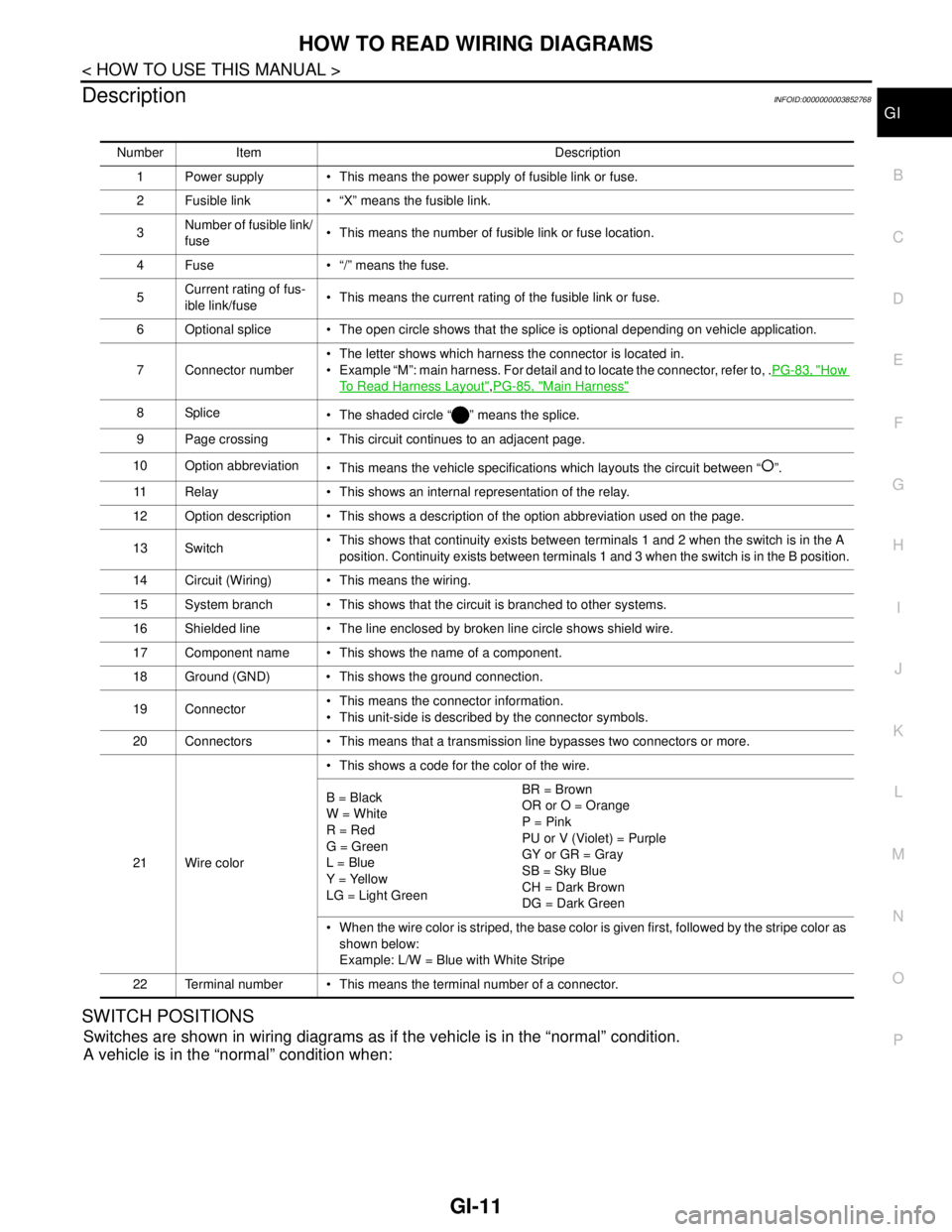
DescriptionINFOID:0000000003852768
SWITCH POSITIONS
Switches are shown in wiring diagrams as if the vehicle is in the “normal” condition.
A vehicle is in the “normal” condition when:
Number Item Description
1 Power supply This means the power supply of fusible link or fuse.
2 Fusible link “X” means the fusible link.
3Number of fusible link/
fuse This means the number of fusible link or fuse location.
4 Fuse “/” means the fuse.
5Current rating of fus-
ible link/fuse This means the current rating of the fusible link or fuse.
6 Optional splice The open circle shows that the splice is optional depending on vehicle application.
7 Connector number The letter shows which harness the connector is located in.
Example “M”: main harness. For detail and to locate the connector, refer to, .PG-83, "
How
To Read Harness Layout",PG-85, "Main Harness"
8Splice
The shaded circle “ ” means the splice.
9 Page crossing This circuit continues to an adjacent page.
10 Option abbreviation
This means the vehicle specifications which layouts the circuit between “ ”.
11 Relay This shows an internal representation of the relay.
12 Option description This shows a description of the option abbreviation used on the page.
13 Switch This shows that continuity exists between terminals 1 and 2 when the switch is in the A
position. Continuity exists between terminals 1 and 3 when the switch is in the B position.
14 Circuit (Wiring) This means the wiring.
15 System branch This shows that the circuit is branched to other systems.
16 Shielded line The line enclosed by broken line circle shows shield wire.
17 Component name This shows the name of a component.
18 Ground (GND) This shows the ground connection.
19 Connector This means the connector information.
This unit-side is described by the connector symbols.
20 Connectors This means that a transmission line bypasses two connectors or more.
21 Wire color This shows a code for the color of the wire.
B = Black
W = White
R = Red
G = Green
L = Blue
Y = Yellow
LG = Light GreenBR = Brown
OR or O = Orange
P = Pink
PU or V (Violet) = Purple
GY or GR = Gray
SB = Sky Blue
CH = Dark Brown
DG = Dark Green
When the wire color is striped, the base color is given first, followed by the stripe color as
shown below:
Example: L/W = Blue with White Stripe
22 Terminal number This means the terminal number of a connector.
Page 2517 of 5121
GI-24
< PRECAUTION >
PRECAUTIONS
PRECAUTION
PRECAUTIONS
DescriptionINFOID:0000000003852776
Observe the following precautions to ensure safe and proper servicing. These precautions are not
described in each individual section.
Precaution for Supplemental Restraint System (SRS) "AIR BAG" and "SEAT BELT
PRE-TENSIONER"
INFOID:0000000003852830
The Supplemental Restraint System such as “AIR BAG” and “SEAT BELT PRE-TENSIONER”, used along
with a front seat belt, helps to reduce the risk or severity of injury to the driver and front passenger for certain
types of collision. Information necessary to service the system safely is included in the “SRS AIRBAG” and
“SEAT BELT” of this Service Manual.
WARNING:
To avoid rendering the SRS inoperative, which could increase the risk of personal injury or death in
the event of a collision which would result in air bag inflation, all maintenance must be performed by
an authorized NISSAN/INFINITI dealer.
Improper maintenance, including incorrect removal and installation of the SRS, can lead to personal
injury caused by unintentional activation of the system. For removal of Spiral Cable and Air Bag
Module, see the “SRS AIRBAG”.
Never use electrical test equipment on any circuit related to the SRS unless instructed to in this Ser-
vice Manual. SRS wiring harnesses can be identified by yellow and/or orange harnesses or harness
connectors.
Precautions For Xenon Headlamp ServiceINFOID:0000000003852778
WARNING:
Comply with the following warnings to prevent any serious accident.
Disconnect the battery cable (negative terminal) or the power supply fuse before installing, remov-
ing, or touching the xenon headlamp (bulb included). The xenon headlamp contains high-voltage
generated parts.
Never work with wet hands.
Check the xenon headlamp ON-OFF status after assembling it to the vehicle. Never turn the xenon
headlamp ON in other conditions. Connect the power supply to the vehicle-side connector.
(Turning it ON outside the lamp case may cause fire or visual impairments.)
Never touch the bulb glass immediately after turning it OFF. It is extremely hot.
CAUTION:
Comply with the following cautions to prevent any error and malfunction.
Install the xenon bulb securely. (Insufficient bulb socket installation may melt the bulb, the connec-
tor, the housing, etc. by high-voltage leakage or corona discharge.)
Never perform HID circuit inspection with a tester.
Never touch the xenon bulb glass with hands. Never put oil and grease on it.
Dispose of the used xenon bulb after packing it in thick vinyl without breaking it.
Never wipe out dirt and contamination with organic solvent (thinner, gasoline, etc.).
Precaution Necessary for Steering Wheel Rotation after Battery Disconnect
INFOID:0000000003852856
NOTE:
Before removing and installing any control units, first turn the push-button ignition switch to the LOCK posi-
tion, then disconnect both battery cables.
After finishing work, confirm that all control unit connectors are connected properly, then re-connect both
battery cables.
Always use CONSULT-III to perform self-diagnosis as a part of each function inspection after finishing work.
If a DTC is detected, perform trouble diagnosis according to self-diagnosis results.
This vehicle is equipped with a push-button ignition switch and a steering lock unit.
If the battery is disconnected or discharged, the steering wheel will lock and cannot be turned.
Page 2531 of 5121
GI-38
< BASIC INSPECTION >
SERVICE INFORMATION FOR ELECTRICAL INCIDENT
TESTING FOR “OPENS” IN THE CIRCUIT
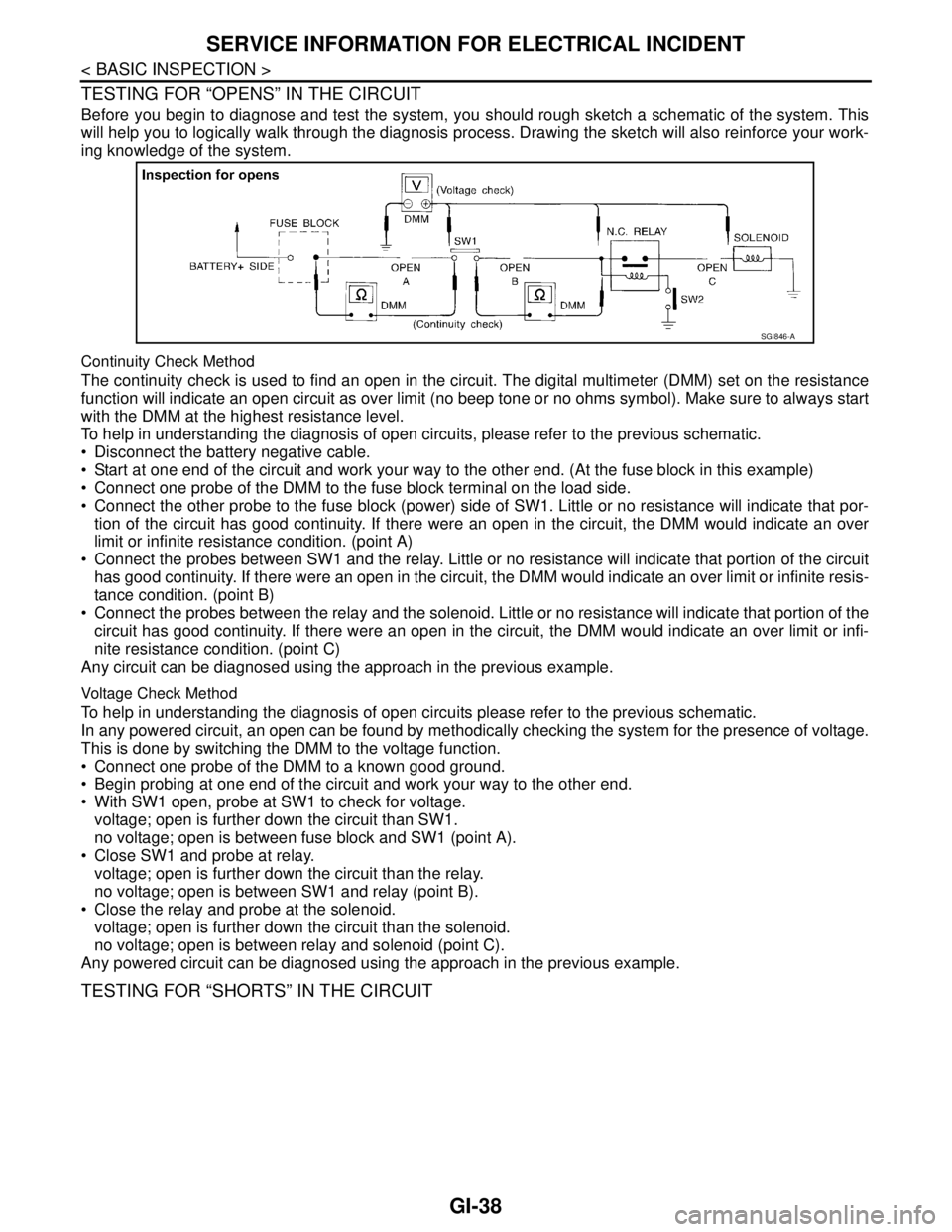
Before you begin to diagnose and test the system, you should rough sketch a schematic of the system. This
will help you to logically walk through the diagnosis process. Drawing the sketch will also reinforce your work-
ing knowledge of the system.
Continuity Check Method
The continuity check is used to find an open in the circuit. The digital multimeter (DMM) set on the resistance
function will indicate an open circuit as over limit (no beep tone or no ohms symbol). Make sure to always start
with the DMM at the highest resistance level.
To help in understanding the diagnosis of open circuits, please refer to the previous schematic.
Disconnect the battery negative cable.
Start at one end of the circuit and work your way to the other end. (At the fuse block in this example)
Connect one probe of the DMM to the fuse block terminal on the load side.
Connect the other probe to the fuse block (power) side of SW1. Little or no resistance will indicate that por-
tion of the circuit has good continuity. If there were an open in the circuit, the DMM would indicate an over
limit or infinite resistance condition. (point A)
Connect the probes between SW1 and the relay. Little or no resistance will indicate that portion of the circuit
has good continuity. If there were an open in the circuit, the DMM would indicate an over limit or infinite resis-
tance condition. (point B)
Connect the probes between the relay and the solenoid. Little or no resistance will indicate that portion of the
circuit has good continuity. If there were an open in the circuit, the DMM would indicate an over limit or infi-
nite resistance condition. (point C)
Any circuit can be diagnosed using the approach in the previous example.
Voltage Check Method
To help in understanding the diagnosis of open circuits please refer to the previous schematic.
In any powered circuit, an open can be found by methodically checking the system for the presence of voltage.
This is done by switching the DMM to the voltage function.
Connect one probe of the DMM to a known good ground.
Begin probing at one end of the circuit and work your way to the other end.
With SW1 open, probe at SW1 to check for voltage.
voltage; open is further down the circuit than SW1.
no voltage; open is between fuse block and SW1 (point A).
Close SW1 and probe at relay.
voltage; open is further down the circuit than the relay.
no voltage; open is between SW1 and relay (point B).
Close the relay and probe at the solenoid.
voltage; open is further down the circuit than the solenoid.
no voltage; open is between relay and solenoid (point C).
Any powered circuit can be diagnosed using the approach in the previous example.
TESTING FOR “SHORTS” IN THE CIRCUIT
SGI846-A
Page 2532 of 5121
SERVICE INFORMATION FOR ELECTRICAL INCIDENT
GI-39
< BASIC INSPECTION >
C
D
E
F
G
H
I
J
K
L
MB
GI
N
O
P
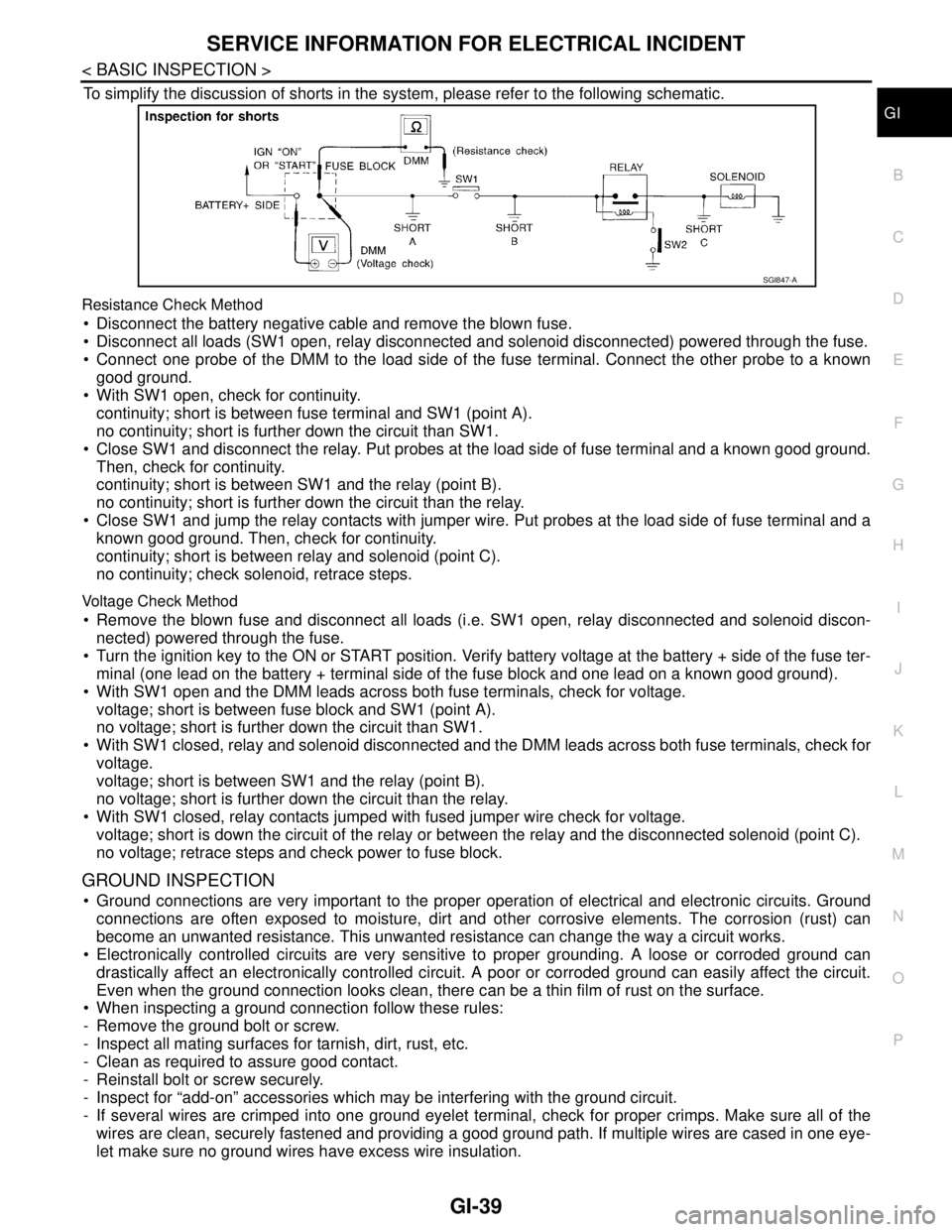
To simplify the discussion of shorts in the system, please refer to the following schematic.
Resistance Check Method
Disconnect the battery negative cable and remove the blown fuse.
Disconnect all loads (SW1 open, relay disconnected and solenoid disconnected) powered through the fuse.
Connect one probe of the DMM to the load side of the fuse terminal. Connect the other probe to a known
good ground.
With SW1 open, check for continuity.
continuity; short is between fuse terminal and SW1 (point A).
no continuity; short is further down the circuit than SW1.
Close SW1 and disconnect the relay. Put probes at the load side of fuse terminal and a known good ground.
Then, check for continuity.
continuity; short is between SW1 and the relay (point B).
no continuity; short is further down the circuit than the relay.
Close SW1 and jump the relay contacts with jumper wire. Put probes at the load side of fuse terminal and a
known good ground. Then, check for continuity.
continuity; short is between relay and solenoid (point C).
no continuity; check solenoid, retrace steps.
Voltage Check Method
Remove the blown fuse and disconnect all loads (i.e. SW1 open, relay disconnected and solenoid discon-
nected) powered through the fuse.
Turn the ignition key to the ON or START position. Verify battery voltage at the battery + side of the fuse ter-
minal (one lead on the battery + terminal side of the fuse block and one lead on a known good ground).
With SW1 open and the DMM leads across both fuse terminals, check for voltage.
voltage; short is between fuse block and SW1 (point A).
no voltage; short is further down the circuit than SW1.
With SW1 closed, relay and solenoid disconnected and the DMM leads across both fuse terminals, check for
voltage.
voltage; short is between SW1 and the relay (point B).
no voltage; short is further down the circuit than the relay.
With SW1 closed, relay contacts jumped with fused jumper wire check for voltage.
voltage; short is down the circuit of the relay or between the relay and the disconnected solenoid (point C).
no voltage; retrace steps and check power to fuse block.
GROUND INSPECTION
Ground connections are very important to the proper operation of electrical and electronic circuits. Ground
connections are often exposed to moisture, dirt and other corrosive elements. The corrosion (rust) can
become an unwanted resistance. This unwanted resistance can change the way a circuit works.
Electronically controlled circuits are very sensitive to proper grounding. A loose or corroded ground can
drastically affect an electronically controlled circuit. A poor or corroded ground can easily affect the circuit.
Even when the ground connection looks clean, there can be a thin film of rust on the surface.
When inspecting a ground connection follow these rules:
- Remove the ground bolt or screw.
- Inspect all mating surfaces for tarnish, dirt, rust, etc.
- Clean as required to assure good contact.
- Reinstall bolt or screw securely.
- Inspect for “add-on” accessories which may be interfering with the ground circuit.
- If several wires are crimped into one ground eyelet terminal, check for proper crimps. Make sure all of the
wires are clean, securely fastened and providing a good ground path. If multiple wires are cased in one eye-
let make sure no ground wires have excess wire insulation.
SGI847-A
Page 2561 of 5121
GW-18
< ON-VEHICLE REPAIR >
FRONT DOOR GLASS
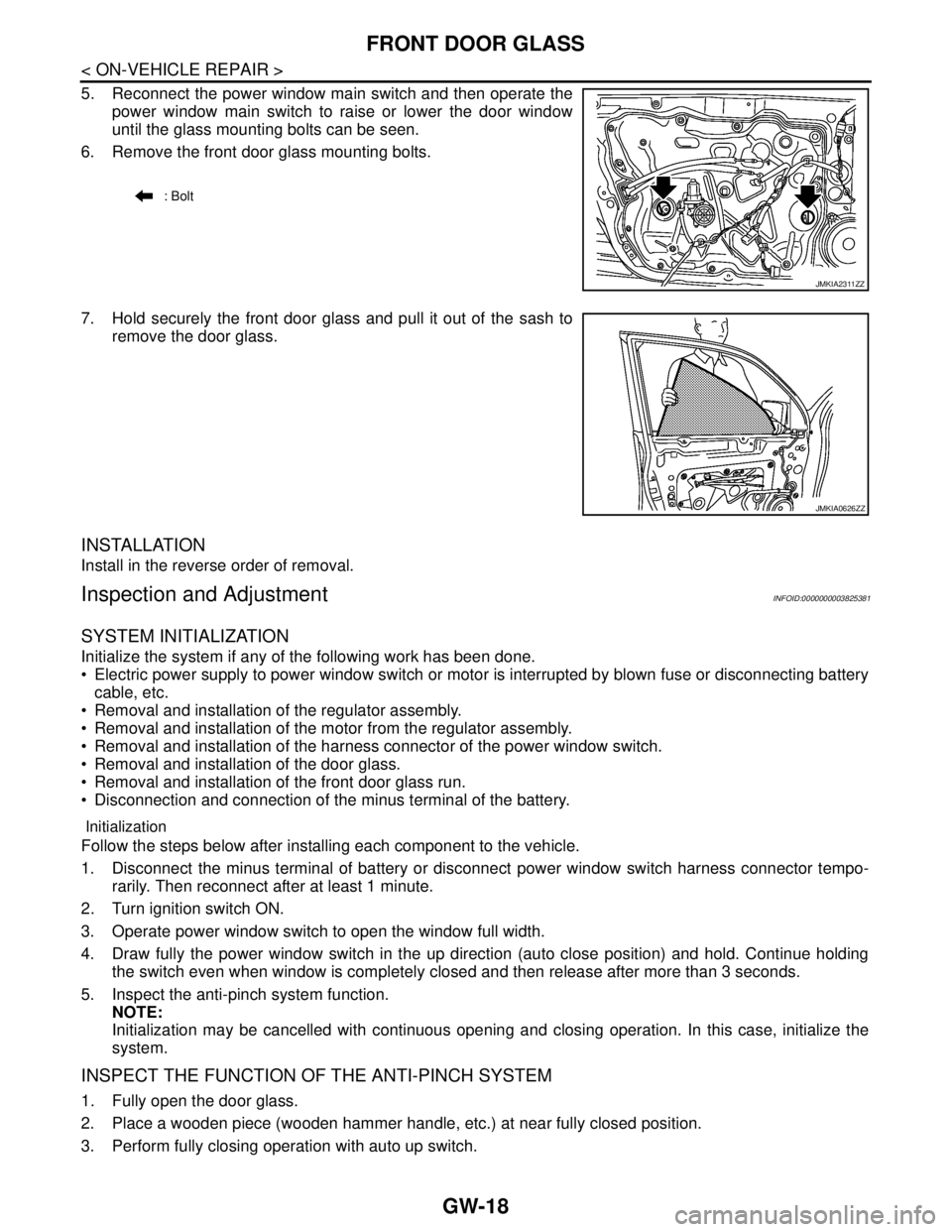
5. Reconnect the power window main switch and then operate the
power window main switch to raise or lower the door window
until the glass mounting bolts can be seen.
6. Remove the front door glass mounting bolts.
7. Hold securely the front door glass and pull it out of the sash to
remove the door glass.
INSTALLATION
Install in the reverse order of removal.
Inspection and AdjustmentINFOID:0000000003825381
SYSTEM INITIALIZATION
Initialize the system if any of the following work has been done.
Electric power supply to power window switch or motor is interrupted by blown fuse or disconnecting battery
cable, etc.
Removal and installation of the regulator assembly.
Removal and installation of the motor from the regulator assembly.
Removal and installation of the harness connector of the power window switch.
Removal and installation of the door glass.
Removal and installation of the front door glass run.
Disconnection and connection of the minus terminal of the battery.
Initialization
Follow the steps below after installing each component to the vehicle.
1. Disconnect the minus terminal of battery or disconnect power window switch harness connector tempo-
rarily. Then reconnect after at least 1 minute.
2. Turn ignition switch ON.
3. Operate power window switch to open the window full width.
4. Draw fully the power window switch in the up direction (auto close position) and hold. Continue holding
the switch even when window is completely closed and then release after more than 3 seconds.
5. Inspect the anti-pinch system function.
NOTE:
Initialization may be cancelled with continuous opening and closing operation. In this case, initialize the
system.
INSPECT THE FUNCTION OF THE ANTI-PINCH SYSTEM
1. Fully open the door glass.
2. Place a wooden piece (wooden hammer handle, etc.) at near fully closed position.
3. Perform fully closing operation with auto up switch.
: Bolt
JMKIA2311ZZ
JMKIA0626ZZ