ignition NISSAN TEANA 2008 Service Manual
[x] Cancel search | Manufacturer: NISSAN, Model Year: 2008, Model line: TEANA, Model: NISSAN TEANA 2008Pages: 5121, PDF Size: 69.03 MB
Page 4232 of 5121
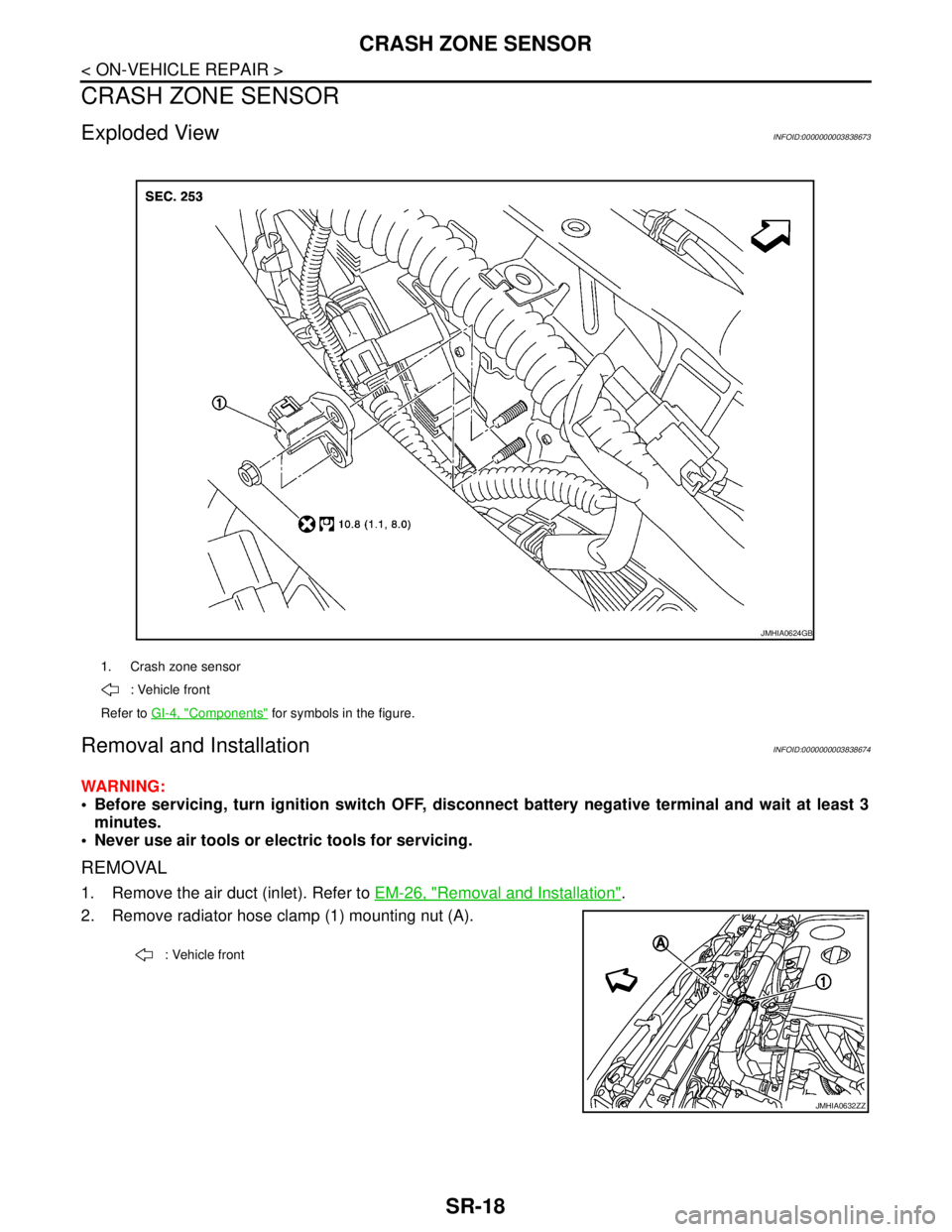
SR-18
< ON-VEHICLE REPAIR >
CRASH ZONE SENSOR
CRASH ZONE SENSOR
Exploded ViewINFOID:0000000003838673
Removal and InstallationINFOID:0000000003838674
WARNING:
Before servicing, turn ignition switch OFF, disconnect battery negative terminal and wait at least 3
minutes.
Never use air tools or electric tools for servicing.
REMOVAL
1. Remove the air duct (inlet). Refer to EM-26, "Removal and Installation".
2. Remove radiator hose clamp (1) mounting nut (A).
1. Crash zone sensor
: Vehicle front
Refer to GI-4, "
Components" for symbols in the figure.
JMHIA0624GB
: Vehicle front
JMHIA0632ZZ
Page 4234 of 5121
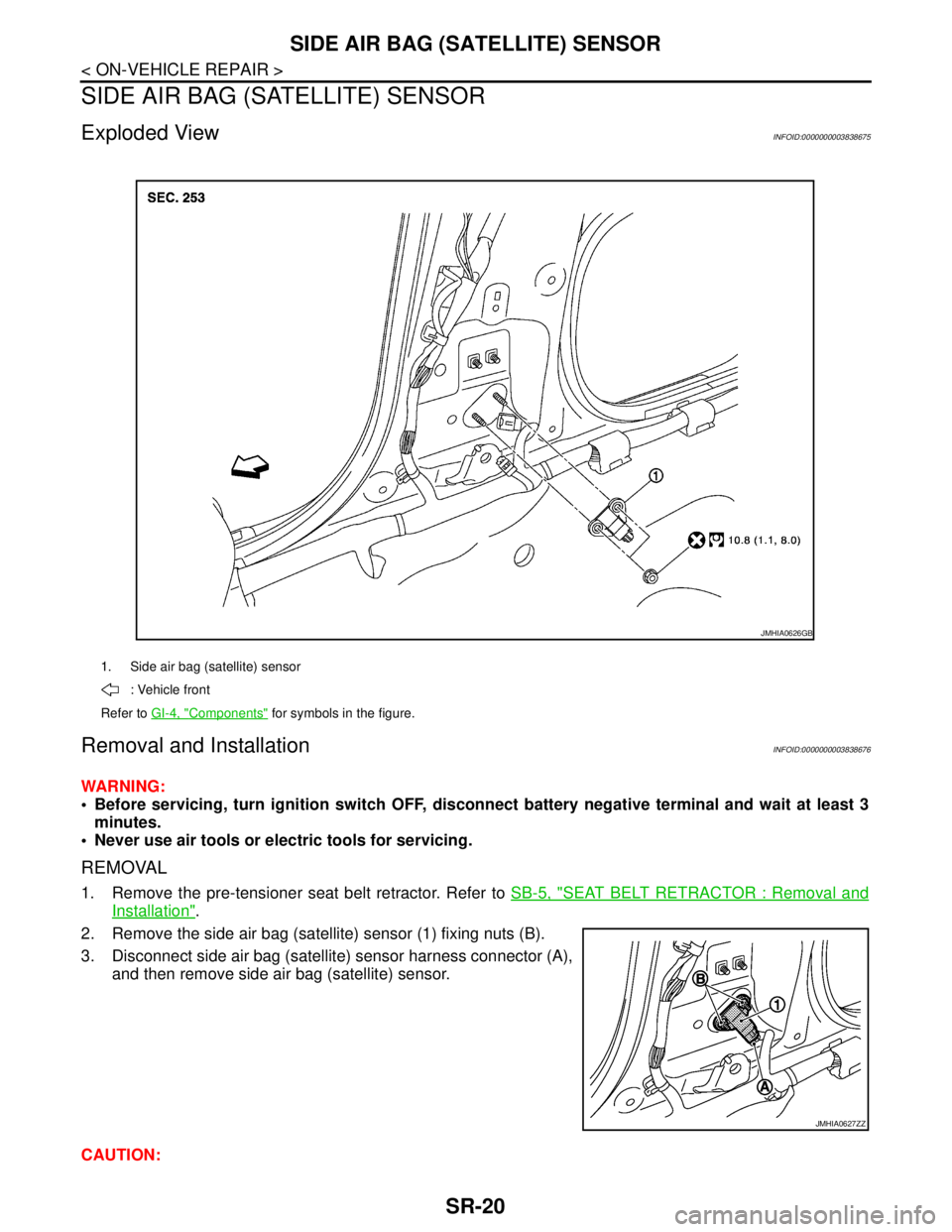
SR-20
< ON-VEHICLE REPAIR >
SIDE AIR BAG (SATELLITE) SENSOR
SIDE AIR BAG (SATELLITE) SENSOR
Exploded ViewINFOID:0000000003838675
Removal and InstallationINFOID:0000000003838676
WARNING:
Before servicing, turn ignition switch OFF, disconnect battery negative terminal and wait at least 3
minutes.
Never use air tools or electric tools for servicing.
REMOVAL
1. Remove the pre-tensioner seat belt retractor. Refer to SB-5, "SEAT BELT RETRACTOR : Removal and
Installation".
2. Remove the side air bag (satellite) sensor (1) fixing nuts (B).
3. Disconnect side air bag (satellite) sensor harness connector (A),
and then remove side air bag (satellite) sensor.
CAUTION:
1. Side air bag (satellite) sensor
: Vehicle front
Refer to GI-4, "
Components" for symbols in the figure.
JMHIA0626GB
JMHIA0627ZZ
Page 4236 of 5121
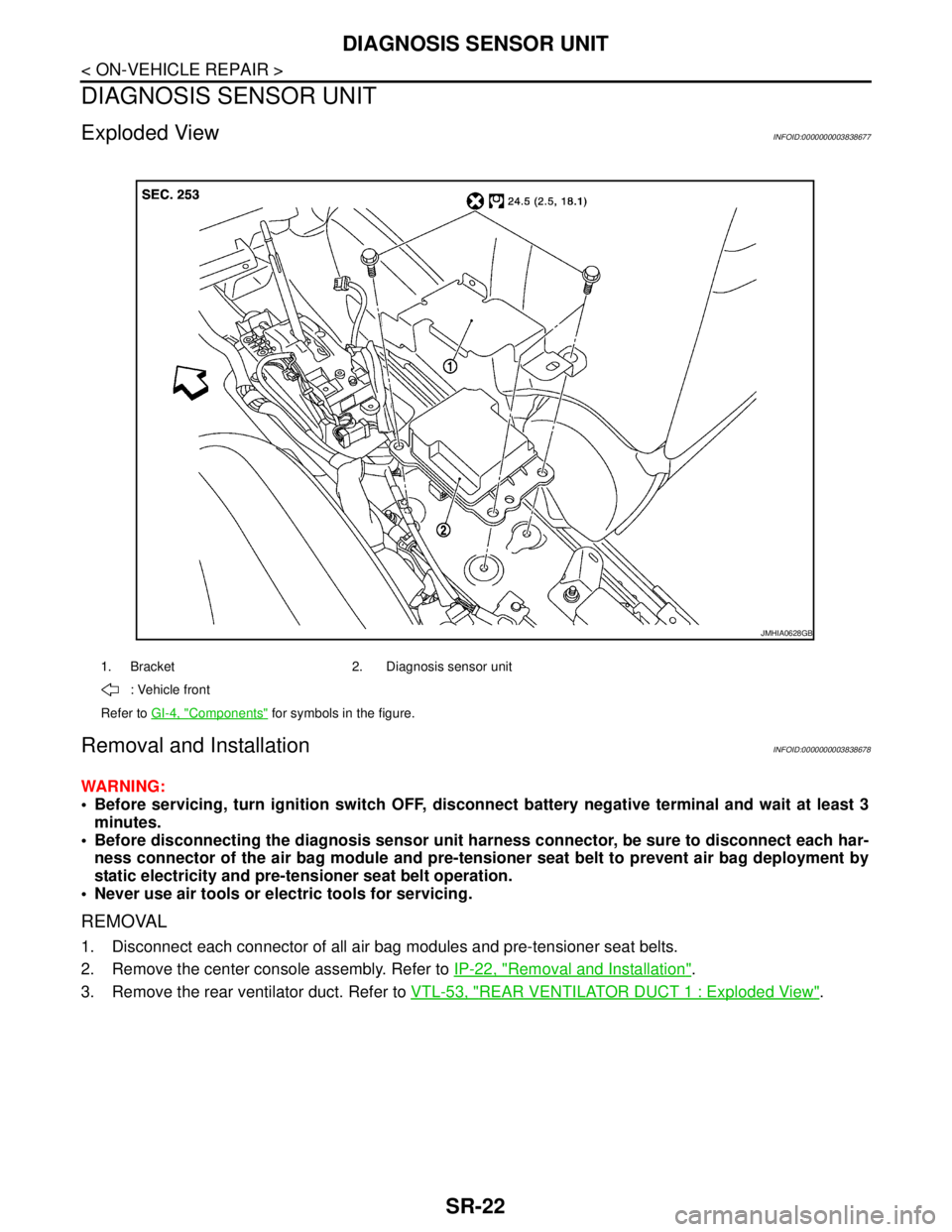
SR-22
< ON-VEHICLE REPAIR >
DIAGNOSIS SENSOR UNIT
DIAGNOSIS SENSOR UNIT
Exploded ViewINFOID:0000000003838677
Removal and InstallationINFOID:0000000003838678
WARNING:
Before servicing, turn ignition switch OFF, disconnect battery negative terminal and wait at least 3
minutes.
Before disconnecting the diagnosis sensor unit harness connector, be sure to disconnect each har-
ness connector of the air bag module and pre-tensioner seat belt to prevent air bag deployment by
static electricity and pre-tensioner seat belt operation.
Never use air tools or electric tools for servicing.
REMOVAL
1. Disconnect each connector of all air bag modules and pre-tensioner seat belts.
2. Remove the center console assembly. Refer to IP-22, "
Removal and Installation".
3. Remove the rear ventilator duct. Refer to VTL-53, "
REAR VENTILATOR DUCT 1 : Exploded View".
1. Bracket 2. Diagnosis sensor unit
: Vehicle front
Refer to GI-4, "
Components" for symbols in the figure.
JMHIA0628GB
Page 4251 of 5121
SRC-8
< FUNCTION DIAGNOSIS >
SRS AIR BAG SYSTEM
3. Detects and records the deployment of air bag and seat belt pre-tensioner, and turns on air bag warning
lamp.
4. Indicates malfunctioning portion with blinking times of air bag warning lamp in diagnosis mode.
5. Indicates the malfunctioning record by CONSULT-III.
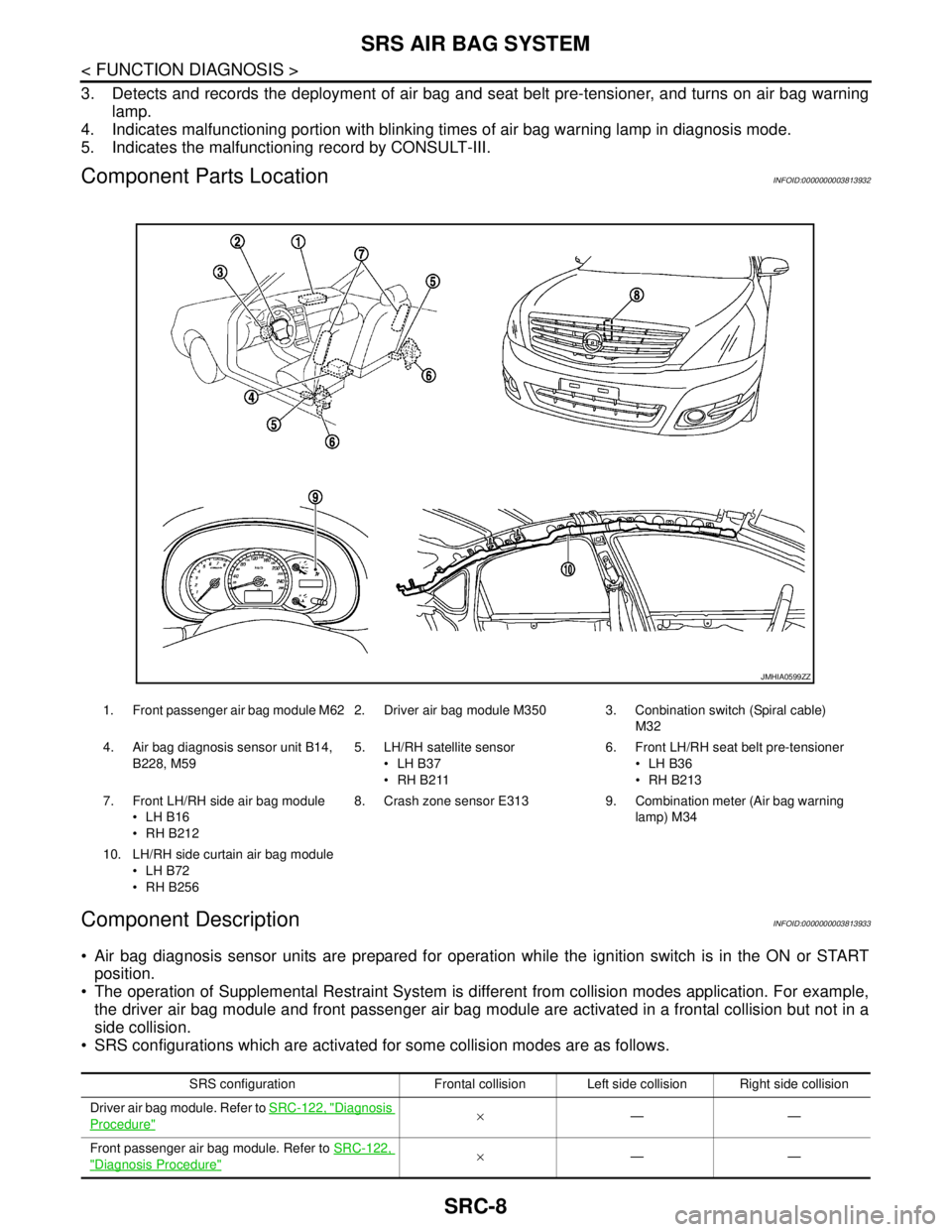
Component Parts LocationINFOID:0000000003813932
Component DescriptionINFOID:0000000003813933
Air bag diagnosis sensor units are prepared for operation while the ignition switch is in the ON or START
position.
The operation of Supplemental Restraint System is different from collision modes application. For example,
the driver air bag module and front passenger air bag module are activated in a frontal collision but not in a
side collision.
SRS configurations which are activated for some collision modes are as follows.
1. Front passenger air bag module M62 2. Driver air bag module M350 3. Conbination switch (Spiral cable)
M32
4. Air bag diagnosis sensor unit B14,
B228, M595. LH/RH satellite sensor
LH B37
RH B2116. Front LH/RH seat belt pre-tensioner
LH B36
RH B213
7. Front LH/RH side air bag module
LH B16
RH B2128. Crash zone sensor E313 9. Combination meter (Air bag warning
lamp) M34
10. LH/RH side curtain air bag module
LH B72
RH B256
JMHIA0599ZZ
SRS configuration Frontal collision Left side collision Right side collision
Driver air bag module. Refer to SRC-122, "
Diagnosis
Procedure"×——
Front passenger air bag module. Refer to SRC-122,
"Diagnosis Procedure"×——
Page 4253 of 5121
SRC-10
< FUNCTION DIAGNOSIS >
DIAGNOSIS SYSTEM (AIRBAG)
DIAGNOSIS SYSTEM (AIRBAG)
Diagnosis DescriptionINFOID:0000000003813934
CAUTION:
• Never use electrical test equipment on any circuit related to the SRS unless instructed in this Ser-
vice Manual. SRS wiring harnesses can be identified by yellow and/or orange harnesses or harness
connectors.
Never repair, splice or modify the SRS wiring harness. If the harness is damaged, replace it with a
new one.
Keep ground portion clean.
DIAGNOSIS FUNCTION
The SRS self-diagnosis results can be read by using air bag warning lamp and/or CONSULT-III.
The user mode is exclusively prepared for the customer (driver). This mode warns the driver of a system
malfunction through the operation of the air bag warning lamp.
The diagnosis mode allows the technician to locate and inspect the malfunctioning part.
The mode applications for the air bag warning lamp and CONSULT-III are as follows.
HOW TO PERFORM TROUBLE DIAGNOSIS FOR QUICK AND ACCURATE REPAIR
A good understanding of the malfunction conditions can make troubleshooting faster and more accurate.
In general, each customer feels differently about a malfunction. It is important to fully understand the symp-
toms or conditions for a customer complaint.
Information from Customer.
WHAT..... Vehicle model.
WHEN..... Date, Frequency.
WHERE..... Road conditions.
HOW..... Operating conditions, Symptoms.
Preliminary Check.
Check that the following parts are in good order.
Battery (Refer to PG-3, "
How to Handle Battery").
Fuse (Refer to PG-82, "
Fuse").
System component-to-harness connections.
Air Bag Warning Lamp DiagnosisINFOID:0000000003843289
SELF-DIAGNOSIS FUNCTION
The reading of these results is accomplished by “User mode” and “Diagnosis mode”.
After a malfunction is repaired, turn ignition switch ON. Diagnosis mode returns to the User mode. At that
time, the self-diagnosis result is cleared.
User mode Diagnosis mode Display type
Air bag warning lamp X X ON-OFF operation
CONSULT-III – X Monitoring
Page 4254 of 5121
DIAGNOSIS SYSTEM (AIRBAG)
SRC-11
< FUNCTION DIAGNOSIS >
C
D
E
F
G
I
J
K
L
MA
B
SRC
N
O
P HOW TO CHANGE SELF-DIAGNOSIS MODE WITHOUT CONSULT-III
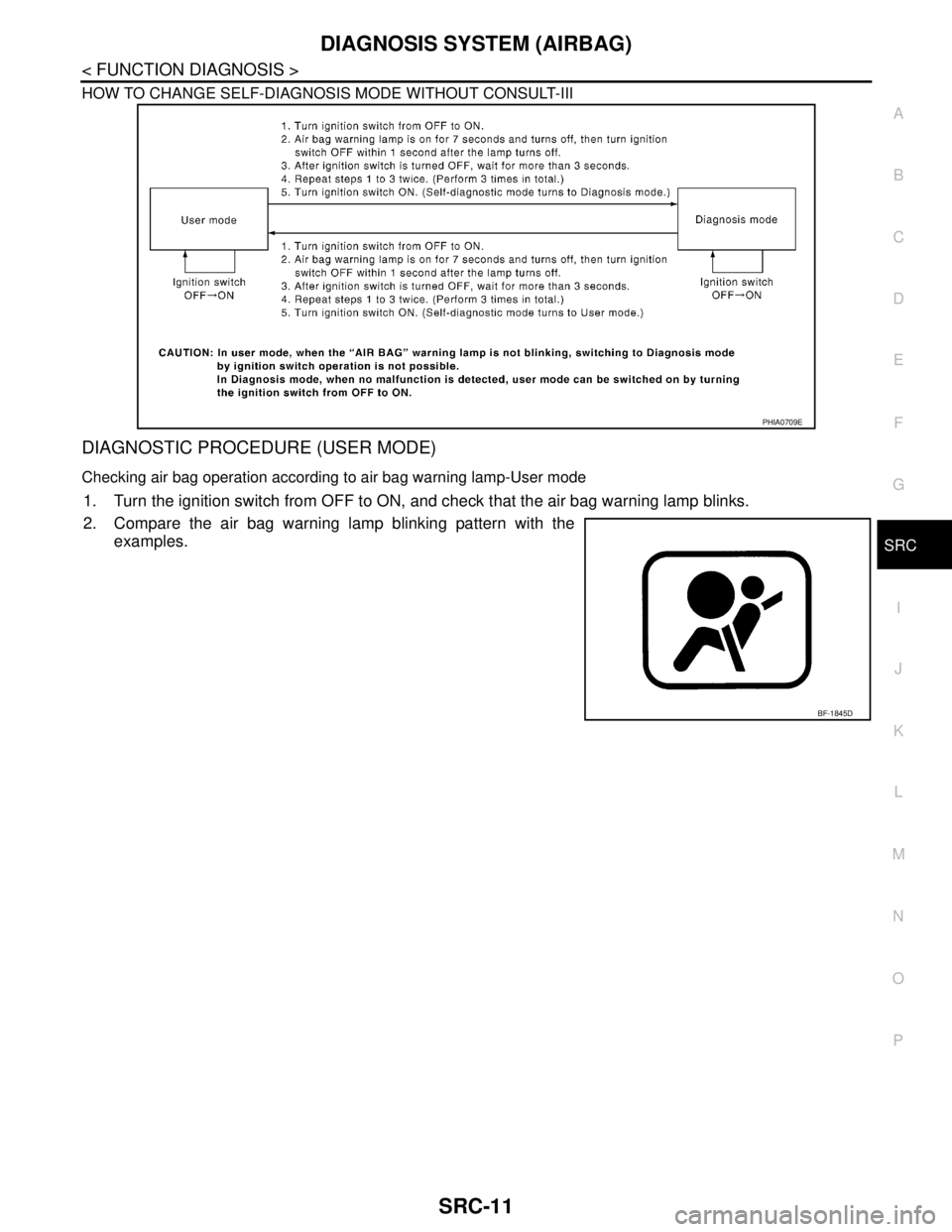
DIAGNOSTIC PROCEDURE (USER MODE)
Checking air bag operation according to air bag warning lamp-User mode
1. Turn the ignition switch from OFF to ON, and check that the air bag warning lamp blinks.
2. Compare the air bag warning lamp blinking pattern with the
examples.
PHIA0709E
BF-1845D
Page 4255 of 5121
SRC-12
< FUNCTION DIAGNOSIS >
DIAGNOSIS SYSTEM (AIRBAG)
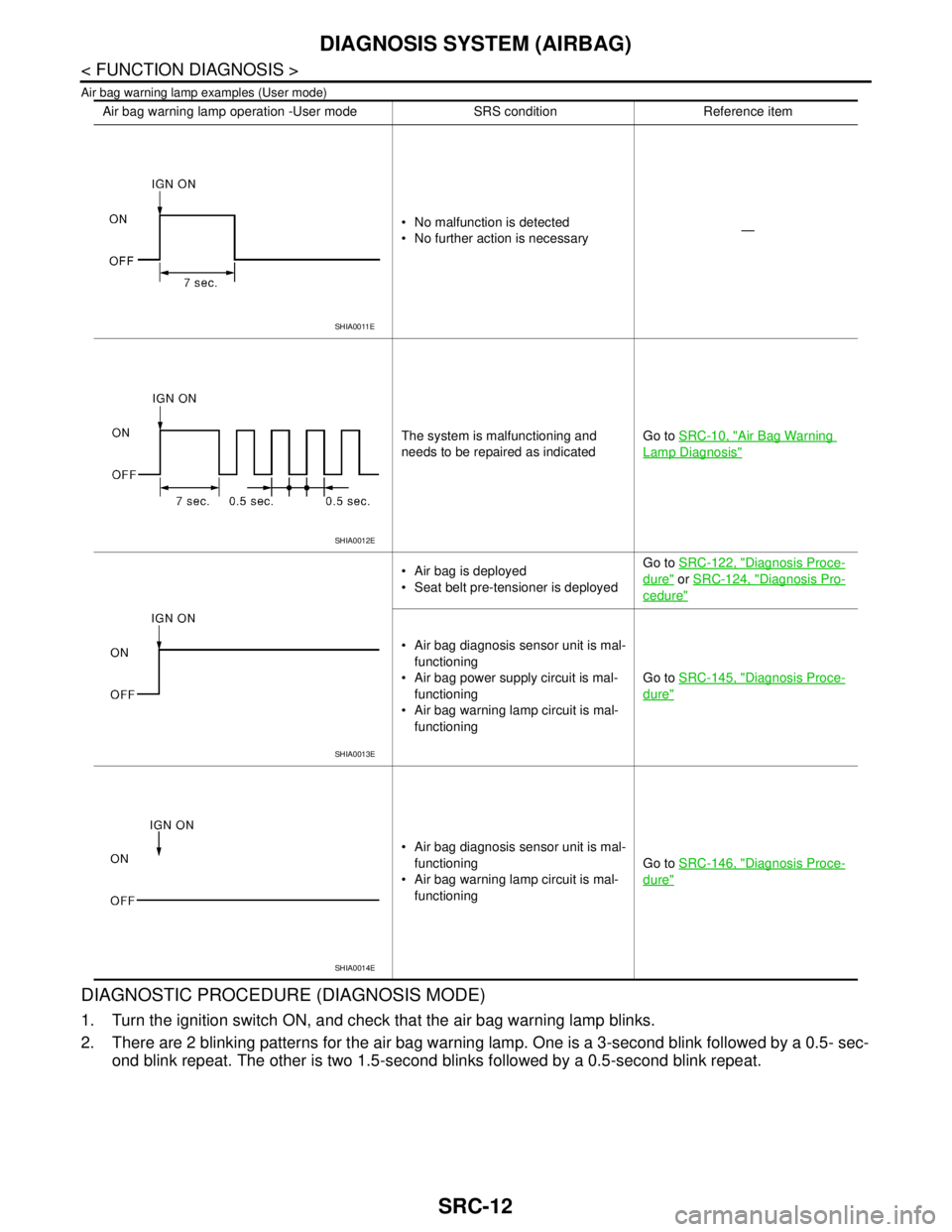
Air bag warning lamp examples (User mode)
DIAGNOSTIC PROCEDURE (DIAGNOSIS MODE)
1. Turn the ignition switch ON, and check that the air bag warning lamp blinks.
2. There are 2 blinking patterns for the air bag warning lamp. One is a 3-second blink followed by a 0.5- sec-
ond blink repeat. The other is two 1.5-second blinks followed by a 0.5-second blink repeat.
Air bag warning lamp operation -User mode SRS condition Reference item
No malfunction is detected
No further action is necessary—
The system is malfunctioning and
needs to be repaired as indicatedGo to SRC-10, "
Air Bag Warning
Lamp Diagnosis"
Air bag is deployed
Seat belt pre-tensioner is deployedGo to SRC-122, "Diagnosis Proce-
dure" or SRC-124, "Diagnosis Pro-
cedure"
Air bag diagnosis sensor unit is mal-
functioning
Air bag power supply circuit is mal-
functioning
Air bag warning lamp circuit is mal-
functioningGo to SRC-145, "
Diagnosis Proce-
dure"
Air bag diagnosis sensor unit is mal-
functioning
Air bag warning lamp circuit is mal-
functioningGo to SRC-146, "
Diagnosis Proce-
dure"
SHIA0011E
SHIA0012E
SHIA0013E
SHIA0014E
Page 4258 of 5121
DIAGNOSIS SYSTEM (AIRBAG)
SRC-15
< FUNCTION DIAGNOSIS >
C
D
E
F
G
I
J
K
L
MA
B
SRC
N
O
P
After a malfunction is repaired, turn the ignition switch OFF for at least one second, then turn ignition switch
ON. Diagnosis mode returns to the user mode. At that time the self-diagnosis result is cleared.
CONSULT-III FunctionINFOID:0000000003813935
HOW TO CHANGE SELF-DIAGNOSIS MODE WITH CONSULT-III
From User Mode to Diagnosis Mode
After selecting “AIR BAG” on the “SELECT SYSTEM” screen, User mode automatically changes to Diagnosis
mode.
From Diagnosis Mode to User Mode
To return to User mode from Diagnosis mode, touch “BACK” key of CONSULT-III until “SELECT SYSTEM”
appears, then Diagnosis mode automatically changes to User mode.
DIAGNOSIS MODE FOR CONSULT-III
“SELF-DIAG [CURRENT]”
Current self-diagnosis results (also indicated with the number of air bag warning lamp blinks in Diagnosis
mode) are displayed on CONSULT-III screen in real time. This refers to a malfunctioning part requiring
repairs.
“SELF-DIAG [PAST]”
Diagnosis results previously stored in the memory are displayed on CONSULT-III screen. The stored results
are not erased until memory erasing is executed.
“TROUBLE DIAG RECORD”
With TROUBLE DIAG RECORD, diagnosis results previously erased by a reset operation can be displayed
on CONSULT-III screen.
“DISCRIMINATED NO.”
The air bag diagnosis sensor unit for each vehicle model has its own individual classification number. This
number is displayed on CONSULT-III screen. When replacing the air bag diagnosis sensor unit, refer to the
part number for the compatibility. After installation, replacement with a correct unit can be checked by con-
firming this classification number on CONSULT-III screen.
After repair, check that the discriminated number of air bag diagnosis sensor unit installed to vehicle is the
same. Refer to SR-22, "
Exploded View".
HOW TO ERASE SELF-DIAGNOSTIC RESULTS
“SELF-DIAG [CURRENT]”
A current self-diagnosis result is displayed on CONSULT-III screen in real time.
After the malfunction is repaired completely, no malfunction is detected on “SELF-DIAG [CURRENT]”.
“SELF-DIAG [PAST]”
Return to “SELF-DIAG [CURRENT]” CONSULT-III screen by touching “BACK” key of CONSULT-III and
select “SELF-DIAG [CURRENT]” in SELECT DIAG MODE. Touch “ERASE” in “SELF-DIAG [CURRENT]”
mode.
NOTE:
If the memory of the malfunction in “SELF-DIAG [PAST]” is not erased, the user mode shows the system
malfunction by illuminating the warning lamp even if the malfunction is repaired completely.
“TROUBLE DIAG RECORD”
The memory of “TROUBLE DIAG RECORD” cannot be erased.
Page 4259 of 5121
SRC-16
< COMPONENT DIAGNOSIS >
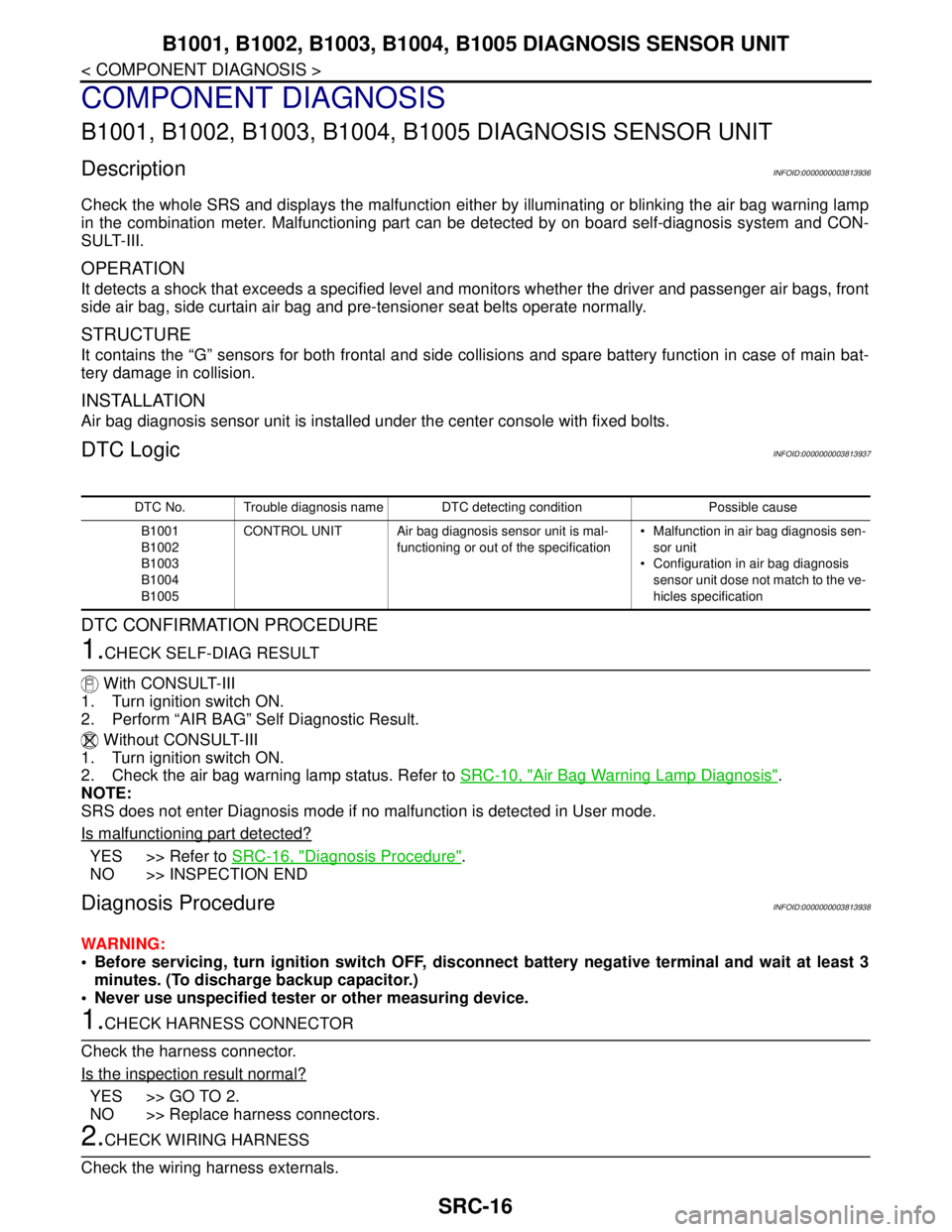
B1001, B1002, B1003, B1004, B1005 DIAGNOSIS SENSOR UNIT
COMPONENT DIAGNOSIS
B1001, B1002, B1003, B1004, B1005 DIAGNOSIS SENSOR UNIT
DescriptionINFOID:0000000003813936
Check the whole SRS and displays the malfunction either by illuminating or blinking the air bag warning lamp
in the combination meter. Malfunctioning part can be detected by on board self-diagnosis system and CON-
SULT-III.
OPERATION
It detects a shock that exceeds a specified level and monitors whether the driver and passenger air bags, front
side air bag, side curtain air bag and pre-tensioner seat belts operate normally.
STRUCTURE
It contains the “G” sensors for both frontal and side collisions and spare battery function in case of main bat-
tery damage in collision.
INSTALLATION
Air bag diagnosis sensor unit is installed under the center console with fixed bolts.
DTC LogicINFOID:0000000003813937
DTC CONFIRMATION PROCEDURE
1.CHECK SELF-DIAG RESULT
With CONSULT-III
1. Turn ignition switch ON.
2. Perform “AIR BAG” Self Diagnostic Result.
Without CONSULT-III
1. Turn ignition switch ON.
2. Check the air bag warning lamp status. Refer to SRC-10, "
Air Bag Warning Lamp Diagnosis".
NOTE:
SRS does not enter Diagnosis mode if no malfunction is detected in User mode.
Is malfunctioning part detected?
YES >> Refer to SRC-16, "Diagnosis Procedure".
NO >> INSPECTION END
Diagnosis ProcedureINFOID:0000000003813938
WARNING:
Before servicing, turn ignition switch OFF, disconnect battery negative terminal and wait at least 3
minutes. (To discharge backup capacitor.)
Never use unspecified tester or other measuring device.
1.CHECK HARNESS CONNECTOR
Check the harness connector.
Is the inspection result normal?
YES >> GO TO 2.
NO >> Replace harness connectors.
2.CHECK WIRING HARNESS
Check the wiring harness externals.
DTC No. Trouble diagnosis name DTC detecting condition Possible cause
B1001
B1002
B1003
B1004
B1005CONTROL UNIT Air bag diagnosis sensor unit is mal-
functioning or out of the specification Malfunction in air bag diagnosis sen-
sor unit
Configuration in air bag diagnosis
sensor unit dose not match to the ve-
hicles specification
Page 4261 of 5121
SRC-18
< COMPONENT DIAGNOSIS >
B1006, B1007, B1008, B1009, B1010 DIAGNOSIS SENSOR UNIT
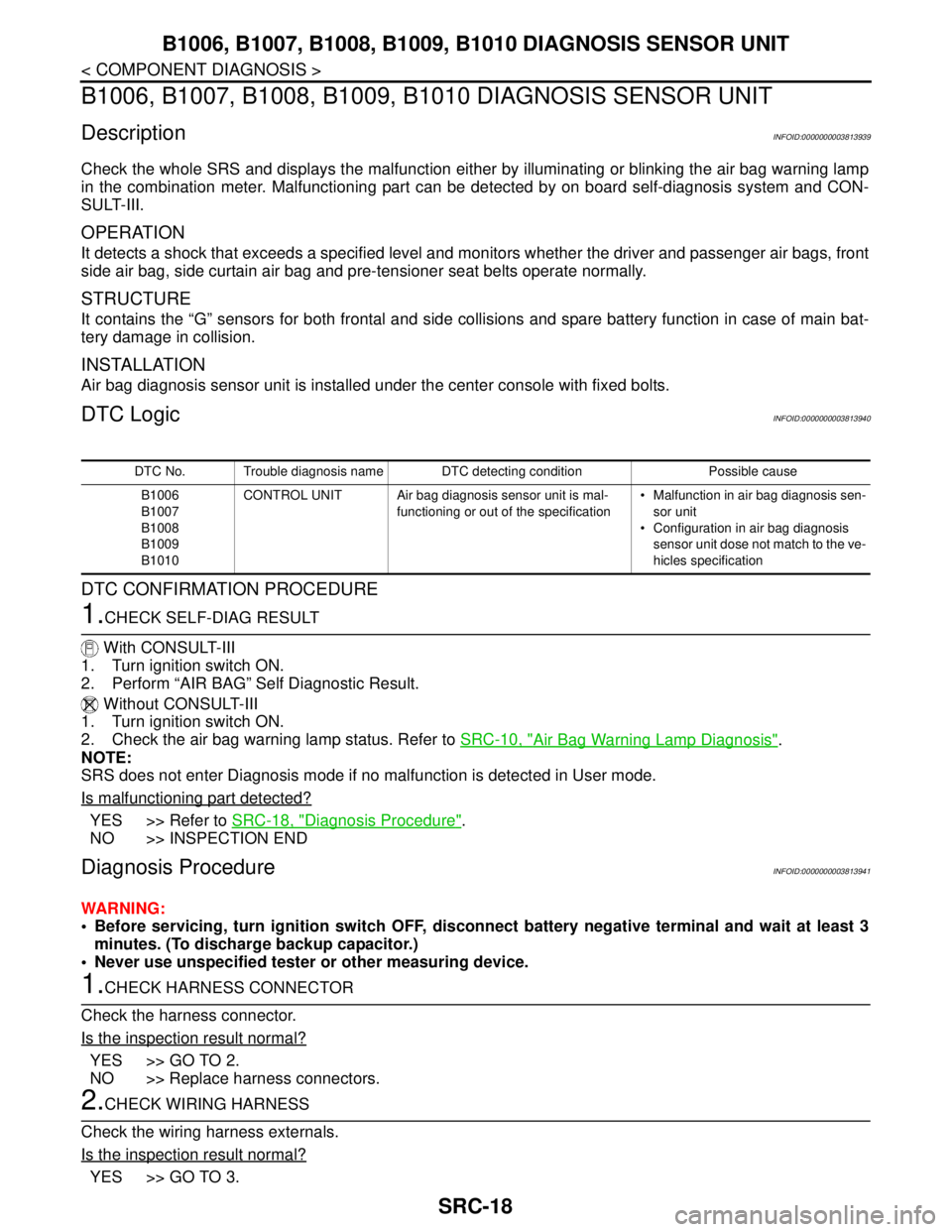
B1006, B1007, B1008, B1009, B1010 DIAGNOSIS SENSOR UNIT
DescriptionINFOID:0000000003813939
Check the whole SRS and displays the malfunction either by illuminating or blinking the air bag warning lamp
in the combination meter. Malfunctioning part can be detected by on board self-diagnosis system and CON-
SULT-III.
OPERATION
It detects a shock that exceeds a specified level and monitors whether the driver and passenger air bags, front
side air bag, side curtain air bag and pre-tensioner seat belts operate normally.
STRUCTURE
It contains the “G” sensors for both frontal and side collisions and spare battery function in case of main bat-
tery damage in collision.
INSTALLATION
Air bag diagnosis sensor unit is installed under the center console with fixed bolts.
DTC LogicINFOID:0000000003813940
DTC CONFIRMATION PROCEDURE
1.CHECK SELF-DIAG RESULT
With CONSULT-III
1. Turn ignition switch ON.
2. Perform “AIR BAG” Self Diagnostic Result.
Without CONSULT-III
1. Turn ignition switch ON.
2. Check the air bag warning lamp status. Refer to SRC-10, "
Air Bag Warning Lamp Diagnosis".
NOTE:
SRS does not enter Diagnosis mode if no malfunction is detected in User mode.
Is malfunctioning part detected?
YES >> Refer to SRC-18, "Diagnosis Procedure".
NO >> INSPECTION END
Diagnosis ProcedureINFOID:0000000003813941
WARNING:
Before servicing, turn ignition switch OFF, disconnect battery negative terminal and wait at least 3
minutes. (To discharge backup capacitor.)
Never use unspecified tester or other measuring device.
1.CHECK HARNESS CONNECTOR
Check the harness connector.
Is the inspection result normal?
YES >> GO TO 2.
NO >> Replace harness connectors.
2.CHECK WIRING HARNESS
Check the wiring harness externals.
Is the inspection result normal?
YES >> GO TO 3.
DTC No. Trouble diagnosis name DTC detecting condition Possible cause
B1006
B1007
B1008
B1009
B1010CONTROL UNIT Air bag diagnosis sensor unit is mal-
functioning or out of the specification Malfunction in air bag diagnosis sen-
sor unit
Configuration in air bag diagnosis
sensor unit dose not match to the ve-
hicles specification