relay NISSAN TEANA 2008 Service Manual
[x] Cancel search | Manufacturer: NISSAN, Model Year: 2008, Model line: TEANA, Model: NISSAN TEANA 2008Pages: 5121, PDF Size: 69.03 MB
Page 2529 of 5121
GI-36
< BASIC INSPECTION >
SERVICE INFORMATION FOR ELECTRICAL INCIDENT
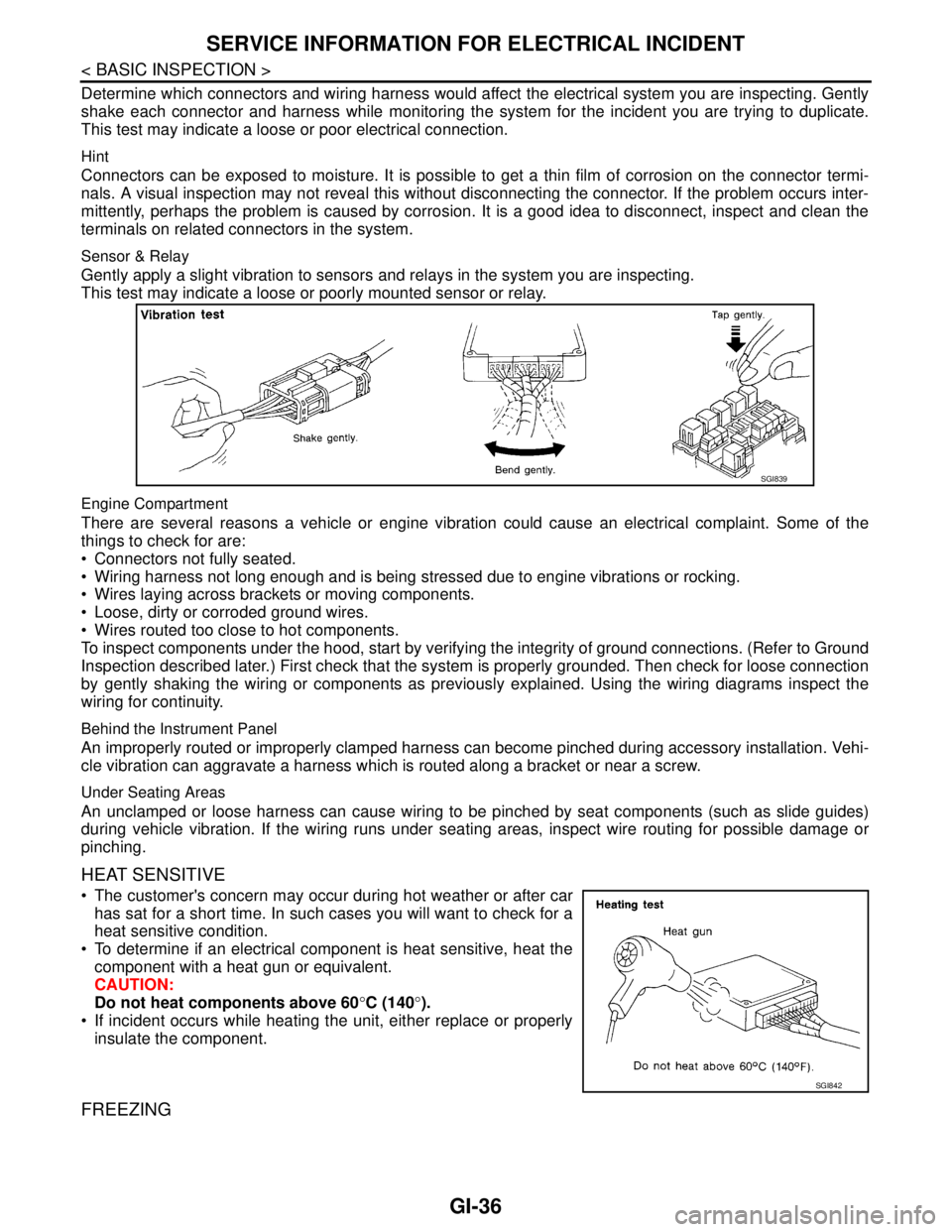
Determine which connectors and wiring harness would affect the electrical system you are inspecting. Gently
shake each connector and harness while monitoring the system for the incident you are trying to duplicate.
This test may indicate a loose or poor electrical connection.
Hint
Connectors can be exposed to moisture. It is possible to get a thin film of corrosion on the connector termi-
nals. A visual inspection may not reveal this without disconnecting the connector. If the problem occurs inter-
mittently, perhaps the problem is caused by corrosion. It is a good idea to disconnect, inspect and clean the
terminals on related connectors in the system.
Sensor & Relay
Gently apply a slight vibration to sensors and relays in the system you are inspecting.
This test may indicate a loose or poorly mounted sensor or relay.
Engine Compartment
There are several reasons a vehicle or engine vibration could cause an electrical complaint. Some of the
things to check for are:
Connectors not fully seated.
Wiring harness not long enough and is being stressed due to engine vibrations or rocking.
Wires laying across brackets or moving components.
Loose, dirty or corroded ground wires.
Wires routed too close to hot components.
To inspect components under the hood, start by verifying the integrity of ground connections. (Refer to Ground
Inspection described later.) First check that the system is properly grounded. Then check for loose connection
by gently shaking the wiring or components as previously explained. Using the wiring diagrams inspect the
wiring for continuity.
Behind the Instrument Panel
An improperly routed or improperly clamped harness can become pinched during accessory installation. Vehi-
cle vibration can aggravate a harness which is routed along a bracket or near a screw.
Under Seating Areas
An unclamped or loose harness can cause wiring to be pinched by seat components (such as slide guides)
during vehicle vibration. If the wiring runs under seating areas, inspect wire routing for possible damage or
pinching.
HEAT SENSITIVE
The customer's concern may occur during hot weather or after car
has sat for a short time. In such cases you will want to check for a
heat sensitive condition.
To determine if an electrical component is heat sensitive, heat the
component with a heat gun or equivalent.
CAUTION:
Do not heat components above 60°C (140°).
If incident occurs while heating the unit, either replace or properly
insulate the component.
FREEZING
SGI839
SGI842
Page 2531 of 5121
GI-38
< BASIC INSPECTION >
SERVICE INFORMATION FOR ELECTRICAL INCIDENT
TESTING FOR “OPENS” IN THE CIRCUIT
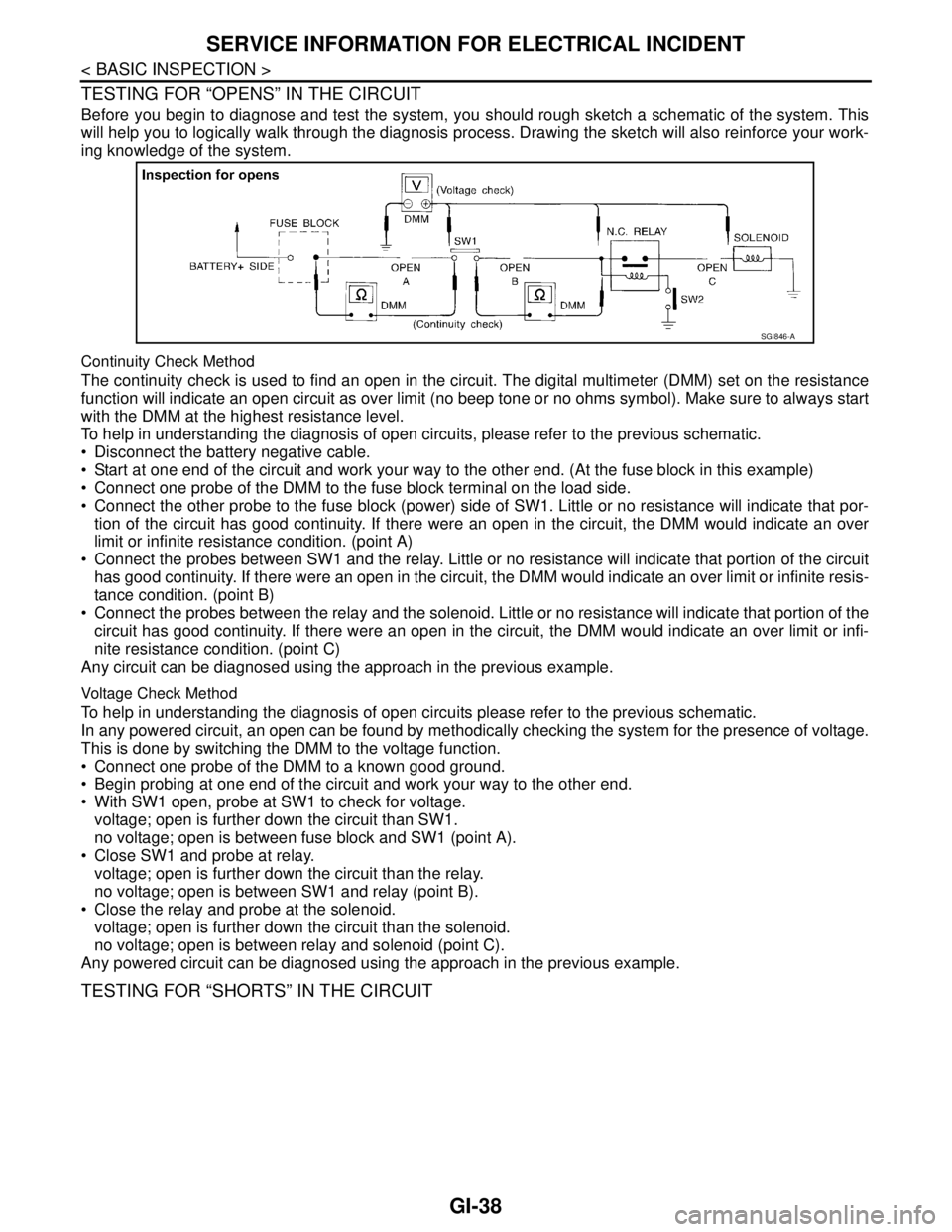
Before you begin to diagnose and test the system, you should rough sketch a schematic of the system. This
will help you to logically walk through the diagnosis process. Drawing the sketch will also reinforce your work-
ing knowledge of the system.
Continuity Check Method
The continuity check is used to find an open in the circuit. The digital multimeter (DMM) set on the resistance
function will indicate an open circuit as over limit (no beep tone or no ohms symbol). Make sure to always start
with the DMM at the highest resistance level.
To help in understanding the diagnosis of open circuits, please refer to the previous schematic.
Disconnect the battery negative cable.
Start at one end of the circuit and work your way to the other end. (At the fuse block in this example)
Connect one probe of the DMM to the fuse block terminal on the load side.
Connect the other probe to the fuse block (power) side of SW1. Little or no resistance will indicate that por-
tion of the circuit has good continuity. If there were an open in the circuit, the DMM would indicate an over
limit or infinite resistance condition. (point A)
Connect the probes between SW1 and the relay. Little or no resistance will indicate that portion of the circuit
has good continuity. If there were an open in the circuit, the DMM would indicate an over limit or infinite resis-
tance condition. (point B)
Connect the probes between the relay and the solenoid. Little or no resistance will indicate that portion of the
circuit has good continuity. If there were an open in the circuit, the DMM would indicate an over limit or infi-
nite resistance condition. (point C)
Any circuit can be diagnosed using the approach in the previous example.
Voltage Check Method
To help in understanding the diagnosis of open circuits please refer to the previous schematic.
In any powered circuit, an open can be found by methodically checking the system for the presence of voltage.
This is done by switching the DMM to the voltage function.
Connect one probe of the DMM to a known good ground.
Begin probing at one end of the circuit and work your way to the other end.
With SW1 open, probe at SW1 to check for voltage.
voltage; open is further down the circuit than SW1.
no voltage; open is between fuse block and SW1 (point A).
Close SW1 and probe at relay.
voltage; open is further down the circuit than the relay.
no voltage; open is between SW1 and relay (point B).
Close the relay and probe at the solenoid.
voltage; open is further down the circuit than the solenoid.
no voltage; open is between relay and solenoid (point C).
Any powered circuit can be diagnosed using the approach in the previous example.
TESTING FOR “SHORTS” IN THE CIRCUIT
SGI846-A
Page 2532 of 5121
SERVICE INFORMATION FOR ELECTRICAL INCIDENT
GI-39
< BASIC INSPECTION >
C
D
E
F
G
H
I
J
K
L
MB
GI
N
O
P
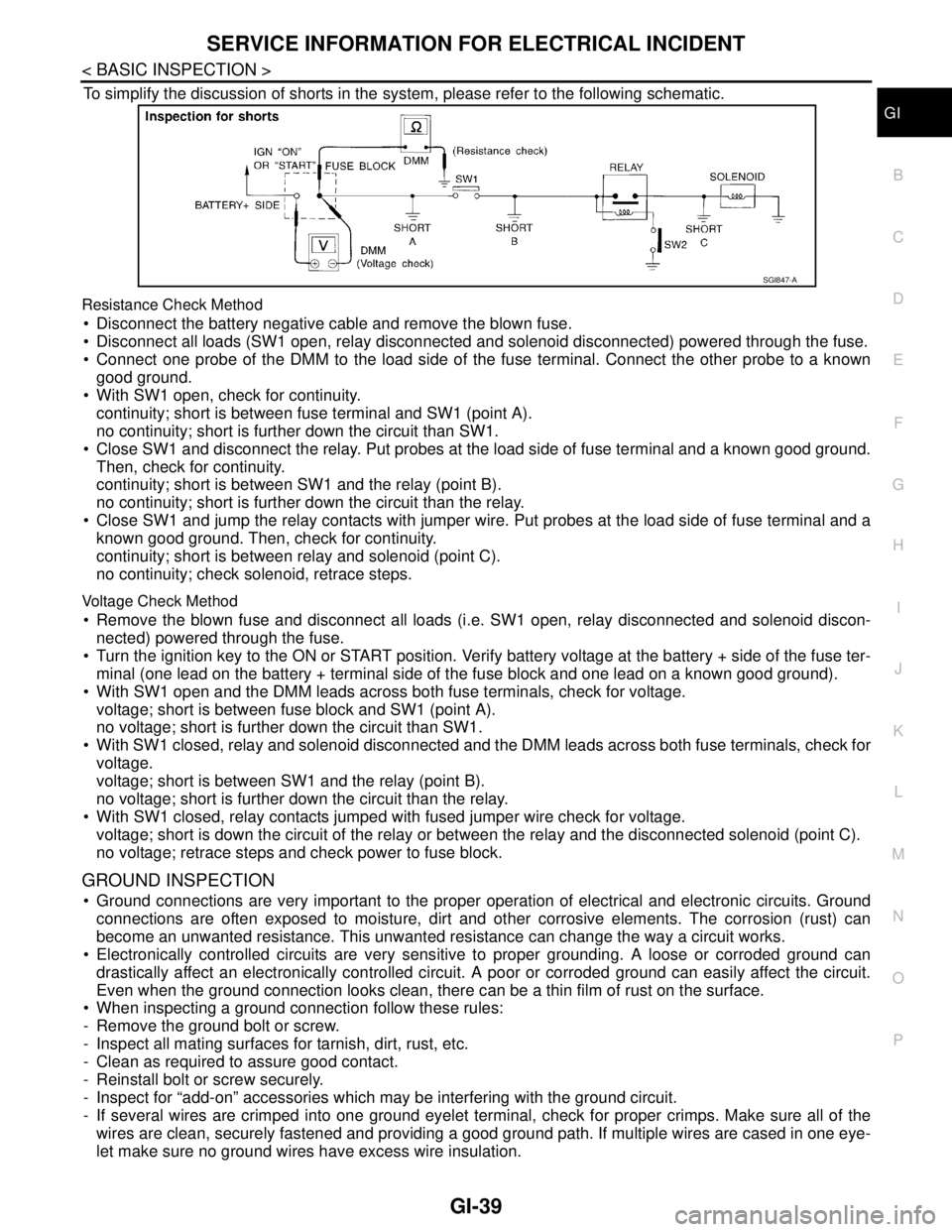
To simplify the discussion of shorts in the system, please refer to the following schematic.
Resistance Check Method
Disconnect the battery negative cable and remove the blown fuse.
Disconnect all loads (SW1 open, relay disconnected and solenoid disconnected) powered through the fuse.
Connect one probe of the DMM to the load side of the fuse terminal. Connect the other probe to a known
good ground.
With SW1 open, check for continuity.
continuity; short is between fuse terminal and SW1 (point A).
no continuity; short is further down the circuit than SW1.
Close SW1 and disconnect the relay. Put probes at the load side of fuse terminal and a known good ground.
Then, check for continuity.
continuity; short is between SW1 and the relay (point B).
no continuity; short is further down the circuit than the relay.
Close SW1 and jump the relay contacts with jumper wire. Put probes at the load side of fuse terminal and a
known good ground. Then, check for continuity.
continuity; short is between relay and solenoid (point C).
no continuity; check solenoid, retrace steps.
Voltage Check Method
Remove the blown fuse and disconnect all loads (i.e. SW1 open, relay disconnected and solenoid discon-
nected) powered through the fuse.
Turn the ignition key to the ON or START position. Verify battery voltage at the battery + side of the fuse ter-
minal (one lead on the battery + terminal side of the fuse block and one lead on a known good ground).
With SW1 open and the DMM leads across both fuse terminals, check for voltage.
voltage; short is between fuse block and SW1 (point A).
no voltage; short is further down the circuit than SW1.
With SW1 closed, relay and solenoid disconnected and the DMM leads across both fuse terminals, check for
voltage.
voltage; short is between SW1 and the relay (point B).
no voltage; short is further down the circuit than the relay.
With SW1 closed, relay contacts jumped with fused jumper wire check for voltage.
voltage; short is down the circuit of the relay or between the relay and the disconnected solenoid (point C).
no voltage; retrace steps and check power to fuse block.
GROUND INSPECTION
Ground connections are very important to the proper operation of electrical and electronic circuits. Ground
connections are often exposed to moisture, dirt and other corrosive elements. The corrosion (rust) can
become an unwanted resistance. This unwanted resistance can change the way a circuit works.
Electronically controlled circuits are very sensitive to proper grounding. A loose or corroded ground can
drastically affect an electronically controlled circuit. A poor or corroded ground can easily affect the circuit.
Even when the ground connection looks clean, there can be a thin film of rust on the surface.
When inspecting a ground connection follow these rules:
- Remove the ground bolt or screw.
- Inspect all mating surfaces for tarnish, dirt, rust, etc.
- Clean as required to assure good contact.
- Reinstall bolt or screw securely.
- Inspect for “add-on” accessories which may be interfering with the ground circuit.
- If several wires are crimped into one ground eyelet terminal, check for proper crimps. Make sure all of the
wires are clean, securely fastened and providing a good ground path. If multiple wires are cased in one eye-
let make sure no ground wires have excess wire insulation.
SGI847-A
Page 2574 of 5121
REFRIGERATION SYSTEM
HA-5
< FUNCTION DIAGNOSIS >
C
D
E
F
G
H
J
K
L
MA
B
HA
N
O
P
FUNCTION DIAGNOSIS
REFRIGERATION SYSTEM
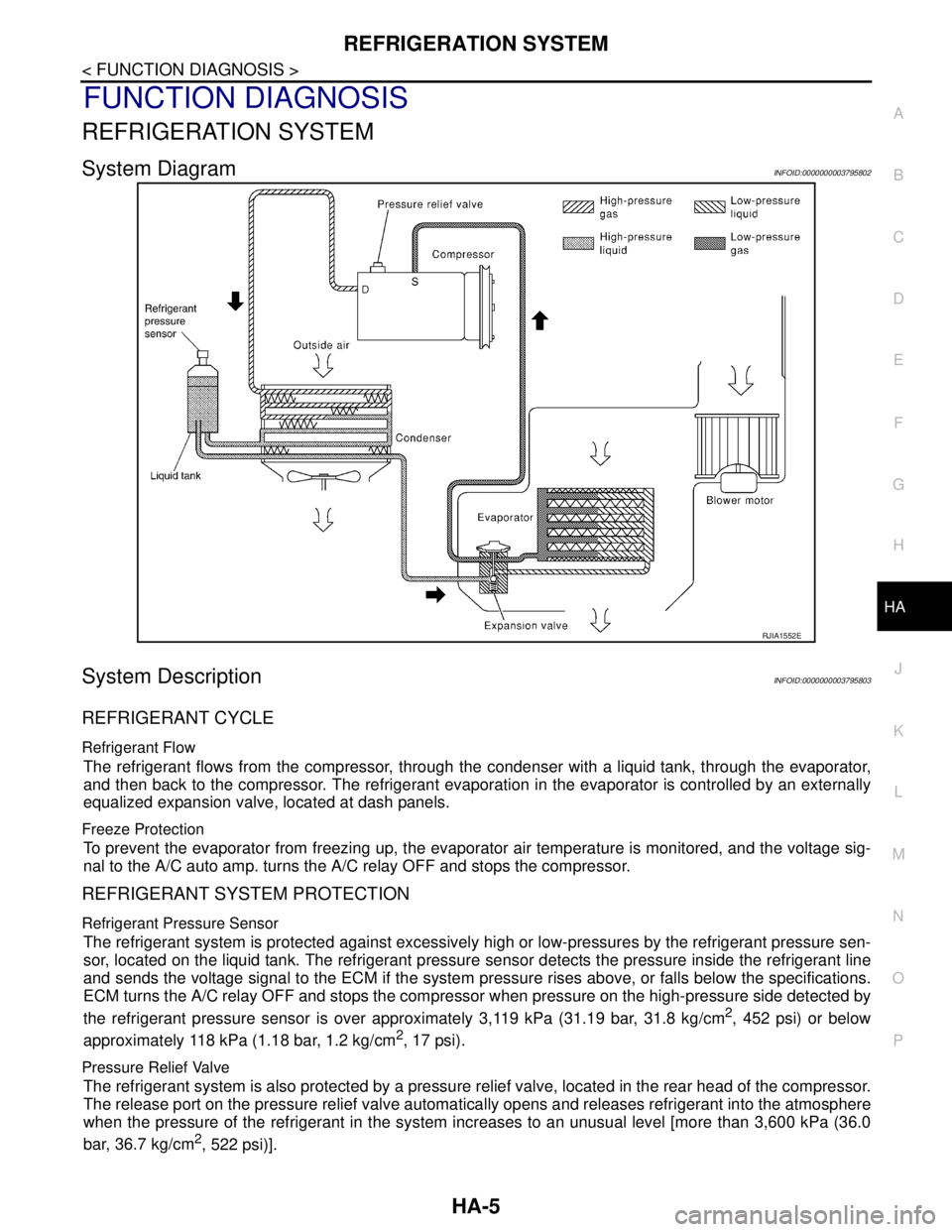
System DiagramINFOID:0000000003795802
System DescriptionINFOID:0000000003795803
REFRIGERANT CYCLE
Refrigerant Flow
The refrigerant flows from the compressor, through the condenser with a liquid tank, through the evaporator,
and then back to the compressor. The refrigerant evaporation in the evaporator is controlled by an externally
equalized expansion valve, located at dash panels.
Freeze Protection
To prevent the evaporator from freezing up, the evaporator air temperature is monitored, and the voltage sig-
nal to the A/C auto amp. turns the A/C relay OFF and stops the compressor.
REFRIGERANT SYSTEM PROTECTION
Refrigerant Pressure Sensor
The refrigerant system is protected against excessively high or low-pressures by the refrigerant pressure sen-
sor, located on the liquid tank. The refrigerant pressure sensor detects the pressure inside the refrigerant line
and sends the voltage signal to the ECM if the system pressure rises above, or falls below the specifications.
ECM turns the A/C relay OFF and stops the compressor when pressure on the high-pressure side detected by
the refrigerant pressure sensor is over approximately 3,119 kPa (31.19 bar, 31.8 kg/cm
2, 452 psi) or below
approximately 118 kPa (1.18 bar, 1.2 kg/cm
2, 17 psi).
Pressure Relief Valve
The refrigerant system is also protected by a pressure relief valve, located in the rear head of the compressor.
The release port on the pressure relief valve automatically opens and releases refrigerant into the atmosphere
when the pressure of the refrigerant in the system increases to an unusual level [more than 3,600 kPa (36.0
bar, 36.7 kg/cm
2, 522 psi)].
RJIA1552E
Page 2664 of 5121
![NISSAN TEANA 2008 Service Manual HAC-36
< FUNCTION DIAGNOSIS >[WITHOUT 7 INCH DISPLAY]
MAGNET CLUTCH CONTROL SYSTEM
MAGNET CLUTCH CONTROL SYSTEM
System DiagramINFOID:0000000003846317
System DescriptionINFOID:0000000003846318
The A/C](/img/5/57391/w960_57391-2663.png "NISSAN TEANA 2008 Service Manual HAC-36
< FUNCTION DIAGNOSIS >[WITHOUT 7 INCH DISPLAY]
MAGNET CLUTCH CONTROL SYSTEM
MAGNET CLUTCH CONTROL SYSTEM
System DiagramINFOID:0000000003846317
System DescriptionINFOID:0000000003846318
The A/C")
HAC-36
< FUNCTION DIAGNOSIS >[WITHOUT 7 INCH DISPLAY]
MAGNET CLUTCH CONTROL SYSTEM
MAGNET CLUTCH CONTROL SYSTEM
System DiagramINFOID:0000000003846317
System DescriptionINFOID:0000000003846318
The A/C auto amp. controls compressor operation by ambient temperature, intake air temperature and signal
from ECM.
SYSTEM OPERATION
When the A/C switch, the AUTO switch, or the DEF switch is pressed, A/C auto amp. transmit the A/C switch
signal and blower fan motor switch signal to the ECM, via CAN communication.
ECM judges whether compressor can be turned ON, based on each sensor status (refrigerant-pressure sen-
sor signal, throttle angle, etc.). If the ECM judges that the compressor can be turned ON, it sends A/C com-
pressor request signal to the IPDM E/R, via CAN communication.
Upon receipt of A/C compressor request signal from the ECM, the IPDM E/R turns the A/C relay ON to oper-
ate the compressor.
When sending A/C compressor request signal to the IPDM E/R via CAN communication line, the ECM simul-
taneously sends A/C compressor feedback signal to A/C auto amp. via CAN communication line.
The ECM sends A/C compressor feedback signal to A/C auto amp., then, uses input A/C compressor feed-
back signal to control air inlet.
Compressor Protection Control
The ECM makes the A/C relay turn OFF and stops the compressor when pressure on the high-pressure side
detected by the refrigerant pressure sensor is over approximately 3,119 kPa (31.19bar, 31.8 kg/cm
2, 452 psi),
or below approximately 118 kPa (1.18bar, 1.2 kg/cm
2, 17 psi).
Low Temperature Protection Control
Turn the A/C relay to OFF and stop the compressor by the signal from the A/C auto amp according to the
evaporator passing air temperature detected by the intake sensor and the ambient temperature detected by
the ambient sensor.
JPIIA0504GB
Page 2698 of 5121
![NISSAN TEANA 2008 Service Manual HAC-70
< COMPONENT DIAGNOSIS >[WITHOUT 7 INCH DISPLAY]
BLOWER MOTOR
YES >> GO TO 6.
NO >> Repair harness or connector.
6.CHECK A/C AUTO AMP. OUTPUT SIGNAL
1. Reconnect blower motor connector and A/C a](/img/5/57391/w960_57391-2697.png "NISSAN TEANA 2008 Service Manual HAC-70
< COMPONENT DIAGNOSIS >[WITHOUT 7 INCH DISPLAY]
BLOWER MOTOR
YES >> GO TO 6.
NO >> Repair harness or connector.
6.CHECK A/C AUTO AMP. OUTPUT SIGNAL
1. Reconnect blower motor connector and A/C a")
HAC-70
< COMPONENT DIAGNOSIS >[WITHOUT 7 INCH DISPLAY]
BLOWER MOTOR
YES >> GO TO 6.
NO >> Repair harness or connector.
6.CHECK A/C AUTO AMP. OUTPUT SIGNAL
1. Reconnect blower motor connector and A/C auto amp. connector.
2. Turn ignition switch ON.
3. Set MODE switch to the VENT position.
4. Check the output waveform between blower motor harness connector and ground using an oscilloscope,
while varying the fan speed from 1 to 7.
Is the inspection result normal?
YES >> Replace the blower motor.
NO >> Replace the A/C auto amp.
7.CHECK POWER VOLTAGE OF BLOWER RELAY
1. Turn the ignition switch OFF.
2. Remove the blower relay. Refer to PG-101, "
Fuse, Connector and Terminal Arrangement".
3. Turn the ignition switch ON.
4. Check the voltage between blower relay fuse block side terminal and ground. Refer to PG-101, "
Fuse,
Connector and Terminal Arrangement" for relay terminal assignment.
Is the inspection result normal?
YES >> GO TO 8.
NO >> Inspection the power supply circuit. Refer to PG-55, "
Wiring Diagram - IGNITION POWER SUP-
PLY -".
8.CHECK BLOWER RELAY
1. Turn the ignition switch OFF.
2. Install the blower relay. Refer to PG-101, "
Fuse, Connector and Terminal Arrangement".
3. Turn the ignition switch ON.
4. Check the operating sound of blower relay.
Is the inspection result normal?
YES >> GO TO 9.
NO >> Replace the blower relay.
9.CHECK FUSE
Check 15A fuses (Nos. 21 and 22).
JPIIA1025GB
(+) (−)
Vol tag e
Blower relay —
1
Ground Battery voltage
3
Page 2782 of 5121
![NISSAN TEANA 2008 Service Manual HAC-154
< FUNCTION DIAGNOSIS >[WITH 7 INCH DISPLAY]
MAGNET CLUTCH CONTROL SYSTEM
MAGNET CLUTCH CONTROL SYSTEM
System DiagramINFOID:0000000003884729
System DescriptionINFOID:0000000003884730
The A/C au](/img/5/57391/w960_57391-2781.png "NISSAN TEANA 2008 Service Manual HAC-154
< FUNCTION DIAGNOSIS >[WITH 7 INCH DISPLAY]
MAGNET CLUTCH CONTROL SYSTEM
MAGNET CLUTCH CONTROL SYSTEM
System DiagramINFOID:0000000003884729
System DescriptionINFOID:0000000003884730
The A/C au")
HAC-154
< FUNCTION DIAGNOSIS >[WITH 7 INCH DISPLAY]
MAGNET CLUTCH CONTROL SYSTEM
MAGNET CLUTCH CONTROL SYSTEM
System DiagramINFOID:0000000003884729
System DescriptionINFOID:0000000003884730
The A/C auto amp. controls compressor operation by ambient temperature, intake air temperature and signal
from ECM.
SYSTEM OPERATION
When the A/C switch, the AUTO switch, or the DEF switch is pressed, A/C auto amp. transmit the A/C switch
signal and blower fan motor switch signal to the ECM, via CAN communication.
ECM judges whether compressor can be turned ON, based on each sensor status (refrigerant-pressure sen-
sor signal, throttle angle, etc.). If the ECM judges that the compressor can be turned ON, it sends A/C com-
pressor request signal to the IPDM E/R, via CAN communication.
Upon receipt of A/C compressor request signal from the ECM, the IPDM E/R turns the A/C relay ON to oper-
ate the compressor.
When sending A/C compressor request signal to the IPDM E/R via CAN communication line, the ECM simul-
taneously sends A/C compressor feedback signal to A/C auto amp. via CAN communication line.
The ECM sends A/C compressor feedback signal to A/C auto amp., then, uses input A/C compressor feed-
back signal to control air inlet.
Compressor Protection Control
The ECM makes the A/C relay turn OFF and stops the compressor when pressure on the high-pressure side
detected by the refrigerant pressure sensor is over approximately 3,119 kPa (31.19bar, 31.8 kg/cm
2, 452 psi),
or below approximately 118 kPa (1.18bar, 1.2 kg/cm
2, 17 psi).
Low Temperature Protection Control
Turn the A/C relay to OFF and stop the compressor by the signal from the A/C auto amp according to the
evaporator passing air temperature detected by the intake sensor and the ambient temperature detected by
the ambient sensor.
JPIIA0504GB
Page 2823 of 5121
![NISSAN TEANA 2008 Service Manual BLOWER MOTOR
HAC-195
< COMPONENT DIAGNOSIS >[WITH 7 INCH DISPLAY]
C
D
E
F
G
H
J
K
L
MA
B
HAC
N
O
P
Is the inspection result normal?
YES >> GO TO 6.
NO >> Repair harness or connector.
6.CHECK A/C AUTO](/img/5/57391/w960_57391-2822.png "NISSAN TEANA 2008 Service Manual BLOWER MOTOR
HAC-195
< COMPONENT DIAGNOSIS >[WITH 7 INCH DISPLAY]
C
D
E
F
G
H
J
K
L
MA
B
HAC
N
O
P
Is the inspection result normal?
YES >> GO TO 6.
NO >> Repair harness or connector.
6.CHECK A/C AUTO")
BLOWER MOTOR
HAC-195
< COMPONENT DIAGNOSIS >[WITH 7 INCH DISPLAY]
C
D
E
F
G
H
J
K
L
MA
B
HAC
N
O
P
Is the inspection result normal?
YES >> GO TO 6.
NO >> Repair harness or connector.
6.CHECK A/C AUTO AMP. OUTPUT SIGNAL
1. Reconnect blower motor connector and A/C auto amp. connector.
2. Turn ignition switch ON.
3. Set MODE switch to the VENT position.
4. Check the output waveform between blower motor harness connector and ground using an oscilloscope,
while varying the fan speed from 1 to 7.
Is the inspection result normal?
YES >> Replace the blower motor.
NO >> Replace the A/C auto amp.
7.CHECK POWER VOLTAGE OF BLOWER RELAY
1. Turn the ignition switch OFF.
2. Remove the blower relay. Refer to PG-101, "
Fuse, Connector and Terminal Arrangement".
3. Turn the ignition switch ON.
4. Check the voltage between blower relay fuse block side terminal and ground. Refer to PG-101, "
Fuse,
Connector and Terminal Arrangement" for relay terminal assignment.
Is the inspection result normal?
YES >> GO TO 8.
NO >> Inspection the power supply circuit. Refer to PG-55, "
Wiring Diagram - IGNITION POWER SUP-
PLY -".
8.CHECK BLOWER RELAY
1. Turn the ignition switch OFF.
2. Install the blower relay. Refer to PG-101, "
Fuse, Connector and Terminal Arrangement".
3. Turn the ignition switch ON.
4. Check the operating sound of blower relay.
Blower motor A/C auto amp.
Continuity
Connector Terminal Connector Terminal
M98 2 M50 32 Existed
JPIIA1025GB
(+) (−)
Vo l ta g e
Blower relay —
1
Ground Battery voltage
3
Page 2824 of 5121
![NISSAN TEANA 2008 Service Manual HAC-196
< COMPONENT DIAGNOSIS >[WITH 7 INCH DISPLAY]
BLOWER MOTOR
Is the inspection result normal?
YES >> GO TO 9.
NO >> Replace the blower relay.
9.CHECK FUSE
Check 15A fuses (Nos. 21 and 22).
NOTE](/img/5/57391/w960_57391-2823.png "NISSAN TEANA 2008 Service Manual HAC-196
< COMPONENT DIAGNOSIS >[WITH 7 INCH DISPLAY]
BLOWER MOTOR
Is the inspection result normal?
YES >> GO TO 9.
NO >> Replace the blower relay.
9.CHECK FUSE
Check 15A fuses (Nos. 21 and 22).
NOTE")
HAC-196
< COMPONENT DIAGNOSIS >[WITH 7 INCH DISPLAY]
BLOWER MOTOR
Is the inspection result normal?
YES >> GO TO 9.
NO >> Replace the blower relay.
9.CHECK FUSE
Check 15A fuses (Nos. 21 and 22).
NOTE:
Refer to PG-101, "
Fuse, Connector and Terminal Arrangement" for fuse location.
Is the inspection result normal?
YES >> Repair the harnesses or connectors.
NO >> Replace the fuse after repairing the applicable circuit.
Component InspectionINFOID:0000000003884775
1.CHECK BLOWER MOTOR
1. Remove the blower motor. Refer to VTL-90, "
Exploded View".
2. Check that the blower motor rotates smoothly.
Is the inspection result normal?
YES >> END.
NO >> Replace blower motor.
Page 2891 of 5121
INL-12
< FUNCTION DIAGNOSIS >
ILLUMINATION CONTROL SYSTEM
ILLUMINATION CONTROL SYSTEM
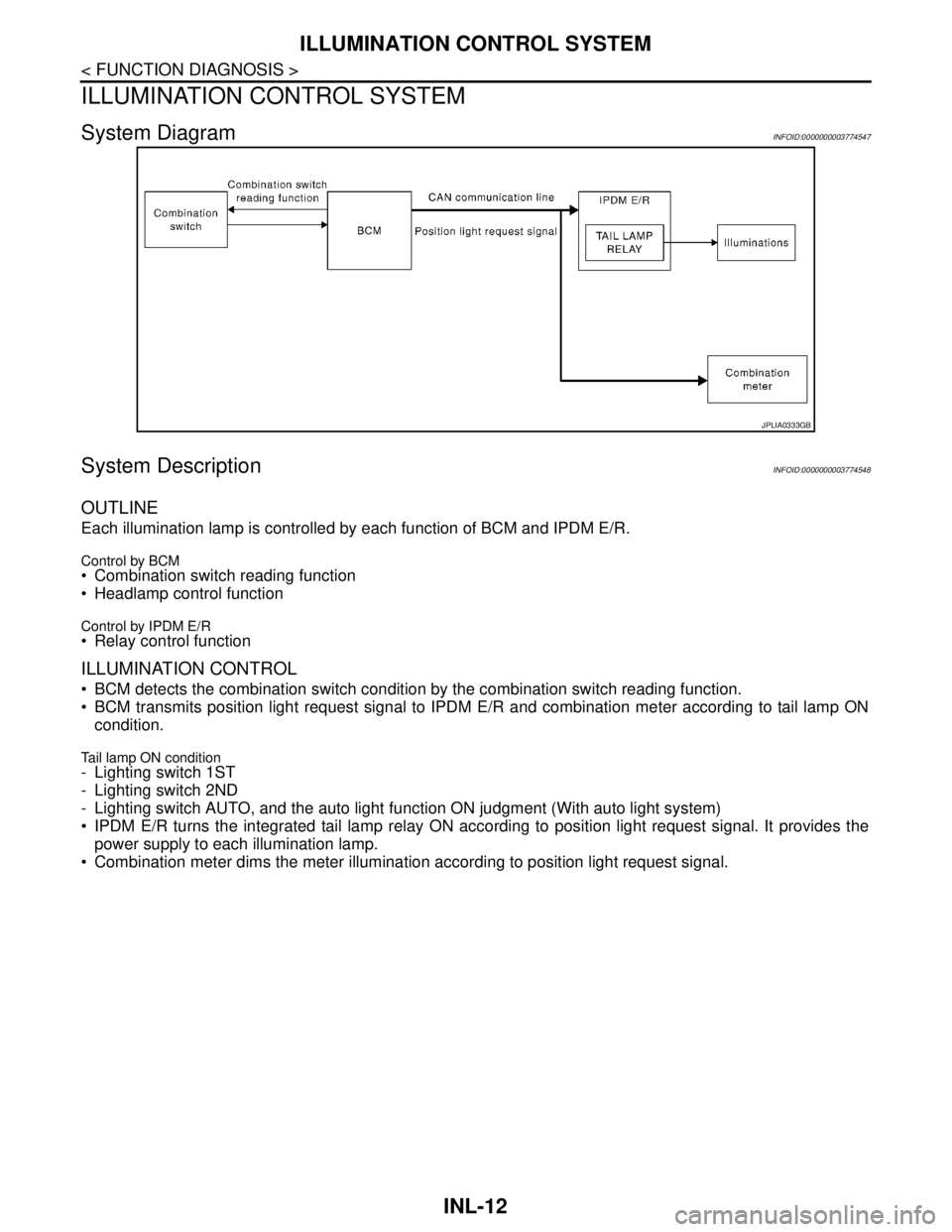
System DiagramINFOID:0000000003774547
System DescriptionINFOID:0000000003774548
OUTLINE
Each illumination lamp is controlled by each function of BCM and IPDM E/R.
Control by BCM Combination switch reading function
Headlamp control function
Control by IPDM E/R Relay control function
ILLUMINATION CONTROL
BCM detects the combination switch condition by the combination switch reading function.
BCM transmits position light request signal to IPDM E/R and combination meter according to tail lamp ON
condition.
Tail lamp ON condition- Lighting switch 1ST
- Lighting switch 2ND
- Lighting switch AUTO, and the auto light function ON judgment (With auto light system)
IPDM E/R turns the integrated tail lamp relay ON according to position light request signal. It provides the
power supply to each illumination lamp.
Combination meter dims the meter illumination according to position light request signal.
JPLIA0333GB