warning NISSAN TEANA 2008 User Guide
[x] Cancel search | Manufacturer: NISSAN, Model Year: 2008, Model line: TEANA, Model: NISSAN TEANA 2008Pages: 5121, PDF Size: 69.03 MB
Page 831 of 5121

BCS-14
< FUNCTION DIAGNOSIS >
POWER CONSUMPTION CONTROL SYSTEM
Sleep condition
Wake-up operation
BCM changes from the low power consumption mode to the CAN communication sleep mode when the any
of the BCM wake-up conditions is fulfilled. Only the control with BCM is activated.
BCM transmits the sleep wake up signal (wake up) to each unit when any of the CAN wake-up conditions is
fulfilled. It changes from the low power consumption mode or the CAN communication sleep mode to the
normal mode.
Each unit starts the transmission of CAN communication with the sleep wake up signal. In addition, the com-
bination meter transmits the wake up signal to BCM via CAN communication to report the CAN communica-
tion start.
Wake-up condition
CAN sleep condition BCM sleep condition
Receiving the sleep-ready signal (ready) from all units
Ignition switch: OFF
Vehicle security system: Not operation
Warning chime: Not operation
Intelligent Key system buzzer: Not operation
Trunk room lamp switch status: No change
Stop lamp switch: OFF
Key slot (card switch) status: No change
Turn signal indicator lamp: Not operation
Exterior lamp: OFF
Door lock status: No change
CONSULT-III communication status: Not communication
Meter display signal: Non-transmission
Door switch status: No change
Rear window defogger: OFF Interior room lamp battery saver: Time out
Push-button ignition switch illumination: OFF
Nissan Vehicle Immobilizer System (NVIS) - NATS: Not opera-
tion
Remote keyless entry receiver communication status: No com-
munication
ACC indicator lamp: Not operation
ON indicator lamp: Not operation
BCM wake-up condition CAN wake-up condition
Trunk lid opener switch: OFF → ON
Remote keyless entry receiver: Receiving
Door lock and unlock switch:
NEUTRAL → LOCK, NEUTRAL → UNLOCK
Front door lock assembly driver side (unlock sensor):
OFF → ON, ON → OFF Receiving the sleep-ready signal (Not-ready) from any units
Key slot (key switch): OFF → ON, ON → OFF
Push-button ignition switch (push switch): OFF→ ON
Hazard switch: OFF → ON
PASSING switch: OFF → ON, ON → OFF
TAIL LAMP switch: OFF → ON
Driver door switch: OFF → ON, ON → OFF
Passenger door switch: OFF → ON, ON → OFF
Rear RH door switch: OFF → ON, ON → OFF
Rear LH door switch: OFF → ON, ON → OFF
Trunk room lamp switch: OFF → ON, ON → OFF
Driver door request switch: OFF → ON
Passenger door request switch: OFF → ON
Trunk lid request switch: OFF → ON
Stop lamp switch: ON
Page 833 of 5121

BCS-16
< FUNCTION DIAGNOSIS >
DIAGNOSIS SYSTEM (BCM)
DIAGNOSIS SYSTEM (BCM)
COMMON ITEM
COMMON ITEM : CONSULT-III Function (BCM - COMMON ITEM)INFOID:0000000003809594
APPLICATION ITEM
CONSULT-III performs the following functions via CAN communication with BCM.
SYSTEM APPLICATION
BCM can perform the following functions for each system.
NOTE:
It can perform the diagnosis modes except the following for all sub system selection items.
×: Applicable item
NOTE:
*: This item is displayed, but is not used.
FREEZE FRAME DATA (FFD) AND IGN COUNTER
Freeze Frame Data
Diagnosis mode Function Description
Work Support Changes the setting for each system function.
Self Diagnostic Result Displays the diagnosis results judged by BCM.
CAN Diag Support MonitorMonitors the reception status of CAN communication viewed from BCM. Refer to CONSULT-III opera-
tion manual.
Data Monitor The BCM input/output signals are displayed.
Active Test The signals used to activate each device are forcibly supplied from BCM.
Ecu Identification The BCM part number is displayed.
Configuration Read and save the vehicle specification.
Write the vehicle specification when replacing BCM.
System Sub system selection itemDiagnosis mode
Work Support Data Monitor Active Test
Door lock DOOR LOCK×××
Rear window defogger REAR DEFOGGER××
Warning chime BUZZER××
Interior room lamp timer INT LAMP×××
Exterior lamp HEAD LAMP×××
Wiper and washer WIPER×××
Turn signal and hazard warning lamps FLASHER×××
— AIR CONDITONER*
Intelligent Key system
Engine start systemINTELLIGENT KEY×××
Combination switch COMB SW×
Body control system BCM×
NVIS - NATS IMMU××
Interior room lamp battery saver BATTERY SAVER×××
Trunk lid opener system TRUNK××
Vehicle security system THEFT ALM×××
— RETAINED PWR*×
Signal buffer system SIGNAL BUFFER××
— TPMS (AIR PRESSURE MONITOR)*×××
Page 836 of 5121
BCS
DIAGNOSIS SYSTEM (BCM)
BCS-19
< FUNCTION DIAGNOSIS >
C
D
E
F
G
H
I
J
K
L B A
O
P N
BUZZER : CONSULT-III Function (BCM - BUZZER)INFOID:0000000003897064
CONSULT-III APPLICATION ITEMS
DATA MONITOR
ACTIVE TEST
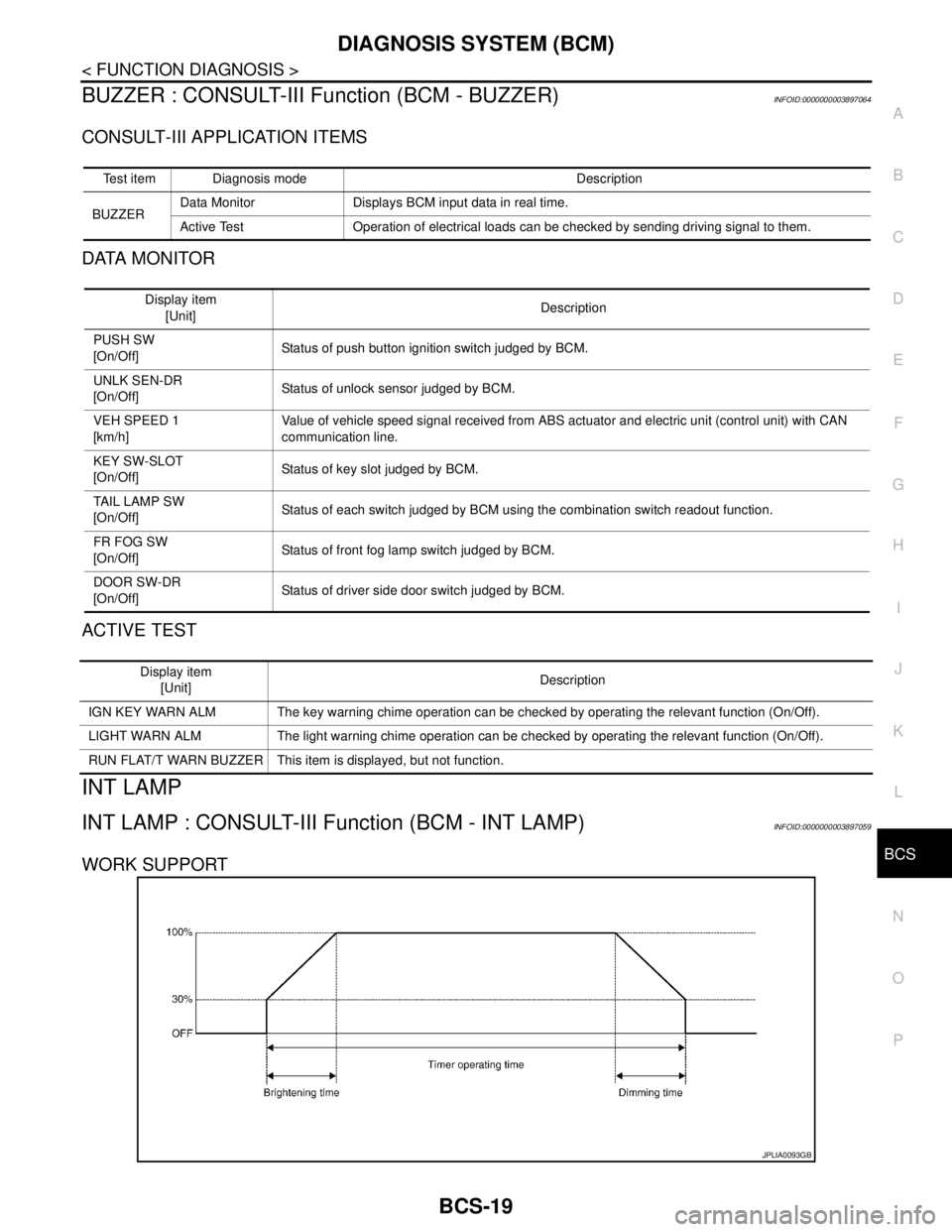
INT LAMP
INT LAMP : CONSULT-III Function (BCM - INT LAMP)INFOID:0000000003897059
WORK SUPPORT
Test item Diagnosis mode Description
BUZZERData Monitor Displays BCM input data in real time.
Active Test Operation of electrical loads can be checked by sending driving signal to them.
Display item
[Unit]Description
PUSH SW
[On/Off]Status of push button ignition switch judged by BCM.
UNLK SEN-DR
[On/Off]Status of unlock sensor judged by BCM.
VEH SPEED 1
[km/h]Value of vehicle speed signal received from ABS actuator and electric unit (control unit) with CAN
communication line.
KEY SW-SLOT
[On/Off]Status of key slot judged by BCM.
TAIL LAMP SW
[On/Off]Status of each switch judged by BCM using the combination switch readout function.
FR FOG SW
[On/Off]Status of front fog lamp switch judged by BCM.
DOOR SW-DR
[On/Off]Status of driver side door switch judged by BCM.
Display item
[Unit]Description
IGN KEY WARN ALM The key warning chime operation can be checked by operating the relevant function (On/Off).
LIGHT WARN ALM The light warning chime operation can be checked by operating the relevant function (On/Off).
RUN FLAT/T WARN BUZZER This item is displayed, but not function.
JPLIA0093GB
Page 841 of 5121

BCS-24
< FUNCTION DIAGNOSIS >
DIAGNOSIS SYSTEM (BCM)
FLASHER
FLASHER : CONSULT-III Function (BCM - FLASHER)INFOID:0000000003897062
WORK SUPPORT
*: Factory setting
DATA MONITOR
ACTIVE TEST
Test item Operation Description
FRONT WIPERHiTransmits the front wiper request signal (HI) to IPDM E/R with CAN communication to
operate the front wiper HI operation.
LoTransmits the front wiper request signal (LO) to IPDM E/R with CAN communication to
operate the front wiper LO operation.
INTTransmits the front wiper request signal (INT) to IPDM E/R with CAN communication to
operate the front wiper INT operation.
Off Stops transmitting the front wiper request signal to stop the front wiper operation.
HEADLAMP WASHER OnTransmits the headlamp washer request signal to IPDM E/R with CAN communication to
operate the headlamp washer operation.
Service item Setting item Setting
HAZARD ANSWER
BACKLock Only* With locking only
Sets the hazard warning lamp answer back function
when the door is lock/unlock with the request switch or
the key fob. Unlk Only With unlocking only
Lock/Unlk With locking/unlocking
Off Without the function
Monitor item
[Unit]Description
REQ SW-DR
[On/Off]The switch status input from the request switch (driver side)
REQ SW-AS
[On/Off]The switch status input from the request switch (passenger side)
PUSH SW
[On/Off]The switch status input from the push-button ignition switch
TURN SIGNAL R
[On/Off]
Each switch status that BCM detects from the combination switch reading function
TURN SIGNAL L
[On/Off]
HAZARD SW
[On/Off]The switch status input from the hazard switch
RKE-LOCK
[On/Off]Lock signal status received from the remote keyless entry receiver
RKE-UNLOCK
[On/Off]Unlock signal status received from the remote keyless entry receiver
RKE-PANIC
[On/Off]Panic alarm signal status received from the remote keyless entry receiver
Test item Operation Description
FLASHERRH Outputs the voltage to blink the right side turn signal lamps.
LH Outputs the voltage to blink the left side turn signal lamps.
Off Stops the voltage to turn the turn signal lamps OFF.
Page 842 of 5121

BCS
DIAGNOSIS SYSTEM (BCM)
BCS-25
< FUNCTION DIAGNOSIS >
C
D
E
F
G
H
I
J
K
L B A
O
P N
INTELLIGENT KEY
INTELLIGENT KEY : CONSULT-III Function (BCM - INTELLIGENT KEY)INFOID:0000000003897053
BCM CONSULT-III FUNCTION
CONSULT-III performs the following functions via CAN communication with BCM.
WORK SUPPORT
Diagnosis mode Function Description
WORK SUPPORT Changes the setting for each system function.
SELF-DIAG RESULTS Displays the diagnosis results judged by BCM.
DATA MONITOR The BCM input/output signals are displayed.
ACTIVE TEST The signals used to activate each device are forcibly supplied from BCM.
Monitor item Description
REMO CONT ID CONFIR It can be checked whether Intelligent Key ID code is registered or not in this mode.
AUTO LOCK SETAuto door lock time can be changed in this mode.
MODE 1: 1 minute
MODE 2: 5 minutes
MODE 3: 30 seconds
MODE 4: 2 minutes
LOCK/UNLOCK BY I-KEYDoor lock/unlock function by door request switch (driver side and passenger side) mode can be
changed to operate (WITH) or not operate (WITHOUT) in this mode.
ENGINE START BY I-KEYEngine start function mode can be changed to operate (WITH) or not operate (WITHOUT) in this
mode.
TRUNK/GLASS HATCH OPENBuzzer reminder function mode by trunk lid opener request switch can be changed to operate
(WITH) or not operate (WITHOUT) in this mode.
PANIC ALARM SETNOTE:
This item is displayed, but cannot be used.
PW DOWN SETNOTE:
This item is displayed, but cannot be used.
TRUNK OPEN DELAYTrunk button pressing on Intelligent Key button can be selected as per the following in this mode.
MODE 1: Press and hold
MODE 2: Press twice
MODE 3: Press and hold, or press twice
LO-BATT OF KEY FOB WARNIntelligent Key low battery warning mode can be changed to operate (WITH) or not operate (WITH-
OUT) in this mode.
ANTI KEY LOCK IN FUNCTIKey reminder function mode can be changed to operate (WITH) or not operate (WITHOUT) in this
mode.
HAZARD ANSWER BACKHazard reminder function mode can be selected from the following in this mode.
LOCK ONLY: Door lock operation only
UNLOCK ONLY: Door unlock operation only
LOCK/UNLOCK: Lock/unlock operation
OFF: Non-operational
ANS BACK I-KEY LOCKBuzzer reminder function (lock operation) mode by door request switch (driver side and passenger
side) can be selected from the following is this mode.
Horn chirp: Sound horn
Buzzer: Sound Intelligent Key warning buzzer
OFF: Non-operational
ANS BACK I-KEY UNLOCKBuzzer reminder function (unlock operation) mode by door request switch can be changed to op-
erate (ON) or not operate (OFF) in this mode.
SHORT CRANKING OUTPUTStarter motor can operate during the times below.
70 msec
100 msec
200 msec
Page 844 of 5121

BCS
DIAGNOSIS SYSTEM (BCM)
BCS-27
< FUNCTION DIAGNOSIS >
C
D
E
F
G
H
I
J
K
L B A
O
P N
ACTIVE TEST
RKE-PANICNOTE:
This item is displayed, but cannot be monitored.
RKE-P/W OPENNOTE:
This item is displayed, but cannot be monitored.
RKE-MODE CHG Indicates [ON/OFF] condition of MODE CHANGE signal from Intelligent Key.
RKE OPE COUN1When remote keyless entry receiver receives the signal transmitted while operating on Intelligent Key, the
numerical values start changing.
RKE OPE COUN2NOTE:
This item is displayed, but cannot be monitored. Monitor Item Condition
Test item Description
BATTERY SAVERThis test is able to check interior room lamp operation.
The interior room lamp will be activated when “ON” on CONSULT-III screen is touched.
PW REMOTO DOWN SETNOTE:
This item is displayed, but cannot be used.
OUTSIDE BUZZERThis test is able to check Intelligent Key warning buzzer operation.
The Intelligent Key warning buzzer will be activated when “ON” on CONSULT-III screen is touched.
INSIDE BUZZERThis test is able to check warning chime in combination meter operation.
Take away warning chime sounds when “TAKE OUT” on CONSULT-III screen is touched.
Key warning chime sounds when “KEY” on CONSULT-III screen is touched.
P position warning chime sounds when “KNOB” on CONSULT-III screen is touched.
INDICATORThis test is able to check warning lamp operation.
“KEY” Warning lamp illuminates when “RED ON” on CONSULT-III screen is touched.
“KEY” Warning lamp blinks when “RED IND” on CONSULT-III screen is touched.
INT LAMPThis test is able to check interior room lamp operation.
The interior room lamp will be activated when “ON” on CONSULT-III screen is touched.
LCDThis test is able to check meter display information
Engine start information displays when “BP N” on CONSULT-III screen is touched.
Engine start information displays when “BP I” on CONSULT-III screen is touched.
Key ID warning displays when “ID NG” on CONSULT-III screen is touched.
Steering lock information displays when “ROTAT” on CONSULT-III screen is touched.
P position warning displays when “SFT P” on CONSULT-III screen is touched.
Intelligent Key insert information displays when “INSRT” on CONSULT-III screen is touched.
Intelligent Key low battery warning displays when “BATT” on CONSULT-III screen is touched.
Take away warning displays when “OUTKEY” on CONSULT-III screen is touched.
OFF position warning displays when “LK WN” on CONSULT-III screen is touched.
TRUNK/GLASS HATCHThis test is able to check trunk lid opener actuator open operation.
This actuator opens when “OPEN” on CONSULT-III screen is touched.
FLASHERThis test is able to check security hazard lamp operation.
The hazard lamps will be activated when “RH” or “LH”on CONSULT-III screen is touched.
HORNThis test is able to check horn operation.
The horn will be activated when “ON” on CONSULT-III screen is touched.
P RANGEThis test is able to check control device power supply
Control device power is supplied when “ON” on CONSULT-III screen is touched.
ENGINE SW ILLUMIThis test is able to check push-ignition switch illumination operation.
Push-ignition switch illumination illuminates when “ON” on CONSULT-III screen is touched.
LOCK INDICATORThis test is able to check LOCK indicator in push-ignition switch operation.
LOCK indicator in push-ignition switch illuminates when “ON” on CONSULT-III screen is touched.
ACC INDICATORThis test is able to check ACC indicator in push-ignition switch operation.
ACC indicator in push-ignition switch illuminates when “ON” on CONSULT-III screen is touched.
IGNITION ON INDThis test is able to check ON indicator in push-ignition switch operation.
ON indicator in push-ignition switch illuminates when “ON” on CONSULT-III screen is touched.
Page 849 of 5121

BCS-32
< FUNCTION DIAGNOSIS >
DIAGNOSIS SYSTEM (BCM)
WORK SUPPORT
ACTIVE TEST
SIGNAL BUFFER
SIGNAL BUFFER : CONSULT-III Function (BCM - SIGNAL BUFFER)INFOID:0000000003809611
DATA MONITOR
ACTIVE TEST
CDL LOCK SW Indicates [ON/OFF] condition of lock signal from door lock/unlock switch.
CDL UNLOCK SW Indicates [ON/OFF] condition of unlock signal from door lock/unlock switch.
KEY CYL LK-SWNOTE:
This is displayed even when it is not equipped.
KEY CYL UN-SWNOTE:
This is displayed even when it is not equipped.
KEY CYL SW-TRNOTE:
This is displayed even when it is not equipped.
TR/BD OPEN SW Indicates [ON/OFF] condition of trunk lid opener switch.
TRNK/HAT MNTR Indicates [ON/OFF] condition of trunk room lamp switch.
RKE-LOCK Indicates [ON/OFF] condition of LOCK signal from Intelligent Key.
RKE-UNLOCK Indicates [ON/OFF] condition of UNLOCK signal from Intelligent Key.
RKE-TR/BD Indicates [ON/OFF] condition of TRUNK LID OPEN signal from Intelligent Key. Monitored Item Description
Test Item Description
SECURITY ALARM SET This mode is able to confirm and change security alarm ON-OFF setting.
THEFT ALM TRGThe switch which triggered vehicle security alarm is recorded. This mode is able to confirm and
erase the record of vehicle security alarm. The trigger data can be erased by touching “CLEAR” on
CONSULT-III screen.
Test Item Description
THEFT INDThis test is able to check security indicator lamp operation. The lamp will be turned on when “ON”
on CONSULT-III screen is touched.
HEADLAMP(HI)This test is able to check vehicle security lamp operation. The headlamps will be activated for 0.5
seconds after “ON” on CONSULT-III screen is touched.
FLASHERThis test is able to check vehicle security hazard lamp operation. The hazard lamps will be activat-
ed after “ON” on CONSULT-III screen is touched.
Monitor item [UNIT] Description
PUSH SW
[Off/On]Displays the status of the push-button ignition switch (push switch) judged by BCM.
Te s t i t e mOpera-
tionDescription
OIL PRESSURE SWOff OFF
OnBCM transmits the oil pressure switch signal to the combination meter via CAN communica-
tion, which illuminates the oil pressure warning lamp in the combination meter.
Page 890 of 5121

BCS
BCM (BODY CONTROL MODULE)
BCS-73
< ECU DIAGNOSIS >
C
D
E
F
G
H
I
J
K
L B A
O
P N
HIGH FLASHER OPERATION
BCM detects the turn signal lamp circuit status by the current value.
BCM increases the turn signal lamp blinking speed if the bulb or harness open is detected with the turn signal
lamp operating.
NOTE:
The blinking speed is normal while activating the hazard warning lamp.
DTC Inspection Priority ChartINFOID:0000000003809630
If some DTCs are displayed at the same time, perform inspections one by one based on the following priority
chart.
B2608: STARTER RELAY Inhibit engine cranking500 ms after the following signal communication status becomes
consistent
Starter motor relay control signal
Starter relay status signal (CAN)
B2609: S/L STATUS Inhibit engine cranking
Inhibit steering lockWhen the following steering lock conditions agree
BCM steering lock control status
Steering lock condition No. 1 signal status
Steering lock condition No. 2 signal status
B260A: IGNITION RELAY Inhibit engine cranking500 ms after the following conditions are fulfilled
IGN relay (IPDM E/R) control signal: OFF (Battery voltage)
Ignition ON signal (CAN to IPDM E/R): OFF (Request signal)
Ignition ON signal (CAN from IPDM E/R): OFF (Condition signal)
B260F: ENG STATE SIG LOSTMaintains the power supply
position attained at the time
of DTC detectionWhen any of the following conditions is fulfilled
Power position changes to ACC
Receives engine status signal (CAN)
B2612: S/L STATUS Inhibit engine cranking
Inhibit steering lockWhen any of the following conditions is fulfilled
Steering lock unit status signal (CAN) is received normally
The BCM steering lock control status matches the steering lock
status recognized by the steering lock unit status signal (CAN
from IPDM E/R)
B2617: STARTER RELAY CIRC Inhibit engine cranking1 second after the starter motor relay control inside BCM becomes
normal
B2618: BCM Inhibit engine cranking1 second after the ignition relay (IPDM E/R) control inside BCM be-
comes normal
B2619: BCM Inhibit engine cranking1 second after the steering lock unit power supply output control in-
side BCM becomes normal
B261E: VEHICLE TYPE Inhibit engine cranking BCM initialization
B26E1: ENG STATE NO RES Inhibit engine crankingWhen any of the following conditions is fulfilled
Power position changes to ACC
Receives engine status signal (CAN)
B26E9: S/L STATUS Inhibit engine cranking
Inhibit steering lockWhen BCM transmits the LOCK request signal to steering lock unit,
and receives LOCK response signal from steering lock unit, the fol-
lowing conditions is fulfilled
Steering condition No. 1 signal: LOCK (0 V)
Steering condition No. 2 signal: LOCK (Battery voltage) Display contents of CONSULT Fail-safe Cancellation
Priority DTC
1 B2562: LOW VOLTAGE
2 U1000: CAN COMM CIRCUIT
U1010: CONTROL UNIT (CAN)
3 B2190: NATS ANTENNA AMP
B2191: DIFFERENCE OF KEY
B2192: ID DISCORD BCM-ECM
B2193: CHAIN OF BCM-ECM
Page 894 of 5121

BCS
PRECAUTIONS
BCS-77
< PRECAUTION >
C
D
E
F
G
H
I
J
K
L B A
O
P N
PRECAUTION
PRECAUTIONS
Precaution for Supplemental Restraint System (SRS) "AIR BAG" and "SEAT BELT
PRE-TENSIONER"
INFOID:0000000003809633
The Supplemental Restraint System such as “AIR BAG” and “SEAT BELT PRE-TENSIONER”, used along
with a front seat belt, helps to reduce the risk or severity of injury to the driver and front passenger for certain
types of collision. This system includes seat belt switch inputs and dual stage front air bag modules. The SRS
system uses the seat belt switches to determine the front air bag deployment, and may only deploy one front
air bag, depending on the severity of a collision and whether the front occupants are belted or unbelted.
Information necessary to service the system safely is included in the “SRS AIRBAG” and “SEAT BELT” of this
Service Manual.
WARNING:
To avoid rendering the SRS inoperative, which could increase the risk of personal injury or death in
the event of a collision which would result in air bag inflation, all maintenance must be performed by
an authorized NISSAN/INFINITI dealer.
Improper maintenance, including incorrect removal and installation of the SRS, can lead to personal
injury caused by unintentional activation of the system. For removal of Spiral Cable and Air Bag
Module, see the “SRS AIRBAG”.
Never use electrical test equipment on any circuit related to the SRS unless instructed to in this Ser-
vice Manual. SRS wiring harnesses can be identified by yellow and/or orange harnesses or harness
connectors.
Page 900 of 5121

BR-4
< PRECAUTION >
PRECAUTIONS
PRECAUTION
PRECAUTIONS
Precaution for Supplemental Restraint System (SRS) "AIR BAG" and "SEAT BELT
PRE-TENSIONER"
INFOID:0000000003890160
The Supplemental Restraint System such as “AIR BAG” and “SEAT BELT PRE-TENSIONER”, used along
with a front seat belt, helps to reduce the risk or severity of injury to the driver and front passenger for certain
types of collision. Information necessary to service the system safely is included in the “SRS AIRBAG” and
“SEAT BELT” of this Service Manual.
WARNING:
• To avoid rendering the SRS inoperative, which could increase the risk of personal injury or death in
the event of a collision which would result in air bag inflation, all maintenance must be performed by
an authorized NISSAN/INFINITI dealer.
Improper maintenance, including incorrect removal and installation of the SRS, can lead to personal
injury caused by unintentional activation of the system. For removal of Spiral Cable and Air Bag
Module, see the “SRS AIRBAG”.
Never use electrical test equipment on any circuit related to the SRS unless instructed to in this Ser-
vice Manual. SRS wiring harnesses can be identified by yellow and/or orange harnesses or harness
connectors.
Precaution Necessary for Steering Wheel Rotation after Battery Disconnect
INFOID:0000000003890161
NOTE:
Before removing and installing any control units, first turn the push-button ignition switch to the LOCK posi-
tion, then disconnect both battery cables.
After finishing work, confirm that all control unit connectors are connected properly, then re-connect both
battery cables.
Always use CONSULT-III to perform self-diagnosis as a part of each function inspection after finishing work.
If a DTC is detected, perform trouble diagnosis according to self-diagnosis results.
This vehicle is equipped with a push-button ignition switch and a steering lock unit.
If the battery is disconnected or discharged, the steering wheel will lock and cannot be turned.
If turning the steering wheel is required with the battery disconnected or discharged, follow the procedure
below before starting the repair operation.
OPERATION PROCEDURE
1. Connect both battery cables.
NOTE:
Supply power using jumper cables if battery is discharged.
2. Turn the push-button ignition switch to ACC position.
(At this time, the steering lock will be released.)
3. Disconnect both battery cables. The steering lock will remain released with both battery cables discon-
nected and the steering wheel can be turned.
4. Perform the necessary repair operation.
5. When the repair work is completed, re-connect both battery cables. With the brake pedal released, turn
the push-button ignition switch from ACC position to ON position, then to LOCK position. (The steering
wheel will lock when the push-button ignition switch is turned to LOCK position.)
6. Perform self-diagnosis check of all control units using CONSULT-III.