ignition NISSAN TEANA 2008 Service Manual
[x] Cancel search | Manufacturer: NISSAN, Model Year: 2008, Model line: TEANA, Model: NISSAN TEANA 2008Pages: 5121, PDF Size: 69.03 MB
Page 901 of 5121
PRECAUTIONS
BR-5
< PRECAUTION >
C
D
E
G
H
I
J
K
L
MA
B
BR
N
O
P
Precaution for Procedure without Cowl Top CoverINFOID:0000000003890162
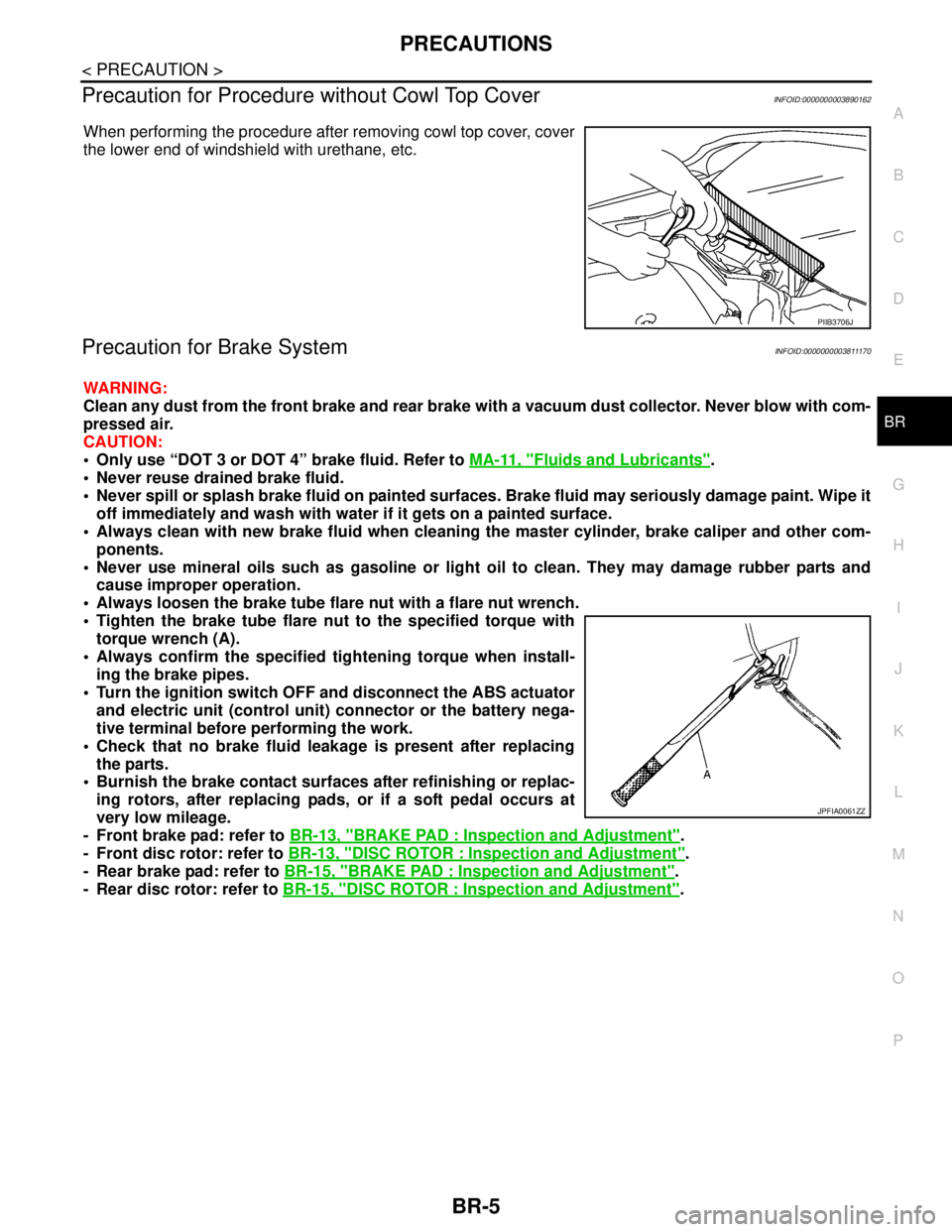
When performing the procedure after removing cowl top cover, cover
the lower end of windshield with urethane, etc.
Precaution for Brake SystemINFOID:0000000003811170
WARNING:
Clean any dust from the front brake and rear brake with a vacuum dust collector. Never blow with com-
pressed air.
CAUTION:
Only use “DOT 3 or DOT 4” brake fluid. Refer to MA-11, "
Fluids and Lubricants".
Never reuse drained brake fluid.
Never spill or splash brake fluid on painted surfaces. Brake fluid may seriously damage paint. Wipe it
off immediately and wash with water if it gets on a painted surface.
Always clean with new brake fluid when cleaning the master cylinder, brake caliper and other com-
ponents.
Never use mineral oils such as gasoline or light oil to clean. They may damage rubber parts and
cause improper operation.
Always loosen the brake tube flare nut with a flare nut wrench.
Tighten the brake tube flare nut to the specified torque with
torque wrench (A).
Always confirm the specified tightening torque when install-
ing the brake pipes.
Turn the ignition switch OFF and disconnect the ABS actuator
and electric unit (control unit) connector or the battery nega-
tive terminal before performing the work.
Check that no brake fluid leakage is present after replacing
the parts.
Burnish the brake contact surfaces after refinishing or replac-
ing rotors, after replacing pads, or if a soft pedal occurs at
very low mileage.
- Front brake pad: refer to BR-13, "
BRAKE PAD : Inspection and Adjustment".
- Front disc rotor: refer to BR-13, "
DISC ROTOR : Inspection and Adjustment".
- Rear brake pad: refer to BR-15, "
BRAKE PAD : Inspection and Adjustment".
- Rear disc rotor: refer to BR-15, "
DISC ROTOR : Inspection and Adjustment".
PIIB3706J
JPFIA0061ZZ
Page 905 of 5121

BRAKE FLUID
BR-9
< ON-VEHICLE MAINTENANCE >
C
D
E
G
H
I
J
K
L
MA
B
BR
N
O
P
BRAKE FLUID
InspectionINFOID:0000000003811173
BRAKE FLUID LEVEL
Check that the fluid level in the sub tank is within the specified
range (MAX – MIN lines).
Visually check for any brake fluid leakage around the sub tank,
reservoir tank and hose.
Check the brake system for any leakage if the fluid level is
extremely low (lower than MIN).
Check the brake system for fluid leakage if the warning lamp
remains illuminated even after the parking brake is released.
BRAKE LINE
1. Check brake line (tubes and hoses) for cracks, deterioration or other damage. Replace any damaged
parts.
2. Check for fluid leakage by fully depressing brake pedal while
engine is running.
CAUTION:
If leakage occurs around joints, retighten or, if necessary,
replace damaged parts.
DrainingINFOID:0000000003811174
CAUTION:
Never spill or splash brake fluid on painted surfaces. Brake fluid may seriously damage paint. Wipe it
off immediately and wash with water if it gets on a painted surface.
Turn the ignition switch OFF and disconnect the ABS actuator and electric unit (control unit) con-
nector or the battery negative terminal before draining.
1. Connect a vinyl tube to the bleed valve.
2. Depress the brake pedal and loosen the bleeder valve to gradu-
ally discharge brake fluid.
RefillingINFOID:0000000003811175
CAUTION:
Turn the ignition switch OFF and disconnect the ABS actuator and electric unit (control unit) connec-
tor or the battery negative terminal before refilling.
1. Check that there is no foreign material in the sub tank, and refill with new brake fluid.
CAUTION:
Never reuse drained brake fluid.
JPFIA0007ZZ
SBR389C
BRA0007D
Page 906 of 5121
BR-10
< ON-VEHICLE MAINTENANCE >
BRAKE FLUID
2. Loosen the bleeder valve, slowly depress the brake pedal to the full stroke, and then release the pedal.
Repeat this operation at intervals of 2 or 3 seconds until all brake fluid is discharged. Then close the
bleeder valve with the brake pedal depressed. Repeat the same work on each wheel.
3. Perform the air bleeding. Refer to BR-10, "
Bleeding Brake System".
Bleeding Brake SystemINFOID:0000000003811176
CAUTION:
Turn the ignition switch OFF and disconnect the ABS actuator and electric unit (control unit) con-
nector or the battery negative terminal before performing the work.
Monitor the fluid level in the sub tank during the air bleeding.
Always use new brake fluid for refilling. Never reuse the drained brake fluid.
1. Connect a vinyl tube to the bleeder valve of the rear right brake.
2. Fully depress the brake pedal 4 to 5 times.
3. Loosen the bleeder valve and bleed air with the brake pedal depressed, and then quickly tighten the
bleeder valve.
4. Repeat steps 2 and 3 until all of the air is out of the brake line.
5. Tighten the bleeder valve to the specified torque.
Front disc brake: refer to BR-34, "
BRAKE CALIPER ASSEMBLY : Exploded View".
Rear disc brake: refer to BR-40, "
BRAKE CALIPER ASSEMBLY : Exploded View".
6. Perform steps 1 to 5 for the rear right brake → front left brake → rear left brake → and front right brake in
order.
7. Check that the fluid level in the sub tank is within the specified range after air bleeding. Refer to BR-9,
"Inspection".
Page 955 of 5121
![NISSAN TEANA 2008 Service Manual BRC-14
< FUNCTION DIAGNOSIS >[ABS]
DIAGNOSIS SYSTEM [ABS ACTUATOR AND ELECTRIC UNIT (CONTROL
UNIT)]
NOTE:
1: A brief moment of On/Off condition occurs every 20 seconds after ignition switch turned ON](/img/5/57391/w960_57391-954.png "NISSAN TEANA 2008 Service Manual BRC-14
< FUNCTION DIAGNOSIS >[ABS]
DIAGNOSIS SYSTEM [ABS ACTUATOR AND ELECTRIC UNIT (CONTROL
UNIT)]
NOTE:
1: A brief moment of On/Off condition occurs every 20 seconds after ignition switch turned ON")
BRC-14
< FUNCTION DIAGNOSIS >[ABS]
DIAGNOSIS SYSTEM [ABS ACTUATOR AND ELECTRIC UNIT (CONTROL
UNIT)]
NOTE:
1: A brief moment of On/Off condition occurs every 20 seconds after ignition switch turned ON. This is not malfunction because it is an
operation for checking.
ACTIVE TEST
CAUTION:
• Do not perform active test while driving vehicle.
Make sure to completely bleed air from brake system.
The active test cannot be started when ABS warning lamp and brake warning lamp are ON.
ABS warning lamp and brake warning lamp are ON during active test.
NOTE:
When active test is performed while depressing the pedal, the pedal depression amount will change. This is
normal. (Only solenoid valve and ABS motor.)
“TEST IS STOPPED” is displayed 10 seconds after operation start.
After “TEST IS STOPPED” is displayed, to perform test again.
Test Item
ABS SOLENOID VALVE
Touch “Up”, “Keep” and “Down”. Then use screen monitor to check that solenoid valve operates as shown in
the table below.
FR RH IN SOL
(On/Off) (Note 1)×
Operation status of each solenoid valve FR RH OUT SOL
(On/Off) (Note 1)×
FR LH IN SOL
(On/Off) (Note 1)×
FR LH OUT SOL
(On/Off) (Note 1)×
RR RH IN SOL
(On/Off) (Note 1)×
RR RH OUT SOL
(On/Off) (Note 1)×
RR LH IN SOL
(On/Off) (Note 1)×
RR LH OUT SOL
(On/Off) (Note 1)×
MOTOR RELAY
(On/Off)×Motor and motor relay operation
ACTUATOR RLY
(On/Off) (Note 1)×Actuator relay operation
ABS WARN LAMP
(On/Off)×ABS warning lamp
EBD WARN LAMP
(On/Off)Brake warning lamp
EBD SIGNAL
(On/Off)EBD operation
ABS SIGNAL
(On/Off)ABS operation
EBD FAIL SIG
(On/Off)EBD fail-safe signal
ABS FAIL SIG
(On/Off)ABS fail-safe signal Monitor item (Unit)SELECT MONITOR ITEM
Remarks
ECU INPUT
SIGNALSMAIN SIGNALS
Page 956 of 5121
![NISSAN TEANA 2008 Service Manual DIAGNOSIS SYSTEM [ABS ACTUATOR AND ELECTRIC UNIT (CONTROL
UNIT)]
BRC-15
< FUNCTION DIAGNOSIS >[ABS]
C
D
E
G
H
I
J
K
L
MA
B
BRC
N
O
P
*: On for 1 to 2 seconds after the touch, and then Off.
NOTE:
A br](/img/5/57391/w960_57391-955.png "NISSAN TEANA 2008 Service Manual DIAGNOSIS SYSTEM [ABS ACTUATOR AND ELECTRIC UNIT (CONTROL
UNIT)]
BRC-15
< FUNCTION DIAGNOSIS >[ABS]
C
D
E
G
H
I
J
K
L
MA
B
BRC
N
O
P
*: On for 1 to 2 seconds after the touch, and then Off.
NOTE:
A br")
DIAGNOSIS SYSTEM [ABS ACTUATOR AND ELECTRIC UNIT (CONTROL
UNIT)]
BRC-15
< FUNCTION DIAGNOSIS >[ABS]
C
D
E
G
H
I
J
K
L
MA
B
BRC
N
O
P
*: On for 1 to 2 seconds after the touch, and then Off.
NOTE:
A brief moment of On/Off condition occurs every 20 seconds after ignition switch turned ON. This is not malfunction because it is an
operation for checking.
ABS MOTOR
Touch “On” and “Off” on screen. Make sure motor relay and actuator relay operates as shown in table below.
NOTE:
A brief moment of On/Off condition occurs every 20 seconds after ignition switch turned ON. This is not malfunction because it is an
operation for checking.
ECU IDENTIFICATION
ABS actuator and electric unit (control unit) part number can be read.
Test item Display itemDisplay (Note)
Up Keep Down
FR RH SOLFR RH IN SOL Off On On
FR RH OUT SOL Off Off On*
FR LH SOLFR LH IN SOL Off On On
FR LH OUT SOL Off Off On*
RR RH SOLRR RH IN SOL Off On On
RR RH OUT SOL Off Off On*
RR LH SOLRR LH IN SOL Off On On
RR LH OUT SOL Off Off On*
Test item Display itemDisplay
On Off
ABS MOTORMOTOR RELAY On Off
ACTUATOR RLY (Note) On On
Page 957 of 5121
![NISSAN TEANA 2008 Service Manual BRC-16
< COMPONENT DIAGNOSIS >[ABS]
C1101, C1102, C1103, C1104 WHEEL SENSOR
COMPONENT DIAGNOSIS
C1101, C1102, C1103, C1104 WHEEL SENSOR
DescriptionINFOID:0000000003766731
When the sensor rotor rotates](/img/5/57391/w960_57391-956.png "NISSAN TEANA 2008 Service Manual BRC-16
< COMPONENT DIAGNOSIS >[ABS]
C1101, C1102, C1103, C1104 WHEEL SENSOR
COMPONENT DIAGNOSIS
C1101, C1102, C1103, C1104 WHEEL SENSOR
DescriptionINFOID:0000000003766731
When the sensor rotor rotates")
BRC-16
< COMPONENT DIAGNOSIS >[ABS]
C1101, C1102, C1103, C1104 WHEEL SENSOR
COMPONENT DIAGNOSIS
C1101, C1102, C1103, C1104 WHEEL SENSOR
DescriptionINFOID:0000000003766731
When the sensor rotor rotates, the magnetic field changes. Wheel sensor converts the magnetic field changes
to current signals (rectangular wave) and transmits them to the ABS actuator and electric unit (control unit).
DTC LogicINFOID:0000000003766732
DTC DETECTION LOGIC
DTC CONFIRMATION PROCEDURE
1.DTC REPRODUCTION PROCEDURE
1. Start the engine and drive the vehicle at 30 km/h (19 MPH) or more for approximately 1 minute.
2. Perform ABS actuator and electric unit (control unit) self-diagnosis.
Is DTC
“C1101”, “C1102”, “C1103” or “C1104” detected?
YES >> Proceed to diagnosis. Refer to BRC-16, "Diagnosis Procedure".
NO >> INSPECTION END
Diagnosis ProcedureINFOID:0000000003766733
CAUTION:
Do not check between wheel sensor terminals.
1.CHECK TIRES
Check air pressure, wear and size. Refer to WT-5, "
Tire Air Pressure".
Is the inspection result normal?
YES >> GO TO 2.
NO >> Repair or replace damaged parts.
2.CHECK SENSOR AND SENSOR ROTOR
Check sensor rotor for damage.
Check wheel sensor for damage, disconnection or looseness.
Is the inspection result normal?
YES >> GO TO 3.
NO >> Repair wheel sensor mount or replace sensor rotor. Then perform the self-diagnosis.
3.CHECK CONNECTOR
1. Turn the ignition switch OFF.
2. Disconnect ABS actuator and electric unit (control unit) connector.
3. Disconnect malfunctioning wheel sensor connector.
4. Check terminal to see if it is deformed, disconnected, looseness, etc.
Is the inspection result normal?
YES >> GO TO 4.
NO >> Repair or replace damaged parts.
DTC Display item Malfunction detected condition Possible cause
C1101 RR RH SENSOR-1Circuit of rear RH wheel sensor is open. Or when the sen-
sor power voltage is outside the standard.
Harness or connector
Wheel sensor
ABS actuator and electric unit
(control unit) C1102 RR LH SENSOR-1Circuit of rear LH wheel sensor is open. Or when the sen-
sor power voltage is outside the standard.
C1103 FR RH SENSOR-1Circuit of front RH wheel sensor is open. Or when the
sensor power voltage is outside the standard.
C1104 FR LH SENSOR-1Circuit of front LH wheel sensor is open. Or when the
sensor power voltage is outside the standard.
Page 958 of 5121
![NISSAN TEANA 2008 Service Manual C1101, C1102, C1103, C1104 WHEEL SENSOR
BRC-17
< COMPONENT DIAGNOSIS >[ABS]
C
D
E
G
H
I
J
K
L
MA
B
BRC
N
O
P
4.CHECK WHEEL SENSOR HARNESS
1. Check the continuity between ABS actuator and electric unit](/img/5/57391/w960_57391-957.png "NISSAN TEANA 2008 Service Manual C1101, C1102, C1103, C1104 WHEEL SENSOR
BRC-17
< COMPONENT DIAGNOSIS >[ABS]
C
D
E
G
H
I
J
K
L
MA
B
BRC
N
O
P
4.CHECK WHEEL SENSOR HARNESS
1. Check the continuity between ABS actuator and electric unit")
C1101, C1102, C1103, C1104 WHEEL SENSOR
BRC-17
< COMPONENT DIAGNOSIS >[ABS]
C
D
E
G
H
I
J
K
L
MA
B
BRC
N
O
P
4.CHECK WHEEL SENSOR HARNESS
1. Check the continuity between ABS actuator and electric unit (control unit) harness connector and wheel
sensor harness connector. (Also check continuity when steering wheel is turned right and left and when
sensor harness inside the wheel house is moved.)
Measurement terminal for power supply circuit
Measurement terminal for signal circuit
2. Check the continuity between ABS actuator and electric unit (control unit) harness connector.
Is the inspection result normal?
YES >> GO TO 5.
NO >> Repair or replace damaged parts.
5.CHECK WHEEL SENSOR POWER SUPPLY CIRCUIT
1. Connect ABS actuator and electric unit (control unit) connector.
2. Turn the ignition switch ON.
CAUTION:
Never start the engine.
3. Check the voltage between wheel sensor harness connector and ground.
Is the inspection result normal?
YES >> GO TO 6.
NO >> Repair or replace damaged parts.
6.CHECK DATA MONITOR
1. Turn the ignition switch OFF.
2. Connect each wheel sensor connector.
ABS actuator and electric unit (control unit) Wheel sensor
Continuity
Connector Terminal Connector Terminal
E349 E39 (Front RH)
1 Existed 16 E22 (Front LH)
8 C4 (Rear RH)
6 C3 (Rear LH)
ABS actuator and electric unit (control unit) Wheel sensor
Continuity
Connector Terminal Connector Terminal
E3410 E39 (Front RH)
2 Existed 5 E22 (Front LH)
19 C4 (Rear RH)
17 C3 (Rear LH)
ABS actuator and electric unit (control unit)
Continuity
Connector Terminal Connector Terminal
E349, 10
E34 1, 4 Not existed 16, 5
8, 19
6, 17
Wheel sensor
—Voltage
Connector Terminal
E39 (Front RH)
1 Ground 8 V or more E22 (Front LH)
C4 (Rear RH)
C3 (Rear LH)
Page 960 of 5121
![NISSAN TEANA 2008 Service Manual C1105, C1106, C1107, C1108 WHEEL SENSOR
BRC-19
< COMPONENT DIAGNOSIS >[ABS]
C
D
E
G
H
I
J
K
L
MA
B
BRC
N
O
P
C1105, C1106, C1107, C1108 WHEEL SENSOR
DescriptionINFOID:0000000003767288
When the sensor](/img/5/57391/w960_57391-959.png "NISSAN TEANA 2008 Service Manual C1105, C1106, C1107, C1108 WHEEL SENSOR
BRC-19
< COMPONENT DIAGNOSIS >[ABS]
C
D
E
G
H
I
J
K
L
MA
B
BRC
N
O
P
C1105, C1106, C1107, C1108 WHEEL SENSOR
DescriptionINFOID:0000000003767288
When the sensor")
C1105, C1106, C1107, C1108 WHEEL SENSOR
BRC-19
< COMPONENT DIAGNOSIS >[ABS]
C
D
E
G
H
I
J
K
L
MA
B
BRC
N
O
P
C1105, C1106, C1107, C1108 WHEEL SENSOR
DescriptionINFOID:0000000003767288
When the sensor rotor rotates, the magnetic field changes. Wheel sensor converts the magnetic field changes
to current signals (rectangular wave) and transmits them to the ABS actuator and electric unit (control unit).
DTC LogicINFOID:0000000003766737
DTC DETECTION LOGIC
DTC CONFIRMATION PROCEDURE
1.DTC REPRODUCTION PROCEDURE
1. Start the engine and drive the vehicle at 30 km/h (19 MPH) or more for approximately 1 minute.
2. Perform ABS actuator and electric unit (control unit) self-diagnosis.
Is DTC
“C1105”, “C1106”, “C1107” or “C1108” detected?
YES >> Proceed to diagnosis. Refer to BRC-19, "Diagnosis Procedure".
NO >> INSPECTION END
Diagnosis ProcedureINFOID:0000000003767289
CAUTION:
Do not check between wheel sensor terminals.
1.CHECK TIRES
Check air pressure, wear and size. Refer to WT-5, "
Tire Air Pressure".
Is the inspection result normal?
YES >> GO TO 2.
NO >> Repair or replace damaged parts.
2.CHECK SENSOR AND SENSOR ROTOR
Check sensor rotor for damage.
Check wheel sensor for damage, disconnection or looseness.
Is the inspection result normal?
YES >> GO TO 3.
NO >> Repair wheel sensor mount or replace sensor rotor. Then perform the self-diagnosis.
3.CHECK CONNECTOR
1. Turn the ignition switch OFF.
2. Disconnect ABS actuator and electric unit (control unit) connector.
3. Disconnect malfunctioning wheel sensor connector.
DTC Display item Malfunction detected condition Possible cause
C1105 RR RH SENSOR-2When the circuit in the rear RH wheel sensor is short-cir-
cuited. Or when the distance between the wheel sensor
and sensor rotor is too large and the sensor pulse cannot
be recognized by the control unit.
Harness or connector
Wheel sensor
ABS actuator and electric unit
(control unit) C1106 RR LH SENSOR-2When the circuit in the rear LH wheel sensor is short-cir-
cuited. Or when the distance between the wheel sensor
and sensor rotor is too large and the sensor pulse cannot
be recognized by the control unit.
C1107 FR RH SENSOR-2When the circuit in the front RH wheel sensor is short-cir-
cuited. Or when the distance between the wheel sensor
and sensor rotor is too large and the sensor pulse cannot
be recognized by the control unit.
C1108 FR LH SENSOR-2When the circuit in the front LH wheel sensor is short-cir-
cuited. Or when the distance between the wheel sensor
and sensor rotor is too large and the sensor pulse cannot
be recognized by the control unit.
Page 961 of 5121
![NISSAN TEANA 2008 Service Manual BRC-20
< COMPONENT DIAGNOSIS >[ABS]
C1105, C1106, C1107, C1108 WHEEL SENSOR
4. Check terminal to see if it is deformed, disconnected, looseness, etc.
Is the inspection result normal?
YES >> GO TO 4.
N](/img/5/57391/w960_57391-960.png "NISSAN TEANA 2008 Service Manual BRC-20
< COMPONENT DIAGNOSIS >[ABS]
C1105, C1106, C1107, C1108 WHEEL SENSOR
4. Check terminal to see if it is deformed, disconnected, looseness, etc.
Is the inspection result normal?
YES >> GO TO 4.
N")
BRC-20
< COMPONENT DIAGNOSIS >[ABS]
C1105, C1106, C1107, C1108 WHEEL SENSOR
4. Check terminal to see if it is deformed, disconnected, looseness, etc.
Is the inspection result normal?
YES >> GO TO 4.
NO >> Repair or replace damaged parts.
4.CHECK WHEEL SENSOR HARNESS
1. Check the continuity between ABS actuator and electric unit (control unit) harness connector and wheel
sensor harness connector. (Also check continuity when steering wheel is turned right and left and when
sensor harness inside the wheel house is moved.)
Measurement terminal for power supply circuit
Measurement terminal for signal circuit
2. Check the continuity between ABS actuator and electric unit (control unit) harness connector.
Is the inspection result normal?
YES >> GO TO 5.
NO >> Repair or replace damaged parts.
5.CHECK WHEEL SENSOR POWER SUPPLY CIRCUIT
1. Connect ABS actuator and electric unit (control unit) connector.
2. Turn the ignition switch ON.
CAUTION:
Never start the engine.
3. Check the voltage between wheel sensor harness connector and ground.
Is the inspection result normal?
YES >> GO TO 6.
ABS actuator and electric unit (control unit) Wheel sensor
Continuity
Connector Terminal Connector Terminal
E349 E39 (Front RH)
1 Existed 16 E22 (Front LH)
8 C4 (Rear RH)
6 C3 (Rear LH)
ABS actuator and electric unit (control unit) Wheel sensor
Continuity
Connector Terminal Connector Terminal
E3410 E39 (Front RH)
2 Existed 5 E22 (Front LH)
19 C4 (Rear RH)
17 C3 (Rear LH)
ABS actuator and electric unit (control unit)
Continuity
Connector Terminal Connector Terminal
E349, 10
E34 1, 4 Not existed 16, 5
8, 19
6, 17
Wheel sensor
—Voltage
Connector Terminal
E39 (Front RH)
1 Ground 8 V or more E22 (Front LH)
C4 (Rear RH)
C3 (Rear LH)
Page 962 of 5121
![NISSAN TEANA 2008 Service Manual C1105, C1106, C1107, C1108 WHEEL SENSOR
BRC-21
< COMPONENT DIAGNOSIS >[ABS]
C
D
E
G
H
I
J
K
L
MA
B
BRC
N
O
P
NO >> Repair or replace damaged parts.
6.CHECK DATA MONITOR
1. Turn the ignition switch OFF](/img/5/57391/w960_57391-961.png "NISSAN TEANA 2008 Service Manual C1105, C1106, C1107, C1108 WHEEL SENSOR
BRC-21
< COMPONENT DIAGNOSIS >[ABS]
C
D
E
G
H
I
J
K
L
MA
B
BRC
N
O
P
NO >> Repair or replace damaged parts.
6.CHECK DATA MONITOR
1. Turn the ignition switch OFF")
C1105, C1106, C1107, C1108 WHEEL SENSOR
BRC-21
< COMPONENT DIAGNOSIS >[ABS]
C
D
E
G
H
I
J
K
L
MA
B
BRC
N
O
P
NO >> Repair or replace damaged parts.
6.CHECK DATA MONITOR
1. Turn the ignition switch OFF.
2. Connect each wheel sensor connector.
3. Check wheel sensor signal. Refer to BRC-21, "
Component Inspection".
Is the inspection result normal?
YES >> Replace ABS actuator and electric unit (control unit).
NO >> Repair or replace damaged parts.
Component InspectionINFOID:0000000003767290
1.CHECK DATA MONITOR
On “DATA MONITOR”, select “FR LH SENSOR”, “FR RH SENSOR”, “RR LH SENSOR”, and “RR RH SEN-
SOR”, and check the vehicle speed.
NOTE:
Confirm tire pressure is normal.
Is the inspection result normal?
YES >> INSPECTION END
NO >> Proceed to diagnosis procedure. Refer to BRC-19, "
Diagnosis Procedure".
Wheel sensor Condition Vehicle speed (DATA MONITOR)
FR LH SENSORVehicle stopped 0 [km/h (MPH)]
Vehicle running
(Note)Nearly matches the speedometer display
(± 10% or less)
FR RH SENSORVehicle stopped 0 [km/h (MPH)]
Vehicle running
(Note)Nearly matches the speedometer display
(± 10% or less)
RR LH SENSORVehicle stopped 0 [km/h (MPH)]
Vehicle running
(Note)Nearly matches the speedometer display
(± 10% or less)
RR RH SENSORVehicle stopped 0 [km/h (MPH)]
Vehicle running
(Note)Nearly matches the speedometer display
(± 10% or less)