check engine NISSAN TEANA 2008 Service Manual
[x] Cancel search | Manufacturer: NISSAN, Model Year: 2008, Model line: TEANA, Model: NISSAN TEANA 2008Pages: 5121, PDF Size: 69.03 MB
Page 4090 of 5121
![NISSAN TEANA 2008 Service Manual B260F ENGINE STATUS
SEC-81
< COMPONENT DIAGNOSIS >[INTELLIGENT KEY SYSTEM]
C
D
E
F
G
H
I
J
L
MA
B
SEC
N
O
P
B260F ENGINE STATUS
DescriptionINFOID:0000000003815011
BCM receives the engine status signal](/img/5/57391/w960_57391-4089.png "NISSAN TEANA 2008 Service Manual B260F ENGINE STATUS
SEC-81
< COMPONENT DIAGNOSIS >[INTELLIGENT KEY SYSTEM]
C
D
E
F
G
H
I
J
L
MA
B
SEC
N
O
P
B260F ENGINE STATUS
DescriptionINFOID:0000000003815011
BCM receives the engine status signal")
B260F ENGINE STATUS
SEC-81
< COMPONENT DIAGNOSIS >[INTELLIGENT KEY SYSTEM]
C
D
E
F
G
H
I
J
L
MA
B
SEC
N
O
P
B260F ENGINE STATUS
DescriptionINFOID:0000000003815011
BCM receives the engine status signal from ECM via CAN communication.
DTC LogicINFOID:0000000003815012
DTC DETECTION LOGIC
NOTE:
If DTC B260F is displayed with DTC U1000, first perform the trouble diagnosis for DTC U1000. Refer to
SEC-28, "
BCM : DTC Logic".
If DTC B260F is displayed with DTC U1010, first perform the trouble diagnosis for DTC U1010. Refer to
SEC-30, "
BCM : DTC Logic".
DTC CONFIRMATION PROCEDURE
1.PERFORM DTC CONFIRMATION PROCEDURE
1. Turn ignition switch ON under the following conditions.
- Selector lever is in the P or N position.
- Do not depress brake pedal.
2. Check “Self diagnostic result” with CONSULT-III.
Is DTC detected?
YES >> Go to SEC-81, "Diagnosis Procedure".
NO >> INSPECTION END
Diagnosis ProcedureINFOID:0000000003815013
1.INSPECTION START
1. Turn ignition switch ON.
2. Check “Self diagnostic result” with CONSULT-III.
3. Touch “ERASE”.
4.Perform DTC Confirmation Procedure.
See SEC-81, "
DTC Logic".
Is the DTC B260F displayed again?
YES >> GO TO 2.
NO >> GO TO 3.
2.REPLACE ECM
Replace ECM. Refer to EC-14, "
ADDITIONAL SERVICE WHEN REPLACING CONTROL UNIT : Description".
>> INSPECTION END
3.CHECK INTERMITTENT INCIDENT
Refer to GI-35, "
Intermittent Incident".
>> INSPECTION END
DTC No. Trouble diagnosis name DTC detecting condition Possible cause
B260F INTERRUPTION OF ENGINE STATUS SIGNALBCM has not yet received the engine status sig-
nal from ECM when ignition switch is in the ON
positionECM
Page 4091 of 5121
![NISSAN TEANA 2008 Service Manual SEC-82
< COMPONENT DIAGNOSIS >[INTELLIGENT KEY SYSTEM]
B26E1 NO RECEPTION OF ENGINE STATUS SIGNAL
B26E1 NO RECEPTION OF ENGINE STATUS SIGNAL
DescriptionINFOID:0000000003815014
BCM receives the engine](/img/5/57391/w960_57391-4090.png "NISSAN TEANA 2008 Service Manual SEC-82
< COMPONENT DIAGNOSIS >[INTELLIGENT KEY SYSTEM]
B26E1 NO RECEPTION OF ENGINE STATUS SIGNAL
B26E1 NO RECEPTION OF ENGINE STATUS SIGNAL
DescriptionINFOID:0000000003815014
BCM receives the engine")
SEC-82
< COMPONENT DIAGNOSIS >[INTELLIGENT KEY SYSTEM]
B26E1 NO RECEPTION OF ENGINE STATUS SIGNAL
B26E1 NO RECEPTION OF ENGINE STATUS SIGNAL
DescriptionINFOID:0000000003815014
BCM receives the engine status signal from ECM via CAN communication.
DTC LogicINFOID:0000000003815015
DTC DETECTION LOGIC
NOTE:
If DTC B26E1 is displayed with DTC U1000, first perform the trouble diagnosis for DTC U1000. Refer to
SEC-28, "
BCM : DTC Logic".
If DTC B26E1 is displayed with DTC U1010, first perform the trouble diagnosis for DTC U1010. Refer to
SEC-30, "
BCM : DTC Logic".
DTC CONFIRMATION PROCEDURE
1.PERFORM DTC CONFIRMATION PROCEDURE
1. Turn ignition switch ON under the following conditions.
- Selector lever is in the P or N position.
- Do not depress brake pedal.
2. Check “Self diagnostic result” with CONSULT-III.
Is DTC detected?
YES >> Go to SEC-82, "Diagnosis Procedure".
NO >> INSPECTION END
Diagnosis ProcedureINFOID:0000000003815016
1.INSPECTION START
1. Turn ignition switch ON.
2. Check “Self diagnostic result” with CONSULT-III.
3. Touch “ERASE”.
4.Perform DTC Confirmation Procedure.
See SEC-82, "
DTC Logic".
Is the DTC B26E1 displayed again?
YES >> GO TO 2.
NO >> GO TO 3.
2.REPLACE ECM
Replace ECM. Refer to EC-14, "
ADDITIONAL SERVICE WHEN REPLACING CONTROL UNIT : Description".
>> INSPECTION END
3.CHECK INTERMITTENT INCIDENT
Refer to GI-35, "
Intermittent Incident".
>> INSPECTION END
DTC No. Trouble diagnosis name DTC detecting condition Possible cause
B26E1 NO RECEPTION OF ENGINE STATUS SIGNALBCM does not receive the engine status signal
from ECM when ignition switch is in the ON po-
sitionECM
Page 4201 of 5121
![NISSAN TEANA 2008 Service Manual S E C -192
< SYMPTOM DIAGNOSIS >[INTELLIGENT KEY SYSTEM]
SECURITY CONTROL SYSTEM
SYMPTOM DIAGNOSIS
SECURITY CONTROL SYSTEM
Symptom TableINFOID:0000000003815090
The engine start function, door lock fun](/img/5/57391/w960_57391-4200.png "NISSAN TEANA 2008 Service Manual S E C -192
< SYMPTOM DIAGNOSIS >[INTELLIGENT KEY SYSTEM]
SECURITY CONTROL SYSTEM
SYMPTOM DIAGNOSIS
SECURITY CONTROL SYSTEM
Symptom TableINFOID:0000000003815090
The engine start function, door lock fun")
S E C -192
< SYMPTOM DIAGNOSIS >[INTELLIGENT KEY SYSTEM]
SECURITY CONTROL SYSTEM
SYMPTOM DIAGNOSIS
SECURITY CONTROL SYSTEM
Symptom TableINFOID:0000000003815090
The engine start function, door lock function, power distribution system and NATS-IVIS/NVIS in the Intelligent
Key system are closely related to each other regarding control. Narrow down the functional area in question
by performing following table to identify which function is malfunctioning. The vehicle security function can
operate only when the door lock and power distribution system are operating normally. Therefore, it is easy to
identify any factor unique to the vehicle security system by performing following table.
Use the chart below to help you find the cause of the symptom. The numbers indicate the order of the inspec-
tion.
NOTE:
Before starting vehicle security system operation check, the following conditions must be met.
Open front windows
Turn ignition switch OFF
Pull out Intelligent Key from key slot.
NO. Function Operation condition Symptom Diagnostic ItemReference
page
1INTELLIGENT
KEY SYSTEM/
DOOR LOCK
FUNCTIONLock/unlock door with door re-
quest switch.
(Intelligent Key is into the out-
side key antenna detection ar-
ea)Door does not lock/unlock —DLK-158
2POWER DIS-
TRIBUTION
FUNCTIONPress push-button ignition
switch under the following con-
dition.
Selector lever position is in
the P or N position.
Do not depress brake pedal.Push-button ignition switch is
not operated—PCS-124
3INTELLIGENT
KEY SYSTEM/
ENGINE START
FUNCTIONStart engine with Intelligent Key
into the vehicle (inside key an-
tenna detection area)Engine can not start with Intel-
ligent Key—SEC-193
4Open the door after ignition
switch is turned ON to OFF.Steering is not locked —SEC-194
5NISSAN VEHI-
CLE IMMOBI-
LIZER
SYSTEM-NATS
FUNCTIONStart engine with Intelligent Key
into the key slot.Engine can not start (Intelli-
gent Key into the key slot)—SEC-195
6Insert Intelligent Key into the
key slot.Key slot indicator does not illu-
minate—SEC-201
7VEHICLE SE-
CURITY SYS-
TEMLock all doors with Intelligent
Key or door request switchVehicle security system can
not be setIntelligent keySEC-197
Door request switchSEC-197
Lock all doors with Intelligent
Key or door request switchSecurity indicator lamp does
not turn ON—SEC-196
In the armed phase, open the
doorVehicle security alarm does
not activate—SEC-199
When alarm sounds, press In-
telligent Key button
Vehicle security system can
not be canceledIntelligent KeySEC-200
When alarm sounds, press door
request switchDoor request switchSEC-200
8POWER DIS-
TRIBUTION
FUNCTIONPress push-button ignition
switch under the following con-
ditions.
Selector lever position is in
the P or N position.
Do not depress brake pedal.Push-button ignition switch
position indicator does not
turn on —PCS-125
Page 4202 of 5121
![NISSAN TEANA 2008 Service Manual ENGINE DOES NOT START WHEN INTELLIGENT KEY IS INSIDE OF VEHICLE
SEC-193
< SYMPTOM DIAGNOSIS >[INTELLIGENT KEY SYSTEM]
C
D
E
F
G
H
I
J
L
MA
B
SEC
N
O
P
ENGINE DOES NOT START WHEN INTELLIGENT KEY IS INS](/img/5/57391/w960_57391-4201.png "NISSAN TEANA 2008 Service Manual ENGINE DOES NOT START WHEN INTELLIGENT KEY IS INSIDE OF VEHICLE
SEC-193
< SYMPTOM DIAGNOSIS >[INTELLIGENT KEY SYSTEM]
C
D
E
F
G
H
I
J
L
MA
B
SEC
N
O
P
ENGINE DOES NOT START WHEN INTELLIGENT KEY IS INS")
ENGINE DOES NOT START WHEN INTELLIGENT KEY IS INSIDE OF VEHICLE
SEC-193
< SYMPTOM DIAGNOSIS >[INTELLIGENT KEY SYSTEM]
C
D
E
F
G
H
I
J
L
MA
B
SEC
N
O
P
ENGINE DOES NOT START WHEN INTELLIGENT KEY IS INSIDE OF VE-
HICLE
DescriptionINFOID:0000000003815091
Before performing the diagnosis in the following table, check “Work Flow”. Refer to SEC-5, "Work Flow".
Check that vehicle is under the condition shown in “Conditions of vehicle” before starting diagnosis, and
check each symptom.
Conditions of Vehicle (Operating Conditions)
“ENGINE START BY I-KEY” in “WORK SUPPORT” is ON when setting on CONSULT-III.
Intelligent Key is not inserted in key slot.
One or more of Intelligent Keys with registered Intelligent Key ID is in the vehicle.
Diagnosis ProcedureINFOID:0000000003815092
1.PERFORM WORK SUPPORT
Perform “INSIDE KEY ANTENNA” on Work Support of “INTELLIGENT KEY”.
Refer to SEC-22, "
INTELLIGENT KEY : CONSULT-III Function (BCM - INTELLIGENT KEY)".
>> GO TO 2.
2.PERFORM SELF DIAGNOSTIC RESULT
Perform “BCM” Self Diagnostic Result.
Is DTC detected?
YES >> Refer to DLK-50, "DTC Logic" (instrument center), DLK-52, "DTC Logic" (console) or DLK-54,
"DTC Logic" (trunk room).
NO >> GO TO 3.
3.CHECK INTELLIGENT KEY
Check Intelligent Key.
Refer to DLK-84, "
ComponentFunctionCheck".
Is the inspection normal?
YES >> GO TO 4.
NO >> Repair or replace malfunctioning parts.
4.CHECK PUSH-BUTTON IGNITION SWITCH
Check push-button ignition switch.
Refer to PCS-63, "
ComponentFunctionCheck".
Is the inspection normal?
YES >> GO TO 5.
NO >> Repair or replace malfunctioning parts.
5.CONFIRM THE OPERATION
Confirm the operation again.
Is the inspection normal?
YES >> Check intermittent incident. Refer to GI-35, "Intermittent Incident".
NO >> GO TO 1.
Page 4204 of 5121
![NISSAN TEANA 2008 Service Manual ENGINE DOES NOT START WHEN INTELLIGENT KEY IS INSERTED INTO KEY
SLOT
SEC-195
< SYMPTOM DIAGNOSIS >[INTELLIGENT KEY SYSTEM]
C
D
E
F
G
H
I
J
L
MA
B
SEC
N
O
P
ENGINE DOES NOT START WHEN INTELLIGENT KEY](/img/5/57391/w960_57391-4203.png "NISSAN TEANA 2008 Service Manual ENGINE DOES NOT START WHEN INTELLIGENT KEY IS INSERTED INTO KEY
SLOT
SEC-195
< SYMPTOM DIAGNOSIS >[INTELLIGENT KEY SYSTEM]
C
D
E
F
G
H
I
J
L
MA
B
SEC
N
O
P
ENGINE DOES NOT START WHEN INTELLIGENT KEY")
ENGINE DOES NOT START WHEN INTELLIGENT KEY IS INSERTED INTO KEY
SLOT
SEC-195
< SYMPTOM DIAGNOSIS >[INTELLIGENT KEY SYSTEM]
C
D
E
F
G
H
I
J
L
MA
B
SEC
N
O
P
ENGINE DOES NOT START WHEN INTELLIGENT KEY IS INSERTED INTO
KEY SLOT
DescriptionINFOID:0000000003815095
Before performing the diagnosis in the following table, check “Work Flow”. Refer to SEC-5, "Work Flow".
Check that vehicle is under the condition shown in “Conditions of vehicle” before starting diagnosis, and
check each symptom.
Condition of Vehicle (Operating Conditions)
Registered Intelligent Key is inserted in key slot.
Diagnosis ProcedureINFOID:0000000003815096
1.PERFORM INITIALIZATION
Perform initialization with CONSULT-III. Reregister all Intelligent Keys.
For initialization and registration of Intelligent Key.
Refer to “CONSULT-III Operation Manual NATS-IVIS/NVIS”.
Can the system be initialized and can the engine be started with reregistered Intelligent Key?
YES >> INSPECTION END
NO >> GO TO 2.
2.CHECK KEY SLOT
Check key slot.
Refer to DLK-86, "
ComponentFunctionCheck".
Is the inspection result normal?
YES >> GO TO 3.
NO >> Repair or replace the malfunctioning parts.
3.CONFIRM THE OPERATION
Confirm the operation again.
Is the result normal?
YES >> Check intermittent incident. Refer to GI-35, "Intermittent Incident".
NO >> GO TO 1.
Page 4397 of 5121
POWER STEERING FLUID
ST-7
< ON-VEHICLE MAINTENANCE >
C
D
E
F
H
I
J
K
L
MA
B
ST
N
O
P
ON-VEHICLE MAINTENANCE
POWER STEERING FLUID
InspectionINFOID:0000000003826225
FLUID LEVEL
1. Check fluid level with engine stopped.
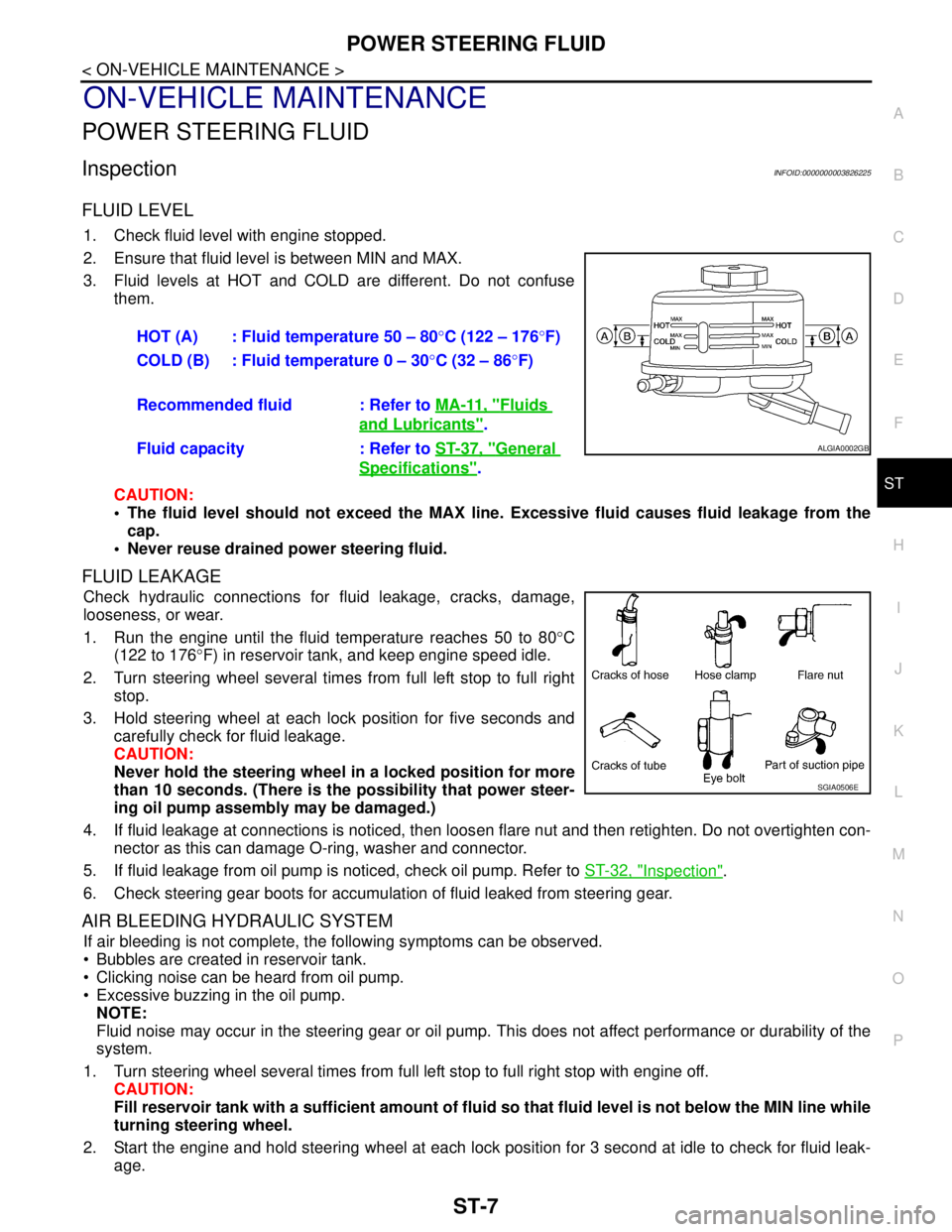
2. Ensure that fluid level is between MIN and MAX.
3. Fluid levels at HOT and COLD are different. Do not confuse
them.
CAUTION:
The fluid level should not exceed the MAX line. Excessive fluid causes fluid leakage from the
cap.
Never reuse drained power steering fluid.
FLUID LEAKAGE
Check hydraulic connections for fluid leakage, cracks, damage,
looseness, or wear.
1. Run the engine until the fluid temperature reaches 50 to 80°C
(122 to 176°F) in reservoir tank, and keep engine speed idle.
2. Turn steering wheel several times from full left stop to full right
stop.
3. Hold steering wheel at each lock position for five seconds and
carefully check for fluid leakage.
CAUTION:
Never hold the steering wheel in a locked position for more
than 10 seconds. (There is the possibility that power steer-
ing oil pump assembly may be damaged.)
4. If fluid leakage at connections is noticed, then loosen flare nut and then retighten. Do not overtighten con-
nector as this can damage O-ring, washer and connector.
5. If fluid leakage from oil pump is noticed, check oil pump. Refer to ST-32, "
Inspection".
6. Check steering gear boots for accumulation of fluid leaked from steering gear.
AIR BLEEDING HYDRAULIC SYSTEM
If air bleeding is not complete, the following symptoms can be observed.
Bubbles are created in reservoir tank.
Clicking noise can be heard from oil pump.
Excessive buzzing in the oil pump.
NOTE:
Fluid noise may occur in the steering gear or oil pump. This does not affect performance or durability of the
system.
1. Turn steering wheel several times from full left stop to full right stop with engine off.
CAUTION:
Fill reservoir tank with a sufficient amount of fluid so that fluid level is not below the MIN line while
turning steering wheel.
2. Start the engine and hold steering wheel at each lock position for 3 second at idle to check for fluid leak-
age.HOT (A) : Fluid temperature 50 – 80°C (122 – 176°F)
COLD (B) : Fluid temperature 0 – 30°C (32 – 86°F)
Recommended fluid : Refer to MA-11, "
Fluids
and Lubricants".
Fluid capacity : Refer to ST-37, "
General
Specifications".
ALGIA0002GB
SGIA0506E
Page 4398 of 5121

ST-8
< ON-VEHICLE MAINTENANCE >
POWER STEERING FLUID
3. Repeat step 2 above several times at approximately 3 second intervals.
CAUTION:
Never hold the steering wheel in a locked position for more than 10 seconds. (There is the possi-
bility that oil pump may be damaged.)
4. Check fluid for bubbles and white contamination.
5. Stop the engine if bubbles and white contamination do not drain out. Perform step 2 and 3 above after
waiting until bubbles and white contamination drain out.
6. Stop the engine, and then check fluid level.
Page 4399 of 5121
STEERING WHEEL
ST-9
< ON-VEHICLE MAINTENANCE >
C
D
E
F
H
I
J
K
L
MA
B
ST
N
O
P
STEERING WHEEL
InspectionINFOID:0000000003806313
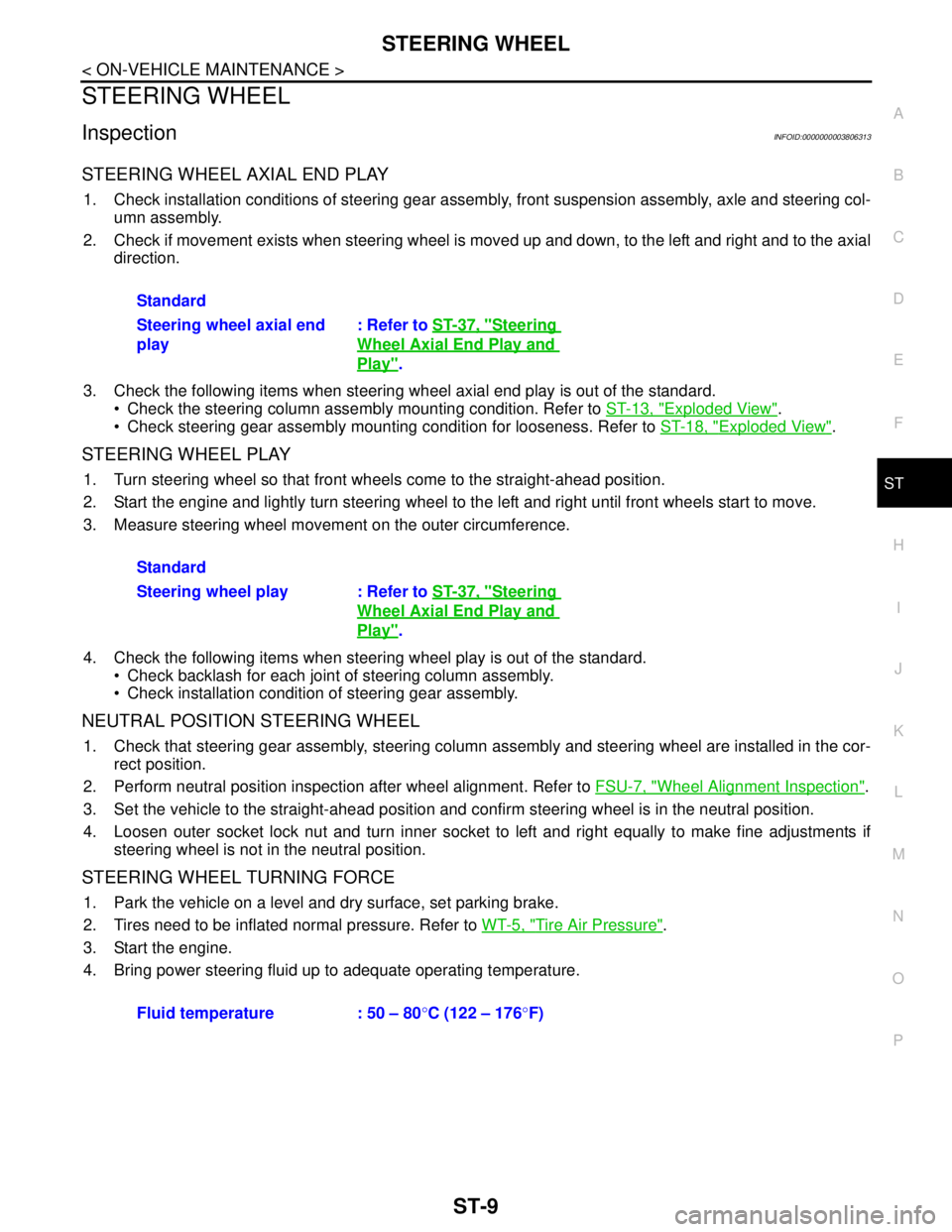
STEERING WHEEL AXIAL END PLAY
1. Check installation conditions of steering gear assembly, front suspension assembly, axle and steering col-
umn assembly.
2. Check if movement exists when steering wheel is moved up and down, to the left and right and to the axial
direction.
3. Check the following items when steering wheel axial end play is out of the standard.
Check the steering column assembly mounting condition. Refer to ST-13, "
Exploded View".
Check steering gear assembly mounting condition for looseness. Refer to ST-18, "
Exploded View".
STEERING WHEEL PLAY
1. Turn steering wheel so that front wheels come to the straight-ahead position.
2. Start the engine and lightly turn steering wheel to the left and right until front wheels start to move.
3. Measure steering wheel movement on the outer circumference.
4. Check the following items when steering wheel play is out of the standard.
Check backlash for each joint of steering column assembly.
Check installation condition of steering gear assembly.
NEUTRAL POSITION STEERING WHEEL
1. Check that steering gear assembly, steering column assembly and steering wheel are installed in the cor-
rect position.
2. Perform neutral position inspection after wheel alignment. Refer to FSU-7, "
Wheel Alignment Inspection".
3. Set the vehicle to the straight-ahead position and confirm steering wheel is in the neutral position.
4. Loosen outer socket lock nut and turn inner socket to left and right equally to make fine adjustments if
steering wheel is not in the neutral position.
STEERING WHEEL TURNING FORCE
1. Park the vehicle on a level and dry surface, set parking brake.
2. Tires need to be inflated normal pressure. Refer to WT-5, "
Tire Air Pressure".
3. Start the engine.
4. Bring power steering fluid up to adequate operating temperature.Standard
Steering wheel axial end
play: Refer to ST-37, "
Steering
Wheel Axial End Play and
Play".
Standard
Steering wheel play : Refer to ST-37, "
Steering
Wheel Axial End Play and
Play".
Fluid temperature : 50 – 80°C (122 – 176°F)
Page 4400 of 5121
ST-10
< ON-VEHICLE MAINTENANCE >
STEERING WHEEL
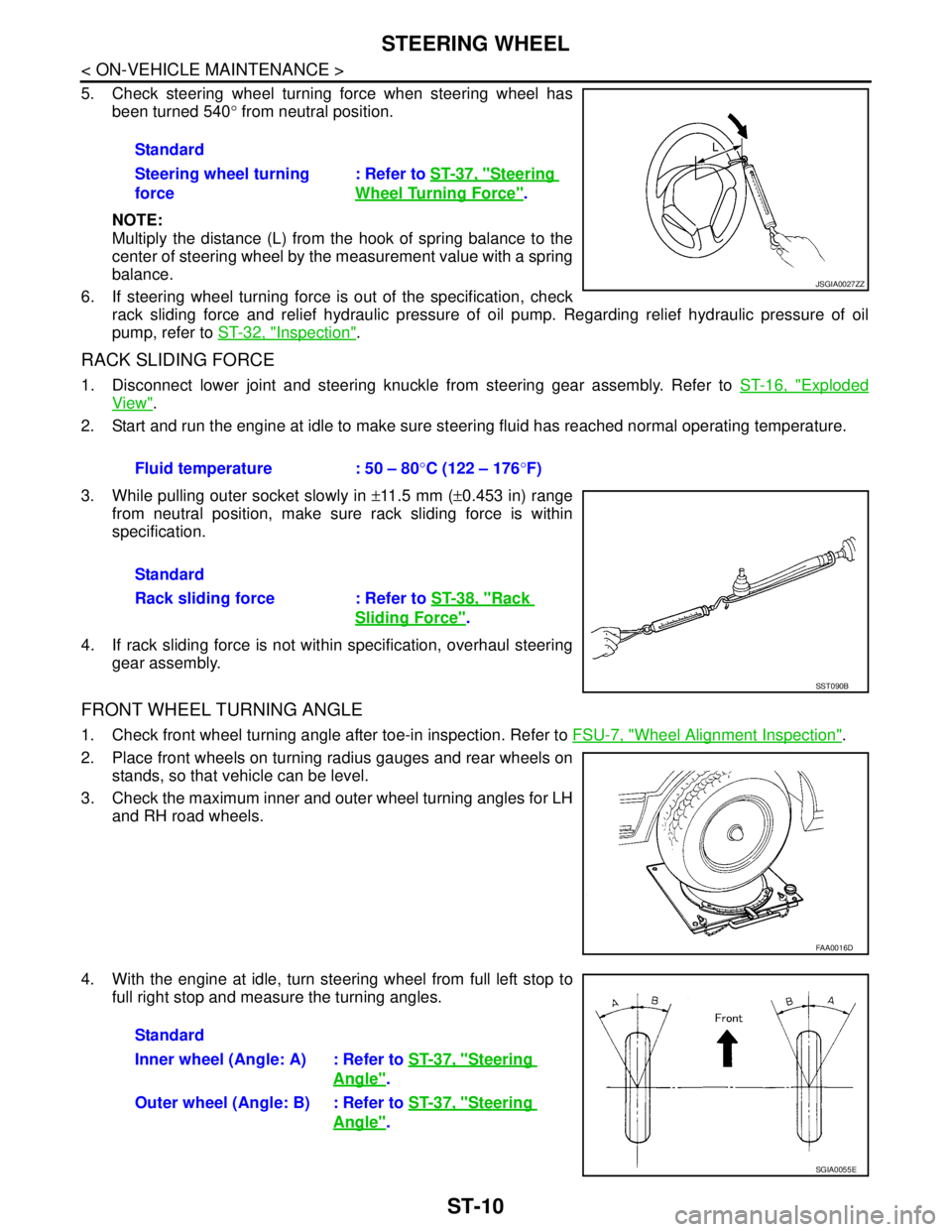
5. Check steering wheel turning force when steering wheel has
been turned 540° from neutral position.
NOTE:
Multiply the distance (L) from the hook of spring balance to the
center of steering wheel by the measurement value with a spring
balance.
6. If steering wheel turning force is out of the specification, check
rack sliding force and relief hydraulic pressure of oil pump. Regarding relief hydraulic pressure of oil
pump, refer to ST-32, "
Inspection".
RACK SLIDING FORCE
1. Disconnect lower joint and steering knuckle from steering gear assembly. Refer to ST-16, "Exploded
View".
2. Start and run the engine at idle to make sure steering fluid has reached normal operating temperature.
3. While pulling outer socket slowly in ±11.5 mm (±0.453 in) range
from neutral position, make sure rack sliding force is within
specification.
4. If rack sliding force is not within specification, overhaul steering
gear assembly.
FRONT WHEEL TURNING ANGLE
1. Check front wheel turning angle after toe-in inspection. Refer to FSU-7, "Wheel Alignment Inspection".
2. Place front wheels on turning radius gauges and rear wheels on
stands, so that vehicle can be level.
3. Check the maximum inner and outer wheel turning angles for LH
and RH road wheels.
4. With the engine at idle, turn steering wheel from full left stop to
full right stop and measure the turning angles.Standard
Steering wheel turning
force: Refer to ST-37, "
Steering
Wheel Turning Force".
JSGIA0027ZZ
Fluid temperature : 50 – 80°C (122 – 176°F)
Standard
Rack sliding force : Refer to ST-38, "
Rack
Sliding Force".
SST090B
FAA0016D
Standard
Inner wheel (Angle: A) : Refer to ST-37, "
Steering
Angle".
Outer wheel (Angle: B) : Refer to ST-37, "
Steering
Angle".
SGIA0055E
Page 4434 of 5121
STC-6
< COMPONENT DIAGNOSIS >
POWER SUPPLY AND GROUND CIRCUIT
COMPONENT DIAGNOSIS
POWER SUPPLY AND GROUND CIRCUIT
DescriptionINFOID:0000000003893526
Power supply to EPS system
Diagnosis ProcedureINFOID:0000000003893527
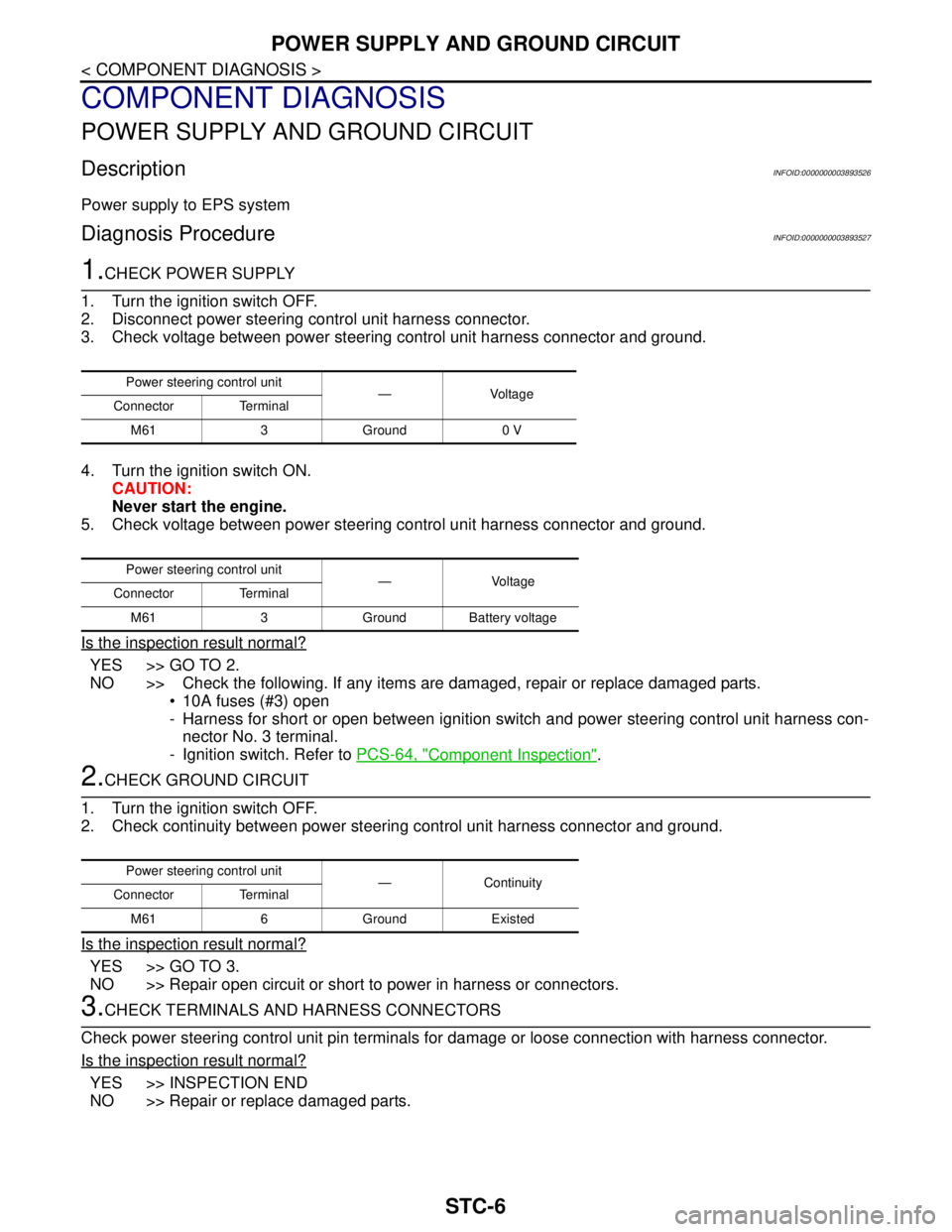
1.CHECK POWER SUPPLY
1. Turn the ignition switch OFF.
2. Disconnect power steering control unit harness connector.
3. Check voltage between power steering control unit harness connector and ground.
4. Turn the ignition switch ON.
CAUTION:
Never start the engine.
5. Check voltage between power steering control unit harness connector and ground.
Is the inspection result normal?
YES >> GO TO 2.
NO >> Check the following. If any items are damaged, repair or replace damaged parts.
10A fuses (#3) open
- Harness for short or open between ignition switch and power steering control unit harness con-
nector No. 3 terminal.
- Ignition switch. Refer to PCS-64, "
Component Inspection".
2.CHECK GROUND CIRCUIT
1. Turn the ignition switch OFF.
2. Check continuity between power steering control unit harness connector and ground.
Is the inspection result normal?
YES >> GO TO 3.
NO >> Repair open circuit or short to power in harness or connectors.
3.CHECK TERMINALS AND HARNESS CONNECTORS
Check power steering control unit pin terminals for damage or loose connection with harness connector.
Is the inspection result normal?
YES >> INSPECTION END
NO >> Repair or replace damaged parts.
Power steering control unit
—Voltage
Connector Terminal
M61 3 Ground 0 V
Power steering control unit
— Voltage
Connector Terminal
M61 3 Ground Battery voltage
Power steering control unit
—Continuity
Connector Terminal
M61 6 Ground Existed