Condition NISSAN TEANA 2008 Service Manual
[x] Cancel search | Manufacturer: NISSAN, Model Year: 2008, Model line: TEANA, Model: NISSAN TEANA 2008Pages: 5121, PDF Size: 69.03 MB
Page 1135 of 5121
CO-12
< ON-VEHICLE MAINTENANCE >
RADIATOR
RADIATOR
RADIATOR CAP
RADIATOR CAP : InspectionINFOID:0000000003793170
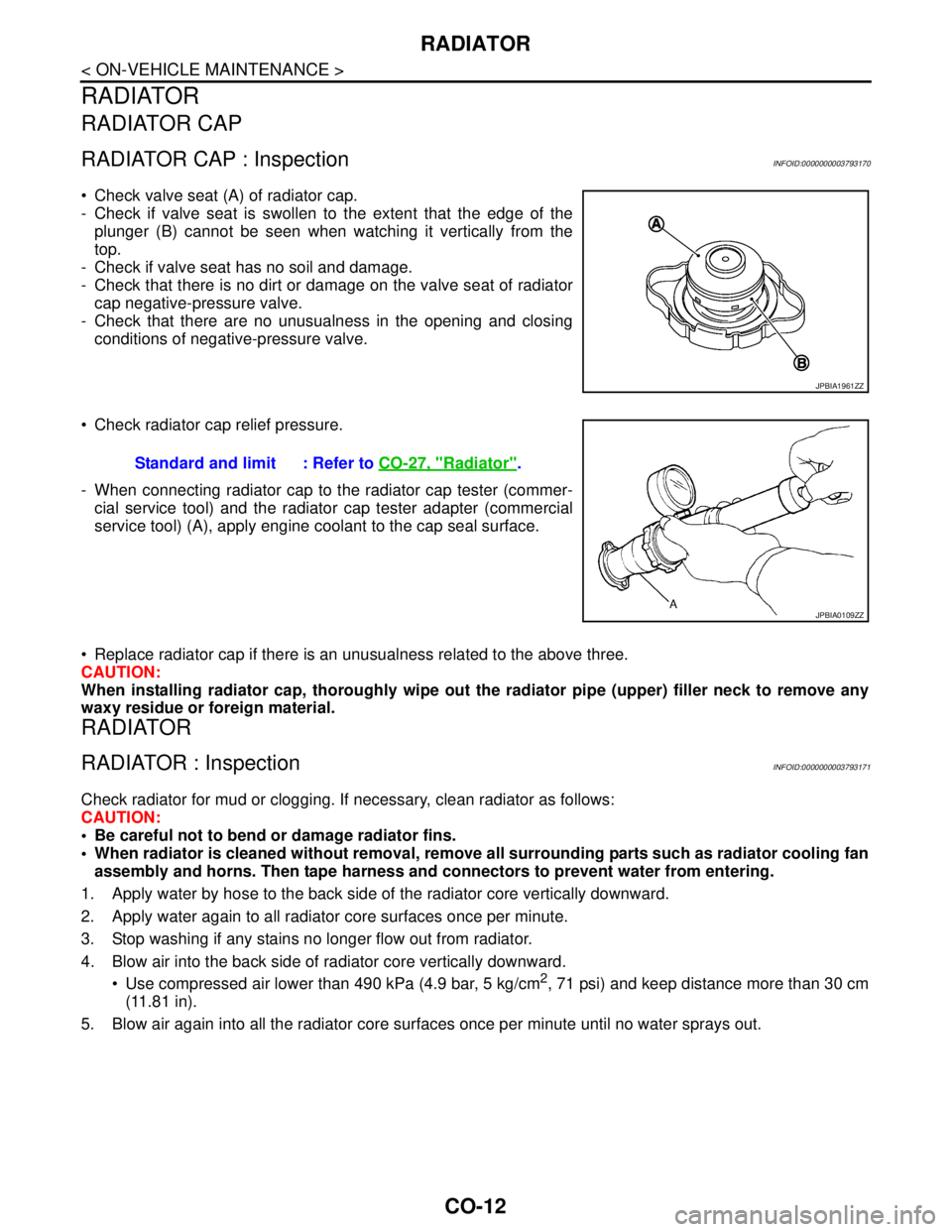
Check valve seat (A) of radiator cap.
- Check if valve seat is swollen to the extent that the edge of the
plunger (B) cannot be seen when watching it vertically from the
top.
- Check if valve seat has no soil and damage.
- Check that there is no dirt or damage on the valve seat of radiator
cap negative-pressure valve.
- Check that there are no unusualness in the opening and closing
conditions of negative-pressure valve.
Check radiator cap relief pressure.
- When connecting radiator cap to the radiator cap tester (commer-
cial service tool) and the radiator cap tester adapter (commercial
service tool) (A), apply engine coolant to the cap seal surface.
Replace radiator cap if there is an unusualness related to the above three.
CAUTION:
When installing radiator cap, thoroughly wipe out the radiator pipe (upper) filler neck to remove any
waxy residue or foreign material.
RADIATOR
RADIATOR : InspectionINFOID:0000000003793171
Check radiator for mud or clogging. If necessary, clean radiator as follows:
CAUTION:
Be careful not to bend or damage radiator fins.
When radiator is cleaned without removal, remove all surrounding parts such as radiator cooling fan
assembly and horns. Then tape harness and connectors to prevent water from entering.
1. Apply water by hose to the back side of the radiator core vertically downward.
2. Apply water again to all radiator core surfaces once per minute.
3. Stop washing if any stains no longer flow out from radiator.
4. Blow air into the back side of radiator core vertically downward.
Use compressed air lower than 490 kPa (4.9 bar, 5 kg/cm
2, 71 psi) and keep distance more than 30 cm
(11.81 in).
5. Blow air again into all the radiator core surfaces once per minute until no water sprays out.
JPBIA1961ZZ
Standard and limit : Refer to CO-27, "Radiator".
JPBIA0109ZZ
Page 1144 of 5121
WATER PUMP
CO-21
< ON-VEHICLE REPAIR >
C
D
E
F
G
H
I
J
K
L
MA
CO
N
P O
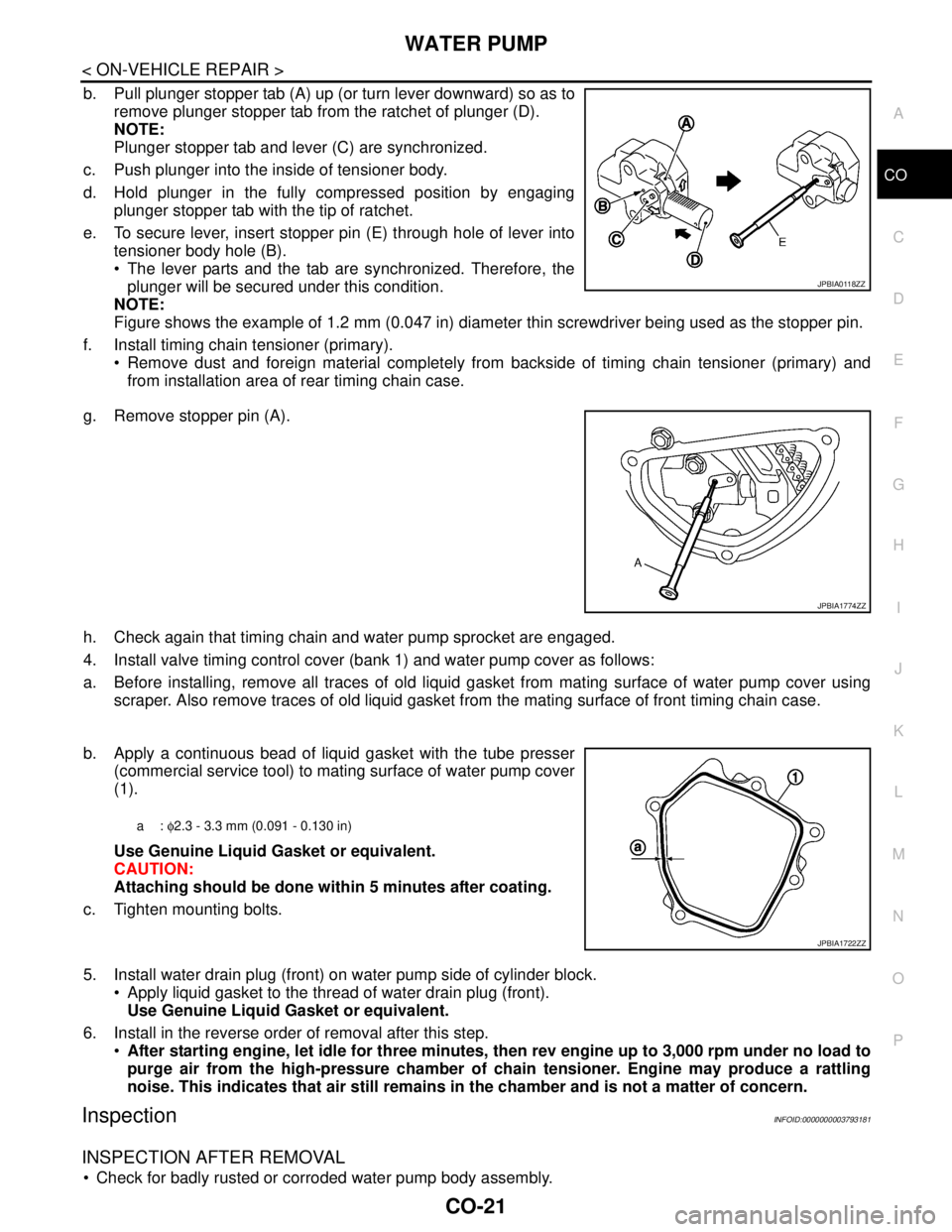
b. Pull plunger stopper tab (A) up (or turn lever downward) so as to
remove plunger stopper tab from the ratchet of plunger (D).
NOTE:
Plunger stopper tab and lever (C) are synchronized.
c. Push plunger into the inside of tensioner body.
d. Hold plunger in the fully compressed position by engaging
plunger stopper tab with the tip of ratchet.
e. To secure lever, insert stopper pin (E) through hole of lever into
tensioner body hole (B).
The lever parts and the tab are synchronized. Therefore, the
plunger will be secured under this condition.
NOTE:
Figure shows the example of 1.2 mm (0.047 in) diameter thin screwdriver being used as the stopper pin.
f. Install timing chain tensioner (primary).
Remove dust and foreign material completely from backside of timing chain tensioner (primary) and
from installation area of rear timing chain case.
g. Remove stopper pin (A).
h. Check again that timing chain and water pump sprocket are engaged.
4. Install valve timing control cover (bank 1) and water pump cover as follows:
a. Before installing, remove all traces of old liquid gasket from mating surface of water pump cover using
scraper. Also remove traces of old liquid gasket from the mating surface of front timing chain case.
b. Apply a continuous bead of liquid gasket with the tube presser
(commercial service tool) to mating surface of water pump cover
(1).
Use Genuine Liquid Gasket or equivalent.
CAUTION:
Attaching should be done within 5 minutes after coating.
c. Tighten mounting bolts.
5. Install water drain plug (front) on water pump side of cylinder block.
Apply liquid gasket to the thread of water drain plug (front).
Use Genuine Liquid Gasket or equivalent.
6. Install in the reverse order of removal after this step.
After starting engine, let idle for three minutes, then rev engine up to 3,000 rpm under no load to
purge air from the high-pressure chamber of chain tensioner. Engine may produce a rattling
noise. This indicates that air still remains in the chamber and is not a matter of concern.
InspectionINFOID:0000000003793181
INSPECTION AFTER REMOVAL
Check for badly rusted or corroded water pump body assembly.
JPBIA0118ZZ
JPBIA1774ZZ
a: φ2.3 - 3.3 mm (0.091 - 0.130 in)
JPBIA1722ZZ
Page 1147 of 5121
CO-24
< ON-VEHICLE REPAIR >
WATER INLET AND THERMOSTAT ASSEMBLY
Inspection
INFOID:0000000003793184
INSPECTION AFTER REMOVAL
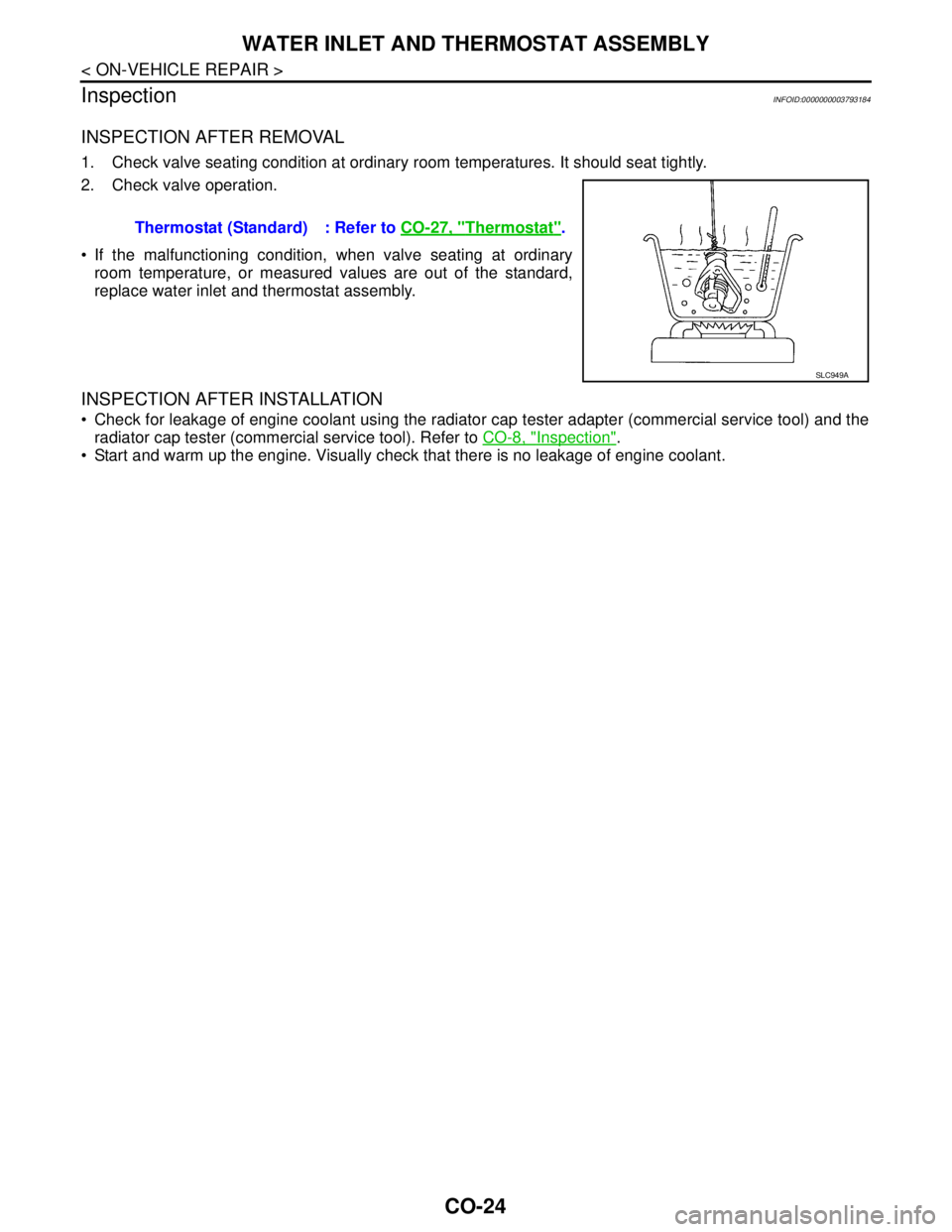
1. Check valve seating condition at ordinary room temperatures. It should seat tightly.
2. Check valve operation.
If the malfunctioning condition, when valve seating at ordinary
room temperature, or measured values are out of the standard,
replace water inlet and thermostat assembly.
INSPECTION AFTER INSTALLATION
Check for leakage of engine coolant using the radiator cap tester adapter (commercial service tool) and the
radiator cap tester (commercial service tool). Refer to CO-8, "
Inspection".
Start and warm up the engine. Visually check that there is no leakage of engine coolant. Thermostat (Standard) : Refer to CO-27, "
Thermostat".
SLC949A
Page 1153 of 5121
DIAGNOSIS AND REPAIR WORKFLOW
DEF-3
< BASIC INSPECTION >
C
D
E
F
G
H
I
J
K
MA
B
DEF
N
O
P
BASIC INSPECTION
DIAGNOSIS AND REPAIR WORKFLOW
Work FlowINFOID:0000000003806024
DETAILED FLOW
1.OBTAIN INFORMATION ABOUT SYMPTOM
Interview the customer to obtain as much malfunction information (conditions and environment when the mal-
function occurred) as possible when the customer brings the vehicle in.
>> GO TO 2.
2.CHECK DTC
Perform self diagnosis with CONSULT-III
Is any DTC detected?
YES >> Refer to BCS-74, "DTCIndex"
NO >> GO TO 3.
3.REPRODUCE THE MALFUNCTION INFORMATION
Check the malfunction on the vehicle that the customer describes.
Inspect the relation of the symptoms and the condition when the symptoms occur.
>> GO TO 4.
4.IDENTIFY THE MALFUNCTIONING SYSTEM WITH “SYMPTOM DIAGNOSIS”
Use “Symptom diagnosis” from the symptom inspection result in step 3. Then identify where to start perform-
ing the diagnosis based on possible causes and symptoms.
>> GO TO 5.
5.IDENTIFY MALFUNCTIONING PARTS WITH “COMPONENT DIAGNOSIS”
Perform the diagnosis with “Component diagnosis” of the applicable system.
>> GO TO 6.
6.REPAIR OR REPLACE THE MALFUNCTIONING PARTS
Repair or replace the specified malfunctioning parts.
>> GO TO 7.
7.FINAL CHECK
Check that malfunctions are not reproduced when obtaining the malfunction information from the customer,
referring to the symptom inspection result in step 3.
Are all malfunctions corrected?
YES >> INSPECTION END
NO >> GO TO 4.
Page 1159 of 5121
DIAGNOSIS SYSTEM (BCM)
DEF-9
< FUNCTION DIAGNOSIS >
C
D
E
F
G
H
I
J
K
MA
B
DEF
N
O
P
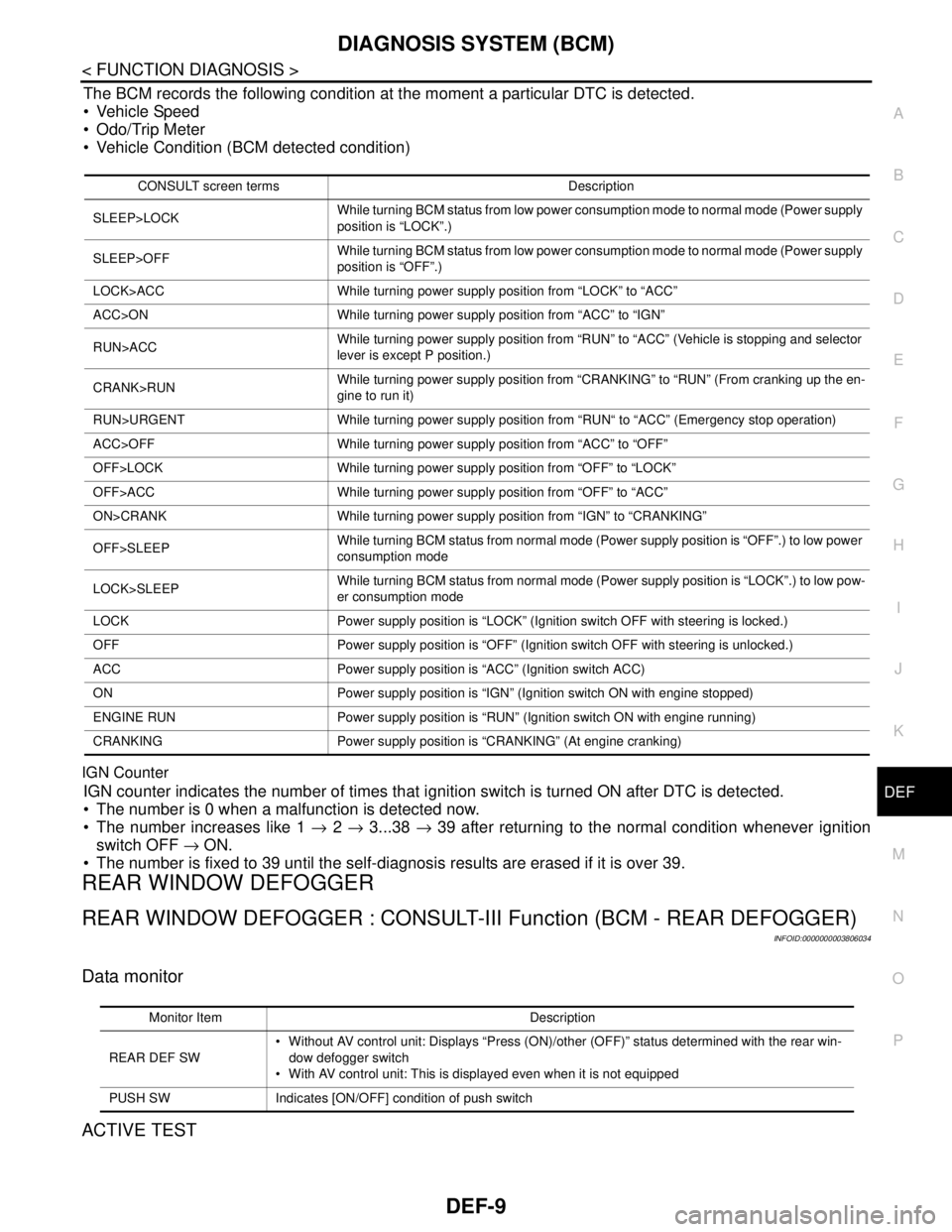
The BCM records the following condition at the moment a particular DTC is detected.
Vehicle Speed
Odo/Trip Meter
Vehicle Condition (BCM detected condition)
IGN Counter
IGN counter indicates the number of times that ignition switch is turned ON after DTC is detected.
The number is 0 when a malfunction is detected now.
The number increases like 1 → 2 → 3...38 → 39 after returning to the normal condition whenever ignition
switch OFF → ON.
The number is fixed to 39 until the self-diagnosis results are erased if it is over 39.
REAR WINDOW DEFOGGER
REAR WINDOW DEFOGGER : CONSULT-III Function (BCM - REAR DEFOGGER)
INFOID:0000000003806034
Data monitor
ACTIVE TEST
CONSULT screen terms Description
SLEEP>LOCKWhile turning BCM status from low power consumption mode to normal mode (Power supply
position is “LOCK”.)
SLEEP>OFFWhile turning BCM status from low power consumption mode to normal mode (Power supply
position is “OFF”.)
LOCK>ACC While turning power supply position from “LOCK” to “ACC”
ACC>ON While turning power supply position from “ACC” to “IGN”
RUN>ACCWhile turning power supply position from “RUN” to “ACC” (Vehicle is stopping and selector
lever is except P position.)
CRANK>RUNWhile turning power supply position from “CRANKING” to “RUN” (From cranking up the en-
gine to run it)
RUN>URGENT While turning power supply position from “RUN“ to “ACC” (Emergency stop operation)
ACC>OFF While turning power supply position from “ACC” to “OFF”
OFF>LOCK While turning power supply position from “OFF” to “LOCK”
OFF>ACC While turning power supply position from “OFF” to “ACC”
ON>CRANK While turning power supply position from “IGN” to “CRANKING”
OFF>SLEEPWhile turning BCM status from normal mode (Power supply position is “OFF”.) to low power
consumption mode
LOCK>SLEEPWhile turning BCM status from normal mode (Power supply position is “LOCK”.) to low pow-
er consumption mode
LOCK Power supply position is “LOCK” (Ignition switch OFF with steering is locked.)
OFF Power supply position is “OFF” (Ignition switch OFF with steering is unlocked.)
ACC Power supply position is “ACC” (Ignition switch ACC)
ON Power supply position is “IGN” (Ignition switch ON with engine stopped)
ENGINE RUN Power supply position is “RUN” (Ignition switch ON with engine running)
CRANKING Power supply position is “CRANKING” (At engine cranking)
Monitor Item Description
REAR DEF SW Without AV control unit: Displays “Press (ON)/other (OFF)” status determined with the rear win-
dow defogger switch
With AV control unit: This is displayed even when it is not equipped
PUSH SW Indicates [ON/OFF] condition of push switch
Page 1164 of 5121
DEF-14
< COMPONENT DIAGNOSIS >
REAR WINDOW DEFOGGER RELAY
REAR WINDOW DEFOGGER RELAY
DescriptionINFOID:0000000003857611
Power is supplied to the rear window defogger with BCM control.
Component Function CheckINFOID:0000000003857612
1.CHECK FUNCTION
1. Perform Active Test (“REAR DEFOGGER”) with CONSULT-III.
2. Touch “ON”.
3. Check that the rear window heating wire is getting warmer.
Is the inspection result normal?
YES >> Rear window defogger relay power supply circuit function is OK.
NO >> Refer to DEF-14, "
Diagnosis Procedure"
Diagnosis ProcedureINFOID:0000000003857613
1.CHECK FUSE
1. Turn ignition switch OFF.
2. Check 10A fuse [No.3, located in fuse block (J/B)].
Is the inspection result normal?
YES >> GO TO 2.
NO >> Replace the blown fuse after repairing the affected circuit if a fuse is blown.
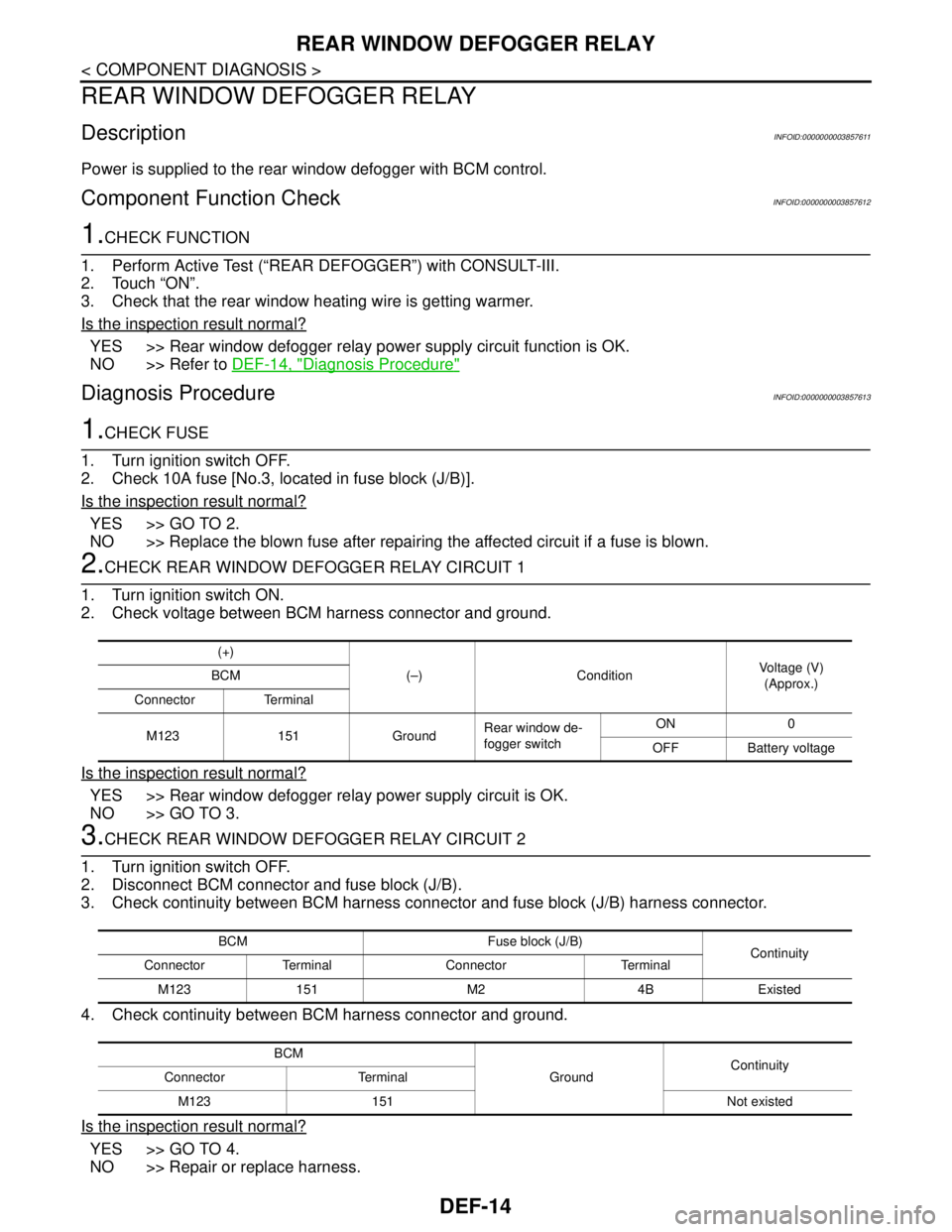
2.CHECK REAR WINDOW DEFOGGER RELAY CIRCUIT 1
1. Turn ignition switch ON.
2. Check voltage between BCM harness connector and ground.
Is the inspection result normal?
YES >> Rear window defogger relay power supply circuit is OK.
NO >> GO TO 3.
3.CHECK REAR WINDOW DEFOGGER RELAY CIRCUIT 2
1. Turn ignition switch OFF.
2. Disconnect BCM connector and fuse block (J/B).
3. Check continuity between BCM harness connector and fuse block (J/B) harness connector.
4. Check continuity between BCM harness connector and ground.
Is the inspection result normal?
YES >> GO TO 4.
NO >> Repair or replace harness.
(+)
(–) ConditionVoltage (V)
(Approx.) BCM
Connector Terminal
M123 151 GroundRear window de-
fogger switchON 0
OFF Battery voltage
BCM Fuse block (J/B)
Continuity
Connector Terminal Connector Terminal
M123 151 M2 4B Existed
BCM
GroundContinuity
Connector Terminal
M123 151 Not existed
Page 1165 of 5121
REAR WINDOW DEFOGGER RELAY
DEF-15
< COMPONENT DIAGNOSIS >
C
D
E
F
G
H
I
J
K
MA
B
DEF
N
O
P
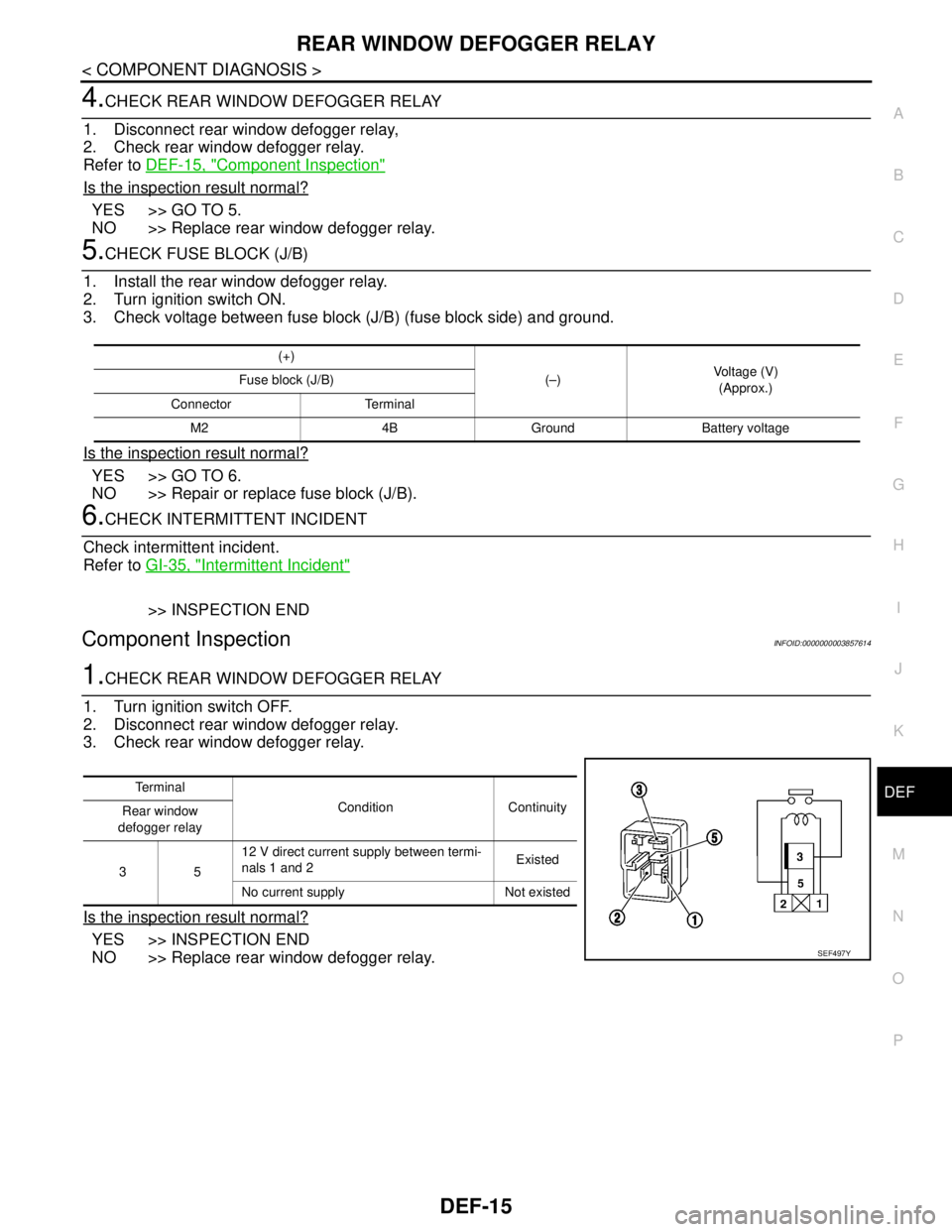
4.CHECK REAR WINDOW DEFOGGER RELAY
1. Disconnect rear window defogger relay,
2. Check rear window defogger relay.
Refer to DEF-15, "
Component Inspection"
Is the inspection result normal?
YES >> GO TO 5.
NO >> Replace rear window defogger relay.
5.CHECK FUSE BLOCK (J/B)
1. Install the rear window defogger relay.
2. Turn ignition switch ON.
3. Check voltage between fuse block (J/B) (fuse block side) and ground.
Is the inspection result normal?
YES >> GO TO 6.
NO >> Repair or replace fuse block (J/B).
6.CHECK INTERMITTENT INCIDENT
Check intermittent incident.
Refer to GI-35, "
Intermittent Incident"
>> INSPECTION END
Component InspectionINFOID:0000000003857614
1.CHECK REAR WINDOW DEFOGGER RELAY
1. Turn ignition switch OFF.
2. Disconnect rear window defogger relay.
3. Check rear window defogger relay.
Is the inspection result normal?
YES >> INSPECTION END
NO >> Replace rear window defogger relay.
(+)
(–)Voltage (V)
(Approx.) Fuse block (J/B)
Connector Terminal
M2 4B Ground Battery voltage
Te r m i n a l
Condition Continuity
Rear window
defogger relay
3512 V direct current supply between termi-
nals 1 and 2Existed
No current supply Not existed
SEF497Y
Page 1166 of 5121
DEF-16
< COMPONENT DIAGNOSIS >
REAR WINDOW DEFOGGER
REAR WINDOW DEFOGGER
DescriptionINFOID:0000000003857615
Heats the heating wire with the power supply from the rear window defogger relay to prevent the rear window
from fogging up.
Component Function CheckINFOID:0000000003857616
1.CHECK REAR WINDOW DEFOGGER
1. Perform Active Test (“REAR DEFOGGER”) with CONSULT-III.
2. Touch “ON”.
3. Check that the rear window heating wire is getting warmer.
Is the inspection result normal?
YES >> Rear window defogger is OK.
NO >> Refer to DEF-16, "
Diagnosis Procedure"
Diagnosis ProcedureINFOID:0000000003857617
1.CHECK FUSE
1. Turn ignition switch OFF.
2. Check 20A fuse [No.15, located in fuse block (J/B)].
Is the inspection result normal?
YES >> GO TO 2.
NO >> Replace the blown fuse after repairing the affected circuit if a fuse is blown.
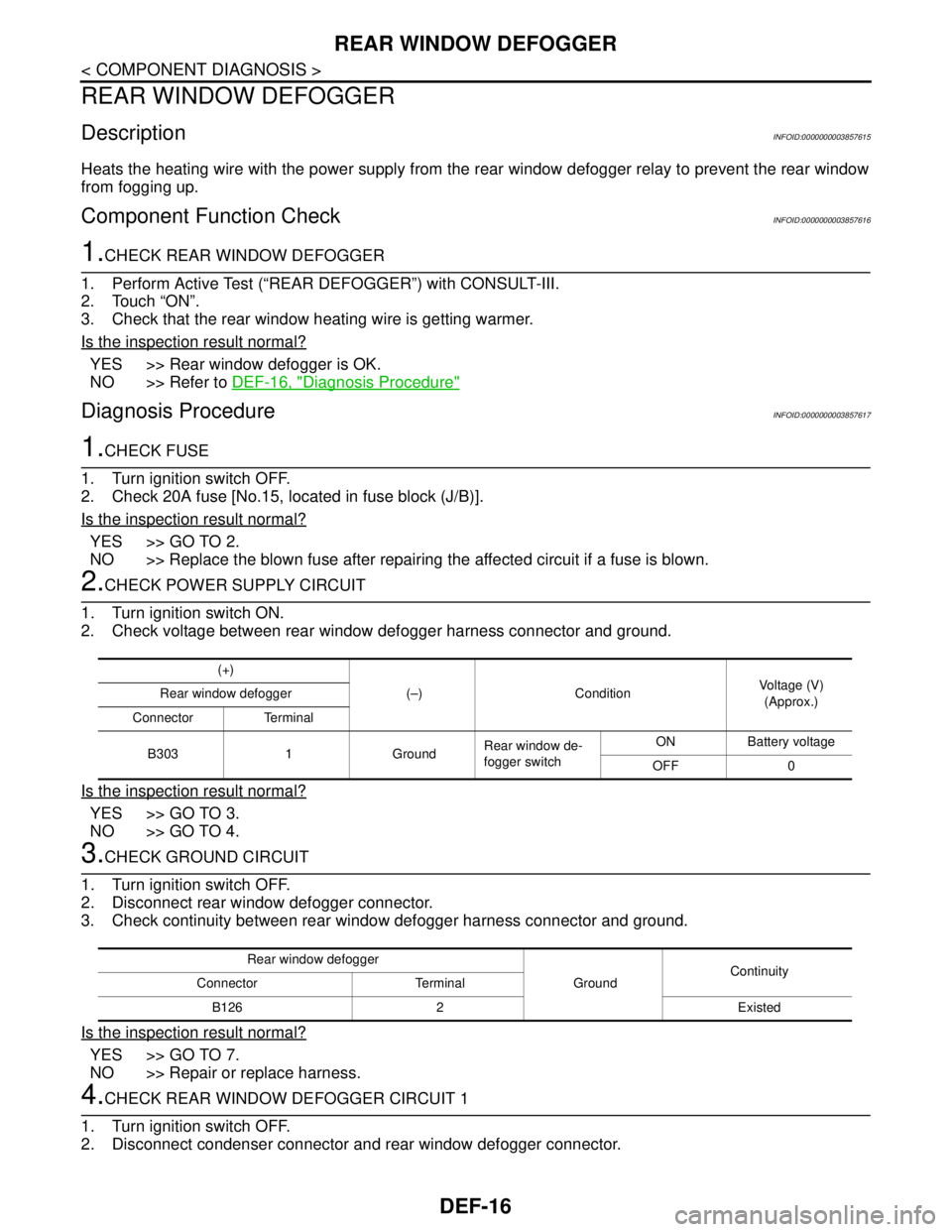
2.CHECK POWER SUPPLY CIRCUIT
1. Turn ignition switch ON.
2. Check voltage between rear window defogger harness connector and ground.
Is the inspection result normal?
YES >> GO TO 3.
NO >> GO TO 4.
3.CHECK GROUND CIRCUIT
1. Turn ignition switch OFF.
2. Disconnect rear window defogger connector.
3. Check continuity between rear window defogger harness connector and ground.
Is the inspection result normal?
YES >> GO TO 7.
NO >> Repair or replace harness.
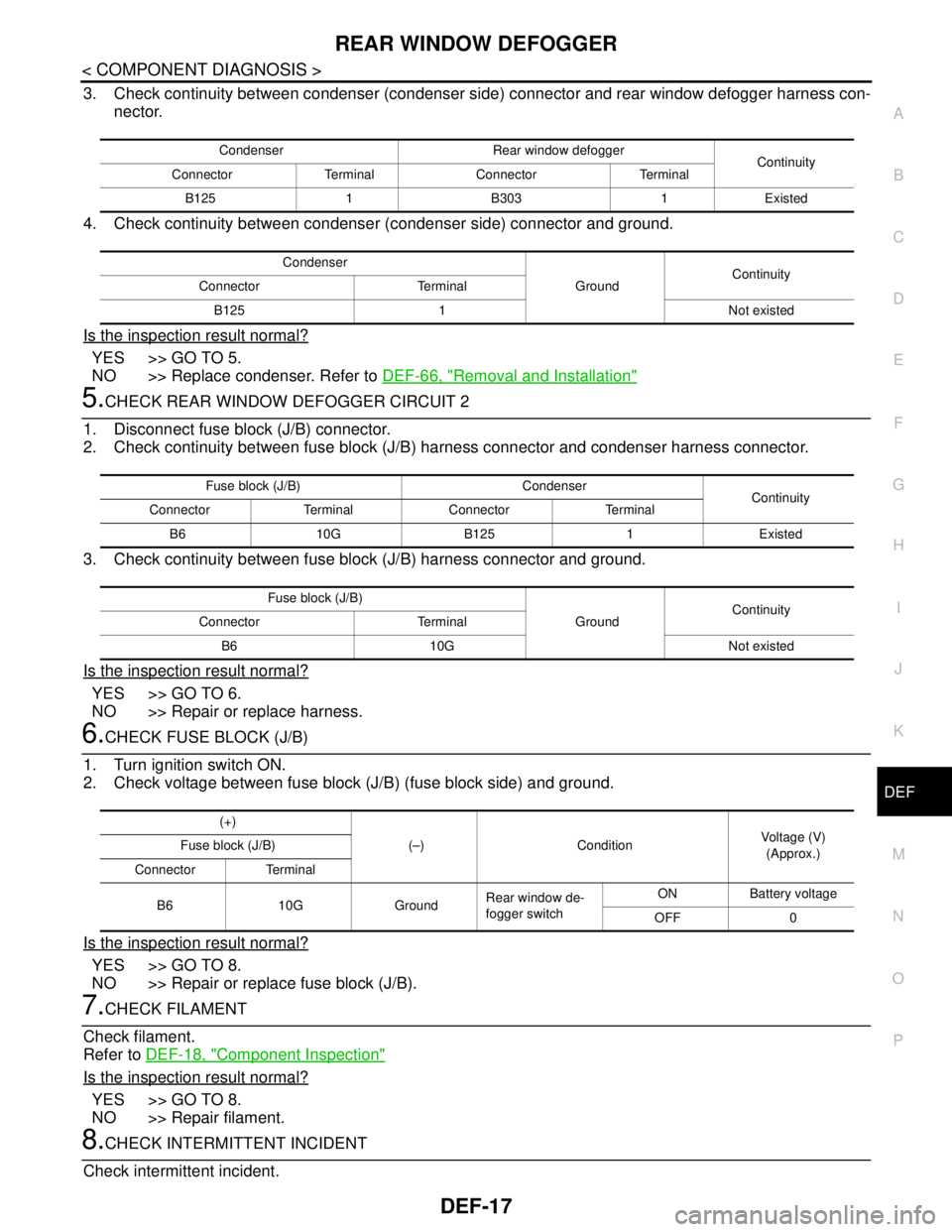
4.CHECK REAR WINDOW DEFOGGER CIRCUIT 1
1. Turn ignition switch OFF.
2. Disconnect condenser connector and rear window defogger connector.
(+)
(–) Condition Voltage (V)
(Approx.) Rear window defogger
Connector Terminal
B303 1 GroundRear window de-
fogger switchON Battery voltage
OFF 0
Rear window defogger
GroundContinuity
Connector Terminal
B126 2 Existed
Page 1167 of 5121
REAR WINDOW DEFOGGER
DEF-17
< COMPONENT DIAGNOSIS >
C
D
E
F
G
H
I
J
K
MA
B
DEF
N
O
P
3. Check continuity between condenser (condenser side) connector and rear window defogger harness con-
nector.
4. Check continuity between condenser (condenser side) connector and ground.
Is the inspection result normal?
YES >> GO TO 5.
NO >> Replace condenser. Refer to DEF-66, "
Removal and Installation"
5.CHECK REAR WINDOW DEFOGGER CIRCUIT 2
1. Disconnect fuse block (J/B) connector.
2. Check continuity between fuse block (J/B) harness connector and condenser harness connector.
3. Check continuity between fuse block (J/B) harness connector and ground.
Is the inspection result normal?
YES >> GO TO 6.
NO >> Repair or replace harness.
6.CHECK FUSE BLOCK (J/B)
1. Turn ignition switch ON.
2. Check voltage between fuse block (J/B) (fuse block side) and ground.
Is the inspection result normal?
YES >> GO TO 8.
NO >> Repair or replace fuse block (J/B).
7.CHECK FILAMENT
Check filament.
Refer to DEF-18, "
Component Inspection"
Is the inspection result normal?
YES >> GO TO 8.
NO >> Repair filament.
8.CHECK INTERMITTENT INCIDENT
Check intermittent incident.
Condenser Rear window defogger
Continuity
Connector Terminal Connector Terminal
B125 1 B303 1 Existed
Condenser
GroundContinuity
Connector Terminal
B125 1 Not existed
Fuse block (J/B) Condenser
Continuity
Connector Terminal Connector Terminal
B6 10G B125 1 Existed
Fuse block (J/B)
GroundContinuity
Connector Terminal
B6 10G Not existed
(+)
(–) ConditionVoltage (V)
(Approx.) Fuse block (J/B)
Connector Terminal
B6 10G GroundRear window de-
fogger switchON Battery voltage
OFF 0
Page 1169 of 5121
DOOR MIRROR DEFOGGER
DEF-19
< COMPONENT DIAGNOSIS >
C
D
E
F
G
H
I
J
K
MA
B
DEF
N
O
P
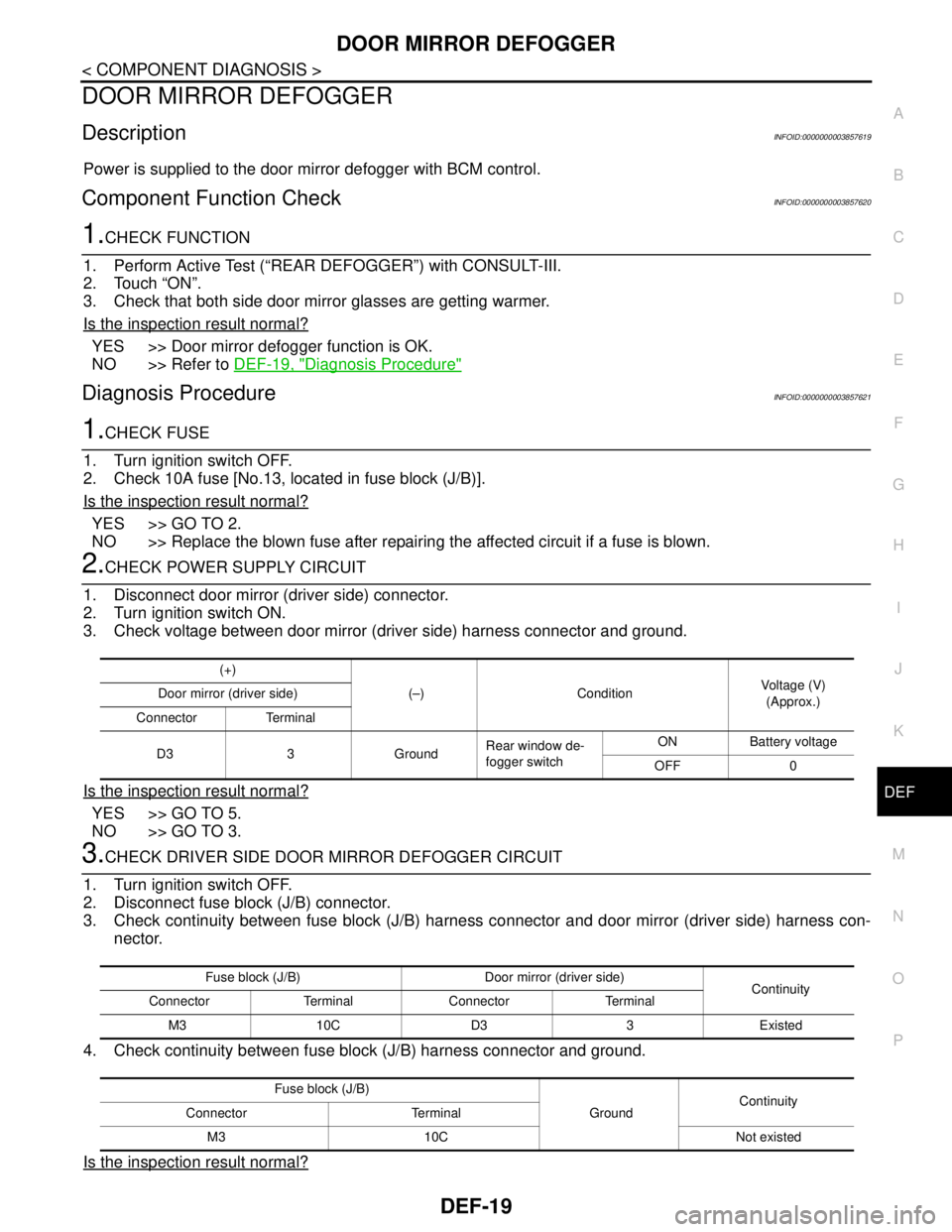
DOOR MIRROR DEFOGGER
DescriptionINFOID:0000000003857619
Power is supplied to the door mirror defogger with BCM control.
Component Function CheckINFOID:0000000003857620
1.CHECK FUNCTION
1. Perform Active Test (“REAR DEFOGGER”) with CONSULT-III.
2. Touch “ON”.
3. Check that both side door mirror glasses are getting warmer.
Is the inspection result normal?
YES >> Door mirror defogger function is OK.
NO >> Refer to DEF-19, "
Diagnosis Procedure"
Diagnosis ProcedureINFOID:0000000003857621
1.CHECK FUSE
1. Turn ignition switch OFF.
2. Check 10A fuse [No.13, located in fuse block (J/B)].
Is the inspection result normal?
YES >> GO TO 2.
NO >> Replace the blown fuse after repairing the affected circuit if a fuse is blown.
2.CHECK POWER SUPPLY CIRCUIT
1. Disconnect door mirror (driver side) connector.
2. Turn ignition switch ON.
3. Check voltage between door mirror (driver side) harness connector and ground.
Is the inspection result normal?
YES >> GO TO 5.
NO >> GO TO 3.
3.CHECK DRIVER SIDE DOOR MIRROR DEFOGGER CIRCUIT
1. Turn ignition switch OFF.
2. Disconnect fuse block (J/B) connector.
3. Check continuity between fuse block (J/B) harness connector and door mirror (driver side) harness con-
nector.
4. Check continuity between fuse block (J/B) harness connector and ground.
Is the inspection result normal?
(+)
(–) Condition Voltage (V)
(Approx.) Door mirror (driver side)
Connector Terminal
D3 3 GroundRear window de-
fogger switchON Battery voltage
OFF 0
Fuse block (J/B) Door mirror (driver side)
Continuity
Connector Terminal Connector Terminal
M3 10C D3 3 Existed
Fuse block (J/B)
GroundContinuity
Connector Terminal
M3 10C Not existed