cooling NISSAN TEANA 2008 Repair Manual
[x] Cancel search | Manufacturer: NISSAN, Model Year: 2008, Model line: TEANA, Model: NISSAN TEANA 2008Pages: 5121, PDF Size: 69.03 MB
Page 2251 of 5121
![NISSAN TEANA 2008 Repair Manual EXL-222
< FUNCTION DIAGNOSIS >[HALOGEN TYPE]
DIAGNOSIS SYSTEM (IPDM E/R)
ACTIVE TEST
Te s t i t e m
IGN RLY
[Off/On]×Displays the status of the ignition relay judged by IPDM E/R.
PUSH SW
[Off/On]Dis](/img/5/57391/w960_57391-2250.png "NISSAN TEANA 2008 Repair Manual EXL-222
< FUNCTION DIAGNOSIS >[HALOGEN TYPE]
DIAGNOSIS SYSTEM (IPDM E/R)
ACTIVE TEST
Te s t i t e m
IGN RLY
[Off/On]×Displays the status of the ignition relay judged by IPDM E/R.
PUSH SW
[Off/On]Dis")
EXL-222
< FUNCTION DIAGNOSIS >[HALOGEN TYPE]
DIAGNOSIS SYSTEM (IPDM E/R)
ACTIVE TEST
Te s t i t e m
IGN RLY
[Off/On]×Displays the status of the ignition relay judged by IPDM E/R.
PUSH SW
[Off/On]Displays the status of the push-button ignition switch judged by IPDM E/R.
INTER/NP SW
[Off/On]Displays the status of the shift position judged by IPDM E/R.
ST RLY CONT
[Off/On]Displays the status of the starter relay status signal received from BCM via CAN
communication.
IHBT RLY -REQ
[Off/On]Displays the status of the starter control relay signal received from BCM via CAN
communication.
ST/INHI RLY
[Off/ ST /INHI/UNKWN]Displays the status of the starter relay and starter control relay judged by IPDM
E/R.
DETENT SW
[Off/On]Displays the status of the control device (detention switch) judged by IPDM E/R.
S/L RLY -REQ
[Off/On]Displays the status of the steering lock relay signal received from BCM via CAN
communication.
S/L STATE
[LOCK/UNLOCK/UNKWN]Displays the status of the steering lock judged by IPDM E/R.
DTRL REQ
[Off]NOTE:
The item is indicated, but not monitored.
OIL P SW
[Open/Close]Displays the status of the oil pressure switch judged by IPDM E/R.
HOOD SW
[Off/On]Displays the status of the hood switch judged by IPDM E/R.
HL WASHER REQ
[Off]Display the status of the headlamp washer request signal received from BCM via
CAN communication.
THFT HRN REQ
[Off/On]Displays the status of the theft warning horn request signal received from BCM
via CAN communication.
HORN CHIRP
[Off/On]Displays the status of the horn reminder signal received from BCM via CAN com-
munication.
CRNRNG LMP REQ
[Off]NOTE:
The item is indicated, but not monitored. Monitor Item
[Unit]MAIN SIG-
NALSDescription
Test item Operation Description
CORNERING LAMPOff
NOTE:
The item is indicated, but cannot be tested. LH
RH
HORN On Operates horn relay for 20 ms.
FRONT WIPEROff OFF
Lo Operates the front wiper relay.
Hi Operates the front wiper relay and front wiper high relay.
MOTOR FAN1OFF
2 Operates the cooling fan relay-1.
3 Operates the cooling fan relay-2.
4 Operates the cooling fan relay-2 and cooling fan relay-3.
HEAD LAMP WASHER On Operates the headlamp washer relay for 1 s.
Page 2347 of 5121
![NISSAN TEANA 2008 Repair Manual EXL-318
< ECU DIAGNOSIS >[HALOGEN TYPE]
IPDM E/R (INTELLIGENT POWER DISTRIBUTION MODULE ENGINE ROOM)
28
(SB)GroundPush-button ignition
switchInputPress the push-button ignition switch 0 V
Release the](/img/5/57391/w960_57391-2346.png "NISSAN TEANA 2008 Repair Manual EXL-318
< ECU DIAGNOSIS >[HALOGEN TYPE]
IPDM E/R (INTELLIGENT POWER DISTRIBUTION MODULE ENGINE ROOM)
28
(SB)GroundPush-button ignition
switchInputPress the push-button ignition switch 0 V
Release the")
EXL-318
< ECU DIAGNOSIS >[HALOGEN TYPE]
IPDM E/R (INTELLIGENT POWER DISTRIBUTION MODULE ENGINE ROOM)
28
(SB)GroundPush-button ignition
switchInputPress the push-button ignition switch 0 V
Release the push-button ignition switch Battery voltage
30
(BR)Ground Starter relay control InputIgnition
switch ONSelector lever in any posi-
tion other than P or N0 V
Selector lever P or N Battery voltage
32
(V)GroundSteering lock unit condi-
tion-1InputSteering lock is activated 0 V
Steering lock is deactivated Battery voltage
33
(G)GroundSteering lock unit condi-
tion-2InputSteering lock is activated Battery voltage
Steering lock is deactivated 0 V
34
(O)Ground Cooling fan relay-3 control InputCooling fan stopped Battery voltage
Cooling fan at HI operation 0 V
35
(P)GroundCooling fan relay-1 power
supplyInputCooling fan stopped Battery voltage
Cooling fan at LO operation 6.0 V
36
(G)Ground Battery power supply Input Ignition switch OFF Battery voltage
38
(GR)GroundCooling fan relay-1 power
supplyOutputCooling fan not operating 0 V
Cooling fan at LO operation 6.0 V
39
(P)—CAN-LInput/
Output——
40
(L)—CAN-HInput/
Output——
41
(B)Ground Ground — Ignition switch ON 0 V
42
(SB)Ground Cooling fan relay-2 control InputCooling fan stopped Battery voltage
Cooling fan MID operating
Cooling fan HI operating0 V
43
(Y)GroundControl device
(Detention switch)InputIgnition
switch ONPress the selector button
(selector lever P)Battery voltage
Selector lever in any po-
sition other than P
Release the selector
button (selector lever P)0 V
44
(G)Ground Horn relay control InputThe horn is deactivated Battery voltage
The horn is activated 0 V
45
(O)Ground Horn switch InputThe horn is deactivated Battery voltage
The horn is activated 0 V
46
(BR)Ground Starter relay control InputIgnition
switch ONSelector lever in any posi-
tion other than P or N0 V
Selector lever P or N Battery voltage
48
(Y/R)Ground A/C relay power supply OutputEngine
runningA/C switch OFF 0 V
A/C switch ON
(A/C compressor is oper-
ating)Battery voltage Te r m i n a l N o .
(Wire color)Description
ConditionVa l u e
(Approx.)
Signal nameInput/
Output +−
Page 2355 of 5121
![NISSAN TEANA 2008 Repair Manual EXL-326
< ECU DIAGNOSIS >[HALOGEN TYPE]
IPDM E/R (INTELLIGENT POWER DISTRIBUTION MODULE ENGINE ROOM)
If No CAN Communication Is Available With BCM
IGNITION RELAY MALFUNCTION DETECTION FUNCTION
IPDM](/img/5/57391/w960_57391-2354.png "NISSAN TEANA 2008 Repair Manual EXL-326
< ECU DIAGNOSIS >[HALOGEN TYPE]
IPDM E/R (INTELLIGENT POWER DISTRIBUTION MODULE ENGINE ROOM)
If No CAN Communication Is Available With BCM
IGNITION RELAY MALFUNCTION DETECTION FUNCTION
IPDM")
EXL-326
< ECU DIAGNOSIS >[HALOGEN TYPE]
IPDM E/R (INTELLIGENT POWER DISTRIBUTION MODULE ENGINE ROOM)
If No CAN Communication Is Available With BCM
IGNITION RELAY MALFUNCTION DETECTION FUNCTION
IPDM E/R monitors the voltage at the contact circuit and excitation coil circuit of the ignition relay inside it.
IPDM E/R judges the ignition relay error if the voltage differs between the contact circuit and the excitation
coil circuit.
If the ignition relay cannot turn OFF due to contact seizure, it activates the tail lamp relay for 10 minutes to
alert the user to the ignition relay malfunction when the ignition switch is turned OFF.
FRONT WIPER CONTROL
IPDM E/R detects front wiper stop position by a front wiper auto stop signal.
When a front wiper auto stop signal is in the conditions listed below, IPDM E/R stops power supply to wiper
after repeating a front wiper 10 seconds activation and 20 seconds stop five times.
Control part Fail-safe operation
Cooling fan Turns ON the cooling fan relay-2 and the cooling fan relay-3 when ignition switch is
turned ON (Cooling fan operates at HI)
Turns OFF the cooling fan relay-1, the cooling fan relay-2 and the cooling fan relay-3
when the ignition switch is turned OFF (Cooling fan does not operate)
A/C compressor A/C relay OFF
Alternator Outputs the power generation command signal (PWM signal) 0%
Control part Fail-safe operation
Headlamp Turns ON the headlamp low relay when the ignition switch is turned ON
Turns OFF the headlamp low relay when the ignition switch is turned OFF
Headlamp high relay OFF
Parking lamps
License plate lamps
Illuminations
Tail lamps Turns ON the tail lamp relay when the ignition switch is turned ON
Turns OFF the tail lamp relay when the ignition switch is turned OFF
Front wiper The status just before activation of fail-safe control is maintained until the ignition
switch is turned OFF while the front wiper is operating at LO or HI speed.
The wiper is operated at LO speed until the ignition switch is turned OFF if the fail-
safe control is activated while the front wiper is set in the INT mode and the front wiper
motor is operating.
Front fog lamps Front fog lamp relay OFF
Horn Horn OFF
Ignition relay The status just before activation of fail-safe is maintained.
Starter motor Starter control relay OFF
Steering lock unit Steering lock relay OFF
Headlamp washer relay Headlamp washer relay OFF
Voltage judgment
IPDM E/R judgment Operation
Ignition relay contact sideIgnition relay excitation coil
side
ON ON Ignition relay ON normal —
OFF OFF Ignition relay OFF normal —
ON OFF Ignition relay ON stuck Detects DTC “B2098: IGN RELAY ON”
Turns ON the tail lamp relay for 10 min-
utes
OFF ON Ignition relay OFF stuck Detects DTC “B2099: IGN RELAY OFF”
Page 2526 of 5121
TOW TRUCK TOWING
GI-33
< PRECAUTION >
C
D
E
F
G
H
I
J
K
L
MB
GI
N
O
P
Do not use the vehicle tie downs to free a vehicle stuck in sand, snow, mud, etc. Never tow the vehi-
cle using the vehicle tie downs or recovery hooks.
Always pull the cable straight out from the front of the vehicle. Never pull on the hook at an angle.
Pulling devices should be routed so they do not touch any part of the suspension, steering, brake or
cooling systems.
Pulling devices such as ropes or canvas straps are not recommended for use in vehicle towing or
recovery.
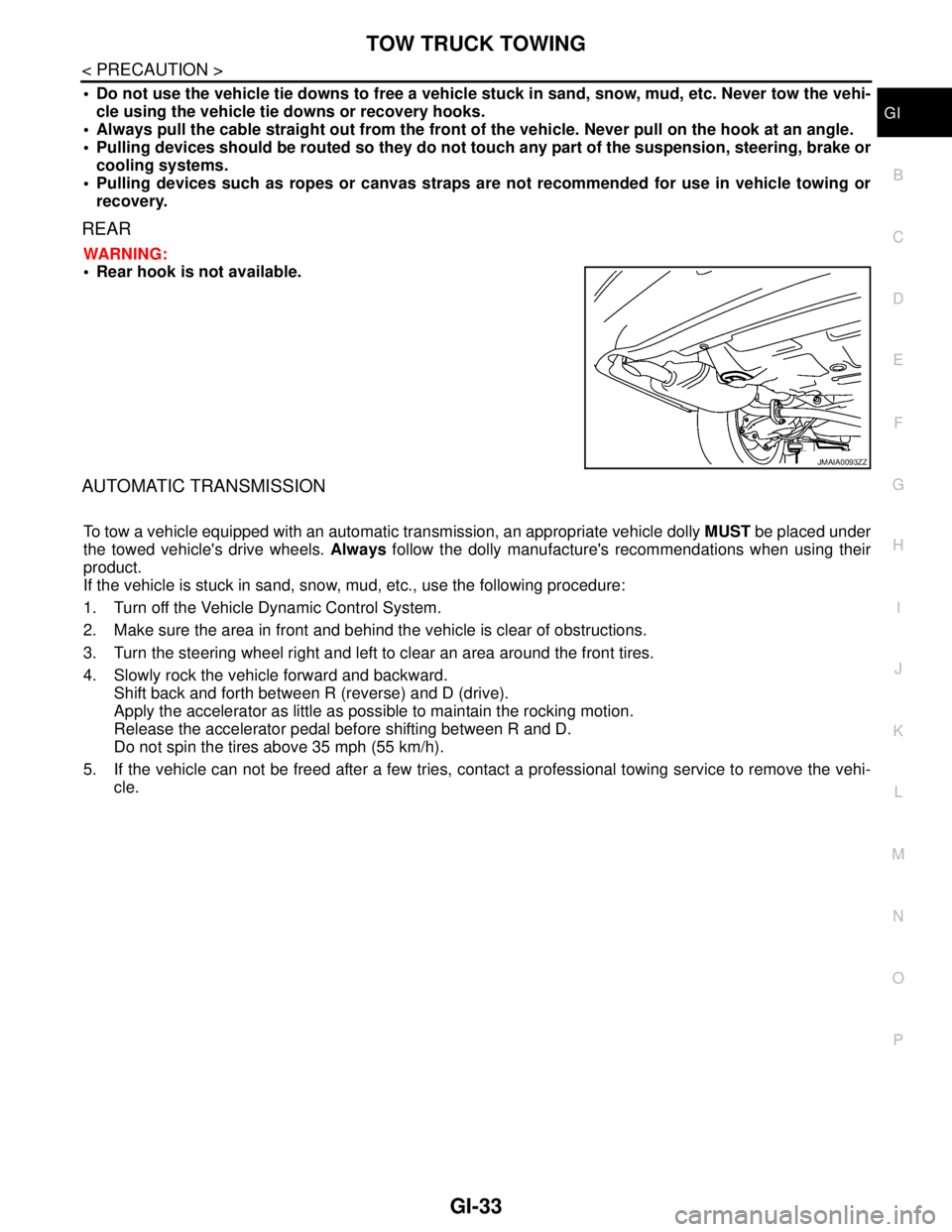
REAR
WARNING:
Rear hook is not available.
AUTOMATIC TRANSMISSION
To tow a vehicle equipped with an automatic transmission, an appropriate vehicle dolly MUST be placed under
the towed vehicle's drive wheels. Always follow the dolly manufacture's recommendations when using their
product.
If the vehicle is stuck in sand, snow, mud, etc., use the following procedure:
1. Turn off the Vehicle Dynamic Control System.
2. Make sure the area in front and behind the vehicle is clear of obstructions.
3. Turn the steering wheel right and left to clear an area around the front tires.
4. Slowly rock the vehicle forward and backward.
Shift back and forth between R (reverse) and D (drive).
Apply the accelerator as little as possible to maintain the rocking motion.
Release the accelerator pedal before shifting between R and D.
Do not spin the tires above 35 mph (55 km/h).
5. If the vehicle can not be freed after a few tries, contact a professional towing service to remove the vehi-
cle.
JMAIA0093ZZ
Page 2577 of 5121
HA-8
< SYMPTOM DIAGNOSIS >
REFRIGERATION SYSTEM SYMPTOMS
SYMPTOM DIAGNOSIS
REFRIGERATION SYSTEM SYMPTOMS
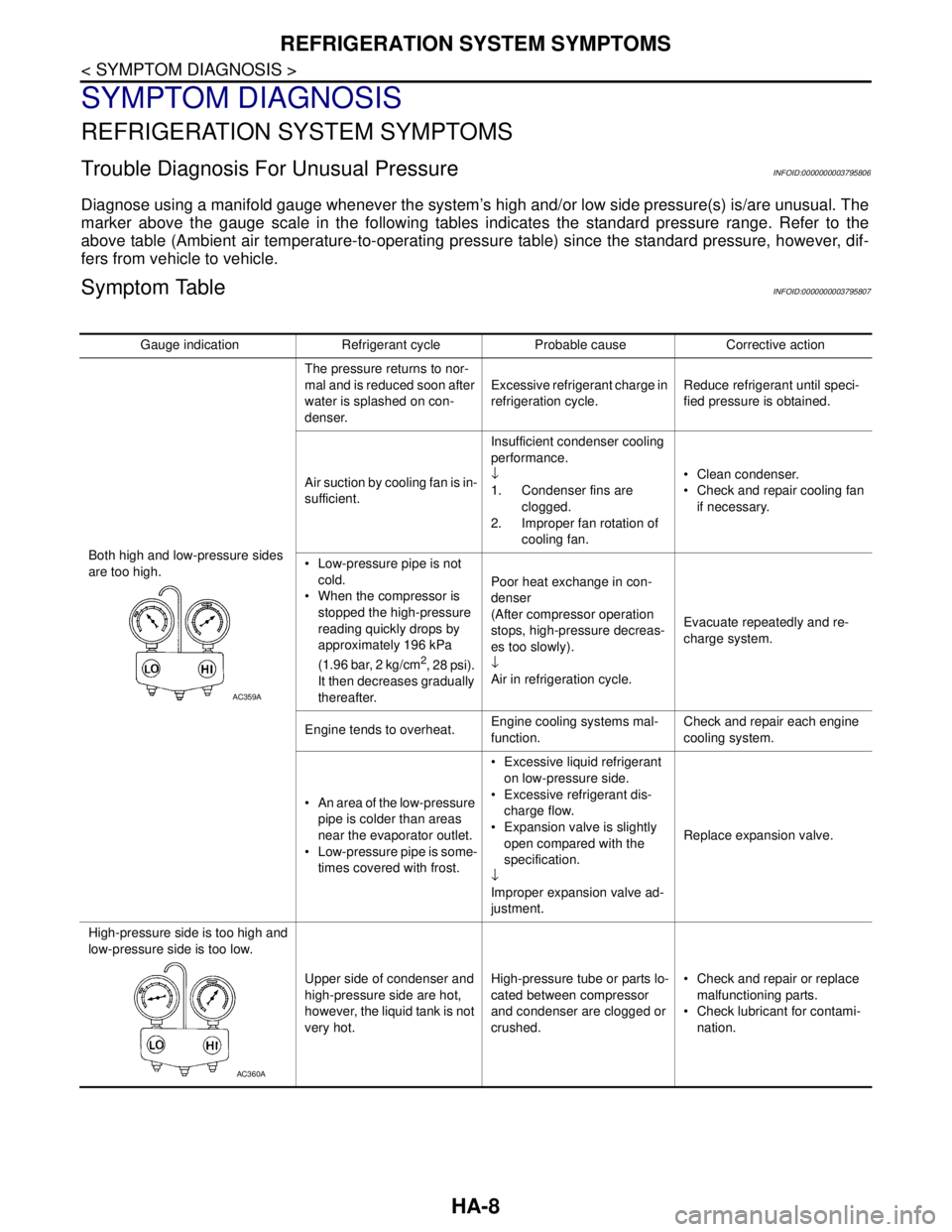
Trouble Diagnosis For Unusual PressureINFOID:0000000003795806
Diagnose using a manifold gauge whenever the system’s high and/or low side pressure(s) is/are unusual. The
marker above the gauge scale in the following tables indicates the standard pressure range. Refer to the
above table (Ambient air temperature-to-operating pressure table) since the standard pressure, however, dif-
fers from vehicle to vehicle.
Symptom TableINFOID:0000000003795807
Gauge indication Refrigerant cycle Probable cause Corrective action
Both high and low-pressure sides
are too high.The pressure returns to nor-
mal and is reduced soon after
water is splashed on con-
denser.Excessive refrigerant charge in
refrigeration cycle.Reduce refrigerant until speci-
fied pressure is obtained.
Air suction by cooling fan is in-
sufficient.Insufficient condenser cooling
performance.
↓
1. Condenser fins are
clogged.
2. Improper fan rotation of
cooling fan. Clean condenser.
Check and repair cooling fan
if necessary.
Low-pressure pipe is not
cold.
When the compressor is
stopped the high-pressure
reading quickly drops by
approximately 196 kPa
(1.96 bar, 2 kg/cm
2, 28 psi).
It then decreases gradually
thereafter.Poor heat exchange in con-
denser
(After compressor operation
stops, high-pressure decreas-
es too slowly).
↓
Air in refrigeration cycle.Evacuate repeatedly and re-
charge system.
Engine tends to overheat.Engine cooling systems mal-
function.Check and repair each engine
cooling system.
An area of the low-pressure
pipe is colder than areas
near the evaporator outlet.
Low-pressure pipe is some-
times covered with frost. Excessive liquid refrigerant
on low-pressure side.
Excessive refrigerant dis-
charge flow.
Expansion valve is slightly
open compared with the
specification.
↓
Improper expansion valve ad-
justment.Replace expansion valve.
High-pressure side is too high and
low-pressure side is too low.
Upper side of condenser and
high-pressure side are hot,
however, the liquid tank is not
very hot.High-pressure tube or parts lo-
cated between compressor
and condenser are clogged or
crushed. Check and repair or replace
malfunctioning parts.
Check lubricant for contami-
nation.
AC359A
AC360A
Page 2579 of 5121
HA-10
< SYMPTOM DIAGNOSIS >
REFRIGERATION SYSTEM SYMPTOMS
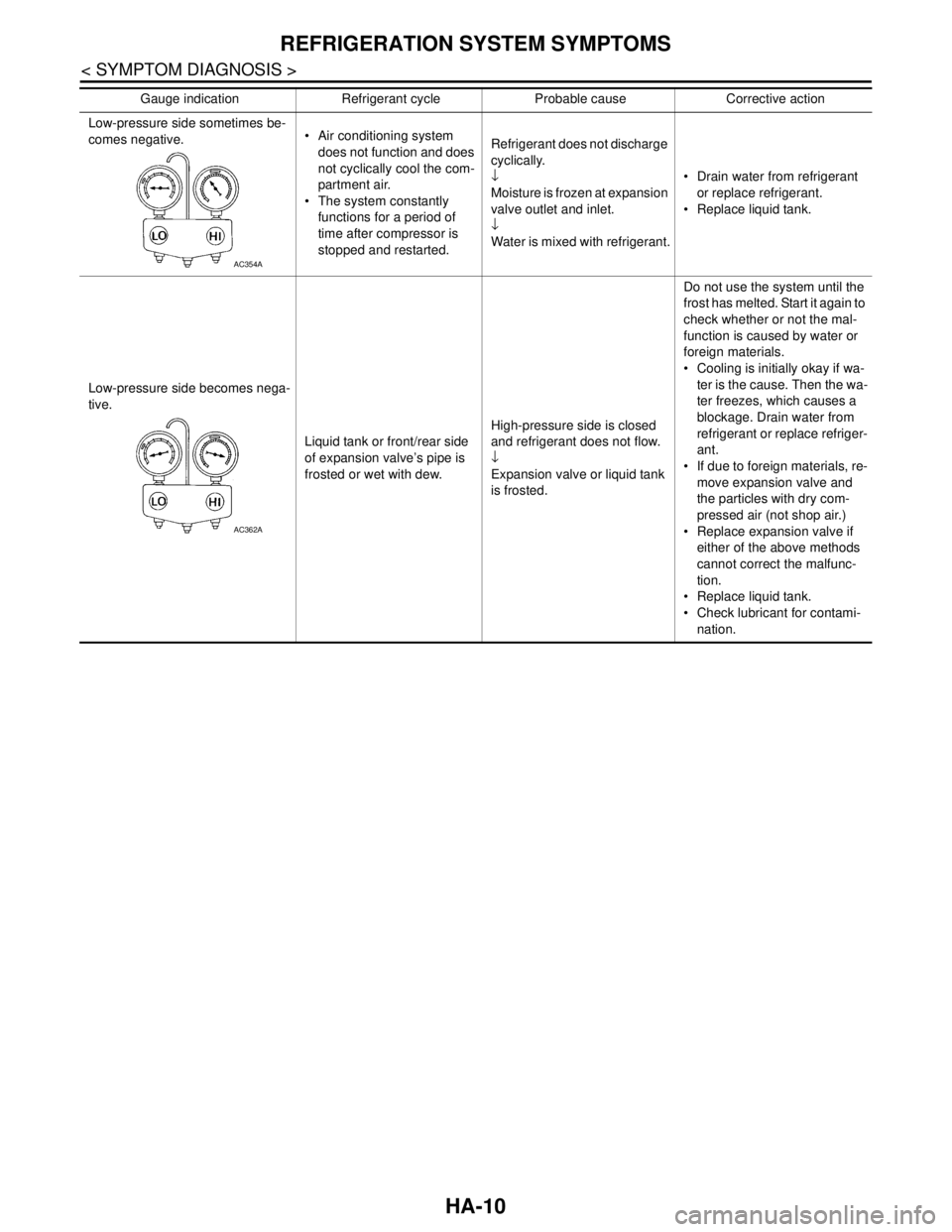
Low-pressure side sometimes be-
comes negative. Air conditioning system
does not function and does
not cyclically cool the com-
partment air.
The system constantly
functions for a period of
time after compressor is
stopped and restarted.Refrigerant does not discharge
cyclically.
↓
Moisture is frozen at expansion
valve outlet and inlet.
↓
Water is mixed with refrigerant. Drain water from refrigerant
or replace refrigerant.
Replace liquid tank.
Low-pressure side becomes nega-
tive.
Liquid tank or front/rear side
of expansion valve’s pipe is
frosted or wet with dew.High-pressure side is closed
and refrigerant does not flow.
↓
Expansion valve or liquid tank
is frosted.Do not use the system until the
frost has melted. Start it again to
check whether or not the mal-
function is caused by water or
foreign materials.
Cooling is initially okay if wa-
ter is the cause. Then the wa-
ter freezes, which causes a
blockage. Drain water from
refrigerant or replace refriger-
ant.
If due to foreign materials, re-
move expansion valve and
the particles with dry com-
pressed air (not shop air.)
Replace expansion valve if
either of the above methods
cannot correct the malfunc-
tion.
Replace liquid tank.
Check lubricant for contami-
nation. Gauge indication Refrigerant cycle Probable cause Corrective action
AC354A
AC362A
Page 2580 of 5121
COMPRESSOR SYSTEM SYMPTOMS
HA-11
< SYMPTOM DIAGNOSIS >
C
D
E
F
G
H
J
K
L
MA
B
HA
N
O
P
COMPRESSOR SYSTEM SYMPTOMS
Symptom TableINFOID:0000000003795808
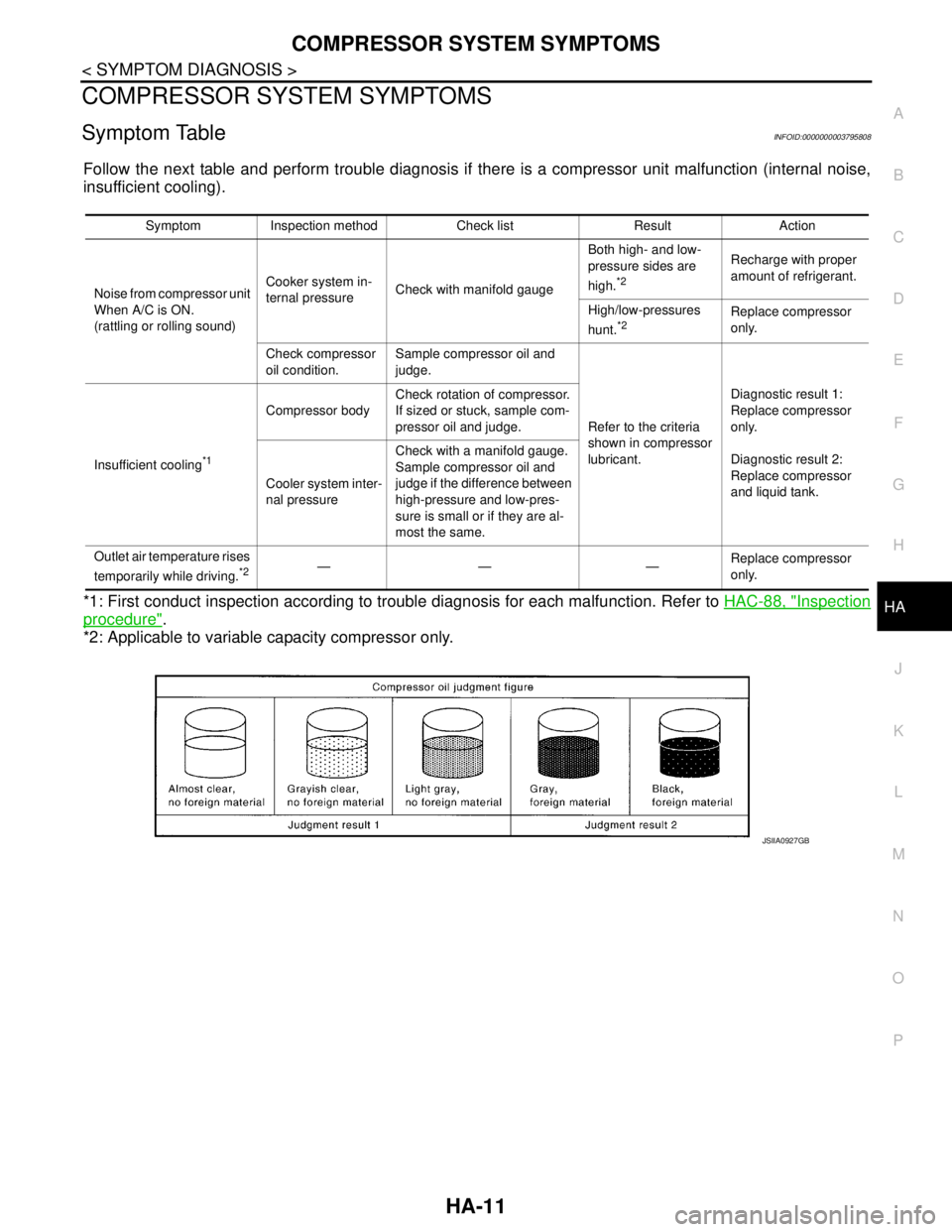
Follow the next table and perform trouble diagnosis if there is a compressor unit malfunction (internal noise,
insufficient cooling).
*1: First conduct inspection according to trouble diagnosis for each malfunction. Refer to HAC-88, "
Inspection
procedure".
*2: Applicable to variable capacity compressor only.
Symptom Inspection method Check list Result Action
Noise from compressor unit
When A/C is ON.
(rattling or rolling sound)Cooker system in-
ternal pressureCheck with manifold gaugeBoth high- and low-
pressure sides are
high.
*2
Recharge with proper
amount of refrigerant.
High/low-pressures
hunt.
*2Replace compressor
only.
Check compressor
oil condition.Sample compressor oil and
judge.
Refer to the criteria
shown in compressor
lubricant.Diagnostic result 1:
Replace compressor
only.
Diagnostic result 2:
Replace compressor
and liquid tank. Insufficient cooling
*1
Compressor bodyCheck rotation of compressor.
If sized or stuck, sample com-
pressor oil and judge.
Cooler system inter-
nal pressureCheck with a manifold gauge.
Sample compressor oil and
judge if the difference between
high-pressure and low-pres-
sure is small or if they are al-
most the same.
Outlet air temperature rises
temporarily while driving.
*2—— —Replace compressor
only.
JSIIA0927GB
Page 2597 of 5121
HA-28
< ON-VEHICLE MAINTENANCE >
LUBRICANT
LUBRICANT
Maintenance of Lubricant QuantityINFOID:0000000003795916
The lubricant in the compressor circulates through the system the refrigerant. Add lubricant to compressor
when replacing any component or after a large refrigerant leakage occurred. It is important to maintain the
specified amount.
If lubricant quantity is not maintained properly, the following malfunctions may result:
Lack of lubricant: May lead to a seized compressor.
Excessive lubricant: Inadequate cooling (thermal exchange interference)
LUBRICANT
LUBRICANT RETURN OPERATION
Adjust the lubricant quantity according to the test group shown below.
1.CHECK LUBRICANT RETURN OPERATION
Can lubricant return operation be performed?
A/C system works normally.
There is no evidence of a large amount of lubricant leakage.
CAUTION:
Never perform the lubricant return operation if excessive lubricant leakage is detected.
Is it successful?
YES >> GO TO 2.
NO >> GO TO 3.
2.PERFORM LUBRICANT RETURN OPERATION
1. Start the engine, and set to the following conditions:
- Engine speed: Idling to 1,200 rpm
- A/C switch: ON
- Blower speed: Max. position
- Set temperature: FULL HOT
- Intake position: Recirculation (REC)
2. Perform lubricant return operation for approximately 10 minutes.
3. Stop the engine.
>> GO TO 3.
3.CHECK REPLACEMENT PART
Should the compressor be replaced?
YES >> Refer to HA-29, "Lubricant Adjusting Procedure for Compressor Replacement".
NO >> Refer to HA-28, "
Lubricant Adjusting Procedure for Components Replacement Except Compres-
sor".
Lubricant Adjusting Procedure for Components Replacement Except Compressor
INFOID:0000000003795917
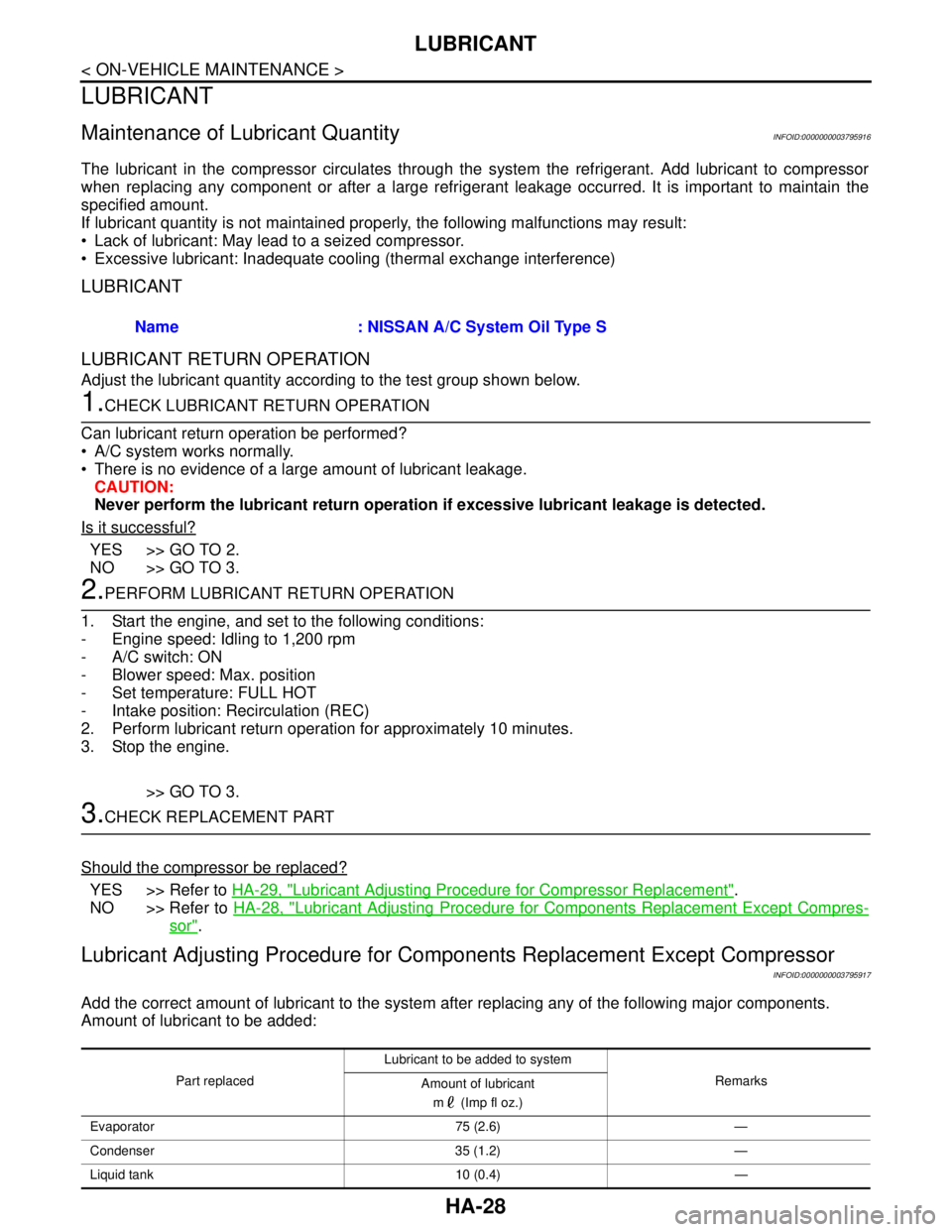
Add the correct amount of lubricant to the system after replacing any of the following major components.
Amount of lubricant to be added:Name : NISSAN A/C System Oil Type S
Part replacedLubricant to be added to system
Remarks
Amount of lubricant
m (Imp fl oz.)
Evaporator 75 (2.6) —
Condenser 35 (1.2) —
Liquid tank 10 (0.4) —
Page 2603 of 5121
HA-34
< ON-VEHICLE MAINTENANCE >
ELECTRICAL LEAK DETECTOR
2. Connect a suitable A/C manifold gauge set (SST) to the A/C service valves.
3. Check if the A/C refrigerant pressure is at least 345 kPa (3.45 bar, 3.52 kg/cm
2, 50 psi) above 16°C
(61°F). Recover/evacuate and recharge the system with the specified amount of refrigerant if less than
specification.
NOTE:
Leakages may not be detected since the system may not reach 345 kPa (3.45 bar, 3.52 kg/cm
2, 50 psi) at
temperatures below 16°C (61°F).
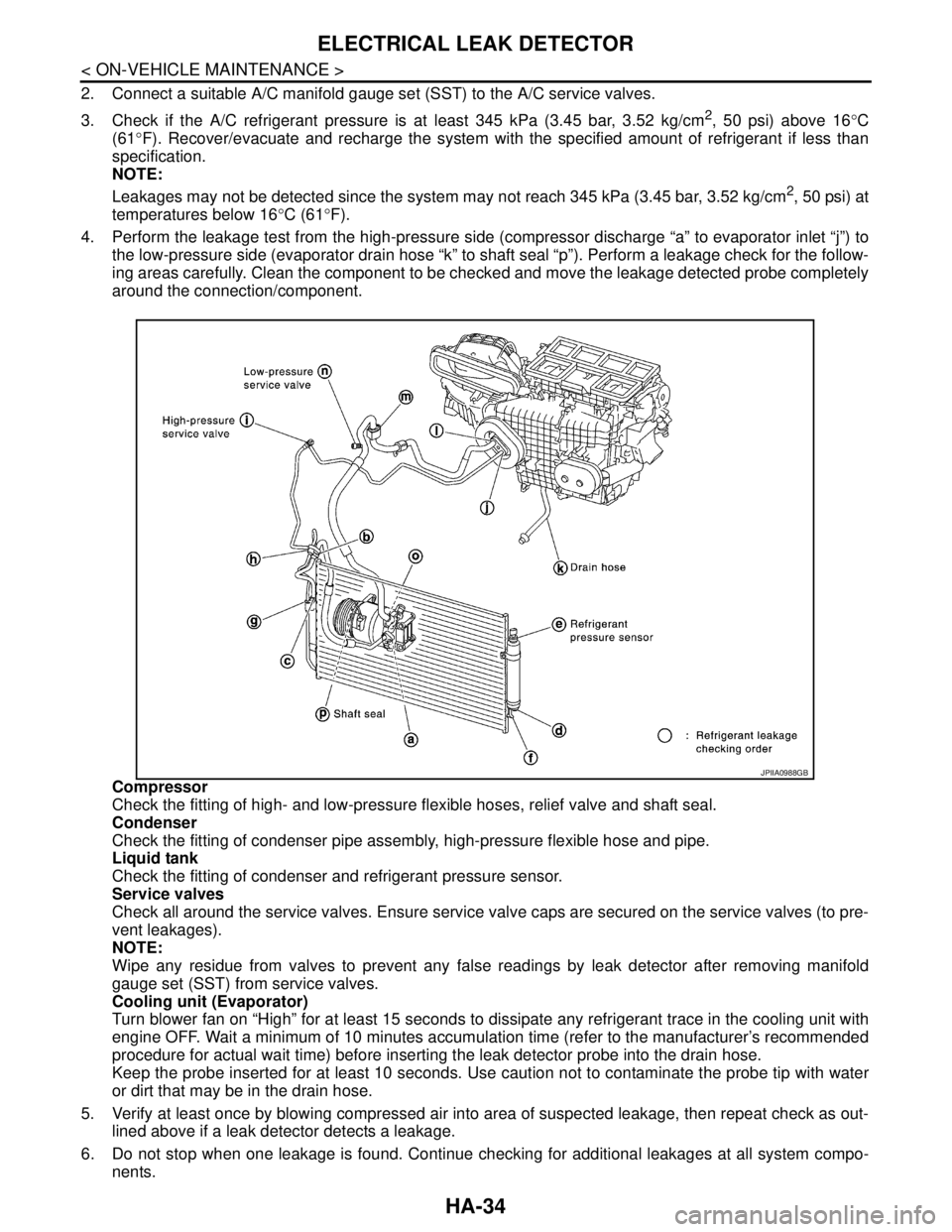
4. Perform the leakage test from the high-pressure side (compressor discharge “a” to evaporator inlet “j”) to
the low-pressure side (evaporator drain hose “k” to shaft seal “p”). Perform a leakage check for the follow-
ing areas carefully. Clean the component to be checked and move the leakage detected probe completely
around the connection/component.
Compressor
Check the fitting of high- and low-pressure flexible hoses, relief valve and shaft seal.
Condenser
Check the fitting of condenser pipe assembly, high-pressure flexible hose and pipe.
Liquid tank
Check the fitting of condenser and refrigerant pressure sensor.
Service valves
Check all around the service valves. Ensure service valve caps are secured on the service valves (to pre-
vent leakages).
NOTE:
Wipe any residue from valves to prevent any false readings by leak detector after removing manifold
gauge set (SST) from service valves.
Cooling unit (Evaporator)
Turn blower fan on “High” for at least 15 seconds to dissipate any refrigerant trace in the cooling unit with
engine OFF. Wait a minimum of 10 minutes accumulation time (refer to the manufacturer’s recommended
procedure for actual wait time) before inserting the leak detector probe into the drain hose.
Keep the probe inserted for at least 10 seconds. Use caution not to contaminate the probe tip with water
or dirt that may be in the drain hose.
5. Verify at least once by blowing compressed air into area of suspected leakage, then repeat check as out-
lined above if a leak detector detects a leakage.
6. Do not stop when one leakage is found. Continue checking for additional leakages at all system compo-
nents.
JPIIA0988GB
Page 2607 of 5121
HA-38
< ON-VEHICLE REPAIR >
LOW-PRESSURE FLEXIBLE HOSE
LOW-PRESSURE FLEXIBLE HOSE
Exploded ViewINFOID:0000000003858210
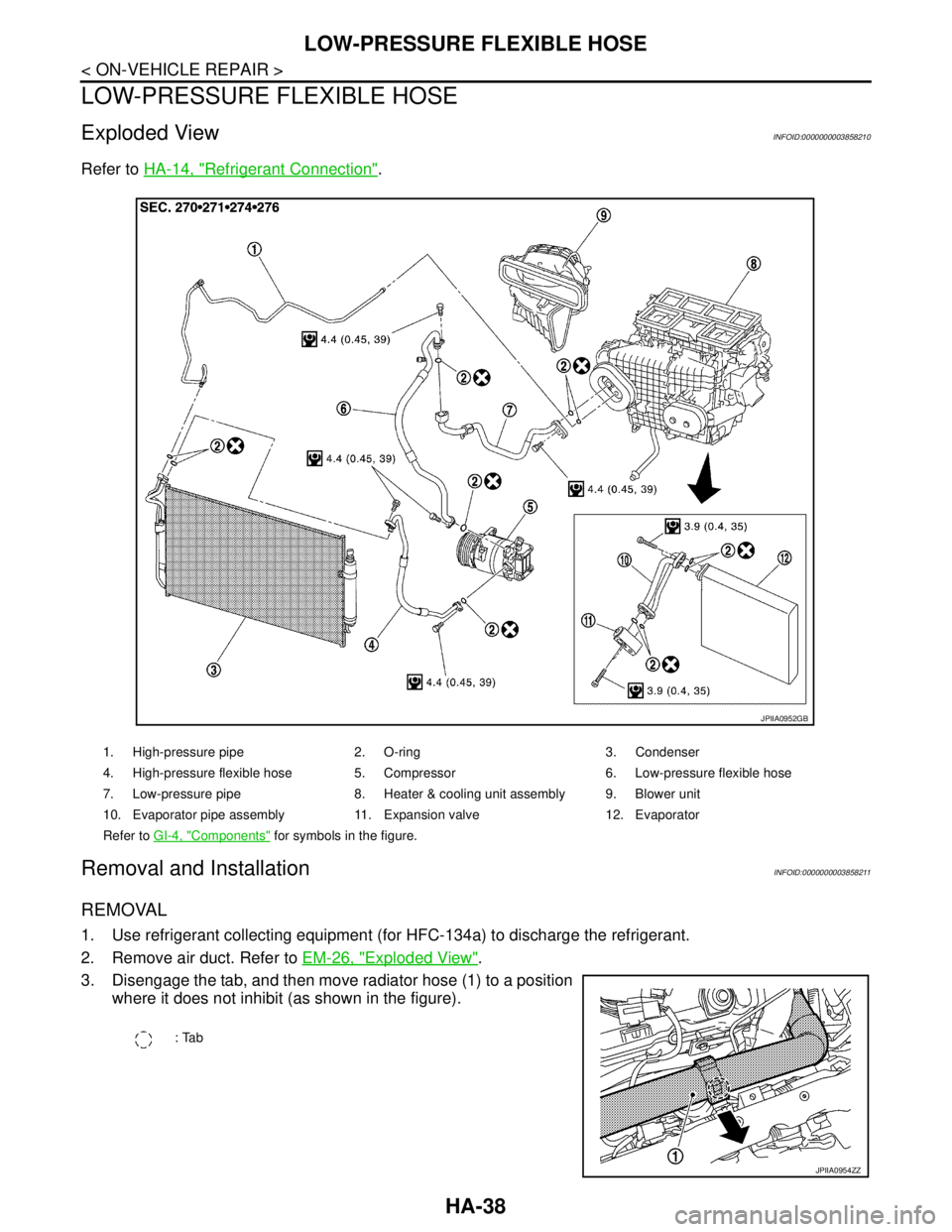
Refer to HA-14, "Refrigerant Connection".
Removal and InstallationINFOID:0000000003858211
REMOVAL
1. Use refrigerant collecting equipment (for HFC-134a) to discharge the refrigerant.
2. Remove air duct. Refer to EM-26, "
Exploded View".
3. Disengage the tab, and then move radiator hose (1) to a position
where it does not inhibit (as shown in the figure).
1. High-pressure pipe 2. O-ring 3. Condenser
4. High-pressure flexible hose 5. Compressor 6. Low-pressure flexible hose
7. Low-pressure pipe 8. Heater & cooling unit assembly 9. Blower unit
10. Evaporator pipe assembly 11. Expansion valve 12. Evaporator
Refer to GI-4, "
Components" for symbols in the figure.
JPIIA0952GB
: Tab
JPIIA0954ZZ