Key NISSAN TEANA 2014 Owners Manual
[x] Cancel search | Manufacturer: NISSAN, Model Year: 2014, Model line: TEANA, Model: NISSAN TEANA 2014Pages: 4801, PDF Size: 51.2 MB
Page 842 of 4801
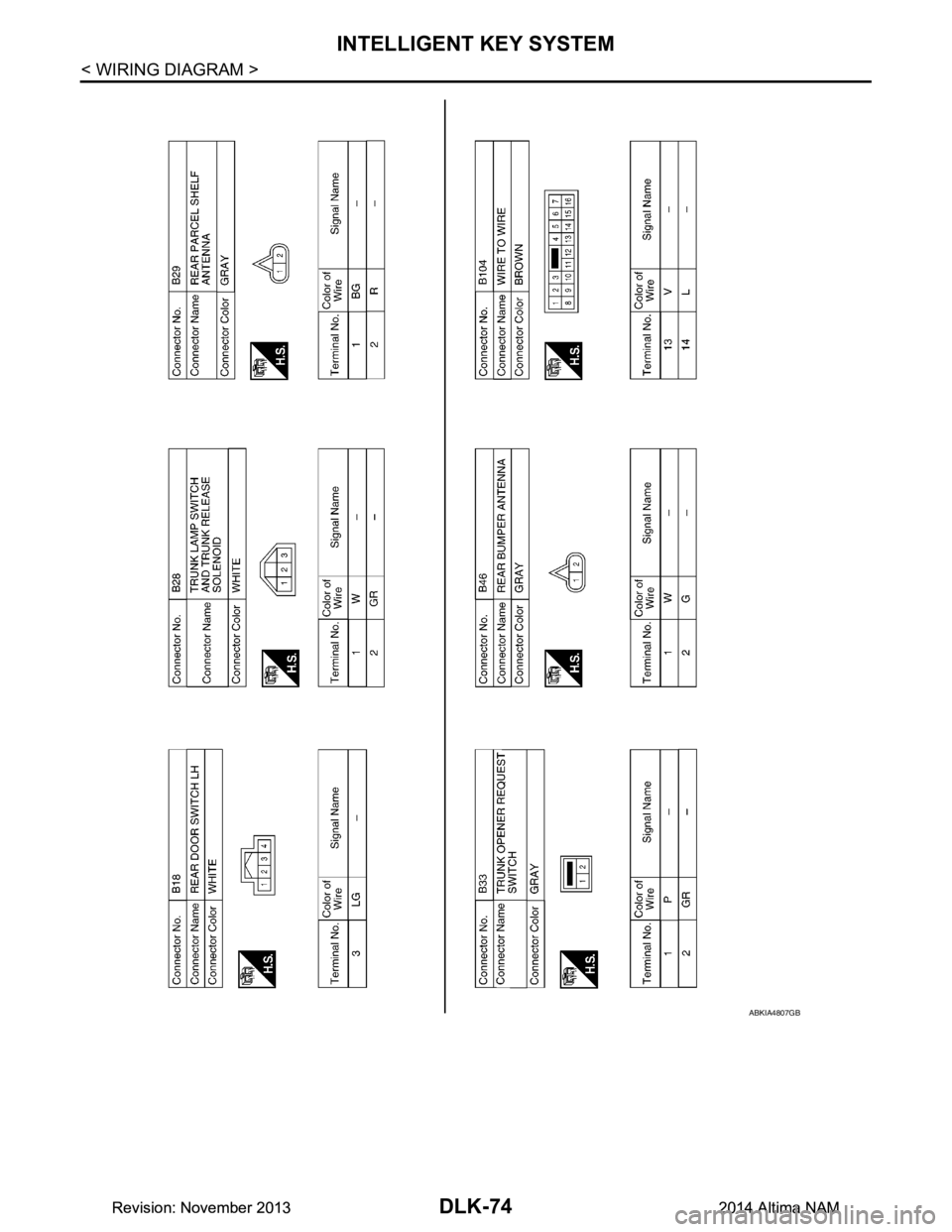
DLK-74
< WIRING DIAGRAM >
INTELLIGENT KEY SYSTEM
ABKIA4807GB
Revision: November 20132014 Altima NAMRevision: November 20132014 Altima NAM
Page 843 of 4801
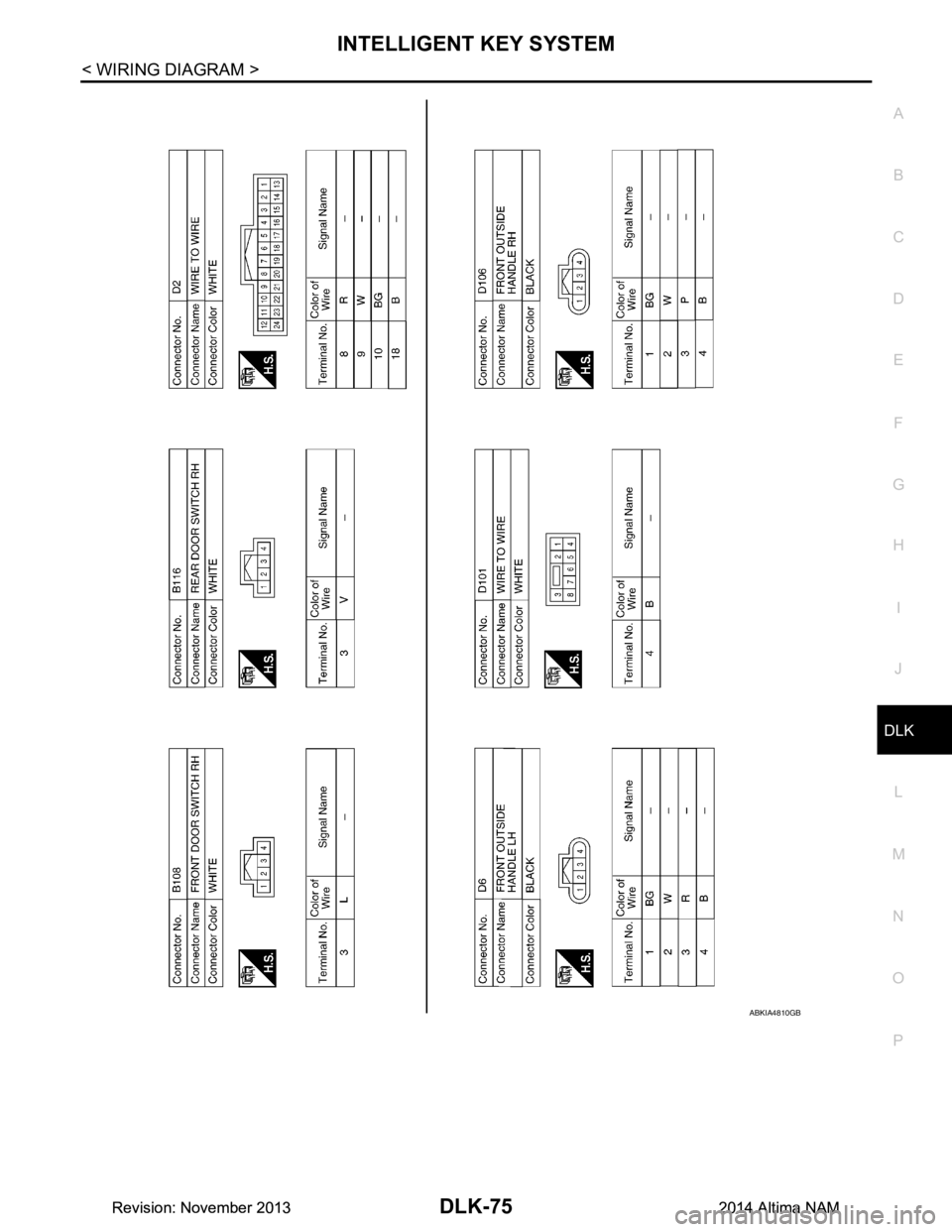
INTELLIGENT KEY SYSTEMDLK-75
< WIRING DIAGRAM >
C
D E
F
G H
I
J
L
M A
B
DLK
N
O P
ABKIA4810GB
Revision: November 20132014 Altima NAMRevision: November 20132014 Altima NAM
Page 844 of 4801
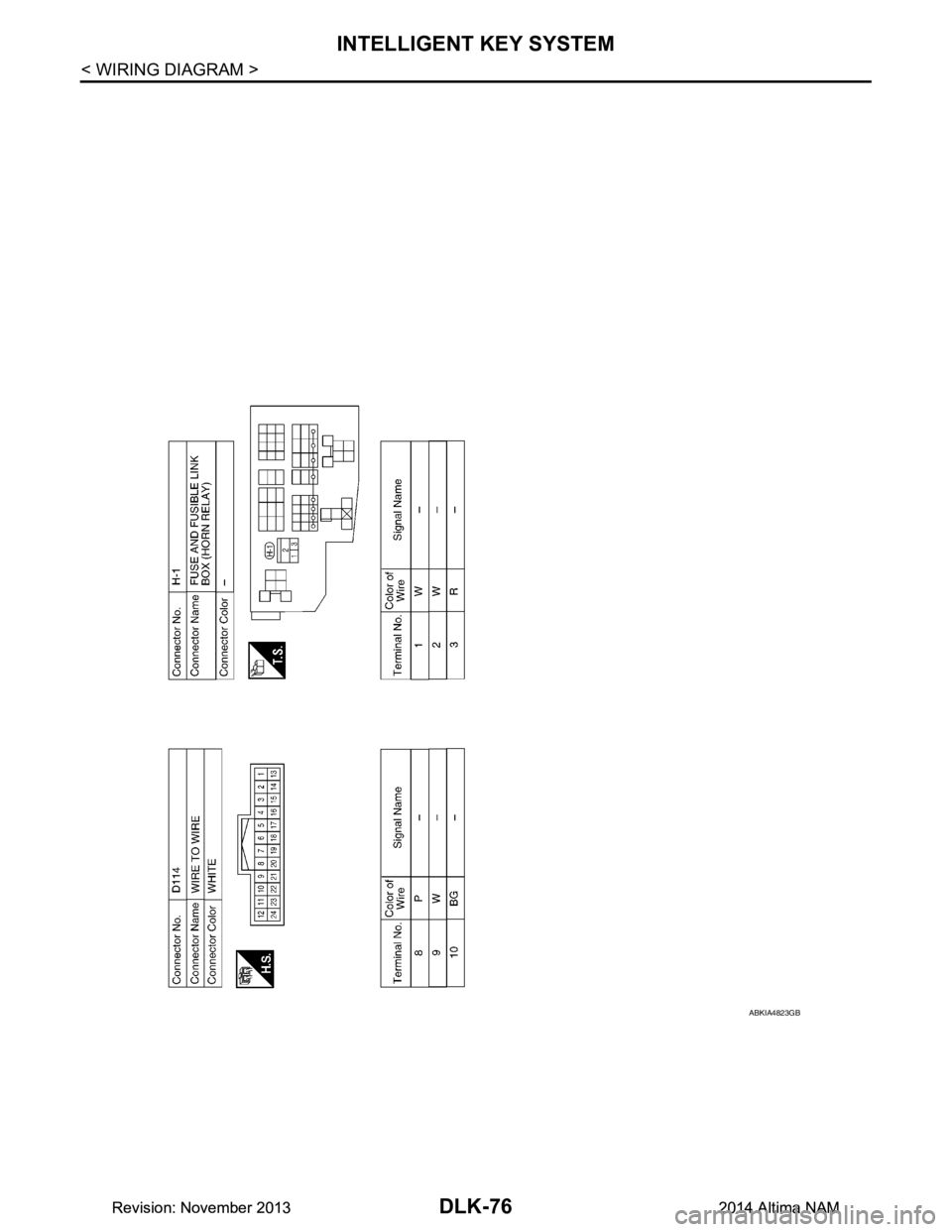
DLK-76
< WIRING DIAGRAM >
INTELLIGENT KEY SYSTEM
ABKIA4823GB
Revision: November 20132014 Altima NAMRevision: November 20132014 Altima NAM
Page 852 of 4801

DLK-84
< BASIC INSPECTION >
INSPECTION AND ADJUSTMENT
INSPECTION AND ADJUSTMENT
ADDITIONAL SERVICE WHEN REPLACING CONTROL UNIT
ADDITIONAL SERVICE WHEN REPL ACING CONTROL UNIT : Description
INFOID:0000000009461804
Perform the system initialization when replacing BCM, replacing Intelligent Key or registering an additional
Intelligent Key.
ADDITIONAL SERVICE WHEN REPLACING CONTROL UNIT : Special Repair Re-
quirement
INFOID:0000000009461805
Refer to the CONSULT Immobilizer mode and follow the on-screen instructions.
Revision: November 20132014 Altima NAMRevision: November 20132014 Altima NAM
Page 856 of 4801
DLK-88
< DTC/CIRCUIT DIAGNOSIS >
B2621 INSIDE ANTENNA
B2621 INSIDE ANTENNA
DTC LogicINFOID:0000000009461814
DTC DETECTION LOGIC
DTC CONFIRMATION PROCEDURE
1.PERFORM DTC CONFIRMATION PROCEDURE
1. Select “INTELLIGENT KEY” of “BCM” using CONSULT.
2. Select “INSIDE ANT DIAGNOSI S” in “WORK SUPPORT” mode.
3. Perform inside key antenna (“INSIDE ANT DIAG NOSIS”) on “WORK SUPPORT” of “INTELLIGENT
KEY”.
4. Check BCM for DTC.
Is inside key antenna DTC detected?
YES >> Refer to DLK-88, "Diagnosis Procedure".
NO >> Inside key antenna (rear parcel shelf) is OK.
Diagnosis ProcedureINFOID:0000000009461815
Regarding Wiring Diagram information, refer to DLK-61, "Wiring Diagram".
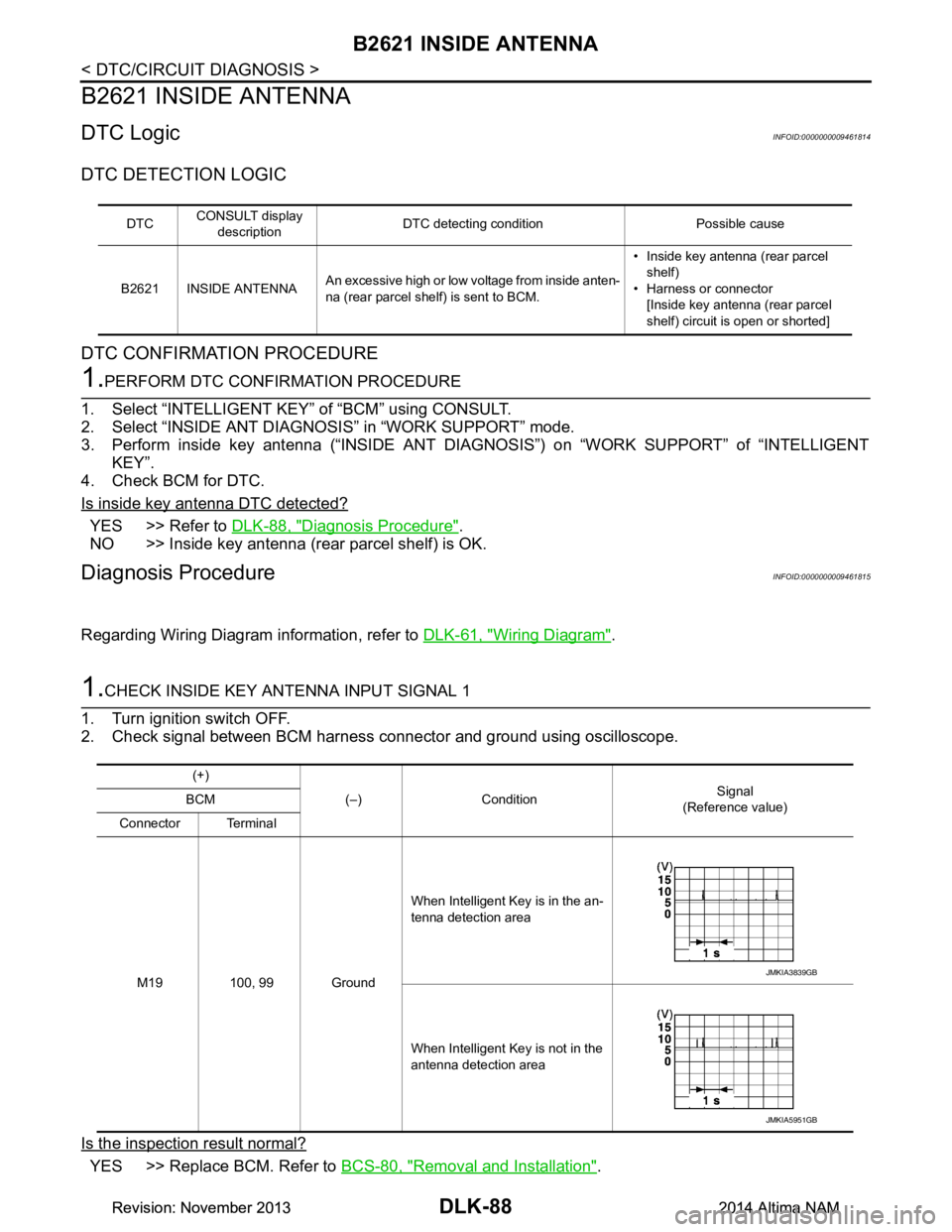
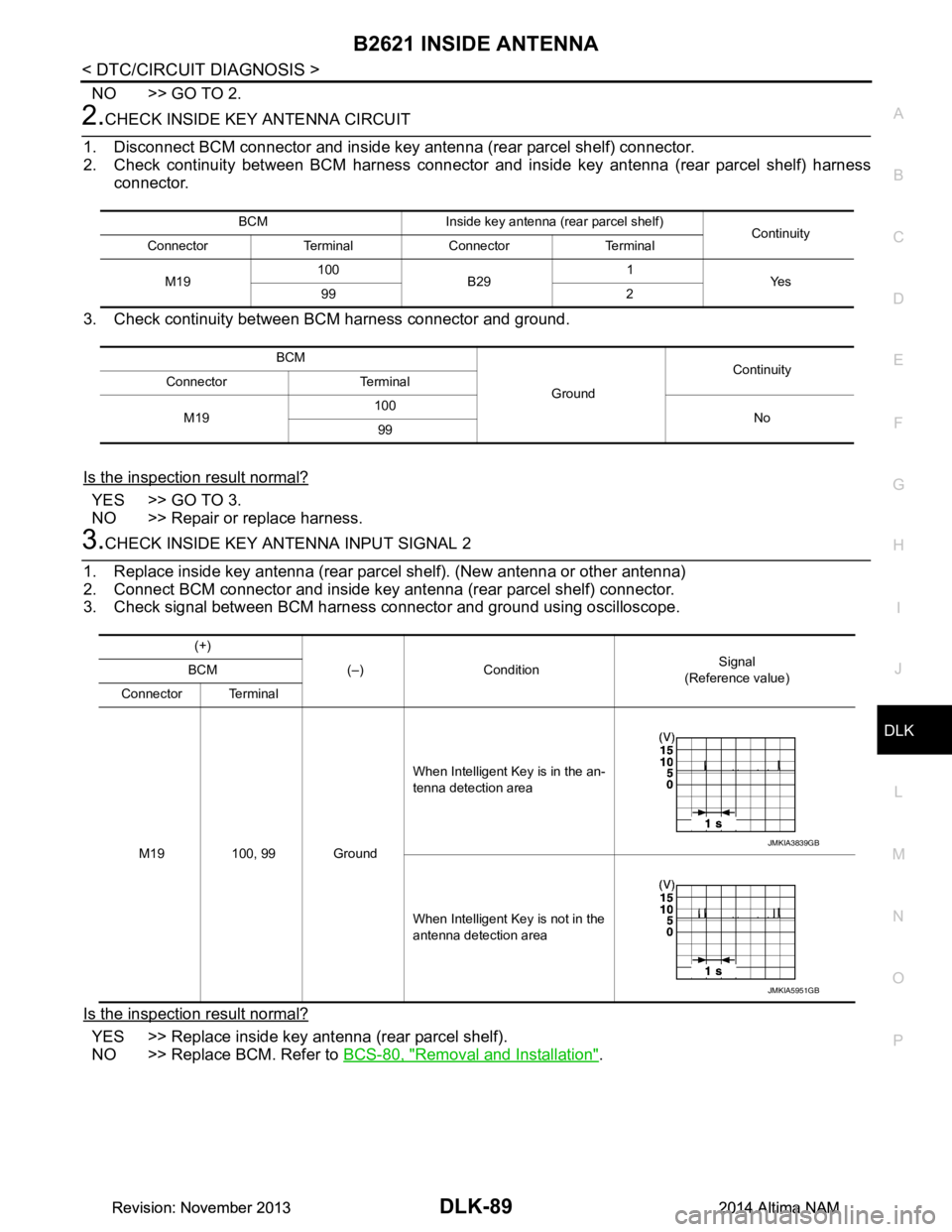
1.CHECK INSIDE KEY ANTENNA INPUT SIGNAL 1
1. Turn ignition switch OFF.
2. Check signal between BCM harness connector and ground using oscilloscope.
Is the inspection result normal?
YES >> Replace BCM. Refer to BCS-80, "Removal and Installation".
DTCCONSULT display
description DTC detecting condition Possible cause
B2621 INSIDE ANTENNA An excessive high or low voltage from inside anten-
na (rear parcel shelf) is sent to BCM. • Inside key antenna (rear parcel
shelf)
• Harness or connector [Inside key antenna (rear parcel
shelf) circuit is open or shorted]
(+)
(–) Condition Signal
(Reference value)
BCM
Connector Terminal
M19 100, 99 Ground When Intelligent Key is in the an-
tenna detection area
When Intelligent Key is not in the
antenna detection area
JMKIA3839GB
JMKIA5951GB
Revision: November 20132014 Altima NAMRevision: November 20132014 Altima NAM
Page 857 of 4801
B2621 INSIDE ANTENNADLK-89
< DTC/CIRCUIT DIAGNOSIS >
C
D E
F
G H
I
J
L
M A
B
DLK
N
O P
NO >> GO TO 2.
2.CHECK INSIDE KEY ANTENNA CIRCUIT
1. Disconnect BCM connector and inside key antenna (rear parcel shelf) connector.
2. Check continuity between BCM harness connector and inside key antenna (rear parcel shelf) harness
connector.
3. Check continuity between BCM harness connector and ground.
Is the inspection result normal?
YES >> GO TO 3.
NO >> Repair or replace harness.
3.CHECK INSIDE KEY ANTENNA INPUT SIGNAL 2
1. Replace inside key antenna (rear parcel shelf). (New antenna or other antenna)
2. Connect BCM connector and inside key antenna (rear parcel shelf) connector.
3. Check signal between BCM harness connector and ground using oscilloscope.
Is the inspection result normal?
YES >> Replace inside key antenna (rear parcel shelf).
NO >> Replace BCM. Refer to BCS-80, "Removal and Installation"
.
BCM Inside key antenna (rear parcel shelf)
Continuity
Connector Terminal Connector Terminal
M19 100
B29 1
Ye s
99 2
BCM GroundContinuity
Connector Terminal
M19 100
No
99
(+)
(–) Condition Signal
(Reference value)
BCM
Connector Terminal
M19 100, 99 Ground When Intelligent Key is in the an-
tenna detection area
When Intelligent Key is not in the
antenna detection area
JMKIA3839GB
JMKIA5951GB
Revision: November 20132014 Altima NAMRevision: November 20132014 Altima NAM
Page 858 of 4801
DLK-90
< DTC/CIRCUIT DIAGNOSIS >
B2622 INSIDE ANTENNA
B2622 INSIDE ANTENNA
DTC LogicINFOID:0000000009461816
DTC DETECTION LOGIC
DTC CONFIRMATION PROCEDURE
1.PERFORM DTC CONFIRMATION PROCEDURE
1. Select INTELLIGENT KEY of BCM using CONSULT.
2. Select INSIDE ANT DIAGNOSIS in WORK SUPPORT mode.
3. Perform inside key antenna (INSIDE ANT DIAGNO SIS) on WORK SUPPORT of INTELLIGENT KEY.
4. Check BCM for DTC.
Is inside key antenna DTC detected?
YES >> Refer to DLK-90, "Diagnosis Procedure".
NO >> Inside key antenna (front console) is OK.
Diagnosis ProcedureINFOID:0000000009461817
Regarding Wiring Diagram information, refer to DLK-61, "Wiring Diagram".
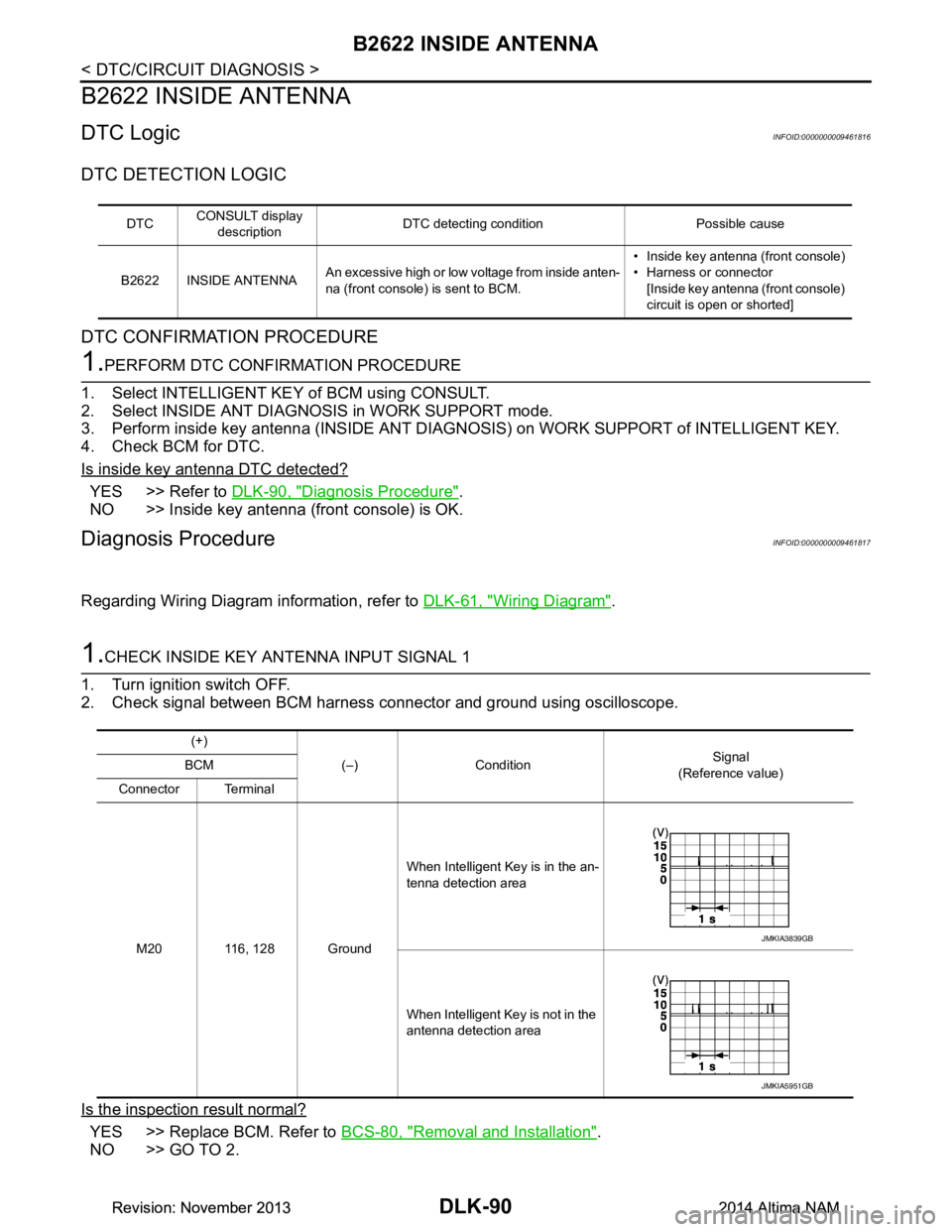
1.CHECK INSIDE KEY ANTENNA INPUT SIGNAL 1
1. Turn ignition switch OFF.
2. Check signal between BCM harness connector and ground using oscilloscope.
Is the inspection result normal?
YES >> Replace BCM. Refer to BCS-80, "Removal and Installation".
NO >> GO TO 2.
DTC CONSULT display
description DTC detecting condition Possible cause
B2622 INSIDE ANTENNA An excessive high or low voltage from inside anten-
na (front console) is sent to BCM. • Inside key antenna (front console)
• Harness or connector [Inside key antenna (front console)
circuit is open or shorted]
(+)
(–) Condition Signal
(Reference value)
BCM
Connector Terminal
M20 116, 128 Ground When Intelligent Key is in the an-
tenna detection area
When Intelligent Key is not in the
antenna detection area
JMKIA3839GB
JMKIA5951GB
Revision: November 20132014 Altima NAMRevision: November 20132014 Altima NAM
Page 859 of 4801
B2622 INSIDE ANTENNADLK-91
< DTC/CIRCUIT DIAGNOSIS >
C
D E
F
G H
I
J
L
M A
B
DLK
N
O P
2.CHECK INSIDE KEY ANTENNA CIRCUIT
1. Disconnect BCM connector and inside key antenna (front console) connector.
2. Check continuity between BCM harness connector and inside key antenna (front console) harness con-
nector.
3. Check continuity between BCM harness connector and ground.
Is the inspection result normal?
YES >> GO TO 3.
NO >> Repair or replace harness.
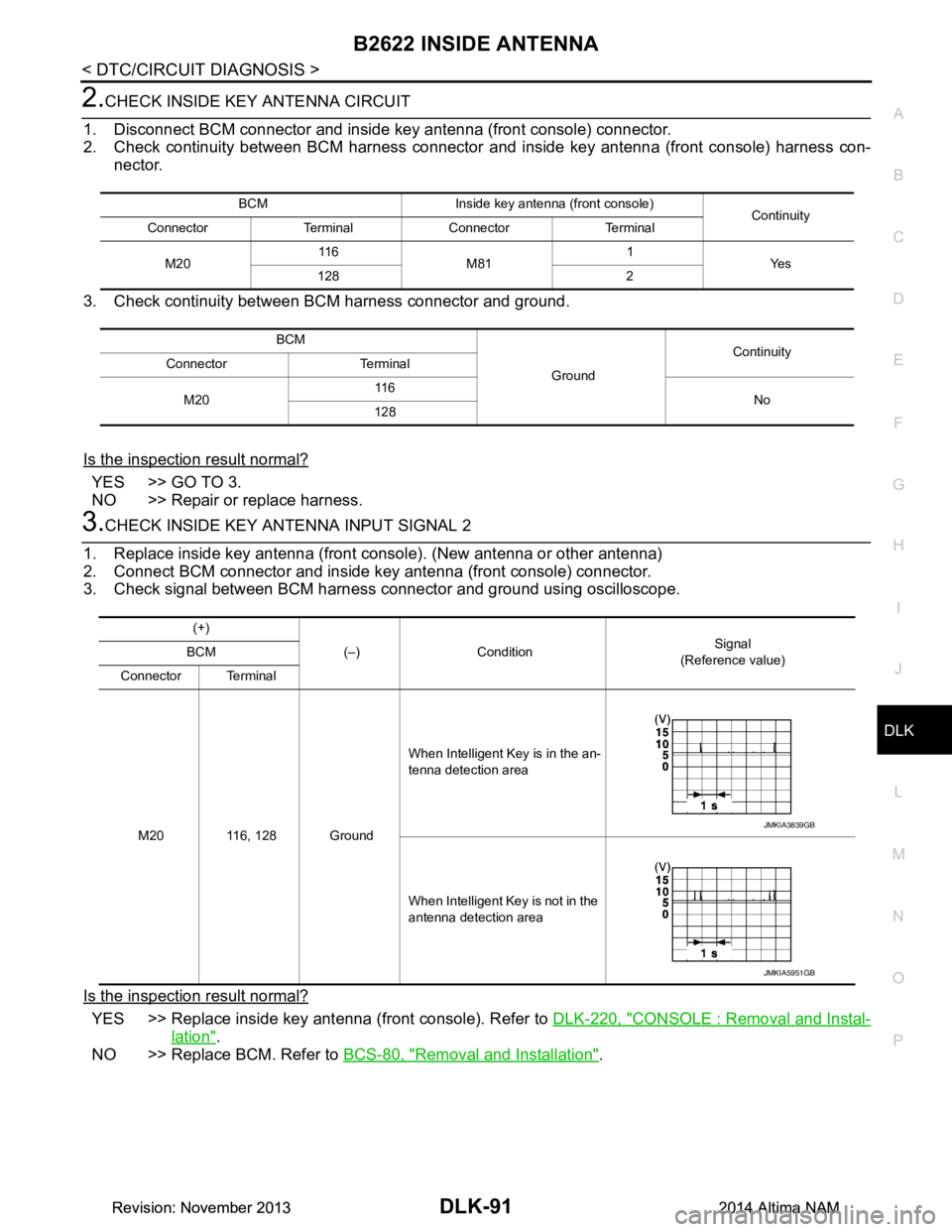
3.CHECK INSIDE KEY ANTENNA INPUT SIGNAL 2
1. Replace inside key antenna (front console). (New antenna or other antenna)
2. Connect BCM connector and inside key antenna (front console) connector.
3. Check signal between BCM harness connector and ground using oscilloscope.
Is the inspection result normal?
YES >> Replace inside key antenna (front console). Refer to DLK-220, "CONSOLE : Removal and Instal-
lation".
NO >> Replace BCM. Refer to BCS-80, "Removal and Installation"
.
BCM Inside key antenna (front console)
Continuity
Connector Terminal Connector Terminal
M20 11 6
M81 1
Ye s
128 2
BCM GroundContinuity
Connector Terminal
M20 11 6
No
128
(+)
(–) Condition Signal
(Reference value)
BCM
Connector Terminal
M20 116, 128 Ground When Intelligent Key is in the an-
tenna detection area
When Intelligent Key is not in the
antenna detection area
JMKIA3839GB
JMKIA5951GB
Revision: November 20132014 Altima NAMRevision: November 20132014 Altima NAM
Page 865 of 4801
B26FF REMOTE KEYLESS ENTRY RECEIVERDLK-97
< DTC/CIRCUIT DIAGNOSIS >
C
D E
F
G H
I
J
L
M A
B
DLK
N
O P
B26FF REMOTE KEYLESS ENTRY RECEIVER
DTC LogicINFOID:0000000009461823
DTC DETECTION LOGIC
DTC CONFIRMATION PROCEDURE
1.PERFORM DTC CONFIRMATION PROCEDURE
1. Turn ignition switch ON.
2. Check DTC in “Self-Diagnostic Result” mode of “BCM” using CONSULT.
Is DTC detected?
YES >> Refer to DLK-97, "Diagnosis Procedure".
NO >> Inspection End.
Diagnosis ProcedureINFOID:0000000009461824
Regarding Wiring Diagram information, refer to DLK-51, "Wiring Diagram".
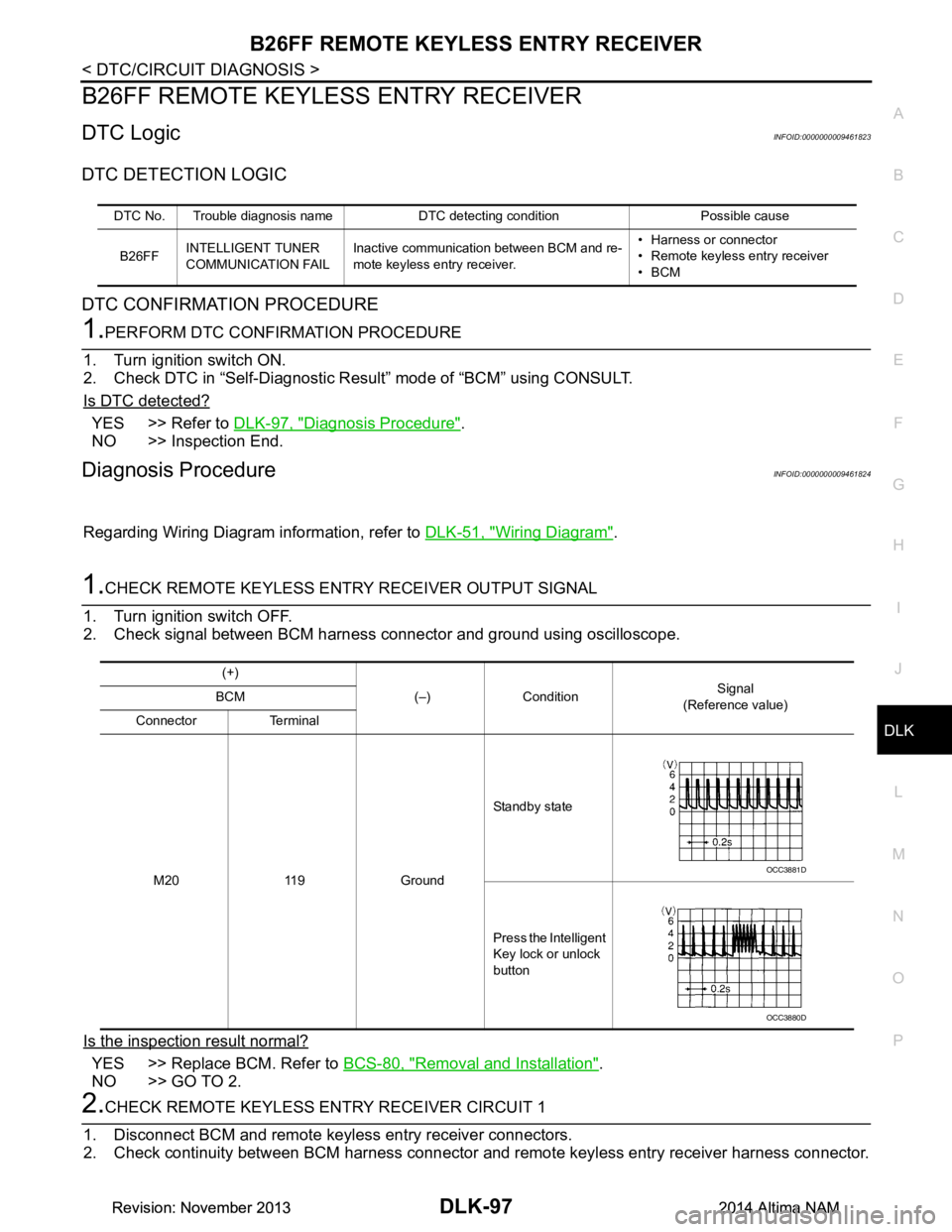
1.CHECK REMOTE KEYLESS ENTRY RECEIVER OUTPUT SIGNAL
1. Turn ignition switch OFF.
2. Check signal between BCM harness connector and ground using oscilloscope.
Is the inspection result normal?
YES >> Replace BCM. Refer to BCS-80, "Removal and Installation".
NO >> GO TO 2.
2.CHECK REMOTE KEYLESS EN TRY RECEIVER CIRCUIT 1
1. Disconnect BCM and remote keyless entry receiver connectors.
2. Check continuity between BCM harness connector and remote keyless entry receiver harness connector.
DTC No. Trouble diagnosis name DTC detecting condition Possible cause
B26FF INTELLIGENT TUNER
COMMUNICATION FAIL Inactive communication between BCM and re-
mote keyless entry receiver. • Harness or connector
• Remote keyless entry receiver
•BCM
(+)
(–) Condition Signal
(Reference value)
BCM
Connector Terminal
M20 119 Ground Standby state
Press the Intelligent
Key lock or unlock
button
OCC3881D
OCC3880D
Revision: November 20132014 Altima NAMRevision: November 20132014 Altima NAM
Page 866 of 4801

DLK-98
< DTC/CIRCUIT DIAGNOSIS >
B26FF REMOTE KEYLESS ENTRY RECEIVER
3. Check continuity between BCM harness connector and ground.
Is the inspection result normal?
YES >> GO TO 3.
NO >> Repair or replace harness.
3.CHECK REMOTE KEYLESS ENTRY RECEIVER POWER SUPPLY
Check voltage between remote keyless entry receiver harness connector and ground.
Is the inspection result normal?
YES >> GO TO 4.
NO-1 >> Check 5A fuse No. 9 [located in fuse block J/B].
NO-2 >> Repair or replace harness between remote keyless entry receiver and 5A fuse No. 9.
4.CHECK REMOTE KEYLESS ENTRY RECEIVER GROUND CIRCUIT
Check continuity between remote keyles s entry receiver harness connector and ground.
Is the inspection result normal?
YES >> Replace remote keyless entry receiver. Refer to DLK-224, "Removal and Installation".
NO >> Repair or replace harness.
BCM Remote keyless entry receiver Continuity
Connector Terminal Connector Terminal
M20 119 M27 2 Yes
(+) (–) Continuity
BCM
Connector Terminal M20 119 Ground No
(+) (–)Vo l ta g e
(Approx)
Remote keyless entry receiver
Connector Terminal M27 1 Ground Battery voltage
Remote keyless entry receiver GroundContinuity
Connector Terminal
M27 3 Yes
Revision: November 20132014 Altima NAMRevision: November 20132014 Altima NAM