SEC NISSAN TEANA 2014 Service Manual
[x] Cancel search | Manufacturer: NISSAN, Model Year: 2014, Model line: TEANA, Model: NISSAN TEANA 2014Pages: 4801, PDF Size: 51.2 MB
Page 4629 of 4801

VTL-1
VENTILATION, HEATER & AIR CONDITIONER
C
D E
F
G H
J
K L
M
SECTION VTL
A
B
VTL
N
O P
CONTENTS
VENTILATION SYSTEM
PRECAUTION ................ ...............................2
PRECAUTIONS .............................................. .....2
Precaution for Supplemental Restraint System
(SRS) "AIR BAG" and "SEAT BELT PRE-TEN-
SIONER" ............................................................. ......
2
Precaution for Work ..................................................2
PREPARATION ............................................3
PREPARATION .............................................. .....3
Special Service Tool ........................................... ......3
Commercial Service Tool ..........................................3
PERIODIC MAINTENANCE ..........................4
IN-CABIN MICROFILTER .............................. .....4
Removal and Installation ...........................................4
SYSTEM DESCRIPTION . .............................5
IN-CABIN MICROFILTER .............................. .....5
Description .......................................................... ......5
REMOVAL AND INSTALLATION ................6
DUCTS AND GRILLES .................................. .....6
Exploded View .................................................... ......6
DEFROSTER NOZZLE .......................................... ......7
DEFROSTER NOZZLE : Removal and Installation
......
7
CENTER VENTILATOR DUCT .............................. ......7
CENTER VENTILATOR DUCT : Removal and In-
stallation .............................................................. ......
7
SIDE DEFROSTER DUCT ..................................... ......7
SIDE DEFROSTER DUCT : Removal and Instal-
lation .................................................................... ......
7
FRONT FLOOR DUCT .......................................... ......8
FRONT FLOOR DUCT : Removal and Installation
- Front Floor Duct ................................................ .....
8
FRONT FLOOR DUCT : Removal and Installation
- Front Floor Connecting Duct ............................. .....
8
FRONT FLOOR DUCT : Removal and Installation
- Front Floor Duct Nozzle .................................... .....
8
ADAPTOR DUCT ................................................... .....8
ADAPTOR DUCT : Removal and Installation -
Adaptor Duct ........................................................ .....
8
ADAPTOR DUCT : Removal and Installation -
Adaptor Extension Duct ....................................... .....
9
REAR CENTER VENTILATOR DUCT ................... .....9
REAR CENTER VENTILATOR DUCT : Removal
and Installation .................................................... .....
9
Exploded View .........................................................10
CENTER VENTILATOR GRILLE ........................... ....10
CENTER VENTILATOR GRILLE : Removal and
Installation ........................................................... ....
11
SIDE VENTILATOR GRILLE ................................. ....11
SIDE VENTILATOR GRILLE : Removal and In-
stallation .............................................................. ....
11
SIDE DEFROSTER GRILLE .................................. ....11
SIDE DEFROSTER GRILLE : Removal and In-
stallation .............................................................. ....
11
REAR CENTER VENTILATOR GRILLE ............... ....12
REAR CENTER VENTILATOR GRILLE : Remov-
al and Installation ................................................. ....
12
BLOWER UNIT .................................................13
BLOWER UNIT ...................................................... ....13
BLOWER UNIT : Exploded View .............................13
BLOWER UNIT : Removal and Installation .............13
BLOWER MOTOR ................................................. ....13
BLOWER MOTOR : Removal and Installation ........13
Revision: November 20132014 Altima NAM
Page 4630 of 4801

VTL-2
< PRECAUTION >
PRECAUTIONS
PRECAUTION
PRECAUTIONS
Precaution for Supplemental Restraint System (SRS) "AIR BAG" and "SEAT BELT
PRE-TENSIONER"
INFOID:0000000009951791
The Supplemental Restraint System such as “A IR BAG” and “SEAT BELT PRE-TENSIONER”, used along
with a front seat belt, helps to reduce the risk or severi ty of injury to the driver and front passenger for certain
types of collision. Information necessary to service the system safely is included in the SR and SB section of
this Service Manual.
WARNING:
• To avoid rendering the SRS inopera tive, which could increase the risk of personal injury or death in
the event of a collision which would result in air bag inflation, all maintenance must be performed by
an authorized NISS AN/INFINITI dealer.
• Improper maintenance, including in correct removal and installation of the SRS, can lead to personal
injury caused by unintent ional activation of the system. For re moval of Spiral Cable and Air Bag
Module, see the SR section.
• Do not use electrical test equipmen t on any circuit related to the SRS unless instructed to in this
Service Manual. SRS wiring harn esses can be identified by yellow and/or orange harnesses or har-
ness connectors.
PRECAUTIONS WHEN USING POWER TOOLS (AIR OR ELECTRIC) AND HAMMERS
WARNING:
• When working near the Airbag Diagnosis Sensor Unit or other Airbag System sensors with the Igni-
tion ON or engine running, DO NOT use air or electri c power tools or strike near the sensor(s) with a
hammer. Heavy vibration could activate the sensor( s) and deploy the air bag(s), possibly causing
serious injury.
• When using air or electric power tools or hammers , always switch the Ignition OFF, disconnect the
battery and wait at least three minutes before performing any service.
Precaution for WorkINFOID:0000000009461571
• When removing or disassembling each component, be careful not to damage or deform it. If a component may be subject to interference, be sure to protect it with a shop cloth.
• When removing (disengaging) components with a screwdriver or similar tool, be sure to wrap the component with a shop cloth or vinyl tape to protect it.
• Protect the removed parts with a s hop cloth and prevent them from being dropped.
• Replace a deformed or damaged clip.
• If a part is specified as a non-reusable part, always replace it with a new one.
• Be sure to tighten bolts and nuts securely to the specified torque.
• After installation is complete, be sure to check that each part works properly.
• Follow the steps below to clean components:
- Water soluble dirt:
• Dip a soft cloth into lukewarm water, wring the water out of the cloth and wipe the dirty area.
• Then rub with a soft, dry cloth.
- Oily dirt:
• Dip a soft cloth into lukewarm water with mild detergent (concentration: within 2 to 3%) and wipe the dirty area.
• Then dip a cloth into fresh water, wring the water out of the cloth and wipe the detergent off.
• Then rub with a soft, dry cloth.
- Do not use organic solvent such as thinner, benzene, alcohol or gasoline.
- For genuine leather seats, use a genuine leather seat cleaner.
Revision: November 20132014 Altima NAM
Page 4643 of 4801

WCS
WCS-1
DRIVER INFORMATION & MULTIMEDIA
C
D E
F
G H
I
J
K L
M B
SECTION WCS
A
O P
CONTENTS
WARNING CHIME SYSTEM
PRECAUTION ................ ...............................3
PRECAUTIONS .............................................. .....3
Precaution for Supplemental Restraint System
(SRS) "AIR BAG" and "SEAT BELT PRE-TEN-
SIONER" ............................................................. ......
3
SYSTEM DESCRIPTION ..............................4
COMPONENT PARTS ................................... .....4
Component Parts Location .................................. ......4
Component Description .............................................4
SYSTEM ..............................................................6
WARNING CHIME SYSTEM .......................................6
WARNING CHIME SYSTEM : System Diagram . ......6
WARNING CHIME SYSTEM : System Description
......
6
LIGHT REMINDER WARNING CHIME ................. ......6
LIGHT REMINDER WARNING CHIME : System
Diagram ............................................................... ......
6
LIGHT REMINDER WARNING CHIME : System
Description .......................................................... ......
6
SEAT BELT WARNING CHIME ............................ ......7
SEAT BELT WARNING CHIME : System Diagram
......
7
SEAT BELT WARNING CHIME : System Descrip-
tion ...................................................................... ......
7
PARKING BRAKE RELEASE WARNING CHIME ......7
PARKING BRAKE RELEASE WARNING CHIME
: System Diagram ................................................ ......
7
PARKING BRAKE RELEASE WARNING CHIME
: System Description ........................................... ......
7
DIAGNOSIS SYSTEM (METER) .........................9
Description .......................................................... ......9
CONSULT Function (METER/M&A) .........................9
DIAGNOSIS SYSTEM (BCM) ............................13
COMMON ITEM ..................................................... ....13
COMMON ITEM : CONSULT Function (BCM -
COMMON ITEM) ................................................. ....
13
BUZZER ................................................................. ....14
BUZZER : CONSULT Function (BCM - BUZZER) ....14
ECU DIAGNOSIS INFORMATION ..............15
BCM, COMBINATION METER .........................15
List of ECU Reference ......................................... ....15
WIRING DIAGRAM ......................................16
WARNING CHIME SYSTEM .............................16
Wiring Diagram .................................................... ....16
BASIC INSPECTION ...................................23
DIAGNOSIS AND REPAIR WORKFLOW ........23
Work Flow ............................................................ ....23
DTC/CIRCUIT DIAGNOSIS .........................25
POWER SUPPLY AND GROUND CIRCUIT ....25
COMBINATION METER ........................................ ....25
COMBINATION METER : Diagnosis Procedure .....25
BCM (BODY CONTROL MODULE) ...................... ....25
BCM (BODY CONTROL MODULE) : Diagnosis
Procedure ............................................................ ....
26
METER BUZZER CIRCUIT ...............................27
Description ...............................................................27
Component Function Check ....................................27
Diagnosis Procedure ..............................................27
SEAT BELT BUCKLE SWITCH SIGNAL CIR-
CUIT ..................................................................
28
Description ........................................................... ....28
Component Function Check ..................................28
Diagnosis Procedure ..............................................28
Revision: November 20132014 Altima NAMRevision: November 20132014 Altima NAM
Page 4645 of 4801
WCS
PRECAUTIONSWCS-3
< PRECAUTION >
C
D E
F
G H
I
J
K L
M B
A
O P
PRECAUTION
PRECAUTIONS
Precaution for Supplemental Restraint System (SRS) "AIR BAG" and "SEAT BELT
PRE-TENSIONER"
INFOID:0000000009955588
The Supplemental Restraint System such as “A IR BAG” and “SEAT BELT PRE-TENSIONER”, used along
with a front seat belt, helps to reduce the risk or severi ty of injury to the driver and front passenger for certain
types of collision. Information necessary to service t he system safely is included in the SR and SB section of
this Service Manual.
WARNING:
• To avoid rendering the SRS inoper ative, which could increase the risk of personal injury or death in
the event of a collision which would result in air bag inflation, all maintenance must be performed by
an authorized NISSAN/INFINITI dealer.
• Improper maintenance, including in correct removal and installation of the SRS, can lead to personal
injury caused by unintentional act ivation of the system. For removal of Spiral Cable and Air Bag
Module, see the SR section.
• Do not use electrical test equipm ent on any circuit related to the SRS unless instructed to in this
Service Manual. SRS wiring harnesses can be identi fied by yellow and/or orange harnesses or har-
ness connectors.
PRECAUTIONS WHEN USING POWER TOOLS (AIR OR ELECTRIC) AND HAMMERS
WARNING:
• When working near the Airbag Diagnosis Sensor Un it or other Airbag System sensors with the Igni-
tion ON or engine running, DO NOT use air or el ectric power tools or strike near the sensor(s) with a
hammer. Heavy vibration could activate the sensor( s) and deploy the air bag(s), possibly causing
serious injury.
• When using air or electric power tools or hammers , always switch the Ignition OFF, disconnect the
battery and wait at least three mi nutes before performing any service.
Revision: November 20132014 Altima NAMRevision: November 20132014 Altima NAM
Page 4649 of 4801
WCS
SYSTEMWCS-7
< SYSTEM DESCRIPTION >
C
D E
F
G H
I
J
K L
M B
A
O P
WARNING CANCEL CONDITIONS
Warning is canceled if any of the following conditions is fulfilled.• Lighting switch OFF
• Ignition switch ON
• Front door switch LH is OFF
SEAT BELT WARNING CHIME
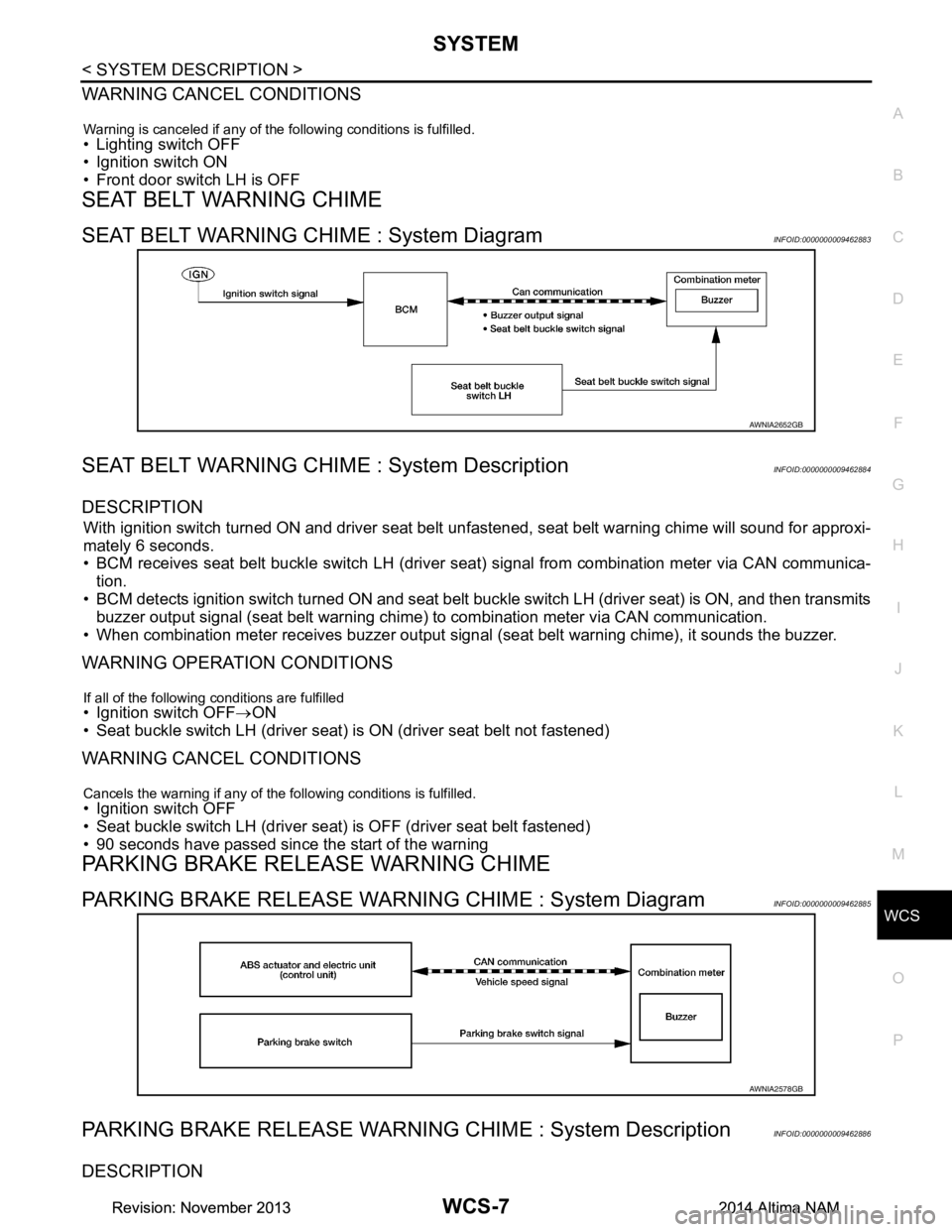
SEAT BELT WARNING CHIME : System DiagramINFOID:0000000009462883
SEAT BELT WARNING CHIME : System DescriptionINFOID:0000000009462884
DESCRIPTION
With ignition switch turned ON and driver seat belt unfastened, seat belt warning chime will sound for approxi-
mately 6 seconds.
• BCM receives seat belt buckle switch LH (driver seat) signal from combination meter via CAN communica- tion.
• BCM detects ignition switch turned ON and seat belt buckle switch LH (driver seat) is ON, and then transmits
buzzer output signal (seat belt warning chime) to combination meter via CAN communication.
• When combination meter receives buzzer output signal (seat belt warning chime), it sounds the buzzer.
WARNING OPERATION CONDITIONS
If all of the following conditions are fulfilled• Ignition switch OFF→ON
• Seat buckle switch LH (driver seat) is ON (driver seat belt not fastened)
WARNING CANCEL CONDITIONS
Cancels the warning if any of the following conditions is fulfilled.• Ignition switch OFF
• Seat buckle switch LH (driver seat) is OFF (driver seat belt fastened)
• 90 seconds have passed since the start of the warning
PARKING BRAKE RELEASE WARNING CHIME
PARKING BRAKE RELEASE WARNING CHIME : System DiagramINFOID:0000000009462885
PARKING BRAKE RELEASE WARNING CHIME : System DescriptionINFOID:0000000009462886
DESCRIPTION
AWNIA2652GB
AWNIA2578GB
Revision: November 20132014 Altima NAMRevision: November 20132014 Altima NAM
Page 4651 of 4801
WCS
DIAGNOSIS SYSTEM (METER)WCS-9
< SYSTEM DESCRIPTION >
C
D E
F
G H
I
J
K L
M B
A
O P
DIAGNOSIS SYSTEM (METER)
DescriptionINFOID:0000000009941189
COMBINATION METER SE LF-DIAGNOSIS MODE
The following meter functions can be checked during Combination Meter Self-Diagnosis Mode:
• Pointer sweep of speedometer, tachometer and gauges.
• Illumination of all LCD segments and color patterns for meter displays.
• Illumination of all lamps/LEDs that are controlled by the combination meter (regardless of switch status).
STARTING COMBINATION METER SELF-DIAGNOSIS MODE
NOTE:
• Check combination meter power supply and ground circuits if self-diagnosis mode does not start. Refer to
MWI-58, "COMBINATION METER : Diagnosis Procedure"
. Replace combination meter if power supply and
ground circuits are found to be normal and self-diagnosis mode does not start. Refer to MWI-82, "Removal
and Installation".
• Combination meter self-diagnosis mode will function with the ignition switch in ON. Combination meter self-
diagnosis mode will exit upon turning the ignition switch to OFF.
How to Initiate Se lf-Diagnosis Mode
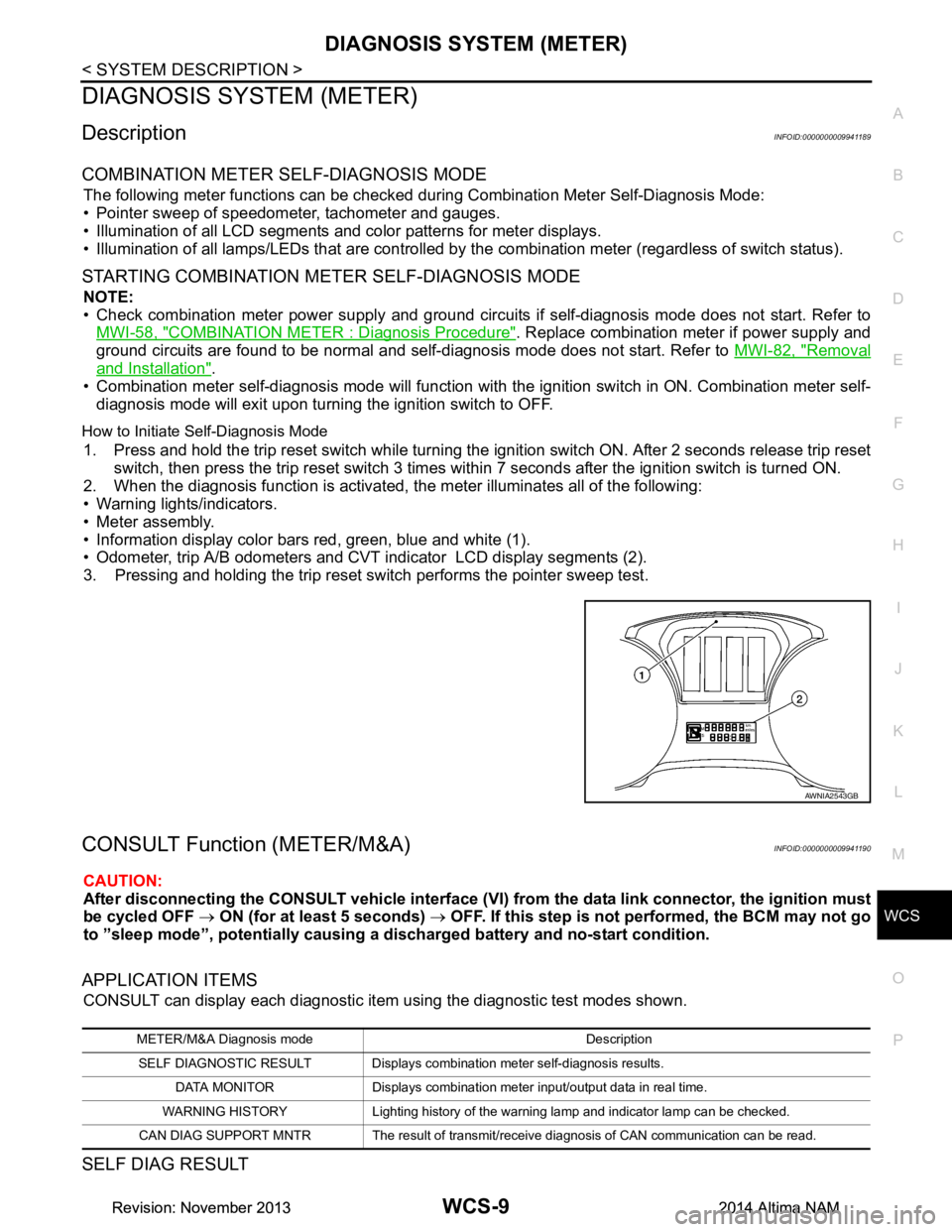
1. Press and hold the trip reset switch while turning the ignition switch ON. After 2 seconds release trip reset
switch, then press the trip reset switch 3 times withi n 7 seconds after the ignition switch is turned ON.
2. When the diagnosis function is activated, the meter illuminates all of the following:
• Warning lights/indicators.
• Meter assembly.
• Information display color bars red, green, blue and white (1).
• Odometer, trip A/B odometers and CVT indicator LCD display segments (2).
3. Pressing and holding the trip reset switch performs the pointer sweep test.
CONSULT Function (METER/M&A)INFOID:0000000009941190
CAUTION:
After disconnecting the CONSULT vehicle interface (VI) from the data link connector, the ignition must
be cycled OFF → ON (for at least 5 seconds) → OFF. If this step is not performed, the BCM may not go
to ”sleep mode”, potentiall y causing a discharged battery and no-start condition.
APPLICATION ITEMS
CONSULT can display each diagnostic item using the diagnostic test modes shown.
SELF DIAG RESULT
AWNIA2543GB
METER/M&A Diagnosis mode Description
SELF DIAGNOSTIC RESULT Displays combination meter self-diagnosis results. DATA MONITOR Displays combination meter input/output data in real time.
WARNING HISTORY Lighting history of the warning lamp and indicator lamp can be checked.
CAN DIAG SUPPORT MNTR The result of transmit/receive diagnosis of CAN communication can be read.
Revision: November 20132014 Altima NAMRevision: November 20132014 Altima NAM
Page 4654 of 4801

WCS-12
< SYSTEM DESCRIPTION >
DIAGNOSIS SYSTEM (METER)
SPECIAL FUNCTION
Special menu
W/L ON HISTORY
• “W/L ON HISTORY” indicates the “TIME” w hen the warning/ indicator lamp is turned on.
• The “TIME” above is:
- 0: The condition that the warning/indicator lamp has been turned on 1 or more times after starting the engine
and waiting for 30 seconds.
- 1 - 39: The number of times the engine was restarted after the 0 condition.
- NO W/L ON HISTORY: No warning/ indicator lamp history is stored.
NOTE:
• W/L ON HISTORY is not stored for approximately 30 seconds after the engine starts.
• Brake warning lamp does not store any history when the parking brake is applied or the brake fluid level gets
low.
LDW IND
[ON/OFF] Displays [ON/OFF] condition of LDW warning indicator message in the informa-
tion display.
TPMS MALF
[ON/OFF] Displays [ON/OFF] condition of TPMS warning indicator.
Display item [Unit]
MAIN
SIGNALS Description
Display item Description
W/L ON HISTORY Lighting history of warning lamp and indicator lamp can be checked.
Revision: November 20132014 Altima NAMRevision: November 20132014 Altima NAM
Page 4655 of 4801

WCS
DIAGNOSIS SYSTEM (BCM)WCS-13
< SYSTEM DESCRIPTION >
C
D E
F
G H
I
J
K L
M B
A
O P
DIAGNOSIS SYSTEM (BCM)
COMMON ITEM
COMMON ITEM : CONSULT Function (BCM - COMMON ITEM)INFOID:0000000009941192
CAUTION:
After disconnecting the CONSULT vehicle interface (VI) from the data link connector, the ignition must
be cycled OFF → ON (for at least 5 seconds) → OFF. If this step is not performed, the BCM may not go
to ”sleep mode”, potentiall y causing a discharged battery and a no-start condition.
APPLICATION ITEM
CONSULT performs the following functions via CAN communication with BCM.
SYSTEM APPLICATION
BCM can perform the following functions.
Direct Diagnostic Mode Description
Ecu Identification The BCM part number is displayed.
Self Diagnostic Result The BCM self diagnostic results are displayed.
Data Monitor The BCM input/output data is displayed in real time.
Active Test The BCM activates outputs to test components.
Work support The settings for BCM functions can be changed.
Configuration • The vehicle specification can be read and saved.
• The vehicle specification can be written when replacing BCM.
CAN Diag Support Mntr The result of transmit/receive diagnosis of CAN communication is displayed.
System Sub System Direct Diagnostic Mode
Ecu Identification
Self Diagnostic Result
Data Monitor
Active Test
Work support
Configuration
CAN Diag Su pport Mntr
Door lock DOOR LOCK ××××
Rear window defogger REAR DEFOGGER ×××
Warning chime BUZZER ××
Interior room lamp timer INT LAMP ×××
Remote keyless entry system MULTI REMOTE ENT ×××
Exterior lamp HEADLAMP ×××
Wiper and washer WIPER ×××
Turn signal and hazard warning lamps FLASHER ××
Air conditioner AIR CONDITIONER ×
Intelligent Key system INTELLIGENT KEY ××××
Combination switch COMB SW ×
BCM BCM × × ×××
Immobilizer IMMU ×××
Interior room lamp battery saver BATTERY SAVER ××
Trunk open TRUNK ×
Vehicle security system THEFT ALM ×××
Revision: November 20132014 Altima NAMRevision: November 20132014 Altima NAM
Page 4656 of 4801

WCS-14
< SYSTEM DESCRIPTION >
DIAGNOSIS SYSTEM (BCM)
BUZZER
BUZZER : CONSULT Function (BCM - BUZZER)INFOID:0000000009941193
CAUTION:
After disconnecting the CONSULT vehicle interface (VI) from the data link connector, the ignition must
be cycled OFF → ON (for at least 5 seconds) → OFF. If this step is not performed, the BCM may not go
to ”sleep mode”, potentially causing a di scharged battery and a no-start condition.
DATA MONITOR
ACTIVE TEST
RAP system RETAINED PWR ×
Signal buffer system SIGNAL BUFFER ×
TPMS AIR PRESSURE MONITOR ××××
System Sub System
Direct Diagnostic Mode
Ecu Identification
Self Diagnostic Result
Data Monitor
Active Test
Work support
Configuration
CAN Diag Support Mntr
Monitor Item [Unit] Description
PUSH -SW [On/Off] Indicates condition of push-button ignition switch.
UNLK SEN -DR [On/Off] Indicates condition of door unlock sensor.
VEH SPEED 1 [km/h] Indicates vehicle speed signal received from ABS on CAN communication line.
TAIL LAMP SW [On/Off] Indicates condition of combination switch.
FR FOG SW [On/Off] Indicates condition of front fog lamp switch.
DOOR SW-DR [On/Off] Indicates condition of front door switch LH.
CDL LOCK SW [On/Off] Indicates condition of lock signal from door lock and unlock switch.
Test Item Description
SEAT BELT WARN TEST This test is able to check seat belt warning chime operation [On/Off].
LIGHT WARN ALM This test is able to check light warning chime operation [On/Off].
REVERSE WARNING This test is able to check reverse warning chime operation [On/Off].
ID REGIST WARNING This test is able to check TPMS transmitter ID regist warning chime operation [On/Off].
Revision: November 20132014 Altima NAMRevision: November 20132014 Altima NAM
Page 4676 of 4801

WT-1
SUSPENSION
C
D
F
G H
I
J
K L
M
SECTION WT
A
B
WT
N
O PCONTENTS
ROAD WHEELS & TIRES
PRECAUTION ................ ...............................3
PRECAUTIONS .............................................. .....3
Precaution for Supplemental Restraint System
(SRS) "AIR BAG" and "SEAT BELT PRE-TEN-
SIONER" ............................................................. ......
3
Service Notice and Precautions for TPMS ................3
Precaution for Road Wheel .......................................4
PREPARATION ............................................5
PREPARATION .............................................. .....5
Special Service Tool ........................................... ......5
Commercial Service Tool ..........................................5
SYSTEM DESCRIPTION ..............................6
COMPONENT PARTS ................................... .....6
Component Parts Location .................................. ......6
Component Description .............................................6
BCM ..........................................................................6
Transmitter ................................................................7
Remote Keyless Entry Receiver ...............................7
Outside Key Antennas ..............................................7
Combination Meter ....................................................7
SYSTEM ..............................................................8
System Diagram .................................................. ......8
System Description ...................................................9
Easy Fill Tire Alert Function ......................................9
DIAGNOSIS SYSTEM (BCM) ............................10
COMMON ITEM ..................................................... ....10
COMMON ITEM : CONSULT Function (BCM -
COMMON ITEM) ................................................. ....
10
AIR PRESSURE MONITOR ......................................11
AIR PRESSURE MONITOR : CONSULT Function
(BCM-AIR PRESSURE MO NITOR) ........................
11
ECU DIAGNOSIS INFORMATION ........... ...13
BCM ...................................................................13
List of ECU Reference ......................................... ....13
WIRING DIAGRAM ......................................14
TIRE PRESSURE MONITORING SYSTEM ......14
Wiring Diagram - With Individual Tire Pressure
Display ................................................................. ....
14
Wiring Diagram - Without Individual Tire Pressure
Display ................................................................. ....
20
BASIC INSPECTION ...................................24
DIAGNOSIS AND REPAIR WORK FLOW .......24
Work Flow ............................................................ ....24
ID REGISTRATION PROCEDURE ...................25
Description ...............................................................25
Work Procedure .......................................................25
DTC/CIRCUIT DIAGNOSIS .........................28
C1704, C1705, C1706, C1707 LOW TIRE
PRESSURE .......................................................
28
DTC Logic ............................................................ ....28
Diagnosis Procedure ...............................................28
C1708, C1709, C1710, C1711 TRANSMITTER
(NO DATA) ........................................................
30
DTC Logic ............................................................ ....30
Diagnosis Procedure ...............................................30
C1712, C1713, C1714, C1715 TRANSMITTER
(CHECKSUM) ....................................................
33
DTC Logic ............................................................ ....33
Diagnosis Procedure ...............................................33
C1716, C1717, C1718, C1719 TRANSMITTER
(PRESSURE DATA) ..........................................
35
DTC Logic ............................................................ ....35
Diagnosis Procedure ...............................................35
Revision: November 20132014 Altima NAMRevision: November 20132014 Altima NAM