ignition NISSAN TEANA 2014 Service Manual
[x] Cancel search | Manufacturer: NISSAN, Model Year: 2014, Model line: TEANA, Model: NISSAN TEANA 2014Pages: 4801, PDF Size: 51.2 MB
Page 3424 of 4801
![NISSAN TEANA 2014 Service Manual
PCS
B26F6 BCMPCS-75
< DTC/CIRCUIT DIAGNOSIS > [POWER DISTRIBUTION SYSTEM]
C
D E
F
G H
I
J
K L
B
A
O P
N
Is the inspection result normal?
YES >> Refer to
GI-43, "Intermittent Incident".
NO >> Repla](/img/5/57390/w960_57390-3423.png "NISSAN TEANA 2014 Service Manual
PCS
B26F6 BCMPCS-75
< DTC/CIRCUIT DIAGNOSIS > [POWER DISTRIBUTION SYSTEM]
C
D E
F
G H
I
J
K L
B
A
O P
N
Is the inspection result normal?
YES >> Refer to
GI-43, \"Intermittent Incident\".
NO >> Repla")
PCS
B26F6 BCMPCS-75
< DTC/CIRCUIT DIAGNOSIS > [POWER DISTRIBUTION SYSTEM]
C
D E
F
G H
I
J
K L
B
A
O P
N
Is the inspection result normal?
YES >> Refer to
GI-43, "Intermittent Incident".
NO >> Replace BCM. Refer to BCS-80, "Removal and Installation"
.
M18 70 — Ignition: OFF 0V
Ignition: ON Battery voltage
Revision: November 20132014 Altima NAMRevision: November 20132014 Altima NAM
Page 3425 of 4801
![NISSAN TEANA 2014 Service Manual
PCS-76
< DTC/CIRCUIT DIAGNOSIS >[POWER DISTRIBUTION SYSTEM]
PUSH-BUTTON IGNITION SWITCH
PUSH-BUTTON IGNITION SWITCH
Component Function CheckINFOID:0000000009461657
1.CHECK FUNCTION
1. Select “PUSH](/img/5/57390/w960_57390-3424.png "NISSAN TEANA 2014 Service Manual
PCS-76
< DTC/CIRCUIT DIAGNOSIS >[POWER DISTRIBUTION SYSTEM]
PUSH-BUTTON IGNITION SWITCH
PUSH-BUTTON IGNITION SWITCH
Component Function CheckINFOID:0000000009461657
1.CHECK FUNCTION
1. Select “PUSH")
PCS-76
< DTC/CIRCUIT DIAGNOSIS >[POWER DISTRIBUTION SYSTEM]
PUSH-BUTTON IGNITION SWITCH
PUSH-BUTTON IGNITION SWITCH
Component Function CheckINFOID:0000000009461657
1.CHECK FUNCTION
1. Select “PUSH SW” in “Data Monitor” of BCM with CONSULT.
2. Check the push-button ignition switch signal under the following conditions.
Is the indication normal?
YES >> Inspection End.
NO >> Go to PCS-76, "Diagnosis Procedure"
.
Diagnosis ProcedureINFOID:0000000009461658
Regarding Wiring Diagram information, refer to PCS-44, "Wiring Diagram".
1. CHECK PUSH-BUTTON IGNITION SWITCH OUTPUT SIGNAL (PUSH-BUTTON IGNITION SWITCH)
1. Turn ignition switch OFF.
2. Disconnect push-button ignition switch connector and IPDM E/R connector E63.
3. Check voltage between push-button ignition switch connector M38 terminal 8 and ground.
Is the inspection result normal?
YES >> GO TO 3.
NO >> GO TO 2.
2. CHECK PUSH-BUTTON IGNI TION SWITCH CIRCUIT (BCM)
1. Disconnect BCM connector M17.
2. Check continuity between BCM connector M17 termi nal 1 and push-button ignition switch connector M38
terminal 8.
3. Check continuity between BCM connector M17 terminal 1 and ground.
Is the inspection result normal?
YES >> Replace BCM. Refer to BCS-80, "Removal and Installation".
NO >> Repair or replace harness or connectors.
3. CHECK IGNITION SWITCH OU TPUT SIGNAL (IPDM E/R)
Check voltage between IPDM E/R connector E63 terminal 38 and ground.
Test item Condition Status
PUSH SW Push-button ignition switch is pressed On
Push-button ignition switch is not pressed Off
Push-button ignition switch GroundVo l ta g e
(Approx.)
Connector Terminal
M38 8 — Battery voltage
BCM Push-button ignition switch Continuity
Connector Terminal Connector Terminal
M171M388 Yes
BCM Ground Continuity
Connector Terminal
M17 1 — No
Revision: November 20132014 Altima NAMRevision: November 20132014 Altima NAM
Page 3426 of 4801
![NISSAN TEANA 2014 Service Manual
PCS
PUSH-BUTTON IGNITION SWITCHPCS-77
< DTC/CIRCUIT DIAGNOSIS > [POWER DISTRIBUTION SYSTEM]
C
D E
F
G H
I
J
K L
B
A
O P
N
Is the inspection result normal?
YES >> GO TO 5.
NO >> GO TO 4.
4. CHECK P](/img/5/57390/w960_57390-3425.png "NISSAN TEANA 2014 Service Manual
PCS
PUSH-BUTTON IGNITION SWITCHPCS-77
< DTC/CIRCUIT DIAGNOSIS > [POWER DISTRIBUTION SYSTEM]
C
D E
F
G H
I
J
K L
B
A
O P
N
Is the inspection result normal?
YES >> GO TO 5.
NO >> GO TO 4.
4. CHECK P")
PCS
PUSH-BUTTON IGNITION SWITCHPCS-77
< DTC/CIRCUIT DIAGNOSIS > [POWER DISTRIBUTION SYSTEM]
C
D E
F
G H
I
J
K L
B
A
O P
N
Is the inspection result normal?
YES >> GO TO 5.
NO >> GO TO 4.
4. CHECK PUSH-BUTTON IGNITION SWITCH CIRCUIT (IPDM E/R)
1. Disconnect BCM connector M17.
2. Check continuity between IPDM E/R connector E63 terminal 38 and push-button ignition switch connector
M38 terminal 8.
3. Check continuity between IPDM E/R connector E63 terminal 38 and ground.
Is the inspection result normal?
YES >> Replace IPDM E/R. Refer to PCS-32, "Removal and Installation".
NO >> Repair or replace harness or connectors.
5.CHECK PUSH-BUTTON IGNITION SWITCH GROUND CIRCUIT
Check continuity between push-button igniti on switch connector M38 terminal 4 and ground.
Is the inspection result normal?
YES >> GO TO 6.
NO >> Repair or replace harness or connectors.
6.CHECK PUSH-BUTTON IGNITION SWITCH
Refer to PCS-77, "Component Inspection"
.
Is the inspection result normal?
YES >> Refer to GI-43, "Intermittent Incident".
NO >> Replace push-button ignition switch.
Component InspectionINFOID:0000000009461659
1.CHECK PUSH-BUTTON IGNITION SWITCH
1. Turn ignition switch OFF.
2. Disconnect push-button ignition switch connector.
3. Check continuity between push-button ignition switch terminals.
Is the inspection result normal?
IPDM E/R GroundVo l ta g e
(Approx.)
Connector Terminal
E63 38 — Battery voltage
IPDM E/R Push-button ignition switch Continuity
Connector Terminal Connector Terminal
E63 38 M38 8 Yes
IPDM E/R Ground Continuity
Connector Terminal
E63 38 — No
Push-button ignition switch Ground Continuity
Connector Terminal
M38 4 — Yes
Push-button ignition switch terminals Condition Continuity
4 – 8 Pressed Yes
Not pressed No
Revision: November 20132014 Altima NAMRevision: November 20132014 Altima NAM
Page 3427 of 4801
![NISSAN TEANA 2014 Service Manual
PCS-78
< DTC/CIRCUIT DIAGNOSIS >[POWER DISTRIBUTION SYSTEM]
PUSH-BUTTON IGNITION SWITCH
YES >> Inspection End.
NO >> Replace push-button ignition switch.
Revision: November 20132014 Altima NAMRevisi](/img/5/57390/w960_57390-3426.png "NISSAN TEANA 2014 Service Manual
PCS-78
< DTC/CIRCUIT DIAGNOSIS >[POWER DISTRIBUTION SYSTEM]
PUSH-BUTTON IGNITION SWITCH
YES >> Inspection End.
NO >> Replace push-button ignition switch.
Revision: November 20132014 Altima NAMRevisi")
PCS-78
< DTC/CIRCUIT DIAGNOSIS >[POWER DISTRIBUTION SYSTEM]
PUSH-BUTTON IGNITION SWITCH
YES >> Inspection End.
NO >> Replace push-button ignition switch.
Revision: November 20132014 Altima NAMRevision: November 20132014 Altima NAM
Page 3429 of 4801
![NISSAN TEANA 2014 Service Manual
PCS-80
< DTC/CIRCUIT DIAGNOSIS >[POWER DISTRIBUTION SYSTEM]
POWER SUPPLY AND GROUND CIRCUIT
Check that the following fusible links are not blown.
Is the fusible link blown?
YES >> Replace the blown](/img/5/57390/w960_57390-3428.png "NISSAN TEANA 2014 Service Manual
PCS-80
< DTC/CIRCUIT DIAGNOSIS >[POWER DISTRIBUTION SYSTEM]
POWER SUPPLY AND GROUND CIRCUIT
Check that the following fusible links are not blown.
Is the fusible link blown?
YES >> Replace the blown")
PCS-80
< DTC/CIRCUIT DIAGNOSIS >[POWER DISTRIBUTION SYSTEM]
POWER SUPPLY AND GROUND CIRCUIT
Check that the following fusible links are not blown.
Is the fusible link blown?
YES >> Replace the blown fusible link after repairing the affected circuit.
NO >> GO TO 2
2. CHECK POWER SUPPLY CIRCUIT
1. Disconnect IPDM E/R connectors E16 and E17.
2. Check voltage between IPDM E/R connectors and ground.
Is the inspection result normal?
YES >> GO TO 3
NO >> Repair or replace harness or connectors.
3. CHECK GROUND CIRCUIT
1. Disconnect IPDM E/R connectors E18 and E63.
2. Check continuity between IPDM E/R connectors and ground.
Is the inspection result normal?
YES >> Inspection End.
NO >> Repair or replace harness or connectors.
Terminal No. Signal name Fusible link No.
1 Fusible link main E (80A)
2 Fusible link IPDM E/R A (250A), C (80A)
3 Fusible link ignition switch A (250A), B (100A), M (40A)
IPDM E/R GroundVo l ta g e
(Approx.)
Connector Terminal
E16 1
—Batteryvoltage
2
E17 3
IPDM E/R Ground Continuity
Connector Terminal
E18 7 —Yes
E63 41
Revision: November 20132014 Altima NAMRevision: November 20132014 Altima NAM
Page 3430 of 4801
![NISSAN TEANA 2014 Service Manual
PCS
PUSH-BUTTON IGNITION SWITCH DOES NOT OPERATEPCS-81
< SYMPTOM DIAGNOSIS > [POWER DISTRIBUTION SYSTEM]
C
D E
F
G H
I
J
K L
B
A
O P
N
SYMPTOM DIAGNOSIS
PUSH-BUTTON IGNITION SW
ITCH DOES NOT OPERAT](/img/5/57390/w960_57390-3429.png "NISSAN TEANA 2014 Service Manual
PCS
PUSH-BUTTON IGNITION SWITCH DOES NOT OPERATEPCS-81
< SYMPTOM DIAGNOSIS > [POWER DISTRIBUTION SYSTEM]
C
D E
F
G H
I
J
K L
B
A
O P
N
SYMPTOM DIAGNOSIS
PUSH-BUTTON IGNITION SW
ITCH DOES NOT OPERAT")
PCS
PUSH-BUTTON IGNITION SWITCH DOES NOT OPERATEPCS-81
< SYMPTOM DIAGNOSIS > [POWER DISTRIBUTION SYSTEM]
C
D E
F
G H
I
J
K L
B
A
O P
N
SYMPTOM DIAGNOSIS
PUSH-BUTTON IGNITION SW
ITCH DOES NOT OPERATE
DescriptionINFOID:0000000009461662
Check that vehicle is under the condition shown in “C onditions of vehicle” before starting diagnosis, and check
each symptom.
NOTE:
The engine start function, door lock function, power dist ribution system, and NATS-IVIS in the Intelligent Key
system are closely related to each other regarding c ontrol. The vehicle security function can operate only
when the door lock and power distribut ion system are operating normally.
Conditions of Vehicle (Operating Conditions)
• “ENGINE START BY I-KEY” in “WORK SUPPORT” is ON when setting on CONSULT.
• One or more of Intelligent Keys with registered Intelligent Key ID is in the vehicle.
Diagnosis ProcedureINFOID:0000000009461663
1.PERFORM WORK SUPPORT
Perform “INSIDE ANT DIAGNOSIS” on Wo rk Support of “INTELLIGENT KEY”.
Refer to PCS-39, "INTELLIGENT KEY : CONSUL T Function (BCM - INTELLIGENT KEY)"
.
>> GO TO 2.
2.PERFORM SELF-DIAGNOSTIC RESULT
Perform self diagnostic result.
Are any DTCs detected?
YES >> Refer to BCS-52, "DTC Index".
NO >> GO TO 3.
3.CHECK PUSH-BUTTON IGNITION SWITCH
Check push-button ignition switch.
Refer to PCS-76, "Component Function Check"
.
Is the operation normal?
YES >> GO TO 4.
NO >> Repair or replace malfunctioning parts.
4.CONFIRM THE OPERATION
Confirm the operation again.
Is the inspection normal?
YES >> Check intermittent incident. Refer to GI-43, "Intermittent Incident".
NO >> GO TO 1.
Revision: November 20132014 Altima NAMRevision: November 20132014 Altima NAM
Page 3432 of 4801
![NISSAN TEANA 2014 Service Manual
PCS
PUSH BUTTON IGNITION SWITCHPCS-83
< REMOVAL AND INSTALLATION > [POWER DISTRIBUTION SYSTEM]
C
D E
F
G H
I
J
K L
B
A
O P
N
PUSH BUTTON IGNITION SWITCH
Exploded ViewINFOID:0000000009461665
Removal](/img/5/57390/w960_57390-3431.png "NISSAN TEANA 2014 Service Manual
PCS
PUSH BUTTON IGNITION SWITCHPCS-83
< REMOVAL AND INSTALLATION > [POWER DISTRIBUTION SYSTEM]
C
D E
F
G H
I
J
K L
B
A
O P
N
PUSH BUTTON IGNITION SWITCH
Exploded ViewINFOID:0000000009461665
Removal")
PCS
PUSH BUTTON IGNITION SWITCHPCS-83
< REMOVAL AND INSTALLATION > [POWER DISTRIBUTION SYSTEM]
C
D E
F
G H
I
J
K L
B
A
O P
N
PUSH BUTTON IGNITION SWITCH
Exploded ViewINFOID:0000000009461665
Removal and InstallationINFOID:0000000009461666
REMOVAL
1. Remove instrument pad (LH). Refer to
IP-14, "Exploded View".
2. Release the pawl on each side of NATS antenna amp. (1) using a suitable tool and remove from the instrument pad (LH).
: Pawl
3. Release the pawl on each side using a suitable tool and remove the push-button ignition switch from the NATS antenna amp.
INSTALLATION
Installation is in the reverse order of removal.
1. NATS antenna amp. 2. Push-button ignition switch
ALKIA2470ZZ
ALMIA0583ZZ
Revision: November 20132014 Altima NAMRevision: November 20132014 Altima NAM
Page 3433 of 4801

PG
PG-1
ELECTRICAL & POWER CONTROL
C
D E
F
G H
I
J
K L
B
SECTION PG
A
O P
N
CONTENTS
POWER SUPPLY, GROUND & CIRCUIT ELEMENTS
PRECAUTION ................
...............................2
PRECAUTIONS .............................................. .....2
Precaution for Supplemental Restraint System
(SRS) "AIR BAG" and "SEAT BELT PRE-TEN-
SIONER" ............................................................. ......
2
PREPARATION ............................................3
PREPARATION .............................................. .....3
Special Service Tool ........................................... ......3
Commercial Service Tool ..........................................3
BASIC INSPECTION ....................................4
BATTERY ....................................................... .....4
How to Handle Battery ........................................ ......4
Work Flow ........................................................... ......4
INSPECTION AND ADJUSTMENT .....................7
ADDITIONAL SERVICE WHEN REMOVING BAT-
TERY NEGATIVE TERMINAL ............................... ......
7
ADDITIONAL SERVICE WHEN REMOVING
BATTERY NEGATIVE TERMINAL : Special Re-
pair Requirement ................................................. ......
7
DTC/CIRCUIT DIAGNOSIS ..........................8
POWER SUPPLY ROUTING CIRCUIT .......... .....8
Wiring Diagram — Battery Power Supply — ....... ......8
Wiring Diagram — Accessory Power Supply — .....15
Wiring Diagram — Ignition Power Supply — ..........19
Fuse ........................................................................28
Fusible Link .............................................................28
GROUND ...........................................................29
Ground Distribution .............................................. ....29
HARNESS .........................................................39
Harness Layout ................................................... ....39
ELECTRICAL UNITS LOCATION ....................61
Electrical Units Location ..........................................61
HARNESS CONNECTOR .................................65
Description ...............................................................65
STANDARDIZED RELAY .................................68
Description ...............................................................68
FUSE BLOCK - JUNCTION BOX (J/B) ............70
Terminal Arrangement .............................................70
FUSE, FUSIBLE LINK AND RELAY BOX ........71
Terminal Arrangement .............................................71
IPDM E/R (INTELLIGENT POWER DISTRI-
BUTION MODULE ENGINE ROOM) ................
72
Fuse, Connector and Terminal Arrangement ...... ....72
REMOVAL AND INSTALLATION ...............73
BATTERY ..........................................................73
Exploded View ..................................................... ....73
Removal and Installation (Battery) ..........................73
Removal and Installation (Battery Tray) ..................74
SERVICE DATA AND SPECIFICATIONS
(SDS) ............... .............................................
75
BATTERY ..........................................................75
Battery ................................................................. ....75
Revision: November 20132014 Altima NAM
Page 3434 of 4801
PG-2
< PRECAUTION >
PRECAUTIONS
PRECAUTION
PRECAUTIONS
Precaution for Supplemental Restraint System (SRS) "AIR BAG" and "SEAT BELT
PRE-TENSIONER"
INFOID:0000000009951599
The Supplemental Restraint System such as “A IR BAG” and “SEAT BELT PRE-TENSIONER”, used along
with a front seat belt, helps to reduce the risk or severi ty of injury to the driver and front passenger for certain
types of collision. Information necessary to service the system safely is included in the SR and SB section of
this Service Manual.
WARNING:
• To avoid rendering the SRS inopera tive, which could increase the risk of personal injury or death in
the event of a collision which would result in air bag inflation, all maintenance must be performed by
an authorized NISS AN/INFINITI dealer.
• Improper maintenance, including in correct removal and installation of the SRS, can lead to personal
injury caused by unintent ional activation of the system. For re moval of Spiral Cable and Air Bag
Module, see the SR section.
• Do not use electrical test equipmen t on any circuit related to the SRS unless instructed to in this
Service Manual. SRS wiring harn esses can be identified by yellow and/or orange harnesses or har-
ness connectors.
PRECAUTIONS WHEN USING POWER TOOLS (AIR OR ELECTRIC) AND HAMMERS
WARNING:
• When working near the Airbag Diagnosis Sensor Unit or other Airbag System sensors with the Igni-
tion ON or engine running, DO NOT use air or electri c power tools or strike near the sensor(s) with a
hammer. Heavy vibration could activate the sensor( s) and deploy the air bag(s), possibly causing
serious injury.
• When using air or electric power tools or hammers , always switch the Ignition OFF, disconnect the
battery and wait at least three minutes before performing any service.
Revision: November 20132014 Altima NAM
Page 3451 of 4801
PG
POWER SUPPLY ROUTING CIRCUITPG-19
< DTC/CIRCUIT DIAGNOSIS >
C
D E
F
G H
I
J
K L
B
A
O P
N
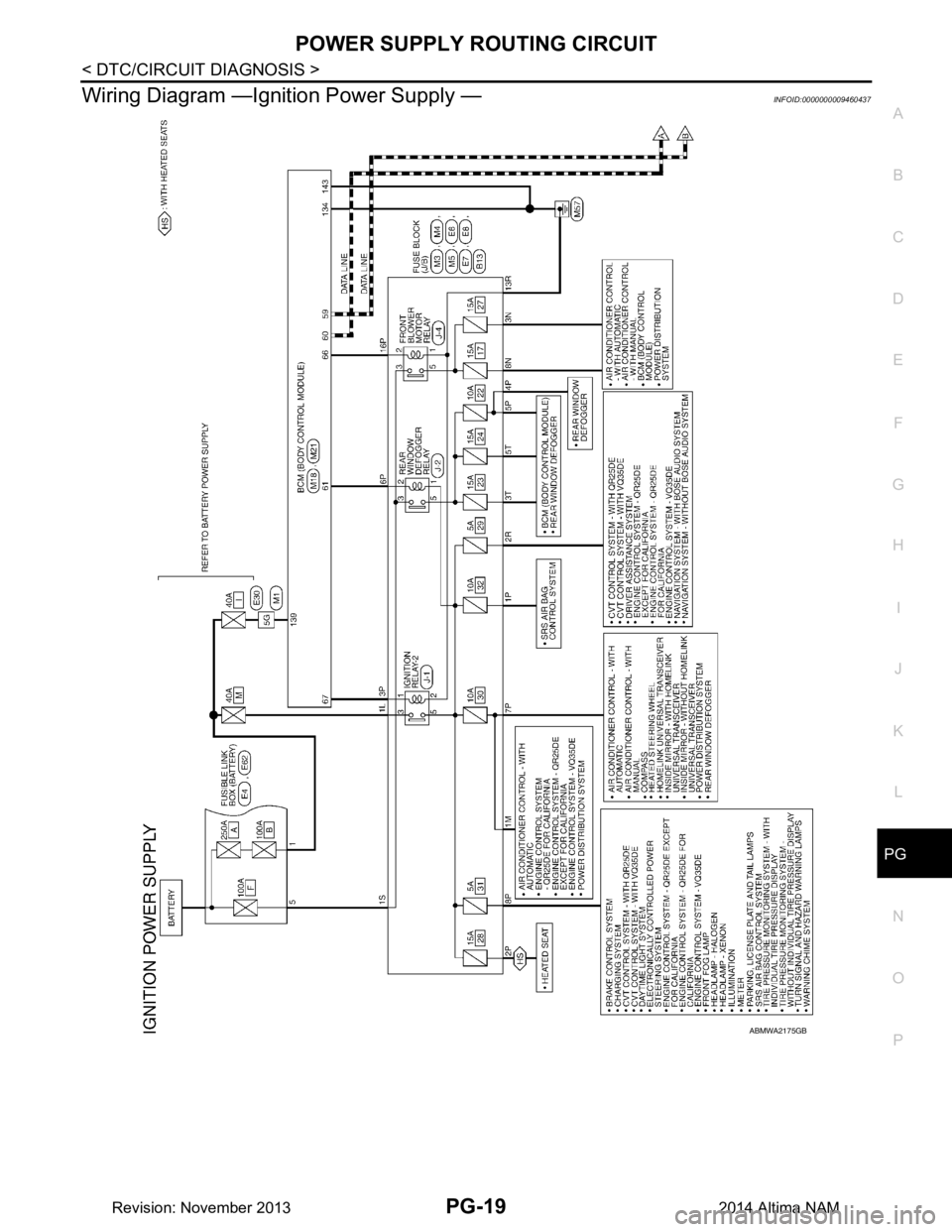
Wiring Diagram —Ignition Power Supply —INFOID:0000000009460437
ABMWA2175GB
Revision: November 20132014 Altima NAM