stop start NISSAN TEANA 2014 Service Manual
[x] Cancel search | Manufacturer: NISSAN, Model Year: 2014, Model line: TEANA, Model: NISSAN TEANA 2014Pages: 4801, PDF Size: 51.2 MB
Page 2840 of 4801
DIAGNOSIS SYSTEM (IPDM E/R)INL-19
< SYSTEM DESCRIPTION >
C
D E
F
G H
I
J
K
M A
B
INL
N
O P
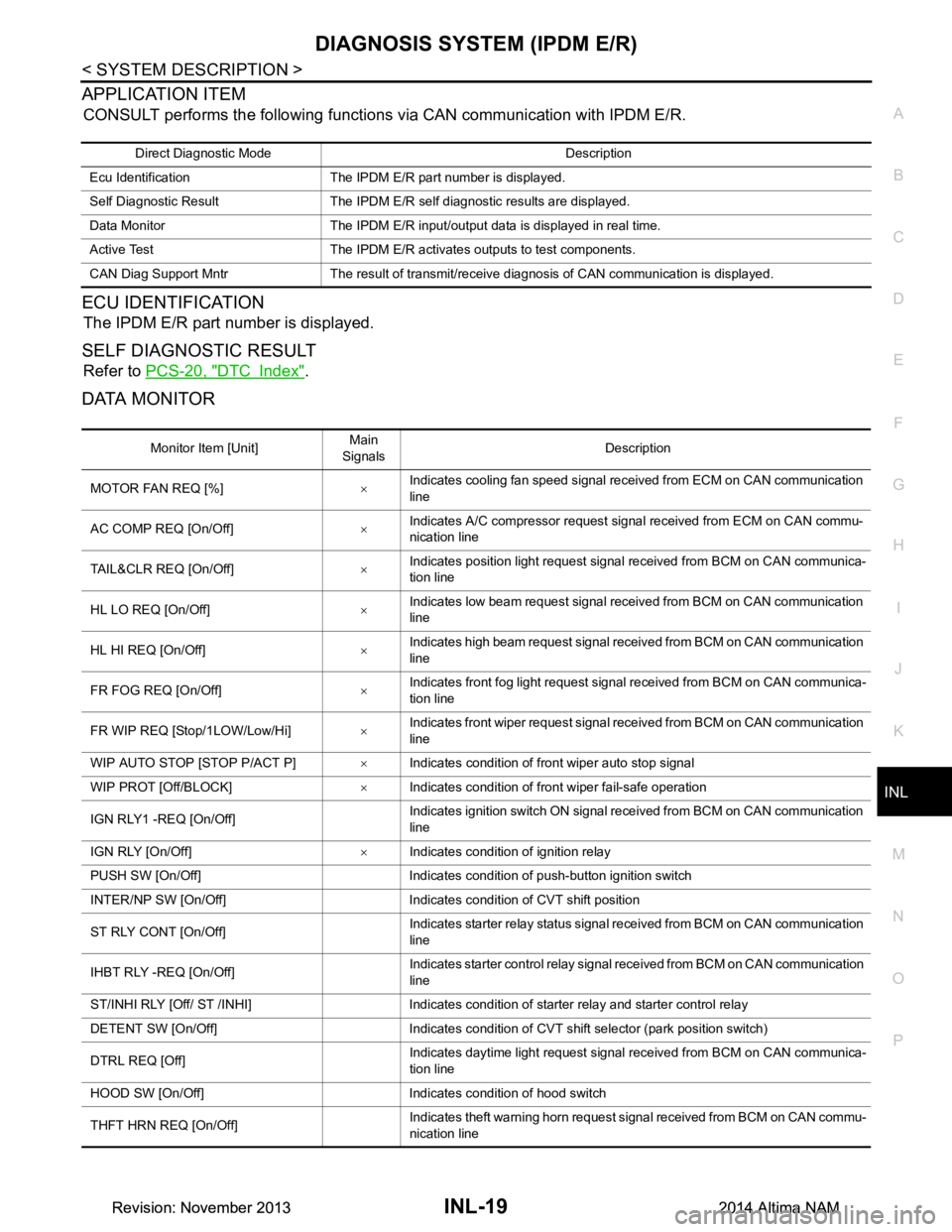
APPLICATION ITEM
CONSULT performs the following functions via CAN communication with IPDM E/R.
ECU IDENTIFICATION
The IPDM E/R part number is displayed.
SELF DIAGNOSTIC RESULT
Refer to PCS-20, "DTC Index".
DATA MONITOR
Direct Diagnostic Mode Description
Ecu Identification The IPDM E/R part number is displayed.
Self Diagnostic Result The IPDM E/R self diagnostic results are displayed.
Data Monitor The IPDM E/R input/output data is displayed in real time.
Active Test The IPDM E/R activates outputs to test components.
CAN Diag Support Mntr The result of transmit/receive diagnosis of CAN communication is displayed.
Monitor Item [Unit] Main
Signals Description
MOTOR FAN REQ [%] ×Indicates cooling fan speed signal received from ECM on CAN communication
line
AC COMP REQ [On/Off] ×Indicates A/C compressor request signal received from ECM on CAN commu-
nication line
TAIL&CLR REQ [On/Off] ×Indicates position light request signal
received from BCM on CAN communica-
tion line
HL LO REQ [On/Off] ×Indicates low beam request signal received from BCM on CAN communication
line
HL HI REQ [On/Off] ×Indicates high beam request signal received from BCM on CAN communication
line
FR FOG REQ [On/Off] ×Indicates front fog light request signal received from BCM on CAN communica-
tion line
FR WIP REQ [Stop/1LOW/Low/Hi] ×Indicates front wiper request signal received from BCM on CAN communication
line
WIP AUTO STOP [STOP P/ACT P] ×Indicates condition of front wiper auto stop signal
WIP PROT [Off/BLOCK] ×Indicates condition of front wiper fail-safe operation
IGN RLY1 -REQ [On/Off] Indicates ignition switch ON signal received from BCM on CAN communication
line
IGN RLY [On/Off] ×Indicates condition of ignition relay
PUSH SW [On/Off] Indicates condition of push-button ignition switch
INTER/NP SW [On/Off] Indicates condition of CVT shift position
ST RLY CONT [On/Off] Indicates starter relay status signal received from BCM on CAN communication
line
IHBT RLY -REQ [On/Off] Indicates starter control relay signal received from BCM on CAN communication
line
ST/INHI RLY [Off/ ST /INHI] Indicates condition of starter relay and starter control relay
DETENT SW [On/Off] Indicates condition of CVT shift selector (park position switch)
DTRL REQ [Off] Indicates daytime light request signal received from BCM on CAN communica-
tion line
HOOD SW [On/Off] Indicates condition of hood switch
THFT HRN REQ [On/Off] Indicates theft warning horn request signal received from BCM on CAN commu-
nication line
Revision: November 20132014 Altima NAMRevision: November 20132014 Altima NAM
Page 2902 of 4801

SQUEAK AND RATTLE TROUBLE DIAGNOSESINT-11
< SYMPTOM DIAGNOSIS >
C
D E
F
G H
I
K L
M A
B
INT
N
O P
INSTRUMENT PANEL
Most incidents are caused by contact and movement between:
1. Cluster lid A and the instrument panel
2. Acrylic lens and combination meter housing
3. Instrument panel to front pillar finisher
4. Instrument panel to windshield
5. Instrument panel pins
6. Wiring harnesses behind the combination meter
7. A/C defroster duct and duct joint
These incidents can usually be located by tapping or moving the components to duplicate the noise or by
pressing on the components while driving to stop the noi se. Most of these incidents can be repaired by apply-
ing felt cloth tape or silicone spray (in hard to reach areas). Urethane pads can be used to insulate wiring har-
ness.
CAUTION:
Do not use silicone spray to isolate a squeak or ra ttle. If you saturate the area with silicone, you will
not be able to recheck the repair.
CENTER CONSOLE
Components to pay attention to include:
1. Shift selector assembly cover to finisher
2. A/C control unit and cluster lid C
3. Wiring harnesses behind audio and A/C control unit
The instrument panel repair and isolation pr ocedures also apply to the center console.
DOORS
Pay attention to the:
1. Finisher and inner panel making a slapping noise
2. Inside handle escutcheon to door finisher
3. Wiring harnesses tapping
4. Door striker out of alignment causing a popping noise on starts and stops
Tapping or moving the components or pressing on them wh ile driving to duplicate the conditions can isolate
many of these incidents. You can usually insulate the ar eas with felt cloth tape or insulator foam blocks from
the NISSAN Squeak and Rattle Kit (J-50397) to repair the noise.
TRUNK
Trunk noises are often caused by a loose jack or loose items put into the trunk by the owner.
In addition look for:
1. Trunk lid bumpers out of adjustment
2. Trunk lid striker out of adjustment
3. The trunk lid torsion bars knocking together
4. A loose license plate or bracket
Most of these incidents can be repaired by adjusting, se curing or insulating the item(s) or component(s) caus-
ing the noise.
SUNROOF/HEADLINING
Noises in the sunroof/headlining area can often be traced to one of the following:
1. Sunroof lid, rail, linkage or seals making a rattle or light knocking noise
2. Sun visor shaft shaking in the holder
3. Front or rear windshield touching headlining and squeaking
Again, pressing on the components to stop the noise while duplicating the conditions can isolate most of these
incidents. Repairs usually consist of insulating with felt cloth tape.
OVERHEAD CONSOLE (FRONT AND REAR)
Overhead console noises are often caused by the cons ole panel clips not being engaged correctly. Most of
these incidents are repaired by pushing up on the c onsole at the clip locations until the clips engage.
In addition look for:
Revision: November 20132014 Altima NAM
Page 2936 of 4801

IP-10
< SYMPTOM DIAGNOSIS >
SQUEAK AND RATTLE TROUBLE DIAGNOSES
INSTRUMENT PANEL
Most incidents are caused by contact and movement between:
1. Cluster lid A and the instrument panel
2. Acrylic lens and combination meter housing
3. Instrument panel to front pillar finisher
4. Instrument panel to windshield
5. Instrument panel pins
6. Wiring harnesses behind the combination meter
7. A/C defroster duct and duct joint
These incidents can usually be located by tapping or moving the components to duplicate the noise or by
pressing on the components while driving to stop the noise. Most of these incidents can be repaired by apply-
ing felt cloth tape or silicone spray (in hard to reach areas). Urethane pads can be used to insulate wiring har-
ness.
CAUTION:
Do not use silicone spray to isolate a squeak or ra ttle. If you saturate the area with silicone, you will
not be able to recheck the repair.
CENTER CONSOLE
Components to pay attention to include:
1. Shift selector assembly cover to finisher
2. A/C control unit and cluster lid C
3. Wiring harnesses behind audio and A/C control unit
The instrument panel repair and isolation pr ocedures also apply to the center console.
DOORS
Pay attention to the:
1. Finisher and inner panel making a slapping noise
2. Inside handle escutcheon to door finisher
3. Wiring harnesses tapping
4. Door striker out of alignment causing a popping noise on starts and stops
Tapping or moving the components or pressing on them wh ile driving to duplicate the conditions can isolate
many of these incidents. You can usually insulate the areas with felt cloth tape or insulator foam blocks from
the NISSAN Squeak and Rattle Kit (J-50397) to repair the noise.
TRUNK
Trunk noises are often caused by a loose jack or loose items put into the trunk by the owner.
In addition look for:
1. Trunk lid bumpers out of adjustment
2. Trunk lid striker out of adjustment
3. The trunk lid torsion bars knocking together
4. A loose license plate or bracket
Most of these incidents can be repaired by adjusting, se curing or insulating the item(s) or component(s) caus-
ing the noise.
SUNROOF/HEADLINING
Noises in the sunroof/headlining area c an often be traced to one of the following:
1. Sunroof lid, rail, linkage or seals making a rattle or light knocking noise
2. Sun visor shaft shaking in the holder
3. Front or rear windshield touching headlining and squeaking
Again, pressing on the components to stop the noise while duplicating the conditions can isolate most of these
incidents. Repairs usually consist of insulating with felt cloth tape.
OVERHEAD CONSOLE (FRONT AND REAR)
Overhead console noises are often caused by the c onsole panel clips not being engaged correctly. Most of
these incidents are repaired by pushing up on the c onsole at the clip locations until the clips engage.
In addition look for:
Revision: November 20132014 Altima NAM
Page 2982 of 4801
![NISSAN TEANA 2014 Service Manual
LAN
SYSTEMLAN-33
< SYSTEM DESCRIPTION > [CAN]
C
D E
F
G H
I
J
K L
B
A
O P
N
Engine status signal T R R R R
Fuel consumption monitor signal T R R
Fuel filler cap warning display signal T R
Malfunc](/img/5/57390/w960_57390-2981.png "NISSAN TEANA 2014 Service Manual
LAN
SYSTEMLAN-33
< SYSTEM DESCRIPTION > [CAN]
C
D E
F
G H
I
J
K L
B
A
O P
N
Engine status signal T R R R R
Fuel consumption monitor signal T R R
Fuel filler cap warning display signal T R
Malfunc")
LAN
SYSTEMLAN-33
< SYSTEM DESCRIPTION > [CAN]
C
D E
F
G H
I
J
K L
B
A
O P
N
Engine status signal T R R R R
Fuel consumption monitor signal T R R
Fuel filler cap warning display signal T R
Malfunctioning indicator lamp signal TR
RT
Oil pressure warning lamp signal T R
Power generation command value
signal TR
Target throttle position signal T R
Wide open throttle position signal T R
EPS operation signal R T
Hydraulic pump electric power steer-
ing warning lamp signal TR
Detention switch signal T R R
Front wiper stop position signal T R
High beam status signal R T
Hood switch signal T R
Interlock/PNP switch signal RT
TR R
Low beam status signal R T
Oil pressure switch signal RT
TR R
Push-button ignition switch status
signal TR
Rear window defogger control signal R T
Sleep ready signal T R
Starter relay status signal T R
Steering lock unit status signal T R
Steering lock relay signal RT
TR
Current gear position signal T R R
CVT position indicator signal T R R
Input shaft revolution signal R T R R
Manual mode indicator signal T R R
N range signal T R
Output shaft revolution signal R T R R
O/D OFF indicator signal
*1TR R
P range signal T R R
Shift position signal T R R
Brake fluid level signal T R
Distance to empty signal T R
Fuel filler cap warning reset signal R T
Fuel level low warning signal T R
Fuel level sensor signal R T Signal name
ECM
EPS
IPDM-E TCM
M&A
STRG AV
AV M
HVAC ABS
BCM
Revision: November 20132014 Altima NAMRevision: November 20132014 Altima NAM
Page 3159 of 4801
![NISSAN TEANA 2014 Service Manual
ENGINE OILLU-9
< PERIODIC MAINTENANCE > [QR25DE]
C
D E
F
G H
I
J
K L
M A
LU
NP
O
PERIODIC MAINTENANCE
ENGINE OIL
InspectionINFOID:0000000009461028
OIL LEVEL
• Before starting the engine, check the](/img/5/57390/w960_57390-3158.png "NISSAN TEANA 2014 Service Manual
ENGINE OILLU-9
< PERIODIC MAINTENANCE > [QR25DE]
C
D E
F
G H
I
J
K L
M A
LU
NP
O
PERIODIC MAINTENANCE
ENGINE OIL
InspectionINFOID:0000000009461028
OIL LEVEL
• Before starting the engine, check the")
ENGINE OILLU-9
< PERIODIC MAINTENANCE > [QR25DE]
C
D E
F
G H
I
J
K L
M A
LU
NP
O
PERIODIC MAINTENANCE
ENGINE OIL
InspectionINFOID:0000000009461028
OIL LEVEL
• Before starting the engine, check the oil level. If t
he engine is already started, stop it and allow 10 minutes
before checking.
• Check that the oil level is within the range (A) on the oil level
gauge.
• If it is out of range, add oil as necessary.
ENGINE OIL APPEARANCE
• Check engine oil for white milky appearance or excessive contamination.
• If engine oil becomes milky, it is highly probable t hat it is contaminated with engine coolant. Repair or
replace damaged parts.
OIL LEAKAGE
Check for oil leakage around the following areas:
•Oil pan
• Oil pan drain plug
• Oil pressure switch
• Oil filter
• Oil cooler
• Valve timing control cover and valve timing control solenoid valve
• Front cover
• Mating surface between cylinder block and cylinder head
• Mating surface between cylinder head and rocker cover
• Crankshaft oil seal (front and rear)
OIL PRESSURE CHECK
WARNING:
• Be careful not to burn yoursel f, as engine oil may be hot.
• Put the CVT shift selector in the Park "P" position.
1. Check engine oil level. Refer to OIL LEVEL.
2. Remove fender protector side cover (RH). Refer to EXT-26, "FENDER PROTECTOR : Exploded View"
.
3. Disconnect oil pressure switch harness connector at oil pressure switch. Remove oil pressure switch and install Tools.
CAUTION:
Do not drop or shock oil pressure switch.
4. Start engine and warm it up to normal operating temperature.
5. Check oil pressure with engine running under no-load, using Tool. NOTE:
JPBIA1497ZZ
Tool numbers : ST25051001 (J-25695-1)
: ST25052000 (J-25695-2)
WBIA0571E
Revision: November 20132014 Altima NAM
Page 3165 of 4801
![NISSAN TEANA 2014 Service Manual
OIL PUMPLU-15
< REMOVAL AND INSTALLATION > [QR25DE]
C
D E
F
G H
I
J
K L
M A
LU
NP
O
- Measure the inner diameter of inner rotor (1) with inside microme-
ter (A).
- (Clearance) = (Inner rotor inner](/img/5/57390/w960_57390-3164.png "NISSAN TEANA 2014 Service Manual
OIL PUMPLU-15
< REMOVAL AND INSTALLATION > [QR25DE]
C
D E
F
G H
I
J
K L
M A
LU
NP
O
- Measure the inner diameter of inner rotor (1) with inside microme-
ter (A).
- (Clearance) = (Inner rotor inner")
OIL PUMPLU-15
< REMOVAL AND INSTALLATION > [QR25DE]
C
D E
F
G H
I
J
K L
M A
LU
NP
O
- Measure the inner diameter of inner rotor (1) with inside microme-
ter (A).
- (Clearance) = (Inner rotor inner diameter) – (Oil pump inner rotor outer diameter)
• If measured/calculated values are out of the st andard, replace front cover and oil pump assembly.
REGULATOR VALVE TO OIL PUMP COVER CLEARANCE- (Clearance) = (Regulator valve hole (1) diameter) – (Regulator
valve (2) outer diameter)
• If the calculated value is out of the standard, replace front cover and oil pump assembly.
CAUTION:
• Coat regulator valve with engine oil.
• Make sure that it falls smoothly into valve hole by its own weight.
INSPECTION AFTER INSTALLATION
1. Check the engine oil level. Refer to LU-9, "Inspection".
2. Start the engine, and check that there is no leakage of engine oil.
3. Stop the engine and wait for 10 minutes.
4. Check the engine oil level and adjust the level. Refer to LU-9, "Inspection"
.
ALBIA0818ZZ
Standard : Refer to LU-18, "Oil Pump".
Standard : Refer to LU-18, "Oil Pump"
.
ALBIA0819ZZ
Revision: November 20132014 Altima NAM
Page 3167 of 4801
![NISSAN TEANA 2014 Service Manual
OIL COOLERLU-17
< REMOVAL AND INSTALLATION > [QR25DE]
C
D E
F
G H
I
J
K L
M A
LU
NP
O
• Tighten oil cooler bolts to
specification in numerical order.
• Do not reuse O-ring.
InspectionINFOID:000](/img/5/57390/w960_57390-3166.png "NISSAN TEANA 2014 Service Manual
OIL COOLERLU-17
< REMOVAL AND INSTALLATION > [QR25DE]
C
D E
F
G H
I
J
K L
M A
LU
NP
O
• Tighten oil cooler bolts to
specification in numerical order.
• Do not reuse O-ring.
InspectionINFOID:000")
OIL COOLERLU-17
< REMOVAL AND INSTALLATION > [QR25DE]
C
D E
F
G H
I
J
K L
M A
LU
NP
O
• Tighten oil cooler bolts to
specification in numerical order.
• Do not reuse O-ring.
InspectionINFOID:0000000009461037
INSPECTION AFTER REMOVAL
Oil Cooler
Check oil cooler for cracks. Check oil cooler for cloggi ng by blowing through engine coolant inlet. If necessary,
replace oil cooler.
INSPECTION AFTER INSTALLATION
1. Check the engine oil level and the engine coolant level and add engine oil and engine coolant. Refer to LU-9, "Inspection"
and CO-11, "System Inspection".
2. Start the engine, and check that there is no leakage of engine oil or engine coolant.
3. Stop the engine and wait for 10 minutes.
4. Check the engine oil level and the engine coolant level again. Refer to LU-9, "Inspection"
and CO-11,
"System Inspection".
Revision: November 20132014 Altima NAM
Page 3175 of 4801
![NISSAN TEANA 2014 Service Manual
ENGINE OILLU-25
< PERIODIC MAINTENANCE > [VQ35DE]
C
D E
F
G H
I
J
K L
M A
LU
NP
O
PERIODIC MAINTENANCE
ENGINE OIL
InspectionINFOID:0000000009461048
OIL LEVEL
NOTE:
• Before starting the engine, c](/img/5/57390/w960_57390-3174.png "NISSAN TEANA 2014 Service Manual
ENGINE OILLU-25
< PERIODIC MAINTENANCE > [VQ35DE]
C
D E
F
G H
I
J
K L
M A
LU
NP
O
PERIODIC MAINTENANCE
ENGINE OIL
InspectionINFOID:0000000009461048
OIL LEVEL
NOTE:
• Before starting the engine, c")
ENGINE OILLU-25
< PERIODIC MAINTENANCE > [VQ35DE]
C
D E
F
G H
I
J
K L
M A
LU
NP
O
PERIODIC MAINTENANCE
ENGINE OIL
InspectionINFOID:0000000009461048
OIL LEVEL
NOTE:
• Before starting the engine, check the oil level. If the engine is already started, stop it and a llow 10 minutes before checking.
• Check that the oil level is within the range as indicated on the oil level gauge.
• If it is out of range, add oil as necessary.
ENGINE OIL APPEARANCE
• Check engine oil for white milky appearance or excessive contamination.
• If engine oil becomes milky, it is highly probable t hat it is contaminated with engine coolant. Repair or
replace damaged parts.
OIL LEAKAGE
Check for oil leakage around the following areas:
•Oil pan
• Oil pan drain plug
• Oil pressure switch
• Oil filter
• Oil cooler
• Intake valve timing control cover and intake valve timing control solenoid valve
• Front cover
• Mating surface between cylinder block and cylinder head
• Mating surface between cylinder head and rocker cover
• Crankshaft oil seal (front and rear)
OIL PRESSURE CHECK
WARNING:
• Be careful not to burn yoursel f, as engine oil may be hot.
• Put the CVT shift selector in the Park “P” position.
1. Check the oil level.
2. Remove fender protector side cover (RH). Refer to EXT-26, "FENDER PROTECTOR : Exploded View"
.
3. Disconnect oil pressure switch harness connector at the oil pressure switch. Remove oil pressure switch and install Tools.
CAUTION:
Do not drop or shock oil pressure switch.
4. Start the engine and warm it up to normal operating temperature.
5. Check oil pressure with engine running under no-load, using Tool. NOTE:
• When engine oil temperature is low, engine oil pressure becomes high.
JMA122D
Tool numbers : ST25051001 (J-25695-1)
: ST25052000 (J-25695-2)
WBIA0571E
Revision: November 20132014 Altima NAM
Page 3183 of 4801
![NISSAN TEANA 2014 Service Manual
OIL COOLERLU-33
< REMOVAL AND INSTALLATION > [VQ35DE]
C
D E
F
G H
I
J
K L
M A
LU
NP
O
When removing components such as hoses, tubes/lines, etc.
, cap or plug openings to prevent fluid from spill-
in](/img/5/57390/w960_57390-3182.png "NISSAN TEANA 2014 Service Manual
OIL COOLERLU-33
< REMOVAL AND INSTALLATION > [VQ35DE]
C
D E
F
G H
I
J
K L
M A
LU
NP
O
When removing components such as hoses, tubes/lines, etc.
, cap or plug openings to prevent fluid from spill-
in")
OIL COOLERLU-33
< REMOVAL AND INSTALLATION > [VQ35DE]
C
D E
F
G H
I
J
K L
M A
LU
NP
O
When removing components such as hoses, tubes/lines, etc.
, cap or plug openings to prevent fluid from spill-
ing.
REMOVAL
1. Remove the engine under cover. Refer to EXT-17, "Removal and Installation".
2. Remove the RH wheel and tire. Refer to WT-53, "Inspection"
.
3. Remove the front fender protector side cover RH. Refer to EXT-26, "FENDER PROTECTOR : Exploded
View".
4. Drain engine coolant. Refer to CO-36, "Changing Engine Coolant"
.
CAUTION:
Do not spill coolant on the drive belt.
5. Disconnect water hoses from oil cooler.
6. Remove the oil filter. Refer to LU-27, "Removal and Installation"
.
7. Remove oil cooler.
8. Remove core support cover. Refer to DLK-179, "Removal and Installation"
.
9. Remove front air duct. Refer to EM-84, "Removal and Installation"
.
10. Remove reservoir tank. Refer to CO-40, "Exploded View"
.
INSPECTION AFTER REMOVAL
1. Check oil cooler for cracks.
2. Check oil cooler for clogging by blowing through coolant inlet. If necessary, replace oil cooler.
Oil Pressure Relief Valve
Inspect oil pressure relief valve for movement, cracks and breaks by pushing the ball. If replacement is neces-
sary, remove valve by prying it out with a suitable tool. Install a new valve in place by tapping it.
INSTALLATION
Installation is in the reverse order of removal.
CAUTION:
• Do not reuse O-ring.
• Do not reuse copper gasket.
• When installing the oil cooler, align the oil cooler slot with the stopper of the oil pan.
INSPECTION AFTER INSTALLATION
1. Check the engine oil level and the engine coolant level and add engine oil and engine coolant. Refer to LU-9, "Inspection"
and CO-11, "System Inspection".
2. Start the engine, and check that there is no leakage of engine oil or engine coolant.
3. Stop the engine and wait for 10 minutes.
4. Check the engine oil level and the engine coolant level again. Refer to LU-9, "Inspection"
and CO-11,
"System Inspection".
Revision: November 20132014 Altima NAM
Page 3201 of 4801
ENGINE MAINTENANCE (QR25DE)MA-17
< PERIODIC MAINTENANCE >
C
D E
F
G H
I
J
K L
M B
MA
N
O A
AIR CLEANER FILTER : Removal and InstallationINFOID:0000000009464547
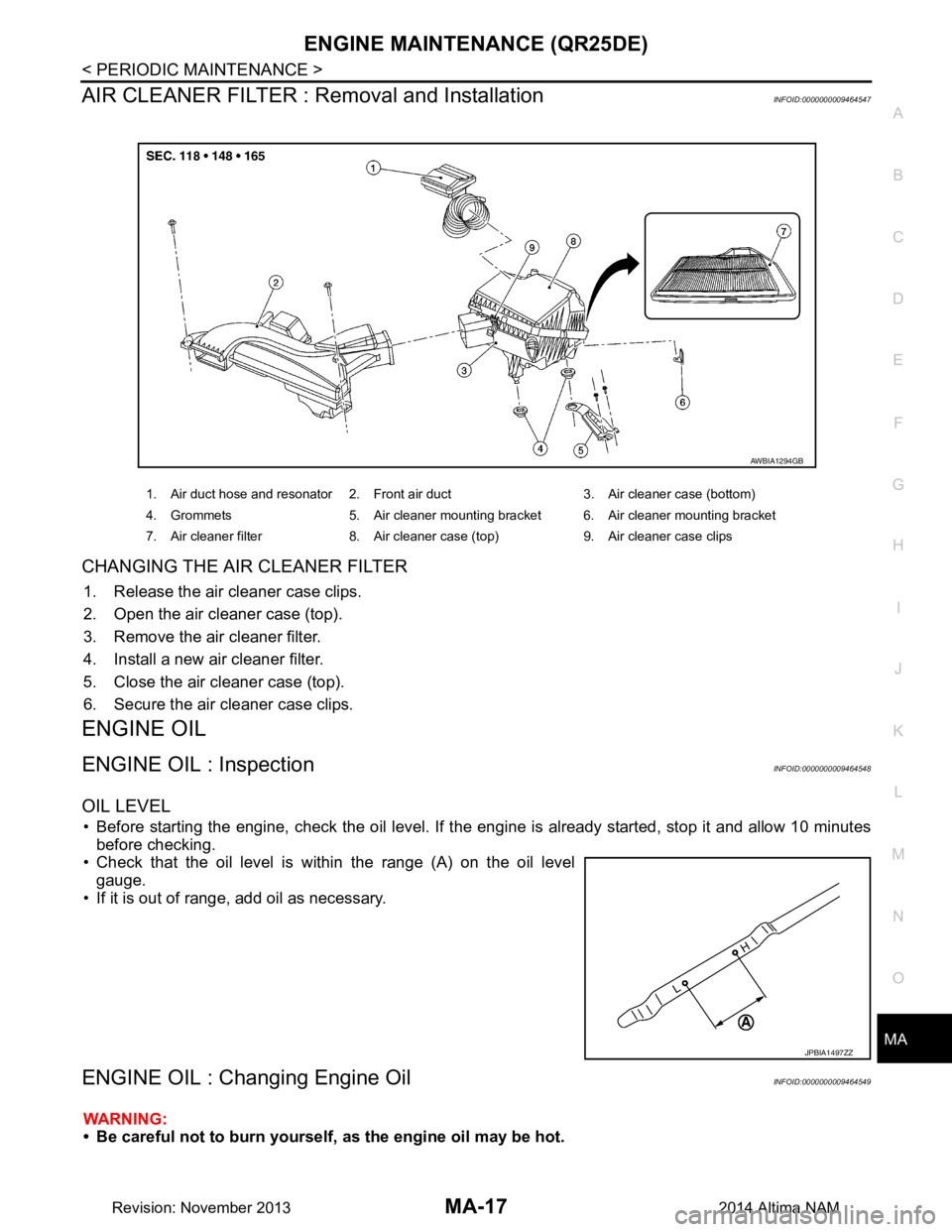
CHANGING THE AIR CLEANER FILTER
1. Release the air cleaner case clips.
2. Open the air cleaner case (top).
3. Remove the air cleaner filter.
4. Install a new air cleaner filter.
5. Close the air cleaner case (top).
6. Secure the air cleaner case clips.
ENGINE OIL
ENGINE OIL : InspectionINFOID:0000000009464548
OIL LEVEL
• Before starting the engine, check the oil level. If t he engine is already started, stop it and allow 10 minutes
before checking.
• Check that the oil level is within the range (A) on the oil level gauge.
• If it is out of range, add oil as necessary.
ENGINE OIL : Changing Engine OilINFOID:0000000009464549
WARNING:
• Be careful not to burn yourself, as the engine oil may be hot.
1. Air duct hose and resonator 2. Front air duct 3. Air cleaner case (bottom)
4. Grommets 5. Air cleaner mounting bracket 6. Air cleaner mounting bracket
7. Air cleaner filter 8. Air cleaner case (top) 9. Air cleaner case clips
AWBIA1294GB
JPBIA1497ZZ
Revision: November 20132014 Altima NAM