fuel NISSAN TEANA 2014 User Guide
[x] Cancel search | Manufacturer: NISSAN, Model Year: 2014, Model line: TEANA, Model: NISSAN TEANA 2014Pages: 4801, PDF Size: 51.2 MB
Page 280 of 4801
BRM-2
< VEHICLE INFORMATION >
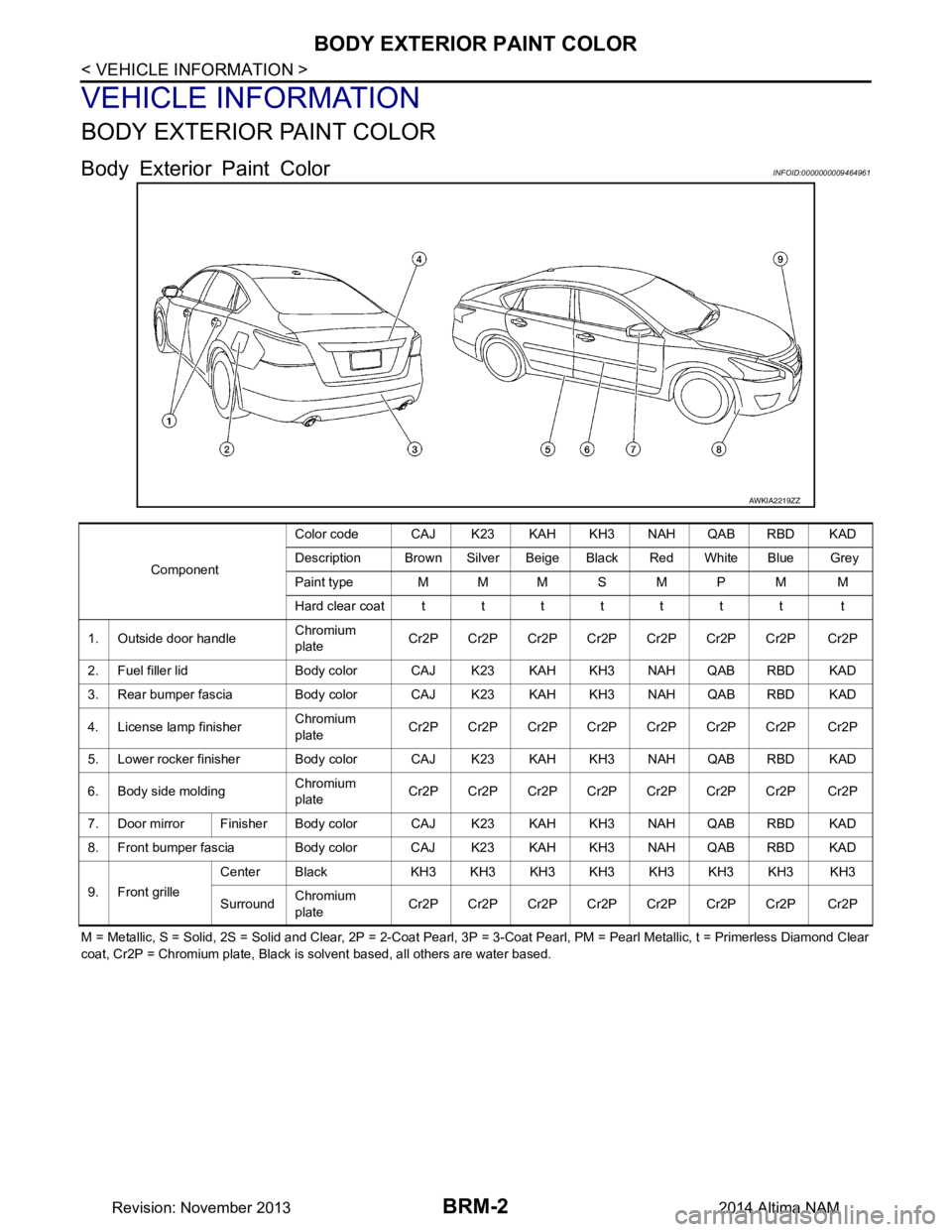
BODY EXTERIOR PAINT COLOR
VEHICLE INFORMATION
BODY EXTERIOR PAINT COLOR
Body Exterior Paint ColorINFOID:0000000009464961
M = Metallic, S = Solid, 2S = Solid and Clear, 2P = 2-Coat Pearl, 3P = 3-Coat Pearl, PM = Pearl Metallic, t = Primerless Diamond Clear
coat, Cr2P = Chromium plate, Black is solvent based, all others are water based.
AWKIA2219ZZ
Component Color code CAJ K23 KAH KH3 NAH QAB RBD KAD
Description Brown Silver Beige Black Red White Blue Grey
Paint type MMMSMPM M
Hard clear coatttttttt t
1. Outside door handle Chromium
plate Cr2P Cr2P Cr2P Cr2P Cr2P Cr2P Cr2P Cr2P
2. Fuel filler lid Body color CAJ K23 KAH KH3 NAH QAB RBD KAD
3. Rear bumper fascia Body color CAJ K23 KAH KH3 NAH QAB RBD KAD
4. License lamp finisher Chromium
plate Cr2P Cr2P Cr2P Cr2P Cr2P Cr2P Cr2P Cr2P
5. Lower rocker finisher Body color CAJ K23 KAH KH3 NAH QAB RBD KAD
6. Body side molding Chromium
plate Cr2P Cr2P Cr2P Cr2P Cr2P Cr2P Cr2P Cr2P
7. Door mirror Finisher Body co lor CAJ K23 KAH KH3 NAH QAB RBD KAD
8. Front bumper fascia Body color CAJ K23 KAH KH3 NAH QAB RBD KAD
9. Front grille Center Black KH3 KH3 KH3 KH3 KH3 KH3 KH3 KH3
Surround Chromium
plate Cr2P Cr2P Cr2P Cr2P Cr2P Cr2P Cr2P Cr2P
Revision: November 20132014 Altima NAM
Page 355 of 4801

CHG-10
< SYSTEM DESCRIPTION >
POWER GENERATION VOLTAGE VARIABLE CONTROL SYSTEM
POWER GENERATION VOLTAGE VARIABLE CONTROL SYSTEM
System DiagramINFOID:0000000009460653
System DescriptionINFOID:0000000009460654
Power generation variable voltage control system has been adopted. By varying the voltage to the generator,
engine load due to power generation of the generator is reduced and fuel consumption is decreased.
NOTE:
When any malfunction is detected in the power generat ion variable voltage control system, power generation
is performed according to the characteristic of the IC regulator in the generator.
Component DescriptionINFOID:0000000009460655
ALMIA0566GB
Component part Description
Generator (IC regulator) The IC regulator controls the power generation voltage by the tar-
get power generation voltage based on the received PWM com-
mand signal.
When there is no PWM command signal, the generator performs
the normal power generation according to the characteristic of the
IC regulator.
ECM The battery current sensor detects the charging/discharging cur-
rent of the battery. The ECM judges the battery condition based on
this signal.
The ECM judges whether to request more output via the power
generation voltage variable control according to the battery condi-
tion.
When performing the power generation voltage variable control,
the ECM calculates the target power generation voltage according
to the battery condition and sends the calculated value as the pow-
er generation command value to the IPDM E/R.
IPDM E/R The IPDM E/R converts the received power generation command
value into a pulse width modulated (PWM) command signal and
sends it to the IC regulator.
Revision: November 20132014 Altima NAMRevision: November 20132014 Altima NAM
Page 428 of 4801
![NISSAN TEANA 2014 User Guide
CO-48
< REMOVAL AND INSTALLATION >[VQ35DE]
WATER PUMP
• Use procedure below to check for fuel leakage.
• Turn ignition switch ON (with engine stopped). With fuel pressure applied to fuel piping,](/img/5/57390/w960_57390-427.png "NISSAN TEANA 2014 User Guide
CO-48
< REMOVAL AND INSTALLATION >[VQ35DE]
WATER PUMP
• Use procedure below to check for fuel leakage.
• Turn ignition switch ON (with engine stopped). With fuel pressure applied to fuel piping,")
CO-48
< REMOVAL AND INSTALLATION >[VQ35DE]
WATER PUMP
• Use procedure below to check for fuel leakage.
• Turn ignition switch ON (with engine stopped). With fuel pressure applied to fuel piping, check for fuel leak- age at connection points.
• Start engine. With engine speed increased, che ck again for fuel leakage at connection points.
• Run engine to check for unusual noise and vibration. NOTE:
If hydraulic pressure inside timing chain tensioner drops after removal and installation, slack in the guide
may generate a pounding noise during and just after engine start. However, this is normal. Noise will stop
after hydraulic pressure rises.
• Warm up engine thoroughly to make sure there is no leakage of fuel, exhaust gas, or any oils/fluids including engine oil and engine coolant.
• Bleed air from passages in lines and hoses, such as in cooling system.
• After cooling down engine, again check oil/fluid levels including engine oil and engine coolant. Refill to spec-
ified level, if necessary.
• Summary of the inspection items:
*Power steering fluid, brake fluid, etc. Item Before starting engine Engine running After engine stopped
Engine coolant Level Leakage Level
Engine oil Level Leakage Level
Transmission/
transaxle fluid CVT Models Leakage Level/Leakage Leakage
Other oils and fluids* Level Leakage Level
Fuel Leakage Leakage Leakage
Exhaust gas — Leakage —
Revision: November 20132014 Altima NAM
Page 471 of 4801
![NISSAN TEANA 2014 User Guide
DAS-38
< BASIC INSPECTION >[ITS CONTROL UNIT]
REAR VIEW CAMERA CALIBRATION
REAR VIEW CAMERA CALIBRATION
DescriptionINFOID:0000000009464665
Always perform the calibration after removing and installing](/img/5/57390/w960_57390-470.png "NISSAN TEANA 2014 User Guide
DAS-38
< BASIC INSPECTION >[ITS CONTROL UNIT]
REAR VIEW CAMERA CALIBRATION
REAR VIEW CAMERA CALIBRATION
DescriptionINFOID:0000000009464665
Always perform the calibration after removing and installing")
DAS-38
< BASIC INSPECTION >[ITS CONTROL UNIT]
REAR VIEW CAMERA CALIBRATION
REAR VIEW CAMERA CALIBRATION
DescriptionINFOID:0000000009464665
Always perform the calibration after removing and installing or replacing the rear view camera.
CAUTION:
• Place the vehicle on level ground wh en the calibration is performed.
• Follow the CONSULT when performing the calib ration. (Rear view camera calibration cannot be
operated without CONSULT).
Work Procedure (Preparation)INFOID:0000000009464666
1.PERFORM SELF-DIAGNOSIS
Perform self-diagnosis of the ITS control unit.
Is any DTC detected?
Except "U1308">> Perform diagnosis on the detected DTC and repair or replace the applicable item. Refer to
DAS-20, "DTC Index"
.
"U1308" or no DTC>> GO TO 2.
2.PREPARATION BEFORE REAR VIEW CAMERA CALIBRATION
NOTE:
Select the "AVM" to diagnose the ITS control unit by CONSULT.
1. Perform pre-inspection for diagnosis. Refer to DAS-34, "Inspection Procedure"
.
2. Adjust the tire pressure to the specified pressure value.
3. Maintain no-load in vehicle.
4. Check if coolant and engine oil are filled up to correct level and fuel tank is full.
5. Situate vehicle where the camera is ex posed at an atmosphere temperature between 0 °C (32 °F) and
30 °C (86 °F)
6. Move the shift selector to P (Park) and release the parking brake.
7. Clean the rear view camera.
>> GO TO 3.
3.PREPARATION OF CALIBRATION TARGET MARK
Prepare the calibration target mark according to the following figure:
ALOIA0186ZZ
(1) : Left and right targets
(2) : Center target
(A) : Side of the black or white area = 200 mm (7.87 in)
(B) : Side of the square target = 400 mm (15.75 in)
Revision: November 20132014 Altima NAMRevision: November 20132014 Altima NAM
Page 473 of 4801
![NISSAN TEANA 2014 User Guide
DAS-40
< BASIC INSPECTION >[ITS CONTROL UNIT]
REAR VIEW CAMERA CALIBRATION
CAUTION:
Make sure that the black/white pattern of the center target is rotated as compared with the left and
right target](/img/5/57390/w960_57390-472.png "NISSAN TEANA 2014 User Guide
DAS-40
< BASIC INSPECTION >[ITS CONTROL UNIT]
REAR VIEW CAMERA CALIBRATION
CAUTION:
Make sure that the black/white pattern of the center target is rotated as compared with the left and
right target")
DAS-40
< BASIC INSPECTION >[ITS CONTROL UNIT]
REAR VIEW CAMERA CALIBRATION
CAUTION:
Make sure that the black/white pattern of the center target is rotated as compared with the left and
right targets.
>> Go to DAS-40, "Work Procedure (Rear View Camera Calibration)"
.
Work Procedure (Rear View Camera Calibration)INFOID:0000000009464668
CAUTION:
Perform the calibration under the sp ecified vehicle condition (fuel full, no-load, specified tire pressure,
etc.). Refer to DAS-38, "Work Procedure (Preparation)"
.
1.CHECK REAR VIEW CAMERA HEIGHT
Measure the rear view camera height “H”.
>> GO TO 2.
2.REAR VIEW CAMERA CALIBRATION
1. Select “Work Support” on “AVM” with CONSULT.
2. Select “REAR CAMERA ITS”.
3. Select "OK". CAUTION:
• Perform the calibration after the ignition or engine has been kept on for at least 10 minutes to
stabilize camera.
• Operate CONSULT outside the vehicle, and close al l doors to retain appropriate vehicle altitude.
4. Input the rear view camera height "H", and then touch "APPLY".
5. Confirm that the same value is displayed on the center display.
6. Confirm the following items:
- The target should be accurately placed.
- The vehicle should be stopped.
- The vehicle should be under the specified vehicle condition.
7. Select “Start” to perform calibration.
8. Confirm the displayed item.
- “Completed”: Select “Completion”.
- Otherwise, perform the following services:
ALOIA0192GB
ALOIA0188ZZ
Revision: November 20132014 Altima NAMRevision: November 20132014 Altima NAM
Page 540 of 4801
![NISSAN TEANA 2014 User Guide
DAS
REAR VIEW CAMERA CALIBRATIONDAS-107
< BASIC INSPECTION > [LDW]
C
D E
F
G H
I
J
K L
M B
N P
A
REAR VIEW CAMERA CALIBRATION
DescriptionINFOID:0000000009464741
Always perform the calibration after](/img/5/57390/w960_57390-539.png "NISSAN TEANA 2014 User Guide
DAS
REAR VIEW CAMERA CALIBRATIONDAS-107
< BASIC INSPECTION > [LDW]
C
D E
F
G H
I
J
K L
M B
N P
A
REAR VIEW CAMERA CALIBRATION
DescriptionINFOID:0000000009464741
Always perform the calibration after")
DAS
REAR VIEW CAMERA CALIBRATIONDAS-107
< BASIC INSPECTION > [LDW]
C
D E
F
G H
I
J
K L
M B
N P
A
REAR VIEW CAMERA CALIBRATION
DescriptionINFOID:0000000009464741
Always perform the calibration after removing and installing or replacing the rear view camera.
CAUTION:
• Place the vehicle on level ground when the calibration is performed.
• Follow the CONSULT when performing the calib ration. (Rear view camera calibration cannot be
operated without CONSULT).
Work Procedure (Preparation)INFOID:0000000009464742
1.PERFORM SELF-DIAGNOSIS
Perform self-diagnosis of the ITS control unit.
Is any DTC detected?
Except "U1308">> Perform diagnosis on the detected DTC and repair or replace the applicable item. Refer to
DAS-89, "DTC Index"
.
"U1308" or no DTC>>GO TO 2.
2.PREPARATION BEFORE REAR VIEW CAMERA CALIBRATION
NOTE:
Select the "AVM" to diagnose the ITS control unit by CONSULT.
1. Perform pre-inspection for diagnosis. Refer to DAS-103, "Inspection Procedure"
.
2. Adjust the tire pressure to the specified pressure value.
3. Maintain no-load in vehicle.
4. Check if coolant and engine oil are filled up to correct level and fuel tank is full.
5. Situate vehicle where the camera is ex posed at an atmosphere temperature between 0 °C (32 °F) and
30 °C (86 °F)
6. Move the shift selector to P (Park) and release the parking brake.
7. Clean the rear view camera.
>> GO TO 3.
3.PREPARATION OF CALIBRATION TARGET MARK
Prepare the calibration target mark according to the following figure:
ALOIA0186ZZ
(1) : Left and right targets
(2) : Center target
(A) : Side of the black or white area = 200 mm (7.87 in)
(B) : Side of the square target = 400 mm (15.75 in)
Revision: November 20132014 Altima NAMRevision: November 20132014 Altima NAM
Page 542 of 4801
![NISSAN TEANA 2014 User Guide
DAS
REAR VIEW CAMERA CALIBRATIONDAS-109
< BASIC INSPECTION > [LDW]
C
D E
F
G H
I
J
K L
M B
N P
A
CAUTION:
Make sure that the black/white pattern of the center target is rotated as compared with t](/img/5/57390/w960_57390-541.png "NISSAN TEANA 2014 User Guide
DAS
REAR VIEW CAMERA CALIBRATIONDAS-109
< BASIC INSPECTION > [LDW]
C
D E
F
G H
I
J
K L
M B
N P
A
CAUTION:
Make sure that the black/white pattern of the center target is rotated as compared with t")
DAS
REAR VIEW CAMERA CALIBRATIONDAS-109
< BASIC INSPECTION > [LDW]
C
D E
F
G H
I
J
K L
M B
N P
A
CAUTION:
Make sure that the black/white pattern of the center target is rotated as compared with the left and
right targets.
>> Go to DAS-109, "Work Procedure (Rear View Camera Calibration)"
.
Work Procedure (Rear Vi ew Camera Calibration)INFOID:0000000009464744
CAUTION:
Perform the calibration under the sp ecified vehicle condition (fuel full, no-load, specified tire pressure,
etc.). Refer to DAS-107, "Work Procedure (Preparation)"
.
1.CHECK REAR VIEW CAMERA HEIGHT
Measure the rear view camera height “H”.
>> GO TO 2.
2.REAR VIEW CAMERA CALIBRATION
1. Select “Work Support” on “AVM” with CONSULT.
2. Select “REAR CAMERA ITS”.
3. Select "OK". CAUTION:
• Perform the calibration after the ignition or en gine has been kept on for at least 10 minutes to
stabilize camera.
• Operate CONSULT outside the vehicle, and close al l doors to retain appropriate vehicle altitude.
4. Input the rear view camera height "H", and then touch "APPLY".
5. Confirm that the same value is displayed on the center display.
6. Confirm the following items:
- The target should be accurately placed.
- The vehicle should be stopped.
- The vehicle should be under the specified vehicle condition.
7. Select “Start” to perform calibration.
8. Confirm the displayed item.
- “Completed”: Select “Completion”.
- Otherwise, perform the following services:
ALOIA0192GB
ALOIA0188ZZ
Revision: November 20132014 Altima NAMRevision: November 20132014 Altima NAM
Page 615 of 4801
![NISSAN TEANA 2014 User Guide
DAS-182
< BASIC INSPECTION >[BSW]
REAR VIEW CAMERA CALIBRATION
REAR VIEW CAMERA CALIBRATION
DescriptionINFOID:0000000009464825
Always perform the calibration after removing and installing or replacin](/img/5/57390/w960_57390-614.png "NISSAN TEANA 2014 User Guide
DAS-182
< BASIC INSPECTION >[BSW]
REAR VIEW CAMERA CALIBRATION
REAR VIEW CAMERA CALIBRATION
DescriptionINFOID:0000000009464825
Always perform the calibration after removing and installing or replacin")
DAS-182
< BASIC INSPECTION >[BSW]
REAR VIEW CAMERA CALIBRATION
REAR VIEW CAMERA CALIBRATION
DescriptionINFOID:0000000009464825
Always perform the calibration after removing and installing or replacing the rear view camera.
CAUTION:
• Place the vehicle on level ground wh en the calibration is performed.
• Follow the CONSULT when performing the calib ration. (Rear view camera calibration cannot be
operated without CONSULT).
Work Procedure (Preparation)INFOID:0000000009464826
1.PERFORM SELF-DIAGNOSIS
Perform self-diagnosis of the ITS control unit.
Is any DTC detected?
Except "U1308">> Perform diagnosis on the detected DTC and repair or replace the applicable item. Refer to
DAS-164, "DTC Index"
.
"U1308" or no DTC>>GO TO 2.
2.PREPARATION BEFORE REAR VIEW CAMERA CALIBRATION
NOTE:
Select the "AVM" to diagnose the ITS control unit by CONSULT.
1. Perform pre-inspection for diagnosis. Refer to DAS-158, "CONSULT Function (AVM)"
.
2. Adjust the tire pressure to the specified pressure value.
3. Maintain no-load in vehicle.
4. Check if coolant and engine oil are filled up to correct level and fuel tank is full.
5. Situate vehicle where the camera is ex posed at an atmosphere temperature between 0 °C (32 °F) and
30 °C (86 °F)
6. Move the shift selector to P (Park) and release the parking brake.
7. Clean the rear view camera.
>> GO TO 3.
3.PREPARATION OF CALIBRATION TARGET MARK
Prepare the calibration target mark according to the following figure:
ALOIA0186ZZ
(1) : Left and right targets
(2) : Center target
(A) : Side of the black or white area = 200 mm (7.87 in)
(B) : Side of the square target = 400 mm (15.75 in)
Revision: November 20132014 Altima NAMRevision: November 20132014 Altima NAM
Page 617 of 4801
![NISSAN TEANA 2014 User Guide
DAS-184
< BASIC INSPECTION >[BSW]
REAR VIEW CAMERA CALIBRATION
CAUTION:
Make sure that the black/white pattern of the center target is rotated as compared with the left and
right targets.
>> Go to](/img/5/57390/w960_57390-616.png "NISSAN TEANA 2014 User Guide
DAS-184
< BASIC INSPECTION >[BSW]
REAR VIEW CAMERA CALIBRATION
CAUTION:
Make sure that the black/white pattern of the center target is rotated as compared with the left and
right targets.
>> Go to")
DAS-184
< BASIC INSPECTION >[BSW]
REAR VIEW CAMERA CALIBRATION
CAUTION:
Make sure that the black/white pattern of the center target is rotated as compared with the left and
right targets.
>> Go to DAS-184, "Work Procedure (Rear View Camera Calibration)"
.
Work Procedure (Rear View Camera Calibration)INFOID:0000000009464828
CAUTION:
Perform the calibration under the sp ecified vehicle condition (fuel full, no-load, specified tire pressure,
etc.). Refer to DAS-182, "Work Procedure (Preparation)"
.
1.CHECK REAR VIEW CAMERA HEIGHT
Measure the rear view camera height “H”.
>> GO TO 2.
2.REAR VIEW CAMERA CALIBRATION
1. Select “Work Support” on “AVM” with CONSULT.
2. Select “REAR CAMERA ITS”.
3. Select "OK". CAUTION:
• Perform the calibration after the ignition or engine has been kept on for at least 10 minutes to
stabilize camera.
• Operate CONSULT outside the vehicle, and close al l doors to retain appropriate vehicle altitude.
4. Input the rear view camera height "H", and then touch "APPLY".
5. Confirm that the same value is displayed on the center display.
6. Confirm the following items:
- The target should be accurately placed.
- The vehicle should be stopped.
- The vehicle should be under the specified vehicle condition.
7. Select “Start” to perform calibration.
8. Confirm the displayed item.
- “Completed”: Select “Completion”.
- Otherwise, perform the following services:
ALOIA0192GB
ALOIA0188ZZ
Revision: November 20132014 Altima NAMRevision: November 20132014 Altima NAM
Page 689 of 4801
![NISSAN TEANA 2014 User Guide
DAS-256
< BASIC INSPECTION >[MOD]
REAR VIEW CAMERA CALIBRATION
REAR VIEW CAMERA CALIBRATION
DescriptionINFOID:0000000009464906
Always perform the calibration after removing and installing or replacin](/img/5/57390/w960_57390-688.png "NISSAN TEANA 2014 User Guide
DAS-256
< BASIC INSPECTION >[MOD]
REAR VIEW CAMERA CALIBRATION
REAR VIEW CAMERA CALIBRATION
DescriptionINFOID:0000000009464906
Always perform the calibration after removing and installing or replacin")
DAS-256
< BASIC INSPECTION >[MOD]
REAR VIEW CAMERA CALIBRATION
REAR VIEW CAMERA CALIBRATION
DescriptionINFOID:0000000009464906
Always perform the calibration after removing and installing or replacing the rear view camera.
CAUTION:
• Place the vehicle on level ground wh en the calibration is performed.
• Follow the CONSULT when performing the calib ration. (Rear view camera calibration cannot be
operated without CONSULT).
Work Procedure (Preparation)INFOID:0000000009464907
1.PERFORM SELF-DIAGNOSIS
Perform self-diagnosis of the ITS control unit.
Is any DTC detected?
Except "U1308">> Perform diagnosis on the detected DTC and repair or replace the applicable item. Refer to
DAS-239, "DTC Index"
.
"U1308" or no DTC>>GO TO 2.
2.PREPARATION BEFORE REAR VIEW CAMERA CALIBRATION
NOTE:
Select the "AVM" to diagnose the ITS control unit by CONSULT.
1. Perform pre-inspection for diagnosis. Refer to DAS-253, "Inspection Procedure"
.
2. Adjust the tire pressure to the specified pressure value.
3. Maintain no-load in vehicle.
4. Check if coolant and engine oil are filled up to correct level and fuel tank is full.
5. Situate vehicle where the camera is ex posed at an atmosphere temperature between 0 °C (32 °F) and
30 °C (86 °F)
6. Move the shift selector to P (Park) and release the parking brake.
7. Clean the rear view camera.
>> GO TO 3.
3.PREPARATION OF CALIBRATION TARGET MARK
Prepare the calibration target mark according to the following figure:
ALOIA0186ZZ
(1) : Left and right targets
(2) : Center target
(A) : Side of the black or white area = 200 mm (7.87 in)
(B) : Side of the square target = 400 mm (15.75 in)
Revision: November 20132014 Altima NAMRevision: November 20132014 Altima NAM