steering NISSAN TEANA 2014 Service Manual
[x] Cancel search | Manufacturer: NISSAN, Model Year: 2014, Model line: TEANA, Model: NISSAN TEANA 2014Pages: 4801, PDF Size: 51.2 MB
Page 3364 of 4801
![NISSAN TEANA 2014 Service Manual
PCS
IPDM E/R (INTELLIGENT POWER DISTRIBUTION MODULE ENGINE ROOM)
PCS-15
< ECU DIAGNOSIS INFORMATION > [IPDM E/R]
C
D E
F
G H
I
J
K L
B
A
O P
N
7
(B) Ground Ground (Power) — Ignition switch ON 0V](/img/5/57390/w960_57390-3363.png "NISSAN TEANA 2014 Service Manual
PCS
IPDM E/R (INTELLIGENT POWER DISTRIBUTION MODULE ENGINE ROOM)
PCS-15
< ECU DIAGNOSIS INFORMATION > [IPDM E/R]
C
D E
F
G H
I
J
K L
B
A
O P
N
7
(B) Ground Ground (Power) — Ignition switch ON 0V")
PCS
IPDM E/R (INTELLIGENT POWER DISTRIBUTION MODULE ENGINE ROOM)
PCS-15
< ECU DIAGNOSIS INFORMATION > [IPDM E/R]
C
D E
F
G H
I
J
K L
B
A
O P
N
7
(B) Ground Ground (Power) — Ignition switch ON 0V
9
(SB) Ground Tail RH Output Ignition
switch ON Lighting switch OFF 0V
Lighting switch 1ST Battery voltage
10
(V) Ground Tail LH Output Ignition
switch ON Lighting switch OFF 0V
Lighting switch 1ST Battery voltage
11
(Y) Ground Front wiper LO Output Ignition
switch ON Front wiper switch OFF 0V
Front wiper switch LO Battery voltage
13
(LG) Ground ECM battery Output Ignition switch OFF 0V
Ignition switch ON Battery voltage
14
(Y) Ground Daytime running lamps Output Ignition switch OFF Battery voltage
15
(R) Ground Fuel pump Output Approximately 1 second or more after
turning the ignition switch ON 0V
• Approximately 1 second after turning the ignition switch ON
• Engine running Battery voltage
18
(L) Ground Front wiper HI Output Ignition
switch ON Front wiper switch OFF 0V
Front wiper switch HI Battery voltage
19
(BR) Ground Power steering control unit Output Ignition switch OFF 0V
Ignition switch ON Battery voltage
21
(L) Ground ECM ignition switch Output Ignition switch OFF 0V
Ignition switch ON Battery voltage
22
(W) Ground Horn relay Input The horn is deactivated Battery voltage
The horn is activated 0V
23
(V) Ground Horn switch Input The horn is deactivated Battery voltage
The horn is activated 0V
27
(BG) Ground Fan motor relay mid Input Ignition switch OFF 0V
Ignition switch ON 0.7V
28
(P) —CAN-L
Input/
Output ——
29
(L) —CAN-H Input/
Output ——
31
(Y) Ground Detent switch Input Ignition
switch ON Press the CVT selector
button (CVT selector lever
P) Battery voltage
• CVT selector lever in any position other than
P
• Release the CVT selec- tor button (CVT selector
lever P) 0V
33
(R) Ground Starter control Input
Ignition
switch ON CVT selector lever in any
position other than P or N 0V
CVT selector lever P or N Battery voltage
34
(SB) Ground Wiper autostop Input Ignition
switch ON Front wiper stop position 0V
Any position other than
front wiper stop position Battery voltage
Te r m i n a l N o .
(Wire color) Description
ConditionVa l u e
(Approx.)
Signal name Input/
Output
+ −
Revision: November 20132014 Altima NAMRevision: November 20132014 Altima NAM
Page 3385 of 4801
![NISSAN TEANA 2014 Service Manual
PCS-36
< SYSTEM DESCRIPTION >[POWER DISTRIBUTION SYSTEM]
SYSTEM
SYSTEM
POWER DISTRIBUTION SYSTEM
POWER DISTRIBUTION SYSTEM : System DiagramINFOID:0000000009461624
POWER DISTRIBUTION SYSTEM
: System](/img/5/57390/w960_57390-3384.png "NISSAN TEANA 2014 Service Manual
PCS-36
< SYSTEM DESCRIPTION >[POWER DISTRIBUTION SYSTEM]
SYSTEM
SYSTEM
POWER DISTRIBUTION SYSTEM
POWER DISTRIBUTION SYSTEM : System DiagramINFOID:0000000009461624
POWER DISTRIBUTION SYSTEM
: System")
PCS-36
< SYSTEM DESCRIPTION >[POWER DISTRIBUTION SYSTEM]
SYSTEM
SYSTEM
POWER DISTRIBUTION SYSTEM
POWER DISTRIBUTION SYSTEM : System DiagramINFOID:0000000009461624
POWER DISTRIBUTION SYSTEM
: System DescriptionINFOID:0000000009461625
SYSTEM DESCRIPTION
• PDS (POWER DISTRIBUTION SYSTEM ) is the system that BCM controls with the operation of the push-
button ignition switch and performs the power distribution to each power circuit. This system is used instead
of the mechanical power supply changing mechanism wi th the operation of the conventional key cylinder.
• The push-button ignition switch can be operated when Intelligent Key is in the following condition.
- Intelligent Key is in the detection area of the inside key antenna.
- Intelligent Key backside is contacted to push-button ignition switch.
• The push-button ignition switch operation is input to BCM as a signal. BCM changes the power supply posi-
tion according to the status and operates the following relays to supply power to each power circuit.
- Ignition relay-1
- Ignition relay-2
- Accessory relay-1
- Accessory relay-2
- Front blower motor relay
NOTE:
The engine switch operation changes due to the conditions of brake pedal, selector lever and vehicle speed.
• The power supply position can be confirmed with the light ing of the indicators in the push-button ignition
switch.
BATTERY SAVER SYSTEM
When all the following conditions are met for 30 minutes, t he battery saver system will cut off the power supply
to prevent battery discharge.
• The ignition switch is in the ACC or ON position
• All doors are closed
• Selector lever is in the P (park) position
Reset Condition of Battery Saver System
In order to prevent the battery from discharging, the battery saver system will cut off the power supply when all
doors are closed, the selector lever is in P (park) positi on and the ignition switch is left in the ACC or ON posi-
tion for 30 minutes. If any of the following conditions are met the battery saver system is released and the
steering will change automatically to lock position from OFF position.
• Opening any door
• Operating door request switch on door handle
• Operating Intelligent Key
AWMIA1282GB
Revision: November 20132014 Altima NAMRevision: November 20132014 Altima NAM
Page 3473 of 4801

PG
HARNESSPG-41
< DTC/CIRCUIT DIAGNOSIS >
C
D E
F
G H
I
J
K L
B
A
O P
N
A2 M6 SMJ : To B1 E2 M74 W/2 : Trunk lid opener cancel switch
A1 M7 W/12 : To R1 B3 M75 G/8 : Trunk lid opener switch
F2 M8 W/12 : To B102 D4 M76 GR/3 : Front power socket
F2 M9 W/16 : To B103 D3 M79 W/12 : A/C switch assembly
F 1 M 1 0 B R / 1 6 : T o B 1 0 4 C 2 M 8 0 B / 2 : D i o d e - 3
A3 M11 W/16 : To D1 E5 M81 GR/2 : Front console antenna
A 2 M 1 3 W / 4 : T o R 2 G 2 M 8 4 W / 2 4 : T o D 1 1 4
G2 M14 W/8 : To D101 D3 M85 W/20 : Audio unit (With base audio system)
E3 M16 W/16 : To M205 D2 M86 W/16 : Audio unit (With base audio system)
C1 M17 G/40 : BCM (Body control module) D2 M87 W/8 : Audio unit (With base audio system)
C1 M18 B/40 : BCM (Body control module) A3 M89 W/4 : Joint connector-M05
B1 M19 GR/24 : BCM (Body control module) A2 M90 L/4 : Heated steering relay
B1 M20 B/24 : BCM (Body control module) B3 M91 W/12 : Accessory prewire LH
B1 M21 W/15 : BCM (Body control module) F2 M92 W/12 : Accessory prewire RH
B3 M22 W/16 : Data link connector C3 M94 W/4 : Paddle shifter (Shift up)
D4 M23 W/12 : CVT shift selector B3 M95 W/3 : Paddle shifter (Shift down)
C1 M24 W/40 : Combination meter C3 M96 W/20 : AV control unit (With navigation system
without BOSE audio system)
A2 M25 B/4 : Accessory relay-2 C2 M97 W/24 : AV control unit (With navigation system
without BOSE audio system)
B2 M26 W/12 : Combination meter D2 M104 W/4 : Aux in jack
F1 M27 B/4 : Remote keyless entry receiver G1 M107 W/4 : Joint connector-M10
C2 M28 W/16 : Combination switch G2 M108 W/4 : Joint connector-M11
C3 M29 Y/6 : Combination switch (Spiral cable) D2 M109 W/8 : Audio unit (With display audio system
without BOSE audio system)
C3 M30 GR/8 : Combination switch (Spiral cable) A3 M112 W/24 : To D2
E2 M31 W/6 : Blower motor F2 M113 W/4 : Joint connector-M12
G2 M32 Y/4 : To D123 F2 M118 W/4 : Joint connector-M13
E1 M33 W/3 : To M125 D2 M119 W/8 : Audio unit (With display audio system
and BOSE audio system)
C3 M34 W/2 : In-vehicle sensor E1 M125 W/3 : To M33
E5 M35 Y/28 : Air bag diagnosis sensor unit E1 M126 W/3 : Intake door motor
D2 M36 BR/2 : Front passenger air bag off indicator E1 M127 W/3 : Mode door motor
D3 M37 W/16 : Front air control (Without auto A/C) C2 M128 W/3 : Air mix door motor LH
C2 M38 W/8 : Push-button ignition switch E2 M129 W/3 : Air mix door motor RH
A2 M39 Y/4 : To D29 C2 M130 W/3 : Air mix door motor
C2 M40 W/3 : NATS antenna amp. C3 M131 L/5 : AV control unit (With navigation with
BOSE audio system)
E 2 M 4 3 W / 2 0 : Audio unit (With display audio system
without BOSE audio system) D3 M132
L/5 : USB interface
D 2 M 4 4 W / 3 2 : Audio unit (With display audio system
without BOSE audio system) C3 M133 L/5
: Audio unit (With display audio system
without BOSE audio system)
E 3 M 4 5 W / 2 0 : Audio unit (With display audio system
and BOSE audio system) D3 M134
L/5 : AV control unit (With navigation system
without BOSE audio system)
E 2 M 4 6 W / 3 2 : Audio unit (With display audio system
and BOSE audio system) D2 M149
L/5 : Audio unit (With display audio system
and BOSE audio system)
D2 M47 W/4 : Joint connector-M04 D3 M151 W/20 : AV control unit (With navigation system
with BOSE audio system)
E2 M50 W/2 : To M300 E3 M152 W/40 : A/C auto amp.(With auto A/C)
Revision: November 20132014 Altima NAM
Page 3474 of 4801

PG-42
< DTC/CIRCUIT DIAGNOSIS >
HARNESS
B3 M51 L/8 : Heated steering wheel switch D2 M153 W / 2 4: AV control unit (With navigation system
with BOSE audio system)
C3 M52 W/2 : Combination switch (Spiral cable) A3 M155 W/4 : Joint connector-M06
C3 M53 W/8 : Steering angle sensor C3 M156 W/4 : Joint connector-M07
D2 M54 W/4 : Hazard switch D3 M157 W/4 : Joint connector-M08
A1 M55 BR/2 : Front speaker LH B3 M158 W/8 : Meter control switch
B1 M56 B/2 : Sunload sensor D1 M159 W/4 : Dongle unit
B2 M57 — : Body ground Console sub-harness
E3 M58 W/40 : ITS control unit D4 M201 W/6 : Front heated seat switch LH
E3 M59 W/32 : ITS control unit E4 M202 BR/6 : Front heated seat switch RH
F2 M60 O/2 : Front passenger air bag module D4 M204 BR/2 : CVT shift selector
F1 M61 — : Body ground E3 M205 W / 1 6 : T o M 1 6
B3 M62 GR/8 : Warning system switch D5 M209 GR/3 : Front console power socket
F1 M63 BR/2 : Front speaker RH Speaker sub-harness
A3 M64 W/4 : Joint connector-M01 D1 M300 W / 2 : T o M 5 0
F1 M66 W/3 : Optical sensor D1 M301 BR/2 : Center speaker
Revision: November 20132014 Altima NAM
Page 3476 of 4801

PG-44
< DTC/CIRCUIT DIAGNOSIS >
HARNESS
F3 E10 GR/32 : ECM (QR25DE except for California) B3 E41 GR/2 : Front wheel sensor RH
F2 E11 W/16 : To F2 F1 E42 BR/6 : Cooling fan relay-2
F2 E12 W/6 : To E203 G2 E43 BR/6 : Cooling fan relay-3
F2 E13 Y/4 : To E205 B2 E54 B/38 : ABS actuator and electric unit (Control
unit)
E2 E15 — : Body ground G2 E5 7 L / 4 : S t o p l a m p r e l a y
E1 E16 B/2 : IPDM E/R (Intelligent power distribution
module engine room) C3 E59 B/6 : Power steering control module
E1 E17 W/4 : IPDM E/R (Intelligent power distribution
module engine room) C4 E60 B/2 : Power steering control module
E1 E18 W/12 : IPDM E/R (Intelligent power distribution
module engine room) B3 E61 — : Body ground
E1 E19 GR/2 : Front wheel sensor LH F2 E62 B/1 : Fusible link box (Battery)
F 1 E 2 1 G R / 6 : J o i n t c o n n e c t o r - E 0 3 F 1 E 6 3 W / 3 2 : IPDM E/R (Intelligent power distribution
module engine room)
F1 E22 GR/6 : Joint connector-E04 E1 E73 BR/3 : Outside warning buzzer
F2 E23 BR/8 : To F25 E1 E74 BR/3 : Intelligent Key warning buzzer
D1 E24 GR/2 : Brake fluid level switch
Revision: November 20132014 Altima NAM
Page 3721 of 4801

RSU-4
< SYMPTOM DIAGNOSIS >
NOISE, VIBRATION AND HARSHNESS (NVH) TROUBLESHOOTING
SYMPTOM DIAGNOSIS
NOISE, VIBRATION AND HARSHNESS (NVH) TROUBLESHOOTING
NVH Troubleshooting ChartINFOID:0000000009464452
Use the chart below to help you find the cause of the sy mptom. If necessary, repair or replace these parts.
×: ApplicableReference page
RSU-8, "Exploded View"
—
—
—
—
RSU-8, "Exploded View"
RSU-5, "Inspection and Adjustment"
—
FAX-5, "NVH Troubleshooting Chart"
FSU-6, "NVH Troubleshooting Chart"WT-52, "NVH Troubleshooting Chart"WT-52, "NVH Troubleshooting Chart"FAX-5, "NVH Troubleshooting Chart"BR-6, "NVH Troubleshooting Chart"ST-29, "NVH Troubleshooting Chart"
Possible cause and SUSPECTED PARTS
Improper installation, looseness
Shock absorber deformation, damage or deflection
Bushing or mounting deterioration
Parts interference
Spring fatigue
Suspension looseness
Incorrect wheel alignment
Stabilizer bar fatigue
FRONT AXLE
FRONT SUSPENSION
TIRES
ROAD WHEEL
DRIVE SHAFT
BRAKES
STEERING
Symp-
tom REAR SUSPENSION Noise
×××××× ×××××××
Shake ×××× × ×××××××
Vibration ××××× ××× × ×
Shimmy ×××× × ×××× ××
Shudder ××× ×××× ××
Poor quality ride
or handling ××××× ××××××
Revision: November 20132014 Altima NAM
Page 3723 of 4801

RSU-6
< PERIODIC MAINTENANCE >
REAR SUSPENSION ASSEMBLY
• Check the wheelarch height in the unladen condition. Refer to RSU-17, "Wheelarch Height (Unladen*1)".
GENERAL INFORMATION AND RECOMMENDATIONS
1. A Four-Wheel Thrust Alignment should be performed.
• This type of alignment is recommended for any NISSAN vehicle.
• The four-wheel “thrust” process helps ensure that the vehicle is properly aligned and the steering wheel
is centered.
• The alignment machine itself should be ca pable of accepting any NISSAN vehicle.
• The alignment machine should be checked to ensure that it is level.
2. Make sure the alignment machine is properly calibrated. • Your alignment machine should be regularly calibrated in order to give correct information.
• Check with the manufacturer of your specific al ignment machine for their recommended Service/Cali-
bration Schedule.
THE ALIGNMENT PROCESS
IMPORTANT: Use only the alignment specifications listed in this Service Manual. Refer to RSU-17,
"Wheelarch Height (Unladen*1)".
1. When displaying the alignment settings, many alignm ent machines use “indicators”: (Green/red, plus or
minus, Go/No Go). Do NOT use these indicators.
• The alignment specifications programmed into your alignment machine that operate these indicators
may not be correct.
• This may result in an ERROR.
2. Most camera-type alignment machines are equipped with both "Rolling Compensation" method and optional "Jacking Compensation" method to "com pensate" the alignment targets or head units.
"Rolling Compensation" is the preferred method.
• If using the "Rolling Compensation" method, after installing the alignment targets or head units, push or pull on the rear wheel to move the vehicle. Do not push or pull the vehicle body.
• If using the "Jacking Compensation" method, after in stalling the alignment targets or head units, raise
the vehicle and rotate the wheels 1/2 turn both ways.
NOTE:
Do not use the "Rolling Compensation" method if you are using sensor-type alignment equipment.
• Follow all instructions for the alignment machine you are using for more information.
CAMBER and TOE
• Camber and toe are both set by adjustment of the fr ont lower link and rear lower link adjusting bolts.
1. Loosen the nuts at the adjustment points on the front lower link and rear lower link.
2. Adjust the camber and toe by turning bolt (1) on front lower link (2).
3. Adjust the camber and toe by turning bolt (1) on rear lower link (2).
ALEIA0164ZZ
ALEIA0165ZZ
Revision: November 20132014 Altima NAM
Page 3728 of 4801
REAR SUSPENSION ASSEMBLYRSU-11
< UNIT REMOVAL AND INSTALLATION >
C
D
F
G H
I
J
K L
M A
B
RSU
N
O P
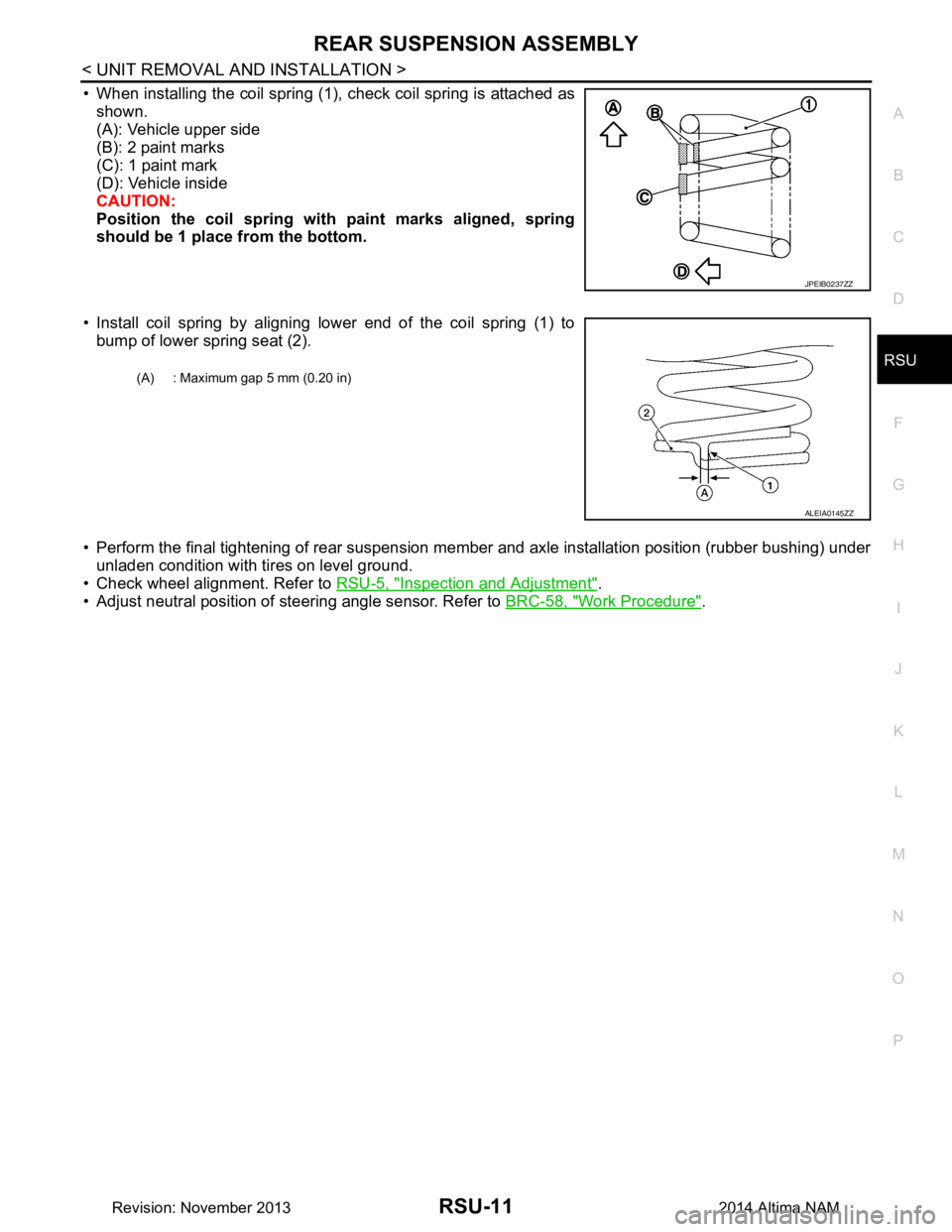
• When installing the coil spring (1), check coil spring is attached as shown.
(A): Vehicle upper side
(B): 2 paint marks
(C): 1 paint mark
(D): Vehicle inside
CAUTION:
Position the coil spring with paint marks aligned, spring
should be 1 place from the bottom.
• Install coil spring by aligning lower end of the coil spring (1) to bump of lower spring seat (2).
• Perform the final tightening of rear suspension me mber and axle installation position (rubber bushing) under
unladen condition with tires on level ground.
• Check wheel alignment. Refer to RSU-5, "Inspection and Adjustment"
.
• Adjust neutral position of steering angle sensor. Refer to BRC-58, "Work Procedure"
.
JPEIB0237ZZ
(A) : Maximum gap 5 mm (0.20 in)
ALEIA0145ZZ
Revision: November 20132014 Altima NAM
Page 3733 of 4801
RSU-16
< REMOVAL AND INSTALLATION >
SUSPENSION ARM
SUSPENSION ARM
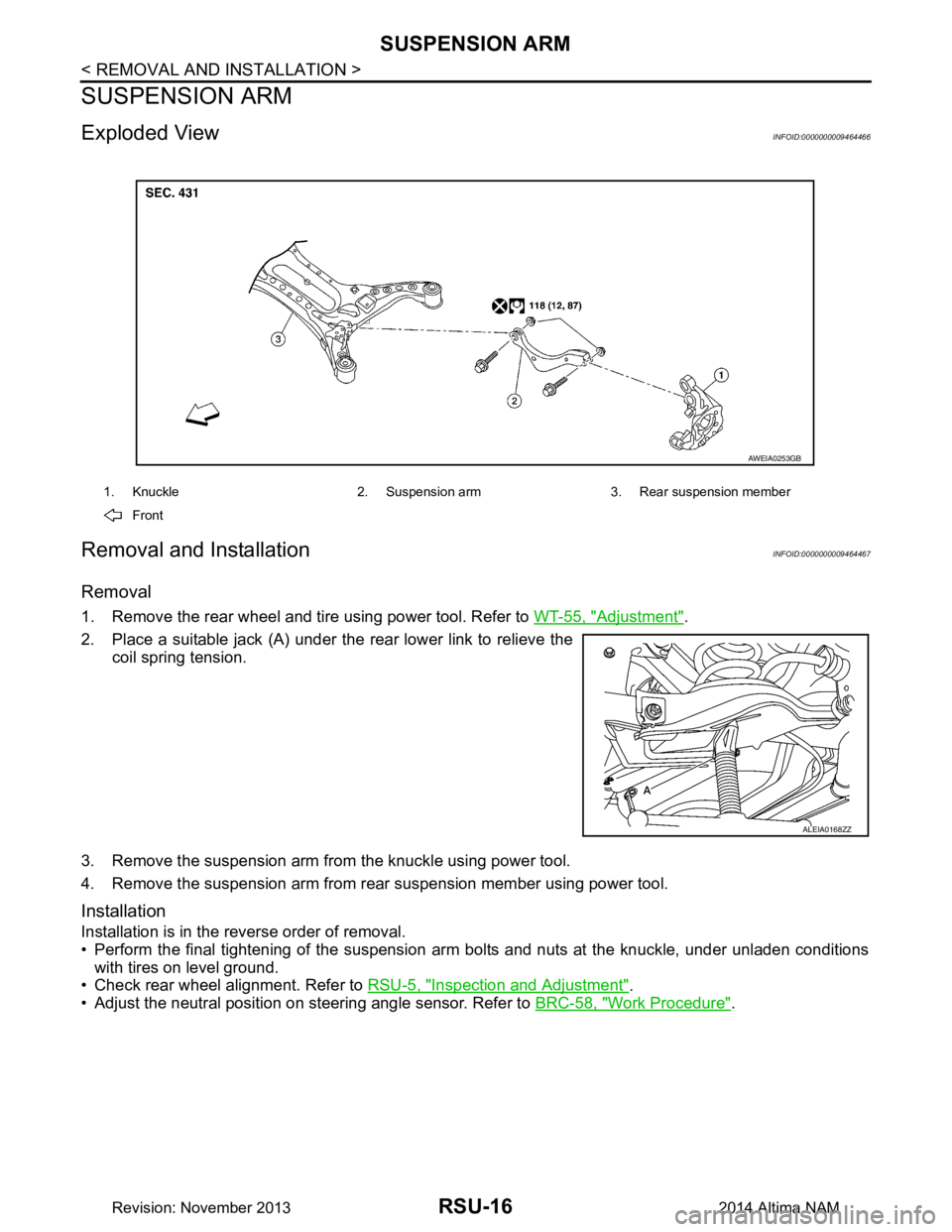
Exploded ViewINFOID:0000000009464466
Removal and InstallationINFOID:0000000009464467
Removal
1. Remove the rear wheel and tire using power tool. Refer to WT-55, "Adjustment".
2. Place a suitable jack (A) under the rear lower link to relieve the coil spring tension.
3. Remove the suspension arm from the knuckle using power tool.
4. Remove the suspension arm from rear suspension member using power tool.
Installation
Installation is in the reverse order of removal.
• Perform the final tightening of the suspension arm bolts and nuts at the knuckle, under unladen conditions
with tires on level ground.
• Check rear wheel alignment. Refer to RSU-5, "Inspection and Adjustment"
.
• Adjust the neutral position on steering angle sensor. Refer to BRC-58, "Work Procedure"
.
1. Knuckle 2. Suspension arm 3. Rear suspension member
Front
AWEIA0253GB
ALEIA0168ZZ
Revision: November 20132014 Altima NAM
Page 3964 of 4801

SR-2
< PRECAUTION >
PRECAUTIONS
PRECAUTION
PRECAUTIONS
Precaution for Supplemental Restraint System (SRS) "AIR BAG" and "SEAT BELT
PRE-TENSIONER"
INFOID:0000000009951759
The Supplemental Restraint System such as “A IR BAG” and “SEAT BELT PRE-TENSIONER”, used along
with a front seat belt, helps to reduce the risk or severi ty of injury to the driver and front passenger for certain
types of collision. Information necessary to service the system safely is included in the SR and SB section of
this Service Manual.
WARNING:
• To avoid rendering the SRS inopera tive, which could increase the risk of personal injury or death in
the event of a collision which would result in air bag inflation, all maintenance must be performed by
an authorized NISS AN/INFINITI dealer.
• Improper maintenance, including in correct removal and installation of the SRS, can lead to personal
injury caused by unintent ional activation of the system. For re moval of Spiral Cable and Air Bag
Module, see the SR section.
• Do not use electrical test equipmen t on any circuit related to the SRS unless instructed to in this
Service Manual. SRS wiring harn esses can be identified by yellow and/or orange harnesses or har-
ness connectors.
PRECAUTIONS WHEN USING POWER TOOLS (AIR OR ELECTRIC) AND HAMMERS
WARNING:
• When working near the Airbag Diagnosis Sensor Unit or other Airbag System sensors with the Igni-
tion ON or engine running, DO NOT use air or electri c power tools or strike near the sensor(s) with a
hammer. Heavy vibration could activate the sensor( s) and deploy the air bag(s), possibly causing
serious injury.
• When using air or electric power tools or hammers , always switch the Ignition OFF, disconnect the
battery and wait at least three minutes before performing any service.
ServiceINFOID:0000000009463063
• Do not use electrical test equipment to check SRS ci rcuits unless instructed to in this Service Manual.
• Before servicing the SRS, turn ignition switch OFF, disconnect both battery cables and wait at least three
minutes.
For approximately three minutes after the cables are remo ved, it is still possible for the air bag and seat belt
pre-tensioner to deploy. Therefore, do not work on any SRS connectors or wires until at least three minutes
have passed.
• Diagnosis sensor unit must always be installed with their arrow marks “ ⇐” pointing towards the front of the
vehicle for proper operation. Also chec k diagnosis sensor unit for cracks, deformities or rust before installa-
tion and replace as required.
• The spiral cable must be aligned with the neutral position since its rotations are limited. Do not turn steering
wheel and column after removal of steering gear.
• Handle air bag module carefully. Always place driver and front passenger air bag modules with the pad side facing upward and seat mounted front side air bag m odule standing with the stud bolt side facing down.
• Conduct self-diagnosis to check entire SRS for proper function after replacing any components.
• After air bag inflates, the instrument panel assembly should be replaced if damaged.
• Always replace instrument panel pad following front passenger air bag deployment.
Precaution for WorkINFOID:0000000009463065
• When removing or disassembling each component, be careful not to damage or deform it. If a component may be subject to interference, be sure to protect it with a shop cloth.
• When removing (disengaging) components with a screwdriver or similar tool, be sure to wrap the component with a shop cloth or vinyl tape to protect it.
• Protect the removed parts with a s hop cloth and prevent them from being dropped.
• Replace a deformed or damaged clip.
• If a part is specified as a non-reusable part, always replace it with a new one.
• Be sure to tighten bolts and nuts securely to the specified torque.
• After installation is complete, be sure to check that each part works properly.
Revision: November 20132014 Altima NAM