ignition NISSAN TEANA 2014 Service Manual
[x] Cancel search | Manufacturer: NISSAN, Model Year: 2014, Model line: TEANA, Model: NISSAN TEANA 2014Pages: 4801, PDF Size: 51.2 MB
Page 796 of 4801
DLK-28
< SYSTEM DESCRIPTION >
SYSTEM (INTELLIGENT KEY SYSTEM)
• When BCM receives the door lock/unlock signal, it operates all door lock actuators and blinks the hazard
lamp (lock: 2 time, unlock: 1 times) and horn chirp si gnal to IPDM E/R at the same time as a reminder.
• IPDM E/R honks horn (lock: 1 time) as a reminder.
OPERATION CONDITION
If the following condition are satisfied, remote keyl ess entry operation is performed when the Intelligent Key is
operated.
SELECTIVE UNLOCK FUNCTION
• When a LOCK signal is transmitted from Intelligent Key, all doors are locked.
• When an UNLOCK signal is transmitted from Intel ligent Key once, driver side door are unlocked.
• Then, if an UNLOCK signal is transmitted from Intelligent Key again within 60 seconds, all other doors are
unlocked.
How to change selective unlock operation mode.
Selective unlock operation mode can be changed using CONSULT.
Refer to BCS-15, "DOOR LOCK : CONSULT Function (BCM - DOOR LOCK)"
.
AUTO DOOR LOCK FUNCTION
After door is unlocked by Intelligent Key button operati on and if 60 seconds or more passes without performing
the following operation, all doors are locked. Howe ver, operation check function does not activate.
How to change auto door lock operation mode.
Auto door lock mode can be changed using CONSULT.
Refer to BCS-22, "INTELLIGENT KEY : CONSULT Function (BCM - INTELLIGENT KEY)"
.
HAZARD AND HORN REMINDER FUNCTION
When doors are locked or unlocked by Intelligent Key, BCM blinks hazard warning lamps as a reminder.
The hazard and horn reminder has a horn chirp mode (C mode) and a non-horn chirp mode (S mode).
Operating Function of Hazard and Horn Reminder
Hazard and horn reminder does not operate in the following conditions.
• Ignition switch position is ON.
• Door is open (only lock operation).
How to Change Hazard and Horn Reminder Mode
With CONSULT
Hazard and horn reminder operation mode can be changed using CONSULT.
Refer to BCS-22, "INTELLIGENT KEY : CONSULT Function (BCM - INTELLIGENT KEY)"
.
Without CONSULT
Remote controller operation Operation condition
Lock • Panic alarm is not activated.
• P (Park) position warning is not activated.
Unlock Panic alarm is not activated.
Operating condition • Door switch is ON
(door is open)
•Door is locked
• Push switch is pressed
C mode S mode
Intelligent Key operation Lock Unlock Lock Unlock
Hazard warning lamp blinks Twice Once Twice —
Horn sound Once — — —
Revision: November 20132014 Altima NAMRevision: November 20132014 Altima NAM
Page 797 of 4801
SYSTEM (INTELLIGENT KEY SYSTEM)DLK-29
< SYSTEM DESCRIPTION >
C
D E
F
G H
I
J
L
M A
B
DLK
N
O P
When LOCK and UNLOCK signals are sent from the Intelligent Key for more than 2 seconds at the same time,
the hazard and horn reminder mode is changed and hazard warning lamp blinks and horn sounds as per the
following items:
LIST OF OPERATION RELATED PARTS
Parts marked with × are the parts related to operation.
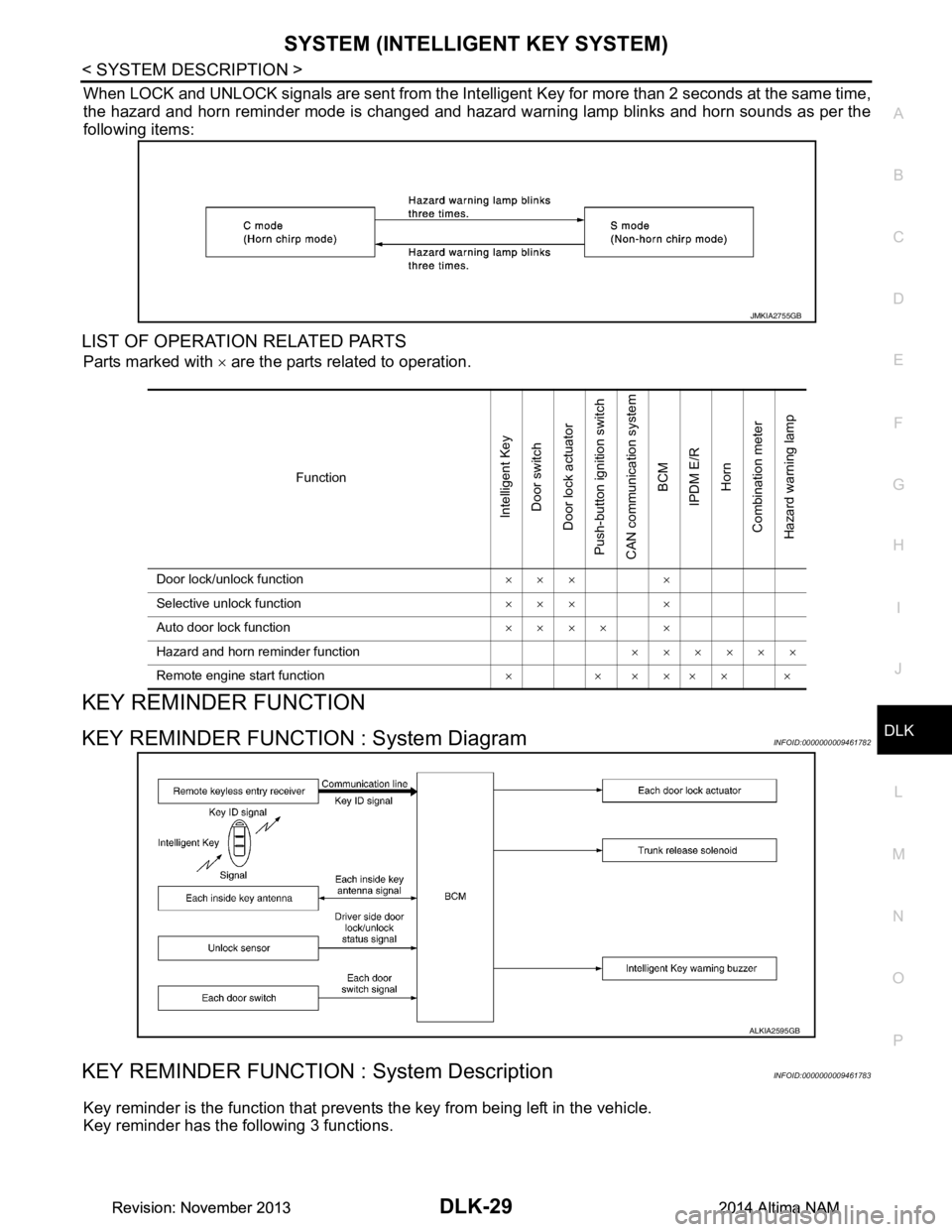
KEY REMINDER FUNCTION
KEY REMINDER FUNCTION : System DiagramINFOID:0000000009461782
KEY REMINDER FUNCTION : System DescriptionINFOID:0000000009461783
Key reminder is the function that prevents the key from being left in the vehicle.
Key reminder has the following 3 functions.
JMKIA2755GB
Function
Intelligent Key
Door switch
Door lock actuator
Push-button ignition switch
CAN communication system BCM
IPDM E/R Horn
Combination meter
Hazard warning lamp
Door lock/unlock function ××× ×
Selective unlock function ××× ×
Auto door lock function ×××× ×
Hazard and horn reminder function ××××××
Remote engine start function × × ×××× ×
ALKIA2595GB
Revision: November 20132014 Altima NAMRevision: November 20132014 Altima NAM
Page 799 of 4801
SYSTEM (INTELLIGENT KEY SYSTEM)DLK-31
< SYSTEM DESCRIPTION >
C
D E
F
G H
I
J
L
M A
B
DLK
N
O P
• To exit the remote engine start mode from inside t he vehicle, depress the brake pedal and press the push-
button ignition switch at the same time.
• To cancel the remote engine start mode away from t he vehicle, press the remote engine start button on the
Intelligent Key.
• Once the vehicle has been started using the remote engi ne start feature it will remain running for 10 minutes.
Extended run time can be added to the initial 10 minute running time by pressing the lock button and remote
engine start button within 5 seconds of each other. Th is will add an additional 10 minutes of running time.
Extended time can only be added once, for a total run time of up to 20 minutes.
HAZARD AND HORN REMINDER FUNCTION
When remote engine start is initiated by Intelligent Key, BCM blinks hazard warning lamps as a reminder.
The hazard and horn reminder has a horn chirp m ode (C mode) and a non-horn chirp mode (S mode).
Operating Function of Hazard and Horn Reminder
Hazard and horn reminder does not operate in the following conditions.
• Ignition switch position is ON.
• Door is open (only lock operation)
How to Change Hazard and Horn Reminder Mode
With CONSULT
Hazard and horn reminder operation mode can be changed using CONSULT.
Refer to BCS-22, "INTELLIGENT KEY : CONSUL T Function (BCM - INTELLIGENT KEY)"
.
Without CONSULT
When LOCK and UNLOCK signals are sent from the Intelligent Key for more than 2 seconds at the same time,
the hazard and horn reminder mode is changed and hazard warning lamp blinks and horn sounds as per the
following items:
LIST OF OPERATION RELATED PARTS
Parts marked with × are the parts related to operation.
Remote engine start cancel opera-
tion • Anti-theft alarm - unauthorized entry
• Maximum time for engine to run by remote start has been exceeded.
• Hazard lamps are turned on.
• Push-button start button is pressed without the Intelligent Key in the vehicle.
• Push-button start button is pressed without depressing the brake pedal.
• The hood is opened while the remote engine start is engaged.
C mode S mode
Intelligent Key operation Lock Unlock Lock Unlock
Hazard warning lamp blinks Twice Once Twice —
Horn sound Once — — —
JMKIA2755GB
Revision: November 20132014 Altima NAMRevision: November 20132014 Altima NAM
Page 800 of 4801
DLK-32
< SYSTEM DESCRIPTION >
SYSTEM (INTELLIGENT KEY SYSTEM)
WELCOME LIGHT FUNCTION
WELCOME LIGHT FUNCTION : System DiagramINFOID:0000000009461786
WELCOME LIGHT FUNCTION : System DescriptionINFOID:0000000009461787
The welcome light function operates as per the following. When the Intelligent Key is within the outside key
antenna detection area, the BCM turns on interior room lamp
* and operates heart beat operation of the push-
button ignition switch.
*: Settings for map lamp, foot lamp, personal lamp, and puddle lamp are available.
OPERATION DESCRIPTION
• When the BCM detects that the Intelligent Key is within the outside key antenna detection area. BCM trans-
mits the request signal to the Intelli gent Key and check it is near the door.
• Intelligent Key receives the request signal and transmits the key ID signal to the BCM via remote keyless entry receiver.
• BCM receives the key ID signal and compares it with the registered key ID.
• BCM illuminates lamps that are set, when key ID verification is OK.
TIMER FUNCTION
BCM can operate welcome light function using the timer function for 9 days after key switch is turned OFF.
The timer function resets when the engine is started
*.Operating period of timer function may differ depending
on battery size.
Function
Intelligent Key
Door switch
Door lock actuator
Push-button ignition switch
CAN communication system
BCM
IPDM E/R
Horn
Combination meter
Hazard warning lamp
Door lock/unlock function ××× ×
Selective unlock function ××× ×
Auto door lock function ×××× ×
Hazard and horn reminder function ××××××
Remote engine start function ×××××××
JMKIA5072GB
Revision: November 20132014 Altima NAMRevision: November 20132014 Altima NAM
Page 801 of 4801
SYSTEM (INTELLIGENT KEY SYSTEM)DLK-33
< SYSTEM DESCRIPTION >
C
D E
F
G H
I
J
L
M A
B
DLK
N
O P
*: Timer function does not stop if another Intelligent Key that has a different key ID is detected within the inte-
rior antenna detection area when starting the engine.
OPERATION CONDITION
If the following condition are satisfi ed, welcome light function is operated.
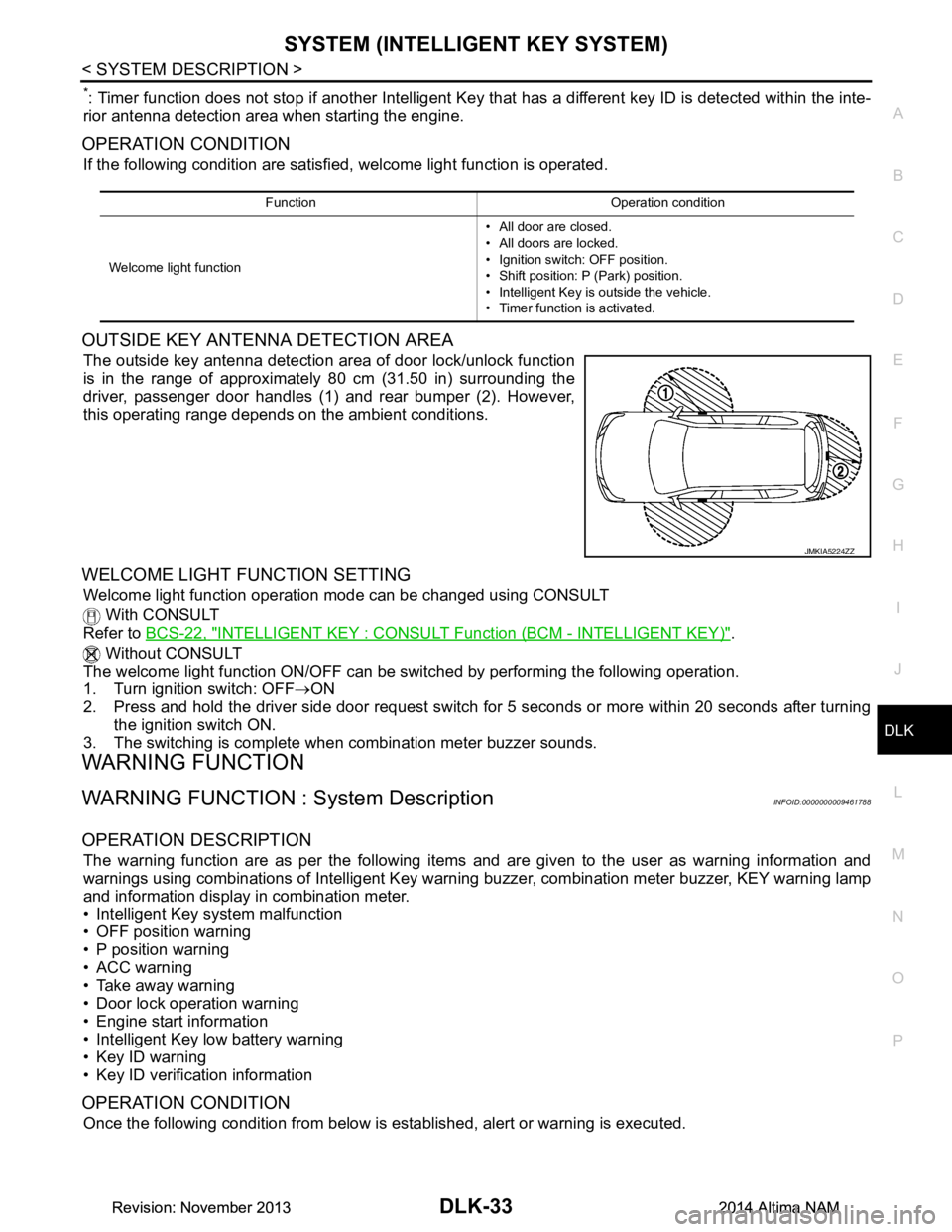
OUTSIDE KEY ANTENNA DETECTION AREA
The outside key antenna detection area of door lock/unlock function
is in the range of approximately 80 cm (31.50 in) surrounding the
driver, passenger door handles (1) and rear bumper (2). However,
this operating range depends on the ambient conditions.
WELCOME LIGHT FUNCTION SETTING
Welcome light function operation mode can be changed using CONSULT
With CONSULT
Refer to BCS-22, "INTELLIGENT KEY : CONSUL T Function (BCM - INTELLIGENT KEY)"
.
Without CONSULT
The welcome light function ON/OFF can be s witched by performing the following operation.
1. Turn ignition switch: OFF →ON
2. Press and hold the driver side door request switch for 5 seconds or more within 20 seconds after turning
the ignition switch ON.
3. The switching is complete when combination meter buzzer sounds.
WARNING FUNCTION
WARNING FUNCTION : System DescriptionINFOID:0000000009461788
OPERATION DESCRIPTION
The warning function are as per the following items and are given to the user as warning information and
warnings using combinations of Intelligent Key warning buzzer, combination meter buzzer, KEY warning lamp
and information display in combination meter.
• Intelligent Key system malfunction
• OFF position warning
• P position warning
• ACC warning
• Take away warning
• Door lock operation warning
• Engine start information
• Intelligent Key low battery warning
• Key ID warning
• Key ID verification information
OPERATION CONDITION
Once the following condition from below is established, alert or warning is executed.
Function Operation condition
Welcome light function • All door are closed.
• All doors are locked.
• Ignition switch: OFF position.
• Shift position: P (Park) position.
• Intelligent Key is outside the vehicle.
• Timer function is activated.
JMKIA5224ZZ
Revision: November 20132014 Altima NAMRevision: November 20132014 Altima NAM
Page 802 of 4801

DLK-34
< SYSTEM DESCRIPTION >
SYSTEM (INTELLIGENT KEY SYSTEM)
WARNING METHOD
The following table shows the alarm or warning methods with chime.
Warning/Information functions Operation procedure
Intelligent Key system malfunction When a malfun ction is detected on BCM, “KEY” warning lamp illuminates.
OFF position warning For internalWhen condition A, B or condition C is satisfied
• Condition A
- Ignition switch: ACC position
- Door switch (driver side ): ON (Door is open)
• Condition B
- Turn ignition switch from ON to OFF while door is open
• Condition C
- Intelligent Key backside is contacted to ignition switch while brake pedal is depressed and ignition switch is LOCK or OFF (When the Intelligent
Key battery is discharged)
- Door switch (driver side ): ON (Door is open)
For external OFF position warning (For internal) is in active mode, driver side door is
closed.
NOTE:
OFF position (For external) active only when each of the sequence occurs
as below: P position warning → ACC warning → OFF position warning (For
internal) → OFF position warning (For internal)
P position warning For internal
• Shift position: Except P (Park) position
• Engine is running to stopped (ignition switch is ON to OFF)
For external Warning is activated when driver door is closed from the open position
while the P (Park) position warning (for inside vehicle) is ON.
ACC warning • When P (Park) position warning is in active mode, shift position changes
P (Park) position
• Ignition switch: ACC position
Ta k e a w a y w a r n i n g Door is open to close
• Ignition switch: Except Lock position
• Door switch: ON to OFF (Door is open to close)
• Intelligent Key cannot be detected inside the vehicle
Door is open • Ignition switch: Except Lock position
• Door switch: ON (Door is open)
• Key ID verification every 5 seconds when registered Intelligent Key can-
not be detected inside the vehicle
Push-button ignition
switch operation • Ignition switch: Except Lock position
• Press push-button ignition switch
• Intelligent Key cannot be detected inside the vehicle
Door lock operation warning When door lock operation is requested while door lock operating condition
of door request switch (if equipped) or Intelligent Key are not satisfied
Engine start information Ignition switch is ON po-
sition • Ignition switch: ON position
• Shift position: P (Park) position*
• Engine is stopped
Ignition switch is except
ON position • Ignition switch: Except ON position
• Shift position: P (Park) position*
• Intelligent Key is inserted in key slot or Intelligent Key can be detected inside the vehicle
Intelligent Key low battery warning When Intelligent Key is low battery, BCM is detected after ignition switch is
turned ON
Key ID warning When registered Intelligent Key cannot be detected inside the vehicle after
ignition switch is turned ON
Key ID verification information • When registered Intelligent Key cannot be detected inside the vehicle
• Intelligent Key battery is discharged
• When NATS antenna amp cannot be detected NATS ID
Revision: November 20132014 Altima NAMRevision: November 20132014 Altima NAM
Page 804 of 4801
DLK-36
< SYSTEM DESCRIPTION >
SYSTEM (INTELLIGENT KEY SYSTEM)
LIST OF OPERATION RELATED PARTS
Parts marked with × are the parts related to operation.
TRUNK LID OPENER SYSTEM
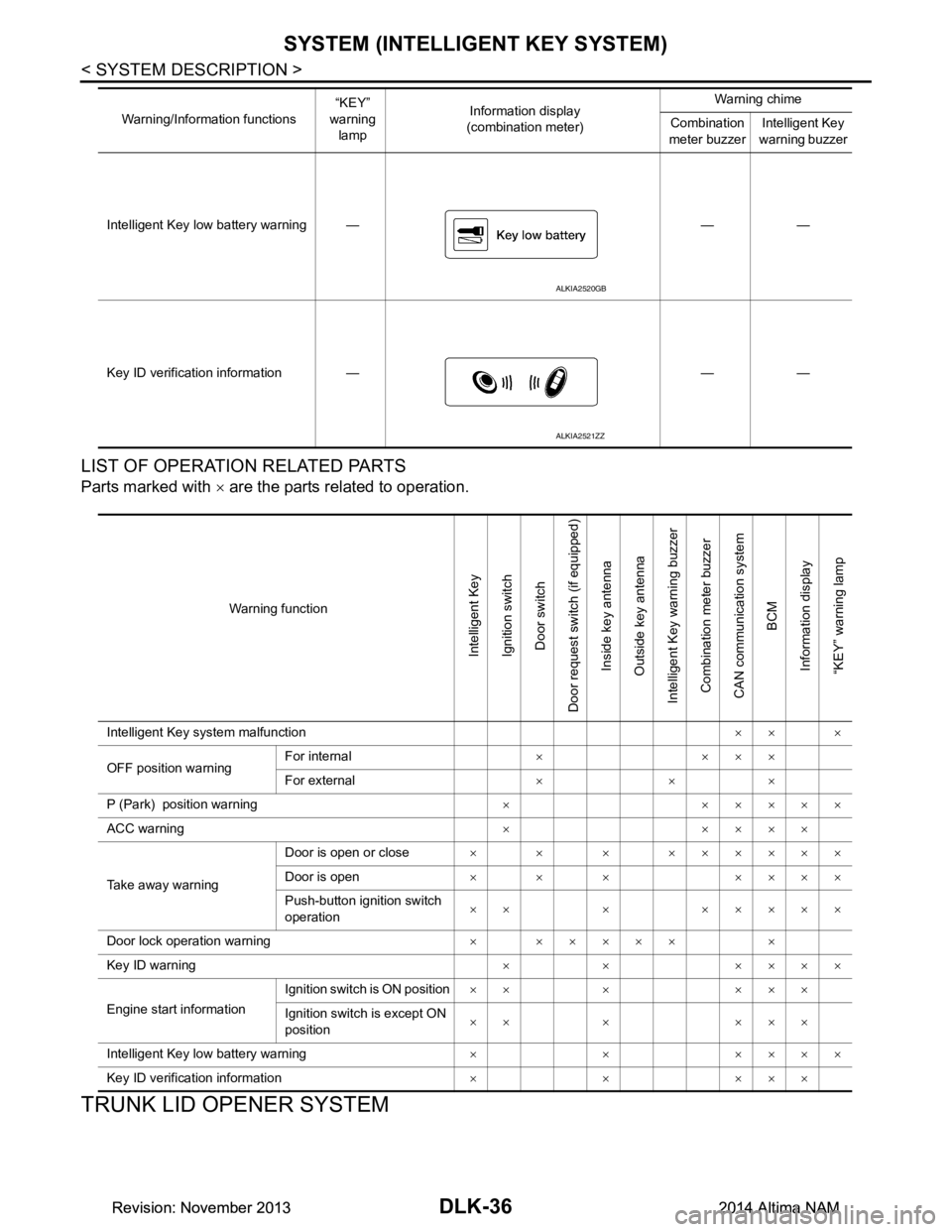
Intelligent Key low battery warning — — —
Key ID verification information — — — Warning/Information functions
“KEY”
warning lamp Information display
(combination meter) Warning chime
Combination
meter buzzer Intelligent Key
warning buzzer
ALKIA2520GB
ALKIA2521ZZ
Warning function
Intelligent Key
Ignition switch Door switch
Door request switch (if equipped) Inside key antenna
Outside key antenna
Intelligent Key warning buzzer Combination meter buzzer
CAN communication system BCM
Information display
“KEY” warning lamp
Intelligent Key system malfunction ×× ×
OFF position warning For internal
××××
For external ×××
P (Park) position warning × ×××××
ACC warning ×××××
Take away warning Door is open or close
× × × ××××××
Door is open × × × ××××
Push-button ignition switch
operation ×× × ×××××
Door lock operation warning × ××××× ×
Key ID warning × × ××××
Engine start information Ignition switch is ON position
×× × ×××
Ignition switch is except ON
position ×× × ×××
Intelligent Key low battery warning × × ××××
Key ID verification information ×××××
Revision: November 20132014 Altima NAMRevision: November 20132014 Altima NAM
Page 810 of 4801

DLK-42
< SYSTEM DESCRIPTION >
DIAGNOSIS SYSTEM (BCM)
DIAGNOSIS SYSTEM (BCM)
COMMON ITEM
COMMON ITEM : CONSULT Function (BCM - COMMON ITEM)INFOID:0000000009952500
CAUTION:
After disconnecting the CONSULT vehicle interface (VI) from the data link connector, the ignition must
be cycled OFF → ON (for at least 5 seconds) → OFF. If this step is not performed, the BCM may not go
to ”sleep mode”, potentially causing a di scharged battery and a no-start condition.
APPLICATION ITEM
CONSULT performs the following functions via CAN communication with BCM.
SYSTEM APPLICATION
BCM can perform the following functions.
Direct Diagnostic Mode Description
Ecu Identification The BCM part number is displayed.
Self Diagnostic Result The BCM self diagnostic results are displayed.
Data Monitor The BCM input/output data is displayed in real time.
Active Test The BCM activates outputs to test components.
Work support The settings for BCM functions can be changed.
Configuration • The vehicle specification can be read and saved.
• The vehicle specification can be written when replacing BCM.
CAN Diag Support Mntr The result of transmit/receive diagnosis of CAN communication is displayed.
System Sub System Direct Diagnostic Mode
Ecu Identification
Self Diagnostic Result
Data Monitor
Active Test
Work support
Configuration
CAN Diag Su pport Mntr
Door lock DOOR LOCK ××××
Rear window defogger REAR DEFOGGER ×××
Warning chime BUZZER ××
Interior room lamp timer INT LAMP ×××
Remote keyless entry system MULTI REMOTE ENT ×××
Exterior lamp HEADLAMP ×××
Wiper and washer WIPER ×××
Turn signal and hazard warning lamps FLASHER ××
Air conditioner AIR CONDITIONER ×
Intelligent Key system INTELLIGENT KEY ××××
Combination switch COMB SW ×
BCM BCM × × ×××
Immobilizer IMMU ×××
Interior room lamp battery saver BATTERY SAVER ××
Trunk open TRUNK ×
Vehicle security system THEFT ALM ×××
Revision: November 20132014 Altima NAMRevision: November 20132014 Altima NAM
Page 811 of 4801
DIAGNOSIS SYSTEM (BCM)DLK-43
< SYSTEM DESCRIPTION >
C
D E
F
G H
I
J
L
M A
B
DLK
N
O P
DOOR LOCK
DOOR LOCK : CONSULT Func tion (BCM - DOOR LOCK)INFOID:0000000009952501
CAUTION:
After disconnecting the CONSULT vehicle interface (VI) from the data link connector, the ignition must
be cycled OFF → ON (for at least 5 seconds) → OFF. If this step is not performed, the BCM may not go
to ”sleep mode”, potentiall y causing a discharged battery and a no-start condition.
SELF DIAGNOSTIC RESULT
Refer to BCS-52, "DTC Index".
DATA MONITOR
ACTIVE TEST
WORK SUPPORT
RAP system RETAINED PWR ×
Signal buffer system SIGNAL BUFFER ×
TPMS AIR PRESSURE MONITOR ××××
System Sub System
Direct Diagnostic Mode
Ecu Identification
Self Diagnostic Result
Data Monitor
Active Test
Work support
Configuration
CAN Diag Support Mntr
Monitor Item [Unit] Description
REQ SW-DR [On/Off] Indicates condition of door request switch LH.
REQ SW-AS [On/Off] Indicates condition of door request switch RH.
REQ SW-BD/TR [On/Off] Indicates condition of trunk opener request switch.
DOOR SW-DR [On/Off] Indicates condition of front door switch LH.
DOOR SW-AS [On/Off] Indicates condition of front door switch RH.
DOOR SW-RR [On/Off] In dicates condition of rear door switch RH.
DOOR SW-RL [On/Off] Indicates condition of rear door switch LH.
DOOR SW-BK [On/Off] Indicates condition of trunk switch.
CDL LOCK SW [On/Off] Indicates condition of lock signal from door lock and unlock switch.
CDL UNLOCK SW [On/Off] Indicates condition of unlock signal from door lock and unlock switch.
KEY CYL LK-SW [On/Off] Indicates condition of lo ck signal from door key cylinder switch.
KEY CYL UN-SW [On/Off] Indicates condition of unlo ck signal from door key cylinder switch.
Test Item Description
DOOR LOCK This test is able to check door lock operation [ALL LOCK/ALL UNLK].
Support Item Setting Description
DOOR LOCK-UNLOCK SET On* Automatic door locks function ON.
Off Automatic door locks function OFF.
AUTO UNLOCK TYPE MODE2 Driver door only unlocks automatically.
MODE1* All doors unlock automatically.
Revision: November 20132014 Altima NAMRevision: November 20132014 Altima NAM
Page 812 of 4801

DLK-44
< SYSTEM DESCRIPTION >
DIAGNOSIS SYSTEM (BCM)
* : Initial setting
INTELLIGENT KEY
INTELLIGENT KEY : CONSULT Function (BCM - INTELLIGENT KEY)INFOID:0000000009952502
CAUTION:
After disconnecting the CONSULT vehicle interface (VI) from the data link connector, the ignition must
be cycled OFF → ON (for at least 5 seconds) → OFF. If this step is not performed, the BCM may not go
to ”sleep mode”, potentially causing a di scharged battery and a no-start condition.
SELF DIAGNOSTIC RESULT
Refer to BCS-52, "DTC Index".
DATA MONITOR
AUTO LOCK FUNCTION MODE3 This mode is not used.
MODE2 Doors lock automatically when shifted out of P (park).
MODE1* Doors lock automatically when vehicle speed reaches 24 km/h (15 mph).
Off —
AUTO UNLOCK FUNCTION MODE3 This mode is not used.
MODE2 Doors unlock automatically when shifted into P (park).
MODE1* Doors unlock automatically when ignition is switched from ON to OFF.
Off —
Support Item Setting Description
Monitor Item [Unit] Main Description
REQ SW -DR [On/Off] ×Indicates condition of door request switch LH.
REQ SW -AS [On/Off] ×Indicates condition of door request switch RH.
REQ SW -BD/TR [On/Off] ×Indicates condition of trunk opener request switch.
PUSH SW [On/Off] Indicates condition of push-button ignition switch.
SHFTLCK SLNID PER SPLY [On/Off] ×Indicates condition of power supply to shiftlock solenoid.
BRAKE SW 1 [On/Off] ×Indicates condition of brake switch.
BRAKE SW 2 [On/Off] Indicates condition of brake switch.
DETE/CANCL SW [On/Off] ×Indicates condition of P (park) position.
SFT PN/N SW [On/Off] ×Indicates condition of P (park) or N (neutral) position.
UNLK SEN -DR [On/Off] ×Indicates condition of door unlock sensor.
PUSH SW -IPDM [On/Off] Indicates condition of push-button ignition switch received from IPDM E/R
on CAN communication line.
IGN RLY1 -F/B [On/Off] Indicates condition of ignition relay 1 received from IPDM E/R on CAN
communication line.
DETE SW -IPDM [On/Off] Indicates condition of detent switch received from TCM on CAN communi-
cation line.
SFT PN -IPDM [On/Off] Indicates condition of P (park) or N (neutral) position from TCM on CAN
communication line.
SFT P -MET [On/Off] Indicates condition of P (park) position from TCM on CAN communication
line.
SFT N -MET [On/Off] Indicates condition of N (neutral) position from IPDM E/R on CAN commu-
nication line.
ENGINE STATE [STOP/START/CRANK/RUN] ×Indicates condition of engine state from ECM on CAN communication line.
VEH SPEED 1 [mph/km/h] ×Indicates condition of vehicle speed signal received from ABS on CAN
communication line.
Revision: November 20132014 Altima NAMRevision: November 20132014 Altima NAM