ignition NISSAN TEANA 2014 Service Manual
[x] Cancel search | Manufacturer: NISSAN, Model Year: 2014, Model line: TEANA, Model: NISSAN TEANA 2014Pages: 4801, PDF Size: 51.2 MB
Page 813 of 4801
![NISSAN TEANA 2014 Service Manual
DIAGNOSIS SYSTEM (BCM)DLK-45
< SYSTEM DESCRIPTION >
C
D E
F
G H
I
J
L
M A
B
DLK
N
O P
ACTIVE TEST
VEH SPEED 2 [mph/km/h] ×Indicates condition of vehicle speed signal received from combination
me](/img/5/57390/w960_57390-812.png "NISSAN TEANA 2014 Service Manual
DIAGNOSIS SYSTEM (BCM)DLK-45
< SYSTEM DESCRIPTION >
C
D E
F
G H
I
J
L
M A
B
DLK
N
O P
ACTIVE TEST
VEH SPEED 2 [mph/km/h] ×Indicates condition of vehicle speed signal received from combination
me")
DIAGNOSIS SYSTEM (BCM)DLK-45
< SYSTEM DESCRIPTION >
C
D E
F
G H
I
J
L
M A
B
DLK
N
O P
ACTIVE TEST
VEH SPEED 2 [mph/km/h] ×Indicates condition of vehicle speed signal received from combination
meter on CAN communication line.
DOOR STAT -DR [LOCK/READY/UNLK] ×Indicates condition of driver side door status.
DOOR STAT -AS [LOCK/READY/UNLK] ×Indicates condition of passenger side door status.
DOOR STAT -RR [LOCK/READY/UNLK] ×Indicates condition of rear right side door status.
DOOR STAT -RL [LOCK/READY/UNLK] ×Indicates condition of rear left side door status.
ID OK FLAG [Set/Reset] Indicates condition of Intelligent Key ID.
PRMT ENG STRT [Set/Reset] Indicates condition of engine start possibility.
PRMT RKE STRT [Set/Reset] Indicates condition of engine start possibility from Intelligent Key.
I-KEY OK FLAG [Key ON/Key OFF] ×Indicates condition of Intelligent Key OK flag.
PRBT ENG STRT [Set/Reset] Indicates condition of engine start prohibit.
ID AUTHENT CANCEL TIMER [STOP] Indicates condition of Intelligent Key ID authentication.
ACC BATTERY SAVER [STOP] Indicate s condition of battery saver.
CRNK PRBT TMR [On/Off] In dicates condition of crank prohibit timer.
AUT CRNK TMR [On/Off] Indicates condition of automatic engine crank timer from Intelligent Key.
CRNK PRBT TME [sec] I ndicates condition of engine crank prohibit time.
AUTO CRNK TME [sec] Indicates co ndition of automatic engine crank time from Intelligent Key.
CRANKING TME [sec] Indicates condition of engine cranking time from Intelligent Key.
DETE SW PWR [On/Off] Indicates condition of detent switch voltage.
ACC RLY -REQ [On/Off] Indicates condition of accessory relay control request.
RKE OPE COUN1 [0-19] ×When remote keyless entry receiver receives the signal transmitted while
operating on Intelligent Key, the numerical value start changing.
RKE OPE COUN2 [0-19] ×When remote keyless entry receiver receives the signal transmitted while
operating on Intelligent Key, the numerical value start changing.
TRNK/HAT MNTR [On/Off] Indicates condition of trunk room lamp switch.
RKE-LOCK [On/Off] Indicates condition of lock signal from Intelligent Key.
RKE-UNLOCK [On/Off] Indicates condition of unlock signal from Intelligent Key.
RKE-TR/BD [On/Off] Indicates condition of trunk open signal from Intelligent Key.
RKE-PANIC [On/Off] Indicates condition of panic signal from Intelligent Key.
RKE-MODE CHG [On/Off] Indicates condition of mode change signal from Intelligent Key. Monitor Item [Unit] Main Description
Test Item Description
INTELLIGENT KEY LINK (CAN) This test is able to check Intelligent Key iden
tification number [Off/ID No1/ID N02/ID No3/ID
No4/ID No5].
INT LAMP This test is able to check interior room lamp operation [On/Off].
FLASHER This test is able to check hazard lamp operation [LH/RH/Off].
HORN This test is able to check horn operation [On].
BATTERY SAVER This test is able to check battery saver operation [On/Off].
TRUNK/BACK DOOR This test is able to check trunk actuator operation [Open].
OUTSIDE BUZZER This test is able to check In telligent Key warning buzzer operation [On/Off].
INSIDE BUZZER This test is able to check combination meter warning chime operation [Take Out/Knob/Key/
Off].
INDICATOR This test is able to check combination meter warning lamp operation [KEY ON/KEY IND/Off].
IGN CONT2 This test is able to check ignition relay-2 control operation [On/Off].
ENGINE SW ILLUMI This test is able to check push-bu tton ignition switch START indicator operation [On/Off].
Revision: November 20132014 Altima NAMRevision: November 20132014 Altima NAM
Page 814 of 4801
![NISSAN TEANA 2014 Service Manual
DLK-46
< SYSTEM DESCRIPTION >
DIAGNOSIS SYSTEM (BCM)
WORK SUPPORT
PUSH SWITCH INDICATOR This test is able to check push-button ignition switch indicator operation [On/Off].
ACC CONT This test is abl](/img/5/57390/w960_57390-813.png "NISSAN TEANA 2014 Service Manual
DLK-46
< SYSTEM DESCRIPTION >
DIAGNOSIS SYSTEM (BCM)
WORK SUPPORT
PUSH SWITCH INDICATOR This test is able to check push-button ignition switch indicator operation [On/Off].
ACC CONT This test is abl")
DLK-46
< SYSTEM DESCRIPTION >
DIAGNOSIS SYSTEM (BCM)
WORK SUPPORT
PUSH SWITCH INDICATOR This test is able to check push-button ignition switch indicator operation [On/Off].
ACC CONT This test is able to check accessory relay control operation [On/Off].
IGN CONT1 This test is able to check ignition relay-1 control operation [On/Off].
ST CONT LOW This test is able to check starter control relay operation [On/Off].
IGNITION RELAY This test is able to ignition relay operation [On/Off].
REVERSE LAMP TEST This test is able to check reverse lamp illumination operation [On/Off].
TRUNK/LUGGAGE LAMP TEST This test is able to check cargo lamp illumination operation [On/Off].
KEYFOB PW TEST This test is able to check power wind ow operation using the Intelligent Key [Off/DOWN/UP].
SHIFTLOCK SOLENOID TEST This test is able to check shift lock solenoid operation [On/Off]. Test Item Description
Support Item Setting Description
IGN/ACC BATTERY SAVER On* Battery saver function ON.
Off Battery saver function OFF.
REMOTE ENGINE STARTER On* Remote engine start function ON.
Off Remote engine start function OFF.
ANSWERBACK I-KEY LOCK UNLOCK BUZZER Buzzer reminder function by door lock/unlock request switch ON.
HORN Horn chirp reminder function by door lock request switch ON.
Off* No reminder function by door lock/unlock request switch.
INVALID This mode is not used.
ANSWERBACK KEYLESS LOCK UN-
LOCK On
Buzzer or horn chirp reminder when doors are locked/unlocked with
Intelligent Key.
Off* No buzzer or horn chirp reminder when doors are locked/unlocked
with Intelligent Key.
ANSWER BACK On* Horn chirp reminder when doors are locked with Intelligent Key.
Off No horn chirp reminder when doors are locked with Intelligent Key.
RETRACTABLE MIRROR SET On Retractable mirror set ON.
Off* Retractable mirror set OFF.
CONFIRM KEY FOB ID — Intelligent Key ID code can check.
LOCK/UNLOCK BY I-KEY On* Door lock/unlock function from Intelligent Key ON.
Off Door lock/unlock function from Intelligent Key OFF.
ENGINE START BY I-KEY On* Engine start function from Intelligent Key ON.
Off Engine start function from Intelligent Key OFF.
TRUNK/GLASS HATCH OPEN On* Buzzer reminder function by trunk opener request switch ON.
Off Buzzer reminder function by trunk opener request switch OFF.
INTELLIGENT KEY LINK SET On Intelligent Key link set ON.
Off* Intelligent Key link set OFF.
SHORT CRANKING OUTPUT Start70 msec
Starter motor operation duration times.
100 msec
200 msec
End —
INSIDE ANT DIAGNOSIS — This function allows inside key antenna self-diagnosis.
Revision: November 20132014 Altima NAMRevision: November 20132014 Altima NAM
Page 815 of 4801

DIAGNOSIS SYSTEM (BCM)DLK-47
< SYSTEM DESCRIPTION >
C
D E
F
G H
I
J
L
M A
B
DLK
N
O P
*: Initial Setting
TRUNK
TRUNK : CONSULT Function (BCM - TRUNK)INFOID:0000000009952503
CAUTION:
After disconnecting the CONSULT vehicle interface (VI) from the data link connector, the ignition must
be cycled OFF → ON (for at least 5 seconds) → OFF. If this step is not performed, the BCM may not go
to ”sleep mode”, potentiall y causing a discharged battery and a no-start condition.
DATA MONITOR
AUTO LOCK SET MODE7 5 min
Auto door lock time can be set in this mode.
MODE6 4 min
MODE5 3 min
MODE4 2 min
MODE3* 1 min
MODE2 30 sec
MODE1 Off
Support Item Setting Description
Monitor Item [Unit] Description
PUSH SW [On/Off] Indicates condition of push-button ignition switch.
UNLK SEN -DR [On/Off] Indicates condition of door unlock sensor.
VEH SPEED 1 [km/h] Indicates vehicle speed signal received from ABS on CAN communication line.
TR CANCEL SW [On/Off] Indicates condition of trunk cancel switch.
TR/BD OPEN SW [On/Off] Indicates condition of trunk opener switch.
TRNK/HAT MNTR [On/Off] Indicates condition of trunk room lamp switch.
RKE-TR/BD [On/Off] Indicates condition of trunk open signal from Intelligent Key.
Revision: November 20132014 Altima NAMRevision: November 20132014 Altima NAM
Page 853 of 4801
U1000 CAN COMM CIRCUITDLK-85
< DTC/CIRCUIT DIAGNOSIS >
C
D E
F
G H
I
J
L
M A
B
DLK
N
O P
DTC/CIRCUIT DIAGNOSIS
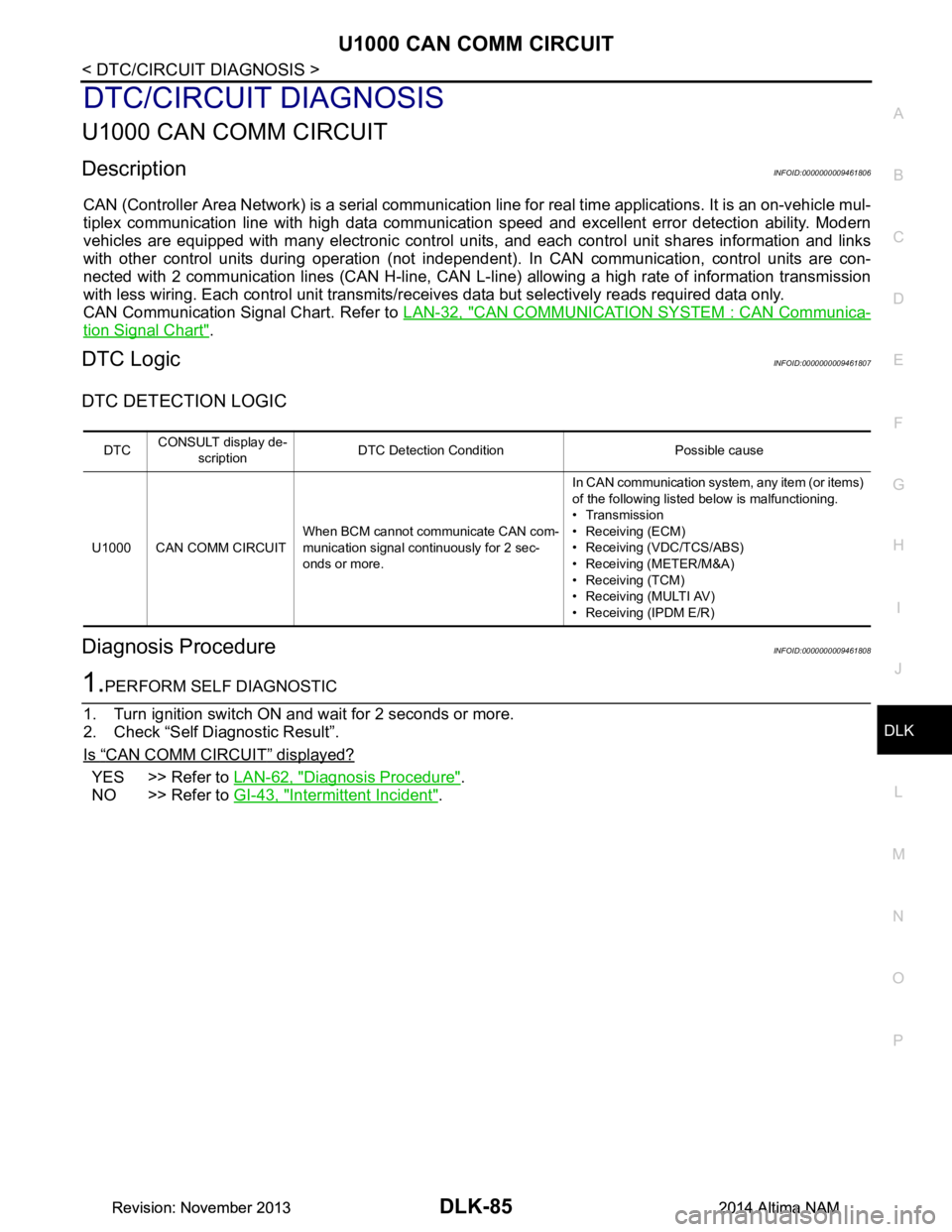
U1000 CAN COMM CIRCUIT
DescriptionINFOID:0000000009461806
CAN (Controller Area Network) is a serial communication line for real time applications. It is an on-vehicle mul-
tiplex communication line with high data communicati on speed and excellent error detection ability. Modern
vehicles are equipped with many electronic control uni ts, and each control unit shares information and links
with other control units during operation (not independent ). In CAN communication, control units are con-
nected with 2 communication lines (CAN H-line, CAN L-li ne) allowing a high rate of information transmission
with less wiring. Each control unit transmits/recei ves data but selectively reads required data only.
CAN Communication Signal Chart. Refer to LAN-32, "CAN COMMUNICATION SYSTEM : CAN Communica-
tion Signal Chart".
DTC LogicINFOID:0000000009461807
DTC DETECTION LOGIC
Diagnosis ProcedureINFOID:0000000009461808
1.PERFORM SELF DIAGNOSTIC
1. Turn ignition switch ON and wait for 2 seconds or more.
2. Check “Self Diagnostic Result”.
Is
“CAN COMM CIRCUIT” displayed?
YES >> Refer to LAN-62, "Diagnosis Procedure".
NO >> Refer to GI-43, "Intermittent Incident"
.
DTCCONSULT display de-
scription DTC Detection Condit
ion Possible cause
U1000 CAN COMM CIRCUIT When BCM cannot communicate CAN com-
munication signal continuously for 2 sec-
onds or more. In CAN communication system, any item (or items)
of the following listed below is malfunctioning.
•Transmission
• Receiving (ECM)
• Receiving (VDC/TCS/ABS)
• Receiving (METER/M&A)
• Receiving (TCM)
• Receiving (MULTI AV)
• Receiving (IPDM E/R)
Revision: November 20132014 Altima NAMRevision: November 20132014 Altima NAM
Page 855 of 4801
B261B REMOTE ENGINE STARTDLK-87
< DTC/CIRCUIT DIAGNOSIS >
C
D E
F
G H
I
J
L
M A
B
DLK
N
O P
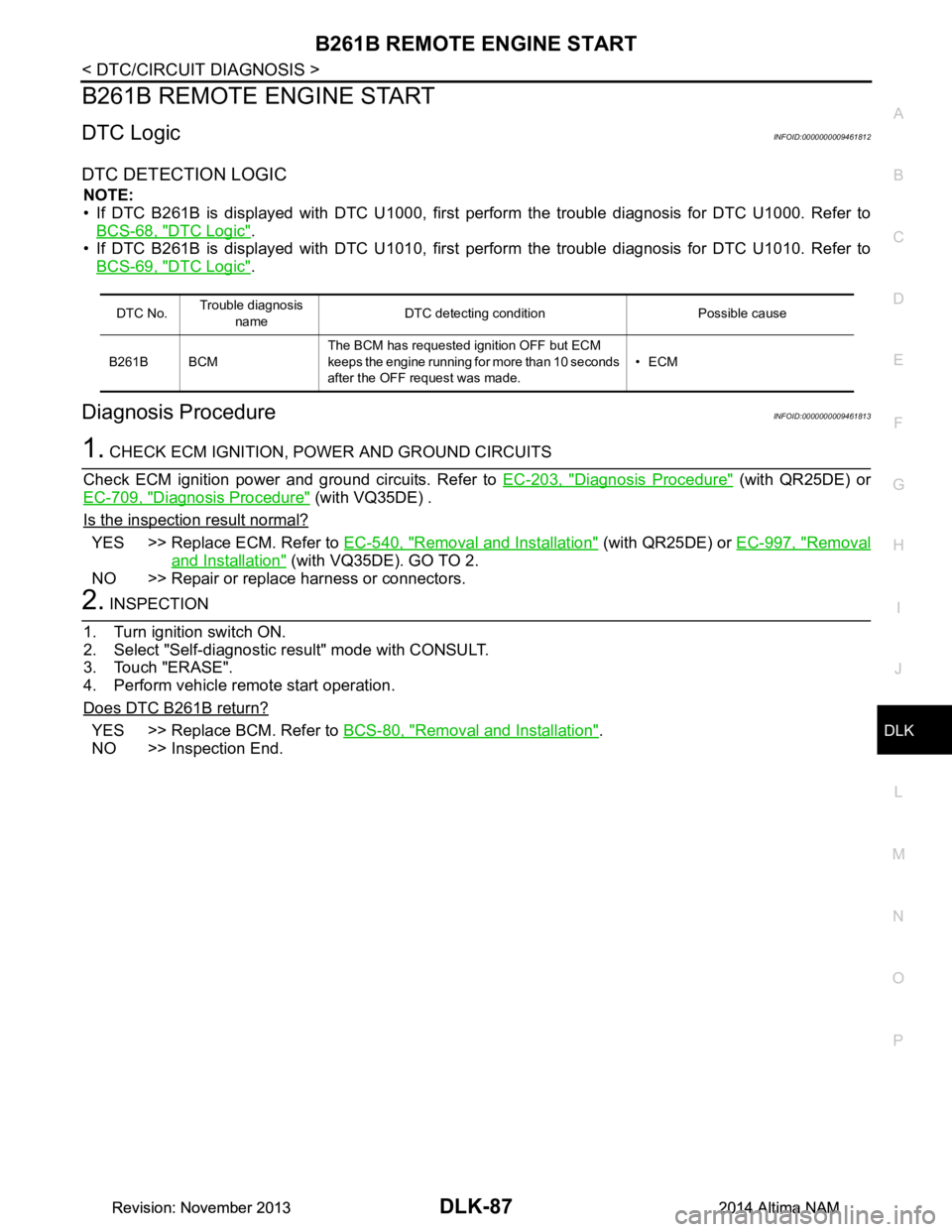
B261B REMOTE ENGINE START
DTC LogicINFOID:0000000009461812
DTC DETECTION LOGIC
NOTE:
• If DTC B261B is displayed with DTC U1000, first perform the trouble diagnosis for DTC U1000. Refer to
BCS-68, "DTC Logic"
.
• If DTC B261B is displayed with DTC U1010, first perform the trouble diagnosis for DTC U1010. Refer to
BCS-69, "DTC Logic"
.
Diagnosis ProcedureINFOID:0000000009461813
1. CHECK ECM IGNITION, POWER AND GROUND CIRCUITS
Check ECM ignition power and ground circuits. Refer to EC-203, "Diagnosis Procedure"
(with QR25DE) or
EC-709, "Diagnosis Procedure"
(with VQ35DE) .
Is the inspection result normal?
YES >> Replace ECM. Refer to EC-540, "Removal and Installation" (with QR25DE) or EC-997, "Removal
and Installation" (with VQ35DE). GO TO 2.
NO >> Repair or replace harness or connectors.
2. INSPECTION
1. Turn ignition switch ON.
2. Select "Self-diagnostic result" mode with CONSULT.
3. Touch "ERASE".
4. Perform vehicle remote start operation.
Does DTC B261B return?
YES >> Replace BCM. Refer to BCS-80, "Removal and Installation".
NO >> Inspection End.
DTC No. Trouble diagnosis
name DTC detecting condition Possible cause
B261B BCM The BCM has requested ignition OFF but ECM
keeps the engine running for more than 10 seconds
after the OFF request was made. •ECM
Revision: November 20132014 Altima NAMRevision: November 20132014 Altima NAM
Page 856 of 4801
DLK-88
< DTC/CIRCUIT DIAGNOSIS >
B2621 INSIDE ANTENNA
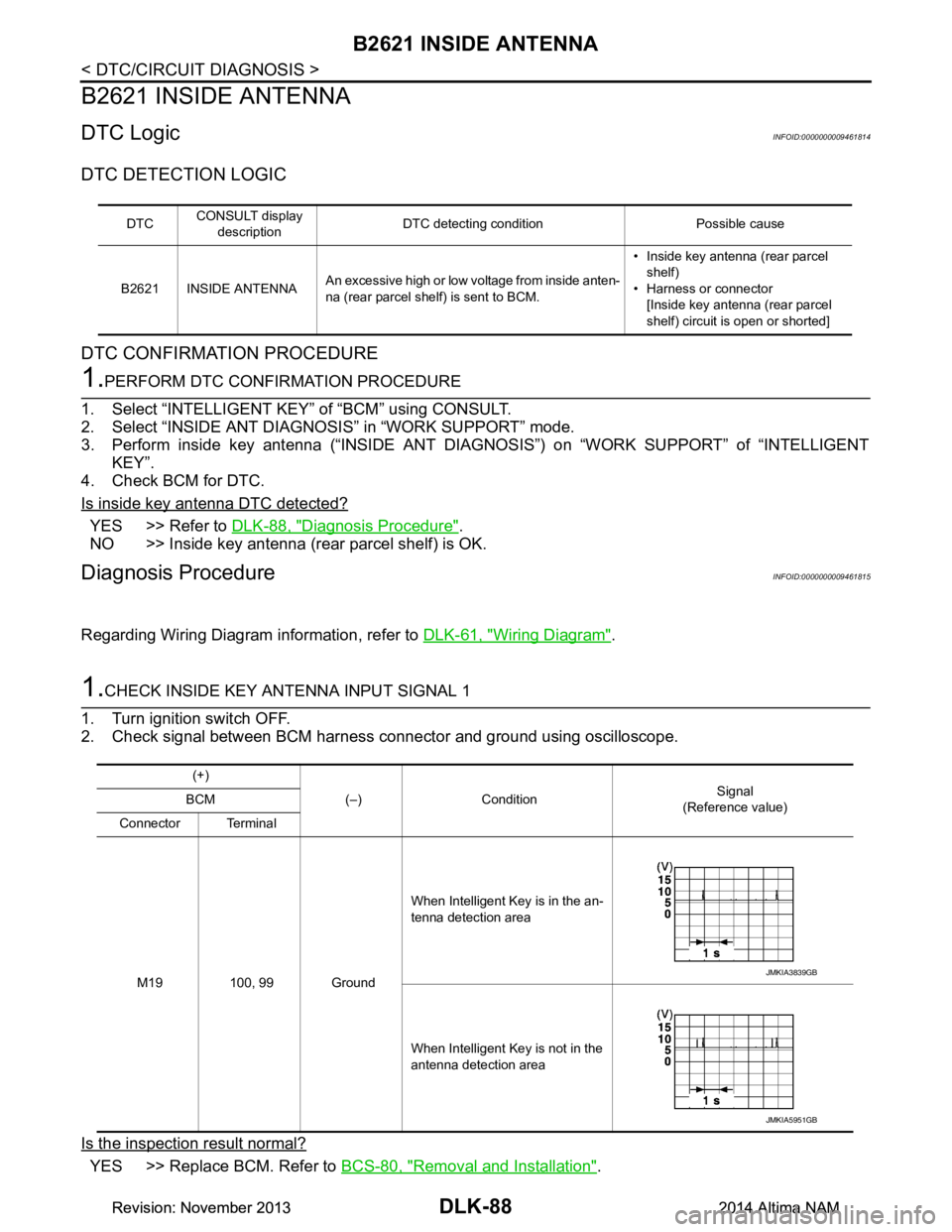
B2621 INSIDE ANTENNA
DTC LogicINFOID:0000000009461814
DTC DETECTION LOGIC
DTC CONFIRMATION PROCEDURE
1.PERFORM DTC CONFIRMATION PROCEDURE
1. Select “INTELLIGENT KEY” of “BCM” using CONSULT.
2. Select “INSIDE ANT DIAGNOSI S” in “WORK SUPPORT” mode.
3. Perform inside key antenna (“INSIDE ANT DIAG NOSIS”) on “WORK SUPPORT” of “INTELLIGENT
KEY”.
4. Check BCM for DTC.
Is inside key antenna DTC detected?
YES >> Refer to DLK-88, "Diagnosis Procedure".
NO >> Inside key antenna (rear parcel shelf) is OK.
Diagnosis ProcedureINFOID:0000000009461815
Regarding Wiring Diagram information, refer to DLK-61, "Wiring Diagram".
1.CHECK INSIDE KEY ANTENNA INPUT SIGNAL 1
1. Turn ignition switch OFF.
2. Check signal between BCM harness connector and ground using oscilloscope.
Is the inspection result normal?
YES >> Replace BCM. Refer to BCS-80, "Removal and Installation".
DTCCONSULT display
description DTC detecting condition Possible cause
B2621 INSIDE ANTENNA An excessive high or low voltage from inside anten-
na (rear parcel shelf) is sent to BCM. • Inside key antenna (rear parcel
shelf)
• Harness or connector [Inside key antenna (rear parcel
shelf) circuit is open or shorted]
(+)
(–) Condition Signal
(Reference value)
BCM
Connector Terminal
M19 100, 99 Ground When Intelligent Key is in the an-
tenna detection area
When Intelligent Key is not in the
antenna detection area
JMKIA3839GB
JMKIA5951GB
Revision: November 20132014 Altima NAMRevision: November 20132014 Altima NAM
Page 858 of 4801
DLK-90
< DTC/CIRCUIT DIAGNOSIS >
B2622 INSIDE ANTENNA
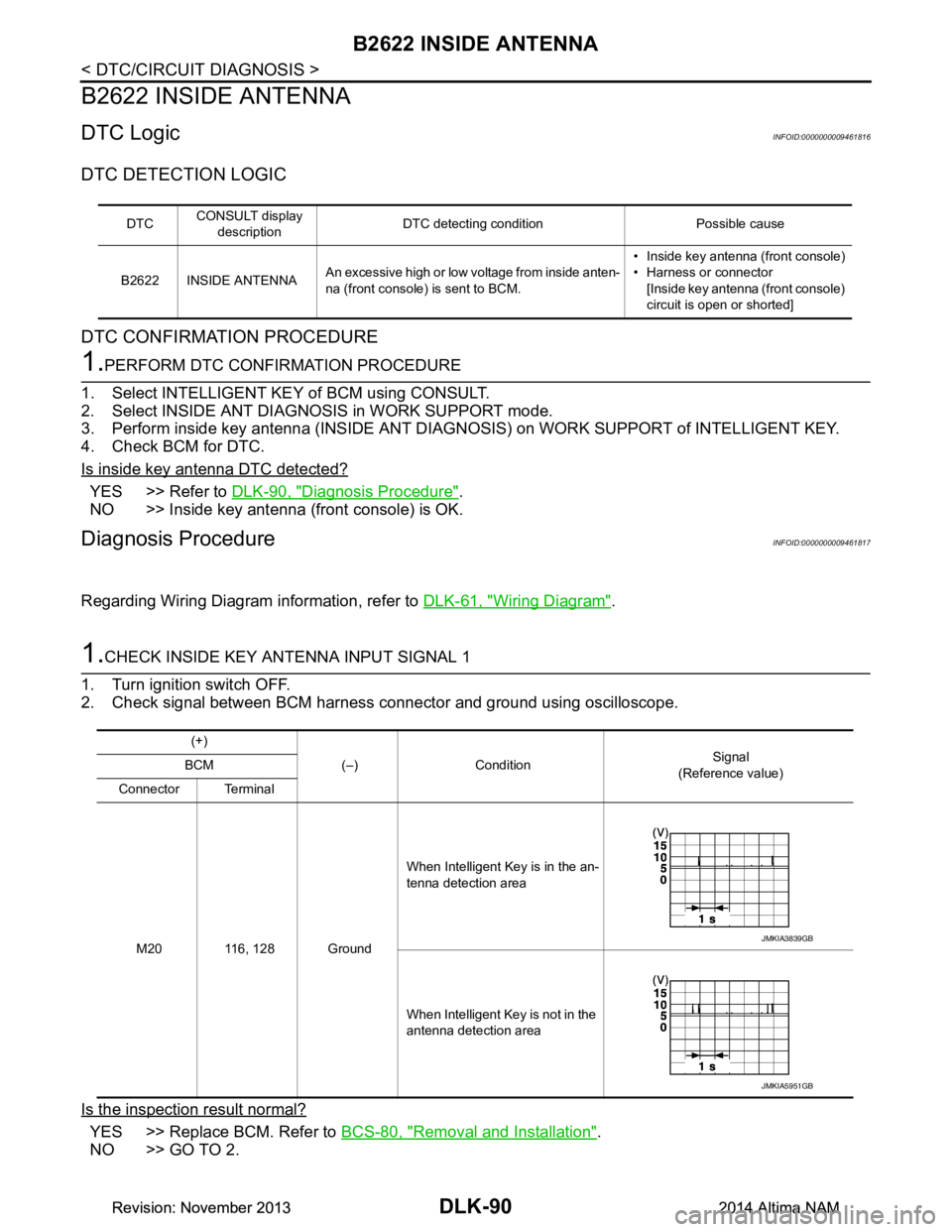
B2622 INSIDE ANTENNA
DTC LogicINFOID:0000000009461816
DTC DETECTION LOGIC
DTC CONFIRMATION PROCEDURE
1.PERFORM DTC CONFIRMATION PROCEDURE
1. Select INTELLIGENT KEY of BCM using CONSULT.
2. Select INSIDE ANT DIAGNOSIS in WORK SUPPORT mode.
3. Perform inside key antenna (INSIDE ANT DIAGNO SIS) on WORK SUPPORT of INTELLIGENT KEY.
4. Check BCM for DTC.
Is inside key antenna DTC detected?
YES >> Refer to DLK-90, "Diagnosis Procedure".
NO >> Inside key antenna (front console) is OK.
Diagnosis ProcedureINFOID:0000000009461817
Regarding Wiring Diagram information, refer to DLK-61, "Wiring Diagram".
1.CHECK INSIDE KEY ANTENNA INPUT SIGNAL 1
1. Turn ignition switch OFF.
2. Check signal between BCM harness connector and ground using oscilloscope.
Is the inspection result normal?
YES >> Replace BCM. Refer to BCS-80, "Removal and Installation".
NO >> GO TO 2.
DTC CONSULT display
description DTC detecting condition Possible cause
B2622 INSIDE ANTENNA An excessive high or low voltage from inside anten-
na (front console) is sent to BCM. • Inside key antenna (front console)
• Harness or connector [Inside key antenna (front console)
circuit is open or shorted]
(+)
(–) Condition Signal
(Reference value)
BCM
Connector Terminal
M20 116, 128 Ground When Intelligent Key is in the an-
tenna detection area
When Intelligent Key is not in the
antenna detection area
JMKIA3839GB
JMKIA5951GB
Revision: November 20132014 Altima NAMRevision: November 20132014 Altima NAM
Page 860 of 4801
DLK-92
< DTC/CIRCUIT DIAGNOSIS >
B26FD SHIFT LOCK SOLENOID
B26FD SHIFT LOCK SOLENOID
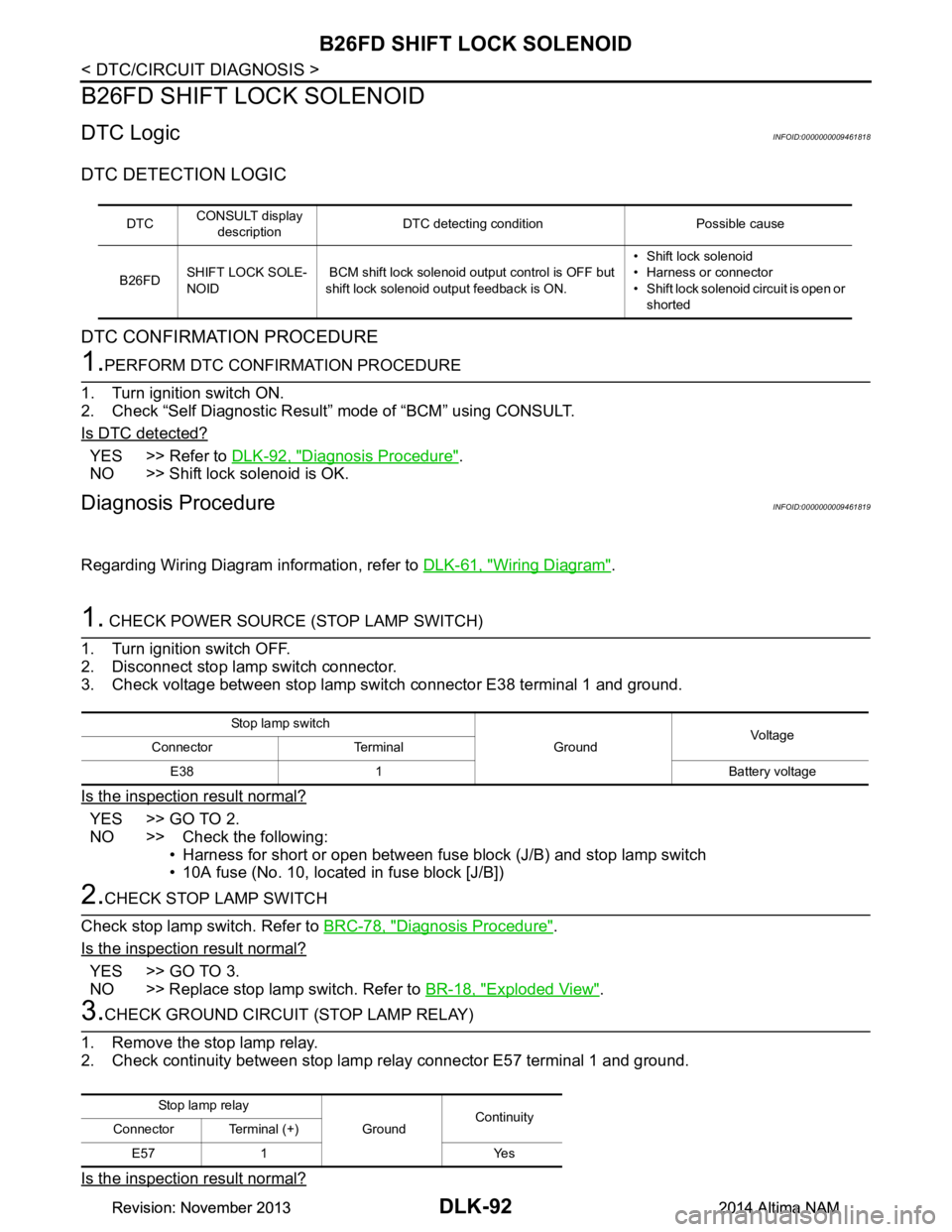
DTC LogicINFOID:0000000009461818
DTC DETECTION LOGIC
DTC CONFIRMATION PROCEDURE
1.PERFORM DTC CONFIRMATION PROCEDURE
1. Turn ignition switch ON.
2. Check “Self Diagnostic Result” mode of “BCM” using CONSULT.
Is DTC detected?
YES >> Refer to DLK-92, "Diagnosis Procedure".
NO >> Shift lock solenoid is OK.
Diagnosis ProcedureINFOID:0000000009461819
Regarding Wiring Diagram information, refer to DLK-61, "Wiring Diagram".
1. CHECK POWER SOURCE (STOP LAMP SWITCH)
1. Turn ignition switch OFF.
2. Disconnect stop lamp switch connector.
3. Check voltage between stop lamp switch connector E38 terminal 1 and ground.
Is the inspection result normal?
YES >> GO TO 2.
NO >> Check the following: • Harness for short or open between fuse block (J/B) and stop lamp switch
• 10A fuse (No. 10, located in fuse block [J/B])
2.CHECK STOP LAMP SWITCH
Check stop lamp switch. Refer to BRC-78, "Diagnosis Procedure"
.
Is the inspection result normal?
YES >> GO TO 3.
NO >> Replace stop lamp switch. Refer to BR-18, "Exploded View"
.
3.CHECK GROUND CIRCUIT (STOP LAMP RELAY)
1. Remove the stop lamp relay.
2. Check continuity between stop lamp relay connector E57 terminal 1 and ground.
Is the inspection result normal?
DTC CONSULT display
description DTC detecting condition Possible cause
B26FD SHIFT LOCK SOLE-
NOID BCM shift lock solenoid output control is OFF but
shift lock solenoid output feedback is ON. • Shift lock solenoid
• Harness or connector
• Shift lock solenoid circuit is open or shorted
Stop lamp switch
GroundVoltage
Connector Terminal
E38 1 Battery voltage
Sto p l am p rela y GroundContinuity
Connector Terminal (+)
E57 1 Yes
Revision: November 20132014 Altima NAMRevision: November 20132014 Altima NAM
Page 863 of 4801
B26FE HOOD SWITCHDLK-95
< DTC/CIRCUIT DIAGNOSIS >
C
D E
F
G H
I
J
L
M A
B
DLK
N
O P
B26FE HOOD SWITCH
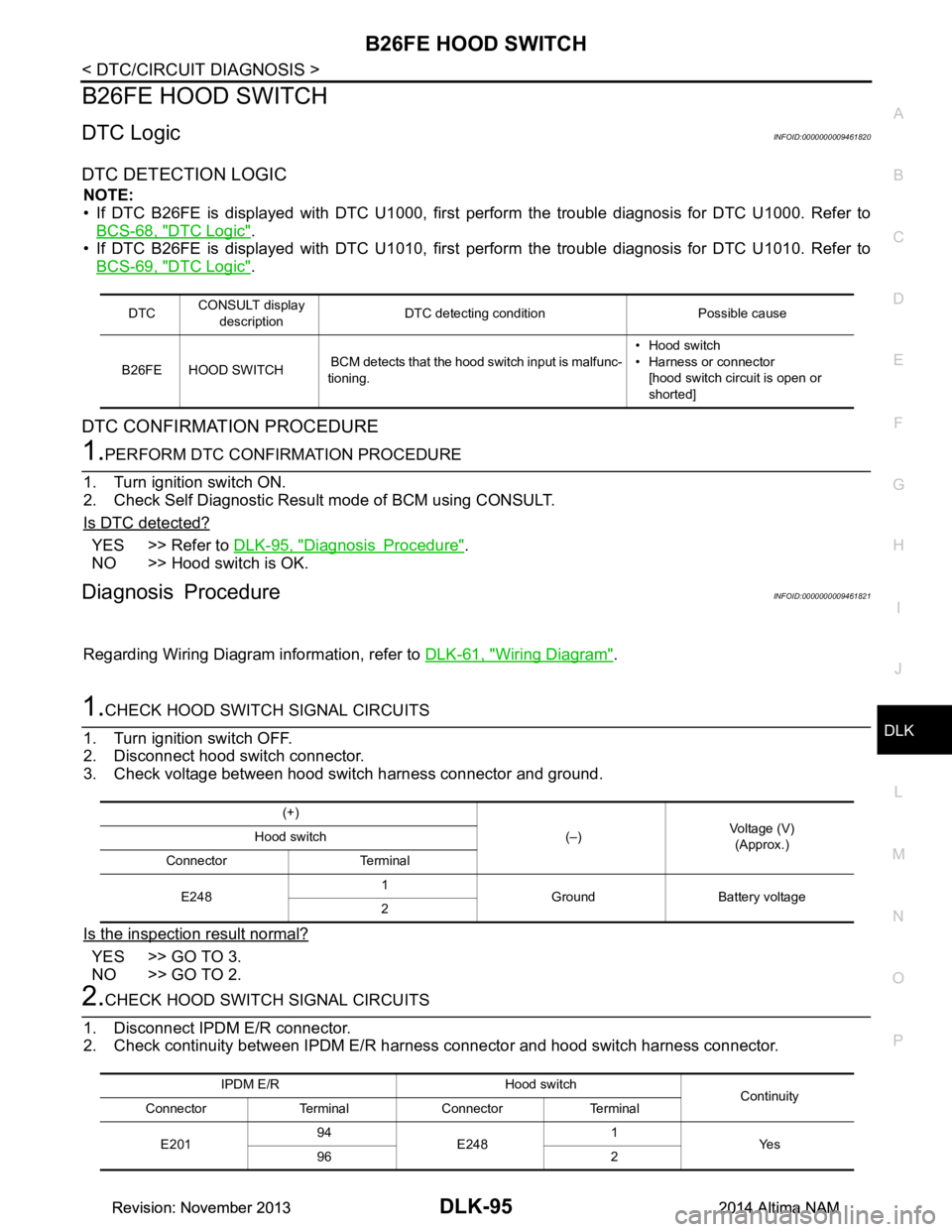
DTC LogicINFOID:0000000009461820
DTC DETECTION LOGIC
NOTE:
• If DTC B26FE is displayed with DTC U1000, firs t perform the trouble diagnosis for DTC U1000. Refer to
BCS-68, "DTC Logic"
.
• If DTC B26FE is displayed with DTC U1010, firs t perform the trouble diagnosis for DTC U1010. Refer to
BCS-69, "DTC Logic"
.
DTC CONFIRMATION PROCEDURE
1.PERFORM DTC CONFIRMATION PROCEDURE
1. Turn ignition switch ON.
2. Check Self Diagnostic Result mode of BCM using CONSULT.
Is DTC detected?
YES >> Refer to DLK-95, "Diagnosis Procedure".
NO >> Hood switch is OK.
Diagnosis ProcedureINFOID:0000000009461821
Regarding Wiring Diagram information, refer to DLK-61, "Wiring Diagram".
1.CHECK HOOD SWITCH SIGNAL CIRCUITS
1. Turn ignition switch OFF.
2. Disconnect hood switch connector.
3. Check voltage between hood switch harness connector and ground.
Is the inspection result normal?
YES >> GO TO 3.
NO >> GO TO 2.
2.CHECK HOOD SWITCH SIGNAL CIRCUITS
1. Disconnect IPDM E/R connector.
2. Check continuity between IPDM E/R har ness connector and hood switch harness connector.
DTCCONSULT display
description DTC detecting condition Possible cause
B26FE HOOD SWITCH BCM detects that the hood switch input is malfunc-
tioning. • Hood switch
• Harness or connector
[hood switch circuit is open or
shorted]
(+)
(–)Voltage (V)
(Approx.)
Hood switch
Connector Terminal
E248 1
Ground Battery voltage
2
IPDM E/R Hood switch Continuity
Connector Terminal Connector Terminal
E201 94
E248 1
Ye s
96 2
Revision: November 20132014 Altima NAMRevision: November 20132014 Altima NAM
Page 864 of 4801
DLK-96
< DTC/CIRCUIT DIAGNOSIS >
B26FE HOOD SWITCH
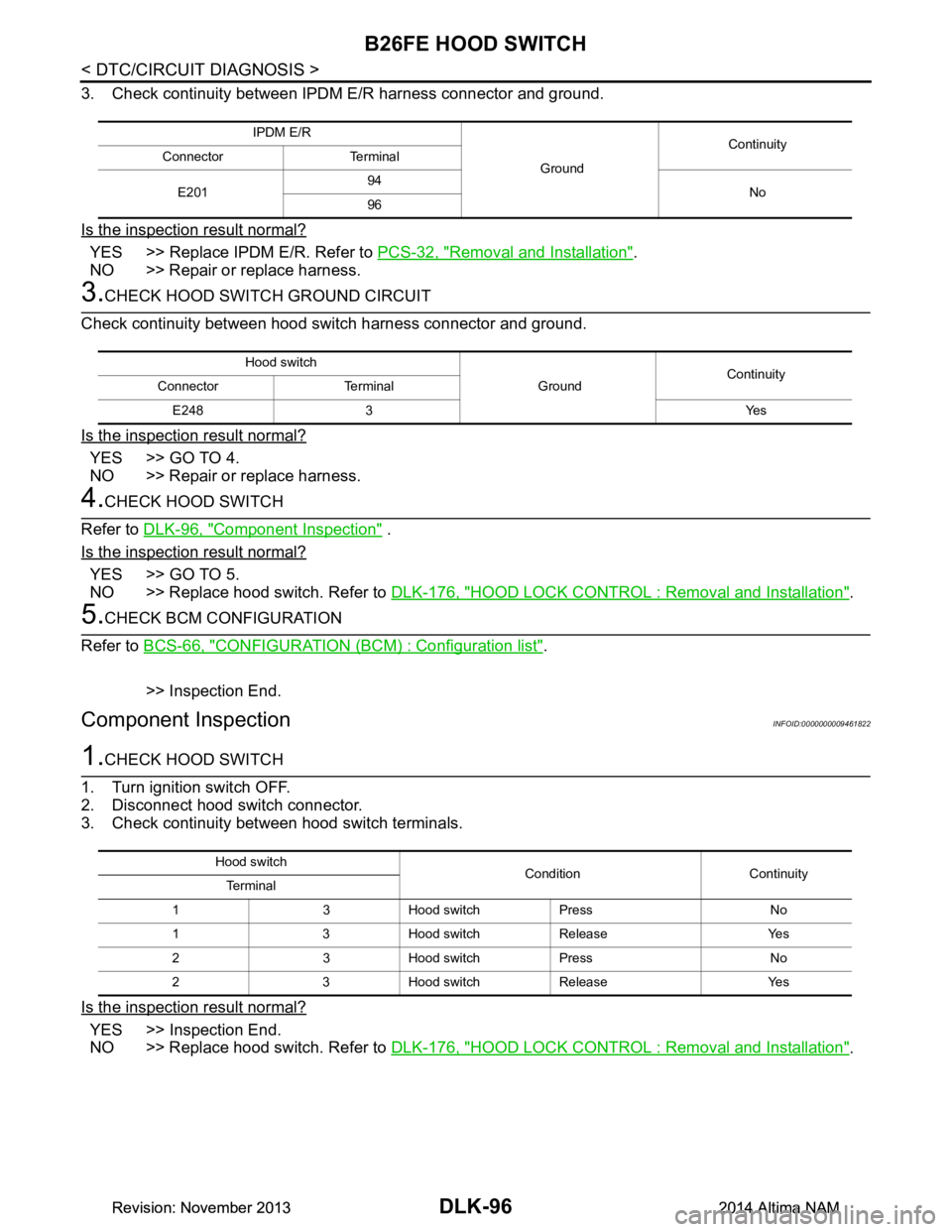
3. Check continuity between IPDM E/R harness connector and ground.
Is the inspection result normal?
YES >> Replace IPDM E/R. Refer to PCS-32, "Removal and Installation".
NO >> Repair or replace harness.
3.CHECK HOOD SWITCH GROUND CIRCUIT
Check continuity between hood switch harness connector and ground.
Is the inspection result normal?
YES >> GO TO 4.
NO >> Repair or replace harness.
4.CHECK HOOD SWITCH
Refer to DLK-96, "Component Inspection"
.
Is the inspection result normal?
YES >> GO TO 5.
NO >> Replace hood switch. Refer to DLK-176, "HOOD LOCK CONTROL : Removal and Installation"
.
5.CHECK BCM CONFIGURATION
Refer to BCS-66, "CONFIGURATION (BCM) : Configuration list"
.
>> Inspection End.
Component InspectionINFOID:0000000009461822
1.CHECK HOOD SWITCH
1. Turn ignition switch OFF.
2. Disconnect hood switch connector.
3. Check continuity between hood switch terminals.
Is the inspection result normal?
YES >> Inspection End.
NO >> Replace hood switch. Refer to DLK-176, "HOOD LOCK CONTROL : Removal and Installation"
.
IPDM E/R
GroundContinuity
Connector Terminal
E201 94
No
96
Hood switch
GroundContinuity
Connector Terminal
E248 3 Yes
Hood switch Condition Continuity
Te r m i n a l
1 3 Hood switch Press No
1 3 Hood switch Release Yes
2 3 Hood switch Press No
2 3 Hood switch Release Yes
Revision: November 20132014 Altima NAMRevision: November 20132014 Altima NAM