fuse NISSAN TEANA 2014 Owner's Manual
[x] Cancel search | Manufacturer: NISSAN, Model Year: 2014, Model line: TEANA, Model: NISSAN TEANA 2014Pages: 4801, PDF Size: 51.2 MB
Page 633 of 4801
![NISSAN TEANA 2014 Owners Manual
DAS-200
< DTC/CIRCUIT DIAGNOSIS >[BSW]
U1309 PUMP UNIT CURRENT
2. Check for continuity between ITS control unit harne
ss connector and rear view camera washer control
unit connector.
3. Check for co](/img/5/57390/w960_57390-632.png "NISSAN TEANA 2014 Owners Manual
DAS-200
< DTC/CIRCUIT DIAGNOSIS >[BSW]
U1309 PUMP UNIT CURRENT
2. Check for continuity between ITS control unit harne
ss connector and rear view camera washer control
unit connector.
3. Check for co")
DAS-200
< DTC/CIRCUIT DIAGNOSIS >[BSW]
U1309 PUMP UNIT CURRENT
2. Check for continuity between ITS control unit harne
ss connector and rear view camera washer control
unit connector.
3. Check for continuity between ITS control unit harness connector and ground.
Is inspection result normal?
YES >> GO TO 4.
NO >> Repair the harness or connector.
4.CHECK CONTINUITY REAR VIEW CAME RA WASHER CONTROL UNIT TO PUMP
1. Disconnect rear view camera air pump connector.
2. Check for continuity between rear view camera washer control unit connector and pump connector.
3. Check for continuity between rear view ca mera washer control unit connector and ground.
Is inspection result normal?
YES >> GO TO 5.
NO >> Repair the harness or connector.
5.CHECK REAR VIEW CAMERA AIR PUMP MOTOR ITS CONTROL UNIT SUPPLY CIRCUIT
Momentarily connect a jumper from a fused battery positiv e to terminal 1 and from ground to terminal 2 of the
rear view camera air pump motor.
Does the pump operate?
YES >> GO TO 6.
NO >> Replace the rear view camera air pump motor.
6.CHECK REAR VIEW CAMERA AIR PUMP MOTOR ITS CONTROL UNIT SUPPLY CIRCUIT
1. Reconnect the ITS control unit connector.
2. Turn the ignition switch ON.
3. Using CONSULT, activate the rear view camera air pump while checking voltage between rear view cam-
era washer control unit connector and ground.
ITS control unit Rear view camera washer
control unit Continuity
Connector Terminal Connector Terminal
M58 2
B167
Ye s
38
ITS control unit GroundContinuity
Connector Terminal
M58 2
No
3
Rear view camera washer control unit Rear view camera air
pump motor Continuity
Connector Terminal Connector Terminal
B16 1
B171
Ye s
22
Rear view camera washer control unit GroundContinuity
Connector Terminal
B16 1
No
2
Revision: November 20132014 Altima NAMRevision: November 20132014 Altima NAM
Page 637 of 4801
![NISSAN TEANA 2014 Owners Manual
DAS-204
< DTC/CIRCUIT DIAGNOSIS >[BSW]
U1310 PUMP UNIT CIRCUIT
2. Check for continuity between ITS control unit harne
ss connector and rear view camera washer control
unit connector.
3. Check for co](/img/5/57390/w960_57390-636.png "NISSAN TEANA 2014 Owners Manual
DAS-204
< DTC/CIRCUIT DIAGNOSIS >[BSW]
U1310 PUMP UNIT CIRCUIT
2. Check for continuity between ITS control unit harne
ss connector and rear view camera washer control
unit connector.
3. Check for co")
DAS-204
< DTC/CIRCUIT DIAGNOSIS >[BSW]
U1310 PUMP UNIT CIRCUIT
2. Check for continuity between ITS control unit harne
ss connector and rear view camera washer control
unit connector.
3. Check for continuity between ITS control unit harness connector and ground.
Is inspection result normal?
YES >> GO TO 4.
NO >> Repair the harness or connector.
4.CHECK CONTINUITY REAR VIEW CAME RA WASHER CONTROL UNIT TO PUMP
1. Disconnect rear view camera air pump connector.
2. Check for continuity between rear view camera washer control unit connector and pump connector.
3. Check for continuity between rear view ca mera washer control unit connector and ground.
Is inspection result normal?
YES >> GO TO 5.
NO >> Repair the harness or connector.
5.CHECK REAR VIEW CAMERA AIR PUMP MOTOR ITS CONTROL UNIT SUPPLY CIRCUIT
Momentarily connect a jumper from a fused battery positiv e to terminal 1 and from ground to terminal 2 of the
rear view camera air pump motor.
Does the pump operate?
YES >> GO TO 6.
NO >> Replace the rear view camera air pump motor.
6.CHECK REAR VIEW CAMERA AIR PUMP MOTOR ITS CONTROL UNIT SUPPLY CIRCUIT
1. Reconnect the ITS control unit connector.
2. Turn the ignition switch ON.
3. Activate the rear view camera air pump while checking voltage between rear view camera washer control
unit connector and ground.
ITS control unit Rear view camera washer
control unit Continuity
Connector Terminal Connector Terminal
M58 2
B167
Ye s
38
ITS control unit GroundContinuity
Connector Terminal
M58 2
No
3
Rear view camera washer control unit Rear view camera air
pump motor Continuity
Connector Terminal Connector Terminal
B16 1
B171
Ye s
22
Rear view camera washer control unit GroundContinuity
Connector Terminal
B16 1
No
2
Revision: November 20132014 Altima NAMRevision: November 20132014 Altima NAM
Page 707 of 4801
![NISSAN TEANA 2014 Owners Manual
DAS-274
< DTC/CIRCUIT DIAGNOSIS >[MOD]
U1309 PUMP UNIT CURRENT
2. Check for continuity between ITS control unit harne
ss connector and rear view camera washer control
unit connector.
3. Check for co](/img/5/57390/w960_57390-706.png "NISSAN TEANA 2014 Owners Manual
DAS-274
< DTC/CIRCUIT DIAGNOSIS >[MOD]
U1309 PUMP UNIT CURRENT
2. Check for continuity between ITS control unit harne
ss connector and rear view camera washer control
unit connector.
3. Check for co")
DAS-274
< DTC/CIRCUIT DIAGNOSIS >[MOD]
U1309 PUMP UNIT CURRENT
2. Check for continuity between ITS control unit harne
ss connector and rear view camera washer control
unit connector.
3. Check for continuity between ITS control unit harness connector and ground.
Is inspection result normal?
YES >> GO TO 4.
NO >> Repair the harness or connector.
4.CHECK CONTINUITY REAR VIEW CAME RA WASHER CONTROL UNIT TO PUMP
1. Disconnect rear view camera air pump connector.
2. Check for continuity between rear view camera washer control unit connector and pump connector.
3. Check for continuity between rear view ca mera washer control unit connector and ground.
Is inspection result normal?
YES >> GO TO 5.
NO >> Repair the harness or connector.
5.CHECK REAR VIEW CAMERA AIR PUMP MOTOR ITS CONTROL UNIT SUPPLY CIRCUIT
Momentarily connect a jumper from a fused battery positiv e to terminal 1 and from ground to terminal 2 of the
rear view camera air pump motor.
Does the pump operate?
YES >> GO TO 6.
NO >> Replace the rear view camera air pump motor.
6.CHECK REAR VIEW CAMERA AIR PUMP MOTOR ITS CONTROL UNIT SUPPLY CIRCUIT
1. Reconnect the ITS control unit connector.
2. Turn the ignition switch ON.
3. Using CONSULT, activate the rear view camera air pump while checking voltage between rear view cam-
era washer control unit connector and ground.
ITS control unit Rear view camera washer
control unit Continuity
Connector Terminal Connector Terminal
M58 2
B167
Ye s
38
ITS control unit GroundContinuity
Connector Terminal
M58 2
No
3
Rear view camera washer control unit Rear view camera air
pump motor Continuity
Connector Terminal Connector Terminal
B16 1
B171
Ye s
22
Rear view camera washer control unit GroundContinuity
Connector Terminal
B16 1
No
2
Revision: November 20132014 Altima NAMRevision: November 20132014 Altima NAM
Page 711 of 4801
![NISSAN TEANA 2014 Owners Manual
DAS-278
< DTC/CIRCUIT DIAGNOSIS >[MOD]
U1310 PUMP UNIT CIRCUIT
2. Check for continuity between ITS control unit harne
ss connector and rear view camera washer control
unit connector.
3. Check for co](/img/5/57390/w960_57390-710.png "NISSAN TEANA 2014 Owners Manual
DAS-278
< DTC/CIRCUIT DIAGNOSIS >[MOD]
U1310 PUMP UNIT CIRCUIT
2. Check for continuity between ITS control unit harne
ss connector and rear view camera washer control
unit connector.
3. Check for co")
DAS-278
< DTC/CIRCUIT DIAGNOSIS >[MOD]
U1310 PUMP UNIT CIRCUIT
2. Check for continuity between ITS control unit harne
ss connector and rear view camera washer control
unit connector.
3. Check for continuity between ITS control unit harness connector and ground.
Is inspection result normal?
YES >> GO TO 4.
NO >> Repair the harness or connector.
4.CHECK CONTINUITY REAR VIEW CAME RA WASHER CONTROL UNIT TO PUMP
1. Disconnect rear view camera air pump connector.
2. Check for continuity between rear view camera washer control unit connector and pump connector.
3. Check for continuity between rear view ca mera washer control unit connector and ground.
Is inspection result normal?
YES >> GO TO 5.
NO >> Repair the harness or connector.
5.CHECK REAR VIEW CAMERA AIR PUMP MOTOR ITS CONTROL UNIT SUPPLY CIRCUIT
Momentarily connect a jumper from a fused battery positiv e to terminal 1 and from ground to terminal 2 of the
rear view camera air pump motor.
Does the pump operate?
YES >> GO TO 6.
NO >> Replace the rear view camera air pump motor.
6.CHECK REAR VIEW CAMERA AIR PUMP MOTOR ITS CONTROL UNIT SUPPLY CIRCUIT
1. Reconnect the ITS control unit connector.
2. Turn the ignition switch ON.
3. Activate the rear view camera air pump while checking voltage between rear view camera washer control
unit connector and ground.
ITS control unit Rear view camera washer
control unit Continuity
Connector Terminal Connector Terminal
M58 2
B167
Ye s
38
ITS control unit GroundContinuity
Connector Terminal
M58 2
No
3
Rear view camera washer control unit Rear view camera air
pump motor Continuity
Connector Terminal Connector Terminal
B16 1
B171
Ye s
22
Rear view camera washer control unit GroundContinuity
Connector Terminal
B16 1
No
2
Revision: November 20132014 Altima NAMRevision: November 20132014 Altima NAM
Page 744 of 4801
REAR WINDOW DEFOGGER SWITCHDEF-19
< DTC/CIRCUIT DIAGNOSIS >
C
D E
F
G H
I
J
K
M A
B
DEF
N
O P
DTC/CIRCUIT DIAGNOSIS
REAR WINDOW DEFOGGER SWITCH
WITH MANUAL A/C
WITH MANUAL A/C : DescriptionINFOID:0000000009463031
• The rear window defogger is operated by pre ssing the rear window defogger switch ON.
• The indicator lamp in the rear window defogger switch illuminates while the rear window defogger is ON.
WITH MANUAL A/C : Component Function CheckINFOID:0000000009463032
1. CHECK REAR WINDOW DEFOGGER SWITCH FUNCTION
1. Push ignition switch to ON.
2. Press rear window defogger switch.
3. Check that the indicator lamp of t he rear window defogger switch illuminates.
4. Press rear window defogger switch.
5. Check that the indicator lamp of t he rear window defogger switch extinguishes.
Is the inspection result normal?
YES >> Rear window defogger switch function is OK.
NO >> Refer to DEF-19, "WITH MANUAL A/C : Diagnosis Procedure"
.
WITH MANUAL A/C : Diagnosis ProcedureINFOID:0000000009463033
Regarding Wiring Diagram information, refer to DEF-11, "Wiring Diagram".
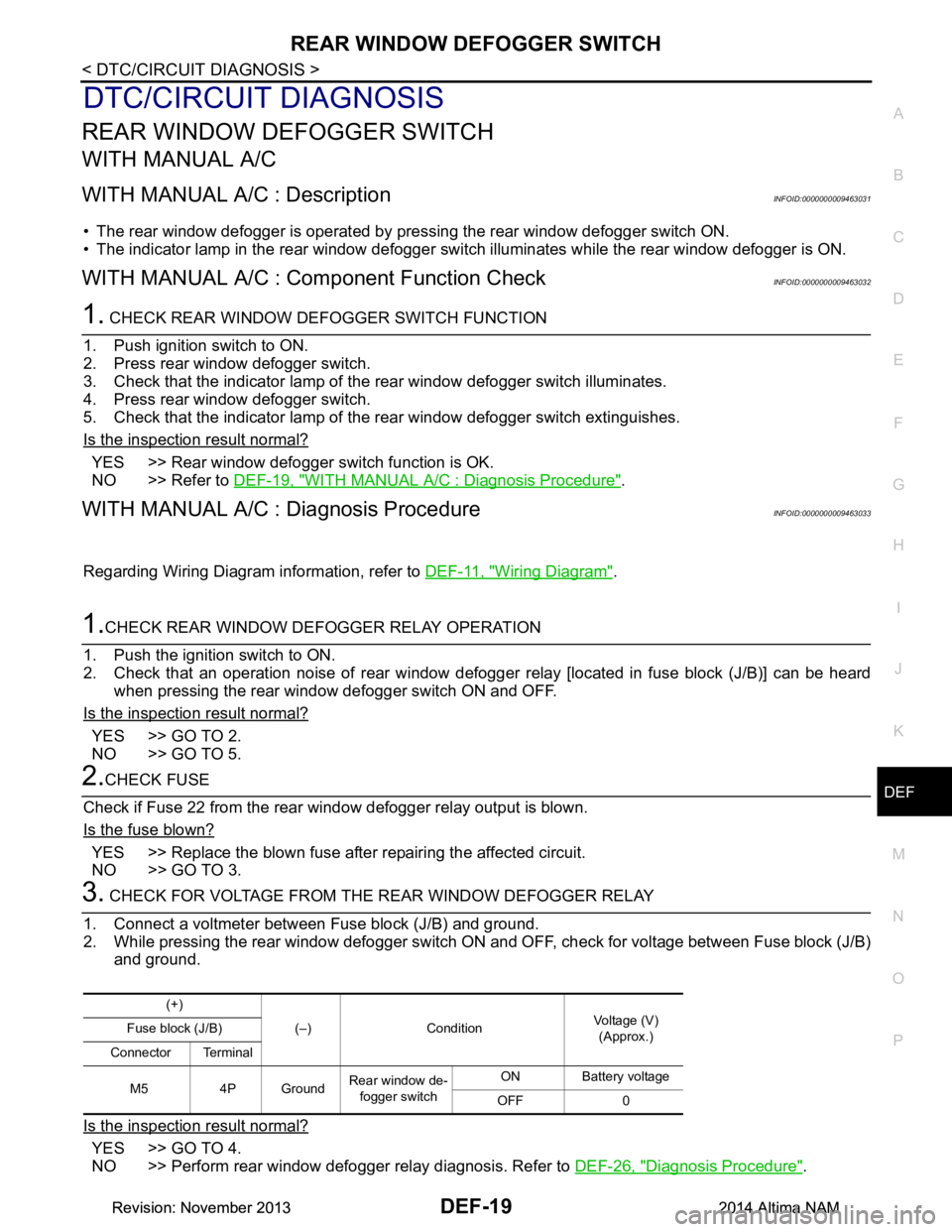
1.CHECK REAR WINDOW DEFOGGER RELAY OPERATION
1. Push the ignition switch to ON.
2. Check that an operation noise of rear window defogger relay [located in fuse block (J/B)] can be heard
when pressing the rear window defogger switch ON and OFF.
Is the inspection result normal?
YES >> GO TO 2.
NO >> GO TO 5.
2.CHECK FUSE
Check if Fuse 22 from the rear window defogger relay output is blown.
Is the fuse blown?
YES >> Replace the blown fuse after repairing the affected circuit.
NO >> GO TO 3.
3. CHECK FOR VOLTAGE FROM THE REAR WINDOW DEFOGGER RELAY
1. Connect a voltmeter between Fuse block (J/B) and ground.
2. While pressing the rear window defogger switch ON and OFF, check for voltage between Fuse block (J/B)
and ground.
Is the inspection result normal?
YES >> GO TO 4.
NO >> Perform rear window defogger relay diagnosis. Refer to DEF-26, "Diagnosis Procedure"
.
(+)
(–) Condition Voltage (V)
(Approx.)
Fuse block (J/B)
Connector Terminal
M5 4P Ground Rear window de-
fogger switch ON Battery voltage
OFF 0
Revision: November 20132014 Altima NAMRevision: November 20132014 Altima NAM
Page 746 of 4801
REAR WINDOW DEFOGGER SWITCHDEF-21
< DTC/CIRCUIT DIAGNOSIS >
C
D E
F
G H
I
J
K
M A
B
DEF
N
O P
YES >> Replace front air control. Refer to HAC-161, "Removal and Installation".
NO >> Repair or replace harness.
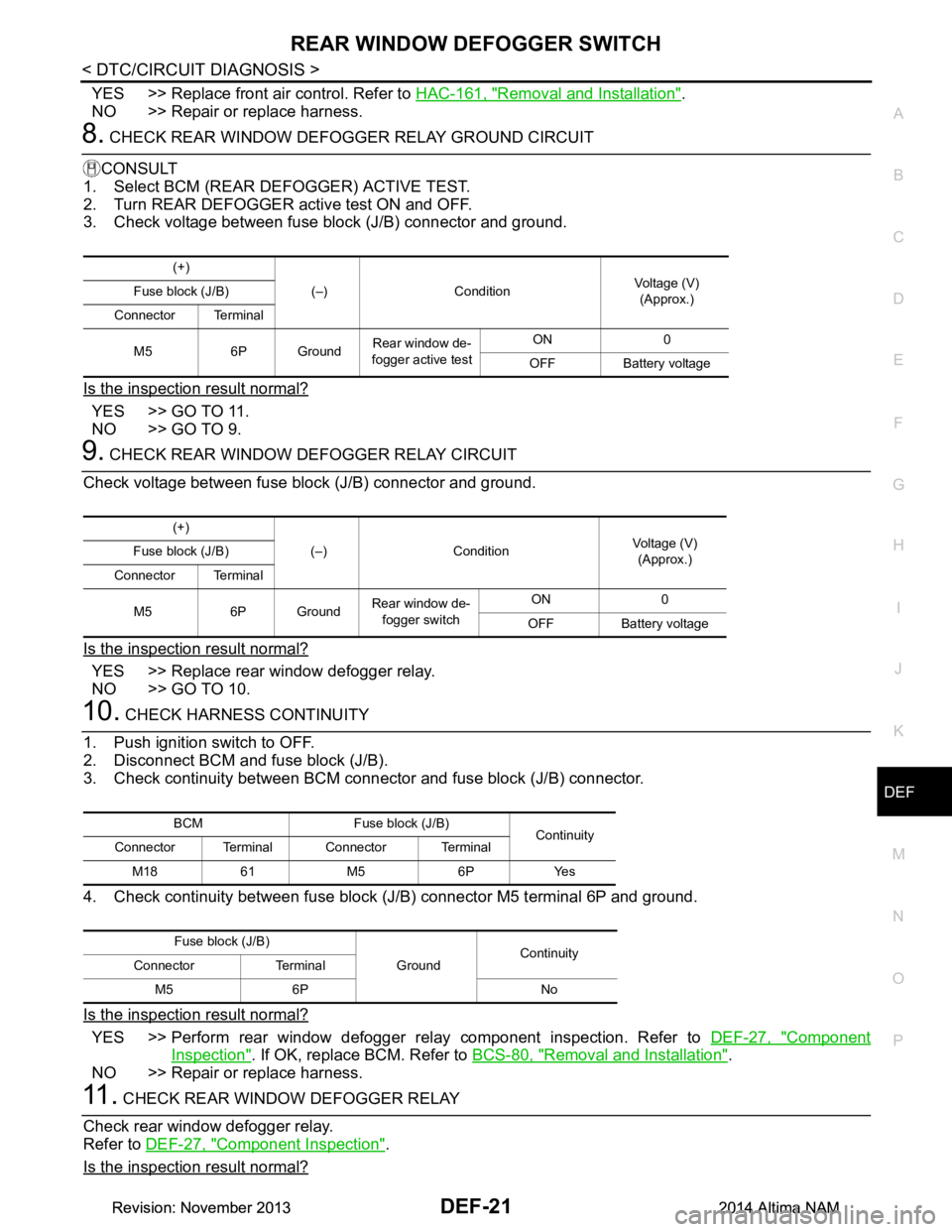
8. CHECK REAR WINDOW DEFOGGER RELAY GROUND CIRCUIT
CONSULT
1. Select BCM (REAR DEFOGGER) ACTIVE TEST.
2. Turn REAR DEFOGGER active test ON and OFF.
3. Check voltage between fuse block (J/B) connector and ground.
Is the inspection result normal?
YES >> GO TO 11.
NO >> GO TO 9.
9. CHECK REAR WINDOW DEFOGGER RELAY CIRCUIT
Check voltage between fuse block (J/B) connector and ground.
Is the inspection result normal?
YES >> Replace rear window defogger relay.
NO >> GO TO 10.
10. CHECK HARNESS CONTINUITY
1. Push ignition switch to OFF.
2. Disconnect BCM and fuse block (J/B).
3. Check continuity between BCM connector and fuse block (J/B) connector.
4. Check continuity between fuse block (J/B) connector M5 terminal 6P and ground.
Is the inspection result normal?
YES >> Perform rear window defogger relay component inspection. Refer to DEF-27, "Component
Inspection". If OK, replace BCM. Refer to BCS-80, "Removal and Installation".
NO >> Repair or replace harness.
11 . CHECK REAR WINDOW DEFOGGER RELAY
Check rear window defogger relay.
Refer to DEF-27, "Component Inspection"
.
Is the inspection result normal?
(+)
(–) Condition Voltage (V)
(Approx.)
Fuse block (J/B)
Connector Terminal
M5 6P Ground Rear window de-
fogger active test ON 0
OFF Battery voltage
(+) (–) Condition Voltage (V)
(Approx.)
Fuse block (J/B)
Connector Terminal
M5 6P Ground Rear window de-
fogger switch ON 0
OFF Battery voltage
BCM Fuse block (J/B) Continuity
Connector Terminal Connector Terminal
M18 61 M5 6P Yes
Fuse block (J/B) GroundContinuity
Connector Terminal
M5 6P No
Revision: November 20132014 Altima NAMRevision: November 20132014 Altima NAM
Page 747 of 4801
DEF-22
< DTC/CIRCUIT DIAGNOSIS >
REAR WINDOW DEFOGGER SWITCH
YES >> GO TO 12.
NO >> Replace rear window defogger relay.
12. CHECK INTERMITTENT INCIDENT
Check intermittent incident.
Refer to GI-43, "Intermittent Incident"
.
Is the inspection result normal?
YES >> Check the following. • Battery power supply circuit.
• Fuse block (J/B).
NO >> Repair or replace the malfunctioning parts.
WITH AUTO A/C
WITH AUTO A/C : DescriptionINFOID:0000000009463034
• The rear window defogger is operated by pres sing the rear window defogger switch ON.
• The indicator lamp in the rear window defogger switch illuminates while the rear window defogger is ON.
WITH AUTO A/C : Component Function CheckINFOID:0000000009463035
1. CHECK REAR WINDOW DEFOGGER SWITCH FUNCTION
1. Push ignition switch to ON.
2. Press rear window defogger switch.
3. Check that the indicator lamp of t he rear window defogger switch illuminates.
4. Press rear window defogger switch.
5. Check that the indicator lamp of t he rear window defogger switch extinguishes.
Is the inspection result normal?
YES >> Rear window defogger switch function is OK.
NO >> Refer to DEF-22, "WITH AUTO A/C : Diagnosis Procedure"
.
WITH AUTO A/C : Diagnosis ProcedureINFOID:0000000009463036
Regarding Wiring Diagram information, refer to DEF-11, "Wiring Diagram".
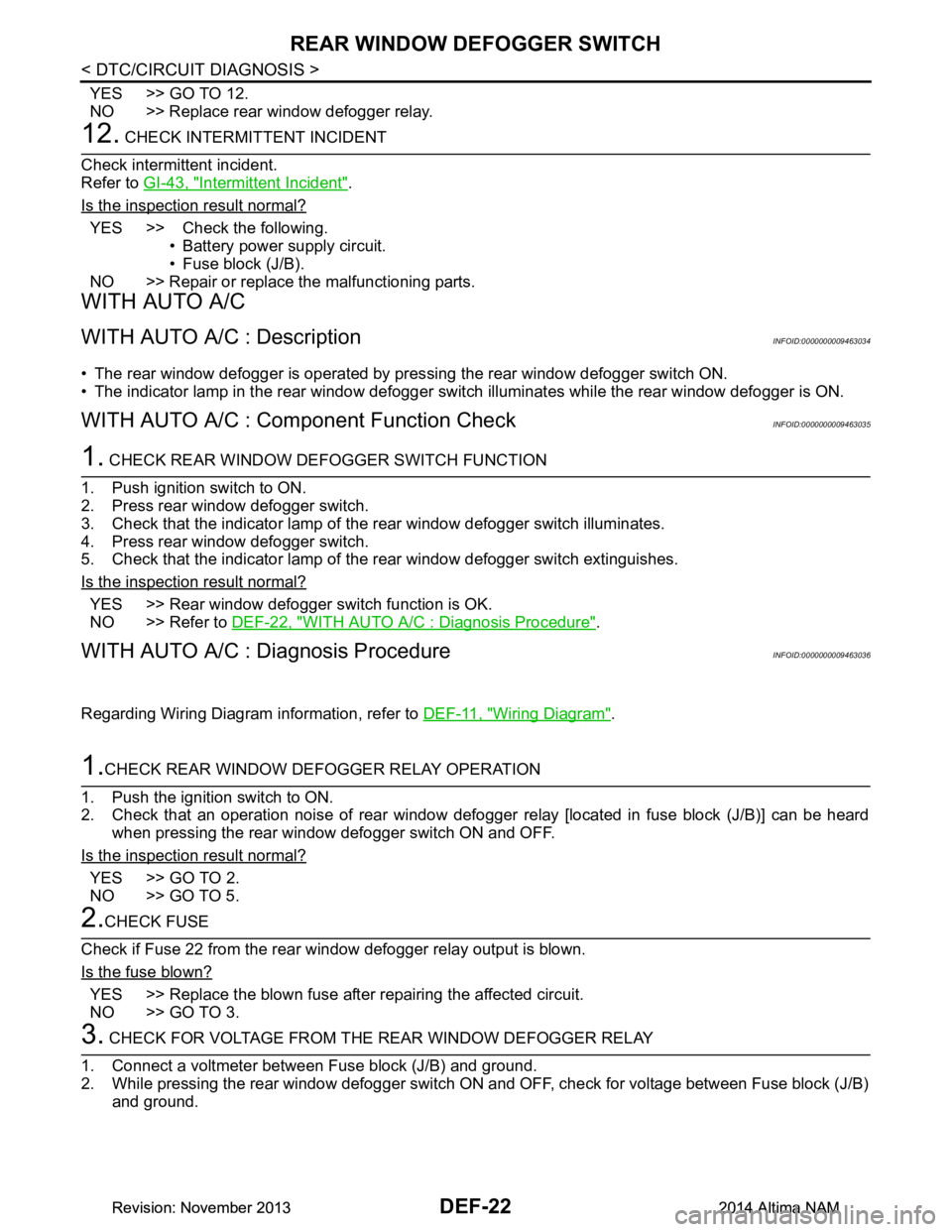
1.CHECK REAR WINDOW DEFOGGER RELAY OPERATION
1. Push the ignition switch to ON.
2. Check that an operation noise of rear window defogger relay [located in fuse block (J/B)] can be heard
when pressing the rear window defogger switch ON and OFF.
Is the inspection result normal?
YES >> GO TO 2.
NO >> GO TO 5.
2.CHECK FUSE
Check if Fuse 22 from the rear window defogger relay output is blown.
Is the fuse blown?
YES >> Replace the blown fuse after repairing the affected circuit.
NO >> GO TO 3.
3. CHECK FOR VOLTAGE FROM THE REAR WINDOW DEFOGGER RELAY
1. Connect a voltmeter between Fuse block (J/B) and ground.
2. While pressing the rear window defogger switch ON and OFF, check for voltage between Fuse block (J/B) and ground.
Revision: November 20132014 Altima NAMRevision: November 20132014 Altima NAM
Page 748 of 4801
REAR WINDOW DEFOGGER SWITCHDEF-23
< DTC/CIRCUIT DIAGNOSIS >
C
D E
F
G H
I
J
K
M A
B
DEF
N
O P
Is the inspection result normal?
YES >> GO TO 4.
NO >> Perform rear window defogger relay diagnosis. Refer to DEF-26, "Diagnosis Procedure"
.
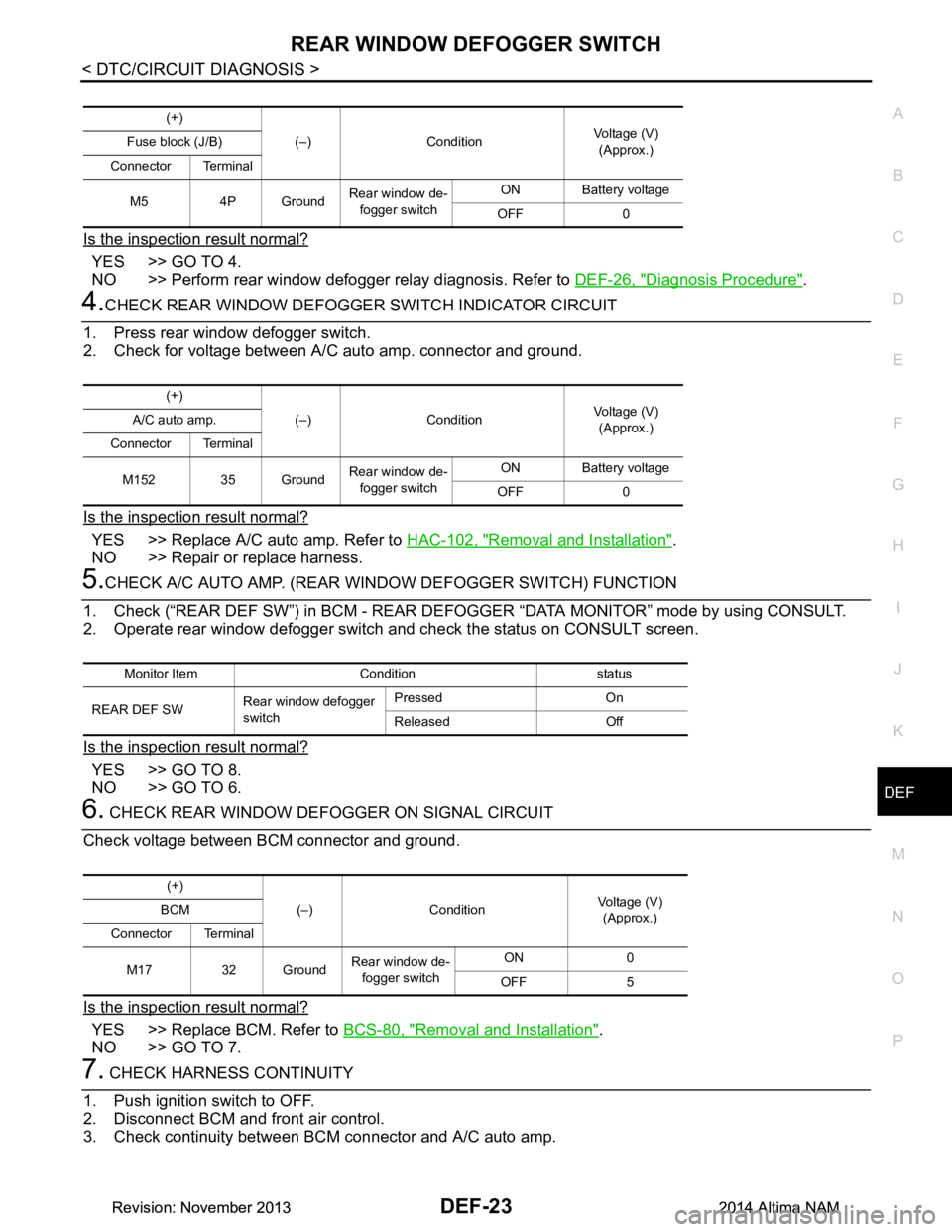
4.CHECK REAR WINDOW DEFOGGER SWITCH INDICATOR CIRCUIT
1. Press rear window defogger switch.
2. Check for voltage between A/C auto amp. connector and ground.
Is the inspection result normal?
YES >> Replace A/C auto amp. Refer to HAC-102, "Removal and Installation".
NO >> Repair or replace harness.
5.CHECK A/C AUTO AMP. (REAR WI NDOW DEFOGGER SWITCH) FUNCTION
1. Check (“REAR DEF SW”) in BCM - REAR DEFOGG ER “DATA MONITOR” mode by using CONSULT.
2. Operate rear window defogger switch and check the status on CONSULT screen.
Is the inspection result normal?
YES >> GO TO 8.
NO >> GO TO 6.
6. CHECK REAR WINDOW DEFOGGER ON SIGNAL CIRCUIT
Check voltage between BCM connector and ground.
Is the inspection result normal?
YES >> Replace BCM. Refer to BCS-80, "Removal and Installation".
NO >> GO TO 7.
7. CHECK HARNESS CONTINUITY
1. Push ignition switch to OFF.
2. Disconnect BCM and front air control.
3. Check continuity between BCM connector and A/C auto amp.
(+)
(–) Condition Voltage (V)
(Approx.)
Fuse block (J/B)
Connector Terminal
M5 4P Ground Rear window de-
fogger switch ON Battery voltage
OFF 0
(+) (–) Condition Voltage (V)
(Approx.)
A/C auto amp.
Connector Terminal
M152 35 Ground Rear window de-
fogger switch ON Battery voltage
OFF 0
Monitor Item Condition status
REAR DEF SW Rear window defogger
switch Pressed On
Released Off
(+) (–) Condition Voltage (V)
(Approx.)
BCM
Connector Terminal
M17 32 Ground Rear window de-
fogger switch ON 0
OFF 5
Revision: November 20132014 Altima NAMRevision: November 20132014 Altima NAM
Page 749 of 4801
DEF-24
< DTC/CIRCUIT DIAGNOSIS >
REAR WINDOW DEFOGGER SWITCH
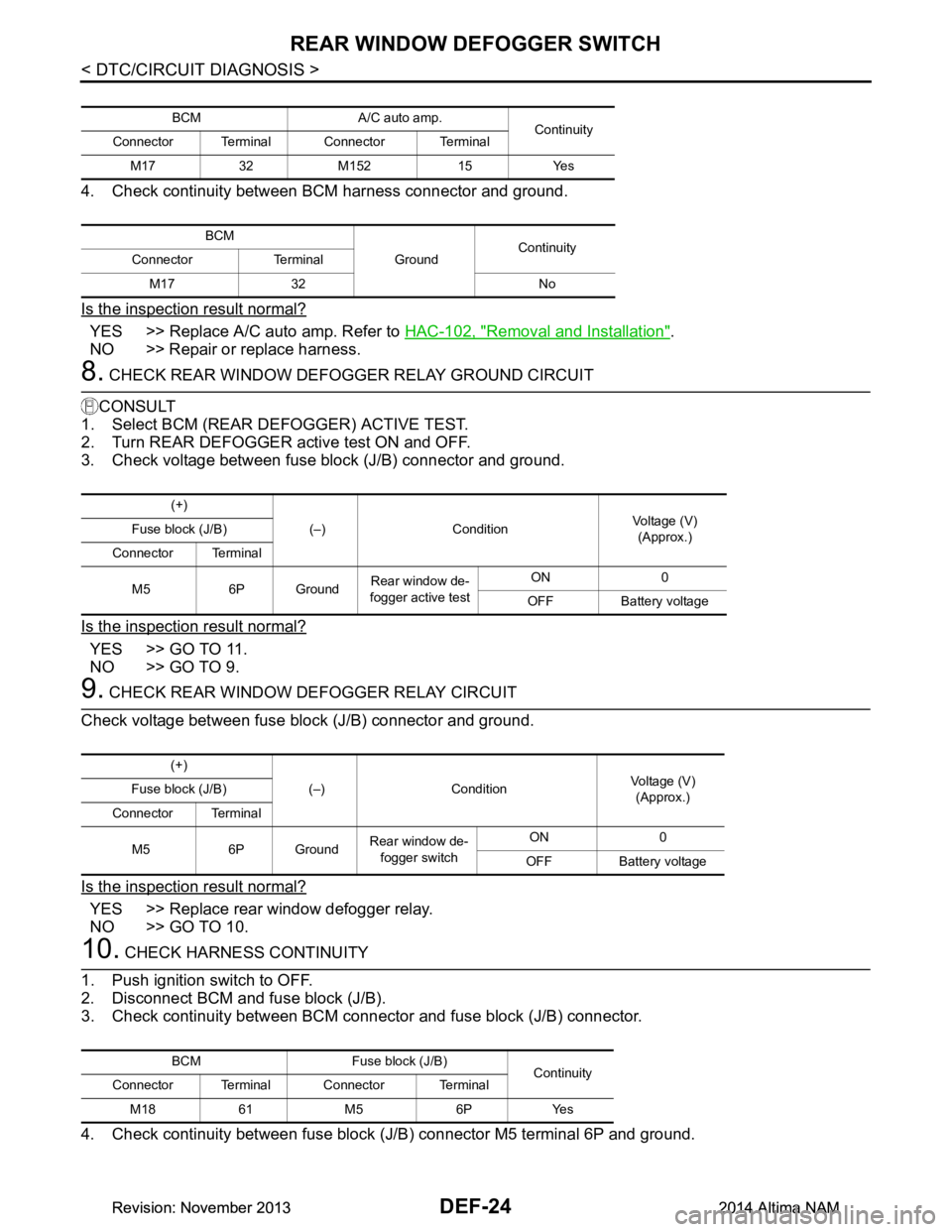
4. Check continuity between BCM harness connector and ground.
Is the inspection result normal?
YES >> Replace A/C auto amp. Refer to HAC-102, "Removal and Installation".
NO >> Repair or replace harness.
8. CHECK REAR WINDOW DEFOGGER RELAY GROUND CIRCUIT
CONSULT
1. Select BCM (REAR DE FOGGER) ACTIVE TEST.
2. Turn REAR DEFOGGER active test ON and OFF.
3. Check voltage between fuse block (J/B) connector and ground.
Is the inspection result normal?
YES >> GO TO 11.
NO >> GO TO 9.
9. CHECK REAR WINDOW DEFOGGER RELAY CIRCUIT
Check voltage between fuse block (J/B) connector and ground.
Is the inspection result normal?
YES >> Replace rear window defogger relay.
NO >> GO TO 10.
10. CHECK HARNESS CONTINUITY
1. Push ignition switch to OFF.
2. Disconnect BCM and fuse block (J/B).
3. Check continuity between BCM connec tor and fuse block (J/B) connector.
4. Check continuity between fuse block (J/B) connector M5 terminal 6P and ground.
BCM A/C auto amp. Continuity
Connector Terminal Connector Terminal
M17 32 M152 15 Yes
BCM GroundContinuity
Connector Terminal
M17 32 No
(+) (–) Condition Voltage (V)
(Approx.)
Fuse block (J/B)
Connector Terminal
M5 6P Ground Rear window de-
fogger active test ON 0
OFF Battery voltage
(+) (–) Condition Voltage (V)
(Approx.)
Fuse block (J/B)
Connector Terminal
M5 6P Ground Rear window de-
fogger switch ON 0
OFF Battery voltage
BCM Fuse block (J/B) Continuity
Connector Terminal Connector Terminal
M18 61 M5 6P Yes
Revision: November 20132014 Altima NAMRevision: November 20132014 Altima NAM
Page 750 of 4801
REAR WINDOW DEFOGGER SWITCHDEF-25
< DTC/CIRCUIT DIAGNOSIS >
C
D E
F
G H
I
J
K
M A
B
DEF
N
O P
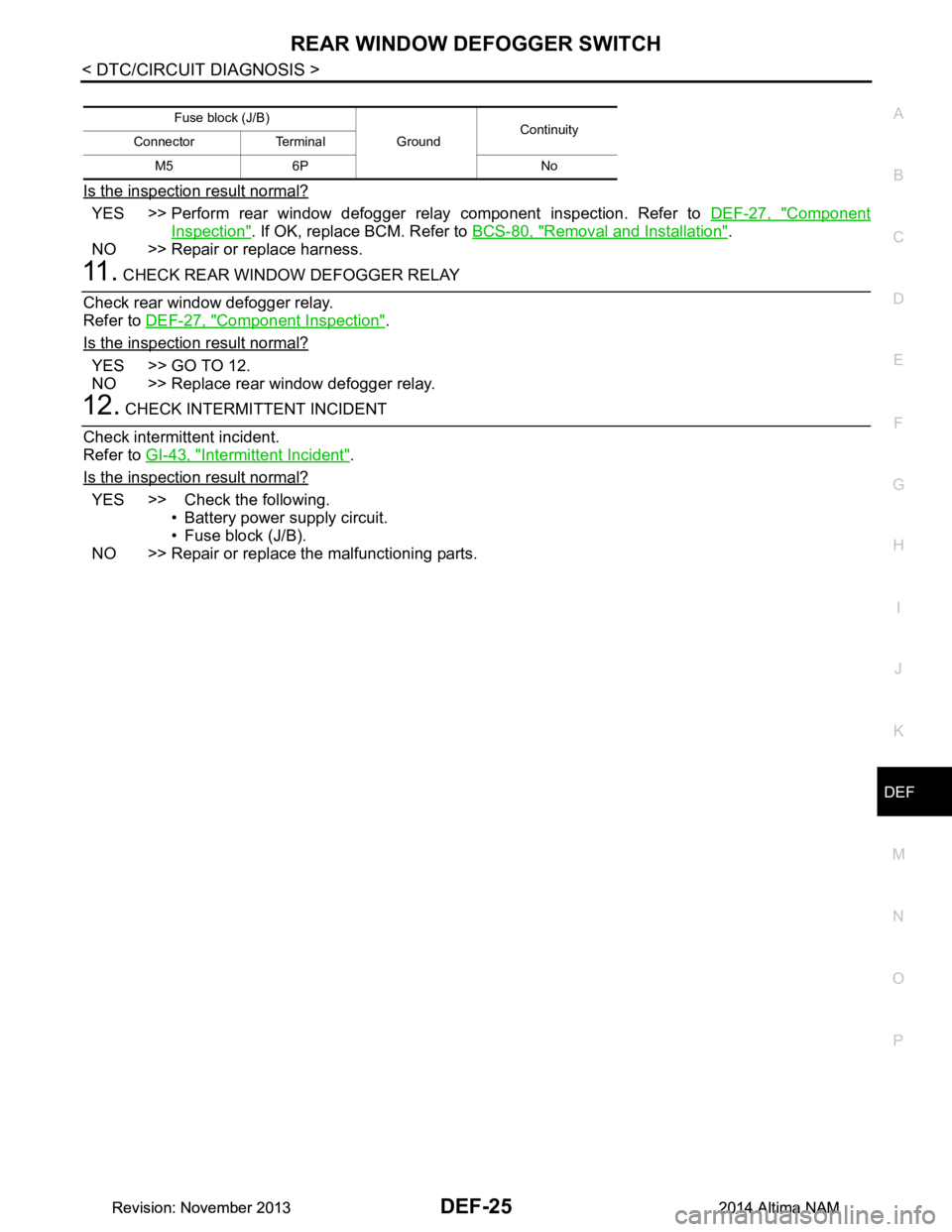
Is the inspection result normal?
YES >> Perform rear window defogger relay component inspection. Refer to DEF-27, "Component
Inspection". If OK, replace BCM. Refer to BCS-80, "Removal and Installation".
NO >> Repair or replace harness.
11 . CHECK REAR WINDOW DEFOGGER RELAY
Check rear window defogger relay.
Refer to DEF-27, "Component Inspection"
.
Is the inspection result normal?
YES >> GO TO 12.
NO >> Replace rear window defogger relay.
12. CHECK INTERMITTENT INCIDENT
Check intermittent incident.
Refer to GI-43, "Intermittent Incident"
.
Is the inspection result normal?
YES >> Check the following. • Battery power supply circuit.
• Fuse block (J/B).
NO >> Repair or replace the malfunctioning parts.
Fuse block (J/B)
GroundContinuity
Connector Terminal
M5 6P No
Revision: November 20132014 Altima NAMRevision: November 20132014 Altima NAM