fuse NISSAN TEANA 2014 User Guide
[x] Cancel search | Manufacturer: NISSAN, Model Year: 2014, Model line: TEANA, Model: NISSAN TEANA 2014Pages: 4801, PDF Size: 51.2 MB
Page 216 of 4801
![NISSAN TEANA 2014 User Guide
BRC-70
< DTC/CIRCUIT DIAGNOSIS >[VDC/TCS/ABS]
C1109 POWER AND GROUND SYSTEM
C1109 POWER AND GROUND SYSTEM
DTC LogicINFOID:0000000009463774
DTC DETECTION LOGIC
DTC CONFIRMATION PROCEDURE
1.CHECK SELF](/img/5/57390/w960_57390-215.png "NISSAN TEANA 2014 User Guide
BRC-70
< DTC/CIRCUIT DIAGNOSIS >[VDC/TCS/ABS]
C1109 POWER AND GROUND SYSTEM
C1109 POWER AND GROUND SYSTEM
DTC LogicINFOID:0000000009463774
DTC DETECTION LOGIC
DTC CONFIRMATION PROCEDURE
1.CHECK SELF")
BRC-70
< DTC/CIRCUIT DIAGNOSIS >[VDC/TCS/ABS]
C1109 POWER AND GROUND SYSTEM
C1109 POWER AND GROUND SYSTEM
DTC LogicINFOID:0000000009463774
DTC DETECTION LOGIC
DTC CONFIRMATION PROCEDURE
1.CHECK SELF DIAGNOSTIC RESULT
With CONSULT.
1. Turn the ignition switch ON.
2. Perform self diagnostic result.
Is DTC C1109 detected?
YES >> Proceed to diagnosis procedure. Refer to BRC-70, "Diagnosis Procedure".
NO >> Inspection End.
Diagnosis ProcedureINFOID:0000000009463775
Regarding Wiring Diagram information, refer to BRC-47, "Wiring Diagram".
1.CONNECTOR INSPECTION
1. Turn ignition switch OFF.
2. Disconnect ABS actuator and electric unit (control unit) connectors.
3. Check connectors and terminals for deformation, disconnection, looseness or damage.
Is the inspection result normal?
YES >> GO TO 2
NO >> Repair or replace as necessary.
2.CHECK ABS ACTUATOR AND ELECTRIC UNIT (CON TROL UNIT) IGNITION POWER SUPPLY CIRCUIT
Check voltage between ABS actuator and electric uni t (control unit) connector E54 terminal 28 and ground.
Is the inspection result normal?
YES >> GO TO 3
NO >> Repair or replace malfunctioning components.
3.CHECK ABS ACTUATOR AND ELECTRIC UNIT (CONTROL UNIT) GROUND CIRCUIT
1. Turn ignition switch OFF.
2. Check continuity between ABS actuator and electric unit (control unit) connector E54 terminals 13, 38 and
ground.
DTC Display Item Malfunction detected condition Possible causes
C1109 BATTERY VOLTAGE
[ABNORMAL] • When ignition voltage is 10 V or less.
• When ignition voltage is 16 V or more. • Harness or connector
• ABS actuator and electric unit
(control unit)
•Fuse
• Ignition power supply system
• Battery
ABS actuator and electric unit (control unit) Ground Condition Voltage
Connector Terminal
E54 28 — Ignition switch ON Battery voltage
Ignition switch OFF 0V
Revision: November 20132014 Altima NAMRevision: November 20132014 Altima NAM
Page 221 of 4801
![NISSAN TEANA 2014 User Guide
C1113, C1145, C1146 YAW RATE/SIDE/DECEL G SENSOR
BRC-75
< DTC/CIRCUIT DIAGNOSIS > [VDC/TCS/ABS]
C
D E
G H
I
J
K L
M A
B
BRC
N
O P
C1113, C1145, C1146 YAW RATE/SIDE/DECEL G SENSOR
DTC LogicINFOID:00](/img/5/57390/w960_57390-220.png "NISSAN TEANA 2014 User Guide
C1113, C1145, C1146 YAW RATE/SIDE/DECEL G SENSOR
BRC-75
< DTC/CIRCUIT DIAGNOSIS > [VDC/TCS/ABS]
C
D E
G H
I
J
K L
M A
B
BRC
N
O P
C1113, C1145, C1146 YAW RATE/SIDE/DECEL G SENSOR
DTC LogicINFOID:00")
C1113, C1145, C1146 YAW RATE/SIDE/DECEL G SENSOR
BRC-75
< DTC/CIRCUIT DIAGNOSIS > [VDC/TCS/ABS]
C
D E
G H
I
J
K L
M A
B
BRC
N
O P
C1113, C1145, C1146 YAW RATE/SIDE/DECEL G SENSOR
DTC LogicINFOID:0000000009463780
DTC DETECTION LOGIC
DTC CONFIRMATION PROCEDURE
1.CHECK SELF DIAGNOSTIC RESULT
With CONSULT.
1. Turn ignition switch OFF to ON.
2. Perform self diagnostic result.
Is DTC C1113, C1145 or C1146 detected?
YES >> Proceed to diagnosis procedure. Refer to BRC-75, "Diagnosis Procedure".
NO >> Inspection End.
Diagnosis ProcedureINFOID:0000000009463781
1.REPLACE ABS ACTUATOR AND ELECTRIC UNIT (CONTROL UNIT)
Replace ABS actuator and electric unit (control unit).
>> Replace ABS actuator and electric unit (control unit). Refer to BRC-128, "Removal and Installa-
tion".
DTC Display Item Malfunction detected condition Possible causes
C1113 G SENSOR When a malfunction is detected in longitunal G sensor
signal.
• Harness or connector
• Yaw rate/side/decel G sensor
• ABS actuator and electric unit (control unit)
• Ignition power supply system
•Fuse
C1145 YAW RATE SENSOR • When a malfunction is detected in yaw rate signal.
• When yaw rate signal is not continuously received for 2 seconds or more.
• When side G signal is not continuously received for
2 seconds or more.
• When decel G signal is not continuously received for 2 seconds or more.
C1146 SIDE G-SEN CIRCUIT When a malfunction is detected in side/decel G sig-
nal.
Revision: November 20132014 Altima NAMRevision: November 20132014 Altima NAM
Page 234 of 4801
![NISSAN TEANA 2014 User Guide
BRC-88
< DTC/CIRCUIT DIAGNOSIS >[VDC/TCS/ABS]
C1143 STEERING ANGLE SENSOR
C1143 STEERING ANGLE SENSOR
DTC LogicINFOID:0000000009463796
DTC DETECTION LOGIC
DTC CONFIRMATION PROCEDURE
1.CHECK SELF DIA](/img/5/57390/w960_57390-233.png "NISSAN TEANA 2014 User Guide
BRC-88
< DTC/CIRCUIT DIAGNOSIS >[VDC/TCS/ABS]
C1143 STEERING ANGLE SENSOR
C1143 STEERING ANGLE SENSOR
DTC LogicINFOID:0000000009463796
DTC DETECTION LOGIC
DTC CONFIRMATION PROCEDURE
1.CHECK SELF DIA")
BRC-88
< DTC/CIRCUIT DIAGNOSIS >[VDC/TCS/ABS]
C1143 STEERING ANGLE SENSOR
C1143 STEERING ANGLE SENSOR
DTC LogicINFOID:0000000009463796
DTC DETECTION LOGIC
DTC CONFIRMATION PROCEDURE
1.CHECK SELF DIAGNOSTIC RESULT
With CONSULT.
1. Turn ignition switch ON.
2. Perform self diagnostic result.
Is DTC C1143 detected?
YES >> Proceed to diagnosis procedure. Refer to BRC-88, "Diagnosis Procedure".
NO >> Inspection End.
Diagnosis ProcedureINFOID:0000000009463797
Regarding Wiring Diagram information, refer to BRC-47, "Wiring Diagram".
1.CONNECTOR INSPECTION
1. Turn ignition switch OFF.
2. Disconnect ABS actuator and electric unit (cont rol unit) and steering angle sensor connectors.
3. Check connectors and terminals for deformation, disconnection, looseness or damage.
Is the inspection result normal?
YES >> GO TO 2.
NO >> Repair or replace as necessary.
2.CHECK STEERING ANGLE SENSOR MOUNTING CONDITION
Check steering angle sensor mounting condition.
Is the inspection result normal?
YES >> GO TO 3.
NO >> Repair or replace malfunctioning components.
3.CHECK STEERING ANGLE SENSOR POWER SUPPLY
1. Turn ignition switch OFF.
2. Disconnect steering angle sensor connector.
3. Turn ignition switch ON.
4. Check voltage between steering angle sensor connector M53 terminal 4 and ground.
Is the inspection result normal?
YES >> GO TO 5.
DTC Display Item Malfunction detected condition Possible causes
C1143 ST ANG SEN CIRCUIT When a malfunction is detected in steering angle sen-
sor. • Harness or connector
• Steering angle sensor
• ABS actuator and electric unit (control unit)
•Fuse
• Ignition power supply system
• CAN communication line
Steering angle sensor —Vo l ta g e
(Approx.)
Connector Terminal
M53 4 Ground Battery voltage
Revision: November 20132014 Altima NAMRevision: November 20132014 Altima NAM
Page 368 of 4801
CHG
CHARGING SYSTEM PRELIMINARY INSPECTIONCHG-23
< DTC/CIRCUIT DIAGNOSIS >
C
D E
F
G H
I
J
K L
B
A
O P
N
DTC/CIRCUIT DIAGNOSIS
CHARGING SYSTEM PRELIMINARY INSPECTION
Diagnosis ProcedureINFOID:0000000009460659
1.CHECK BATTERY TERMINALS CONNECTION
Check if battery terminals are clean and tight.
Is the inspection result normal?
YES >> GO TO 2.
NO >> Repair battery terminal connection. Confirm repair by performing complete Charging system test
using EXP-800 NI or GR8-1200 NI (if available). Refer to the applicable Instruction Manual for
proper testing procedures.
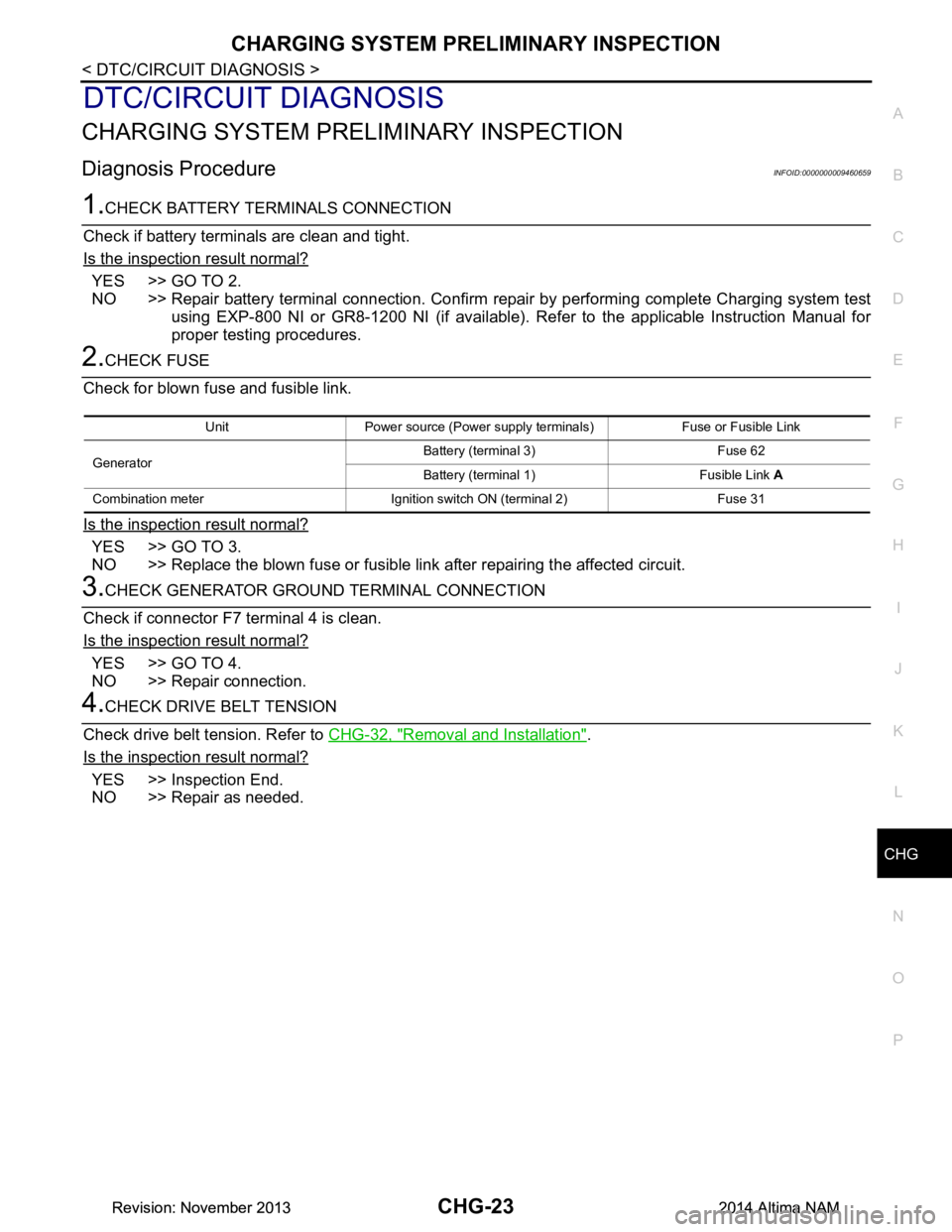
2.CHECK FUSE
Check for blown fuse and fusible link.
Is the inspection result normal?
YES >> GO TO 3.
NO >> Replace the blown fuse or fusible link after repairing the affected circuit.
3.CHECK GENERATOR GROUND TERMINAL CONNECTION
Check if connector F7 terminal 4 is clean.
Is the inspection result normal?
YES >> GO TO 4.
NO >> Repair connection.
4.CHECK DRIVE BELT TENSION
Check drive belt tension. Refer to CHG-32, "Removal and Installation"
.
Is the inspection result normal?
YES >> Inspection End.
NO >> Repair as needed.
Unit Power source (Power supply terminals) Fuse or Fusible Link
Generator Battery (terminal 3) Fuse 62
Battery (terminal 1) Fusible Link A
Combination meter Ignition switch ON (terminal 2) Fuse 31
Revision: November 20132014 Altima NAMRevision: November 20132014 Altima NAM
Page 372 of 4801
CHG
L TERMINAL CIRCUIT (OPEN)CHG-27
< DTC/CIRCUIT DIAGNOSIS >
C
D E
F
G H
I
J
K L
B
A
O P
N
L TERMINAL CIRCUIT (OPEN)
DescriptionINFOID:0000000009460663
The “L” terminal circuit controls the charge warning
lamp. The charge warning lamp turns ON when the igni-
tion switch is set to ON or START. When the generator is providing sufficient voltage with the engine running,
the charge warning lamp turns OFF. If the charge warn ing lamp illuminates with the engine running, a malfunc-
tion is indicated.
Diagnosis ProcedureINFOID:0000000009460664
Regarding Wiring Diagram information. Refer to CHG-12, "Wiring Diagram".
1.CHECK “L” TERMINAL CONNECTION
1. Turn ignition switch OFF.
2. Check if “L” terminal is clean and tight.
Is the inspection result normal?
YES >> GO TO 2.
NO >> Repair “L” terminal connection. Confirm repair by performing complete Charging system test
using EXP-800 NI or GR8-1200 NI (if available). Refer to applicable Instruction Manual for proper
testing procedures.
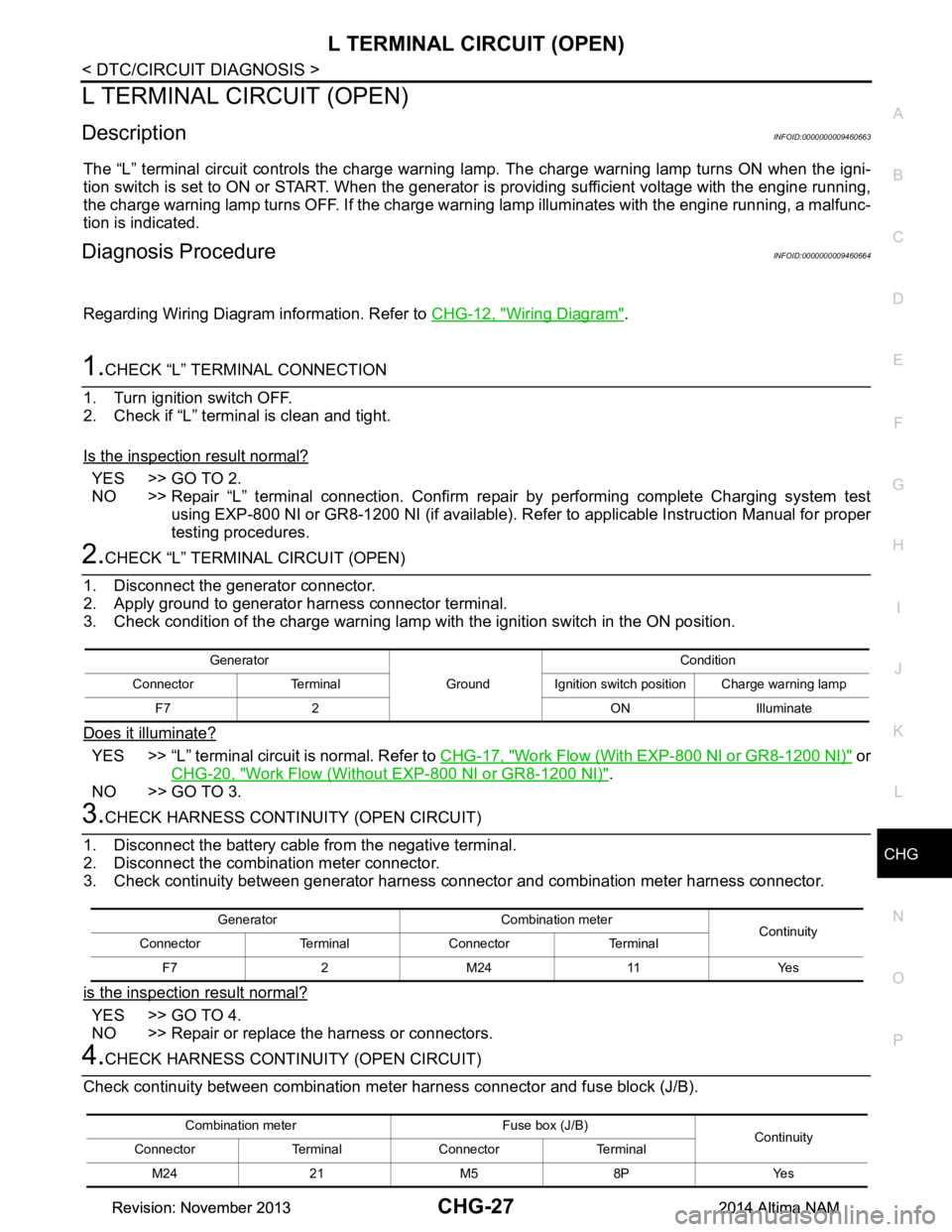
2.CHECK “L” TERMINAL CIRCUIT (OPEN)
1. Disconnect the generator connector.
2. Apply ground to generator harness connector terminal.
3. Check condition of the charge warning lamp with the ignition switch in the ON position.
Does it illuminate?
YES >> “L” terminal circuit is normal. Refer to CHG-17, "Work Flow (With EXP-800 NI or GR8-1200 NI)" or
CHG-20, "Work Flow (Without EXP-800 NI or GR8-1200 NI)"
.
NO >> GO TO 3.
3.CHECK HARNESS CONTI NUITY (OPEN CIRCUIT)
1. Disconnect the battery cabl e from the negative terminal.
2. Disconnect the combination meter connector.
3. Check continuity between generator harness connector and combination meter harness connector.
is the inspection result normal?
YES >> GO TO 4.
NO >> Repair or replace the harness or connectors.
4.CHECK HARNESS CONTI NUITY (OPEN CIRCUIT)
Check continuity between combination me ter harness connector and fuse block (J/B).
Generator
GroundCondition
Connector Terminal Ignition switch position Charge warning lamp F7 2 ON Illuminate
Generator Combination meter Continuity
Connector Terminal Connector Terminal
F7 2 M24 11 Yes
Combination meter Fuse box (J/B) Continuity
Connector Terminal Connector Terminal
M24 21 M5 8P Yes
Revision: November 20132014 Altima NAMRevision: November 20132014 Altima NAM
Page 375 of 4801
CHG-30
< DTC/CIRCUIT DIAGNOSIS >
S TERMINAL CIRCUIT
S TERMINAL CIRCUIT
DescriptionINFOID:0000000009460667
The output voltage of the generator is controlled by the IC regulator at terminal “S” detecting the input voltage
from battery.
The “S” terminal circuit detects the battery voltage to adjust the generator output voltage with the IC voltage
regulator.
Diagnosis ProcedureINFOID:0000000009460668
Regarding Wiring Diagram information. Refer to CHG-12, "Wiring Diagram".
1.CHECK “S” TERMINAL CONNECTION
1. Turn ignition switch OFF.
2. Check if “S” terminal is clean and tight.
Is the inspection result normal?
YES >> GO TO 2.
NO >> Repair “S” terminal connection. Confirm repa ir by performing complete Charging system test
using EXP-800 NI or GR8-1200 NI (if available). Refer to the applicable Instruction Manual for
proper testing procedures.
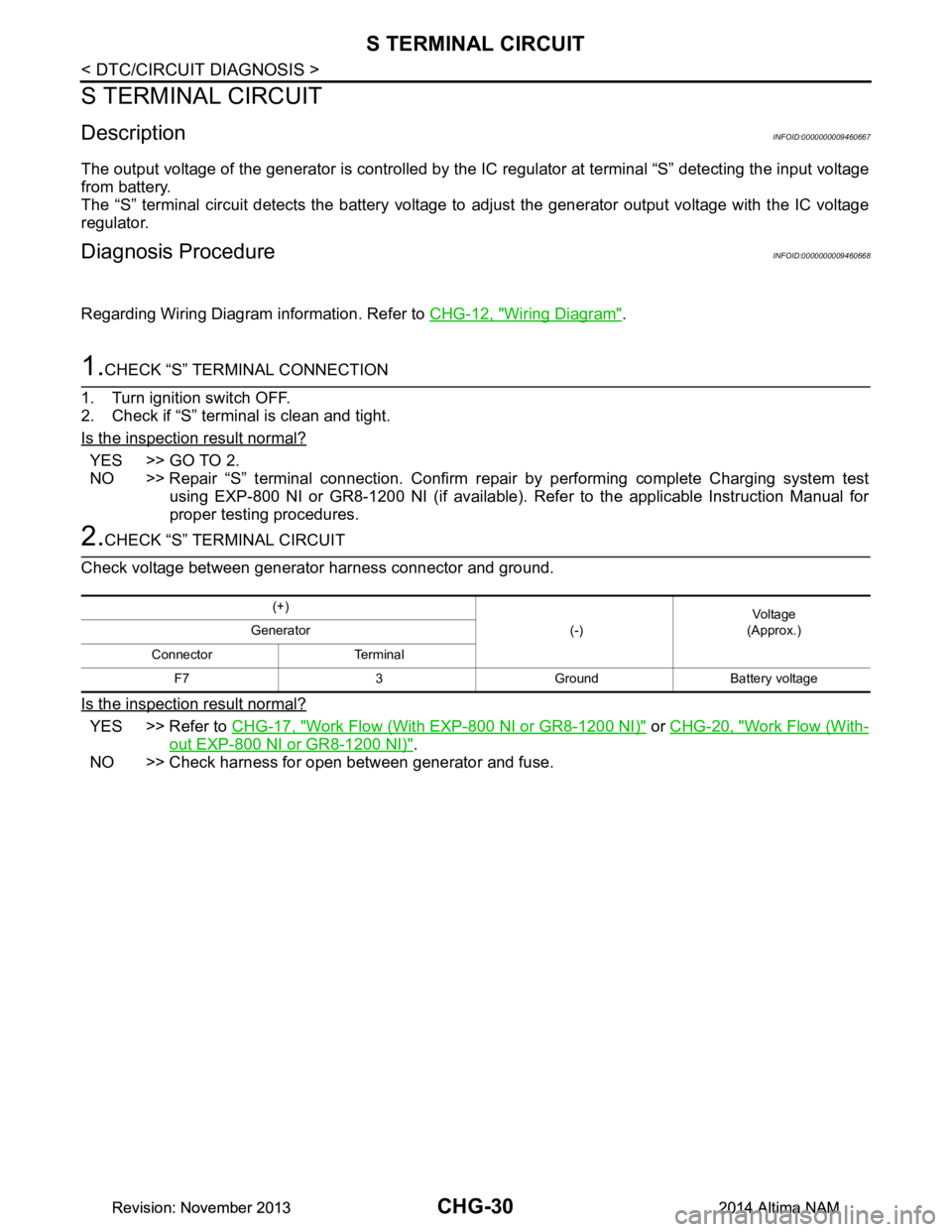
2.CHECK “S” TERMINAL CIRCUIT
Check voltage between generator harness connector and ground.
Is the inspection result normal?
YES >> Refer to CHG-17, "Work Flow (With EXP-800 NI or GR8-1200 NI)" or CHG-20, "Work Flow (With-
out EXP-800 NI or GR8-1200 NI)".
NO >> Check harness for open between generator and fuse.
(+)
(-)Voltage
(Approx.)
Generator
Connector Terminal F7 3 Ground Battery voltage
Revision: November 20132014 Altima NAMRevision: November 20132014 Altima NAM
Page 489 of 4801
![NISSAN TEANA 2014 User Guide
DAS-56
< DTC/CIRCUIT DIAGNOSIS >[ITS CONTROL UNIT]
U1309 PUMP UNIT CURRENT
2. Check for continuity between ITS control unit harne
ss connector and rear view camera washer control
unit connector.
3.](/img/5/57390/w960_57390-488.png "NISSAN TEANA 2014 User Guide
DAS-56
< DTC/CIRCUIT DIAGNOSIS >[ITS CONTROL UNIT]
U1309 PUMP UNIT CURRENT
2. Check for continuity between ITS control unit harne
ss connector and rear view camera washer control
unit connector.
3.")
DAS-56
< DTC/CIRCUIT DIAGNOSIS >[ITS CONTROL UNIT]
U1309 PUMP UNIT CURRENT
2. Check for continuity between ITS control unit harne
ss connector and rear view camera washer control
unit connector.
3. Check for continuity between ITS control unit harness connector and ground.
Is inspection result normal?
YES >> GO TO 4.
NO >> Repair the harness or connector.
4.CHECK CONTINUITY REAR VIEW CAME RA WASHER CONTROL UNIT TO PUMP
1. Disconnect rear view camera air pump connector.
2. Check for continuity between rear view camera washer control unit connector and pump connector.
3. Check for continuity between rear view ca mera washer control unit connector and ground.
Is inspection result normal?
YES >> GO TO 5.
NO >> Repair the harness or connector.
5.CHECK REAR VIEW CAMERA AIR PUMP MOTOR ITS CONTROL UNIT SUPPLY CIRCUIT
Momentarily connect a jumper from a fused battery positiv e to terminal 1 and from ground to terminal 2 of the
rear view camera air pump motor.
Does the pump operate?
YES >> GO TO 6.
NO >> Replace the rear view camera air pump motor.
6.CHECK REAR VIEW CAMERA AIR PUMP MOTOR ITS CONTROL UNIT SUPPLY CIRCUIT
1. Reconnect the ITS control unit connector.
2. Turn the ignition switch ON.
3. Using CONSULT, activate the rear view camera air pump while checking voltage between rear view cam-
era washer control unit connector and ground.
ITS control unit Rear view camera washer
control unit Continuity
Connector Terminal Connector Terminal
M58 2
B167
Ye s
38
ITS control unit GroundContinuity
Connector Terminal
M58 2
No
3
Rear view camera washer control unit Rear view camera air
pump motor Continuity
Connector Terminal Connector Terminal
B16 1
B171
Ye s
22
Rear view camera washer control unit GroundContinuity
Connector Terminal
B16 1
No
2
Revision: November 20132014 Altima NAMRevision: November 20132014 Altima NAM
Page 493 of 4801
![NISSAN TEANA 2014 User Guide
DAS-60
< DTC/CIRCUIT DIAGNOSIS >[ITS CONTROL UNIT]
U1310 PUMP UNIT CIRCUIT
2. Check for continuity between ITS control unit harne
ss connector and rear view camera washer control
unit connector.
3.](/img/5/57390/w960_57390-492.png "NISSAN TEANA 2014 User Guide
DAS-60
< DTC/CIRCUIT DIAGNOSIS >[ITS CONTROL UNIT]
U1310 PUMP UNIT CIRCUIT
2. Check for continuity between ITS control unit harne
ss connector and rear view camera washer control
unit connector.
3.")
DAS-60
< DTC/CIRCUIT DIAGNOSIS >[ITS CONTROL UNIT]
U1310 PUMP UNIT CIRCUIT
2. Check for continuity between ITS control unit harne
ss connector and rear view camera washer control
unit connector.
3. Check for continuity between ITS control unit harness connector and ground.
Is inspection result normal?
YES >> GO TO 4.
NO >> Repair the harness or connector.
4.CHECK CONTINUITY REAR VIEW CAME RA WASHER CONTROL UNIT TO PUMP
1. Disconnect rear view camera air pump connector.
2. Check for continuity between rear view camera washer control unit connector and pump connector.
3. Check for continuity between rear view ca mera washer control unit connector and ground.
Is inspection result normal?
YES >> GO TO 5.
NO >> Repair the harness or connector.
5.CHECK REAR VIEW CAMERA AIR PUMP MOTOR ITS CONTROL UNIT SUPPLY CIRCUIT
Momentarily connect a jumper from a fused battery positiv e to terminal 1 and from ground to terminal 2 of the
rear view camera air pump motor.
Does the pump operate?
YES >> GO TO 6.
NO >> Replace the rear view camera air pump motor.
6.CHECK REAR VIEW CAMERA AIR PUMP MOTOR ITS CONTROL UNIT SUPPLY CIRCUIT
1. Reconnect the ITS control unit connector.
2. Turn the ignition switch ON.
3. Activate the rear view camera air pump while checking voltage between rear view camera washer control
unit connector and ground.
ITS control unit Rear view camera washer
control unit Continuity
Connector Terminal Connector Terminal
M58 2
B167
Ye s
38
ITS control unit GroundContinuity
Connector Terminal
M58 2
No
3
Rear view camera washer control unit Rear view camera air
pump motor Continuity
Connector Terminal Connector Terminal
B16 1
B171
Ye s
22
Rear view camera washer control unit GroundContinuity
Connector Terminal
B16 1
No
2
Revision: November 20132014 Altima NAMRevision: November 20132014 Altima NAM
Page 558 of 4801
![NISSAN TEANA 2014 User Guide
DAS
U1309 PUMP UNIT CURRENTDAS-125
< DTC/CIRCUIT DIAGNOSIS > [LDW]
C
D E
F
G H
I
J
K L
M B
N P
A
2. Check for continuity between ITS control unit harnes s connector and rear view camera washer cont](/img/5/57390/w960_57390-557.png "NISSAN TEANA 2014 User Guide
DAS
U1309 PUMP UNIT CURRENTDAS-125
< DTC/CIRCUIT DIAGNOSIS > [LDW]
C
D E
F
G H
I
J
K L
M B
N P
A
2. Check for continuity between ITS control unit harnes s connector and rear view camera washer cont")
DAS
U1309 PUMP UNIT CURRENTDAS-125
< DTC/CIRCUIT DIAGNOSIS > [LDW]
C
D E
F
G H
I
J
K L
M B
N P
A
2. Check for continuity between ITS control unit harnes s connector and rear view camera washer control
unit connector.
3. Check for continuity between ITS control unit harness connector and ground.
Is inspection result normal?
YES >> GO TO 4.
NO >> Repair the harness or connector.
4.CHECK CONTINUITY REAR VIEW CAME RA WASHER CONTROL UNIT TO PUMP
1. Disconnect rear view camera air pump connector.
2. Check for continuity between rear view camera washer control unit connector and pump connector.
3. Check for continuity between rear view ca mera washer control unit connector and ground.
Is inspection result normal?
YES >> GO TO 5.
NO >> Repair the harness or connector.
5.CHECK REAR VIEW CAMERA AIR PUMP MO TOR ITS CONTROL UNIT SUPPLY CIRCUIT
Momentarily connect a jumper from a fused battery posit ive to terminal 1 and from ground to terminal 2 of the
rear view camera air pump motor.
Does the pump operate?
YES >> GO TO 6.
NO >> Replace the rear view camera air pump motor.
6.CHECK REAR VIEW CAMERA AIR PUMP MO TOR ITS CONTROL UNIT SUPPLY CIRCUIT
1. Reconnect the ITS control unit connector.
2. Turn the ignition switch ON.
3. Using CONSULT, activate the rear view camera air pump while checking voltage between rear view cam-
era washer control unit connector and ground.
ITS control unit Rear view camera washer
control unit Continuity
Connector Terminal Connector Terminal
M58 2
B167
Ye s
38
ITS control unit GroundContinuity
Connector Terminal
M58 2
No
3
Rear view camera washer control unit Rear view camera air
pump motor Continuity
Connector Terminal Connector Terminal
B16 1
B171
Ye s
22
Rear view camera washer control unit GroundContinuity
Connector Terminal
B16 1
No
2
Revision: November 20132014 Altima NAMRevision: November 20132014 Altima NAM
Page 562 of 4801
![NISSAN TEANA 2014 User Guide
DAS
U1310 PUMP UNIT CIRCUITDAS-129
< DTC/CIRCUIT DIAGNOSIS > [LDW]
C
D E
F
G H
I
J
K L
M B
N P
A
2. Check for continuity between ITS control unit harnes s connector and rear view camera washer cont](/img/5/57390/w960_57390-561.png "NISSAN TEANA 2014 User Guide
DAS
U1310 PUMP UNIT CIRCUITDAS-129
< DTC/CIRCUIT DIAGNOSIS > [LDW]
C
D E
F
G H
I
J
K L
M B
N P
A
2. Check for continuity between ITS control unit harnes s connector and rear view camera washer cont")
DAS
U1310 PUMP UNIT CIRCUITDAS-129
< DTC/CIRCUIT DIAGNOSIS > [LDW]
C
D E
F
G H
I
J
K L
M B
N P
A
2. Check for continuity between ITS control unit harnes s connector and rear view camera washer control
unit connector.
3. Check for continuity between ITS control unit harness connector and ground.
Is inspection result normal?
YES >> GO TO 4.
NO >> Repair the harness or connector.
4.CHECK CONTINUITY REAR VIEW CAME RA WASHER CONTROL UNIT TO PUMP
1. Disconnect rear view camera air pump connector.
2. Check for continuity between rear view camera washer control unit connector and pump connector.
3. Check for continuity between rear view ca mera washer control unit connector and ground.
Is inspection result normal?
YES >> GO TO 5.
NO >> Repair the harness or connector.
5.CHECK REAR VIEW CAMERA AIR PUMP MO TOR ITS CONTROL UNIT SUPPLY CIRCUIT
Momentarily connect a jumper from a fused battery posit ive to terminal 1 and from ground to terminal 2 of the
rear view camera air pump motor.
Does the pump operate?
YES >> GO TO 6.
NO >> Replace the rear view camera air pump motor.
6.CHECK REAR VIEW CAMERA AIR PUMP MO TOR ITS CONTROL UNIT SUPPLY CIRCUIT
1. Reconnect the ITS control unit connector.
2. Turn the ignition switch ON.
3. Activate the rear view camera air pump while chec king voltage between rear view camera washer control
unit connector and ground.
ITS control unit Rear view camera washer
control unit Continuity
Connector Terminal Connector Terminal
M58 2
B167
Ye s
38
ITS control unit GroundContinuity
Connector Terminal
M58 2
No
3
Rear view camera washer control unit Rear view camera air
pump motor Continuity
Connector Terminal Connector Terminal
B16 1
B171
Ye s
22
Rear view camera washer control unit GroundContinuity
Connector Terminal
B16 1
No
2
Revision: November 20132014 Altima NAMRevision: November 20132014 Altima NAM