stop start NISSAN TEANA 2014 Owner's Manual
[x] Cancel search | Manufacturer: NISSAN, Model Year: 2014, Model line: TEANA, Model: NISSAN TEANA 2014Pages: 4801, PDF Size: 51.2 MB
Page 427 of 4801
![NISSAN TEANA 2014 Owners Manual
WATER PUMPCO-47
< REMOVAL AND INSTALLATION > [VQ35DE]
C
D E
F
G H
I
J
K L
M A
CO
NP
O
4. Turn the crankshaft pulley approximately 20
° clockwise so that
the timing chain on the timing chain tension](/img/5/57390/w960_57390-426.png "NISSAN TEANA 2014 Owners Manual
WATER PUMPCO-47
< REMOVAL AND INSTALLATION > [VQ35DE]
C
D E
F
G H
I
J
K L
M A
CO
NP
O
4. Turn the crankshaft pulley approximately 20
° clockwise so that
the timing chain on the timing chain tension")
WATER PUMPCO-47
< REMOVAL AND INSTALLATION > [VQ35DE]
C
D E
F
G H
I
J
K L
M A
CO
NP
O
4. Turn the crankshaft pulley approximately 20
° clockwise so that
the timing chain on the timing chain tensioner side is loose.
5. Apply engine oil to the oil feed hole and timing chain tensioner and install the timing chain tensioner.
6. Remove the stopper pin (A).
7. Install valve timing control cover (bank 1) and water pump cover.
a. Before installing, remove all traces of liquid gasket from mating surface of water pump cover and IVT cover using a scraper.
Also remove traces of liquid gasket from the mating surface of the front cover.
b. Apply a continuous bead of liquid gasket to mating surface of IVT cover and water pump cover. Use Gen-
uine RTV Silicone Sealant or equivalent. Refer to GI-21, "Recommended Chemical Products and
Sealants".
CAUTION:
• Installation should be done within 5 minutes afte r applying liquid gasket.
• Do not fill the engine with oil for at least 30 minutes after the co mponents are installed to allow
the sealant to cure.
8. Install water drain plug (A) and copper sealing washer (B). CAUTION:
Do not reuse copper sealing washers.
9. Installation of remaining components is in the reverse order of removal. • After installation, refill coolant and check for leaks. Refer to CO-36, "Changing Engine Coolant"
and CO-
35, "System Inspection".
CAUTION:
Do not spill coolant in en gine compartment. Use a sh op cloth to absorb coolant.
• After starting engine, let idle for three minutes, then rev engine up to 3,000 rpm under no load to purge air from the high-pressure chamber of the chai n tensioner. The engine may produce a rattling noise.
This indicates that air still remains in the chamber and is not a matter of concern.
INSPECTION AFTER INSTALLATION
• Before starting engine, check oil/fluid levels incl uding engine coolant and engine oil. If less than required
quantity, fill to the specified level. Refer to MA-11, "FOR USA AND CANADA : Fluids and Lubricants"
.
PBIC0848E
AWBIA0905ZZ
: Front
Water drain plug (A) : Refer to EM-224, "Disas-
sembly and Assembly".
AWBIA1202GB
Revision: November 20132014 Altima NAM
Page 428 of 4801
![NISSAN TEANA 2014 Owners Manual
CO-48
< REMOVAL AND INSTALLATION >[VQ35DE]
WATER PUMP
• Use procedure below to check for fuel leakage.
• Turn ignition switch ON (with engine stopped). With fuel pressure applied to fuel piping,](/img/5/57390/w960_57390-427.png "NISSAN TEANA 2014 Owners Manual
CO-48
< REMOVAL AND INSTALLATION >[VQ35DE]
WATER PUMP
• Use procedure below to check for fuel leakage.
• Turn ignition switch ON (with engine stopped). With fuel pressure applied to fuel piping,")
CO-48
< REMOVAL AND INSTALLATION >[VQ35DE]
WATER PUMP
• Use procedure below to check for fuel leakage.
• Turn ignition switch ON (with engine stopped). With fuel pressure applied to fuel piping, check for fuel leak- age at connection points.
• Start engine. With engine speed increased, che ck again for fuel leakage at connection points.
• Run engine to check for unusual noise and vibration. NOTE:
If hydraulic pressure inside timing chain tensioner drops after removal and installation, slack in the guide
may generate a pounding noise during and just after engine start. However, this is normal. Noise will stop
after hydraulic pressure rises.
• Warm up engine thoroughly to make sure there is no leakage of fuel, exhaust gas, or any oils/fluids including engine oil and engine coolant.
• Bleed air from passages in lines and hoses, such as in cooling system.
• After cooling down engine, again check oil/fluid levels including engine oil and engine coolant. Refill to spec-
ified level, if necessary.
• Summary of the inspection items:
*Power steering fluid, brake fluid, etc. Item Before starting engine Engine running After engine stopped
Engine coolant Level Leakage Level
Engine oil Level Leakage Level
Transmission/
transaxle fluid CVT Models Leakage Level/Leakage Leakage
Other oils and fluids* Level Leakage Level
Fuel Leakage Leakage Leakage
Exhaust gas — Leakage —
Revision: November 20132014 Altima NAM
Page 473 of 4801
![NISSAN TEANA 2014 Owners Manual
DAS-40
< BASIC INSPECTION >[ITS CONTROL UNIT]
REAR VIEW CAMERA CALIBRATION
CAUTION:
Make sure that the black/white pattern of the center target is rotated as compared with the left and
right target](/img/5/57390/w960_57390-472.png "NISSAN TEANA 2014 Owners Manual
DAS-40
< BASIC INSPECTION >[ITS CONTROL UNIT]
REAR VIEW CAMERA CALIBRATION
CAUTION:
Make sure that the black/white pattern of the center target is rotated as compared with the left and
right target")
DAS-40
< BASIC INSPECTION >[ITS CONTROL UNIT]
REAR VIEW CAMERA CALIBRATION
CAUTION:
Make sure that the black/white pattern of the center target is rotated as compared with the left and
right targets.
>> Go to DAS-40, "Work Procedure (Rear View Camera Calibration)"
.
Work Procedure (Rear View Camera Calibration)INFOID:0000000009464668
CAUTION:
Perform the calibration under the sp ecified vehicle condition (fuel full, no-load, specified tire pressure,
etc.). Refer to DAS-38, "Work Procedure (Preparation)"
.
1.CHECK REAR VIEW CAMERA HEIGHT
Measure the rear view camera height “H”.
>> GO TO 2.
2.REAR VIEW CAMERA CALIBRATION
1. Select “Work Support” on “AVM” with CONSULT.
2. Select “REAR CAMERA ITS”.
3. Select "OK". CAUTION:
• Perform the calibration after the ignition or engine has been kept on for at least 10 minutes to
stabilize camera.
• Operate CONSULT outside the vehicle, and close al l doors to retain appropriate vehicle altitude.
4. Input the rear view camera height "H", and then touch "APPLY".
5. Confirm that the same value is displayed on the center display.
6. Confirm the following items:
- The target should be accurately placed.
- The vehicle should be stopped.
- The vehicle should be under the specified vehicle condition.
7. Select “Start” to perform calibration.
8. Confirm the displayed item.
- “Completed”: Select “Completion”.
- Otherwise, perform the following services:
ALOIA0192GB
ALOIA0188ZZ
Revision: November 20132014 Altima NAMRevision: November 20132014 Altima NAM
Page 542 of 4801
![NISSAN TEANA 2014 Owners Manual
DAS
REAR VIEW CAMERA CALIBRATIONDAS-109
< BASIC INSPECTION > [LDW]
C
D E
F
G H
I
J
K L
M B
N P
A
CAUTION:
Make sure that the black/white pattern of the center target is rotated as compared with t](/img/5/57390/w960_57390-541.png "NISSAN TEANA 2014 Owners Manual
DAS
REAR VIEW CAMERA CALIBRATIONDAS-109
< BASIC INSPECTION > [LDW]
C
D E
F
G H
I
J
K L
M B
N P
A
CAUTION:
Make sure that the black/white pattern of the center target is rotated as compared with t")
DAS
REAR VIEW CAMERA CALIBRATIONDAS-109
< BASIC INSPECTION > [LDW]
C
D E
F
G H
I
J
K L
M B
N P
A
CAUTION:
Make sure that the black/white pattern of the center target is rotated as compared with the left and
right targets.
>> Go to DAS-109, "Work Procedure (Rear View Camera Calibration)"
.
Work Procedure (Rear Vi ew Camera Calibration)INFOID:0000000009464744
CAUTION:
Perform the calibration under the sp ecified vehicle condition (fuel full, no-load, specified tire pressure,
etc.). Refer to DAS-107, "Work Procedure (Preparation)"
.
1.CHECK REAR VIEW CAMERA HEIGHT
Measure the rear view camera height “H”.
>> GO TO 2.
2.REAR VIEW CAMERA CALIBRATION
1. Select “Work Support” on “AVM” with CONSULT.
2. Select “REAR CAMERA ITS”.
3. Select "OK". CAUTION:
• Perform the calibration after the ignition or en gine has been kept on for at least 10 minutes to
stabilize camera.
• Operate CONSULT outside the vehicle, and close al l doors to retain appropriate vehicle altitude.
4. Input the rear view camera height "H", and then touch "APPLY".
5. Confirm that the same value is displayed on the center display.
6. Confirm the following items:
- The target should be accurately placed.
- The vehicle should be stopped.
- The vehicle should be under the specified vehicle condition.
7. Select “Start” to perform calibration.
8. Confirm the displayed item.
- “Completed”: Select “Completion”.
- Otherwise, perform the following services:
ALOIA0192GB
ALOIA0188ZZ
Revision: November 20132014 Altima NAMRevision: November 20132014 Altima NAM
Page 617 of 4801
![NISSAN TEANA 2014 Owners Manual
DAS-184
< BASIC INSPECTION >[BSW]
REAR VIEW CAMERA CALIBRATION
CAUTION:
Make sure that the black/white pattern of the center target is rotated as compared with the left and
right targets.
>> Go to](/img/5/57390/w960_57390-616.png "NISSAN TEANA 2014 Owners Manual
DAS-184
< BASIC INSPECTION >[BSW]
REAR VIEW CAMERA CALIBRATION
CAUTION:
Make sure that the black/white pattern of the center target is rotated as compared with the left and
right targets.
>> Go to")
DAS-184
< BASIC INSPECTION >[BSW]
REAR VIEW CAMERA CALIBRATION
CAUTION:
Make sure that the black/white pattern of the center target is rotated as compared with the left and
right targets.
>> Go to DAS-184, "Work Procedure (Rear View Camera Calibration)"
.
Work Procedure (Rear View Camera Calibration)INFOID:0000000009464828
CAUTION:
Perform the calibration under the sp ecified vehicle condition (fuel full, no-load, specified tire pressure,
etc.). Refer to DAS-182, "Work Procedure (Preparation)"
.
1.CHECK REAR VIEW CAMERA HEIGHT
Measure the rear view camera height “H”.
>> GO TO 2.
2.REAR VIEW CAMERA CALIBRATION
1. Select “Work Support” on “AVM” with CONSULT.
2. Select “REAR CAMERA ITS”.
3. Select "OK". CAUTION:
• Perform the calibration after the ignition or engine has been kept on for at least 10 minutes to
stabilize camera.
• Operate CONSULT outside the vehicle, and close al l doors to retain appropriate vehicle altitude.
4. Input the rear view camera height "H", and then touch "APPLY".
5. Confirm that the same value is displayed on the center display.
6. Confirm the following items:
- The target should be accurately placed.
- The vehicle should be stopped.
- The vehicle should be under the specified vehicle condition.
7. Select “Start” to perform calibration.
8. Confirm the displayed item.
- “Completed”: Select “Completion”.
- Otherwise, perform the following services:
ALOIA0192GB
ALOIA0188ZZ
Revision: November 20132014 Altima NAMRevision: November 20132014 Altima NAM
Page 691 of 4801
![NISSAN TEANA 2014 Owners Manual
DAS-258
< BASIC INSPECTION >[MOD]
REAR VIEW CAMERA CALIBRATION
CAUTION:
Make sure that the black/white pattern of the center target is rotated as compared with the left and
right targets.
>> Go to](/img/5/57390/w960_57390-690.png "NISSAN TEANA 2014 Owners Manual
DAS-258
< BASIC INSPECTION >[MOD]
REAR VIEW CAMERA CALIBRATION
CAUTION:
Make sure that the black/white pattern of the center target is rotated as compared with the left and
right targets.
>> Go to")
DAS-258
< BASIC INSPECTION >[MOD]
REAR VIEW CAMERA CALIBRATION
CAUTION:
Make sure that the black/white pattern of the center target is rotated as compared with the left and
right targets.
>> Go to DAS-258, "Work Procedure (Rear View Camera Calibration)"
.
Work Procedure (Rear View Camera Calibration)INFOID:0000000009464909
CAUTION:
Perform the calibration under the sp ecified vehicle condition (fuel full, no-load, specified tire pressure,
etc.). Refer to DAS-256, "Work Procedure (Preparation)"
.
1.CHECK REAR VIEW CAMERA HEIGHT
Measure the rear view camera height “H”.
>> GO TO 2.
2.REAR VIEW CAMERA CALIBRATION
1. Select “Work Support” on “AVM” with CONSULT.
2. Select “REAR CAMERA ITS”.
3. Select "OK". CAUTION:
• Perform the calibration after the ignition or engine has been kept on for at least 10 minutes to
stabilize camera.
• Operate CONSULT outside the vehicle, and close al l doors to retain appropriate vehicle altitude.
4. Input the rear view camera height "H", and then touch "APPLY".
5. Confirm that the same value is displayed on the center display.
6. Confirm the following items:
- The target should be accurately placed.
- The vehicle should be stopped.
- The vehicle should be under the specified vehicle condition.
7. Select “Start” to perform calibration.
8. Confirm the displayed item.
- “Completed”: Select “Completion”.
- Otherwise, perform the following services:
ALOIA0192GB
ALOIA0188ZZ
Revision: November 20132014 Altima NAMRevision: November 20132014 Altima NAM
Page 801 of 4801
SYSTEM (INTELLIGENT KEY SYSTEM)DLK-33
< SYSTEM DESCRIPTION >
C
D E
F
G H
I
J
L
M A
B
DLK
N
O P
*: Timer function does not stop if another Intelligent Key that has a different key ID is detected within the inte-
rior antenna detection area when starting the engine.
OPERATION CONDITION
If the following condition are satisfi ed, welcome light function is operated.
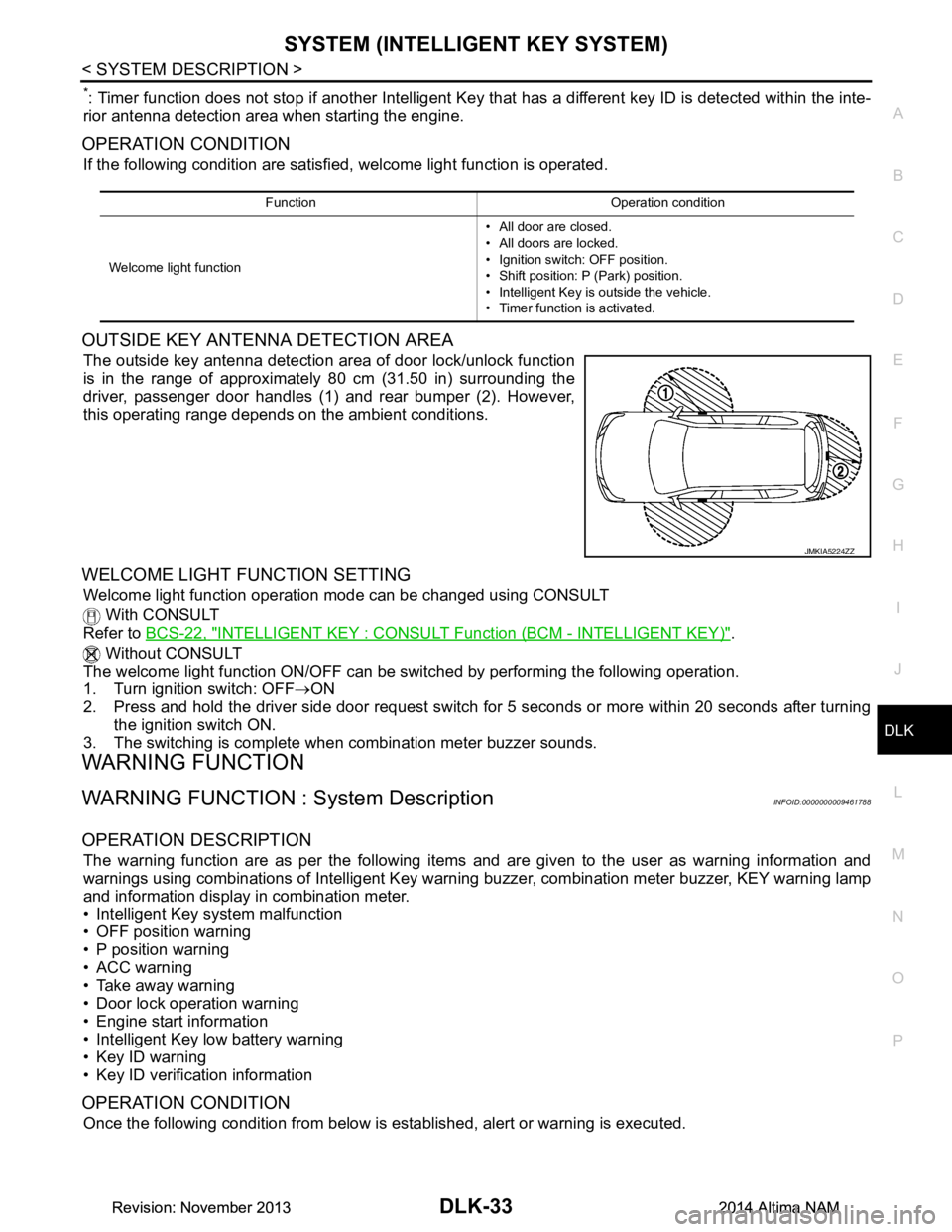
OUTSIDE KEY ANTENNA DETECTION AREA
The outside key antenna detection area of door lock/unlock function
is in the range of approximately 80 cm (31.50 in) surrounding the
driver, passenger door handles (1) and rear bumper (2). However,
this operating range depends on the ambient conditions.
WELCOME LIGHT FUNCTION SETTING
Welcome light function operation mode can be changed using CONSULT
With CONSULT
Refer to BCS-22, "INTELLIGENT KEY : CONSUL T Function (BCM - INTELLIGENT KEY)"
.
Without CONSULT
The welcome light function ON/OFF can be s witched by performing the following operation.
1. Turn ignition switch: OFF →ON
2. Press and hold the driver side door request switch for 5 seconds or more within 20 seconds after turning
the ignition switch ON.
3. The switching is complete when combination meter buzzer sounds.
WARNING FUNCTION
WARNING FUNCTION : System DescriptionINFOID:0000000009461788
OPERATION DESCRIPTION
The warning function are as per the following items and are given to the user as warning information and
warnings using combinations of Intelligent Key warning buzzer, combination meter buzzer, KEY warning lamp
and information display in combination meter.
• Intelligent Key system malfunction
• OFF position warning
• P position warning
• ACC warning
• Take away warning
• Door lock operation warning
• Engine start information
• Intelligent Key low battery warning
• Key ID warning
• Key ID verification information
OPERATION CONDITION
Once the following condition from below is established, alert or warning is executed.
Function Operation condition
Welcome light function • All door are closed.
• All doors are locked.
• Ignition switch: OFF position.
• Shift position: P (Park) position.
• Intelligent Key is outside the vehicle.
• Timer function is activated.
JMKIA5224ZZ
Revision: November 20132014 Altima NAMRevision: November 20132014 Altima NAM
Page 802 of 4801

DLK-34
< SYSTEM DESCRIPTION >
SYSTEM (INTELLIGENT KEY SYSTEM)
WARNING METHOD
The following table shows the alarm or warning methods with chime.
Warning/Information functions Operation procedure
Intelligent Key system malfunction When a malfun ction is detected on BCM, “KEY” warning lamp illuminates.
OFF position warning For internalWhen condition A, B or condition C is satisfied
• Condition A
- Ignition switch: ACC position
- Door switch (driver side ): ON (Door is open)
• Condition B
- Turn ignition switch from ON to OFF while door is open
• Condition C
- Intelligent Key backside is contacted to ignition switch while brake pedal is depressed and ignition switch is LOCK or OFF (When the Intelligent
Key battery is discharged)
- Door switch (driver side ): ON (Door is open)
For external OFF position warning (For internal) is in active mode, driver side door is
closed.
NOTE:
OFF position (For external) active only when each of the sequence occurs
as below: P position warning → ACC warning → OFF position warning (For
internal) → OFF position warning (For internal)
P position warning For internal
• Shift position: Except P (Park) position
• Engine is running to stopped (ignition switch is ON to OFF)
For external Warning is activated when driver door is closed from the open position
while the P (Park) position warning (for inside vehicle) is ON.
ACC warning • When P (Park) position warning is in active mode, shift position changes
P (Park) position
• Ignition switch: ACC position
Ta k e a w a y w a r n i n g Door is open to close
• Ignition switch: Except Lock position
• Door switch: ON to OFF (Door is open to close)
• Intelligent Key cannot be detected inside the vehicle
Door is open • Ignition switch: Except Lock position
• Door switch: ON (Door is open)
• Key ID verification every 5 seconds when registered Intelligent Key can-
not be detected inside the vehicle
Push-button ignition
switch operation • Ignition switch: Except Lock position
• Press push-button ignition switch
• Intelligent Key cannot be detected inside the vehicle
Door lock operation warning When door lock operation is requested while door lock operating condition
of door request switch (if equipped) or Intelligent Key are not satisfied
Engine start information Ignition switch is ON po-
sition • Ignition switch: ON position
• Shift position: P (Park) position*
• Engine is stopped
Ignition switch is except
ON position • Ignition switch: Except ON position
• Shift position: P (Park) position*
• Intelligent Key is inserted in key slot or Intelligent Key can be detected inside the vehicle
Intelligent Key low battery warning When Intelligent Key is low battery, BCM is detected after ignition switch is
turned ON
Key ID warning When registered Intelligent Key cannot be detected inside the vehicle after
ignition switch is turned ON
Key ID verification information • When registered Intelligent Key cannot be detected inside the vehicle
• Intelligent Key battery is discharged
• When NATS antenna amp cannot be detected NATS ID
Revision: November 20132014 Altima NAMRevision: November 20132014 Altima NAM
Page 812 of 4801

DLK-44
< SYSTEM DESCRIPTION >
DIAGNOSIS SYSTEM (BCM)
* : Initial setting
INTELLIGENT KEY
INTELLIGENT KEY : CONSULT Function (BCM - INTELLIGENT KEY)INFOID:0000000009952502
CAUTION:
After disconnecting the CONSULT vehicle interface (VI) from the data link connector, the ignition must
be cycled OFF → ON (for at least 5 seconds) → OFF. If this step is not performed, the BCM may not go
to ”sleep mode”, potentially causing a di scharged battery and a no-start condition.
SELF DIAGNOSTIC RESULT
Refer to BCS-52, "DTC Index".
DATA MONITOR
AUTO LOCK FUNCTION MODE3 This mode is not used.
MODE2 Doors lock automatically when shifted out of P (park).
MODE1* Doors lock automatically when vehicle speed reaches 24 km/h (15 mph).
Off —
AUTO UNLOCK FUNCTION MODE3 This mode is not used.
MODE2 Doors unlock automatically when shifted into P (park).
MODE1* Doors unlock automatically when ignition is switched from ON to OFF.
Off —
Support Item Setting Description
Monitor Item [Unit] Main Description
REQ SW -DR [On/Off] ×Indicates condition of door request switch LH.
REQ SW -AS [On/Off] ×Indicates condition of door request switch RH.
REQ SW -BD/TR [On/Off] ×Indicates condition of trunk opener request switch.
PUSH SW [On/Off] Indicates condition of push-button ignition switch.
SHFTLCK SLNID PER SPLY [On/Off] ×Indicates condition of power supply to shiftlock solenoid.
BRAKE SW 1 [On/Off] ×Indicates condition of brake switch.
BRAKE SW 2 [On/Off] Indicates condition of brake switch.
DETE/CANCL SW [On/Off] ×Indicates condition of P (park) position.
SFT PN/N SW [On/Off] ×Indicates condition of P (park) or N (neutral) position.
UNLK SEN -DR [On/Off] ×Indicates condition of door unlock sensor.
PUSH SW -IPDM [On/Off] Indicates condition of push-button ignition switch received from IPDM E/R
on CAN communication line.
IGN RLY1 -F/B [On/Off] Indicates condition of ignition relay 1 received from IPDM E/R on CAN
communication line.
DETE SW -IPDM [On/Off] Indicates condition of detent switch received from TCM on CAN communi-
cation line.
SFT PN -IPDM [On/Off] Indicates condition of P (park) or N (neutral) position from TCM on CAN
communication line.
SFT P -MET [On/Off] Indicates condition of P (park) position from TCM on CAN communication
line.
SFT N -MET [On/Off] Indicates condition of N (neutral) position from IPDM E/R on CAN commu-
nication line.
ENGINE STATE [STOP/START/CRANK/RUN] ×Indicates condition of engine state from ECM on CAN communication line.
VEH SPEED 1 [mph/km/h] ×Indicates condition of vehicle speed signal received from ABS on CAN
communication line.
Revision: November 20132014 Altima NAMRevision: November 20132014 Altima NAM
Page 813 of 4801
![NISSAN TEANA 2014 Owners Manual
DIAGNOSIS SYSTEM (BCM)DLK-45
< SYSTEM DESCRIPTION >
C
D E
F
G H
I
J
L
M A
B
DLK
N
O P
ACTIVE TEST
VEH SPEED 2 [mph/km/h] ×Indicates condition of vehicle speed signal received from combination
me](/img/5/57390/w960_57390-812.png "NISSAN TEANA 2014 Owners Manual
DIAGNOSIS SYSTEM (BCM)DLK-45
< SYSTEM DESCRIPTION >
C
D E
F
G H
I
J
L
M A
B
DLK
N
O P
ACTIVE TEST
VEH SPEED 2 [mph/km/h] ×Indicates condition of vehicle speed signal received from combination
me")
DIAGNOSIS SYSTEM (BCM)DLK-45
< SYSTEM DESCRIPTION >
C
D E
F
G H
I
J
L
M A
B
DLK
N
O P
ACTIVE TEST
VEH SPEED 2 [mph/km/h] ×Indicates condition of vehicle speed signal received from combination
meter on CAN communication line.
DOOR STAT -DR [LOCK/READY/UNLK] ×Indicates condition of driver side door status.
DOOR STAT -AS [LOCK/READY/UNLK] ×Indicates condition of passenger side door status.
DOOR STAT -RR [LOCK/READY/UNLK] ×Indicates condition of rear right side door status.
DOOR STAT -RL [LOCK/READY/UNLK] ×Indicates condition of rear left side door status.
ID OK FLAG [Set/Reset] Indicates condition of Intelligent Key ID.
PRMT ENG STRT [Set/Reset] Indicates condition of engine start possibility.
PRMT RKE STRT [Set/Reset] Indicates condition of engine start possibility from Intelligent Key.
I-KEY OK FLAG [Key ON/Key OFF] ×Indicates condition of Intelligent Key OK flag.
PRBT ENG STRT [Set/Reset] Indicates condition of engine start prohibit.
ID AUTHENT CANCEL TIMER [STOP] Indicates condition of Intelligent Key ID authentication.
ACC BATTERY SAVER [STOP] Indicate s condition of battery saver.
CRNK PRBT TMR [On/Off] In dicates condition of crank prohibit timer.
AUT CRNK TMR [On/Off] Indicates condition of automatic engine crank timer from Intelligent Key.
CRNK PRBT TME [sec] I ndicates condition of engine crank prohibit time.
AUTO CRNK TME [sec] Indicates co ndition of automatic engine crank time from Intelligent Key.
CRANKING TME [sec] Indicates condition of engine cranking time from Intelligent Key.
DETE SW PWR [On/Off] Indicates condition of detent switch voltage.
ACC RLY -REQ [On/Off] Indicates condition of accessory relay control request.
RKE OPE COUN1 [0-19] ×When remote keyless entry receiver receives the signal transmitted while
operating on Intelligent Key, the numerical value start changing.
RKE OPE COUN2 [0-19] ×When remote keyless entry receiver receives the signal transmitted while
operating on Intelligent Key, the numerical value start changing.
TRNK/HAT MNTR [On/Off] Indicates condition of trunk room lamp switch.
RKE-LOCK [On/Off] Indicates condition of lock signal from Intelligent Key.
RKE-UNLOCK [On/Off] Indicates condition of unlock signal from Intelligent Key.
RKE-TR/BD [On/Off] Indicates condition of trunk open signal from Intelligent Key.
RKE-PANIC [On/Off] Indicates condition of panic signal from Intelligent Key.
RKE-MODE CHG [On/Off] Indicates condition of mode change signal from Intelligent Key. Monitor Item [Unit] Main Description
Test Item Description
INTELLIGENT KEY LINK (CAN) This test is able to check Intelligent Key iden
tification number [Off/ID No1/ID N02/ID No3/ID
No4/ID No5].
INT LAMP This test is able to check interior room lamp operation [On/Off].
FLASHER This test is able to check hazard lamp operation [LH/RH/Off].
HORN This test is able to check horn operation [On].
BATTERY SAVER This test is able to check battery saver operation [On/Off].
TRUNK/BACK DOOR This test is able to check trunk actuator operation [Open].
OUTSIDE BUZZER This test is able to check In telligent Key warning buzzer operation [On/Off].
INSIDE BUZZER This test is able to check combination meter warning chime operation [Take Out/Knob/Key/
Off].
INDICATOR This test is able to check combination meter warning lamp operation [KEY ON/KEY IND/Off].
IGN CONT2 This test is able to check ignition relay-2 control operation [On/Off].
ENGINE SW ILLUMI This test is able to check push-bu tton ignition switch START indicator operation [On/Off].
Revision: November 20132014 Altima NAMRevision: November 20132014 Altima NAM