lock NISSAN TEANA 2014 Service Manual
[x] Cancel search | Manufacturer: NISSAN, Model Year: 2014, Model line: TEANA, Model: NISSAN TEANA 2014Pages: 4801, PDF Size: 51.2 MB
Page 2239 of 4801
![NISSAN TEANA 2014 Service Manual
CYLINDER BLOCKEM-241
< UNIT DISASSEMBLY AND ASSEMBLY > [VQ35DE]
C
D E
F
G H
I
J
K L
M A
EM
NP
O
1. Set the main bearings in their proper positions on the cylinder
block and the main bearing cap.
2.](/img/5/57390/w960_57390-2238.png "NISSAN TEANA 2014 Service Manual
CYLINDER BLOCKEM-241
< UNIT DISASSEMBLY AND ASSEMBLY > [VQ35DE]
C
D E
F
G H
I
J
K L
M A
EM
NP
O
1. Set the main bearings in their proper positions on the cylinder
block and the main bearing cap.
2.")
CYLINDER BLOCKEM-241
< UNIT DISASSEMBLY AND ASSEMBLY > [VQ35DE]
C
D E
F
G H
I
J
K L
M A
EM
NP
O
1. Set the main bearings in their proper positions on the cylinder
block and the main bearing cap.
2. Install the main bearing caps and bearing beam to the cylinder block. Tighten all bolts in the numerical order as specified. Refer
to EM-224, "Disassembly and Assembly"
.
3. Measure the inner diameters (A) of each main bearing as shown.
4. Measure the outer diameters (Dm) of each crankshaft main jour- nal as shown.
5. Calculate the main bearing clearance. Main bearing clearance = (A) - (Dm)
• If it exceeds the limit, replace the bearing.
• If clearance cannot be adjusted using any standard bearing
grade, grind crankshaft journal and use an undersized bear-
ing.
• When grinding the crankshaft journal, confirm that the (L) dimension in the fillet role is more than the specified limit.
6. If the crankshaft or the cylinder block is replaced wit h a new one, select thickness of the main bearings as
follows:
SEM175F
SEM845E
Standard : 0.035 - 0.045 mm (0.0014 - 0.0018 in)
Limit : 0.065 mm (0.0026 in)
AEM033
(L) : 0.10 mm (0.0039 in)
SEM964
Revision: November 20132014 Altima NAM
Page 2240 of 4801
![NISSAN TEANA 2014 Service Manual
EM-242
< UNIT DISASSEMBLY AND ASSEMBLY >[VQ35DE]
CYLINDER BLOCK
a. The grade number of each cylinder block main journal is
punched on the respective cylinder block. These numbers are
punched in eith](/img/5/57390/w960_57390-2239.png "NISSAN TEANA 2014 Service Manual
EM-242
< UNIT DISASSEMBLY AND ASSEMBLY >[VQ35DE]
CYLINDER BLOCK
a. The grade number of each cylinder block main journal is
punched on the respective cylinder block. These numbers are
punched in eith")
EM-242
< UNIT DISASSEMBLY AND ASSEMBLY >[VQ35DE]
CYLINDER BLOCK
a. The grade number of each cylinder block main journal is
punched on the respective cylinder block. These numbers are
punched in either Arabic or Roman numerals. If measured diam-
eter is out of the grade punched, decide suitable grade from
available main bearings.
b. The grade number of each crankshaft main journal is punched on the crankshaft end. These numbers are punched in either
Arabic or Roman numerals. If measured diameter is out of grade
punched, decide the suitable grade from available main bear-
ings.
c. Select the main bearing suitable thickness according to the following table:
SEM756G
SEM452G
PBIC0814E
Revision: November 20132014 Altima NAM
Page 2241 of 4801
![NISSAN TEANA 2014 Service Manual
CYLINDER BLOCKEM-243
< UNIT DISASSEMBLY AND ASSEMBLY > [VQ35DE]
C
D E
F
G H
I
J
K L
M A
EM
NP
O
Connecting Rod Bearing (Big End)
1. Install the connecting rod bearing to the connecting rod and cap.](/img/5/57390/w960_57390-2240.png "NISSAN TEANA 2014 Service Manual
CYLINDER BLOCKEM-243
< UNIT DISASSEMBLY AND ASSEMBLY > [VQ35DE]
C
D E
F
G H
I
J
K L
M A
EM
NP
O
Connecting Rod Bearing (Big End)
1. Install the connecting rod bearing to the connecting rod and cap.")
CYLINDER BLOCKEM-243
< UNIT DISASSEMBLY AND ASSEMBLY > [VQ35DE]
C
D E
F
G H
I
J
K L
M A
EM
NP
O
Connecting Rod Bearing (Big End)
1. Install the connecting rod bearing to the connecting rod and cap.
2. Install the connecting rod cap to the connecti ng rod. Tighten to specification. Refer to EM-224, "Disassem-
bly and Assembly".
3. Measure the inner diameter (C) of each connecting rod (big end) as shown.
4. Measure the outer diameter (Dp) of each crankshaft pin journal.
5. Calculate the connecting rod bearing clearance. Connecting rod bearing clearance = (C) - (Dp)
6. If the calculated clearance exceeds the specified limit, replace the bearings.
7. If the clearance cannot be adjusted within the standard of any bearing, grind the crankshaft journal and use undersized bear-
ings.
8. If the crankshaft is replaced with a new one, select the connect-
ing rod bearings according to the following table:
Connecting Rod Bearing Grad e Number (Identification
Color)
These numbers are punched in eit her Arabic or Roman numer-
als.
Method B (Using Plastigage)
• Remove oil and dust on the crankshaft pin and the surfaces of each bearing completely.
• Cut a Plastigage slightly shorter than the bearing width, and place it in crankshaft axial direction, avoiding oil holes.
• Install the connecting rod bearings to the connecting rod cap, and tighten the connecting rod nuts to the specified torque.
CAUTION:
Do not rotate the crankshaft.
• Remove the connecting rod cap and bearings, and using the scale on the Plastigage bag, measure the Plastigage width.
NOTE:
The procedure when the measured value exceeds the repair limit
is same as that described in "Method A (Using Bore Gauge and Micrometer)".
DRIVE PLATE RUNOUT
AEM027
Standard : 0.020 - 0.045 mm (0.0008 - 0.0018 in)
Limit : 0.070 mm (0.0028 in)
AEM034
Crankshaft pin journal grade number Connecting rod bearing grade
number
0 0 (black)
1 1 (brown)
2 2 (green)
SEM452G
SEM142
Revision: November 20132014 Altima NAM
Page 2242 of 4801
![NISSAN TEANA 2014 Service Manual
EM-244
< UNIT DISASSEMBLY AND ASSEMBLY >[VQ35DE]
CYLINDER BLOCK
Runout (Total Indicator Reading):
CAUTION:
• The signal plate is built into the drive assembly. Be careful not
to damage the signa](/img/5/57390/w960_57390-2241.png "NISSAN TEANA 2014 Service Manual
EM-244
< UNIT DISASSEMBLY AND ASSEMBLY >[VQ35DE]
CYLINDER BLOCK
Runout (Total Indicator Reading):
CAUTION:
• The signal plate is built into the drive assembly. Be careful not
to damage the signa")
EM-244
< UNIT DISASSEMBLY AND ASSEMBLY >[VQ35DE]
CYLINDER BLOCK
Runout (Total Indicator Reading):
CAUTION:
• The signal plate is built into the drive assembly. Be careful not
to damage the signal plate, particularly the teeth.
• Check the drive plate and sign al plate for deformation or
cracks.
• Keep any magnetized objects away from th e signal plate, particularly the teeth.
OIL JET
• Check nozzle for deformation and damage.
• Blow compressed air from nozzle, and check for clogs.
• If it is not operating properly, replace oil jet.
OIL JET RELIEF VALVE
• Using a clean plastic stick, press check valve in oil jet relief valve. Make sure that valve moves smoothly with proper reaction force.
• If it is not operating properly, replace oil jet relief valve.
Dowel Pin AlignmentINFOID:0000000009460583
REMOVAL
1. Use suitable tool to lock the drive plate and match mark (A) before removing the bolts.
CAUTION:
Do not damage the ring gear t eeth, or the signal plate teeth
behind the ring gear, when setting Tool. Drive plate
torque converter sur-
face : less than 0.35 mm (.0138 in)
Ring gear : less than 0.5 mm (.0197 in)
SEM849EB
SEM760G
EMU0468D
ALBIA0522ZZ
Revision: November 20132014 Altima NAM
Page 2243 of 4801
![NISSAN TEANA 2014 Service Manual
CYLINDER BLOCKEM-245
< UNIT DISASSEMBLY AND ASSEMBLY > [VQ35DE]
C
D E
F
G H
I
J
K L
M A
EM
NP
O
2. Remove the drive plate.
• Loosen the drive plate bolts in a diagonal order.
CAUTION:
• Do not](/img/5/57390/w960_57390-2242.png "NISSAN TEANA 2014 Service Manual
CYLINDER BLOCKEM-245
< UNIT DISASSEMBLY AND ASSEMBLY > [VQ35DE]
C
D E
F
G H
I
J
K L
M A
EM
NP
O
2. Remove the drive plate.
• Loosen the drive plate bolts in a diagonal order.
CAUTION:
• Do not")
CYLINDER BLOCKEM-245
< UNIT DISASSEMBLY AND ASSEMBLY > [VQ35DE]
C
D E
F
G H
I
J
K L
M A
EM
NP
O
2. Remove the drive plate.
• Loosen the drive plate bolts in a diagonal order.
CAUTION:
• Do not disassemble drive plate.
• Do not place drive plate with signal plate facing down.
• When handling the signal plate, take care not to damage
or scratch it.
• Handle the signal plate in a manner that prevents it from becoming magnetized.
INSTALLATION
Installation is in the reverse order of removal.
• When installing the drive plate to the crankshaft, use the triangle shaped match mark (A) as shown to correctly align the crankshaft
side dowel pin to the drive plate side dowel pin hole.
• Install the drive plate and drive plate reinforcement plate in the direction as shown.
• Tighten the drive plate bolts in a diagonal pattern in two steps. Refer to EM-224, "Disassembly and Assembly"
.
SEM760G
LBIA0469E
PBIC0910E
Revision: November 20132014 Altima NAM
Page 2250 of 4801
![NISSAN TEANA 2014 Service Manual
EM-252
< SERVICE DATA AND SPECIFICATIONS (SDS) [VQ35DE]
SERVICE DATA AND SPECIFICATIONS (SDS)
VALVE SPRING
Unit: mm (in)
Cylinder BlockINFOID:0000000009460591
CYLINDER BLOCK
Unit: mm (in)
Items Stand](/img/5/57390/w960_57390-2249.png "NISSAN TEANA 2014 Service Manual
EM-252
< SERVICE DATA AND SPECIFICATIONS (SDS) [VQ35DE]
SERVICE DATA AND SPECIFICATIONS (SDS)
VALVE SPRING
Unit: mm (in)
Cylinder BlockINFOID:0000000009460591
CYLINDER BLOCK
Unit: mm (in)
Items Stand")
EM-252
< SERVICE DATA AND SPECIFICATIONS (SDS) [VQ35DE]
SERVICE DATA AND SPECIFICATIONS (SDS)
VALVE SPRING
Unit: mm (in)
Cylinder BlockINFOID:0000000009460591
CYLINDER BLOCK
Unit: mm (in)
Items Standard
Free height 47.07 mm (1.8531 in)
Installation height 37.0 mm (1.457 in)
Installation load 166 - 188 N (16.9 - 19.2 kg, 37 - 42 lb)
Height during valve open 27.2 mm (1.071 in)
Load with valve open 373 - 421 N (38.0 - 42.9 kg, 84 - 95 lb)
Items Limit
Squareness Less than 2.0 (0.079)
Surface distortion Standard Less than 0.03 (0.0012)
Limit 0.10 (0.0039)
Main bearing housing inner diameter Standard 63.993 - 64.017 (2.5194 - 2.5203)
Cylinder bore Inner diameter StandardGrade No. 1 95.500 - 95.510 (3.7598 - 3.7602)
Grade No. 2 95.510 - 95.520 (3.7602 - 3.7606)
Grade No. 3 95.520 - 95.530 (3.7606 - 3.7610)
Wear limit 0.20 (0.0079)
Out-of-round Limit0.015 (0.0006)
Taper (Difference between A and C) 0.015 (0.0006)
JPBIA2238GB
Revision: November 20132014 Altima NAM
Page 2283 of 4801
DIAGNOSIS SYSTEM (BCM)EXL-17
< SYSTEM DESCRIPTION >
C
D E
F
G H
I
J
K
M A
B
EXL
N
O P
DIAGNOSIS SYSTEM (BCM)
COMMON ITEM
COMMON ITEM : CONSULT Function (BCM - COMMON ITEM)INFOID:0000000009956424
CAUTION:
After disconnecting the CONSULT vehicle interface (VI) from the data link connector, the ignition must
be cycled OFF → ON (for at least 5 seconds) → OFF. If this step is not performed, the BCM may not go
to ”sleep mode”, potentiall y causing a discharged battery and a no-start condition.
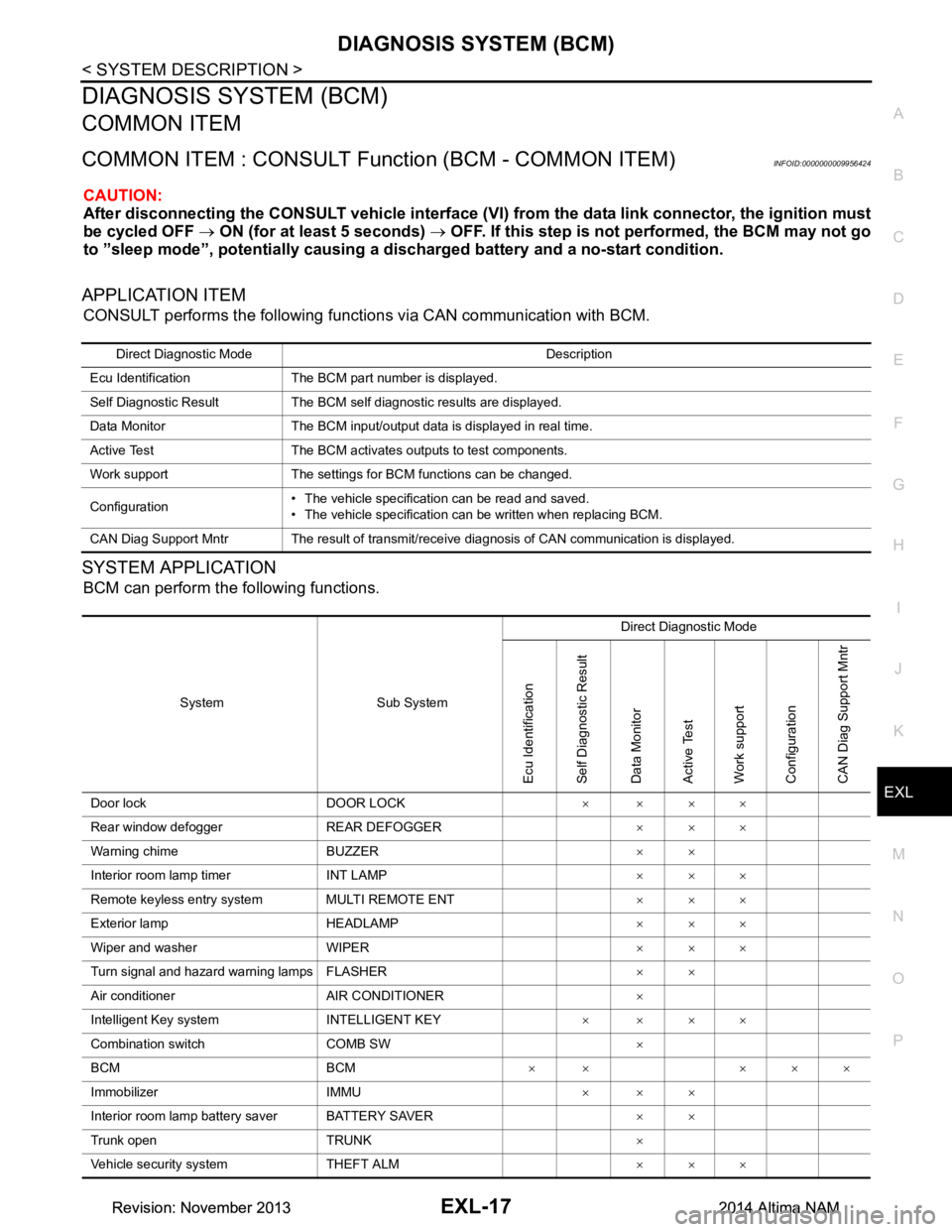
APPLICATION ITEM
CONSULT performs the following functions via CAN communication with BCM.
SYSTEM APPLICATION
BCM can perform the following functions.
Direct Diagnostic Mode Description
Ecu Identification The BCM part number is displayed.
Self Diagnostic Result The BCM self diagnostic results are displayed.
Data Monitor The BCM input/output data is displayed in real time.
Active Test The BCM activates outputs to test components.
Work support The settings for BCM functions can be changed.
Configuration • The vehicle specification can be read and saved.
• The vehicle specification can be written when replacing BCM.
CAN Diag Support Mntr The result of transmit/receive diagnosis of CAN communication is displayed.
System Sub System Direct Diagnostic Mode
Ecu Identification
Self Diagnostic Result
Data Monitor
Active Test
Work support
Configuration
CAN Diag Su pport Mntr
Door lock DOOR LOCK ××××
Rear window defogger REAR DEFOGGER ×××
Warning chime BUZZER ××
Interior room lamp timer INT LAMP ×××
Remote keyless entry system MULTI REMOTE ENT ×××
Exterior lamp HEADLAMP ×××
Wiper and washer WIPER ×××
Turn signal and hazard warning lamps FLASHER ××
Air conditioner AIR CONDITIONER ×
Intelligent Key system INTELLIGENT KEY ××××
Combination switch COMB SW ×
BCM BCM × × ×××
Immobilizer IMMU ×××
Interior room lamp battery saver BATTERY SAVER ××
Trunk open TRUNK ×
Vehicle security system THEFT ALM ×××
Revision: November 20132014 Altima NAMRevision: November 20132014 Altima NAM
Page 2285 of 4801
DIAGNOSIS SYSTEM (BCM)EXL-19
< SYSTEM DESCRIPTION >
C
D E
F
G H
I
J
K
M A
B
EXL
N
O P
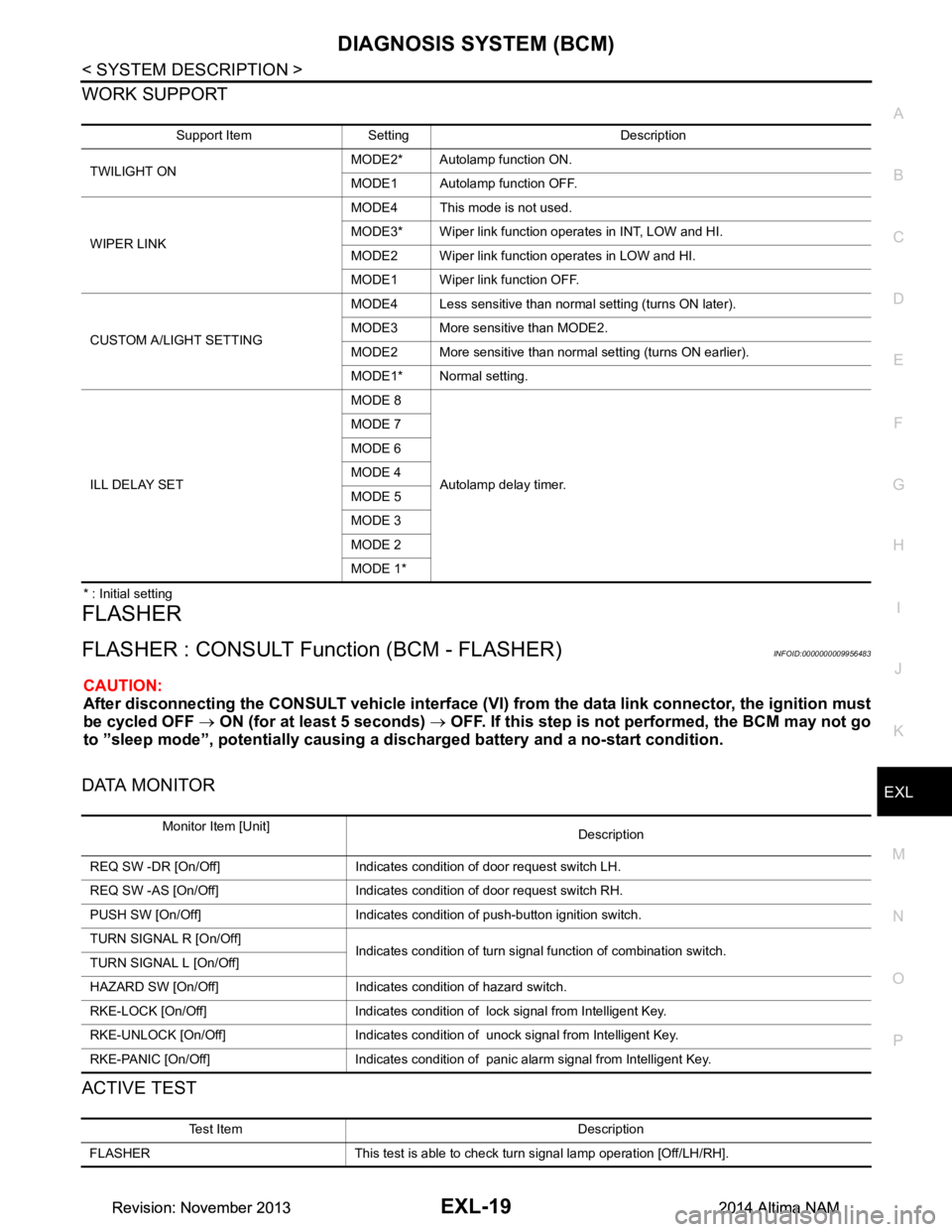
WORK SUPPORT
* : Initial setting
FLASHER
FLASHER : CONSULT Func tion (BCM - FLASHER)INFOID:0000000009956483
CAUTION:
After disconnecting the CONSULT vehicle interface (VI) from the data link connector, the ignition must
be cycled OFF → ON (for at least 5 seconds) → OFF. If this step is not performed, the BCM may not go
to ”sleep mode”, potentiall y causing a discharged battery and a no-start condition.
DATA MONITOR
ACTIVE TEST
Support Item Setting Description
TWILIGHT ON MODE2* Autolamp function ON.
MODE1 Autolamp function OFF.
WIPER LINK MODE4 This mode is not used.
MODE3* Wiper link function operates in INT, LOW and HI.
MODE2 Wiper link function operates in LOW and HI.
MODE1 Wiper link function OFF.
CUSTOM A/LIGHT SETTING MODE4 Less sensitive than normal setting (turns ON later).
MODE3 More sensitive than MODE2.
MODE2 More sensitive than normal setting (turns ON earlier).
MODE1* Normal setting.
ILL DELAY SET MODE 8
Autolamp delay timer.
MODE 7
MODE 6
MODE 4
MODE 5
MODE 3
MODE 2
MODE 1*
Monitor Item [Unit] Description
REQ SW -DR [On/Off] Indicates condition of door request switch LH.
REQ SW -AS [On/Off] Indicates condition of door request switch RH.
PUSH SW [On/Off] Indicates condition of push-button ignition switch.
TURN SIGNAL R [On/Off] Indicates condition of turn signal function of combination switch.
TURN SIGNAL L [On/Off]
HAZARD SW [On/Off] Indicates condition of hazard switch.
RKE-LOCK [On/Off] Indicates condition of lock signal from Intelligent Key.
RKE-UNLOCK [On/Off] Indicates condition of unock signal from Intelligent Key.
RKE-PANIC [On/Off] Indicates condition of panic alarm signal from Intelligent Key.
Test Item Description
FLASHER This test is able to check turn signal lamp operation [Off/LH/RH].
Revision: November 20132014 Altima NAMRevision: November 20132014 Altima NAM
Page 2286 of 4801

EXL-20
< SYSTEM DESCRIPTION >
DIAGNOSIS SYSTEM (BCM)
COMB SW
COMB SW : CONSULT Function (BCM - COMB SW)INFOID:0000000009956484
CAUTION:
After disconnecting the CONSULT vehicle interface (VI) from the data link connector, the ignition must
be cycled OFF → ON (for at least 5 seconds) → OFF. If this step is not performed, the BCM may not go
to ”sleep mode”, potentially causing a di scharged battery and a no-start condition.
DATA MONITOR
BATTERY SAVER
BATTERY SAVER : CONSULT Function (BCM - BATTERY SAVER)INFOID:0000000009956486
CAUTION:
After disconnecting the CONSULT vehicle interface (VI) from the data link connector, the ignition must
be cycled OFF → ON (for at least 5 seconds) → OFF. If this step is not performed, the BCM may not go
to ”sleep mode”, potentially causing a di scharged battery and a no-start condition.
DATA MONITOR
Monitor Item [Unit] Description
FR WIPER HI [On/Off]
Indicates condition of wiper operation of combination switch.
FR WIPER LOW [On/Off]
FR WASHER SW [On/Off]
FR WIPER INT [On/Off]
INT VOLUME [1 - 7] Indicates condition of intermittent wiper operation of combination switch.
TURN SIGNAL R [On/Off] Indicates condition of right turn signal operation of combination switch.
TURN SIGNAL L [On/Off] Indicates condition of left turn signal operation of combination switch.
TAIL LAMP SW [On/Off] Indicates condition of tail lamp switch operation of combination switch.
HI BEAM SW [On/Off] Indicates condition of Hi beam switch operation of combination switch.
HEAD LAMP SW 1 [On/Off] Indicates condition of head lamp switch 1 operation of combination switch.
HEAD LAMP SW 2 [On/Off] Indicates condition of head lamp switch 2 operation of combination switch.
PASSING SW [On/Off] Indicates condition of pass ing switch operation of combination switch.
AUTO LIGHT SW [On/Off] Indicates condition of auto light switch operation of combination switch.
FR FOG SW [On/Off] Indicates condition of front fog lamp switch operation of combination switch.
Monitor Item [Unit] Description
REQ SW -DR [On/Off] Indicates condition of door request switch LH.
REQ SW -AS [On/Off] Indicates condition of door request switch RH.
PUSH SW [On/Off] Indicates condition push-button ignition switch.
UNLK SEN -DR [On/Off] Indicates condition of door unlock sensor.
DOOR SW-DR [On/Off] Indicates condition of front door switch LH.
DOOR SW-AS [On/Off] Indicates condition of front door switch RH.
DOOR SW-RR [On/Off] Indicates condition of rear door switch RH.
DOOR SW-RL [On/Off] Indicates condition of rear door switch LH.
DOOR SW-BK [On/Off] Indicates condition of trunk switch.
CDL LOCK SW [On/Off] Indicates condition of lock signal from door lock and unlock switch.
CDL UNLOCK SW [On/Off] Indicates condition of unlock signal from door lock and unlock switch.
KEY CYL LK-SW [On/Off] Indicates condition of lo ck signal from door key cylinder switch.
Revision: November 20132014 Altima NAMRevision: November 20132014 Altima NAM
Page 2287 of 4801
![NISSAN TEANA 2014 Service Manual
DIAGNOSIS SYSTEM (BCM)EXL-21
< SYSTEM DESCRIPTION >
C
D E
F
G H
I
J
K
M A
B
EXL
N
O P
ACTIVE TEST
KEY CYL UN-SW [On/Off] Indicates condition of unl ock signal from door key cylinder switch.
TRNK/HA](/img/5/57390/w960_57390-2286.png "NISSAN TEANA 2014 Service Manual
DIAGNOSIS SYSTEM (BCM)EXL-21
< SYSTEM DESCRIPTION >
C
D E
F
G H
I
J
K
M A
B
EXL
N
O P
ACTIVE TEST
KEY CYL UN-SW [On/Off] Indicates condition of unl ock signal from door key cylinder switch.
TRNK/HA")
DIAGNOSIS SYSTEM (BCM)EXL-21
< SYSTEM DESCRIPTION >
C
D E
F
G H
I
J
K
M A
B
EXL
N
O P
ACTIVE TEST
KEY CYL UN-SW [On/Off] Indicates condition of unl ock signal from door key cylinder switch.
TRNK/HAT MNTR [On/Off] Indicates condition of trunk room lamp switch.
RKE-LOCK [On/Off] Indicates condition of lock signal from Intelligent Key.
RKE-UNLOCK [On/Off] Indicates condition of unlock signal from Intelligent Key. Monitor Item [Unit] Description
Test item Description
BATTERY SAVER This test is able to check battery saver operation [On/Off].
Revision: November 20132014 Altima NAMRevision: November 20132014 Altima NAM