reset NISSAN TEANA 2014 Workshop Manual
[x] Cancel search | Manufacturer: NISSAN, Model Year: 2014, Model line: TEANA, Model: NISSAN TEANA 2014Pages: 4801, PDF Size: 51.2 MB
Page 3282 of 4801

MWI
COMBINATION METERMWI-27
< ECU DIAGNOSIS INFORMATION >
C
D E
F
G H
I
J
K L
M B
A
O PFail-SafeINFOID:0000000009461695
FA I L - S A F E
The combination meter activates the fail-safe contro l if CAN communication with each unit is malfunctioning.
DTC IndexINFOID:0000000009461696
52
(P) Ground O/D OFF/SPORT switch Input Ignition
switch
ON O/D OFF switch pressed 0 V
Other than the above 5 V
Te r m i n a l N o .
(Wire color) Description
ConditionVa l u e
(Approx.)
+ – Signal name Input/
Output
Function Specifications
Speedometer Reset to zero by suspending communication.
Tachometer
Engine coolant temperature gauge
Illumination control When suspending communication, changes to nighttime mode.
Information display Odo/trip meter An indicated value is maintained at communications blackout.
Shift position indicator The display turns OFF by suspending communication.
Warning messages The display turns OFF by suspending communication.
Buzzer The buzzer turns OFF by suspending communication.
Warning lamp/indicator lamp ABS warning lamp
The lamp turns ON by suspending communication.
O/D OFF indicator lamp
Slip indicator lamp
Brake warning lamp
Malfunction indicator lamp
VDC OFF indicator lamp
EPS warning lamp
Low tire pressure warning lamp The lamp blinking caused by suspending communication.
High beam indicator lamp
The lamp turns OFF by suspending communication.
Turn signal indicator lamp
Master warning lamp
Front lamp indicator lamp
Lane departure warning
Tail lamp indicator lamp
Air bag warning lamp
The lamp turns off when disconnected.
Charge warning lamp
Seat belt warning lamp
Security indicator lamp
Display contents of CONSULT Diagnostic item is detected when... Refer to
CAN COMM CIRCUIT
[U1000] When combination meter is not transmitting or receiving CAN communication signal for 2
seconds or more. MWI-53
CONTROL UNIT (CAN)
[U1010] When detecting error during the initial diagnosis of the CAN controller of combination
meter. MWI-54
Revision: November 20132014 Altima NAMRevision: November 20132014 Altima NAM
Page 3323 of 4801

MWI-68
< DTC/CIRCUIT DIAGNOSIS >
METER CONTROL SWITCH SIGNAL CIRCUIT
METER CONTROL SWITCH SIGNAL CIRCUIT
Diagnosis ProcedureINFOID:0000000009461733
Regarding Wiring Diagram information, refer to MWI-32, "Wiring Diagram".
1.CHECK METER CONTROL SWITCH SIGNAL
1. Turn ignition switch ON.
2. Check voltage between the following terminals of the meter control switch harness connector M158.
Is the inspection result normal?
YES >> Inspection End.
NO >> GO TO 2.
2.CHECK METER CONTROL SWITCH HARNESS
1. Turn ignition switch OFF.
2. Disconnect combination meter harness connector M26 and meter control switch harness connector
M158.
3. Check continuity between combination meter harness connector M26 and meter control switch harness connector M158.
4. Check continuity between combination meter harness connector and ground.
Is the inspection result normal?
YES >> Inspection End.
NO >> Repair or replace harness or connectors.
Meter control switch
ConditionVo l ta g e
(Approx.)
Connector Te r m i n a l s
(+) ( −)
M158 7
4When illumination control switch (
−) is pressed 0 V
Other than the above 5 V
5 When trip reset switch is pressed 0 V
Other than the above 5 V
6 When illumination control switch (+) is pressed 0 V
Other than the above 5 V
Combination meter Meter control switch Continuity
Connector Terminal Connector Terminal
M26 41
M158 5
Ye s
42 7
47 6
48 4
Combination meter GroundContinuity
Connector Terminal
M26 41
No
42
47
48
Revision: November 20132014 Altima NAMRevision: November 20132014 Altima NAM
Page 3324 of 4801

MWI
METER CONTROL SWITCH SIGNAL CIRCUITMWI-69
< DTC/CIRCUIT DIAGNOSIS >
C
D E
F
G H
I
J
K L
M B
A
O P
Component InspectionINFOID:0000000009461734
1.CHECK METER CONTROL SWITCH
1. Turn ignition switch OFF.
2. Disconnect meter control switch connector.
3. Check meter control switch.
Is the inspection result normal?
YES >> Inspection End.
NO >> Replace meter control switch. Refer to IP-14, "Exploded View"
.
Meter control switch
Condition Continuity
Te r m i n a l s
7
4When illumination control switch (
−) is pressed Yes
Other than the above No
5 When trip reset switch is pressed Yes
Other than the above No
6 When illumination control switch (+) is pressed Yes
Other than the above No
Revision: November 20132014 Altima NAMRevision: November 20132014 Altima NAM
Page 3385 of 4801
![NISSAN TEANA 2014 Workshop Manual
PCS-36
< SYSTEM DESCRIPTION >[POWER DISTRIBUTION SYSTEM]
SYSTEM
SYSTEM
POWER DISTRIBUTION SYSTEM
POWER DISTRIBUTION SYSTEM : System DiagramINFOID:0000000009461624
POWER DISTRIBUTION SYSTEM
: System](/img/5/57390/w960_57390-3384.png "NISSAN TEANA 2014 Workshop Manual
PCS-36
< SYSTEM DESCRIPTION >[POWER DISTRIBUTION SYSTEM]
SYSTEM
SYSTEM
POWER DISTRIBUTION SYSTEM
POWER DISTRIBUTION SYSTEM : System DiagramINFOID:0000000009461624
POWER DISTRIBUTION SYSTEM
: System")
PCS-36
< SYSTEM DESCRIPTION >[POWER DISTRIBUTION SYSTEM]
SYSTEM
SYSTEM
POWER DISTRIBUTION SYSTEM
POWER DISTRIBUTION SYSTEM : System DiagramINFOID:0000000009461624
POWER DISTRIBUTION SYSTEM
: System DescriptionINFOID:0000000009461625
SYSTEM DESCRIPTION
• PDS (POWER DISTRIBUTION SYSTEM ) is the system that BCM controls with the operation of the push-
button ignition switch and performs the power distribution to each power circuit. This system is used instead
of the mechanical power supply changing mechanism wi th the operation of the conventional key cylinder.
• The push-button ignition switch can be operated when Intelligent Key is in the following condition.
- Intelligent Key is in the detection area of the inside key antenna.
- Intelligent Key backside is contacted to push-button ignition switch.
• The push-button ignition switch operation is input to BCM as a signal. BCM changes the power supply posi-
tion according to the status and operates the following relays to supply power to each power circuit.
- Ignition relay-1
- Ignition relay-2
- Accessory relay-1
- Accessory relay-2
- Front blower motor relay
NOTE:
The engine switch operation changes due to the conditions of brake pedal, selector lever and vehicle speed.
• The power supply position can be confirmed with the light ing of the indicators in the push-button ignition
switch.
BATTERY SAVER SYSTEM
When all the following conditions are met for 30 minutes, t he battery saver system will cut off the power supply
to prevent battery discharge.
• The ignition switch is in the ACC or ON position
• All doors are closed
• Selector lever is in the P (park) position
Reset Condition of Battery Saver System
In order to prevent the battery from discharging, the battery saver system will cut off the power supply when all
doors are closed, the selector lever is in P (park) positi on and the ignition switch is left in the ACC or ON posi-
tion for 30 minutes. If any of the following conditions are met the battery saver system is released and the
steering will change automatically to lock position from OFF position.
• Opening any door
• Operating door request switch on door handle
• Operating Intelligent Key
AWMIA1282GB
Revision: November 20132014 Altima NAMRevision: November 20132014 Altima NAM
Page 3389 of 4801
![NISSAN TEANA 2014 Workshop Manual
PCS-40
< SYSTEM DESCRIPTION >[POWER DISTRIBUTION SYSTEM]
DIAGNOSIS SYSTEM (BCM)
ACTIVE TEST
VEH SPEED 2 [mph/km/h]
×Indicates condition of vehicle speed signal received from combination
meter on C](/img/5/57390/w960_57390-3388.png "NISSAN TEANA 2014 Workshop Manual
PCS-40
< SYSTEM DESCRIPTION >[POWER DISTRIBUTION SYSTEM]
DIAGNOSIS SYSTEM (BCM)
ACTIVE TEST
VEH SPEED 2 [mph/km/h]
×Indicates condition of vehicle speed signal received from combination
meter on C")
PCS-40
< SYSTEM DESCRIPTION >[POWER DISTRIBUTION SYSTEM]
DIAGNOSIS SYSTEM (BCM)
ACTIVE TEST
VEH SPEED 2 [mph/km/h]
×Indicates condition of vehicle speed signal received from combination
meter on CAN communication line.
DOOR STAT -DR [LOCK/READY/UNLK] ×Indicates condition of driver side door status.
DOOR STAT -AS [LOCK/READY/UNLK] ×Indicates condition of passenger side door status.
DOOR STAT -RR [LOCK/READY/UNLK] ×Indicates condition of rear right side door status.
DOOR STAT -RL [LOCK/READY/UNLK] ×Indicates condition of rear left side door status.
ID OK FLAG [Set/Reset] Indicates condition of Intelligent Key ID.
PRMT ENG STRT [Set/Reset] Indicates condition of engine start possibility.
PRMT RKE STRT [Set/Reset] Indicates condition of engine start possibility from Intelligent Key.
I-KEY OK FLAG [Key ON/Key OFF] ×Indicates condition of Intelligent Key OK flag.
PRBT ENG STRT [Set/Reset] Indicates condition of engine start prohibit.
ID AUTHENT CANCEL TIMER [STOP] Indicates condition of Intelligent Key ID authentication.
ACC BATTERY SAVER [STOP] Indicate s condition of battery saver.
CRNK PRBT TMR [On/Off] Indicates co ndition of crank prohibit timer.
AUT CRNK TMR [On/Off] Indicates co ndition of automatic engine crank timer fr om Intelligent Key.
CRNK PRBT TME [sec] Indicat es condition of engine crank prohibit time.
AUTO CRNK TME [sec] Indicates co ndition of automatic engine crank time from Intelligent Key.
CRANKING TME [sec] Indicates condition of engine cranking time from Intelligent Key.
DETE SW PWR [On/Off] Indicates condition of detent switch voltage.
ACC RLY -REQ [On/Off] Indicates condition of accessory relay control request.
RKE OPE COUN1 [0-19] ×When remote keyless entry receiver receives the signal transmitted while
operating on Intelligent Key, the numerical value start changing.
RKE OPE COUN2 [0-19] ×When remote keyless entry receiver receives the signal transmitted while
operating on Intelligent Key, the numerical value start changing.
TRNK/HAT MNTR [On/Off] Indicates condition of trunk room lamp switch.
RKE-LOCK [On/Off] Indicates condition of lock signal from Intelligent Key.
RKE-UNLOCK [On/Off] Indicates condition of unlock signal from Intelligent Key.
RKE-TR/BD [On/Off] Indicates condition of trunk open signal from Intelligent Key.
RKE-PANIC [On/Off] Indicates condition of panic signal from Intelligent Key.
RKE-MODE CHG [On/Off] Indicates condition of mode change signal from Intelligent Key. Monitor Item [Unit] Main Description
Test Item Description
INTELLIGENT KEY LINK (CAN) This test is able to check Intelligent Key identification number [Off/ID No1/ID N02/ID No3/ID
No4/ID No5].
INT LAMP This test is able to check interior room lamp operation [On/Off].
FLASHER This test is able to check hazard lamp operation [LH/RH/Off].
HORN This test is able to check horn operation [On].
BATTERY SAVER This test is able to check battery saver operation [On/Off].
TRUNK/BACK DOOR This test is able to check trunk actuator operation [Open].
OUTSIDE BUZZER This test is able to check Intelligent Key warning buzzer operation [On/Off].
INSIDE BUZZER This test is able to check combination meter warning chime operation [Take Out/Knob/Key/
Off].
INDICATOR This test is able to check combination meter warning lamp operation [KEY ON/KEY IND/Off].
IGN CONT2 This test is able to check ignition relay-2 control operation [On/Off].
ENGINE SW ILLUMI This test is able to check push-button ignition switch START indicator operation [On/Off].
Revision: November 20132014 Altima NAMRevision: November 20132014 Altima NAM
Page 3439 of 4801
PG
INSPECTION AND ADJUSTMENTPG-7
< BASIC INSPECTION >
C
D E
F
G H
I
J
K L
B
A
O P
N
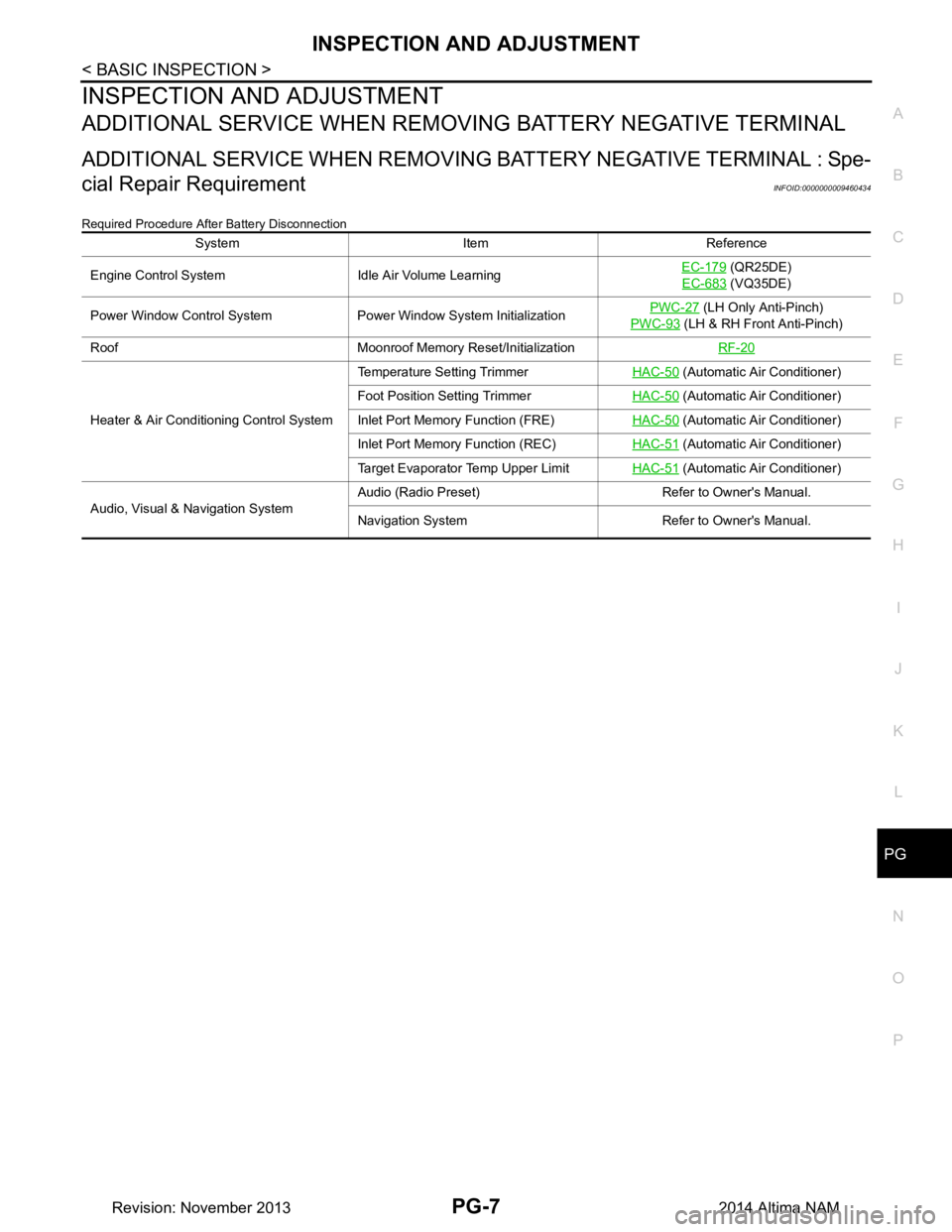
INSPECTION AND ADJUSTMENT
ADDITIONAL SERVICE WHEN REMOVI
NG BATTERY NEGATIVE TERMINAL
ADDITIONAL SERVICE WHEN REMOVING BATTERY NEGATIVE TERMINAL : Spe-
cial Repair Requirement
INFOID:0000000009460434
Required Procedure After Battery Disconnection
System Item Reference
Engine Control System Idle Air Volume Learning EC-179
(QR25DE)
EC-683
(VQ35DE)
Power Window Control System Power Window System Initialization PWC-27
(LH Only Anti-Pinch)
PWC-93
(LH & RH Front Anti-Pinch)
Roof Moonroof Memory Reset/Initialization RF-20
Heater & Air Conditioning Control SystemTemperature Setting Trimmer
HAC-50
(Automatic Air Conditioner)
Foot Position Setting Trimmer HAC-50
(Automatic Air Conditioner)
Inlet Port Memory Function (FRE) HAC-50
(Automatic Air Conditioner)
Inlet Port Memory Function (REC) HAC-51
(Automatic Air Conditioner)
Target Evaporator Temp Upper Limit HAC-51
(Automatic Air Conditioner)
Audio, Visual & Navigation System Audio (Radio Preset) Refer to Owner's Manual.
Navigation System Refer to Owner's Manual.
Revision: November 20132014 Altima NAM
Page 3506 of 4801

PG-74
< REMOVAL AND INSTALLATION >
BATTERY
Reset electronic systems as necessary. Refer to PG-7, "ADDITIONAL SERVICE WHEN REMOVING BAT-
TERY NEGATIVE TERMINAL : Special Repair Requirement".
Removal and Installation (Battery Tray)INFOID:0000000009460450
REMOVAL
1. Remove battery and battery tray liner. Refer to PG-73, "Removal and Installation (Battery)".
2. Remove front air duct and air cleaner case assembly. Refer to EM-29, "Removal and Installation"
(QR25DE models) or EM-144, "Removal and Installation" (VQ35DE models).
3. Disconnect transmission control module (TCM). Refer to TM-183, "Exploded View"
(RE0F10D) TM-384,
"Exploded View"or (RE0F10E).
4. Remove the ECM bracket.
5. Remove the battery tray bolts and battery tray.
6. Remove the battery tray support bolts and battery tray support.
INSTALLATION
Installation is in the reverse order of removal.
Reset electronic systems as necessary. Refer to PG-7, "ADDITIONAL SERVICE WHEN REMOVING BAT-
TERY NEGATIVE TERMINAL : Special Repair Requirement".
Revision: November 20132014 Altima NAM
Page 3685 of 4801

RF-20
< BASIC INSPECTION >
INSPECTION AND ADJUSTMENT
INSPECTION AND ADJUSTMENT
ADDITIONAL SERVICE WHEN REPLACING CONTROL UNIT
ADDITIONAL SERVICE WHEN REPL ACING CONTROL UNIT : Description
INFOID:0000000009461301
MEMORY RESET PROCEDURE
1. Please observe the following instructi ons at confirming the moonroof operation.
NOTE:
Do not disconnect the electronic power while the moonroof is operating or within 5 seconds after the
moonroof stops. (to wipe-out the memory of lid position and operating friction.)
2. Initialization of system should be conducted after the following conditions. • When the moonroof motor is changed.
• When the moonroof does not operate normally. (Incomplete initialization conditions)
ADDITIONAL SERVICE WHEN REPLACING CONTROL UNIT : Special Repair Re-
quirement
INFOID:0000000009461302
INITIALIZATION PROCEDURE
If the moonroof does not open or clos e automatically, use the following procedure to return moonroof opera-
tion to normal.
NOTE:
If the moonroof switch is released at any time duri ng step 4, the procedure must be started over again. Leave
the ignition switch ON for at least 2 seconds after this procedure.
1. Push the ignition switch to the ON position.
2. Hold the moonroof switch in the tilt up position. Release the switch when the moonroof has reached the
full tilt up position.
3. Hold the moonroof switch in the tilt up position agai n. After a delay, the moonroof will backup. Release the
switch.
4. Within 4 seconds of releasing the switch in step 3, hold the moonroof switch in the tilt up position again.
The moonroof will move from the full tilt-up → slide-close → slide-open → slide-close → tilt-up → slide-
close. Release the switch, initialization is complete if the moonroof operates normally.
ANTI-PINCH FUNCTION
1. Fully open the moonroof to the full open position.
2. Place a piece of wood at the fully closed position.
3. Close the moonroof completely with auto-slide close function.
4. Moonroof should make contact and then tilt up in reverse for 100mm (3.94 in.) (approx.).
CAUTION:
• Do not test the anti-pinch functi on with your hands or other part of body parts because they may be
pinched.
• Depending on environment and drivin g conditions, if a similar impact or load is applied to the moon-
roof it may lower.
• Test the auto-slide operation before inspectio n when the system initialization is performed.
• Perform the initialization proced ure when the auto-slide operation or anti-pinch function does not
operate normally.
Revision: November 20132014 Altima NAMRevision: November 20132014 Altima NAM
Page 3779 of 4801
SE-30
< REMOVAL AND INSTALLATION >
FRONT SEAT
PASSENGER SIDE : Removal and Installation - Seat Assembly
INFOID:0000000009462938
REMOVAL
WARNING:
Do not leave any objects (screwdriver s, tools, etc.) on the seat during seat repair. It can lead to per-
sonal injury if the side air bag module should accidentally deploy.
CAUTION:
• When removing or installing the seat trim, handle it carefully to keep dirt out and to avoid damage.
• When checking the power seat circuit for continuity using a circuit tester, do not confuse its connec-
tor with the side air bag module connector. Such an error may cau se the air bag module to deploy.
• Do not drop, tilt, or bump the si de air bag module while installing the seat. Always handle it with
care.
• After front side air bag module inflates, the front seatback assembly must be replaced.
• When removing and installing the seat, use shop cloths to protect components from damage.
• Before removing the front seat, turn the ignition switch OFF, disconnect both battery cables and wait
at least three minutes.
1. Disconnect the negative and positive battery terminal s and wait at least three minutes. Refer to PG-73,
"Removal and Installation (Battery)".
2. Remove the headrest.
3. Slide the seat to the full rearward position.
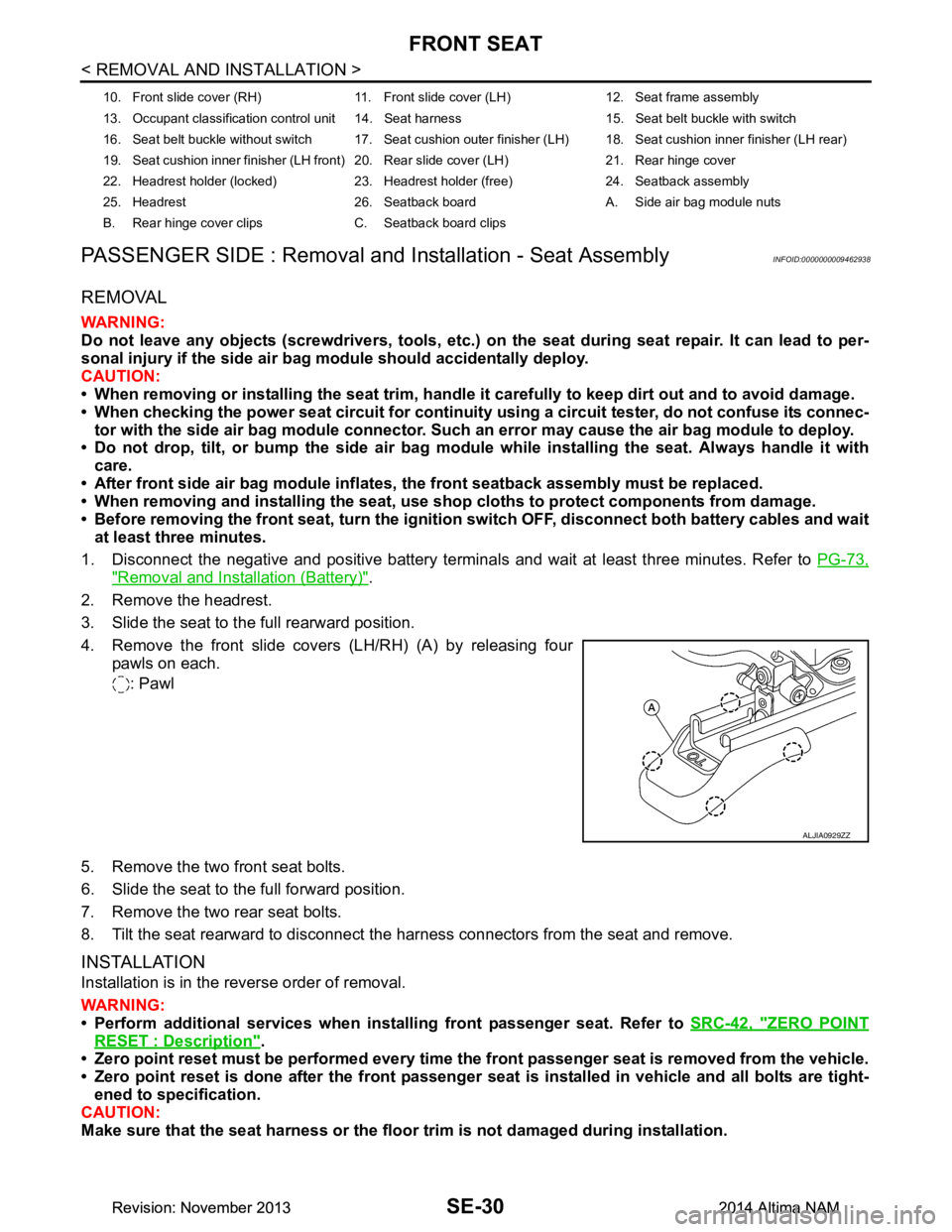
4. Remove the front slide covers (LH/RH) (A) by releasing four pawls on each.
: Pawl
5. Remove the two front seat bolts.
6. Slide the seat to the full forward position.
7. Remove the two rear seat bolts.
8. Tilt the seat rearward to disconnect the harness connectors from the seat and remove.
INSTALLATION
Installation is in the reverse order of removal.
WARNING:
• Perform additional services when instal ling front passenger seat. Refer to SRC-42, "ZERO POINT
RESET : Description".
• Zero point reset must be performed every time th e front passenger seat is removed from the vehicle.
• Zero point reset is done after the front passenger seat is installed in vehicle and all bolts are tight-
ened to specification.
CAUTION:
Make sure that the seat harness or the floor trim is not damaged during installation.
10. Front slide cover (RH) 11. Front sl ide cover (LH) 12. Seat frame assembly
13. Occupant classification control unit 14. Seat harness 15. Seat belt buckle with switch
16. Seat belt buckle without switch 17. Seat cushion outer finisher (LH) 18. Seat cushion inner finisher (LH rear)
19. Seat cushion inner finisher (LH front) 20. Rear slide cover (LH) 21. Rear hinge cover
22. Headrest holder (locked) 23. Headrest holder (free) 24. Seatback assembly
25. Headrest 26. Seatback board A. Side air bag module nuts
B. Rear hinge cover clips C. Seatback board clips
ALJIA0929ZZ
Revision: November 20132014 Altima NAMRevision: November 20132014 Altima NAM
Page 3842 of 4801
SYSTEMSEC-17
< SYSTEM DESCRIPTION >
C
D E
F
G H
I
J
L
M A
B
SEC
N
O P
• The panic alarm does not start when the theft warning alarm is activating and the panic alarm stops when the theft warning alarm is activated.
The priority of the functions are as per the following.
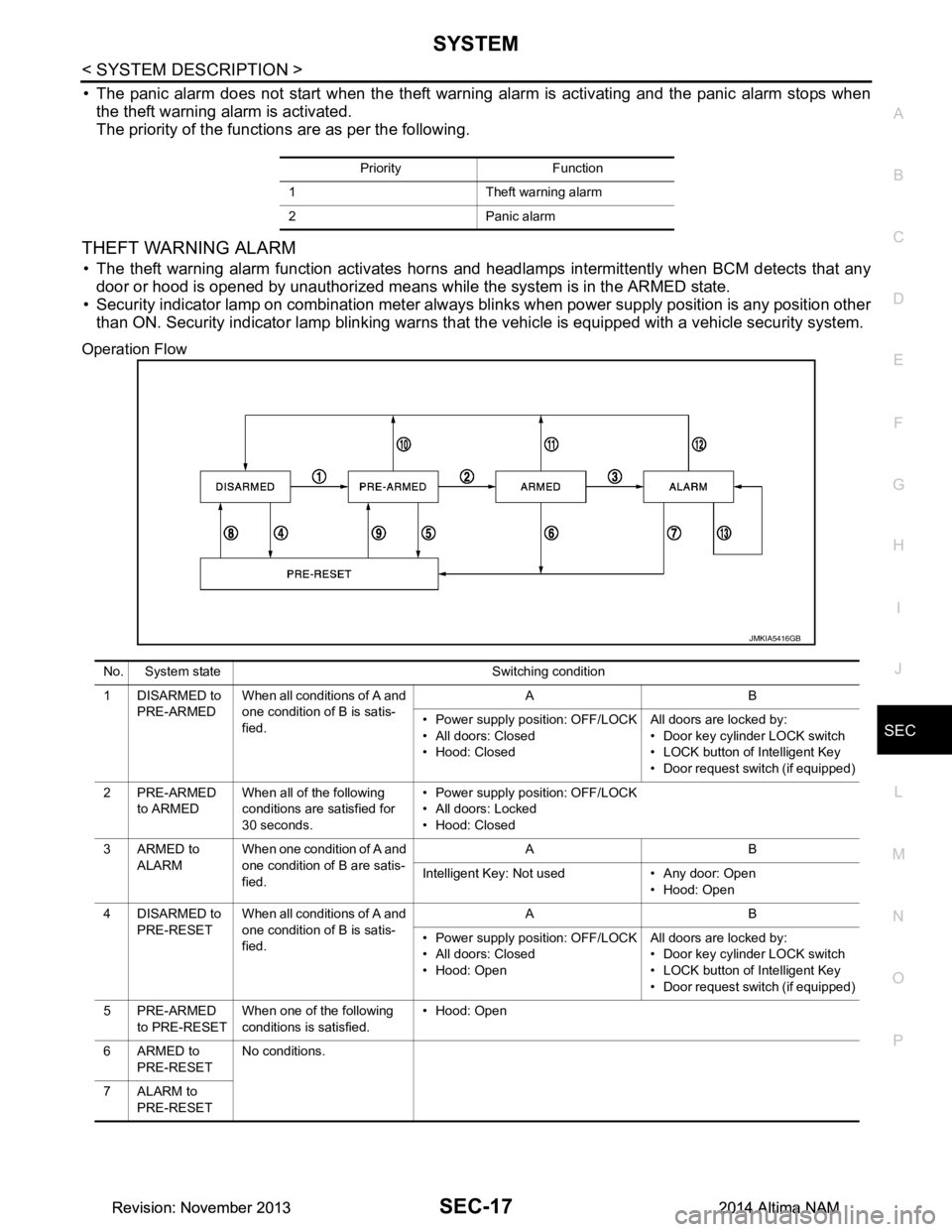
THEFT WARNING ALARM
• The theft warning alarm function activates horns and headlamps intermittently when BCM detects that any
door or hood is opened by unauthorized means whil e the system is in the ARMED state.
• Security indicator lamp on combination meter always blinks when power supply position is any position other
than ON. Security indicator lamp blinking warns that the vehicle is equipped with a vehicle security system.
Operation Flow
Priority Function
1 Theft warning alarm
2 Panic alarm
JMKIA5416GB
No. System state Switching condition
1 DISARMED to PRE-ARMED When all conditions of A and
one condition of B is satis-
fied. AB
• Power supply position: OFF/LOCK
• All doors: Closed
• Hood: Closed All doors are locked by:
• Door key cylinder LOCK switch
• LOCK button of Intelligent Key
• Door request switch (if equipped)
2PRE-ARMED to ARMED When all of the following
conditions are satisfied for
30 seconds. • Power supply position: OFF/LOCK
• All doors: Locked
• Hood: Closed
3ARMED to ALARM When one condition of A and
one condition of B are satis-
fied. AB
Intelligent Key: Not used • Any door: Open • Hood: Open
4 DISARMED to PRE-RESET When all conditions of A and
one condition of B is satis-
fied. AB
• Power supply position: OFF/LOCK
• All doors: Closed
• Hood: Open All doors are locked by:
• Door key cylinder LOCK switch
• LOCK button of Intelligent Key
• Door request switch (if equipped)
5PRE-ARMED to PRE-RESET When one of the following
conditions is satisfied. • Hood: Open
6ARMED to PRE-RESET No conditions.
7 ALARM to PRE-RESET
Revision: November 20132014 Altima NAMRevision: November 20132014 Altima NAM