reset NISSAN TEANA 2014 Workshop Manual
[x] Cancel search | Manufacturer: NISSAN, Model Year: 2014, Model line: TEANA, Model: NISSAN TEANA 2014Pages: 4801, PDF Size: 51.2 MB
Page 3843 of 4801
SEC-18
< SYSTEM DESCRIPTION >
SYSTEM
NOTE:
• BCM ignores the door key cylinder UNLOCK switch signal input for 1 second after the door key cylinder LOCK switch signal input .
• To lock/unlock all doors by operating remote controller button of Intelligent Key or door request switch (if equipped), Intell igent Key
must be within the detection area of outside key antenna. For details, refer to DLK-21, "System Description"
.
• To open trunk by operating trunk opener switch, Intelligent Key must be within the detection area of outside key antenna. For details,
refer to DLK-41, "System Description"
.
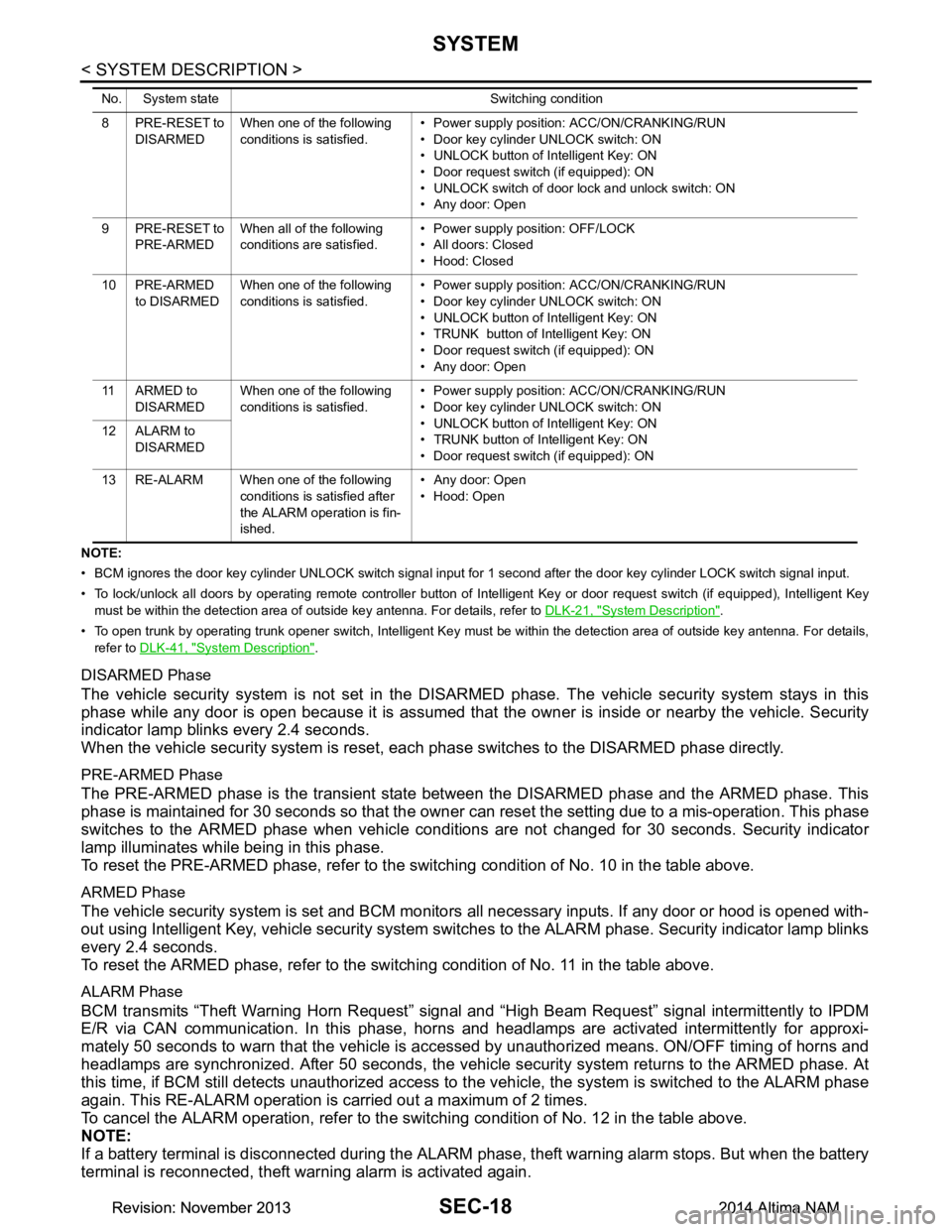
DISARMED Phase
The vehicle security system is not set in the DISAR MED phase. The vehicle security system stays in this
phase while any door is open because it is assumed that the owner is inside or nearby the vehicle. Security
indicator lamp blinks every 2.4 seconds.
When the vehicle security system is reset, eac h phase switches to the DISARMED phase directly.
PRE-ARMED Phase
The PRE-ARMED phase is the transient state bet ween the DISARMED phase and the ARMED phase. This
phase is maintained for 30 seconds so that the owner c an reset the setting due to a mis-operation. This phase
switches to the ARMED phase when vehicle conditions are not changed for 30 seconds. Security indicator
lamp illuminates while being in this phase.
To reset the PRE-ARMED phase, refer to the s witching condition of No. 10 in the table above.
ARMED Phase
The vehicle security system is set and BCM monitors all necessary inputs. If any door or hood is opened with-
out using Intelligent Key, vehicle security system switc hes to the ALARM phase. Security indicator lamp blinks
every 2.4 seconds.
To reset the ARMED phase, refer to the switching condition of No. 11 in the table above.
ALARM Phase
BCM transmits “Theft Warning Horn Request” signal and “High Beam Request” signal intermittently to IPDM
E/R via CAN communication. In this phase, horns and headlamps are activated intermittently for approxi-
mately 50 seconds to warn that the vehicle is a ccessed by unauthorized means. ON/OFF timing of horns and
headlamps are synchronized. After 50 seconds, the vehicle security system returns to the ARMED phase. At
this time, if BCM still detects unauthorized access to t he vehicle, the system is switched to the ALARM phase
again. This RE-ALARM operation is carried out a maximum of 2 times.
To cancel the ALARM operation, refer to the switching condition of No. 12 in the table above.
NOTE:
If a battery terminal is disconnected during the ALARM phase, theft warning alarm stops. But when the battery
terminal is reconnected, theft warning alarm is activated again.
8 PRE-RESET to
DISARMED When one of the following
conditions is satisfied. • Power supply positi
on: ACC/ON/CRANKING/RUN
• Door key cylinder UNLOCK switch: ON
• UNLOCK button of Intelligent Key: ON
• Door request switch (if equipped): ON
• UNLOCK switch of door lock and unlock switch: ON
• Any door: Open
9 PRE-RESET to PRE-ARMED When all of the following
conditions are satisfied. • Power supply position: OFF/LOCK
• All doors: Closed
• Hood: Closed
10 PRE-ARMED to DISARMED When one of the following
conditions is satisfied. • Power supply positi
on: ACC/ON/CRANKING/RUN
• Door key cylinder UNLOCK switch: ON
• UNLOCK button of Intelligent Key: ON
• TRUNK button of Intelligent Key: ON
• Door request switch (if equipped): ON
• Any door: Open
11 A R M E D t o DISARMED When one of the following
conditions is satisfied. • Power supply positi
on: ACC/ON/CRANKING/RUN
• Door key cylinder UNLOCK switch: ON
• UNLOCK button of Intelligent Key: ON
• TRUNK button of In telligent Key: ON
• Door request switch (if equipped): ON
12 ALARM to
DISARMED
13 RE-ALARM When one of the following conditions is satisfied after
the ALARM operation is fin-
ished. • Any door: Open
• Hood: Open
No. System state Switching condition
Revision: November 20132014 Altima NAMRevision: November 20132014 Altima NAM
Page 3844 of 4801

SYSTEMSEC-19
< SYSTEM DESCRIPTION >
C
D E
F
G H
I
J
L
M A
B
SEC
N
O P
PRE-RESET Phase
The PRE-RESET phase is the transient state betw
een each phase and DISARMED phase. If only the condi-
tion of hood is not satisfied, the system switches to the PRE-RESET phase. Then, when any condition is
changed, the system switches to the DISARMED phase or PRE-ARMED phase.
PANIC ALARM
• The panic alarm function activates horns and headlamps intermittently when the owner presses the PANIC
ALARM button of Intelligent Key outside the vehicle while the power supply position is OFF or LOCK.
• When BCM receives panic alarm signal from Intelligent Key, BCM transmits “Theft Warning Horn Request”
signal and “High Beam Request” signal intermittently to IPDM E/R via CAN communication. To prevent the
activation due to mis-operation of Intelligent Key by owner, the panic alarm function is activated when BCM
receives the signal for 0.4 - 0.6 seconds.
• Panic alarm operation is maintained for 25 seconds.
• Panic alarm operation is cancelled when BCM receives one of the following signals:
- LOCK button of Intelligent Key: ON
- UNLOCK button of Intelligent Key: ON
- PANIC ALARM button of Intelligent Key: Long pressed
- Any door request switch (if equipped): ON
Revision: November 20132014 Altima NAMRevision: November 20132014 Altima NAM
Page 3847 of 4801
![NISSAN TEANA 2014 Workshop Manual
SEC-22
< SYSTEM DESCRIPTION >
DIAGNOSIS SYSTEM (BCM)
ACTIVE TEST
VEH SPEED 2 [mph/km/h]×Indicates condition of vehicle speed signal received from combination
meter on CAN communication line.
DOOR](/img/5/57390/w960_57390-3846.png "NISSAN TEANA 2014 Workshop Manual
SEC-22
< SYSTEM DESCRIPTION >
DIAGNOSIS SYSTEM (BCM)
ACTIVE TEST
VEH SPEED 2 [mph/km/h]×Indicates condition of vehicle speed signal received from combination
meter on CAN communication line.
DOOR")
SEC-22
< SYSTEM DESCRIPTION >
DIAGNOSIS SYSTEM (BCM)
ACTIVE TEST
VEH SPEED 2 [mph/km/h]×Indicates condition of vehicle speed signal received from combination
meter on CAN communication line.
DOOR STAT -DR [LOCK/READY/UNLK] ×Indicates condition of driver side door status.
DOOR STAT -AS [LOCK/READY/UNLK] ×Indicates condition of passenger side door status.
DOOR STAT -RR [LOCK/READY/UNLK] ×Indicates condition of rear right side door status.
DOOR STAT -RL [LOCK/READY/UNLK] ×Indicates condition of rear left side door status.
ID OK FLAG [Set/Reset] Indicates condition of Intelligent Key ID.
PRMT ENG STRT [Set/Reset] Indicates condition of engine start possibility.
PRMT RKE STRT [Set/Reset] Indicates condition of engine start possibility from Intelligent Key.
I-KEY OK FLAG [Key ON/Key OFF] ×Indicates condition of Intelligent Key OK flag.
PRBT ENG STRT [Set/Reset] Indicates condition of engine start prohibit.
ID AUTHENT CANCEL TIMER [STOP] Indicates condition of Intelligent Key ID authentication.
ACC BATTERY SAVER [STOP] Indicate s condition of battery saver.
CRNK PRBT TMR [On/Off] Indicates co ndition of crank prohibit timer.
AUT CRNK TMR [On/Off] Indicates co ndition of automatic engine crank timer fr om Intelligent Key.
CRNK PRBT TME [sec] Indicat es condition of engine crank prohibit time.
AUTO CRNK TME [sec] Indicates co ndition of automatic engine crank time from Intelligent Key.
CRANKING TME [sec] Indicates condition of engine cranking time from Intelligent Key.
DETE SW PWR [On/Off] Indicates condition of detent switch voltage.
ACC RLY -REQ [On/Off] Indicates condition of accessory relay control request.
RKE OPE COUN1 [0-19] ×When remote keyless entry receiver receives the signal transmitted while
operating on Intelligent Key, the numerical value start changing.
RKE OPE COUN2 [0-19] ×When remote keyless entry receiver receives the signal transmitted while
operating on Intelligent Key, the numerical value start changing.
TRNK/HAT MNTR [On/Off] Indicates condition of trunk room lamp switch.
RKE-LOCK [On/Off] Indicates condition of lock signal from Intelligent Key.
RKE-UNLOCK [On/Off] Indicates condition of unlock signal from Intelligent Key.
RKE-TR/BD [On/Off] Indicates condition of trunk open signal from Intelligent Key.
RKE-PANIC [On/Off] Indicates condition of panic signal from Intelligent Key.
RKE-MODE CHG [On/Off] Indicates condition of mode change signal from Intelligent Key. Monitor Item [Unit] Main Description
Test Item Description
INTELLIGENT KEY LINK (CAN) This test is able to check Intelligent Key identification number [Off/ID No1/ID N02/ID No3/ID
No4/ID No5].
INT LAMP This test is able to check interior room lamp operation [On/Off].
FLASHER This test is able to check hazard lamp operation [LH/RH/Off].
HORN This test is able to check horn operation [On].
BATTERY SAVER This test is able to check battery saver operation [On/Off].
TRUNK/BACK DOOR This test is able to check trunk actuator operation [Open].
OUTSIDE BUZZER This test is able to check Intelligent Key warning buzzer operation [On/Off].
INSIDE BUZZER This test is able to check combination meter warning chime operation [Take Out/Knob/Key/
Off].
INDICATOR This test is able to check combination meter warning lamp operation [KEY ON/KEY IND/Off].
IGN CONT2 This test is able to check ignition relay-2 control operation [On/Off].
ENGINE SW ILLUMI This test is able to check push-button ignition switch START indicator operation [On/Off].
Revision: November 20132014 Altima NAMRevision: November 20132014 Altima NAM
Page 3968 of 4801
SR-6
< BASIC INSPECTION >
COLLISION DIAGNOSIS
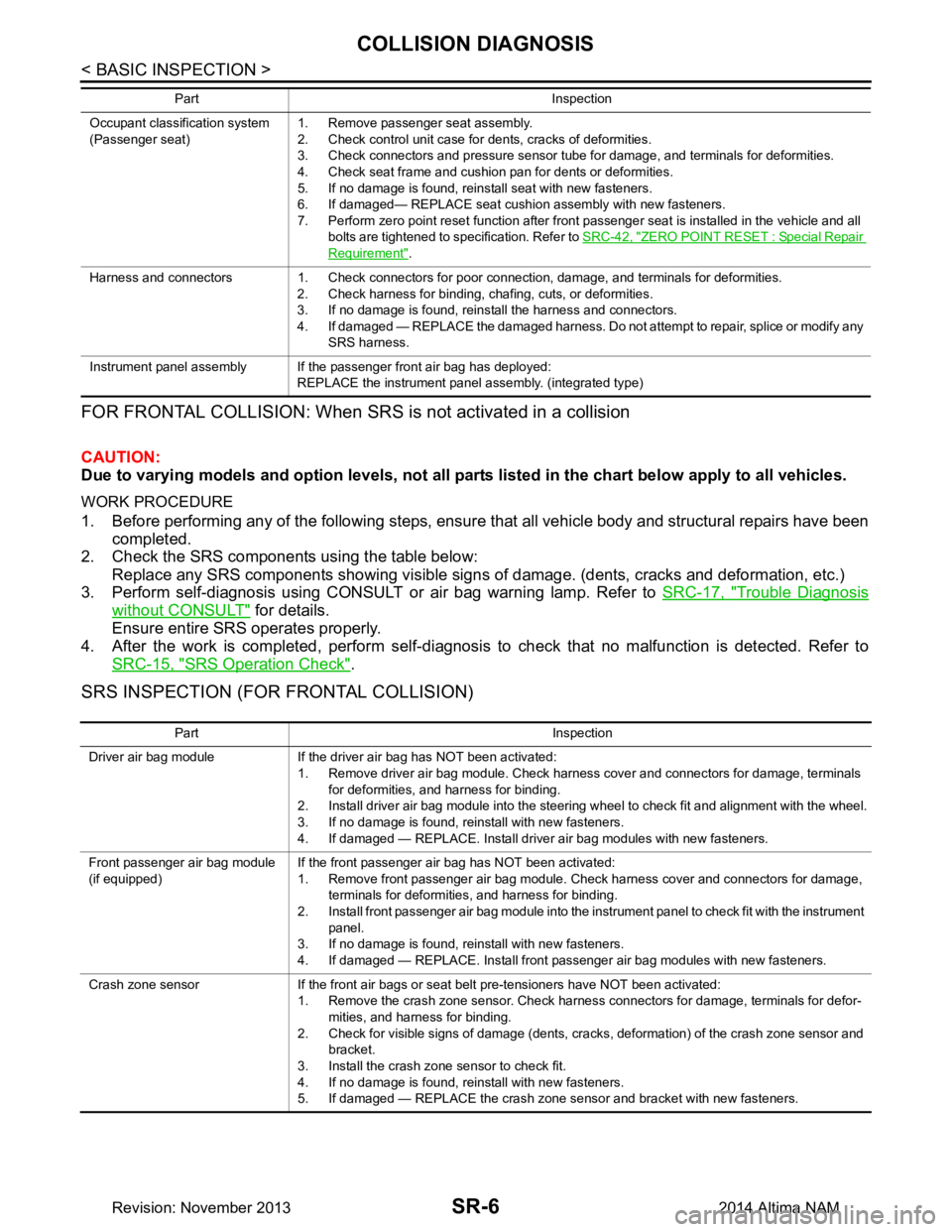
FOR FRONTAL COLLISION: When SRS is not activated in a collision
CAUTION:
Due to varying models and option levels, not all part s listed in the chart below apply to all vehicles.
WORK PROCEDURE
1. Before performing any of the following steps, ensur e that all vehicle body and structural repairs have been
completed.
2. Check the SRS components using the table below:
Replace any SRS components showing visible signs of damage. (dents, cracks and deformation, etc.)
3. Perform self-diagnosis using CONSULT or air bag warning lamp. Refer to SRC-17, "Trouble Diagnosis
without CONSULT" for details.
Ensure entire SRS operates properly.
4. After the work is completed, perform self-diagnosis to check that no malfunction is detected. Refer to
SRC-15, "SRS Operation Check"
.
SRS INSPECTION (FOR FRONTAL COLLISION)
Occupant classification system
(Passenger seat) 1. Remove passenger seat assembly.
2. Check control unit case for dents, cracks of deformities.
3. Check connectors and pressure sensor tube for damage, and terminals for deformities.
4. Check seat frame and cushion pan for dents or deformities.
5. If no damage is found, reinstall seat with new fasteners.
6. If damaged— REPLACE seat cushion assembly with new fasteners.
7. Perform zero point reset function after front passenger seat is installed in the vehicle and all bolts are tightened to specification. Refer to SRC-42, "ZERO POINT RESET : Special Repair
Requirement".
Harness and connectors 1. Check connectors for poor connection, damage, and terminals for deformities. 2. Check harness for binding, chafing, cuts, or deformities.
3. If no damage is found, reinstall the harness and connectors.
4. If damaged — REPLACE the damaged harness. Do not attempt to repair, splice or modify any SRS harness.
Instrument panel assembly If the passenger front air bag has deployed: REPLACE the instrument panel assembly. (integrated type)
Part Inspection
Part Inspection
Driver air bag module If the driver air bag has NOT been activated: 1. Remove driver air bag module. Check harness cover and connectors for damage, terminals for deformities, and harness for binding.
2. Install driver air bag module into the steering wheel to check fit and alignment with the wheel.
3. If no damage is found, reinstall with new fasteners.
4. If damaged — REPLACE. Install driver air bag modules with new fasteners.
Front passenger air bag module
(if equipped) If the front passenger air bag has NOT been activated:
1. Remove front passenger air bag module. Check harness cover and connectors for damage, terminals for deformities, and harness for binding.
2. Install front passenger air bag module into the instrument panel to check fit with the instrument panel.
3. If no damage is found, reinstall with new fasteners.
4. If damaged — REPLACE. Install front passenger air bag modules with new fasteners.
Crash zone sensor If the front air bags or seat belt pre-tensioners have NOT been activated: 1. Remove the crash zone sensor. Check harness connectors for damage, terminals for defor-mities, and harness for binding.
2. Check for visible signs of damage (dents, cracks, deformation) of the crash zone sensor and bracket.
3. Install the crash zone sensor to check fit.
4. If no damage is found, reinstall with new fasteners.
5. If damaged — REPLACE the crash zone sensor and bracket with new fasteners.
Revision: November 20132014 Altima NAM
Page 3969 of 4801
COLLISION DIAGNOSISSR-7
< BASIC INSPECTION >
C
D E
F
G
I
J
K L
M A
B
SR
N
O P
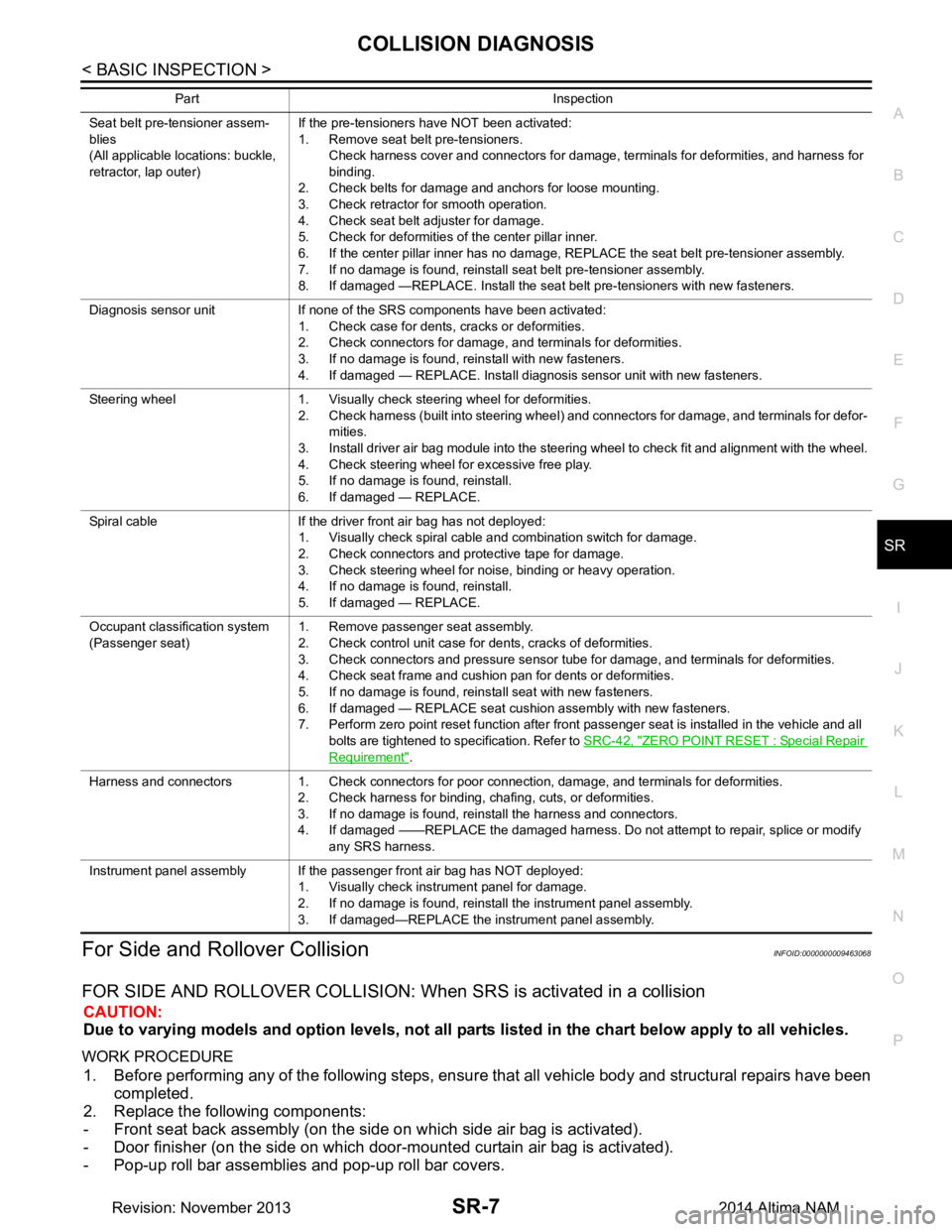
For Side and Rollover CollisionINFOID:0000000009463068
FOR SIDE AND ROLLOVER COLLISION: When SRS is activated in a collision
CAUTION:
Due to varying models and option levels, not all parts listed in the chart below apply to all vehicles.
WORK PROCEDURE
1. Before performing any of the following steps, ensur e that all vehicle body and structural repairs have been
completed.
2. Replace the following components:
- Front seat back assembly (on the side on which side air bag is activated).
- Door finisher (on the side on which door-mounted curtain air bag is activated).
- Pop-up roll bar assemblies and pop-up roll bar covers.
Seat belt pre-tensioner assem-
blies
(All applicable locations: buckle,
retractor, lap outer) If the pre-tensioners have NOT been activated:
1. Remove seat belt pre-tensioners.
Check harness cover and connectors for damage, terminals for deformities, and harness for
binding.
2. Check belts for damage and anchors for loose mounting.
3. Check retractor for smooth operation.
4. Check seat belt adjuster for damage.
5. Check for deformities of the center pillar inner.
6. If the center pillar inner has no damage, REPLACE the seat belt pre-tensioner assembly.
7. If no damage is found, reinstall seat belt pre-tensioner assembly.
8. If damaged —REPLACE. Install the seat belt pre-tensioners with new fasteners.
Diagnosis sensor unit If none of the SRS components have been activated: 1. Check case for dents, cracks or deformities.
2. Check connectors for damage, and terminals for deformities.
3. If no damage is found, reinstall with new fasteners.
4. If damaged — REPLACE. Install diagnosis sensor unit with new fasteners.
Steering wheel 1. Visually check steering wheel for deformities. 2. Check harness (built into steering wheel) and connectors for damage, and terminals for defor-mities.
3. Install driver air bag module into the steering wheel to check fit and alignment with the wheel.
4. Check steering wheel for excessive free play.
5. If no damage is found, reinstall.
6. If damaged — REPLACE.
Spiral cable If the driver front air bag has not deployed: 1. Visually check spiral cable and combination switch for damage.
2. Check connectors and protective tape for damage.
3. Check steering wheel for noise, binding or heavy operation.
4. If no damage is found, reinstall.
5. If damaged — REPLACE.
Occupant classification system
(Passenger seat) 1. Remove passenger seat assembly.
2. Check control unit case for dents, cracks of deformities.
3. Check connectors and pressure sensor tube for damage, and terminals for deformities.
4. Check seat frame and cushion pan for dents or deformities.
5. If no damage is found, reinstall seat with new fasteners.
6. If damaged — REPLACE seat cushion assembly with new fasteners.
7. Perform zero point reset function after front passenger seat is installed in the vehicle and all
bolts are tightened to specification. Refer to SRC-42, "ZERO POINT RESET : Special Repair
Requirement".
Harness and connectors 1. Check connectors for poor connection, damage, and terminals for deformities. 2. Check harness for binding, chafing, cuts, or deformities.
3. If no damage is found, reinstall the harness and connectors.
4. If damaged ——REPLACE the damaged harness. Do not attempt to repair, splice or modify any SRS harness.
Instrument panel assembly If the passenger front air bag has NOT deployed: 1. Visually check instrument panel for damage.
2. If no damage is found, reinstall the instrument panel assembly.
3. If damaged—REPLACE the instrument panel assembly.
Part Inspection
Revision: November 20132014 Altima NAM
Page 3976 of 4801
SR-14
< REMOVAL AND INSTALLATION >
DRIVER AIR BAG MODULE
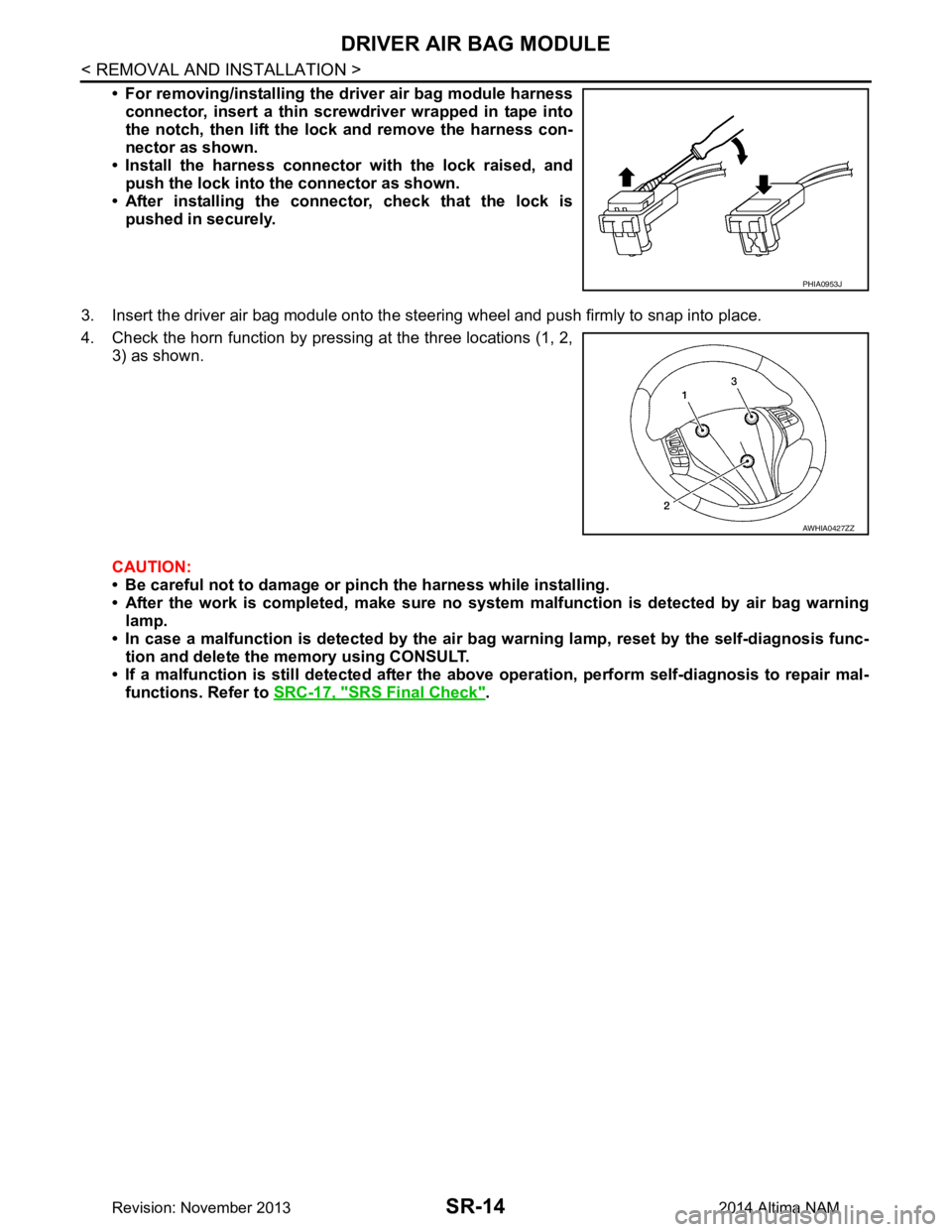
• For removing/installing the driver air bag module harnessconnector, insert a thin screwdriver wrapped in tape into
the notch, then lift the lock and remove the harness con-
nector as shown.
• Install the harness connector with the lock raised, and push the lock into the connector as shown.
• After installing the conn ector, check that the lock is
pushed in securely.
3. Insert the driver air bag module onto the st eering wheel and push firmly to snap into place.
4. Check the horn function by pressing at the three locations (1, 2, 3) as shown.
CAUTION:
• Be careful not to damage or pinch the harness while installing.
• After the work is completed, make sure no syst em malfunction is detected by air bag warning
lamp.
• In case a malfunction is detected by the air bag warning lamp, reset by the self-diagnosis func-
tion and delete the memory using CONSULT.
• If a malfunction is still detected after the abo ve operation, perform self-diagnosis to repair mal-
functions. Refer to SRC-17, "SRS Final Check"
.
PHIA0953J
AWHIA0427ZZ
Revision: November 20132014 Altima NAM
Page 3994 of 4801

SRC-1
RESTRAINTS
C
D E
F
G
I
J
K L
M
SECTION SRC
A
B
SRC
N
O P
CONTENTS
SRS AIRBAG CONTROL SYSTEM
PRECAUTION ................ ...............................4
PRECAUTIONS .............................................. .....4
Precaution for Supplemental Restraint System
(SRS) "AIR BAG" and "SEAT BELT PRE-TEN-
SIONER" ............................................................. ......
4
Precaution for SRS "AIR BAG" and "SEAT BELT
PRE-TENSIONER" Service ................................ ......
4
SYSTEM DESCRIPTION ..............................5
COMPONENT PARTS ................................... .....5
Component Parts Location .................................. ......5
Component Description .............................................6
Driver Air Bag Module ...............................................7
Front Passenger Air Bag Module ..............................7
Front Side Air Bag Module .................................. ......7
Side Curtain Air Bag Module .....................................7
Front Seat Belt Pre-tensioner ....................................8
Air Bag Diagnosis Sensor Unit ..................................8
Crash Zone Sensor ...................................................8
Front Side Air Bag Satellite Sensor ...........................8
Rear Side Air Bag Satellite Sensor ...........................9
Front Door Satellite Sensor .......................................9
SRS Component Connectors ....................................9
SYSTEM .............................................................11
SRS AIR BAG SYSTEM ............................................11
SRS AIR BAG SYSTEM : Sy stem Diagram ............11
SRS AIR BAG SYSTEM : System Description ... ....11
OCCUPANT CLASSIFICATION SYSTEM ............ ....11
OCCUPANT CLASSIFICATION SYSTEM : Sys-
tem Diagram ........................................................ ....
12
OCCUPANT CLASSIFICATION SYSTEM : Sys-
tem Description ................................................... ....
12
SEAT BELT WARNING LAMP SYSTEM ..................13
SEAT BELT WARNING LAMP SYSTEM : System
Diagram ............................................................... ....
13
SEAT BELT WARNING LAMP SYSTEM : System
Description ........................................................... ....
14
DIAGNOSIS SYSTEM (AIR BAG) ....................15
Diagnosis Description ..............................................15
SRS Operation Check .............................................15
Trouble Diagnosis with CONSULT ..........................16
Trouble Diagnosis without CONSULT .....................17
SRS History Check ..................................................17
SRS Final Check .....................................................17
CONSULT Function (AIR BAG) ...............................17
CONSULT Function (OCCUPANT DETECTION) ....18
ECU DIAGNOSIS INFORMATION ..............19
DIAGNOSIS SENSOR UNIT .............................19
DTC Index ........................................................... ....19
Flash Code Index ....................................................23
WIRING DIAGRAM ......................................26
SRS AIR BAG SYSTEM ...................................26
Wiring Diagram .................................................... ....26
BASIC INSPECTION ...................................40
DIAGNOSIS AND REPAIR WORK FLOW .......40
Work Flow ............................................................ ....40
INSPECTION AND ADJUSTMENT ..................42
ADDITIONAL SERVICE WHEN REPLACING
CONTROL UNIT .................................................... ....
42
ADDITIONAL SERVICE WHEN REPLACING
CONTROL UNIT : Description ............................. ....
42
ADDITIONAL SERVICE WHEN REPLACING
CONTROL UNIT : Special Repair Requirement .. ....
42
ZERO POINT RESET ............................................. ....42
ZERO POINT RESET : Description .........................42
ZERO POINT RESET : Special Repair Require-
ment ..................................................................... ....
42
Revision: November 20132014 Altima NAMRevision: November 20132014 Altima NAM
Page 4005 of 4801
SRC-12
< SYSTEM DESCRIPTION >
SYSTEM
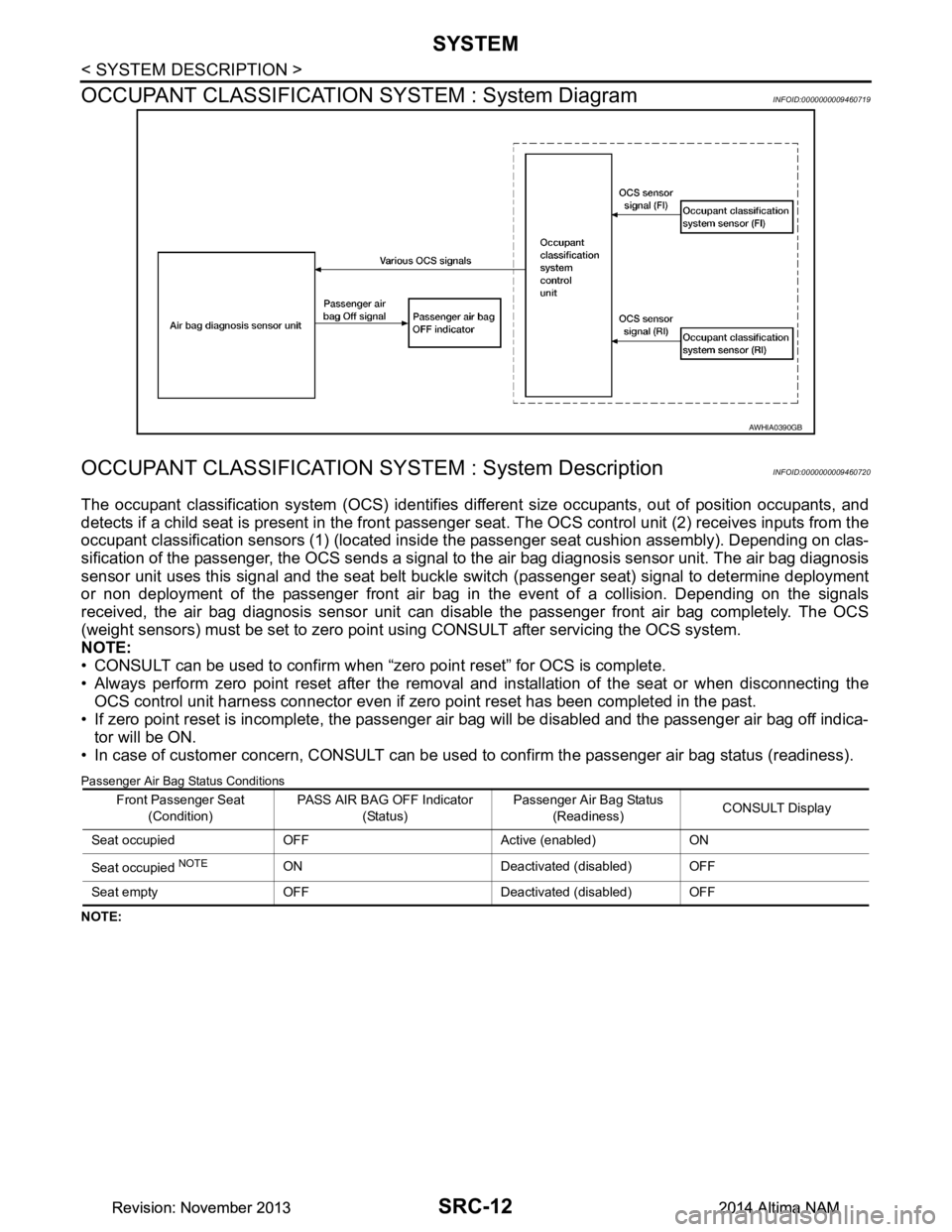
OCCUPANT CLASSIFICATION SYSTEM : System Diagram
INFOID:0000000009460719
OCCUPANT CLASSIFICATION SY STEM : System DescriptionINFOID:0000000009460720
The occupant classification system (OCS) identifies diff erent size occupants, out of position occupants, and
detects if a child seat is present in the front passenger seat. The OCS control unit (2) receives inputs from the
occupant classification sensors (1) (located inside t he passenger seat cushion assembly). Depending on clas-
sification of the passenger, the OCS sends a signal to the air bag diagnosis sensor unit. The air bag diagnosis
sensor unit uses this signal and the seat belt buckle switch (passenger seat) signal to determine deployment
or non deployment of the passenger front air bag in the event of a collision. Depending on the signals
received, the air bag diagnosis sensor unit can dis able the passenger front air bag completely. The OCS
(weight sensors) must be set to zero point using CONSULT after servicing the OCS system.
NOTE:
• CONSULT can be used to confirm when “zero point reset” for OCS is complete.
• Always perform zero point reset after the removal and installation of the seat or when disconnecting the
OCS control unit harness connector even if zero point reset has been completed in the past.
• If zero point reset is incomplete, the passenger air bag will be disabled and the passenger air bag off indica-
tor will be ON.
• In case of customer concern, CONSULT can be us ed to confirm the passenger air bag status (readiness).
Passenger Air Bag Status Conditions
NOTE:
AWHIA0390GB
Front Passenger Seat
(Condition) PASS AIR BAG OFF Indicator
(Status) Passenger Air Bag Status
(Readiness) CONSULT Display
Seat occupied OFF Active (enabled) ON
Seat occupied
NOTEON Deactivated (disabled) OFF
Seat empty OFF Deactivated (disabled) OFF
Revision: November 20132014 Altima NAMRevision: November 20132014 Altima NAM
Page 4009 of 4801
SRC-16
< SYSTEM DESCRIPTION >
DIAGNOSIS SYSTEM (AIR BAG)
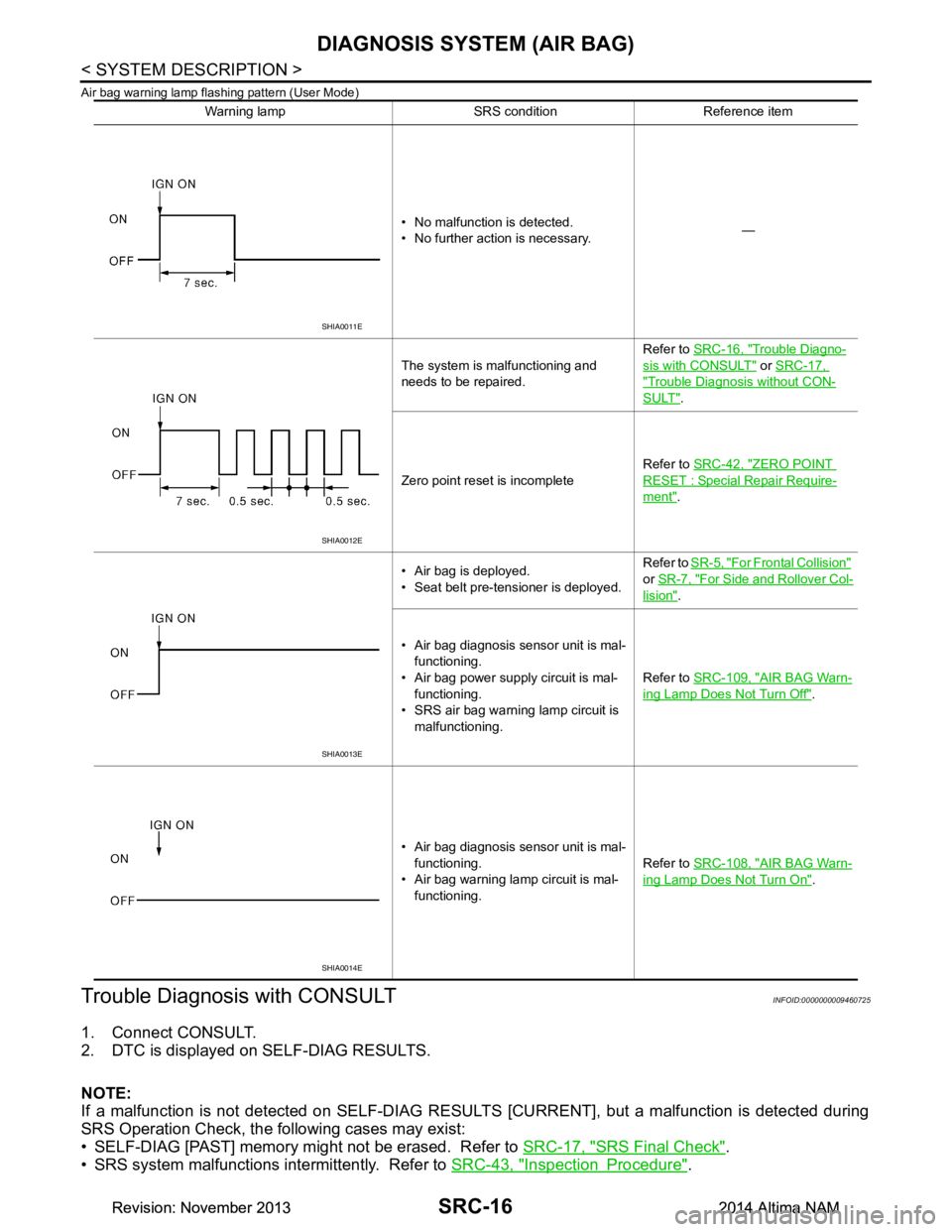
Air bag warning lamp flashing pattern (User Mode)
Trouble Diagnosis with CONSULTINFOID:0000000009460725
1. Connect CONSULT.
2. DTC is displayed on SELF-DIAG RESULTS.
NOTE:
If a malfunction is not detected on SELF-DIAG RESU LTS [CURRENT], but a malfunction is detected during
SRS Operation Check, the following cases may exist:
• SELF-DIAG [PAST] memory might not be erased. Refer to SRC-17, "SRS Final Check"
.
• SRS system malfunctions intermittently. Refer to SRC-43, "Inspection Procedure"
.
Warning lamp SRS condition Reference item
• No malfunction is detected.
• No further action is necessary. —
The system is malfunctioning and
needs to be repaired. Refer to
SRC-16, "Trouble Diagno-
sis with CONSULT" or SRC-17,
"Trouble Diagnosis without CON-
SULT".
Zero point reset is incomplete Refer to
SRC-42, "ZERO POINT
RESET : Special Repair Require-
ment".
• Air bag is deployed.
• Seat belt pre-tensioner is deployed. Refer to
SR-5, "For Frontal Collision"
or SR-7, "For Side and Rollover Col-
lision".
• Air bag diagnosis sensor unit is mal- functioning.
• Air bag power supply circuit is mal- functioning.
• SRS air bag warning lamp circuit is
malfunctioning. Refer to
SRC-109, "AIR BAG Warn-
ing Lamp Does Not Turn Off".
• Air bag diagnosis sensor unit is mal- functioning.
• Air bag warning lamp circuit is mal- functioning. Refer to
SRC-108, "AIR BAG Warn-
ing Lamp Does Not Turn On".
SHIA0011E
SHIA0012E
SHIA0013E
SHIA0014E
Revision: November 20132014 Altima NAMRevision: November 20132014 Altima NAM
Page 4010 of 4801
DIAGNOSIS SYSTEM (AIR BAG)SRC-17
< SYSTEM DESCRIPTION >
C
D E
F
G
I
J
K L
M A
B
SRC
N
O P
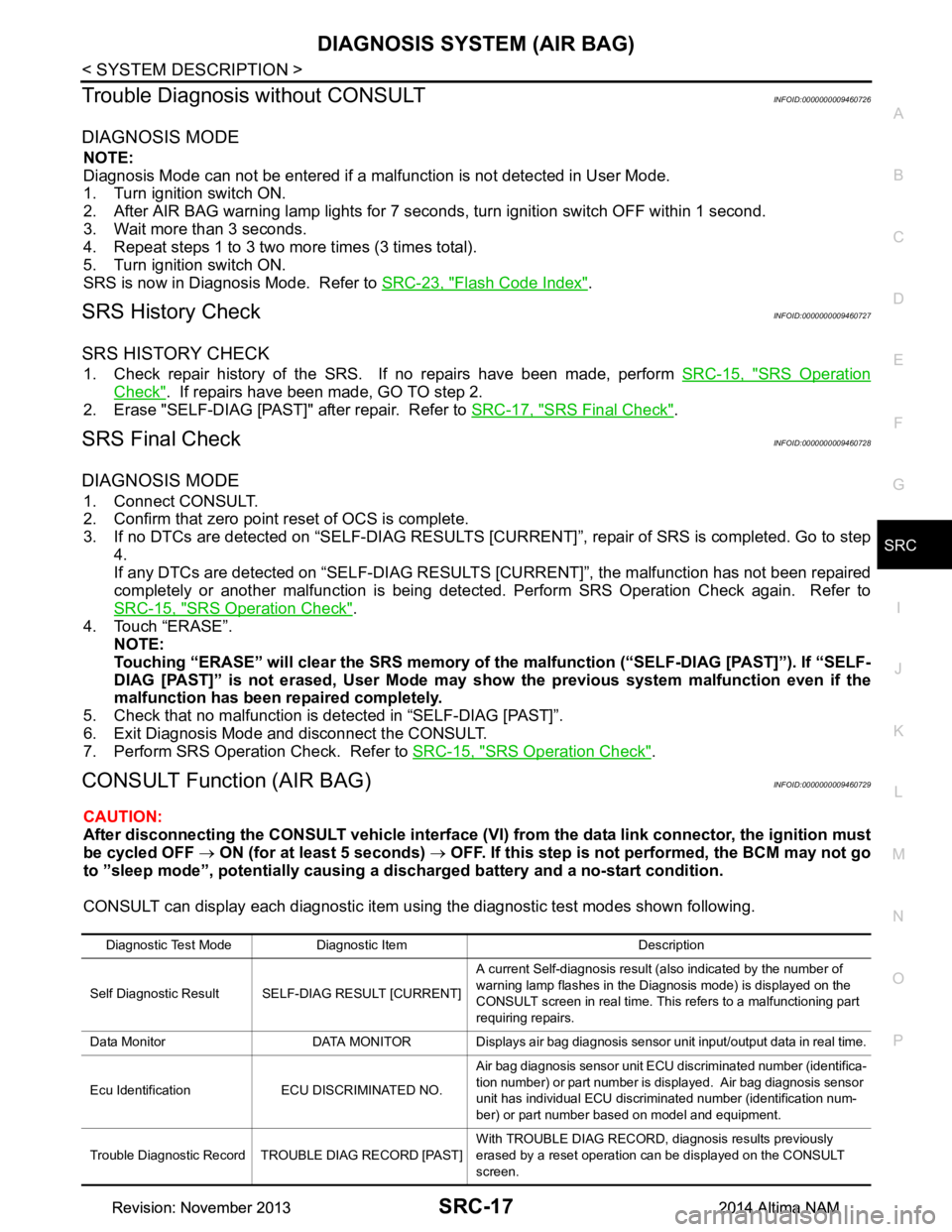
Trouble Diagnosis without CONSULTINFOID:0000000009460726
DIAGNOSIS MODE
NOTE:
Diagnosis Mode can not be entered if a malfunction is not detected in User Mode.
1. Turn ignition switch ON.
2. After AIR BAG warning lamp lights for 7 seconds, turn ignition switch OFF within 1 second.
3. Wait more than 3 seconds.
4. Repeat steps 1 to 3 two more times (3 times total).
5. Turn ignition switch ON.
SRS is now in Diagnosis Mode. Refer to SRC-23, "Flash Code Index"
.
SRS History CheckINFOID:0000000009460727
SRS HISTORY CHECK
1. Check repair history of the SRS. If no repairs have been made, perform SRC-15, "SRS Operation
Check". If repairs have been made, GO TO step 2.
2. Erase "SELF-DIAG [PAST]" after repair. Refer to SRC-17, "SRS Final Check"
.
SRS Final CheckINFOID:0000000009460728
DIAGNOSIS MODE
1. Connect CONSULT.
2. Confirm that zero point reset of OCS is complete.
3. If no DTCs are detected on “SELF- DIAG RESULTS [CURRENT]”, repair of SRS is completed. Go to step
4.
If any DTCs are detected on “SEL F-DIAG RESULTS [CURRENT]”, t he malfunction has not been repaired
completely or another malfunction is being detected. Perform SRS Operation Check again. Refer to
SRC-15, "SRS Operation Check"
.
4. Touch “ERASE”. NOTE:
Touching “ERASE” will clear the SRS memory of the malfunction (“SELF-DIAG [PAST]”). If “SELF-
DIAG [PAST]” is not erased, User Mode may s how the previous system malfunction even if the
malfunction has been repaired completely.
5. Check that no malfunction is detected in “SELF-DIAG [PAST]”.
6. Exit Diagnosis Mode and disconnect the CONSULT.
7. Perform SRS Operation Check. Refer to SRC-15, "SRS Operation Check"
.
CONSULT Function (AIR BAG)INFOID:0000000009460729
CAUTION:
After disconnecting the CONSULT vehicle interface (VI) from the data link connector, the ignition must
be cycled OFF → ON (for at least 5 seconds) → OFF. If this step is not performed, the BCM may not go
to ”sleep mode”, potentiall y causing a discharged battery and a no-start condition.
CONSULT can display each diagnostic item using the diagnostic test modes shown following.
Diagnostic Test Mode Diagnostic Item Description
Self Diagnostic Result SEL F-DIAG RESULT [CURRENT]A current Self-diagnosis result (also indicated by the number of
warning lamp flashes in the Diagnosis mode) is displayed on the
CONSULT screen in real time. This refers to a malfunctioning part
requiring repairs.
Data Monitor DATA MONITOR Displays air bag diagnosis sensor unit input/output data in real time.
Ecu Identification ECU DISCRIMINATED NO. Air bag diagnosis sensor unit ECU discriminated number (identifica-
tion number) or part number is displayed. Air bag diagnosis sensor
unit has individual ECU discriminated number (identification num-
ber) or part number based on model and equipment.
Trouble Diagnostic Record TROUBLE DIAG RECORD [PAST] With TROUBLE DIAG RECORD, diagnosis results previously
erased by a reset operation can be displayed on the CONSULT
screen.
Revision: November 20132014 Altima NAMRevision: November 20132014 Altima NAM